Linux: the first second
Alison Chaiken
alison@she-devel.com
March 3, 2017
https://flic.kr/p/6h96xg
How Linux starts
● What precisely does “off” mean?
● Why does my bootloader have two
binaries?
● ACPI vs DTB
● When does the kernel first spawn a
second thread?
● What is an initrd?
● How does PID 1 start?
● Out-of-bounds: systemd;
SecureBoot; fastboot
THE FOLLOWING CONTENT MAY BE TOO
DISTURBING FOR SOME VIEWERS
-- you will witness a kernel panic and
a boot failure;
-- a NULL pointer will be dereferenced
 successfully!
4
Applying power
5
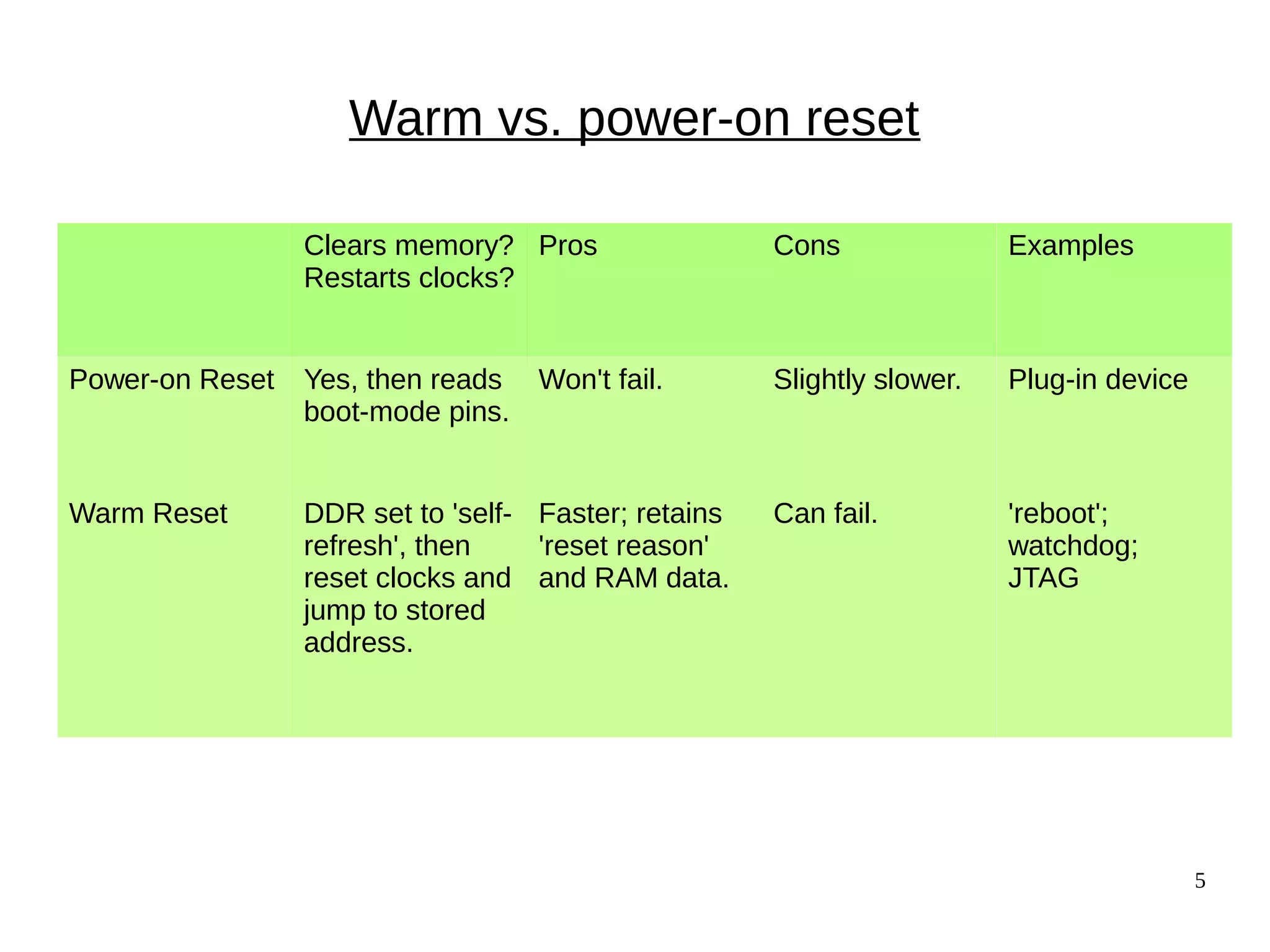
Warm vs. power-on reset
Clears memory?
Restarts clocks?
Pros Cons Examples
Power-on Reset Yes, then reads
boot-mode pins.
Won't fail. Slightly slower. Plug-in device
Warm Reset DDR set to 'self-
refresh', then
reset clocks and
jump to stored
address.
Faster; retains
'reset reason'
and RAM data.
Can fail. 'reboot';
watchdog;
JTAG
6
x86_64: Never genuinely off
Source: Intel
IPMI: run from Baseboard Management Controller
AMT: run from Graphics and Memory Controller Hub
7Source: https://recon.cx/2014/slides/Recon%202014%20Skochinsky.pdf
8
Bootloaders:
x86 and u-boot
9
Bootloaders according to Intel
Read
device-tree
(ARM)
10
'Shim' bootloader  'Early Init'
● ARM: “SPL”, “XLoader” or “MLO” in addition to u-boot.img.
● “Software program loader” separates CPU-specific code.
● Problem: DRAM controller must be initialized.
● Solution: load into SRAM ('OCRAM' in i.MX6, 'l2ram' for TI).
– Why this works: SRAM (and pNOR) are mapped memory.
● Problem: SRAM is little! (256K on i.MX6, 2 MB on DRA7x).
● Solution: start with a tiny SPL.
11
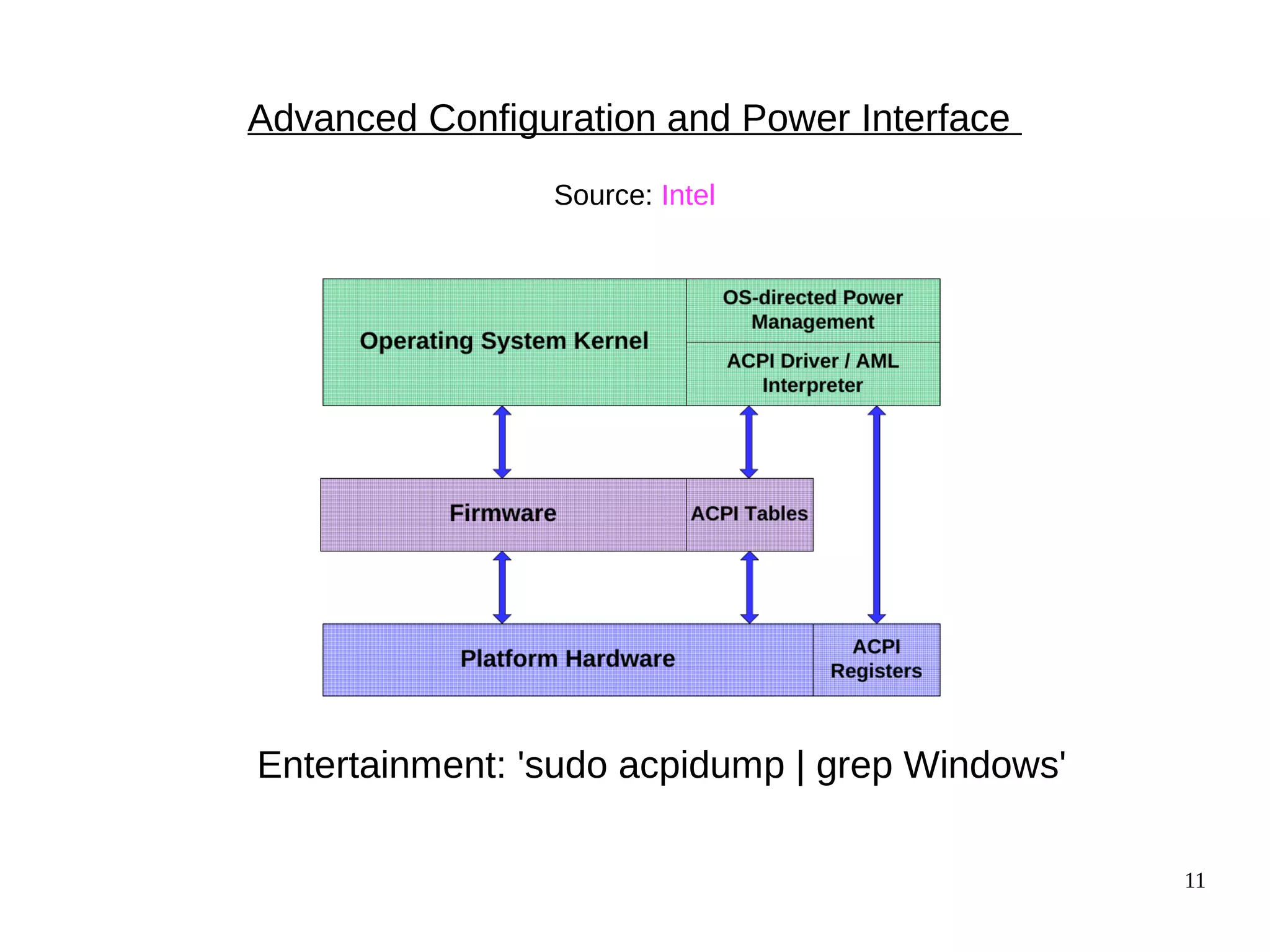
Advanced Configuration and Power Interface
Source: Intel
Entertainment: 'sudo acpidump | grep Windows'
12
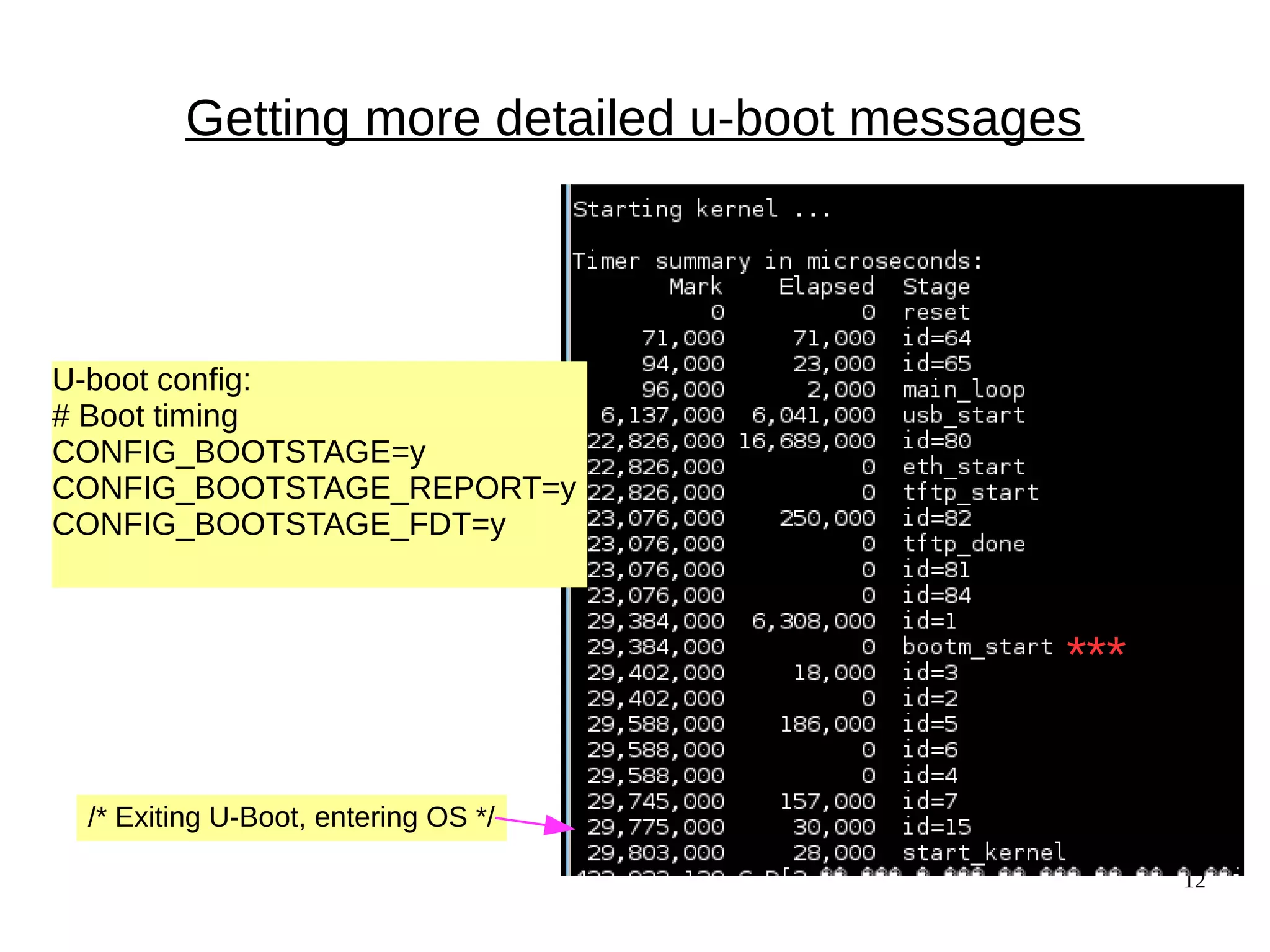
Getting more detailed u-boot messages
U-boot config:
# Boot timing
CONFIG_BOOTSTAGE=y
CONFIG_BOOTSTAGE_REPORT=y
CONFIG_BOOTSTAGE_FDT=y
/* Exiting U-Boot, entering OS */
***
13
enum bootstage_id {
BOOTSTAGE_ID_START = 0,
BOOTSTAGE_ID_CHECK_MAGIC,/* Checking image magic */
BOOTSTAGE_ID_CHECK_HEADER, /* Checking image header */
BOOTSTAGE_ID_CHECK_CHECKSUM, /* Checking image checksum */
BOOTSTAGE_ID_CHECK_ARCH, /* Checking architecture */
BOOTSTAGE_ID_CHECK_IMAGETYPE = 5,/* Checking image type */
BOOTSTAGE_ID_DECOMP_IMAGE, /* Decompressing image */
BOOTSTAGE_ID_KERNEL_LOADED, /* Kernel has been loaded */
BOOTSTAGE_ID_DECOMP_UNIMPL = 7, /* Odd decompression algorithm */
BOOTSTAGE_ID_RUN_OS = 15, /* Exiting U-Boot, entering OS */
/* Boot stages related to loading a kernel from an network device */
BOOTSTAGE_ID_NET_CHECKSUM = 60,
BOOTSTAGE_ID_NET_ETH_START = 64,
BOOTSTAGE_ID_NET_ETH_INIT,
BOOTSTAGE_ID_NET_START = 80,
BOOTSTAGE_ID_NET_NETLOOP_OK,
};
Interpretation of bootstages
14
Passing info from Kernel to Bootloader
● U-boot can pass info in registers or in kernel cmdline.
● Most arches pass “Reset cause” to bootloader.
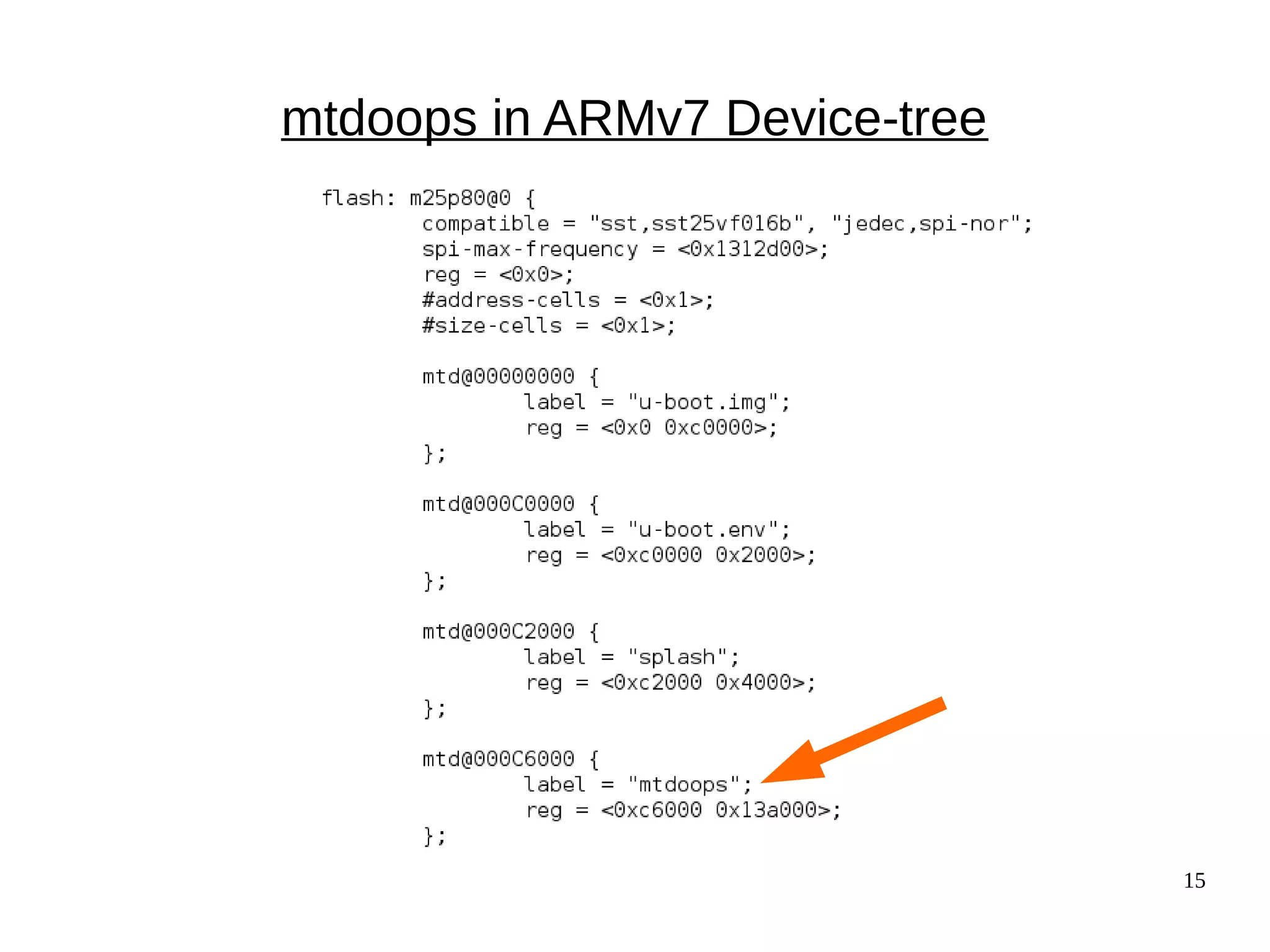
● mtdoops and ramoops save backtraces in persistent stores
specified by device-tree.
15
mtdoops in ARMv7 Device-tree
16
The coming revolution in non-volatile storage
Source: Micron
● 1 Gb non-volatile memory  suspend even for brief
inactivity.
● POR will become a rare event.
● Profound security implications.
● Linux drivers: Matthew Wilcox, XIP DAX
AKA,
'Optane'
by Intel
Specs:
ArsTechnica
17
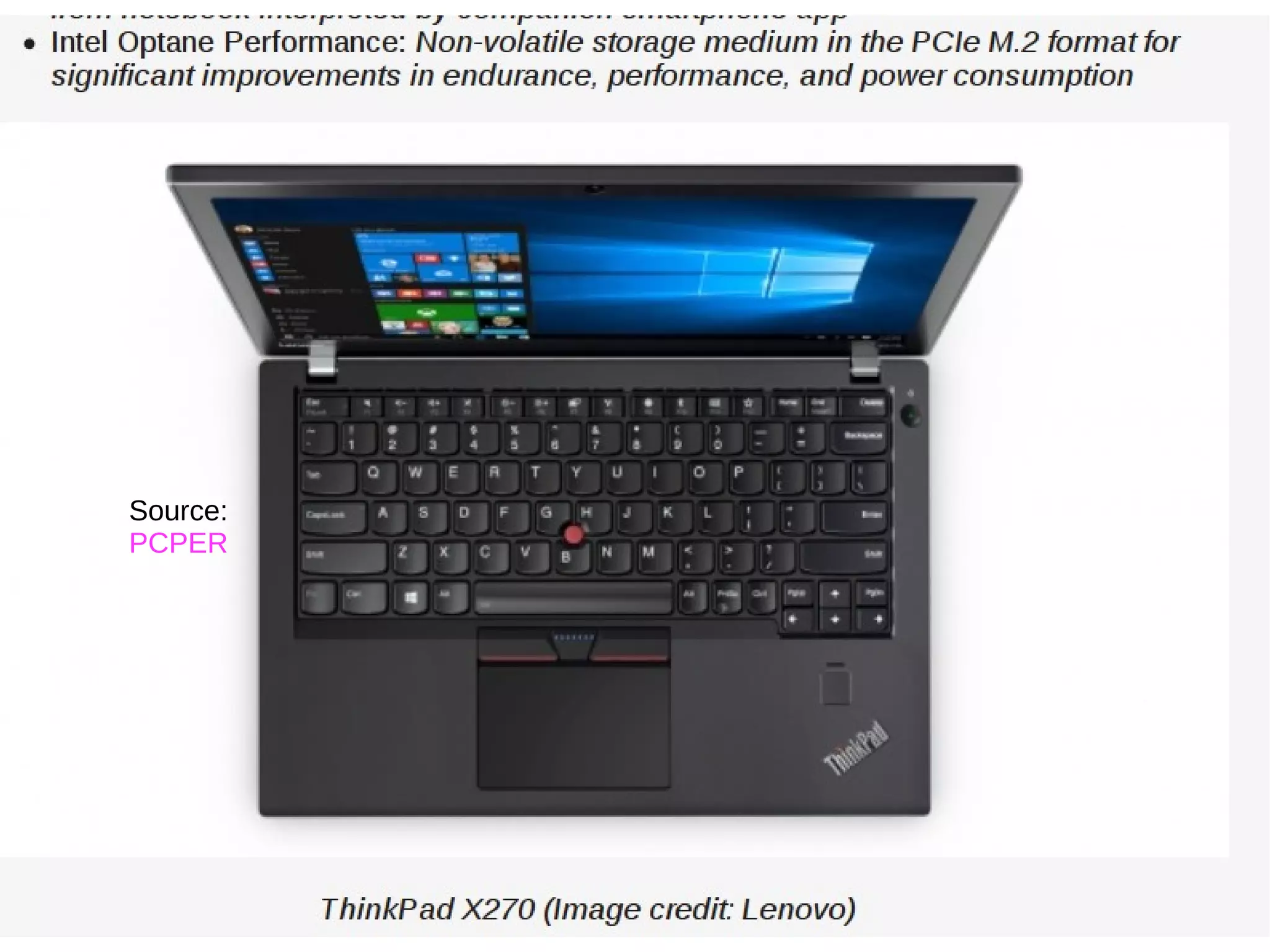
Coming soon to a system near you
Source:
PCPER
18
Starting up
the kernel
19
The kernel is an ELF binary
● vmlinux is a regular ELF binary.
– readelf -e vmlinux
● Extract vmlinux from vmlinuz:
– <path-to-kernel-source>/scripts/extract-vmlinux 
/boot/vmlinuz-$(uname -r) > vmlinux
https://flic.kr/p/6xuhiK
20
Quiz: 
How do ELF binaries 
start?
?
?
?
?
?? ??
?
21
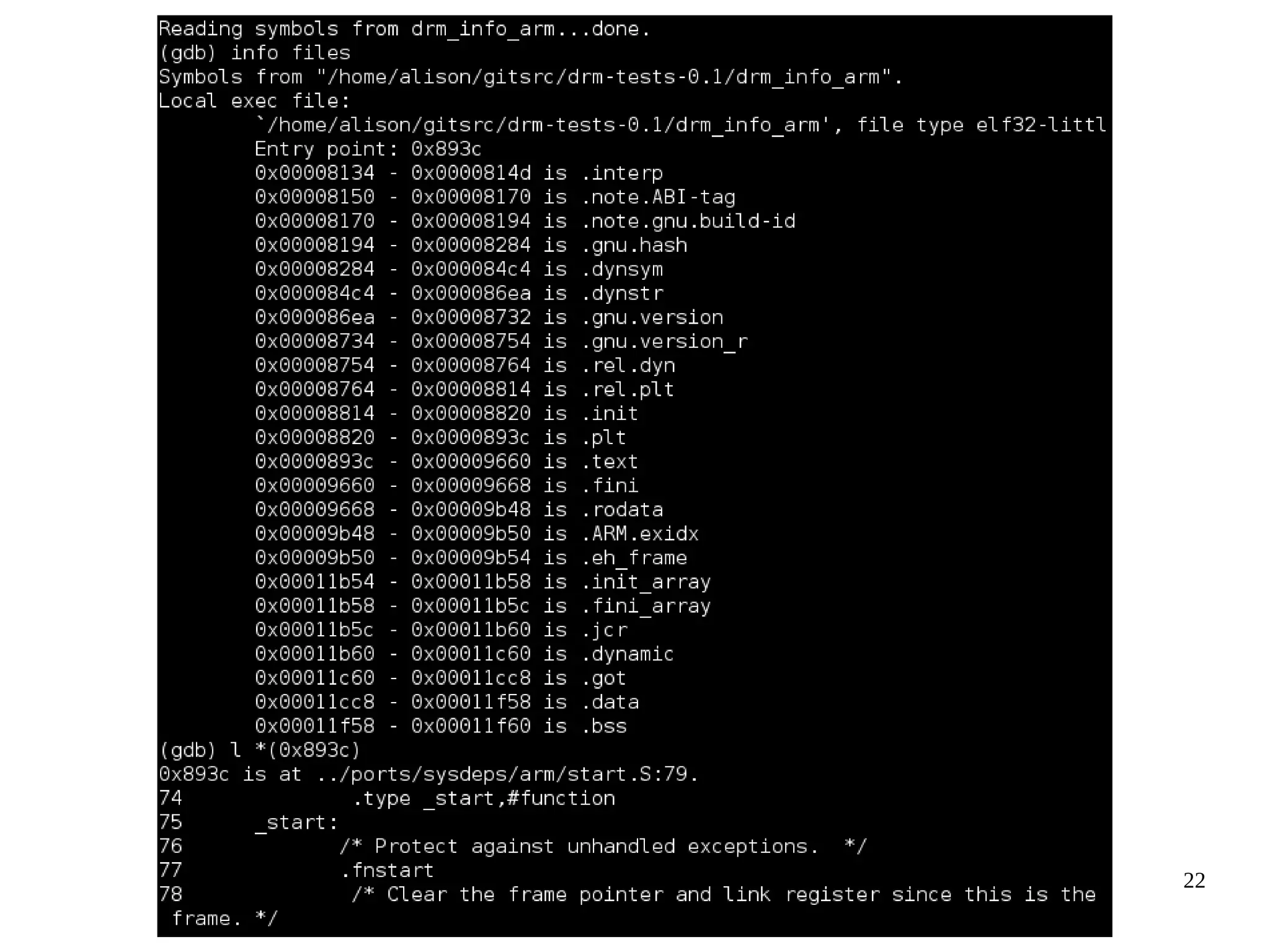
Examining ELF binary start with GDB
(results depend on toolchain)
● Compile your C program with '-ggdb'.
● gdb <some-binary-executable>
● Type 'info files'
● Look for 'Entry point'.
● x86_64:
− Type 'b *(hex address)'
− Type 'run'
− Type 'info functions'
● ARM:
− Type 'l *(hex address)'
− Type 'l 1,80'
− Type 'info functions' or
'info sources'
22
23
The kernel as PID 0
● Userspace processes need a stack, a heap, STD* file
descriptors and an environment to start.
● An ASM constructor “ctor” from crti.o, crtn.o and crt1.0
provided by libgcc allocates these resources.
● Source is start.S.
● Corresponding kernel resources are provided via inline
ASM.
24
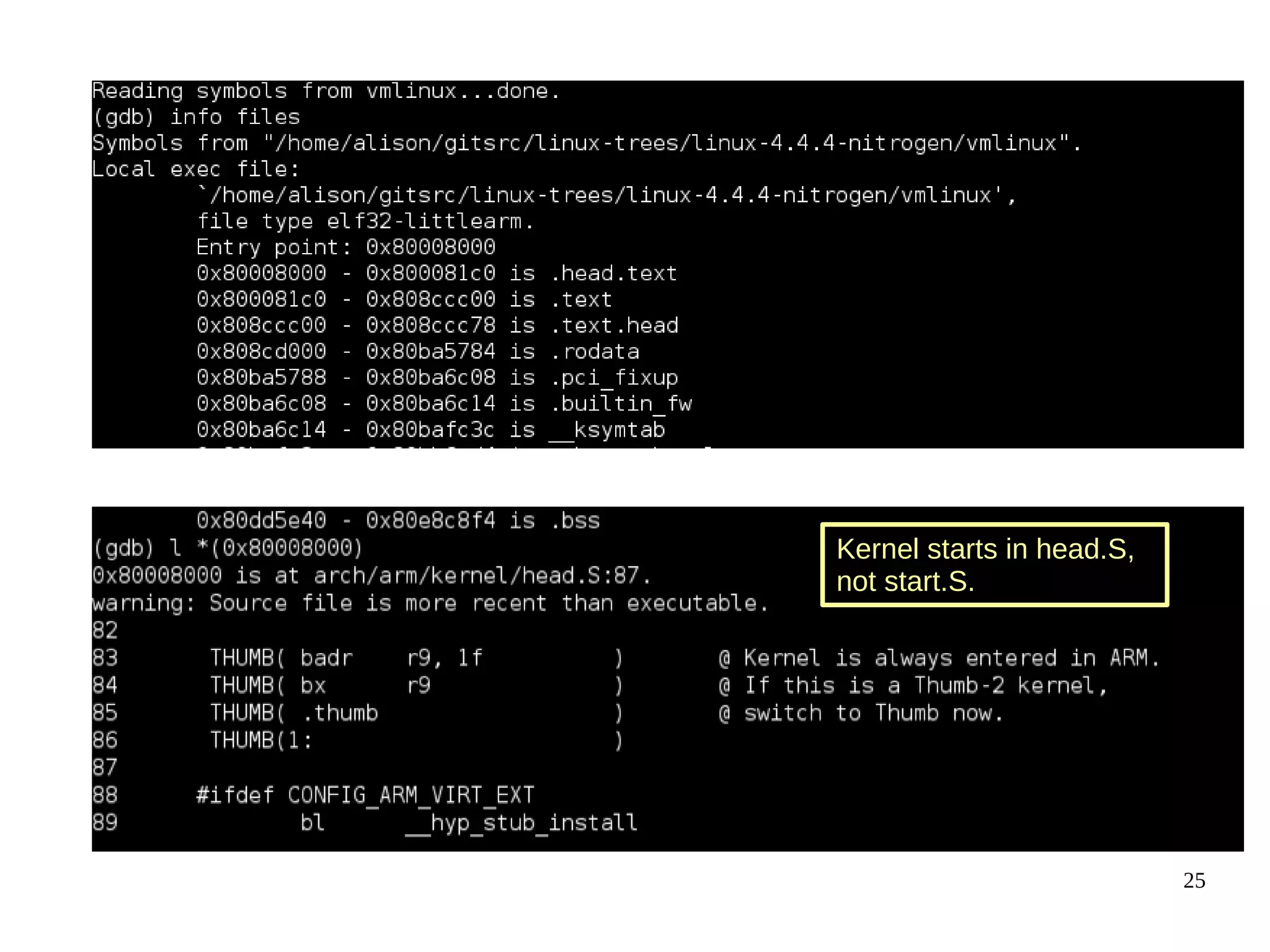
Examining kernel start with GDB
1 Type 'file vmlinux'. (If zImage, extract with linux/scripts/extract-vmlinux).
2 Type:
gdb vmlinux
3 Type:
info files
4 Find 'Entry point'.
5 Type:
  l *(hex address)
6 Type
l 1,80
25
Kernel starts in head.S,
not start.S.
26
What's in head.S?
● Type 'file vmlinux.o'
● Try 'arm-linux-gnueabihf-gdb vmlinux.o'
● Type 'info files'
● Type 'l *(0x0)' <---- actually works!
27
The kernel's main() function:
highlights of start_kernel()
start_kernel() {:
−boot_cpu_init();
−page_address_init();
−setup_arch(&command_line);
−page_alloc_init();
−pr_notice("Kernel command line: );
−parse_args("Booting kernel", command_line);
−mm_init();
−sched_init();
−init_IRQ();
−init_timers(); timekeeping_init();
−rest_init();
}
“Activate the first processor.”
process the device-tree
All timestamps before
are [0.000000]
setup page tables
and start virtual memory
start
userspace
28
About Initrds
29
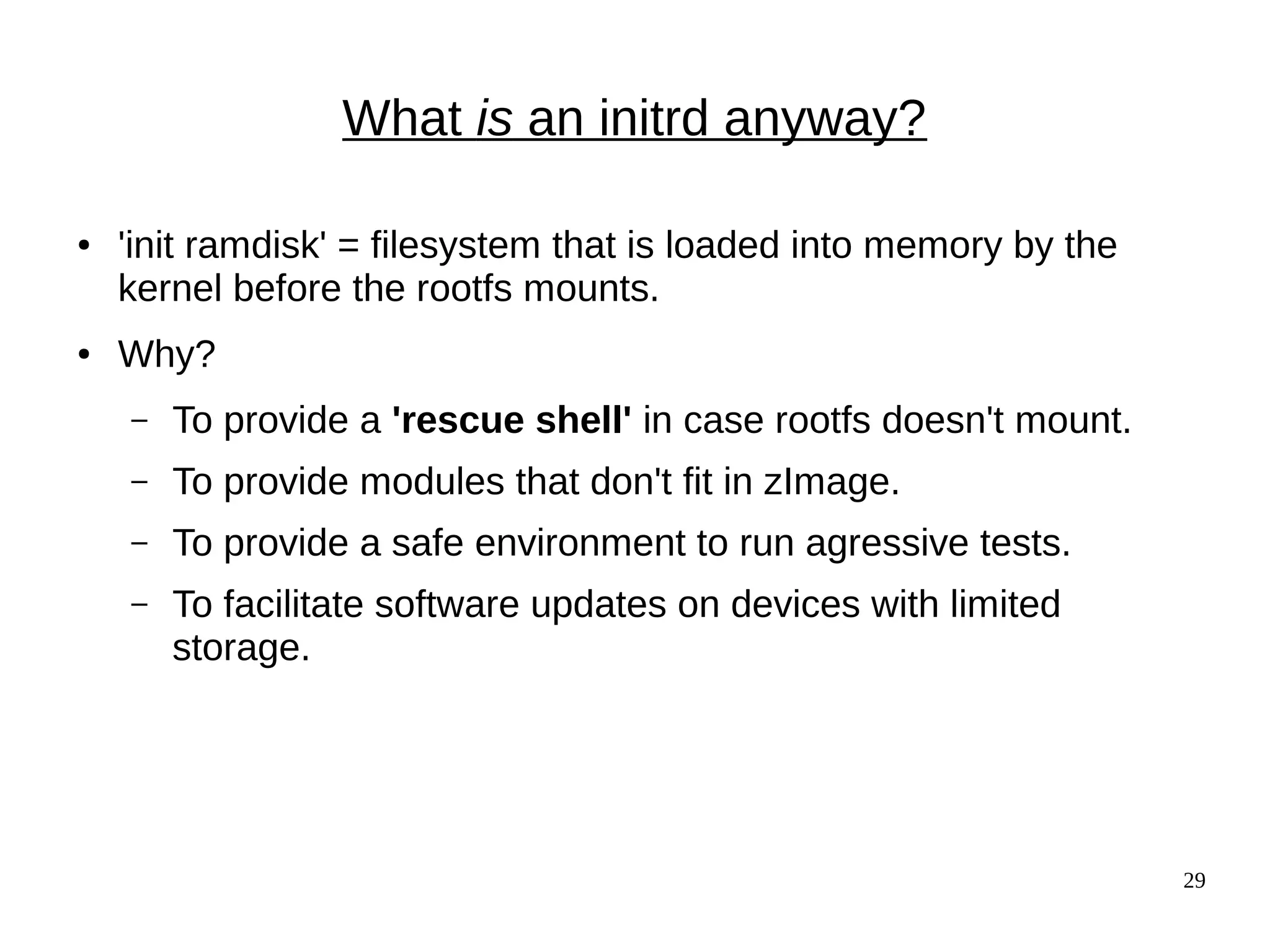
What is an initrd anyway?
● 'init ramdisk' = filesystem that is loaded into memory by the
kernel before the rootfs mounts.
● Why?
– To provide a 'rescue shell' in case rootfs doesn't mount.
– To provide modules that don't fit in zImage.
– To provide a safe environment to run agressive tests.
– To facilitate software updates on devices with limited
storage.
30
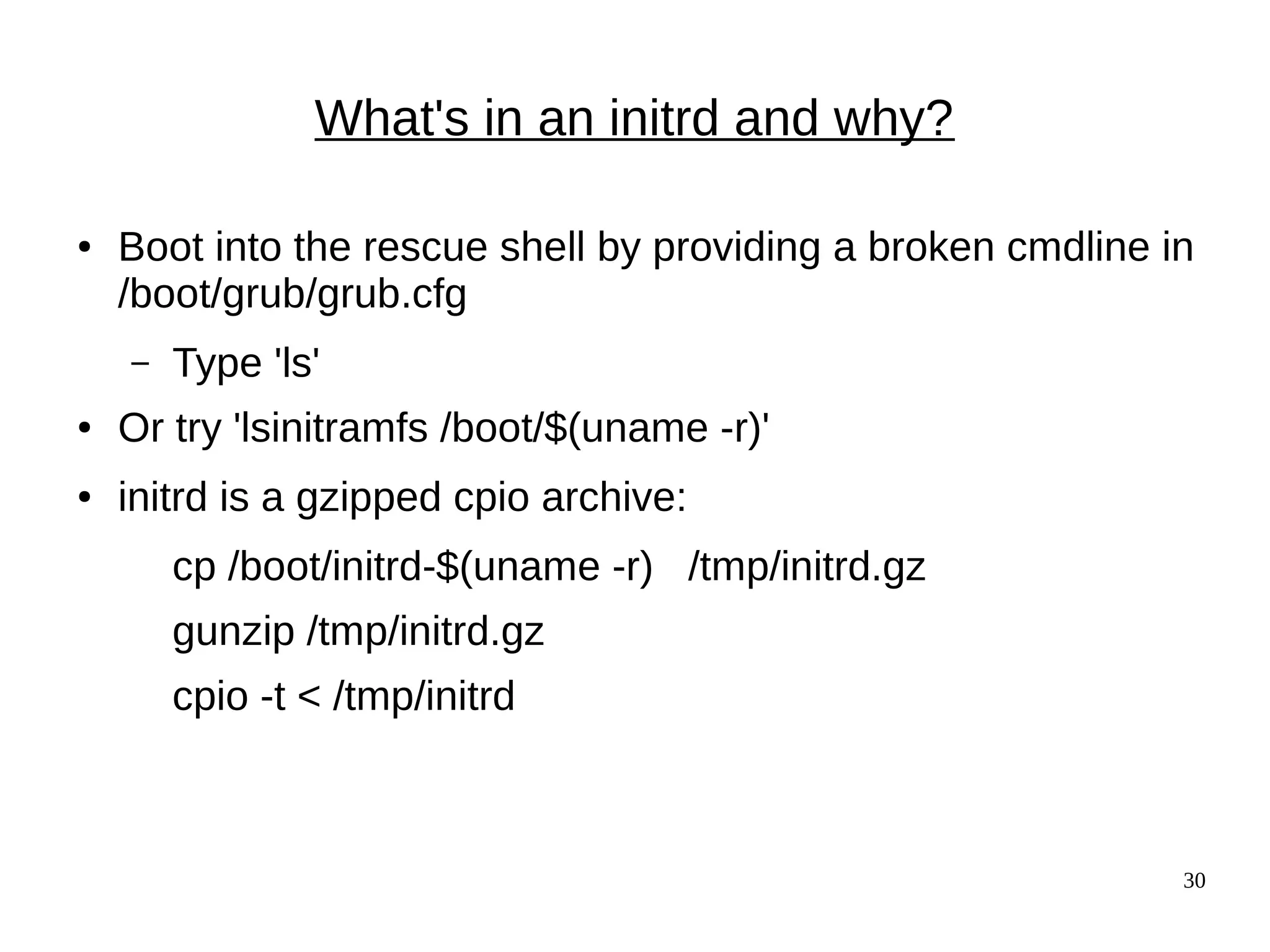
What's in an initrd and why?
● Boot into the rescue shell by providing a broken cmdline in
/boot/grub/grub.cfg
– Type 'ls'
● Or try 'lsinitramfs /boot/$(uname -r)'
● initrd is a gzipped cpio archive:
cp /boot/initrd-$(uname -r) /tmp/initrd.gz
gunzip /tmp/initrd.gz
cpio -t < /tmp/initrd
31
Exploring initramfs
32
Booting into Rescue Shell
/scripts/local-block is the function local_block() inside initramfs /scripts/local
33
OMG! My life is over! (rescue shell tips)
Inhale on a 4-count, then exhale on a 10-count.
● Oh no! 'help' scrolls pages of unreadable crap!
Relax your jaw. Make circles with your neck.
● Read 'man busybox'.
● 'help | grep' works in busybox.
● Look in /bin and /sbin. There's fsck!!
● You have sed and vi (but not emacs ;-( )
● Type 'reboot -f' when you are bored.
34
Hibernation and Suspension
35
{Hibernate, Suspend} == Freeze
● Suspend: save state to memory.
● Hibernate: save state to disk (swap).
● Main code is in kernel/freezer.c.
● Freezing of processes preserves state, protects filesystems.
● Each core must save its state separately.
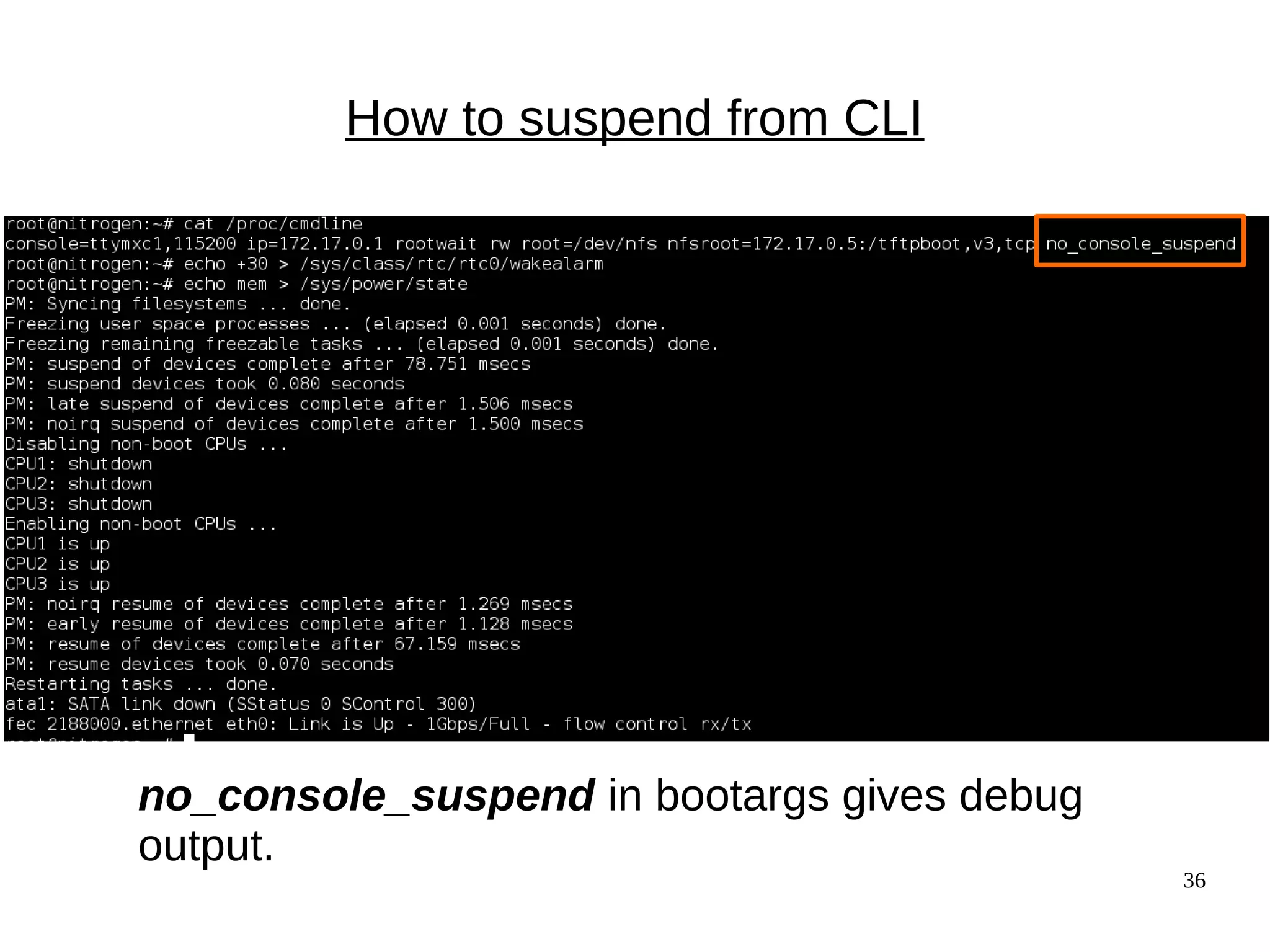
● To watch, append no_console_suspend to bootargs.
36
How to suspend from CLI
no_console_suspend in bootargs gives debug
output.
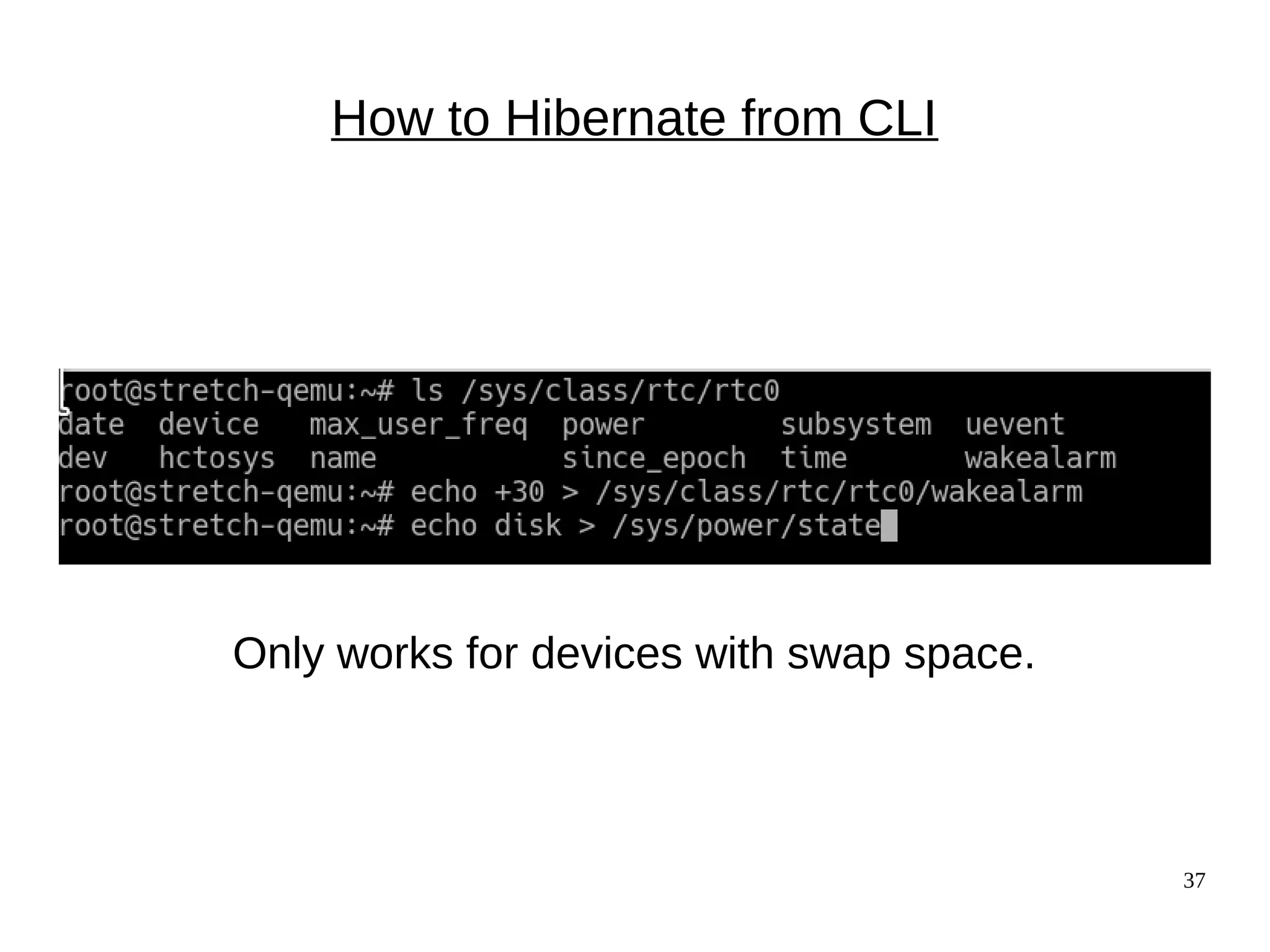
37
How to Hibernate from CLI
Only works for devices with swap space.
38
Summary
● u-boot's CONFIG_BOOTSTAGES, acpidump and
systemd-bootchart provide details about boot.
● Practicing with QEMU is entertaining and low-risk.
● Examine your kernel with GDB and binutils.
● ARM and x86 boot processes are quite distinct.
● High-speed non-volatile memory is about to have a
massive impact on Linux.
39
Major References
● Embedded Linux Primer by Chris Hallinan (book)
● Booting ARM Linux by Russell King and
THE LINUX/x86 BOOT PROTOCOL (Documentation/)
● Program startup process in userspace at linux-insides blog
● Matthew Garrett's comprehensive series on UEFI
● Status of Intel Management Engine on various laptops
(Coreboot) and servers (FSF)
● All about ACPI talk by Darren Hart, ELCE 2013
● Arch Wiki on hacking ACPI tables
do_bootm_states = u-boot state machine
bootm.c<lib>
“Main Entry point for arm
bootm implementation”
BootROM
(internal EEPROM)
resume?
Read Reset
Controller registers
No
Yes
Jump to
stored image
bootm_start() bootm_find_os()
bootm_load_os() bootm_os_get_boot_func()
boot_selected_os
do_bootm_linux()
bootm_jump_linux()
bootm.c<common>
Das U-boot
***
Boot ROM
in CPU
Shim
bootloader
(Xloader,
MLO, etc.)
bootloader
(u-boot,
GRUB, etc.)
cpu_idleudev
arch/arm/kernel/smp.c
kernel/smp.c
head.S
head-common.S
“Kernel startup entry point” Decompress
the
kernel
spawn
2nd
thread
Boot
secondary
cores
start
userspace
init
smp_init()
start of zImage
secondary_start_kernel()
kernel/smpboot.c
idle_threads_init()
main.c
start_kernel()
kernel_init
do_initcalls()
42
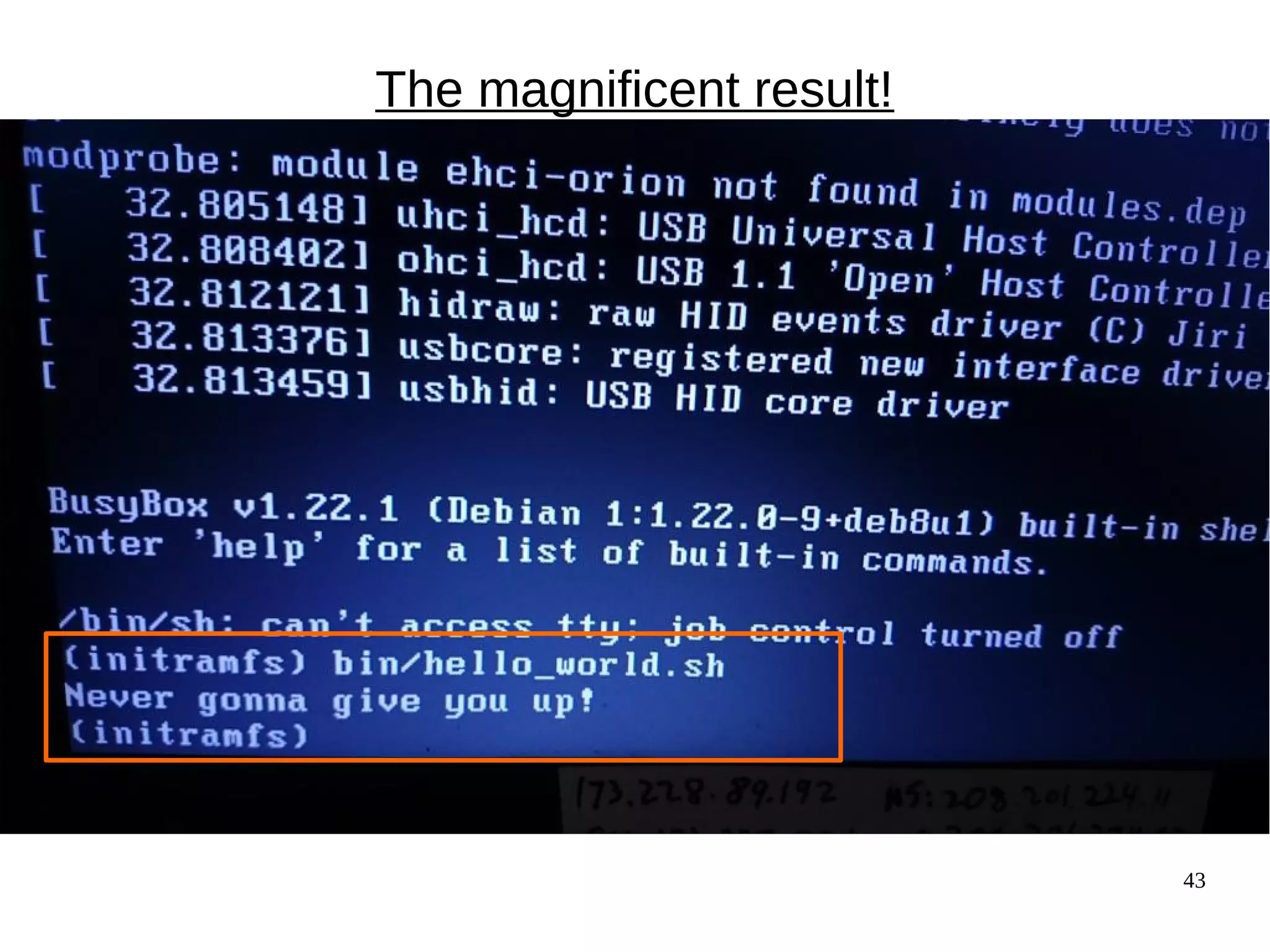
How to create your own initrd
● Unpack one that already works with gunzip and 'cpio -i'
● Copy in your binary.
● Use gen_initramfs.h from kernel source tree:
– scripts/gen_initramfs_list.sh -o <archive> <path to source>
● Run 'lsinitramfs <archive>' to check the result.
● cp <archive> /boot; edit /boot/grub/grub.cfg
CAUTION: your system boots fine, right? You're crazy to mess
with the bootloader, you moron.
● Run grub-script-check.
43
The magnificent result!
44
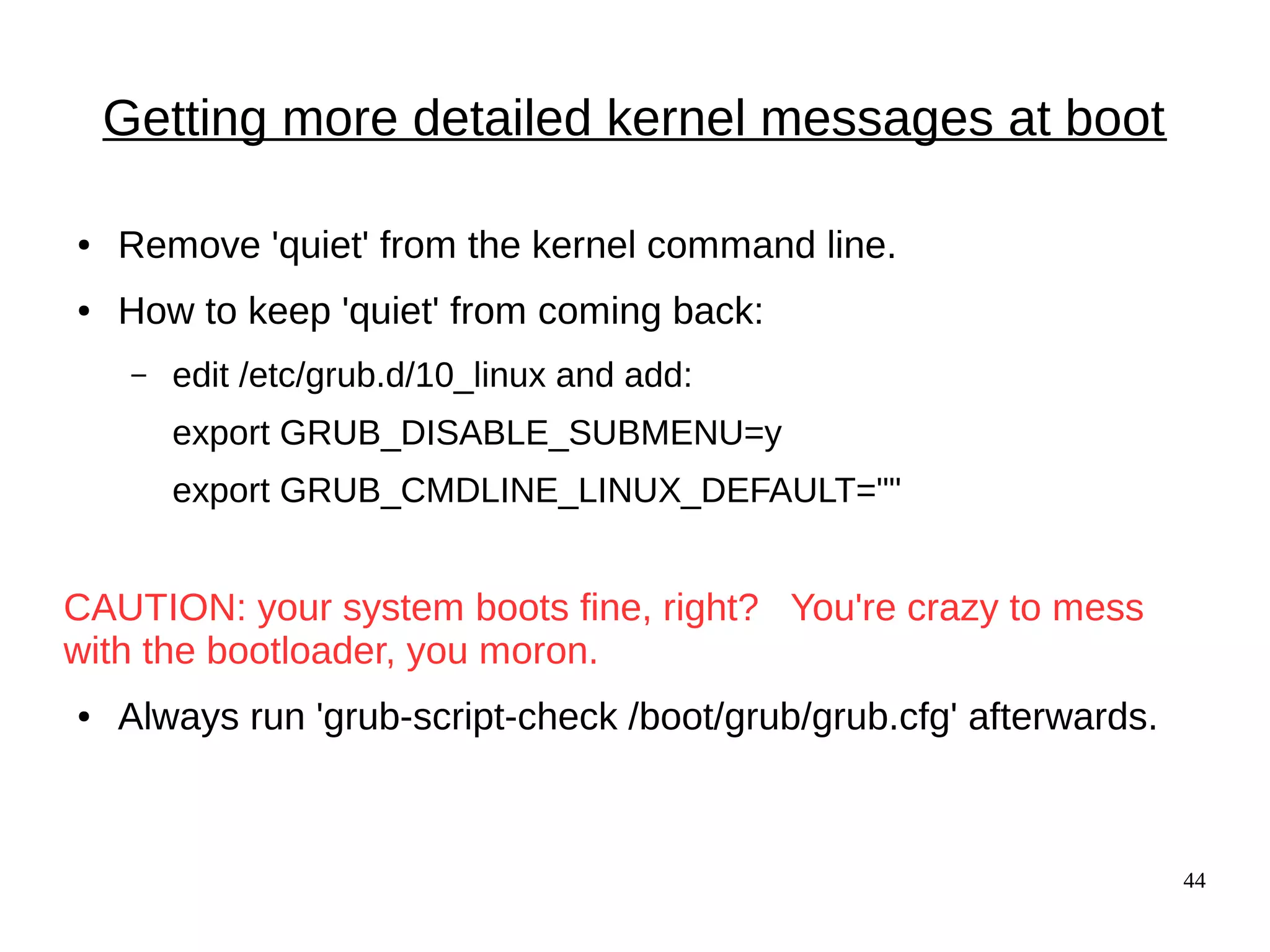
Getting more detailed kernel messages at boot
● Remove 'quiet' from the kernel command line.
● How to keep 'quiet' from coming back:
– edit /etc/grub.d/10_linux and add:
export GRUB_DISABLE_SUBMENU=y
export GRUB_CMDLINE_LINUX_DEFAULT=""
CAUTION: your system boots fine, right? You're crazy to mess
with the bootloader, you moron.
● Always run 'grub-script-check /boot/grub/grub.cfg' afterwards.
45
Learning more with systemd-bootchart
● Make sure kernel is compiled with CONFIG_SCHEDSTATS=y.
● 'apt-get install systemd-bootchart'
● Interrupt grub by typing 'e'
● Append 'init=/lib/systemd/systemd-bootchart' to the line that
starts with 'linux'
● After boot, open the SVG image in /run/log/ with a browser.
A change in compiling your own kernel
47
Appendix: running QEMU
#!/bin/bash
ROOTDIR=/home/alison/ISOs
HDNAME=debian-testing
VERSION=4.9.5
# Load kernel via GRUB; console shows in QEMU window.
#qemu-system-x86_64 -machine accel=kvm -name ${HDNAME} -boot c -drive file=$
{ROOTDIR}/${HDNAME}.raw,format=raw -m 4096 -smp cpus=1 -net nic,model=e1000
-net user,hostfwd=tcp:127.0.0.1:6666-:22 -localtime -serial stdio
# Load kernel from external file; console shows in xterm; GRUB doesn't run.
qemu-system-x86_64 -machine accel=kvm -name ${HDNAME} -initrd
/home/alison/embedded/SCALE2017/kernel/initrd.img-${VERSION} -kernel
/home/alison/embedded/SCALE2017/kernel/vmlinuz-${VERSION} -boot c -drive file=$
{ROOTDIR}/${HDNAME}.raw,format=raw -m 4096 -smp cpus=1 -net nic,model=e1000
-net user,hostfwd=tcp:127.0.0.1:6666-:22 -localtime -serial stdio -append
"console=ttyAMA0 console=ttyS0 root=UUID=8e6a1c7e-b3c4-4a37-8e21-56a137c9dded
ro"
48
Findingu-bootstartwithGDB
The ARM bootloader
● Read fundamental configuration from fuses, switches and
GPIOs.
● Then, for ARM:
1. Setup and initialise the RAM.
2. Initialise one serial port.
3. Detect the machine type.
4. Setup the kernel tagged list. device-tree
5. Load initramfs.
6. Call the kernel image.
Code in the SPL: board_init_f() and jump_to_image_linux()
50
Where do messages originate?
[ 54.590327] Starting kernel ...
[ 54.593459]
Uncompressing Linux... done, booting the kernel.
Linux version 3.0.35-2508-g54750ff (gcc version 4.6.3 #1 SMP PREEMPT
CPU: ARMv7 Processor [412fc09a] revision 10 (ARMv7), cr=10c53c7d
CPU: VIPT nonaliasing data cache, VIPT aliasing instruction cache
Machine: Freescale i.MX 6Quad/DualLite/Solo Sabre-SD Board
Memory policy: ECC disabled, Data cache writealloc
CPU identified as i.MX6Q, silicon rev 1.1
PERCPU: Embedded 7 pages/cpu @8c008000 s5440 r8192 d15040 u32768
Built 1 zonelists in Zone order, mobility grouping on. Total pages: 227328
Kernel command line: console=ttymxc1,115200 ip=dhcp rootwait root=/dev/nfs
nfsroot=172.17.0.1:/tftpboot/alison/mx6q/fsl-mx6,v3,tcp
u-boot misc.c
in
zImage
header
from kernel
proper
from CPU
from
kernel
passed from u-boot
}
51
Image, zImage, uImage, vmlinux, vmlinuz?
● Image is the raw executable.
● zImage is compressed version of Image with prepended
uncompression instructions in ASM.
● uImage is a zImage with a u-boot header.
● vmlinux is ELF executable containing Image in .text section.
● vmlinuz is a stripped version of vmlinux.

Linux: the first second

  • 1.
    Linux: the firstsecond Alison Chaiken alison@she-devel.com March 3, 2017
  • 2.
    https://flic.kr/p/6h96xg How Linux starts ●What precisely does “off” mean? ● Why does my bootloader have two binaries? ● ACPI vs DTB ● When does the kernel first spawn a second thread? ● What is an initrd? ● How does PID 1 start? ● Out-of-bounds: systemd; SecureBoot; fastboot
  • 3.
    THE FOLLOWING CONTENTMAY BE TOO DISTURBING FOR SOME VIEWERS -- you will witness a kernel panic and a boot failure; -- a NULL pointer will be dereferenced  successfully!
  • 4.
  • 5.
    5 Warm vs. power-onreset Clears memory? Restarts clocks? Pros Cons Examples Power-on Reset Yes, then reads boot-mode pins. Won't fail. Slightly slower. Plug-in device Warm Reset DDR set to 'self- refresh', then reset clocks and jump to stored address. Faster; retains 'reset reason' and RAM data. Can fail. 'reboot'; watchdog; JTAG
  • 6.
    6 x86_64: Never genuinelyoff Source: Intel IPMI: run from Baseboard Management Controller AMT: run from Graphics and Memory Controller Hub
  • 7.
  • 8.
  • 9.
    9 Bootloaders according toIntel Read device-tree (ARM)
  • 10.
    10 'Shim' bootloader 'Early Init' ● ARM: “SPL”, “XLoader” or “MLO” in addition to u-boot.img. ● “Software program loader” separates CPU-specific code. ● Problem: DRAM controller must be initialized. ● Solution: load into SRAM ('OCRAM' in i.MX6, 'l2ram' for TI). – Why this works: SRAM (and pNOR) are mapped memory. ● Problem: SRAM is little! (256K on i.MX6, 2 MB on DRA7x). ● Solution: start with a tiny SPL.
  • 11.
    11 Advanced Configuration andPower Interface Source: Intel Entertainment: 'sudo acpidump | grep Windows'
  • 12.
    12 Getting more detailedu-boot messages U-boot config: # Boot timing CONFIG_BOOTSTAGE=y CONFIG_BOOTSTAGE_REPORT=y CONFIG_BOOTSTAGE_FDT=y /* Exiting U-Boot, entering OS */ ***
  • 13.
    13 enum bootstage_id { BOOTSTAGE_ID_START= 0, BOOTSTAGE_ID_CHECK_MAGIC,/* Checking image magic */ BOOTSTAGE_ID_CHECK_HEADER, /* Checking image header */ BOOTSTAGE_ID_CHECK_CHECKSUM, /* Checking image checksum */ BOOTSTAGE_ID_CHECK_ARCH, /* Checking architecture */ BOOTSTAGE_ID_CHECK_IMAGETYPE = 5,/* Checking image type */ BOOTSTAGE_ID_DECOMP_IMAGE, /* Decompressing image */ BOOTSTAGE_ID_KERNEL_LOADED, /* Kernel has been loaded */ BOOTSTAGE_ID_DECOMP_UNIMPL = 7, /* Odd decompression algorithm */ BOOTSTAGE_ID_RUN_OS = 15, /* Exiting U-Boot, entering OS */ /* Boot stages related to loading a kernel from an network device */ BOOTSTAGE_ID_NET_CHECKSUM = 60, BOOTSTAGE_ID_NET_ETH_START = 64, BOOTSTAGE_ID_NET_ETH_INIT, BOOTSTAGE_ID_NET_START = 80, BOOTSTAGE_ID_NET_NETLOOP_OK, }; Interpretation of bootstages
  • 14.
    14 Passing info fromKernel to Bootloader ● U-boot can pass info in registers or in kernel cmdline. ● Most arches pass “Reset cause” to bootloader. ● mtdoops and ramoops save backtraces in persistent stores specified by device-tree.
  • 15.
  • 16.
    16 The coming revolutionin non-volatile storage Source: Micron ● 1 Gb non-volatile memory  suspend even for brief inactivity. ● POR will become a rare event. ● Profound security implications. ● Linux drivers: Matthew Wilcox, XIP DAX AKA, 'Optane' by Intel Specs: ArsTechnica
  • 17.
    17 Coming soon toa system near you Source: PCPER
  • 18.
  • 19.
    19 The kernel isan ELF binary ● vmlinux is a regular ELF binary. – readelf -e vmlinux ● Extract vmlinux from vmlinuz: – <path-to-kernel-source>/scripts/extract-vmlinux /boot/vmlinuz-$(uname -r) > vmlinux https://flic.kr/p/6xuhiK
  • 20.
  • 21.
    21 Examining ELF binarystart with GDB (results depend on toolchain) ● Compile your C program with '-ggdb'. ● gdb <some-binary-executable> ● Type 'info files' ● Look for 'Entry point'. ● x86_64: − Type 'b *(hex address)' − Type 'run' − Type 'info functions' ● ARM: − Type 'l *(hex address)' − Type 'l 1,80' − Type 'info functions' or 'info sources'
  • 22.
  • 23.
    23 The kernel asPID 0 ● Userspace processes need a stack, a heap, STD* file descriptors and an environment to start. ● An ASM constructor “ctor” from crti.o, crtn.o and crt1.0 provided by libgcc allocates these resources. ● Source is start.S. ● Corresponding kernel resources are provided via inline ASM.
  • 24.
    24 Examining kernel startwith GDB 1 Type 'file vmlinux'. (If zImage, extract with linux/scripts/extract-vmlinux). 2 Type: gdb vmlinux 3 Type: info files 4 Find 'Entry point'. 5 Type:   l *(hex address) 6 Type l 1,80
  • 25.
    25 Kernel starts inhead.S, not start.S.
  • 26.
    26 What's in head.S? ●Type 'file vmlinux.o' ● Try 'arm-linux-gnueabihf-gdb vmlinux.o' ● Type 'info files' ● Type 'l *(0x0)' <---- actually works!
  • 27.
    27 The kernel's main()function: highlights of start_kernel() start_kernel() {: −boot_cpu_init(); −page_address_init(); −setup_arch(&command_line); −page_alloc_init(); −pr_notice("Kernel command line: ); −parse_args("Booting kernel", command_line); −mm_init(); −sched_init(); −init_IRQ(); −init_timers(); timekeeping_init(); −rest_init(); } “Activate the first processor.” process the device-tree All timestamps before are [0.000000] setup page tables and start virtual memory start userspace
  • 28.
  • 29.
    29 What is aninitrd anyway? ● 'init ramdisk' = filesystem that is loaded into memory by the kernel before the rootfs mounts. ● Why? – To provide a 'rescue shell' in case rootfs doesn't mount. – To provide modules that don't fit in zImage. – To provide a safe environment to run agressive tests. – To facilitate software updates on devices with limited storage.
  • 30.
    30 What's in aninitrd and why? ● Boot into the rescue shell by providing a broken cmdline in /boot/grub/grub.cfg – Type 'ls' ● Or try 'lsinitramfs /boot/$(uname -r)' ● initrd is a gzipped cpio archive: cp /boot/initrd-$(uname -r) /tmp/initrd.gz gunzip /tmp/initrd.gz cpio -t < /tmp/initrd
  • 31.
  • 32.
    32 Booting into RescueShell /scripts/local-block is the function local_block() inside initramfs /scripts/local
  • 33.
    33 OMG! My lifeis over! (rescue shell tips) Inhale on a 4-count, then exhale on a 10-count. ● Oh no! 'help' scrolls pages of unreadable crap! Relax your jaw. Make circles with your neck. ● Read 'man busybox'. ● 'help | grep' works in busybox. ● Look in /bin and /sbin. There's fsck!! ● You have sed and vi (but not emacs ;-( ) ● Type 'reboot -f' when you are bored.
  • 34.
  • 35.
    35 {Hibernate, Suspend} ==Freeze ● Suspend: save state to memory. ● Hibernate: save state to disk (swap). ● Main code is in kernel/freezer.c. ● Freezing of processes preserves state, protects filesystems. ● Each core must save its state separately. ● To watch, append no_console_suspend to bootargs.
  • 36.
    36 How to suspendfrom CLI no_console_suspend in bootargs gives debug output.
  • 37.
    37 How to Hibernatefrom CLI Only works for devices with swap space.
  • 38.
    38 Summary ● u-boot's CONFIG_BOOTSTAGES,acpidump and systemd-bootchart provide details about boot. ● Practicing with QEMU is entertaining and low-risk. ● Examine your kernel with GDB and binutils. ● ARM and x86 boot processes are quite distinct. ● High-speed non-volatile memory is about to have a massive impact on Linux.
  • 39.
    39 Major References ● EmbeddedLinux Primer by Chris Hallinan (book) ● Booting ARM Linux by Russell King and THE LINUX/x86 BOOT PROTOCOL (Documentation/) ● Program startup process in userspace at linux-insides blog ● Matthew Garrett's comprehensive series on UEFI ● Status of Intel Management Engine on various laptops (Coreboot) and servers (FSF) ● All about ACPI talk by Darren Hart, ELCE 2013 ● Arch Wiki on hacking ACPI tables
  • 40.
    do_bootm_states = u-bootstate machine bootm.c<lib> “Main Entry point for arm bootm implementation” BootROM (internal EEPROM) resume? Read Reset Controller registers No Yes Jump to stored image bootm_start() bootm_find_os() bootm_load_os() bootm_os_get_boot_func() boot_selected_os do_bootm_linux() bootm_jump_linux() bootm.c<common> Das U-boot ***
  • 41.
    Boot ROM in CPU Shim bootloader (Xloader, MLO,etc.) bootloader (u-boot, GRUB, etc.) cpu_idleudev arch/arm/kernel/smp.c kernel/smp.c head.S head-common.S “Kernel startup entry point” Decompress the kernel spawn 2nd thread Boot secondary cores start userspace init smp_init() start of zImage secondary_start_kernel() kernel/smpboot.c idle_threads_init() main.c start_kernel() kernel_init do_initcalls()
  • 42.
    42 How to createyour own initrd ● Unpack one that already works with gunzip and 'cpio -i' ● Copy in your binary. ● Use gen_initramfs.h from kernel source tree: – scripts/gen_initramfs_list.sh -o <archive> <path to source> ● Run 'lsinitramfs <archive>' to check the result. ● cp <archive> /boot; edit /boot/grub/grub.cfg CAUTION: your system boots fine, right? You're crazy to mess with the bootloader, you moron. ● Run grub-script-check.
  • 43.
  • 44.
    44 Getting more detailedkernel messages at boot ● Remove 'quiet' from the kernel command line. ● How to keep 'quiet' from coming back: – edit /etc/grub.d/10_linux and add: export GRUB_DISABLE_SUBMENU=y export GRUB_CMDLINE_LINUX_DEFAULT="" CAUTION: your system boots fine, right? You're crazy to mess with the bootloader, you moron. ● Always run 'grub-script-check /boot/grub/grub.cfg' afterwards.
  • 45.
    45 Learning more withsystemd-bootchart ● Make sure kernel is compiled with CONFIG_SCHEDSTATS=y. ● 'apt-get install systemd-bootchart' ● Interrupt grub by typing 'e' ● Append 'init=/lib/systemd/systemd-bootchart' to the line that starts with 'linux' ● After boot, open the SVG image in /run/log/ with a browser.
  • 46.
    A change incompiling your own kernel
  • 47.
    47 Appendix: running QEMU #!/bin/bash ROOTDIR=/home/alison/ISOs HDNAME=debian-testing VERSION=4.9.5 #Load kernel via GRUB; console shows in QEMU window. #qemu-system-x86_64 -machine accel=kvm -name ${HDNAME} -boot c -drive file=$ {ROOTDIR}/${HDNAME}.raw,format=raw -m 4096 -smp cpus=1 -net nic,model=e1000 -net user,hostfwd=tcp:127.0.0.1:6666-:22 -localtime -serial stdio # Load kernel from external file; console shows in xterm; GRUB doesn't run. qemu-system-x86_64 -machine accel=kvm -name ${HDNAME} -initrd /home/alison/embedded/SCALE2017/kernel/initrd.img-${VERSION} -kernel /home/alison/embedded/SCALE2017/kernel/vmlinuz-${VERSION} -boot c -drive file=$ {ROOTDIR}/${HDNAME}.raw,format=raw -m 4096 -smp cpus=1 -net nic,model=e1000 -net user,hostfwd=tcp:127.0.0.1:6666-:22 -localtime -serial stdio -append "console=ttyAMA0 console=ttyS0 root=UUID=8e6a1c7e-b3c4-4a37-8e21-56a137c9dded ro"
  • 48.
  • 49.
    The ARM bootloader ●Read fundamental configuration from fuses, switches and GPIOs. ● Then, for ARM: 1. Setup and initialise the RAM. 2. Initialise one serial port. 3. Detect the machine type. 4. Setup the kernel tagged list. device-tree 5. Load initramfs. 6. Call the kernel image. Code in the SPL: board_init_f() and jump_to_image_linux()
  • 50.
    50 Where do messagesoriginate? [ 54.590327] Starting kernel ... [ 54.593459] Uncompressing Linux... done, booting the kernel. Linux version 3.0.35-2508-g54750ff (gcc version 4.6.3 #1 SMP PREEMPT CPU: ARMv7 Processor [412fc09a] revision 10 (ARMv7), cr=10c53c7d CPU: VIPT nonaliasing data cache, VIPT aliasing instruction cache Machine: Freescale i.MX 6Quad/DualLite/Solo Sabre-SD Board Memory policy: ECC disabled, Data cache writealloc CPU identified as i.MX6Q, silicon rev 1.1 PERCPU: Embedded 7 pages/cpu @8c008000 s5440 r8192 d15040 u32768 Built 1 zonelists in Zone order, mobility grouping on. Total pages: 227328 Kernel command line: console=ttymxc1,115200 ip=dhcp rootwait root=/dev/nfs nfsroot=172.17.0.1:/tftpboot/alison/mx6q/fsl-mx6,v3,tcp u-boot misc.c in zImage header from kernel proper from CPU from kernel passed from u-boot }
  • 51.
    51 Image, zImage, uImage,vmlinux, vmlinuz? ● Image is the raw executable. ● zImage is compressed version of Image with prepended uncompression instructions in ASM. ● uImage is a zImage with a u-boot header. ● vmlinux is ELF executable containing Image in .text section. ● vmlinuz is a stripped version of vmlinux.