Managing Your Online Brand: LinkedinJeffrei CliftonRockwell Peer Advisor
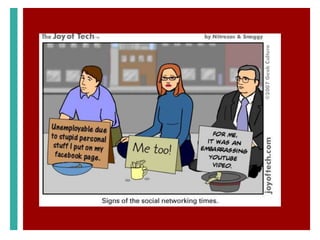
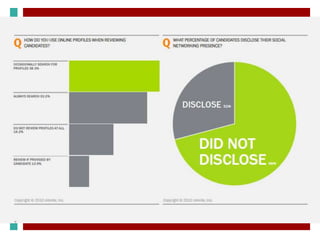
BASICSWelcomeOnline Identity70% of employers have rejected a candidate based on information they have found online85% say positive online reputation has influenced their hiring decisions	“It is no longer enough to have a solid resume. Students now need a professional online presence.”				- Holly Paul, US Recruiting Leader @ PWC
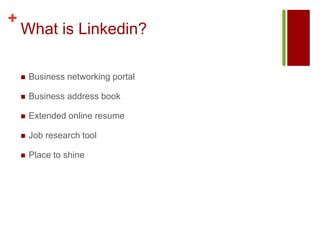
What is Linkedin? Business networking portalBusiness address bookExtended online resumeJob research toolPlace to shine
Don’t I know you?!
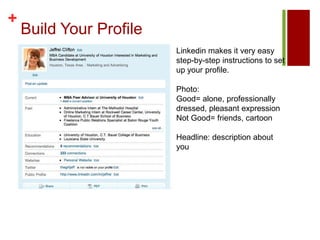
Build Your ProfileLinkedin makes it very easy step-by-step instructions to set up your profile. Photo: Good= alone, professionally dressed, pleasant expressionNot Good= friends, cartoonHeadline: description about you
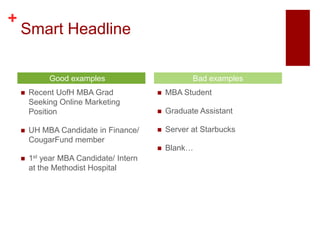
Smart HeadlineRecent UofH MBA Grad Seeking Online Marketing PositionUH MBA Candidate in Finance/ CougarFund member1st year MBA Candidate/ Intern at the Methodist Hospital MBA StudentGraduate AssistantServer at StarbucksBlank… Good examples	Bad examples
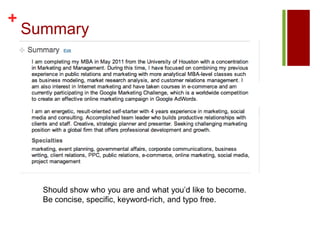
SummaryShould show who you are and what you’d like to become. Be concise, specific, keyword-rich, and typo free.
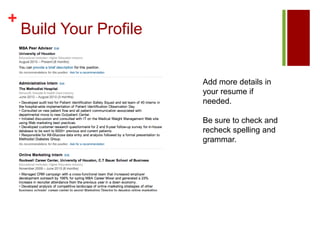
Build Your ProfileAdd more details in your resume if needed. Be sure to check and recheck spelling and grammar.
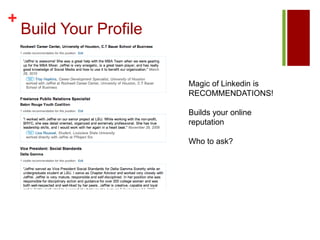
Build Your ProfileMagic of Linkedin is RECOMMENDATIONS!Builds your online reputationWho to ask?
Rules for your ProfileProfessional photoRight headlineWrite rich keyword summary that sells your skills and experienceGet strong helpful recommendationsTie Linkedin to your other efforts
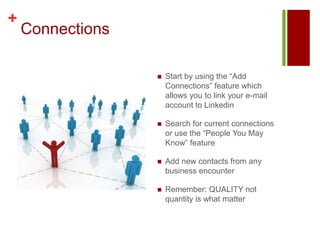
ConnectionsStart by using the “Add Connections” feature which allows you to link your e-mail account to LinkedinSearch for current connections or use the “People You May Know” featureAdd new contacts from any business encounterRemember: QUALITY not quantity is what matter
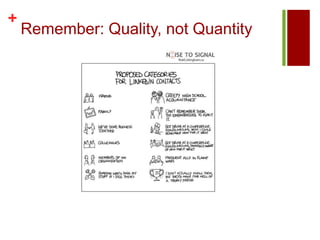
Remember: Quality, not Quantity
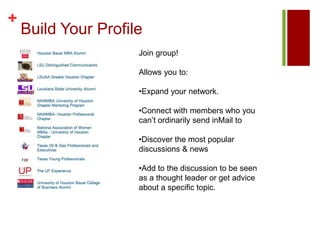
Build Your ProfileJoin group!Allows you to: Expand your network.
Connect with members who you can’t ordinarily send inMail to
Discover the most popular discussions & news
Add to the discussion to be seen as a thought leader or get advice about a specific topic.So You Want a Job?
How Linkedin Can HelpReach out to your networkUse your groupsJob search within LinkedinConnect with decision makers and hiring managers at companiesNetwork Network Network
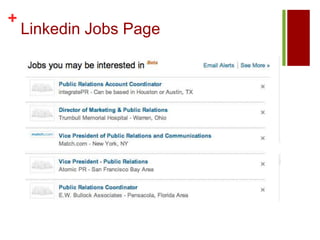
Linkedin Jobs Page
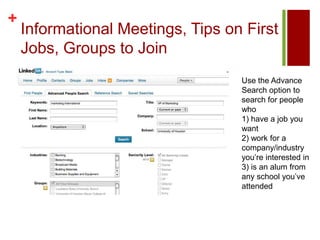
Informational Meetings, Tips on First Jobs, Groups to JoinUse the Advance Search option to search for people who 1) have a job you want 2) work for a company/industry you’re interested in 3) is an alum from any school you’ve attended
Researching and Prepping for InterviewsPeople who will be meeting: facts about education/work experience, interests, personal connectionsCompany you’ll be interviewing with:  information, current news, industry knowledge Insider information
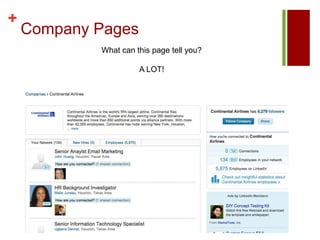
Company PagesWhat can this page tell you? A LOT!
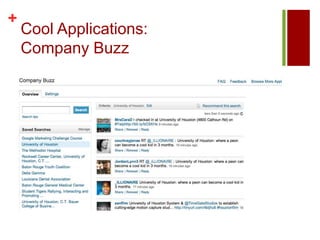
Cool Applications: Company Buzz
Other Cool Apps		Reading List by AmazonSlideshareEvents
Connect Linkedin with Other EffortsE-mail signature:Jeffrei Cliftonjeffrei.clifton@gmail.comConnect with me on LinkedIn: www.linkedin.com/in/jeffreiBusiness cardsGoogle pages

Linkedin Presentation

  • 1.
    Managing Your OnlineBrand: LinkedinJeffrei CliftonRockwell Peer Advisor
  • 2.
    BASICSWelcomeOnline Identity70% ofemployers have rejected a candidate based on information they have found online85% say positive online reputation has influenced their hiring decisions “It is no longer enough to have a solid resume. Students now need a professional online presence.” - Holly Paul, US Recruiting Leader @ PWC
  • 6.
    What is Linkedin?Business networking portalBusiness address bookExtended online resumeJob research toolPlace to shine
  • 7.
  • 9.
    Build Your ProfileLinkedinmakes it very easy step-by-step instructions to set up your profile. Photo: Good= alone, professionally dressed, pleasant expressionNot Good= friends, cartoonHeadline: description about you
  • 10.
    Smart HeadlineRecent UofHMBA Grad Seeking Online Marketing PositionUH MBA Candidate in Finance/ CougarFund member1st year MBA Candidate/ Intern at the Methodist Hospital MBA StudentGraduate AssistantServer at StarbucksBlank… Good examples Bad examples
  • 11.
    SummaryShould show whoyou are and what you’d like to become. Be concise, specific, keyword-rich, and typo free.
  • 12.
    Build Your ProfileAddmore details in your resume if needed. Be sure to check and recheck spelling and grammar.
  • 13.
    Build Your ProfileMagicof Linkedin is RECOMMENDATIONS!Builds your online reputationWho to ask?
  • 14.
    Rules for yourProfileProfessional photoRight headlineWrite rich keyword summary that sells your skills and experienceGet strong helpful recommendationsTie Linkedin to your other efforts
  • 15.
    ConnectionsStart by usingthe “Add Connections” feature which allows you to link your e-mail account to LinkedinSearch for current connections or use the “People You May Know” featureAdd new contacts from any business encounterRemember: QUALITY not quantity is what matter
  • 16.
  • 17.
    Build Your ProfileJoingroup!Allows you to: Expand your network.
  • 18.
    Connect with memberswho you can’t ordinarily send inMail to
  • 19.
    Discover the mostpopular discussions & news
  • 20.
    Add to thediscussion to be seen as a thought leader or get advice about a specific topic.So You Want a Job?
  • 21.
    How Linkedin CanHelpReach out to your networkUse your groupsJob search within LinkedinConnect with decision makers and hiring managers at companiesNetwork Network Network
  • 22.
  • 23.
    Informational Meetings, Tipson First Jobs, Groups to JoinUse the Advance Search option to search for people who 1) have a job you want 2) work for a company/industry you’re interested in 3) is an alum from any school you’ve attended
  • 24.
    Researching and Preppingfor InterviewsPeople who will be meeting: facts about education/work experience, interests, personal connectionsCompany you’ll be interviewing with: information, current news, industry knowledge Insider information
  • 25.
    Company PagesWhat canthis page tell you? A LOT!
  • 26.
  • 27.
    Other Cool Apps ReadingList by AmazonSlideshareEvents
  • 28.
    Connect Linkedin withOther EffortsE-mail signature:Jeffrei Cliftonjeffrei.clifton@gmail.comConnect with me on LinkedIn: www.linkedin.com/in/jeffreiBusiness cardsGoogle pages

Editor's Notes

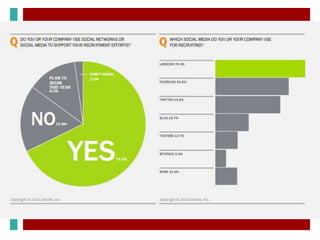
  • #5 Looking forward, social networks lead all otherrecruiting channels for planned investment byemployers as the economy recovers:• 46% of respondents plan to spend more on socialrecruiting in 2010 than 2009• 36% will spend less on job boards• 38% will spend less on third party recruiters andsearch firms
  • #7 Business networking portal--- Linkedin is almost exclusively used for business connections, so use it that way. Show your “Best Self.” Business address book- invite connections, make new connections, join relevant groups, keep all your contacts in one place, you can also export your address books, find out where people work/moved jobs/significant updatesExtended online resume- Linkedin gives you a place to really put a lot of information somewhere for recruiters and interviewers to find; more so than regular, 1 or 2 page resumes. Use the web space to really dig deep into what your previous experience is and what you’re looking for and interested in. Job research tool- Linkedin is also a great portal for Job searching or identifying informational interviewees. More on that later… Place to shine- It also gives you a place to shine! From recommendations to group discussions boards you really have a chance to show just how amazing and knowledgeable you are.
  • #8 How’s it work..Think “6th Degrees of Kevin Bacon” except Linkedin uses 3 degrees and trust me 3 degrees gets you to a whole lot of people
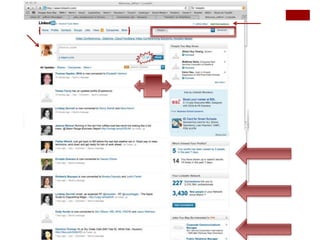
  • #9 Here is screenshot of my homepage. There’s my menu barMy picture and status updateOption to link to Twitter (since I have linked those accounts, but set it up so I have to choose which updates on both applications crossover)Search barSome people I may know and people I do know and what they’re up toWho’s viewed my profileHow many people I’m connected to How many people have searched for my profile in the last X number of days
  • #14 Gives an opportunity for someone to vouch for you and say amazing things about you! Use this tool! HR reps feel more secure in hiring someone with a proven record of success and positive feelings from previous bosses and coworkers
  • #20 Friendly message to family, friends, business contacts--- Good subject lineWho you are why you want to connectYour ask (general career advice, insight into career/company)Thank them! Groups- keep eye out on job posting job boardsJob Search in Linkedin- shows who and how you’re connected with that companyCan then ask for introduction from your connections
  • #21 Search for open jobs by location, company, date posted and more.Explore career options and reach out to new connections on different career paths.
  • #23 Insider information: traits company looks for, politics at the office, culture, interesting little know facts
  • #24 Shows youWhat co doesCareer paths people pursedWhere company has its officesProfiles of people who will be interviewing you or future colleaguesAvailable jobsInterviewer: Education experienceCareer pathTweeting aboutConnections you might shareFind connections in your network who work or have worked at the company and request a brief interview to find out.. .Culture, Leaders,Traits recruiters are looking for Blogs and publications are must reads
  • #25 Add the Company Buzz AppFollow companiesGo to your buzz page to see what people are saying about the company and industry