Lightning  アプリケーション開発
Visualforce  ページの移⾏行行
Salesforce  Developer  Web  セミナー
​ AppExchange  アライアンス部
​ テクニカルエバンジェリスト
​ 川畑  隆博
Forward-Looking Statements
​ This presentation may contain forward-looking statements that involve risks, uncertainties, and assumptions. If any such uncertainties materialize or if any of
the assumptions proves incorrect, the results of salesforce.com, inc. could differ materially from the results expressed or implied by the forward-looking
statements we make. All statements other than statements of historical fact could be deemed forward-looking, including any projections of product or
service availability, subscriber growth, earnings, revenues, or other financial items and any statements regarding strategies or plans of management for future
operations, statements of belief, any statements concerning new, planned, or upgraded services or technology developments and customer contracts or use
of our services.
​ The risks and uncertainties referred to above include – but are not limited to – risks associated with developing and delivering new functionality for our
service, new products and services, our new business model, our past operating losses, possible fluctuations in our operating results and rate of growth,
interruptions or delays in our Web hosting, breach of our security measures, the outcome of any litigation, risks associated with completed and any possible
mergers and acquisitions, the immature market in which we operate, our relatively limited operating history, our ability to expand, retain, and motivate our
employees and manage our growth, new releases of our service and successful customer deployment, our limited history reselling non-salesforce.com
products, and utilization and selling to larger enterprise customers. Further information on potential factors that could affect the financial results of
salesforce.com, inc. is included in our annual report on Form 10-K for the most recent fiscal year and in our quarterly report on Form 10-Q for the most
recent fiscal quarter. These documents and others containing important disclosures are available on the SEC Filings section of the Investor Information
section of our Web site.
​ Any unreleased services or features referenced in this or other presentations, press releases or public statements are not currently available and may not be
delivered on time or at all. Customers who purchase our services should make the purchase decisions based upon features that are currently available.
Salesforce.com, inc. assumes no obligation and does not intend to update these forward-looking statements.
​ Statement under the Private Securities Litigation Reform Act of 1995
話者紹介
AppExchange  アライアンス部
テクニカルエバンジェリスト
川畑  隆博
2006年年:Salesforce  を利利⽤用した  UI  開発
2011年年:Force.com  上での業務アプリケーション開発
2016年年:AppExchange  アプリケーションに関する技術を担当
今⽇日の内容
4  |  ©2017  Salesforce
内容
•  Lightning  アプリケーション開発での  Visualforce  
ページのマイグレーションについて、効果的な事例例
や修正パターンをご説明します。
対象者
•  Salesforce  開発者(中級程度度)
•  AppExchange  アプリケーション開発者
ゴール •  Visualforce  を置き換えるポイントを理理解できる。
セミナーの流流れ
5  |  ©2017  Salesforce
ü 最後に質問への回答の時間を設けます
ü 質問はいつでも送ってもらってOKです
Lightning  
Experience  で
の  Visualforce  
の活⽤用
Visualforce
ページの移⾏行行
Lightning  
Ready  アプリ
ケーション認定
ガイド
まとめ
1 2 3 4
はじめに
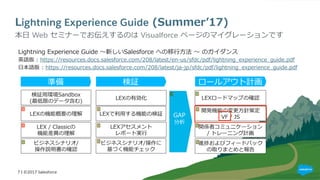
Lightning Experience Guide  (Summerʼ’17)
Lightning  Experience  Guide  〜~新しいSalesforce  への移⾏行行⽅方法  〜~  のガイダンス
英語版  :  https://resources.docs.salesforce.com/208/latest/en-‐‑‒us/sfdc/pdf/lightning_̲experience_̲guide.pdf
⽇日本語版  :  https://resources.docs.salesforce.com/208/latest/ja-‐‑‒jp/sfdc/pdf/lightning_̲experience_̲guide.pdf
​ 本⽇日  Web  セミナーでお伝えするのは  Visualforce  ページのマイグレーションです
ビジネスシナリオ/
操作説明書の確認
検証⽤用環境Sandbox
(最低限のデータ含む)
ビジネスシナリオ/操作に
基づく機能チェック
検証
開発機能の変更更⽅方針策定
VF  /  JS
準備 ロールアウト計画
LEXの有効化
LEXアセスメント
レポート実⾏行行
LEXロードマップの確認
LEXで利利⽤用する機能の検証LEXの機能概要の理理解
LEX  /  Classicの
機能差異異の理理解
関係者コミュニケーション
/  トレーニング計画
GAP
分析
進捗およびフィードバック
の取りまとめと報告
7 | ©2017 Salesforce
1.  Lightning  Experience  での  
Visualforce  の活⽤用
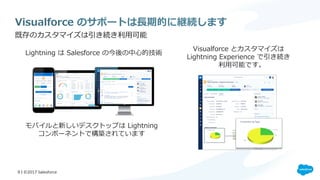
Visualforce  のサポートは⻑⾧長期的に継続します
​ 既存のカスタマイズは引き続き利利⽤用可能
Lightning  は  Salesforce  の今後の中⼼心的技術
Visualforce  とカスタマイズは
Lightning  Experience  で引き続き
利利⽤用可能です。
モバイルと新しいデスクトップは  Lightning    
コンポーネントで構築されています
9 | ©2017 Salesforce
Lightning Experience で Visualforce を使⽤用できる場所
​ アプリケーションランチャーから  Visualforce  ページを実⾏行行する
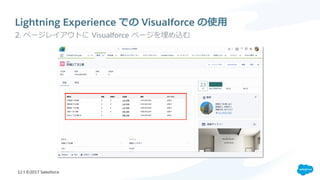
​ ページレイアウトに  Visualforce  ページを埋め込む
​ 標準ボタンをオーバーライドして  Visualforce  ページを表⽰示する
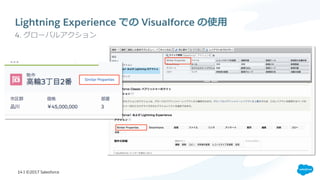
​ グローバルアクションとして  Visualforce  ページを起動する
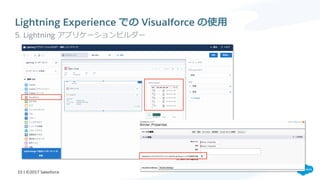
​ Lightning  アプリケーションビルダーを使って  Visualforce  ページ  を配置する
10 | ©2017 Salesforce
1
2
3
4
5
Lightning Experience  での  Visualforce  の使⽤用
​ 1.  アプリケーションランチャーから  Visualforce  ページを実⾏行行する
11 | ©2017 Salesforce
Lightning Experience での Visualforce の使⽤用
​ 2. ページレイアウトに  Visualforce  ページを埋め込む
12 | ©2017 Salesforce
Lightning Experience  での  Visualforce  の使⽤用
​ 3. 標準ボタンの上書き
13 | ©2017 Salesforce
Lightning Experience での Visualforce の使⽤用
​ 4. グローバルアクション
14 | ©2017 Salesforce
Lightning Experience での Visualforce の使⽤用
​ 5. Lightning  アプリケーションビルダー
15 | ©2017 Salesforce
LEX  上の  Visualforce  の主な考慮点
1.  組み込み標準コンポーネントを利利⽤用するVFページはClassicのデサインでの表⽰示・操作になります
2.  Classicのヘッダーとサイドバーは常に抑制された状態になります
3.  VFページのタイトルは標準では表⽰示されません
4.  ナビゲーションイベントを起動するJavaScriptユーティリティの”sforce.one”は、LEX上で表⽰示される
VFページに⾃自動的に組み込まれます
5.  Classic環境ではVFはアプリケーションコンテナとして動作しますが、LEX上のVFは⼤大きなLEXコンテ
ナにラップされたHTMLのiframe内で実⾏行行されるため、コーディングが必要になります
16 | ©2017 Salesforce
2.  Visualforce  ページの移⾏行行
Visualforce  ページの移⾏行行ステップ(例例)
18  |  ©2017  Salesforce
SLDS*  を使⽤用
して  LEX  スタ
イルを反映
Classic  と  LEX  
で適切切に表⽰示さ
れるように改善
アプリケーショ
ンビルダーで
配置
Lightning  コン
ポーネントに置
き換え
1 2 3 4
Visualforce  で  
Lightning  コン
ポーネントを
使⽤用
5
*SLDS  =  Salesforce  Lightning  Design  System
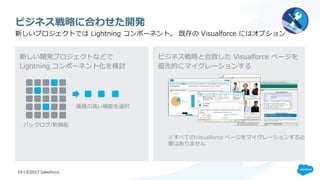
ビジネス戦略略に合わせた開発
ビジネス戦略略と合致した  Visualforce  ページを
優先的にマイグレーションする
新しい開発プロジェクトなどで
Lightning  コンポーネント化を検討
新しいプロジェクトでは  Lightning  コンポーネント。  既存の  Visualforce  にはオプション
※すべてのVisualforce  ページをマイグレーションする必
要はありません
バックログ/新機能
価値の⾼高い機能を選択
19 | ©2017 Salesforce
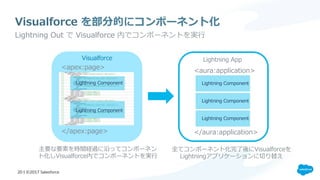
Visualforce  を部分的にコンポーネント化
​ Lightning  Out  で  Visualforce  内でコンポーネントを実⾏行行
Lightning  Component
<apex:page>
</apex:page>
<aura:application>
</aura:application>
Lightning  Component
Lightning  AppVisualforce
主要な要素を時間経過に沿ってコンポーネン
ト化しVisualforce内でコンポーネントを実⾏行行
全てコンポーネント化完了了後にVisualforceを
Lightningアプリケーションに切切り替え
20 | ©2017 Salesforce
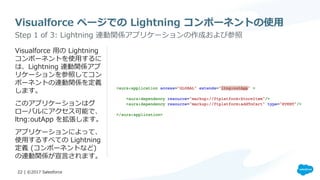
コーディング
​ Visualforce  ⽤用の  Lightning  
コンポーネントを使⽤用するに
は、Lightning  連動関係アプ
リケーションを参照してコン
ポーネントの連動関係を定義
します。
​ このアプリケーションはグ
ローバルにアクセス可能で、
ltng:outApp  を拡張します。
​ アプリケーションによって、
使⽤用するすべての  Lightning  
定義  (コンポーネントなど)  
の連動関係が宣⾔言されます。
Visualforce  ページでの  Lightning  コンポーネントの使⽤用
​ Step  1  of  3:  Lightning  連動関係アプリケーションの作成および参照
22  |  ©2017  Salesforce
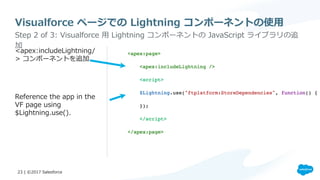
​ <apex:includeLightning/
>  コンポーネントを追加
​ Reference  the  app  in  the  
VF  page  using  
$Lightning.use().
Visualforce  ページでの  Lightning  コンポーネントの使⽤用
​ Step  2  of  3:  Visualforce  ⽤用  Lightning  コンポーネントの  JavaScript  ライブラリの追
加
23  |  ©2017  Salesforce
Visualforce  ページでの  Lightning  コンポーネントの使⽤用
​ $Lightning.createComponent(String  type,  Object  attributes,  String  locator,  function  
callback)  を使⽤用して、最上位コンポーネントをページに追加します。この関数は  
$A.createComponent()  に似ていますが、コンポーネントの挿⼊入先となる  DOM  要素を指定す
る追加の  domLocator  パラメータが含まれています。  
​ Step  3  of  3:  コンポーネントの作成
Visualforce Lightning  Component
24 | ©2017 Salesforce
3.  Lightning  対応アプリケーション
認定ガイド
Lightning  対応アプリケーションの申請ステップ
​ 必須要件は「ユースケースが期待通り動作すること」のみです
1.  レビュー⽤用のケースを登録   2.  アプリのクリックパスを提供 3.  AppExchangeのパッケージ
とリスティングのスクリーン
ショットを更更新
⾚赤丸でクリックパスを表⽰示したスクリーン
ショットをケースにアタッチしてださい
サポートカテゴリ:  
AppExchange  and  Feature  Requests
トピック:
AppExchange/Checkout
優先度度:
High
タイトル:
Lightning  Ready  Certification
詳細:
Lightning対応の申請依頼:
アプリ名:
アプリのクリックパスを画⾯面キャプチャ
して添付  
Updated  
screenshots
最新情報はこちら(2017年年8⽉月現在)https://sfdc.co/LightningReady  
26 | ©2017 Salesforce
4.  まとめ
まとめ
•  Visualforce  のサポートは⻑⾧長期的に継続します
•  優先度度に応じた  Visualforce  ページの移⾏行行を推奨します
•  Lightning  対応アプリケーションも増えていきます
※追記:既存  Visualforce  ページの⾃自動スタイリング(ベータ)
Automatically  Style  Existing  Visualforce  Pages  with  Lightning  Experience  Stylesheets  (Beta)
https://releasenotes.docs.salesforce.com/en-‐‑‒us/winter18/release-‐‑‒notes/rn_̲vf_̲lightningstylesheets.htm
28 | ©2017 Salesforce
おわりに
Trailhead  と関連リソース
​ トレイル:Lightning  Experience  への移⾏行行
•  https://trailhead.salesforce.com/ja/trails/lex_̲admin_̲migration
​ プロジェクト:Build  Flexible  Apps  with  Visualforce  Pages  and  Lightning  Components
•  https://trailhead.salesforce.com/ja/projects/workshop-‐‑‒lightning-‐‑‒programmatic
​ Migrating  Visualforce  Pages  to  Lightning
•  https://developer.salesforce.com/events/webinars/migrating-‐‑‒visualforce-‐‑‒pages-‐‑‒lightning
​ サンプルコード
•  https://github.com/developerforce/LightningNowWorkshop
​ クイックスタートからプロジェクトまで豊富なラインナップ
30  |  ©2017  Salesforce
& QA

Lightning アプリケーション開発 - Visualforce ページの移行

  • 1.
    Lightning  アプリケーション開発 Visualforce  ページの移⾏行行 Salesforce Developer  Web  セミナー ​ AppExchange  アライアンス部 ​ テクニカルエバンジェリスト ​ 川畑  隆博
  • 2.
    Forward-Looking Statements ​ This presentationmay contain forward-looking statements that involve risks, uncertainties, and assumptions. If any such uncertainties materialize or if any of the assumptions proves incorrect, the results of salesforce.com, inc. could differ materially from the results expressed or implied by the forward-looking statements we make. All statements other than statements of historical fact could be deemed forward-looking, including any projections of product or service availability, subscriber growth, earnings, revenues, or other financial items and any statements regarding strategies or plans of management for future operations, statements of belief, any statements concerning new, planned, or upgraded services or technology developments and customer contracts or use of our services. ​ The risks and uncertainties referred to above include – but are not limited to – risks associated with developing and delivering new functionality for our service, new products and services, our new business model, our past operating losses, possible fluctuations in our operating results and rate of growth, interruptions or delays in our Web hosting, breach of our security measures, the outcome of any litigation, risks associated with completed and any possible mergers and acquisitions, the immature market in which we operate, our relatively limited operating history, our ability to expand, retain, and motivate our employees and manage our growth, new releases of our service and successful customer deployment, our limited history reselling non-salesforce.com products, and utilization and selling to larger enterprise customers. Further information on potential factors that could affect the financial results of salesforce.com, inc. is included in our annual report on Form 10-K for the most recent fiscal year and in our quarterly report on Form 10-Q for the most recent fiscal quarter. These documents and others containing important disclosures are available on the SEC Filings section of the Investor Information section of our Web site. ​ Any unreleased services or features referenced in this or other presentations, press releases or public statements are not currently available and may not be delivered on time or at all. Customers who purchase our services should make the purchase decisions based upon features that are currently available. Salesforce.com, inc. assumes no obligation and does not intend to update these forward-looking statements. ​ Statement under the Private Securities Litigation Reform Act of 1995
  • 3.
    話者紹介 AppExchange  アライアンス部 テクニカルエバンジェリスト 川畑  隆博 2006年年:Salesforce を利利⽤用した  UI  開発 2011年年:Force.com  上での業務アプリケーション開発 2016年年:AppExchange  アプリケーションに関する技術を担当
  • 4.
    今⽇日の内容 4  |  ©2017 Salesforce 内容 •  Lightning  アプリケーション開発での  Visualforce   ページのマイグレーションについて、効果的な事例例 や修正パターンをご説明します。 対象者 •  Salesforce  開発者(中級程度度) •  AppExchange  アプリケーション開発者 ゴール •  Visualforce  を置き換えるポイントを理理解できる。
  • 5.
    セミナーの流流れ 5  |  ©2017 Salesforce ü 最後に質問への回答の時間を設けます ü 質問はいつでも送ってもらってOKです Lightning   Experience  で の  Visualforce   の活⽤用 Visualforce ページの移⾏行行 Lightning   Ready  アプリ ケーション認定 ガイド まとめ 1 2 3 4
  • 6.
  • 7.
    Lightning Experience Guide (Summerʼ’17) Lightning  Experience  Guide  〜~新しいSalesforce  への移⾏行行⽅方法  〜~  のガイダンス 英語版  :  https://resources.docs.salesforce.com/208/latest/en-‐‑‒us/sfdc/pdf/lightning_̲experience_̲guide.pdf ⽇日本語版  :  https://resources.docs.salesforce.com/208/latest/ja-‐‑‒jp/sfdc/pdf/lightning_̲experience_̲guide.pdf ​ 本⽇日  Web  セミナーでお伝えするのは  Visualforce  ページのマイグレーションです ビジネスシナリオ/ 操作説明書の確認 検証⽤用環境Sandbox (最低限のデータ含む) ビジネスシナリオ/操作に 基づく機能チェック 検証 開発機能の変更更⽅方針策定 VF  /  JS 準備 ロールアウト計画 LEXの有効化 LEXアセスメント レポート実⾏行行 LEXロードマップの確認 LEXで利利⽤用する機能の検証LEXの機能概要の理理解 LEX  /  Classicの 機能差異異の理理解 関係者コミュニケーション /  トレーニング計画 GAP 分析 進捗およびフィードバック の取りまとめと報告 7 | ©2017 Salesforce
  • 8.
    1.  Lightning  Experience での   Visualforce  の活⽤用
  • 9.
    Visualforce  のサポートは⻑⾧長期的に継続します ​ 既存のカスタマイズは引き続き利利⽤用可能 Lightning  は Salesforce  の今後の中⼼心的技術 Visualforce  とカスタマイズは Lightning  Experience  で引き続き 利利⽤用可能です。 モバイルと新しいデスクトップは  Lightning     コンポーネントで構築されています 9 | ©2017 Salesforce
  • 10.
    Lightning Experience でVisualforce を使⽤用できる場所 ​ アプリケーションランチャーから  Visualforce  ページを実⾏行行する ​ ページレイアウトに  Visualforce  ページを埋め込む ​ 標準ボタンをオーバーライドして  Visualforce  ページを表⽰示する ​ グローバルアクションとして  Visualforce  ページを起動する ​ Lightning  アプリケーションビルダーを使って  Visualforce  ページ  を配置する 10 | ©2017 Salesforce 1 2 3 4 5
  • 11.
    Lightning Experience  での Visualforce  の使⽤用 ​ 1.  アプリケーションランチャーから  Visualforce  ページを実⾏行行する 11 | ©2017 Salesforce
  • 12.
    Lightning Experience でのVisualforce の使⽤用 ​ 2. ページレイアウトに  Visualforce  ページを埋め込む 12 | ©2017 Salesforce
  • 13.
    Lightning Experience  での Visualforce  の使⽤用 ​ 3. 標準ボタンの上書き 13 | ©2017 Salesforce
  • 14.
    Lightning Experience でのVisualforce の使⽤用 ​ 4. グローバルアクション 14 | ©2017 Salesforce
  • 15.
    Lightning Experience でのVisualforce の使⽤用 ​ 5. Lightning  アプリケーションビルダー 15 | ©2017 Salesforce
  • 16.
    LEX  上の  Visualforce の主な考慮点 1.  組み込み標準コンポーネントを利利⽤用するVFページはClassicのデサインでの表⽰示・操作になります 2.  Classicのヘッダーとサイドバーは常に抑制された状態になります 3.  VFページのタイトルは標準では表⽰示されません 4.  ナビゲーションイベントを起動するJavaScriptユーティリティの”sforce.one”は、LEX上で表⽰示される VFページに⾃自動的に組み込まれます 5.  Classic環境ではVFはアプリケーションコンテナとして動作しますが、LEX上のVFは⼤大きなLEXコンテ ナにラップされたHTMLのiframe内で実⾏行行されるため、コーディングが必要になります 16 | ©2017 Salesforce
  • 17.
  • 18.
    Visualforce  ページの移⾏行行ステップ(例例) 18  | ©2017  Salesforce SLDS*  を使⽤用 して  LEX  スタ イルを反映 Classic  と  LEX   で適切切に表⽰示さ れるように改善 アプリケーショ ンビルダーで 配置 Lightning  コン ポーネントに置 き換え 1 2 3 4 Visualforce  で   Lightning  コン ポーネントを 使⽤用 5 *SLDS  =  Salesforce  Lightning  Design  System
  • 19.
    ビジネス戦略略に合わせた開発 ビジネス戦略略と合致した  Visualforce  ページを 優先的にマイグレーションする 新しい開発プロジェクトなどで Lightning コンポーネント化を検討 新しいプロジェクトでは  Lightning  コンポーネント。  既存の  Visualforce  にはオプション ※すべてのVisualforce  ページをマイグレーションする必 要はありません バックログ/新機能 価値の⾼高い機能を選択 19 | ©2017 Salesforce
  • 20.
    Visualforce  を部分的にコンポーネント化 ​ Lightning  Out で  Visualforce  内でコンポーネントを実⾏行行 Lightning  Component Lightning  Component <apex:page> </apex:page> <aura:application> </aura:application> Lightning  Component Lightning  Component Lightning  Component Lightning  AppVisualforce 主要な要素を時間経過に沿ってコンポーネン ト化しVisualforce内でコンポーネントを実⾏行行 全てコンポーネント化完了了後にVisualforceを Lightningアプリケーションに切切り替え 20 | ©2017 Salesforce
  • 21.
  • 22.
    ​ Visualforce  ⽤用の  Lightning  コンポーネントを使⽤用するに は、Lightning  連動関係アプ リケーションを参照してコン ポーネントの連動関係を定義 します。 ​ このアプリケーションはグ ローバルにアクセス可能で、 ltng:outApp  を拡張します。 ​ アプリケーションによって、 使⽤用するすべての  Lightning   定義  (コンポーネントなど)   の連動関係が宣⾔言されます。 Visualforce  ページでの  Lightning  コンポーネントの使⽤用 ​ Step  1  of  3:  Lightning  連動関係アプリケーションの作成および参照 22  |  ©2017  Salesforce
  • 23.
    ​ <apex:includeLightning/ >  コンポーネントを追加 ​ Reference  the app  in  the   VF  page  using   $Lightning.use(). Visualforce  ページでの  Lightning  コンポーネントの使⽤用 ​ Step  2  of  3:  Visualforce  ⽤用  Lightning  コンポーネントの  JavaScript  ライブラリの追 加 23  |  ©2017  Salesforce
  • 24.
    Visualforce  ページでの  Lightning コンポーネントの使⽤用 ​ $Lightning.createComponent(String  type,  Object  attributes,  String  locator,  function   callback)  を使⽤用して、最上位コンポーネントをページに追加します。この関数は   $A.createComponent()  に似ていますが、コンポーネントの挿⼊入先となる  DOM  要素を指定す る追加の  domLocator  パラメータが含まれています。   ​ Step  3  of  3:  コンポーネントの作成 Visualforce Lightning  Component 24 | ©2017 Salesforce
  • 25.
  • 26.
    Lightning  対応アプリケーションの申請ステップ ​ 必須要件は「ユースケースが期待通り動作すること」のみです 1.  レビュー⽤用のケースを登録  2.  アプリのクリックパスを提供 3.  AppExchangeのパッケージ とリスティングのスクリーン ショットを更更新 ⾚赤丸でクリックパスを表⽰示したスクリーン ショットをケースにアタッチしてださい サポートカテゴリ:   AppExchange  and  Feature  Requests トピック: AppExchange/Checkout 優先度度: High タイトル: Lightning  Ready  Certification 詳細: Lightning対応の申請依頼: アプリ名: アプリのクリックパスを画⾯面キャプチャ して添付   Updated   screenshots 最新情報はこちら(2017年年8⽉月現在)https://sfdc.co/LightningReady   26 | ©2017 Salesforce
  • 27.
  • 28.
    まとめ •  Visualforce  のサポートは⻑⾧長期的に継続します • 優先度度に応じた  Visualforce  ページの移⾏行行を推奨します •  Lightning  対応アプリケーションも増えていきます ※追記:既存  Visualforce  ページの⾃自動スタイリング(ベータ) Automatically  Style  Existing  Visualforce  Pages  with  Lightning  Experience  Stylesheets  (Beta) https://releasenotes.docs.salesforce.com/en-‐‑‒us/winter18/release-‐‑‒notes/rn_̲vf_̲lightningstylesheets.htm 28 | ©2017 Salesforce
  • 29.
  • 30.
    Trailhead  と関連リソース ​ トレイル:Lightning  Experience への移⾏行行 •  https://trailhead.salesforce.com/ja/trails/lex_̲admin_̲migration ​ プロジェクト:Build  Flexible  Apps  with  Visualforce  Pages  and  Lightning  Components •  https://trailhead.salesforce.com/ja/projects/workshop-‐‑‒lightning-‐‑‒programmatic ​ Migrating  Visualforce  Pages  to  Lightning •  https://developer.salesforce.com/events/webinars/migrating-‐‑‒visualforce-‐‑‒pages-‐‑‒lightning ​ サンプルコード •  https://github.com/developerforce/LightningNowWorkshop ​ クイックスタートからプロジェクトまで豊富なラインナップ 30  |  ©2017  Salesforce
  • 31.