Takashi Abe @ Platform Specialist
Heroku最新情報セミナー
Dreamforce 2018新発表のVPN Supportもご紹介!!
@sho7650
Forward-Looking Statements
Statement under the Private Securities Litigation Reform Act of 1995:
This presentation may contain forward-looking statements that involve risks, uncertainties, and assumptions. If any such uncertainties materialize or if
any of the assumptions proves incorrect, the results of salesforce.com, inc. could differ materially from the results expressed or implied by the
forward-looking statements we make. All statements other than statements of historical fact could be deemed forward-looking, including any projections
of product or service availability, subscriber growth, earnings, revenues, or other financial items and any statements regarding strategies or plans of
management for future operations, statements of belief, any statements concerning new, planned, or upgraded services or technology developments
and customer contracts or use of our services.
The risks and uncertainties referred to above include – but are not limited to – risks associated with developing and delivering new functionality for our
service, new products and services, our new business model, our past operating losses, possible fluctuations in our operating results and rate of growth,
interruptions or delays in our Web hosting, breach of our security measures, the outcome of any litigation, risks associated with completed and any
possible mergers and acquisitions, the immature market in which we operate, our relatively limited operating history, our ability to expand, retain, and
motivate our employees and manage our growth, new releases of our service and successful customer deployment, our limited history reselling
non-salesforce.com products, and utilization and selling to larger enterprise customers. Further information on potential factors that could affect the
financial results of salesforce.com, inc. is included in our annual report on Form 10-K for the most recent fiscal year and in our quarterly report on Form
10-Q for the most recent fiscal quarter. These documents and others containing important disclosures are available on the SEC Filings section of the
Investor Information section of our Web site.
Any unreleased services or features referenced in this or other presentations, press releases or public statements are not currently available and may
not be delivered on time or at all. Customers who purchase our services should make the purchase decisions based upon features that are currently
available. Salesforce.com, inc. assumes no obligation and does not intend to update these forward-looking statements.
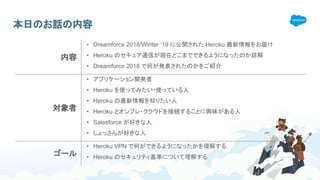
本日のお話の内容
内容
• Dreamforce 2018/Winter ‘19 に公開された Heroku 最新情報をお届け
• Heroku のセキュア通信が現在どこまでできるようになったのか詳解
• Dreamforce 2018 で何が発表されたのかをご紹介
対象者
• アプリケーション開発者
• Heroku を使ってみたい・使っている人
• Heroku の最新情報を知りたい人
• Heroku とオンプレ・クラウドを接続することに興味がある人
• Salesforce が好きな人
• しょっさんが好きな人
ゴール
• Heroku VPN で何ができるようになったかを理解する
• Heroku のセキュリティ基準について理解する
自己紹介
​Heroku Webinar 担当
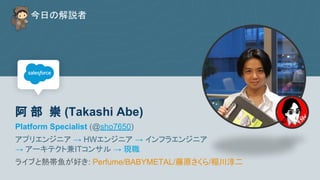
   今日の解説者
阿 部 崇 (Takashi Abe)
Platform Specialist (@sho7650)
アプリエンジニア → HWエンジニア → インフラエンジニア
→ アーキテクト兼ITコンサル → 現職
ライブと熱帯魚が好き: Perfume/BABYMETAL/藤原さくら/稲川淳二
Heroku Update in Winter ’19 コンテンツ
1. Heroku VPN
a. Private Space VPN Connections
b. Internal Routing for Private Space apps
c. configuration Private Space network CIDR ranges
2. Heroku other Security Update
a. Heroku Connect with Shield Private Spaces and Shield Postgres
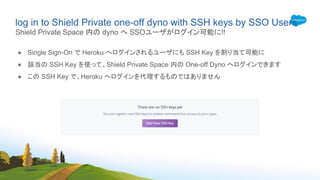
b. log in to Shield Private one-off dyno with SSH keys by SSO Users
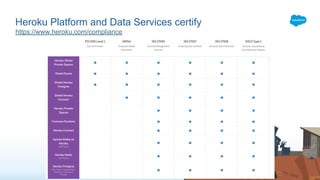
c. Heroku Platform and Data Services certify → ISO27001,27017, and 27018 / SOC2 Type I
3. Heroku CLI with Autocomplete
4. Dreamforce 2018 Wrap-up
Security を中心に、大規模な Heroku Function の update がありました
1. Heroku VPN
Heroku に、ついにVPNがやってきた
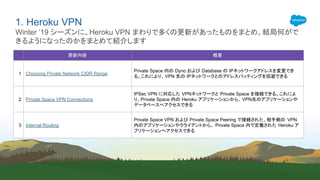
1. Heroku VPN
Winter ‘19 シーズンに、Heroku VPN まわりで多くの更新があったものをまとめ、結局何がで
きるようになったのかをまとめて紹介します
更新内容 概要
1 Choosing Private Network CIDR Range
Private Space 内の Dyno および Database の IPネットワークアドレスを変更でき
る。これにより、VPN 先の IPネットワークとのアドレスバッティングを回避できる
2 Private Space VPN Connections
IPSec VPN に対応した VPNネットワークと Private Space を接続できる。これによ
り、Private Space 内の Heroku アプリケーションから、 VPN先のアプリケーションや
データベースへアクセスできる
3 Internal Routing
Private Space VPN および Private Space Peering で接続された、相手側の VPN
内のアプリケーションやクライアントから、 Private Space 内で定義された Heroku ア
プリケーションへアクセスできる
Microsoft Azure or Other
Azure Virtual Network
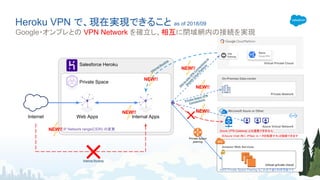
Heroku VPN で、現在実現できること as of 2018/09
Google・オンプレとの VPN Network を確立し、相互に閉域網内の接続を実現
Private Space
Web Apps Internal AppsInternet
VPN
Gateway
Name
Cloud VPN
Virtual Private Cloud
virtual private cloud
Private Space
peering
Site-to-site
VPN
C
onnections
to
G
oogle
C
loud
Platform
On-Premise Data-center
Amazon Web Services
Private Network
Private Space VPN
Connections
Salesforce Heroku
IP Network range(CIDR) の変更 Azure VPN Gateway とは連携できません
※Azure Vnet 内に IPSec ルータを配置すれば接続できます
NEW!!
NEW!!
NEW!!
NEW!!
NEW!!
Internal Routing
Internal Routing
AWS Private Space Peering もこれまで通り利用可能です
NEW!!
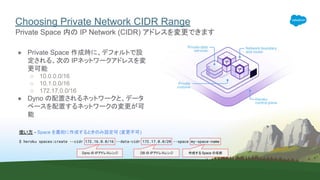
Choosing Private Network CIDR Range
● Private Space 作成時に、デフォルトで設
定される、次の IPネットワークアドレスを変
更可能
○ 10.0.0.0/16
○ 10.1.0.0/16
○ 172.17.0.0/16
● Dyno の配置されるネットワークと、データ
ベースを配置するネットワークの変更が可
能
Private Space 内の IP Network (CIDR) アドレスを変更できます
使い方 - Space を最初に作成するときのみ設定可 (変更不可)
$ heroku spaces:create --cidr 172.16.0.0/16 --data-cidr 172.17.0.0/20 --space my-space-name
Dyno の IPアドレスレンジ DB の IPアドレスレンジ 作成する Space の名前
Private Space VPN Connections
● Internet に公開された IP アドレスを持つ IPSec VPN ルータと、VPN 接続できます。
● 次の制限・制約があります
○ Private Space 内に割り当てられたネットワークアドレスと、接続先の内部ネットワークアドレスが同じ場
合には、通信できません
※ Private Space 内のネットワークアドレスは作成時に変更可能です(前ページの Choosing Private
Network CIDR Range)
○ 静的ルーティングしか構成できません。BGP は利用不可です
○ VPN は、“IPSec IKE v1事前共有鍵認証方式” AES-128-cbc 暗号方式での接続となります
※ Heroku 側は相手側の事前共有鍵を受け入れることはできません
○ 接続先のVPN から、Heroku Private Space 内のデータベース(Postgres/Redis/Kafka)へは、接続でき
ません。trusted IP whitelisting を利用してください
IPSec VPN に対応した仮想ネットワークとのセキュア接続を実現します
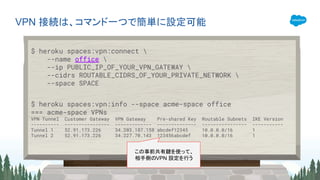
VPN 接続は、コマンド一つで簡単に設定可能
$ heroku spaces:vpn:connect 
--name office 
--ip PUBLIC_IP_OF_YOUR_VPN_GATEWAY 
--cidrs ROUTABLE_CIDRS_OF_YOUR_PRIVATE_NETWORK 
--space SPACE
$ heroku spaces:vpn:info --space acme-space office
=== acme-space VPNs
VPN Tunnel Customer Gateway VPN Gateway Pre-shared Key Routable Subnets IKE Version
---------- ---------------- ------------- -------------- ---------------- -----------
Tunnel 1 52.91.173.226 34.203.187.158 abcdef12345 10.0.0.0/16 1
Tunnel 2 52.91.173.226 34.227.70.143 123456abcdef 10.0.0.0/16 1
この事前共有鍵を使って、
相手側のVPN 設定を行う
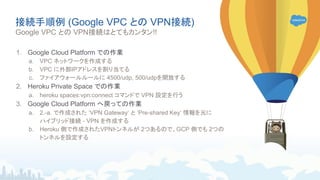
接続手順例 (Google VPC との VPN接続)
1. Google Cloud Platform での作業
a. VPC ネットワークを作成する
b. VPC に外部IPアドレスを割り当てる
c. ファイアウォールルールに 4500/udp, 500/udpを開放する
2. Heroku Private Space での作業
a. heroku spaces:vpn:connect コマンドで VPN 設定を行う
3. Google Cloud Platform へ戻っての作業
a. 2.-a. で作成された ‘VPN Gateway’ と ‘Pre-shared Key’ 情報を元に
ハイブリッド接続 - VPN を作成する
b. Heroku 側で作成されたVPNトンネルが 2つあるので、GCP 側でも 2つの
トンネルを設定する
Google VPC との VPN接続はとてもカンタン!!
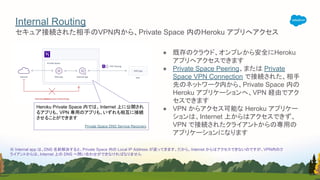
● 既存のクラウド、オンプレから安全にHeroku
アプリへアクセスできます
● Private Space Peering、または Private
Space VPN Connection で接続された、相手
先のネットワーク内から、Private Space 内の
Heroku アプリケーションへ、VPN 経由でアク
セスできます
● VPN からアクセス可能な Heroku アプリケー
ションは、Internet 上からはアクセスできず、
VPN で接続されたクライアントからの専用の
アプリケーションになります
セキュア接続された相手のVPN内から、Private Space 内のHeroku アプリへアクセス
Internal Routing
Heroku Private Space 内では、Internet 上に公開され
るアプリも、VPN 専用のアプリも、いずれも相互に接続
させることができます
Private Space DNS Service Recovery
※ Internal app は、DNS 名前解決すると、Private Space 内の Local IP Address が返ってきます。だから、Internet からはアクセスできないのですが、VPN内のク
ライアントからは、Internet 上の DNS へ問い合わせができなければなりません
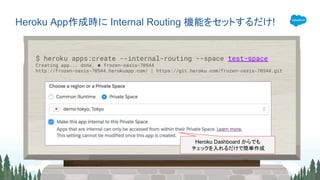
Heroku App作成時に Internal Routing 機能をセットするだけ!
$ heroku apps:create --internal-routing --space test-space
Creating app... done, ⬢ frozen-oasis-70544
http://frozen-oasis-70544.herokuapp.com/ | https://git.heroku.com/frozen-oasis-70544.git
Heroku Dashboard からでも
チェックを入れるだけで簡単作成
VPN 利用に際しての注意事項
● Private Space VPN Connection・Internal Routing機能は、Private Space の契約があれば、利
用可能ですが、対向となる VPN を提供するクラウド(Google VPN や AWS VPC Peeringなど)側
では、VPN接続数やネットワークの転送量での課金が発生します
● VPN 接続先のネットワークと異なるネットワークへ接続している場合、Private Space とそのネット
ワークとは相互に接続できない場合があります。
○ BGP を利用した動的ネットワークルーティングが使えず、VPN 接続時に指定したプライベートネットワー
クに対するスタティックルーティングが利用されます
● 「AWS マネージド IPsec VPN 接続」をベースに IPSec VPN 機能を実現しています
○ VPN 構成時には「Amazon VPC ネットワーク管理ガイド」が参考になります
● Azure の提供する managed VPN (VPN Gateway) とは接続できません
○ Azure Platform 上に Software VPN ルーターを配置・設定して、そのルーターとの IPSec VPN 接続を
行うことで、同等の機能を実現できます
Private Space PeeringとPrivate Space VPN Connectionの差異
● Private Space Peering 機能も、Private Space の契約があれば、利用可能ですが、対向となる
VPC (Virtual Private Cloud)を提供するAWS側では、ネットワークの転送量での課金が発生しま
す
● VPN ではなく、Private Space Peering を使って、接続先のVPCから、更にその先に異なるVPCを
VPC Peering (Google / AWS) で接続している場合(多段HOP)、Private Space とそのネットワー
クとは相互に接続できません
Peering を利用する場合、多段ホップを実現できません
Private Space
VPN
Gateway Virtual Private Cloud
virtual private cloud
VPN
Gateway Virtual Private Cloud
Private Network
※ Private Space と接続されたVPCとは
疎通できますが、そのVPCと Direct
Connect されたオンプレとは接続できませ
ん
Direct Peering
VPC Peering
Direct Connect
Private Network
Dedicated Interconnect
Private Space VPN Connection
Private Space Peering
2. Heroku Other Security Update
Security 強化は続くよいつまでも
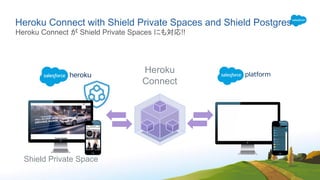
Heroku Connect with Shield Private Spaces and Shield Postgres
Heroku Connect が Shield Private Spaces にも対応!!
Shield Private Space
Heroku
Connect
log in to Shield Private one-off dyno with SSH keys by SSO Users
● Single Sign-On で Heroku へログインされるユーザにも SSH Key を割り当て可能に
● 該当の SSH Key を使って、Shield Private Space 内の One-off Dyno へログインできます
● この SSH Key で、Heroku へログインを代理するものではありません
Shield Private Space 内の dyno へ SSOユーザがログイン可能に!!
Heroku Platform として、新たにISO27001,27017, and 27018 / SOC2 Type I へ準拠
Heroku Platform and Data Services certify
https://www.heroku.com/compliance
Heroku Platform and Data Services certify
3. Heroku CLI with Autocomplete
Heroku CLI が、より便利になった!
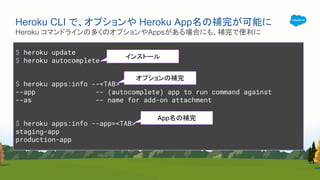
$ heroku update
$ heroku autocomplete
$ heroku apps:info --<TAB>
--app -- (autocomplete) app to run command against
--as -- name for add-on attachment
$ heroku apps:info --app=<TAB>
staging-app
production-app
Heroku コマンドラインの多くのオプションやAppsがある場合にも、補完で便利に
Heroku CLI で、オプションや Heroku App名の補完が可能に
インストール
オプションの補完
App名の補完
4. Dreamforce 2018 Wrap-up
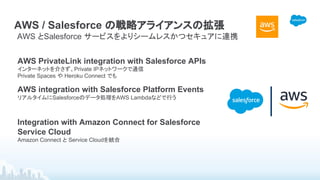
AWS / Salesforce の戦略アライアンスの拡張
AWS とSalesforce サービスをよりシームレスかつセキュアに連携
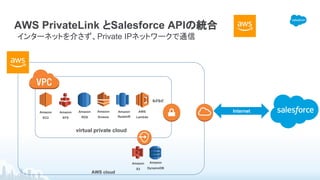
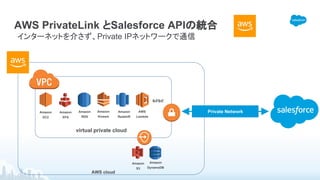
AWS PrivateLink integration with Salesforce APIs
インターネットを介さず、Private IPネットワークで通信
Private Spaces や Heroku Connect でも
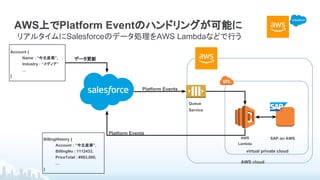
AWS integration with Salesforce Platform Events
リアルタイムにSalesforceのデータ処理をAWS Lambdaなどで行う
Integration with Amazon Connect for Salesforce
Service Cloud
Amazon Connect と Service Cloudを統合
AWS PrivateLink とSalesforce APIの統合
インターネットを介さず、Private IPネットワークで通信
​AWS cloud
​virtual private cloud
​Amazon
EC2
​Amazon
S3
​Amazon
RDS
​Amazon
Kinesis
​Amazon
Redshift
​などなど
​AWS
Lambda
​Amazon
EFS
​Amazon
DynamoDB
Internet
AWS PrivateLink とSalesforce APIの統合
インターネットを介さず、Private IPネットワークで通信
​AWS cloud
​virtual private cloud
​Amazon
EC2
​Amazon
S3
​Amazon
RDS
​Amazon
Kinesis
​Amazon
Redshift
​などなど
​AWS
Lambda
​Amazon
EFS
​Amazon
DynamoDB
Private Network
AWS上でPlatform Eventのハンドリングが可能に
リアルタイムにSalesforceのデータ処理をAWS Lambdaなどで行う
​AWS cloud
​AWS
Lambda
Account {
Name : ”今北産業”,
Industry : “メディア”
…
}
​データ更新
​Queue
Service
BillingHistory {
Account : ”今北産業”,
BillingNo : 1112433,
PriceTotal : ¥983,000,
…
}
​SAP on AWS
​virtual private cloud
​Platform Events
​Platform Events
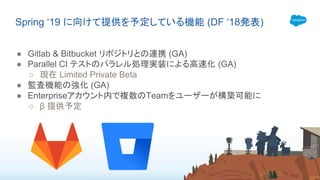
● Gitlab & Bitbucket リポジトリとの連携 (GA)
● Parallel CI テストのパラレル処理実装による高速化 (GA)
○ 現在 Limited Private Beta
● 監査機能の強化 (GA)
● Enterpriseアカウント内で複数のTeamをユーザーが構築可能に
○ β 提供予定
Spring ‘19 に向けて提供を予定している機能 (DF ‘18発表)
http://bit.ly/DevSurvey_2018_1018
アンケートにご協力くださいませ
Heroku seminar winter19

Heroku seminar winter19

  • 1.
    Takashi Abe @Platform Specialist Heroku最新情報セミナー Dreamforce 2018新発表のVPN Supportもご紹介!! @sho7650
  • 2.
    Forward-Looking Statements Statement underthe Private Securities Litigation Reform Act of 1995: This presentation may contain forward-looking statements that involve risks, uncertainties, and assumptions. If any such uncertainties materialize or if any of the assumptions proves incorrect, the results of salesforce.com, inc. could differ materially from the results expressed or implied by the forward-looking statements we make. All statements other than statements of historical fact could be deemed forward-looking, including any projections of product or service availability, subscriber growth, earnings, revenues, or other financial items and any statements regarding strategies or plans of management for future operations, statements of belief, any statements concerning new, planned, or upgraded services or technology developments and customer contracts or use of our services. The risks and uncertainties referred to above include – but are not limited to – risks associated with developing and delivering new functionality for our service, new products and services, our new business model, our past operating losses, possible fluctuations in our operating results and rate of growth, interruptions or delays in our Web hosting, breach of our security measures, the outcome of any litigation, risks associated with completed and any possible mergers and acquisitions, the immature market in which we operate, our relatively limited operating history, our ability to expand, retain, and motivate our employees and manage our growth, new releases of our service and successful customer deployment, our limited history reselling non-salesforce.com products, and utilization and selling to larger enterprise customers. Further information on potential factors that could affect the financial results of salesforce.com, inc. is included in our annual report on Form 10-K for the most recent fiscal year and in our quarterly report on Form 10-Q for the most recent fiscal quarter. These documents and others containing important disclosures are available on the SEC Filings section of the Investor Information section of our Web site. Any unreleased services or features referenced in this or other presentations, press releases or public statements are not currently available and may not be delivered on time or at all. Customers who purchase our services should make the purchase decisions based upon features that are currently available. Salesforce.com, inc. assumes no obligation and does not intend to update these forward-looking statements.
  • 3.
    本日のお話の内容 内容 • Dreamforce 2018/Winter‘19 に公開された Heroku 最新情報をお届け • Heroku のセキュア通信が現在どこまでできるようになったのか詳解 • Dreamforce 2018 で何が発表されたのかをご紹介 対象者 • アプリケーション開発者 • Heroku を使ってみたい・使っている人 • Heroku の最新情報を知りたい人 • Heroku とオンプレ・クラウドを接続することに興味がある人 • Salesforce が好きな人 • しょっさんが好きな人 ゴール • Heroku VPN で何ができるようになったかを理解する • Heroku のセキュリティ基準について理解する
  • 4.
  • 5.
       今日の解説者 阿 部 崇(Takashi Abe) Platform Specialist (@sho7650) アプリエンジニア → HWエンジニア → インフラエンジニア → アーキテクト兼ITコンサル → 現職 ライブと熱帯魚が好き: Perfume/BABYMETAL/藤原さくら/稲川淳二
  • 6.
    Heroku Update inWinter ’19 コンテンツ 1. Heroku VPN a. Private Space VPN Connections b. Internal Routing for Private Space apps c. configuration Private Space network CIDR ranges 2. Heroku other Security Update a. Heroku Connect with Shield Private Spaces and Shield Postgres b. log in to Shield Private one-off dyno with SSH keys by SSO Users c. Heroku Platform and Data Services certify → ISO27001,27017, and 27018 / SOC2 Type I 3. Heroku CLI with Autocomplete 4. Dreamforce 2018 Wrap-up Security を中心に、大規模な Heroku Function の update がありました
  • 7.
    1. Heroku VPN Herokuに、ついにVPNがやってきた
  • 8.
    1. Heroku VPN Winter‘19 シーズンに、Heroku VPN まわりで多くの更新があったものをまとめ、結局何がで きるようになったのかをまとめて紹介します 更新内容 概要 1 Choosing Private Network CIDR Range Private Space 内の Dyno および Database の IPネットワークアドレスを変更でき る。これにより、VPN 先の IPネットワークとのアドレスバッティングを回避できる 2 Private Space VPN Connections IPSec VPN に対応した VPNネットワークと Private Space を接続できる。これによ り、Private Space 内の Heroku アプリケーションから、 VPN先のアプリケーションや データベースへアクセスできる 3 Internal Routing Private Space VPN および Private Space Peering で接続された、相手側の VPN 内のアプリケーションやクライアントから、 Private Space 内で定義された Heroku ア プリケーションへアクセスできる
  • 9.
    Microsoft Azure orOther Azure Virtual Network Heroku VPN で、現在実現できること as of 2018/09 Google・オンプレとの VPN Network を確立し、相互に閉域網内の接続を実現 Private Space Web Apps Internal AppsInternet VPN Gateway Name Cloud VPN Virtual Private Cloud virtual private cloud Private Space peering Site-to-site VPN C onnections to G oogle C loud Platform On-Premise Data-center Amazon Web Services Private Network Private Space VPN Connections Salesforce Heroku IP Network range(CIDR) の変更 Azure VPN Gateway とは連携できません ※Azure Vnet 内に IPSec ルータを配置すれば接続できます NEW!! NEW!! NEW!! NEW!! NEW!! Internal Routing Internal Routing AWS Private Space Peering もこれまで通り利用可能です NEW!!
  • 10.
    Choosing Private NetworkCIDR Range ● Private Space 作成時に、デフォルトで設 定される、次の IPネットワークアドレスを変 更可能 ○ 10.0.0.0/16 ○ 10.1.0.0/16 ○ 172.17.0.0/16 ● Dyno の配置されるネットワークと、データ ベースを配置するネットワークの変更が可 能 Private Space 内の IP Network (CIDR) アドレスを変更できます 使い方 - Space を最初に作成するときのみ設定可 (変更不可) $ heroku spaces:create --cidr 172.16.0.0/16 --data-cidr 172.17.0.0/20 --space my-space-name Dyno の IPアドレスレンジ DB の IPアドレスレンジ 作成する Space の名前
  • 11.
    Private Space VPNConnections ● Internet に公開された IP アドレスを持つ IPSec VPN ルータと、VPN 接続できます。 ● 次の制限・制約があります ○ Private Space 内に割り当てられたネットワークアドレスと、接続先の内部ネットワークアドレスが同じ場 合には、通信できません ※ Private Space 内のネットワークアドレスは作成時に変更可能です(前ページの Choosing Private Network CIDR Range) ○ 静的ルーティングしか構成できません。BGP は利用不可です ○ VPN は、“IPSec IKE v1事前共有鍵認証方式” AES-128-cbc 暗号方式での接続となります ※ Heroku 側は相手側の事前共有鍵を受け入れることはできません ○ 接続先のVPN から、Heroku Private Space 内のデータベース(Postgres/Redis/Kafka)へは、接続でき ません。trusted IP whitelisting を利用してください IPSec VPN に対応した仮想ネットワークとのセキュア接続を実現します
  • 12.
    VPN 接続は、コマンド一つで簡単に設定可能 $ herokuspaces:vpn:connect --name office --ip PUBLIC_IP_OF_YOUR_VPN_GATEWAY --cidrs ROUTABLE_CIDRS_OF_YOUR_PRIVATE_NETWORK --space SPACE $ heroku spaces:vpn:info --space acme-space office === acme-space VPNs VPN Tunnel Customer Gateway VPN Gateway Pre-shared Key Routable Subnets IKE Version ---------- ---------------- ------------- -------------- ---------------- ----------- Tunnel 1 52.91.173.226 34.203.187.158 abcdef12345 10.0.0.0/16 1 Tunnel 2 52.91.173.226 34.227.70.143 123456abcdef 10.0.0.0/16 1 この事前共有鍵を使って、 相手側のVPN 設定を行う
  • 13.
    接続手順例 (Google VPCとの VPN接続) 1. Google Cloud Platform での作業 a. VPC ネットワークを作成する b. VPC に外部IPアドレスを割り当てる c. ファイアウォールルールに 4500/udp, 500/udpを開放する 2. Heroku Private Space での作業 a. heroku spaces:vpn:connect コマンドで VPN 設定を行う 3. Google Cloud Platform へ戻っての作業 a. 2.-a. で作成された ‘VPN Gateway’ と ‘Pre-shared Key’ 情報を元に ハイブリッド接続 - VPN を作成する b. Heroku 側で作成されたVPNトンネルが 2つあるので、GCP 側でも 2つの トンネルを設定する Google VPC との VPN接続はとてもカンタン!!
  • 14.
    ● 既存のクラウド、オンプレから安全にHeroku アプリへアクセスできます ● PrivateSpace Peering、または Private Space VPN Connection で接続された、相手 先のネットワーク内から、Private Space 内の Heroku アプリケーションへ、VPN 経由でアク セスできます ● VPN からアクセス可能な Heroku アプリケー ションは、Internet 上からはアクセスできず、 VPN で接続されたクライアントからの専用の アプリケーションになります セキュア接続された相手のVPN内から、Private Space 内のHeroku アプリへアクセス Internal Routing Heroku Private Space 内では、Internet 上に公開され るアプリも、VPN 専用のアプリも、いずれも相互に接続 させることができます Private Space DNS Service Recovery ※ Internal app は、DNS 名前解決すると、Private Space 内の Local IP Address が返ってきます。だから、Internet からはアクセスできないのですが、VPN内のク ライアントからは、Internet 上の DNS へ問い合わせができなければなりません
  • 15.
    Heroku App作成時に InternalRouting 機能をセットするだけ! $ heroku apps:create --internal-routing --space test-space Creating app... done, ⬢ frozen-oasis-70544 http://frozen-oasis-70544.herokuapp.com/ | https://git.heroku.com/frozen-oasis-70544.git Heroku Dashboard からでも チェックを入れるだけで簡単作成
  • 16.
    VPN 利用に際しての注意事項 ● PrivateSpace VPN Connection・Internal Routing機能は、Private Space の契約があれば、利 用可能ですが、対向となる VPN を提供するクラウド(Google VPN や AWS VPC Peeringなど)側 では、VPN接続数やネットワークの転送量での課金が発生します ● VPN 接続先のネットワークと異なるネットワークへ接続している場合、Private Space とそのネット ワークとは相互に接続できない場合があります。 ○ BGP を利用した動的ネットワークルーティングが使えず、VPN 接続時に指定したプライベートネットワー クに対するスタティックルーティングが利用されます ● 「AWS マネージド IPsec VPN 接続」をベースに IPSec VPN 機能を実現しています ○ VPN 構成時には「Amazon VPC ネットワーク管理ガイド」が参考になります ● Azure の提供する managed VPN (VPN Gateway) とは接続できません ○ Azure Platform 上に Software VPN ルーターを配置・設定して、そのルーターとの IPSec VPN 接続を 行うことで、同等の機能を実現できます
  • 17.
    Private Space PeeringとPrivateSpace VPN Connectionの差異 ● Private Space Peering 機能も、Private Space の契約があれば、利用可能ですが、対向となる VPC (Virtual Private Cloud)を提供するAWS側では、ネットワークの転送量での課金が発生しま す ● VPN ではなく、Private Space Peering を使って、接続先のVPCから、更にその先に異なるVPCを VPC Peering (Google / AWS) で接続している場合(多段HOP)、Private Space とそのネットワー クとは相互に接続できません Peering を利用する場合、多段ホップを実現できません Private Space VPN Gateway Virtual Private Cloud virtual private cloud virtual private cloud VPN Gateway Virtual Private Cloud Private Network ※ Private Space と接続されたVPCとは 疎通できますが、そのVPCと Direct Connect されたオンプレとは接続できませ ん Direct Peering VPC Peering Direct Connect Private Network Dedicated Interconnect Private Space VPN Connection Private Space Peering
  • 18.
    2. Heroku OtherSecurity Update Security 強化は続くよいつまでも
  • 19.
    Heroku Connect withShield Private Spaces and Shield Postgres Heroku Connect が Shield Private Spaces にも対応!! Shield Private Space Heroku Connect
  • 20.
    log in toShield Private one-off dyno with SSH keys by SSO Users ● Single Sign-On で Heroku へログインされるユーザにも SSH Key を割り当て可能に ● 該当の SSH Key を使って、Shield Private Space 内の One-off Dyno へログインできます ● この SSH Key で、Heroku へログインを代理するものではありません Shield Private Space 内の dyno へ SSOユーザがログイン可能に!!
  • 21.
    Heroku Platform として、新たにISO27001,27017,and 27018 / SOC2 Type I へ準拠 Heroku Platform and Data Services certify
  • 22.
  • 23.
    3. Heroku CLIwith Autocomplete Heroku CLI が、より便利になった!
  • 24.
    $ heroku update $heroku autocomplete $ heroku apps:info --<TAB> --app -- (autocomplete) app to run command against --as -- name for add-on attachment $ heroku apps:info --app=<TAB> staging-app production-app Heroku コマンドラインの多くのオプションやAppsがある場合にも、補完で便利に Heroku CLI で、オプションや Heroku App名の補完が可能に インストール オプションの補完 App名の補完
  • 25.
  • 26.
    AWS / Salesforceの戦略アライアンスの拡張 AWS とSalesforce サービスをよりシームレスかつセキュアに連携 AWS PrivateLink integration with Salesforce APIs インターネットを介さず、Private IPネットワークで通信 Private Spaces や Heroku Connect でも AWS integration with Salesforce Platform Events リアルタイムにSalesforceのデータ処理をAWS Lambdaなどで行う Integration with Amazon Connect for Salesforce Service Cloud Amazon Connect と Service Cloudを統合
  • 27.
    AWS PrivateLink とSalesforceAPIの統合 インターネットを介さず、Private IPネットワークで通信 ​AWS cloud ​virtual private cloud ​Amazon EC2 ​Amazon S3 ​Amazon RDS ​Amazon Kinesis ​Amazon Redshift ​などなど ​AWS Lambda ​Amazon EFS ​Amazon DynamoDB Internet
  • 28.
    AWS PrivateLink とSalesforceAPIの統合 インターネットを介さず、Private IPネットワークで通信 ​AWS cloud ​virtual private cloud ​Amazon EC2 ​Amazon S3 ​Amazon RDS ​Amazon Kinesis ​Amazon Redshift ​などなど ​AWS Lambda ​Amazon EFS ​Amazon DynamoDB Private Network
  • 29.
    AWS上でPlatform Eventのハンドリングが可能に リアルタイムにSalesforceのデータ処理をAWS Lambdaなどで行う ​AWScloud ​AWS Lambda Account { Name : ”今北産業”, Industry : “メディア” … } ​データ更新 ​Queue Service BillingHistory { Account : ”今北産業”, BillingNo : 1112433, PriceTotal : ¥983,000, … } ​SAP on AWS ​virtual private cloud ​Platform Events ​Platform Events
  • 30.
    ● Gitlab &Bitbucket リポジトリとの連携 (GA) ● Parallel CI テストのパラレル処理実装による高速化 (GA) ○ 現在 Limited Private Beta ● 監査機能の強化 (GA) ● Enterpriseアカウント内で複数のTeamをユーザーが構築可能に ○ β 提供予定 Spring ‘19 に向けて提供を予定している機能 (DF ‘18発表)
  • 31.