Takashi Hatamoto
Restriction Rules(制限ルール)
調べてみた
Summer’21新機能に関する調査と考察
SFDG 運営サブリーダー
自己紹介
はたもと たかし
畑本 貴史
株式会社チームスピリット エンジニア
TSFチーム(製品開発)
こんな感じ
• Salesforceひとすじ早10年
• AIアプリコンテスト2018 優勝チーム(ロボホンズ)
• Salesforce Developer Group Tokyo 運営
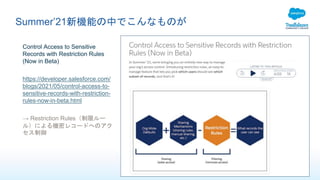
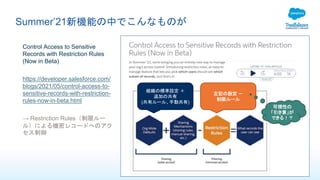
Summer’21新機能の中でこんなものが
Control Access to Sensitive
Records with Restriction Rules
(Now in Beta)
https://developer.salesforce.com/
blogs/2021/05/control-access-to-
sensitive-records-with-restriction-
rules-now-in-beta.html
→ Restriction Rules(制限ルー
ル)による機密レコードへのアク
セス制御
Summer’21新機能の中でこんなものが
Control Access to Sensitive
Records with Restriction Rules
(Now in Beta)
https://developer.salesforce.com/
blogs/2021/05/control-access-to-
sensitive-records-with-restriction-
rules-now-in-beta.html
→ Restriction Rules(制限ルー
ル)による機密レコードへのアク
セス制御
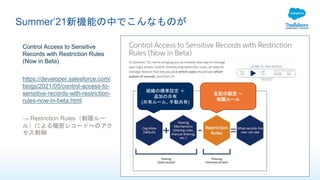
組織の標準設定 +
追加の共有
(共有ルール、手動共有)
左記の設定 -
制限ルール
Summer’21新機能の中でこんなものが
Control Access to Sensitive
Records with Restriction Rules
(Now in Beta)
https://developer.salesforce.com/
blogs/2021/05/control-access-to-
sensitive-records-with-restriction-
rules-now-in-beta.html
→ Restriction Rules(制限ルー
ル)による機密レコードへのアク
セス制御
組織の標準設定 +
追加の共有
(共有ルール、手動共有)
左記の設定 -
制限ルール
可視性の
「引き算」が
できる!?
もう少し調べてみた
Without restriction rules, users who have access to an account can see its contracts, tasks, and events,
even when the organization-wide default is set to Private. For custom objects, users can see all of their
child records. Restriction rules allow you to define which users see which records in Lightning
Experience for custom objects, contracts, tasks, and events and configure truly “Private” access for
these objects. Creating, editing, and deleting restriction rules are only available via the Tooling and
Metadata APIs.
もう少し調べてみた
Without restriction rules, users who have access to an account can see its contracts, tasks, and events,
even when the organization-wide default is set to Private. For custom objects, users can see all of their
child records. Restriction rules allow you to define which users see which records in Lightning
Experience for custom objects, contracts, tasks, and events and configure truly “Private” access for
these objects. Creating, editing, and deleting restriction rules are only available via the Tooling and
Metadata APIs.
• 適用できるオブジェクト
• Contract(契約)、task(ToDo)、event(行動)
• カスタムオブジェクト
• 組織のデフォルト共有設定が「非公開」であっても、これらのオブジェクトが子レコードになってい
る場合は無制限に参照可能になってしまう。
• →子レコードの中でも更に詳細な閲覧制限を実現したい場合に使用する
• 登録/更新/削除は以下の経路で行う
• Tooling API
• Metadata API
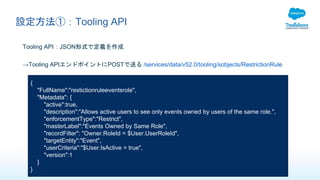
設定方法①:Tooling API
Tooling API:JSON形式で定義を作成
→Tooling APIエンドポイントにPOSTで送る /services/data/v52.0/tooling/sobjects/RestrictionRule
{
"FullName":"restictionruleeventsrole",
"Metadata": {
"active":true,
"description":"Allows active users to see only events owned by users of the same role.",
"enforcementType":"Restrict",
"masterLabel":"Events Owned by Same Role",
"recordFilter": "Owner.RoleId = $User.UserRoleId",
"targetEntity":"Event",
"userCriteria":"$User.IsActive = true",
"version":1
}
}
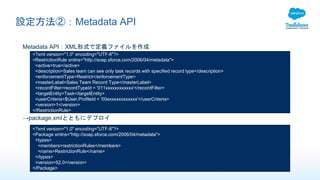
設定方法②:Metadata API
Metadata API:XML形式で定義ファイルを作成
<?xml version="1.0" encoding="UTF-8"?>
<RestrictionRule xmlns="http://soap.sforce.com/2006/04/metadata">
<active>true</active>
<description>Sales team can see only task records with specified record type</description>
<enforcementType>Restrict</enforcementType>
<masterLabel>Sales Team Record Type</masterLabel>
<recordFilter>recordTypeId = '011xxxxxxxxxxxx'</recordFilter>
<targetEntity>Task</targetEntity>
<userCriteria>$User.ProfileId = '00exxxxxxxxxxxx'</userCriteria>
<version>1</version>
</RestrictionRule>
→package.xmlとともにデプロイ
<?xml version="1.0" encoding="UTF-8"?>
<Package xmlns="http://soap.sforce.com/2006/04/metadata">
<types>
<members>restrictionRules</members>
<name>RestrictionRule</name>
</types>
<version>52.0</version>
</Package>
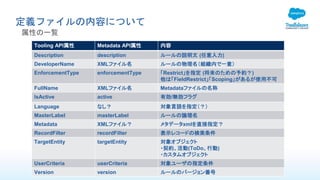
定義ファイルの内容について
属性の一覧
Tooling API属性 Metadata API属性 内容
Description description ルールの説明文 (任意入力)
DeveloperName XMLファイル名 ルールの物理名(組織内で一意)
EnforcementType enforcementType 「Restrict」を指定 (将来のための予約?)
他は「FieldRestrict」「Scoping」があるが使用不可
FullName XMLファイル名 Metadataファイルの名称
IsActive active 有効/無効フラグ
Language なし? 対象言語を指定(?)
MasterLabel masterLabel ルールの論理名
Metadata XMLファイル? メタデータxmlを直接指定?
RecordFilter recordFilter 表示レコードの検索条件
TargetEntity targetEntity 対象オブジェクト
・契約、活動(ToDo、行動)
・カスタムオブジェクト
UserCriteria userCriteria 対象ユーザの指定条件
Version version ルールのバージョン番号
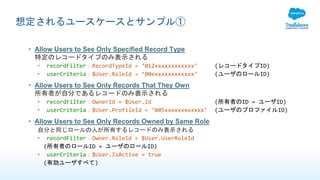
想定されるユースケースとサンプル①
• Allow Users to See Only Specified Record Type
特定のレコードタイプのみ表示される
• recordFilter:RecordTypeId = ‘012xxxxxxxxxxxx’ (レコードタイプID)
• userCriteria:$User.RoleId = ‘00exxxxxxxxxxxx‘ (ユーザのロールID)
• Allow Users to See Only Records That They Own
所有者が自分であるレコードのみ表示される
• recordFilter:OwnerId = $User.Id (所有者のID = ユーザID)
• userCriteria:$User.ProfileId = ‘005xxxxxxxxxxxx’ (ユーザのプロファイルID)
• Allow Users to See Only Records Owned by Same Role
自分と同じロールの人が所有するレコードのみ表示される
• recordFilter:Owner.RoleId = $User.UserRoleId
(所有者のロールID = ユーザのロールID)
• userCriteria:$User.IsActive = true
(有効ユーザすべて)
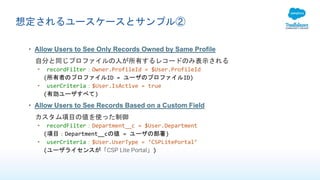
想定されるユースケースとサンプル②
• Allow Users to See Only Records Owned by Same Profile
自分と同じプロファイルの人が所有するレコードのみ表示される
• recordFilter:Owner.ProfileId = $User.ProfileId
(所有者のプロファイルID = ユーザのプロファイルID)
• userCriteria:$User.IsActive = true
(有効ユーザすべて)
• Allow Users to See Records Based on a Custom Field
カスタム項目の値を使った制御
• recordFilter:Department__c = $User.Department
(項目:Department__cの値 = ユーザの部署)
• userCriteria:$User.UserType = ‘CSPLitePortal’
(ユーザライセンスが「CSP Lite Portal」)
詳細仕様
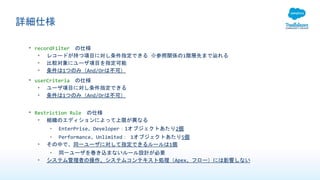
• recordFilter の仕様
• レコードが持つ項目に対し条件指定できる ※参照関係の1階層先まで辿れる
• 比較対象にユーザ項目を指定可能
• 条件は1つのみ(And/Orは不可)
• userCriteria の仕様
• ユーザ項目に対し条件指定できる
• 条件は1つのみ(And/Orは不可)
• Restriction Rule の仕様
• 組織のエディションによって上限が異なる
• EnterPrise、Developer:1オブジェクトあたり2個
• Performance、Unlimited: 1オブジェクトあたり5個
• その中で、同一ユーザに対して指定できるルールは1個
• 同一ユーザを巻き込まないルール設計が必要
• システム管理者の操作、システムコンテキスト処理(Apex、フロー)には影響しない
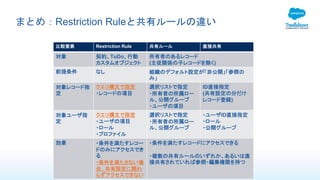
まとめ:Restriction Ruleと共有ルールの違い
比較要素 Restriction Rule 共有ルール 直接共有
対象 契約、ToDo、行動
カスタムオブジェクト
所有者のあるレコード
(主従関係の子レコードを除く)
前提条件 なし 組織のデフォルト設定が「非公開」「参照の
み」
対象レコード指
定
クエリ構文で指定
・レコードの項目
選択リストで指定
・所有者の所属ロー
ル、公開グループ
・ユーザの項目
ID直接指定
(共有設定の分だけ
レコード登録)
対象ユーザ指
定
クエリ構文で指定
・ユーザの項目
・ロール
・プロファイル
選択リストで指定
・所有者の所属ロー
ル、公開グループ
・ユーザID直接指定
・ロール
・公開グループ
効果 ・条件を満たすレコー
ドのみにアクセスでき
る
・条件を満たさない場
合、共有設定に関わ
らずアクセスできない
・条件を満たすレコードにアクセスできる
・複数の共有ルールのいずれか、あるいは直
接共有されていれば参照・編集権限を持つ
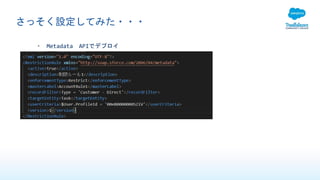
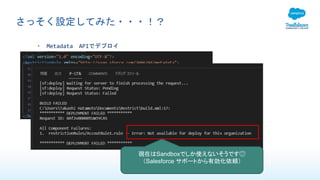
さっそく設定してみた・・・
• Metadata APIでデプロイ
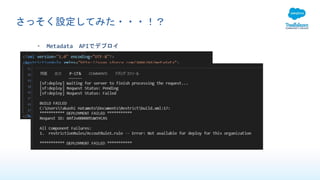
さっそく設定してみた・・・!?
• Metadata APIでデプロイ
さっそく設定してみた・・・!?
• Metadata APIでデプロイ
現在はSandboxでしか使えないそうです😥
(Salesforce サポートから有効化依頼)
参考資料
• Salesforce Developer Blog
• 紹介記事
• https://developer.salesforce.com/blogs/2021/05/control-access-to-sensitive-records-with-restriction-
rules-now-in-beta.html
• Restriction Rules Developer Guide (Beta)
• Restriction Rulesのリファレンス
• https://developer.salesforce.com/docs/atlas.en-
us.restriction_rules.meta/restriction_rules/meta_restrictionrule.htm
• Trailblazer Communityグループ:Restriction Rules Beta
• ベータ参加ユーザ向けのグループ
• https://trailhead.salesforce.com/ja/trailblazer-community/groups/0F94S000000Gwle#discussion
Restriction Rules(制限ルール)調べてみた

Restriction Rules(制限ルール) 調べてみた

  • 1.
  • 2.
    自己紹介 はたもと たかし 畑本 貴史 株式会社チームスピリットエンジニア TSFチーム(製品開発) こんな感じ • Salesforceひとすじ早10年 • AIアプリコンテスト2018 優勝チーム(ロボホンズ) • Salesforce Developer Group Tokyo 運営
  • 3.
    Summer’21新機能の中でこんなものが Control Access toSensitive Records with Restriction Rules (Now in Beta) https://developer.salesforce.com/ blogs/2021/05/control-access-to- sensitive-records-with-restriction- rules-now-in-beta.html → Restriction Rules(制限ルー ル)による機密レコードへのアク セス制御
  • 4.
    Summer’21新機能の中でこんなものが Control Access toSensitive Records with Restriction Rules (Now in Beta) https://developer.salesforce.com/ blogs/2021/05/control-access-to- sensitive-records-with-restriction- rules-now-in-beta.html → Restriction Rules(制限ルー ル)による機密レコードへのアク セス制御 組織の標準設定 + 追加の共有 (共有ルール、手動共有) 左記の設定 - 制限ルール
  • 5.
    Summer’21新機能の中でこんなものが Control Access toSensitive Records with Restriction Rules (Now in Beta) https://developer.salesforce.com/ blogs/2021/05/control-access-to- sensitive-records-with-restriction- rules-now-in-beta.html → Restriction Rules(制限ルー ル)による機密レコードへのアク セス制御 組織の標準設定 + 追加の共有 (共有ルール、手動共有) 左記の設定 - 制限ルール 可視性の 「引き算」が できる!?
  • 6.
    もう少し調べてみた Without restriction rules,users who have access to an account can see its contracts, tasks, and events, even when the organization-wide default is set to Private. For custom objects, users can see all of their child records. Restriction rules allow you to define which users see which records in Lightning Experience for custom objects, contracts, tasks, and events and configure truly “Private” access for these objects. Creating, editing, and deleting restriction rules are only available via the Tooling and Metadata APIs.
  • 7.
    もう少し調べてみた Without restriction rules,users who have access to an account can see its contracts, tasks, and events, even when the organization-wide default is set to Private. For custom objects, users can see all of their child records. Restriction rules allow you to define which users see which records in Lightning Experience for custom objects, contracts, tasks, and events and configure truly “Private” access for these objects. Creating, editing, and deleting restriction rules are only available via the Tooling and Metadata APIs. • 適用できるオブジェクト • Contract(契約)、task(ToDo)、event(行動) • カスタムオブジェクト • 組織のデフォルト共有設定が「非公開」であっても、これらのオブジェクトが子レコードになってい る場合は無制限に参照可能になってしまう。 • →子レコードの中でも更に詳細な閲覧制限を実現したい場合に使用する • 登録/更新/削除は以下の経路で行う • Tooling API • Metadata API
  • 8.
    設定方法①:Tooling API Tooling API:JSON形式で定義を作成 →ToolingAPIエンドポイントにPOSTで送る /services/data/v52.0/tooling/sobjects/RestrictionRule { "FullName":"restictionruleeventsrole", "Metadata": { "active":true, "description":"Allows active users to see only events owned by users of the same role.", "enforcementType":"Restrict", "masterLabel":"Events Owned by Same Role", "recordFilter": "Owner.RoleId = $User.UserRoleId", "targetEntity":"Event", "userCriteria":"$User.IsActive = true", "version":1 } }
  • 9.
    設定方法②:Metadata API Metadata API:XML形式で定義ファイルを作成 <?xmlversion="1.0" encoding="UTF-8"?> <RestrictionRule xmlns="http://soap.sforce.com/2006/04/metadata"> <active>true</active> <description>Sales team can see only task records with specified record type</description> <enforcementType>Restrict</enforcementType> <masterLabel>Sales Team Record Type</masterLabel> <recordFilter>recordTypeId = '011xxxxxxxxxxxx'</recordFilter> <targetEntity>Task</targetEntity> <userCriteria>$User.ProfileId = '00exxxxxxxxxxxx'</userCriteria> <version>1</version> </RestrictionRule> →package.xmlとともにデプロイ <?xml version="1.0" encoding="UTF-8"?> <Package xmlns="http://soap.sforce.com/2006/04/metadata"> <types> <members>restrictionRules</members> <name>RestrictionRule</name> </types> <version>52.0</version> </Package>
  • 10.
    定義ファイルの内容について 属性の一覧 Tooling API属性 MetadataAPI属性 内容 Description description ルールの説明文 (任意入力) DeveloperName XMLファイル名 ルールの物理名(組織内で一意) EnforcementType enforcementType 「Restrict」を指定 (将来のための予約?) 他は「FieldRestrict」「Scoping」があるが使用不可 FullName XMLファイル名 Metadataファイルの名称 IsActive active 有効/無効フラグ Language なし? 対象言語を指定(?) MasterLabel masterLabel ルールの論理名 Metadata XMLファイル? メタデータxmlを直接指定? RecordFilter recordFilter 表示レコードの検索条件 TargetEntity targetEntity 対象オブジェクト ・契約、活動(ToDo、行動) ・カスタムオブジェクト UserCriteria userCriteria 対象ユーザの指定条件 Version version ルールのバージョン番号
  • 11.
    想定されるユースケースとサンプル① • Allow Usersto See Only Specified Record Type 特定のレコードタイプのみ表示される • recordFilter:RecordTypeId = ‘012xxxxxxxxxxxx’ (レコードタイプID) • userCriteria:$User.RoleId = ‘00exxxxxxxxxxxx‘ (ユーザのロールID) • Allow Users to See Only Records That They Own 所有者が自分であるレコードのみ表示される • recordFilter:OwnerId = $User.Id (所有者のID = ユーザID) • userCriteria:$User.ProfileId = ‘005xxxxxxxxxxxx’ (ユーザのプロファイルID) • Allow Users to See Only Records Owned by Same Role 自分と同じロールの人が所有するレコードのみ表示される • recordFilter:Owner.RoleId = $User.UserRoleId (所有者のロールID = ユーザのロールID) • userCriteria:$User.IsActive = true (有効ユーザすべて)
  • 12.
    想定されるユースケースとサンプル② • Allow Usersto See Only Records Owned by Same Profile 自分と同じプロファイルの人が所有するレコードのみ表示される • recordFilter:Owner.ProfileId = $User.ProfileId (所有者のプロファイルID = ユーザのプロファイルID) • userCriteria:$User.IsActive = true (有効ユーザすべて) • Allow Users to See Records Based on a Custom Field カスタム項目の値を使った制御 • recordFilter:Department__c = $User.Department (項目:Department__cの値 = ユーザの部署) • userCriteria:$User.UserType = ‘CSPLitePortal’ (ユーザライセンスが「CSP Lite Portal」)
  • 13.
    詳細仕様 • recordFilter の仕様 •レコードが持つ項目に対し条件指定できる ※参照関係の1階層先まで辿れる • 比較対象にユーザ項目を指定可能 • 条件は1つのみ(And/Orは不可) • userCriteria の仕様 • ユーザ項目に対し条件指定できる • 条件は1つのみ(And/Orは不可) • Restriction Rule の仕様 • 組織のエディションによって上限が異なる • EnterPrise、Developer:1オブジェクトあたり2個 • Performance、Unlimited: 1オブジェクトあたり5個 • その中で、同一ユーザに対して指定できるルールは1個 • 同一ユーザを巻き込まないルール設計が必要 • システム管理者の操作、システムコンテキスト処理(Apex、フロー)には影響しない
  • 14.
    まとめ:Restriction Ruleと共有ルールの違い 比較要素 RestrictionRule 共有ルール 直接共有 対象 契約、ToDo、行動 カスタムオブジェクト 所有者のあるレコード (主従関係の子レコードを除く) 前提条件 なし 組織のデフォルト設定が「非公開」「参照の み」 対象レコード指 定 クエリ構文で指定 ・レコードの項目 選択リストで指定 ・所有者の所属ロー ル、公開グループ ・ユーザの項目 ID直接指定 (共有設定の分だけ レコード登録) 対象ユーザ指 定 クエリ構文で指定 ・ユーザの項目 ・ロール ・プロファイル 選択リストで指定 ・所有者の所属ロー ル、公開グループ ・ユーザID直接指定 ・ロール ・公開グループ 効果 ・条件を満たすレコー ドのみにアクセスでき る ・条件を満たさない場 合、共有設定に関わ らずアクセスできない ・条件を満たすレコードにアクセスできる ・複数の共有ルールのいずれか、あるいは直 接共有されていれば参照・編集権限を持つ
  • 15.
  • 16.
  • 17.
  • 18.
    参考資料 • Salesforce DeveloperBlog • 紹介記事 • https://developer.salesforce.com/blogs/2021/05/control-access-to-sensitive-records-with-restriction- rules-now-in-beta.html • Restriction Rules Developer Guide (Beta) • Restriction Rulesのリファレンス • https://developer.salesforce.com/docs/atlas.en- us.restriction_rules.meta/restriction_rules/meta_restrictionrule.htm • Trailblazer Communityグループ:Restriction Rules Beta • ベータ参加ユーザ向けのグループ • https://trailhead.salesforce.com/ja/trailblazer-community/groups/0F94S000000Gwle#discussion