1.1Overview of theProject
• The Library Management System (LMS) is designed to manage and
automate the functioning of a library, allowing both users and
administrators to easily manage book inventories, check book
availability, and perform other related tasks.
• The system is web-based, enabling users to interact with it remotely,
using a simple and user-friendly interface.
• This system allows users to manage their book orders, account
information, and payment options, while administrators can maintain
and update the library’s catalog.
4.
1.2 Module description
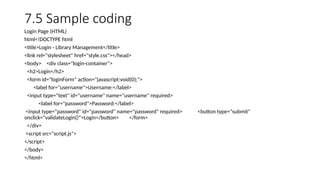
•Creating a complete library management system involves multiple
HTML, CSS, and JavaScript functionalities.
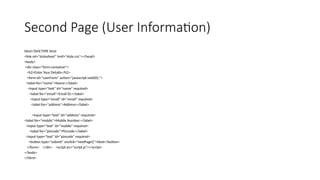
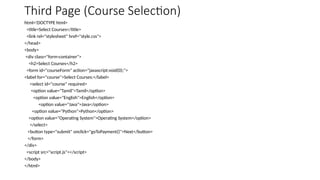
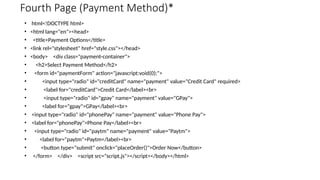
• Below is the simplified code for the basic flow that you described: a
login page, personal information page, course selection, payment
method, and order confirmation. For simplicity, this implementation
uses HTML for structure, CSS for styling, and JavaScript for page
navigation and handling user inputs.
5.
1.3 System specification
•System specification defines the technical requirements and
functionalities of a system.
• For a Library Management System (LMS), the system specification
includes both hardware and software requirements, as well as the
functional and non-functional requirements.
• It ensures that the system will meet the expectations of the users and
administrators.
2.1 Existing System
•The Existing System in library management typically involves manual
processes or basic software solutions that track books and users. In
manual systems, records are kept on paper, making data retrieval slow and
prone to errors.
• Basic software systems may offer limited functionality, such as tracking
book availability or user registrations, but lack online integration or
scalability.
• Additionally, these systems often lack advanced features like secure online
transactions or automated reporting, leading to inefficiency and poor user
experience. As a result, the existing systems are inadequate for handling
the growing demands of modern library management.
8.
2.2 Proposed System
•The Proposed System aims to streamline library management through a
fully automated, web-based solution.
• It will include features like online book cataloging, user registration, search
functionality, and the ability to borrow or return books digitally. With a
user-friendly interface, the proposed system will integrate secure login for
users, track books in real-time, and generate automated reports.
• Additionally, the system will support online payment for fines and
memberships, improving efficiency and accessibility. By leveraging modern
technologies, this system will enhance the overall library experience for
both staff and users, offering increased scalability, security, and accuracy.
4. SYSTEM TESTING& IMPLEMENTATION
• 4.1 Testing
• 4.2 System implementation
15.
4.1 Testing
• Testingis an essential phase in the software development life cycle,
ensuring that the software meets its requirements and functions as
intended.
• It helps identify defects and issues that may arise in the system. For
the Library Management System, testing focuses on verifying that
each feature works correctly, ensuring the reliability and stability of
the application.
16.
System implementation
• Systemimplementation is the final stage of software development,
where the developed system is deployed and made operational.
• In the context of the Library Management System created with
HTML, CSS, and JavaScript, the implementation process involves
several steps, from development to testing, to making the system
available for use.
17.
CONCLUSION:
• The LibraryManagement System implemented using HTML, CSS, and JavaScript provides a
user-friendly and efficient platform for users to log in, fill in personal details, select courses,
and make payments.
• The system demonstrates the core functionalities of an e-commerce-like interface, allowing
users to browse, select, and purchase courses.
• The various steps such as login, course selection, and payment methods are handled
seamlessly with interactive UI elements, and pop-ups are used for confirming actions like
order placement.
• This system can serve as a foundation for more advanced library management systems,
with the current version focusing on a simple user experience and interaction model.
• The website structure is designed to be easily extensible, allowing for future integration of
more advanced features like database connectivity, security enhancements, and more
complex payment gateways.
18.
5.1 Future enhancement
•As the current Library Management System serves as a foundational
model, there are multiple ways to expand and improve it to better
meet the evolving needs of users and administrators.
• Future enhancements can make the system more robust, feature-
rich, and user-friendly. Below are several possible future
enhancements:
Database Integration
User Authentication and Authorization



![PROJECT_SRS[1].hgxfsdheth,vgxergdtrcxfpdf](https://cdn.slidesharecdn.com/ss_thumbnails/projectsrs1-241215082732-4afe27f3-thumbnail.jpg?width=640&height=640&fit=bounds)


