INTRODUCTION TO
LIBRARY RESEARCH
Sinclair Community College
 When you hear the word “Library,” it’s likely you picture a
bunch of books. Or if you are downtown, perhaps the
Starbucks.
 Though we certainly have a lot of books on our shelves still,
these days we actually have more of our content online
than in print!
 But who cares about library resources when you have
Google?
 The truth is, even though Google can help you find
information quickly, it often falls short when you need
trustworthy information for academic or career purposes.
 Google sources aren’t reviewed or evaluated prior to
publishing, unlike library sources.
 Google sources are organized by keyword rather than
subject, unlike library sources, meaning they have lower
relevance.
 Although some Google sources might be useful, after you
take the extra time to evaluate them, library sources are
higher-quality and usually not available for free on the web.
 Overall, using library sources
instead of Google resources will
save you time and guarantee a
better grade, because they are
higher quality references.
 Learning better search methods
will help you to better
understand our library
databases.
RESEARCH TIPS FOR FINDING BETTER
INFORMATION
 Let’s start a practice scenario.
 You’ve chosen a research topic: The Death Penalty’s
Impact on Crime Rates.
 Time to find some quality sources you can use in your
paper.
 A great place to begin your search is with the LibSearch
search box on the library home page.
 It’s a bad idea to type in the whole topic as a phrase, since
library databases are pickier than general search engines
and can’t comprehend full sentences.
 Instead, try breaking down your topic into Keywords, the
key concepts of a topic.
 For this search, try to use the keywords “Death Penalty,”
and “Crime Rates.”
 Before continuing on with our search, there’s an important
concept you should know about called “Don’t Search”
Words.
 Words like “Impact,” “Change,” “Help,” “Affect,” “Influence,”
and “Importance,” to name a few, are important in your
research question, but the articles you search through are
not likely to use these exact words.
 This will result in you missing out on valuable search results.
Better just not to use them at all.
 You may also want to consider how others would word
your query before moving forward. Maybe some research
articles used different words for the same concept.
 You can also use the “advanced search”
option that allows you to search for
keywords using these Boolean
Operators.
 Boolean Operators are “AND,” “OR,” and
“NOT.”
 If you don’t get enough results, try
broadening your search by adding
another keyword and the operator “OR.”
 If you get too many results, try narrowing
your search by adding another keyword
and the operator “AND.”
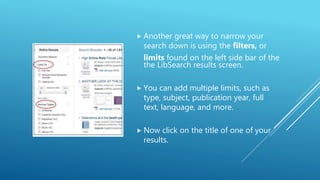
 Another great way to narrow your
search down is using the filters, or
limits found on the left side bar of the
the LibSearch results screen.
 You can add multiple limits, such as
type, subject, publication year, full
text, language, and more.
 Now click on the title of one of your
results.
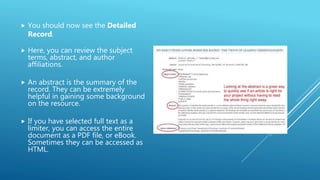
 You should now see the Detailed
Record.
 Here, you can review the subject
terms, abstract, and author
affiliations.
 An abstract is the summary of the
record. They can be extremely
helpful in gaining some background
on the resource.
 If you have selected full text as a
limiter, you can access the entire
document as a PDF file, or eBook.
Sometimes they can be accessed as
HTML.
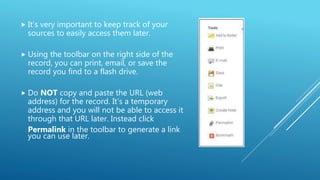
 It’s very important to keep track of your
sources to easily access them later.
 Using the toolbar on the right side of the
record, you can print, email, or save the
record you find to a flash drive.
 Do NOT copy and paste the URL (web
address) for the record. It’s a temporary
address and you will not be able to access it
through that URL later. Instead click
Permalink in the toolbar to generate a link
you can use later.
EVALUATING INFORMATION
 We’ve now addressed that library resources are higher quality
sources, but what makes information high quality?
 You can definitely find trustworthy information using search
engines like Google, but in order to do this, you have to
carefully evaluate your sources before using or trusting them.
 A great way to evaluate information is to apply the CRAAP test.
What is that?
 The five criteria for evaluating information are:
 Currency
 Relevance
 Authority
 Accuracy
 Purpose
 Let’s take a look at the specific questions you should be
asking yourself as you evaluate a source and put it to the
CRAAP test.
 Currency: The timeline of the information.
 When was the information published or posted?
 Has it been revised or updated?
 Does your topic require current information or will older
information work?
 Relevance: The importance of the information for your
needs.
 Does the information relate to your topic or help you answer
question?
 Who is the intended audience?
 Is the information at an appropriate level?
 Authority: The source of the information.
 Who is the author and is he or she qualified to write on this topic?
 Is there an organization published or is responsible for this article?
 What can you learn from the URL? (.com and .org can be created by anyone)
 Accuracy: The reliability and correctness of the content
 Is the information supported by evidence?
 Can you clarify the articles claims?
 How many errors do you see?
 Purpose: The reason the information exists.
 What is the main goal of the information?
 Is the information fact, opinion, or propaganda?
 Can you identify any biases?
 Every website is different, so there aren’t clearly defined
places where you’ll always look for these criteria. Instead
you need to bring a critical eye to every source and hunt
around until you find what you need.
 Be sure to make sure you talk with your instructor to learn
more about the criteria they expect in your sources for your
project.
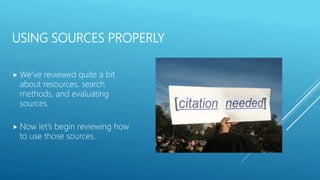
USING SOURCES PROPERLY
 We’ve reviewed quite a bit
about resources, search
methods, and evaluating
sources.
 Now let’s begin reviewing how
to use those sources.
 Properly using sources involves a variety of different skills,
including effective note-taking, proper integration of
source material, and above all, correct citation.
 Why is citation so important?
 We Cite:
 To help make our argument and show that it is well-
supported by objective evidence.
 To give credit to those who influenced our ideas and avoid
plagiarism.
 To make it easy for someone else to retrace our research
process and see how we arrived at our conclusions.
 So what is plagiarism? Plagiarism, according to a definition from
Indiana University, is using others’ ideas and words without
clearly acknowledging the source of that information.
 There are three ways to integrate your sources and all of them
require that you cite the source.
 Quote – An exact phrase from a passage and put inside quotation
marks.
 Paraphrase – A restatement of a passage put in your own words,
about the same length as the original.
 Summary – A much shorter rephrasing of the main idea of the
passage (usually just one or two sentences).
 More often than not, plagiarism is simply an accident.
 There are several strategies you can try to avoid plagiarism
in your own work.
 Take detailed notes when researching. Include the original
sources of ideas and which notes are quotes, summaries,
paraphrases or your own thoughts.
 Paraphrase without looking at the original source to avoid
bad paraphrases.
 Focus on the meaning, not the actual words.
 Proofread and revise to help identify missing citations or
attribution. The writing center can help with this.
 Now that you understand plagiarism, you understand why
citation is so important.
 To begin with, the way you actually formulate your citations
depends on the requirements of your class.
 There are many citation styles out there, for example, English and
the Humanities will typically use MLA, while Social sciences and
business will typically use APA. Other subjects have numerous
options for citation styles.
 There are many resources available to help you with citations.
There are guides available for review, as well as sources such as
the Purdue Owl which are extremely helpful. Another trick, if
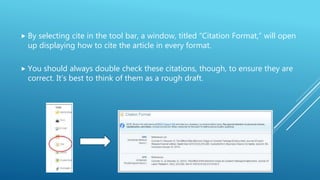
using Sinclair databases, is to use the citation link in the toolbar.
 By selecting cite in the tool bar, a window, titled “Citation Format,” will open
up displaying how to cite the article in every format.
 You should always double check these citations, though, to ensure they are
correct. It’s best to think of them as a rough draft.
 Now that you have reviewed types of sources, searching for
sources using library resources, evaluation of sources, and
how to cite your sources, you should be ready to begin on
your own.
 Please refer to this LibGuide if ever you need further
assistance with the concepts in this slideshow. For more
information and details, review Andrew Walsh’s LibGuide,
Library Research Tutorial.
Libguide powerpoint

Libguide powerpoint

  • 1.
  • 2.
     When youhear the word “Library,” it’s likely you picture a bunch of books. Or if you are downtown, perhaps the Starbucks.  Though we certainly have a lot of books on our shelves still, these days we actually have more of our content online than in print!  But who cares about library resources when you have Google?
  • 3.
     The truthis, even though Google can help you find information quickly, it often falls short when you need trustworthy information for academic or career purposes.  Google sources aren’t reviewed or evaluated prior to publishing, unlike library sources.  Google sources are organized by keyword rather than subject, unlike library sources, meaning they have lower relevance.  Although some Google sources might be useful, after you take the extra time to evaluate them, library sources are higher-quality and usually not available for free on the web.
  • 4.
     Overall, usinglibrary sources instead of Google resources will save you time and guarantee a better grade, because they are higher quality references.  Learning better search methods will help you to better understand our library databases.
  • 5.
    RESEARCH TIPS FORFINDING BETTER INFORMATION  Let’s start a practice scenario.  You’ve chosen a research topic: The Death Penalty’s Impact on Crime Rates.  Time to find some quality sources you can use in your paper.
  • 6.
     A greatplace to begin your search is with the LibSearch search box on the library home page.  It’s a bad idea to type in the whole topic as a phrase, since library databases are pickier than general search engines and can’t comprehend full sentences.  Instead, try breaking down your topic into Keywords, the key concepts of a topic.  For this search, try to use the keywords “Death Penalty,” and “Crime Rates.”
  • 7.
     Before continuingon with our search, there’s an important concept you should know about called “Don’t Search” Words.  Words like “Impact,” “Change,” “Help,” “Affect,” “Influence,” and “Importance,” to name a few, are important in your research question, but the articles you search through are not likely to use these exact words.  This will result in you missing out on valuable search results. Better just not to use them at all.  You may also want to consider how others would word your query before moving forward. Maybe some research articles used different words for the same concept.
  • 8.
     You canalso use the “advanced search” option that allows you to search for keywords using these Boolean Operators.  Boolean Operators are “AND,” “OR,” and “NOT.”  If you don’t get enough results, try broadening your search by adding another keyword and the operator “OR.”  If you get too many results, try narrowing your search by adding another keyword and the operator “AND.”
  • 9.
     Another greatway to narrow your search down is using the filters, or limits found on the left side bar of the the LibSearch results screen.  You can add multiple limits, such as type, subject, publication year, full text, language, and more.  Now click on the title of one of your results.
  • 10.
     You shouldnow see the Detailed Record.  Here, you can review the subject terms, abstract, and author affiliations.  An abstract is the summary of the record. They can be extremely helpful in gaining some background on the resource.  If you have selected full text as a limiter, you can access the entire document as a PDF file, or eBook. Sometimes they can be accessed as HTML.
  • 11.
     It’s veryimportant to keep track of your sources to easily access them later.  Using the toolbar on the right side of the record, you can print, email, or save the record you find to a flash drive.  Do NOT copy and paste the URL (web address) for the record. It’s a temporary address and you will not be able to access it through that URL later. Instead click Permalink in the toolbar to generate a link you can use later.
  • 12.
    EVALUATING INFORMATION  We’venow addressed that library resources are higher quality sources, but what makes information high quality?  You can definitely find trustworthy information using search engines like Google, but in order to do this, you have to carefully evaluate your sources before using or trusting them.  A great way to evaluate information is to apply the CRAAP test. What is that?
  • 13.
     The fivecriteria for evaluating information are:  Currency  Relevance  Authority  Accuracy  Purpose  Let’s take a look at the specific questions you should be asking yourself as you evaluate a source and put it to the CRAAP test.
  • 14.
     Currency: Thetimeline of the information.  When was the information published or posted?  Has it been revised or updated?  Does your topic require current information or will older information work?  Relevance: The importance of the information for your needs.  Does the information relate to your topic or help you answer question?  Who is the intended audience?  Is the information at an appropriate level?
  • 15.
     Authority: Thesource of the information.  Who is the author and is he or she qualified to write on this topic?  Is there an organization published or is responsible for this article?  What can you learn from the URL? (.com and .org can be created by anyone)  Accuracy: The reliability and correctness of the content  Is the information supported by evidence?  Can you clarify the articles claims?  How many errors do you see?  Purpose: The reason the information exists.  What is the main goal of the information?  Is the information fact, opinion, or propaganda?  Can you identify any biases?
  • 16.
     Every websiteis different, so there aren’t clearly defined places where you’ll always look for these criteria. Instead you need to bring a critical eye to every source and hunt around until you find what you need.  Be sure to make sure you talk with your instructor to learn more about the criteria they expect in your sources for your project.
  • 17.
    USING SOURCES PROPERLY We’ve reviewed quite a bit about resources, search methods, and evaluating sources.  Now let’s begin reviewing how to use those sources.
  • 18.
     Properly usingsources involves a variety of different skills, including effective note-taking, proper integration of source material, and above all, correct citation.  Why is citation so important?  We Cite:  To help make our argument and show that it is well- supported by objective evidence.  To give credit to those who influenced our ideas and avoid plagiarism.  To make it easy for someone else to retrace our research process and see how we arrived at our conclusions.
  • 19.
     So whatis plagiarism? Plagiarism, according to a definition from Indiana University, is using others’ ideas and words without clearly acknowledging the source of that information.  There are three ways to integrate your sources and all of them require that you cite the source.  Quote – An exact phrase from a passage and put inside quotation marks.  Paraphrase – A restatement of a passage put in your own words, about the same length as the original.  Summary – A much shorter rephrasing of the main idea of the passage (usually just one or two sentences).  More often than not, plagiarism is simply an accident.
  • 20.
     There areseveral strategies you can try to avoid plagiarism in your own work.  Take detailed notes when researching. Include the original sources of ideas and which notes are quotes, summaries, paraphrases or your own thoughts.  Paraphrase without looking at the original source to avoid bad paraphrases.  Focus on the meaning, not the actual words.  Proofread and revise to help identify missing citations or attribution. The writing center can help with this.
  • 21.
     Now thatyou understand plagiarism, you understand why citation is so important.  To begin with, the way you actually formulate your citations depends on the requirements of your class.  There are many citation styles out there, for example, English and the Humanities will typically use MLA, while Social sciences and business will typically use APA. Other subjects have numerous options for citation styles.  There are many resources available to help you with citations. There are guides available for review, as well as sources such as the Purdue Owl which are extremely helpful. Another trick, if using Sinclair databases, is to use the citation link in the toolbar.
  • 22.
     By selectingcite in the tool bar, a window, titled “Citation Format,” will open up displaying how to cite the article in every format.  You should always double check these citations, though, to ensure they are correct. It’s best to think of them as a rough draft.
  • 23.
     Now thatyou have reviewed types of sources, searching for sources using library resources, evaluation of sources, and how to cite your sources, you should be ready to begin on your own.  Please refer to this LibGuide if ever you need further assistance with the concepts in this slideshow. For more information and details, review Andrew Walsh’s LibGuide, Library Research Tutorial.