Leveraging the Cloud
for Your Business

Discussion outline
 CornerStone’s journey with the cloud
 What is the cloud?
 Categories of cloud services
 Case studies reveal benefits of the cloud
Our history with cloud services
2002 Challenge: Launched with limited capital and limited resources
Solution: Use local ASPs for billing, provisioning, CRM
Result: Became a provider known for quality and value
2005 Challenge: Integrate sales and operations in 4 offices, support remotes
Solution: Rely on hosted desktop and leverage ASP
Result: Became SaaS agent
2006 Challenge: Shift from services to solutions
Solution: Buy softswitch (VoIP & hosted voice), acquire 40% SkySphere
Result: Began to see increase in average revenue per user
Our feet firmly planted…head in “the cloud”!
2009 Acquired Richmond Telephone/Richmond Networx
2011 Acquisitions establish CornerStone as cloud provider
 Data Center Services
 Cloud Computing
 Hosted Voice Services
 Network and operations presence in Manhattan
What is the Cloud? 

?
damn-cloud-computers copy
The Cloud is for Everyone
At work, at home, on the road!
Banking – at ATMs and online
Amazon – shopping
Social networking – communicating
Google – e-mail and document sharing
Apple – entertainment
Cloud Computing…
Hire a taxi or buy a car?
Taxi driver/company
• Drives the car
• Fills the tank
• Maintains the vehicle
You pay a fixed ‘rate’
and taxi gets you there.
You’re the owner
• Insure the vehicle
• Pay for upkeep
• Keep it secure
Upfront and ongoing cost
gives you pros and cons
of owning the car.
Three categories of service
Application
(SaaS)
Platform
(PaaS)
Infrastructure
(IaaS)
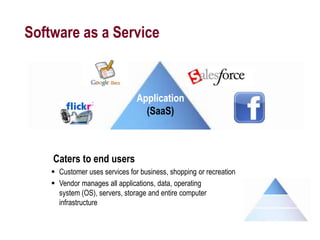
Software as a Service
Application
(SaaS)
Caters to end users
 Customer uses services for business, shopping or recreation
 Vendor manages all applications, data, operating
system (OS), servers, storage and entire computer
infrastructure
Platform as a Service
Platform
(PaaS)
Caters to developers
 Customer brings their own application software and data
 Vendor supports middleware, OS, servers, storage, and all hardware
 Let’s user develop and host customized applications
Infrastructure as a Service
Caters to IT staff who want access to remote hardware
 Customer manages application software, data, middleware and some OS
 Cloud provider delivers virtual equipment including servers, storage
 Customer has worry-free hardware, maintenance, environmental
conditions
 Global growth from $3.7 billion to $10.5 billion by 2014
Infrastructure
(IaaS)
Benefits of cloud computing
Case Studies
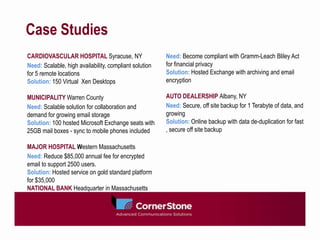
CARDIOVASCULAR HOSPITAL Syracuse, NY
Need: Scalable, high availability, compliant solution
for 5 remote locations
Solution: 150 Virtual Xen Desktops
MUNICIPALITY Warren County
Need: Scalable solution for collaboration and
demand for growing email storage
Solution: 100 hosted Microsoft Exchange seats with
25GB mail boxes - sync to mobile phones included
MAJOR HOSPITAL Western Massachusetts
Need: Reduce $85,000 annual fee for encrypted
email to support 2500 users.
Solution: Hosted service on gold standard platform
for $35,000
NATIONAL BANK Headquarter in Massachusetts
Need: Become compliant with Gramm-Leach Bliley Act
for financial privacy
Solution: Hosted Exchange with archiving and email
encryption
AUTO DEALERSHIP Albany, NY
Need: Secure, off site backup for 1 Terabyte of data, and
growing
Solution: Online backup with data de-duplication for fast
, secure off site backup
What can it do for you?
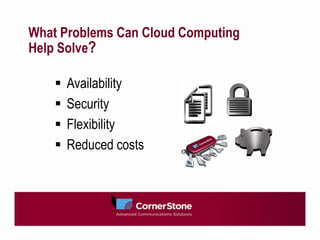
What Problems Can Cloud Computing
Help Solve?

 Availability
 Security
 Flexibility
 Reduced costs
Availability, Reliability and
Disaster Recovery
 Constant access to business applications
 Leverage your cloud provider’s disaster recovery plan
 Alternative to customer-owned, redundant platforms
Security
Challenges
 Increasingly complex
 Increase in hacker activity and available malware
 Fines for non-compliance with HIPAA
Cloud solution
 Standards compliance / SaaS 70
 Proven results for Fortune 1000 and U.S. Armed Forces
Flexibility
Challenge
 Increasing number of work-from-home
employees
 Need to collaborate, share files, and communicate with ease
Cloud Solution
 Portability
 Hosted e-mail, desktop files, and hosted phone service
that are affordable and secure
Reduced costs
Gartner’s 2011 CIO Agenda survey: reducing cost as a
top priority
U.S. Government’s CIO shows savings as agencies move to the cloud
 GSA: move 17,000 users to hosted e-mail saves $15 million
 Dept. of Agriculture: move 120,000 users to hosted e-mail saves
$27 million
 D.O.D: $54,000 up front for cloud avoids $1 million in legacy upgrade
 Department of Health and Human Services implements electronic health
records using cloud service. Reduces time to market from over 1 year to
only 3 mos., supporting over 100,000 primary care practitioners.
Position yourself to compete
Faster time
to market
Creation of
new value
drivers
Easier to
scale-out
Lower
upfront IT
costs
Immediate
access to hardware
resources
No upfront
capital
Pay-per-use
billing
Scalability &
Affordability
Seamlessly
scale services in
correlation
with client demand
Lower IT barriers
to innovation
Support
interoperability
between legacy /
new platforms
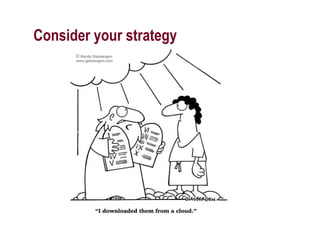
Consider your strategy
Learn more about cloud computing
 Singin’ in the Rain and Workin’ in the Cloud, CornerStone newsletter includes a 14-page
article from industry thought leader Gartner with insight on how to address risks of
moving your data to the cloud.
 Leveraging the Cloud for Your Business, a brief article, complete with references, that
provides overview and practical steps for your organization.
www.cstel.com/leverage_the_cloud
 High Bandwidth Internet Access: Opening Doors to Business Innovation, discusses
trends and case studies on innovation enabled by bandwidth and cloud services.
www.cstel.com/high_bandwidth_internet_access
 Can You Really Find Security in the Cloud?, addresses benefits organizations can
realize by using cloud services to comply with data security regulations.
www.cstel.com/data_security_in_the_cloud

Leverage cloud skysphere

  • 1.
    Leveraging the Cloud forYour Business

  • 2.
    Discussion outline  CornerStone’sjourney with the cloud  What is the cloud?  Categories of cloud services  Case studies reveal benefits of the cloud
  • 3.
    Our history withcloud services 2002 Challenge: Launched with limited capital and limited resources Solution: Use local ASPs for billing, provisioning, CRM Result: Became a provider known for quality and value 2005 Challenge: Integrate sales and operations in 4 offices, support remotes Solution: Rely on hosted desktop and leverage ASP Result: Became SaaS agent 2006 Challenge: Shift from services to solutions Solution: Buy softswitch (VoIP & hosted voice), acquire 40% SkySphere Result: Began to see increase in average revenue per user
  • 4.
    Our feet firmlyplanted…head in “the cloud”! 2009 Acquired Richmond Telephone/Richmond Networx 2011 Acquisitions establish CornerStone as cloud provider  Data Center Services  Cloud Computing  Hosted Voice Services  Network and operations presence in Manhattan
  • 5.
    What is theCloud? 
 ?
  • 6.
  • 7.
    The Cloud isfor Everyone At work, at home, on the road! Banking – at ATMs and online Amazon – shopping Social networking – communicating Google – e-mail and document sharing Apple – entertainment
  • 8.
    Cloud Computing… Hire ataxi or buy a car? Taxi driver/company • Drives the car • Fills the tank • Maintains the vehicle You pay a fixed ‘rate’ and taxi gets you there. You’re the owner • Insure the vehicle • Pay for upkeep • Keep it secure Upfront and ongoing cost gives you pros and cons of owning the car.
  • 9.
    Three categories ofservice Application (SaaS) Platform (PaaS) Infrastructure (IaaS)
  • 10.
    Software as aService Application (SaaS) Caters to end users  Customer uses services for business, shopping or recreation  Vendor manages all applications, data, operating system (OS), servers, storage and entire computer infrastructure
  • 11.
    Platform as aService Platform (PaaS) Caters to developers  Customer brings their own application software and data  Vendor supports middleware, OS, servers, storage, and all hardware  Let’s user develop and host customized applications
  • 12.
    Infrastructure as aService Caters to IT staff who want access to remote hardware  Customer manages application software, data, middleware and some OS  Cloud provider delivers virtual equipment including servers, storage  Customer has worry-free hardware, maintenance, environmental conditions  Global growth from $3.7 billion to $10.5 billion by 2014 Infrastructure (IaaS)
  • 13.
  • 14.
    Case Studies CARDIOVASCULAR HOSPITALSyracuse, NY Need: Scalable, high availability, compliant solution for 5 remote locations Solution: 150 Virtual Xen Desktops MUNICIPALITY Warren County Need: Scalable solution for collaboration and demand for growing email storage Solution: 100 hosted Microsoft Exchange seats with 25GB mail boxes - sync to mobile phones included MAJOR HOSPITAL Western Massachusetts Need: Reduce $85,000 annual fee for encrypted email to support 2500 users. Solution: Hosted service on gold standard platform for $35,000 NATIONAL BANK Headquarter in Massachusetts Need: Become compliant with Gramm-Leach Bliley Act for financial privacy Solution: Hosted Exchange with archiving and email encryption AUTO DEALERSHIP Albany, NY Need: Secure, off site backup for 1 Terabyte of data, and growing Solution: Online backup with data de-duplication for fast , secure off site backup
  • 15.
    What can itdo for you?
  • 16.
    What Problems CanCloud Computing Help Solve?
  Availability  Security  Flexibility  Reduced costs
  • 17.
    Availability, Reliability and DisasterRecovery  Constant access to business applications  Leverage your cloud provider’s disaster recovery plan  Alternative to customer-owned, redundant platforms
  • 18.
    Security Challenges  Increasingly complex Increase in hacker activity and available malware  Fines for non-compliance with HIPAA Cloud solution  Standards compliance / SaaS 70  Proven results for Fortune 1000 and U.S. Armed Forces
  • 19.
    Flexibility Challenge  Increasing numberof work-from-home employees  Need to collaborate, share files, and communicate with ease Cloud Solution  Portability  Hosted e-mail, desktop files, and hosted phone service that are affordable and secure
  • 20.
    Reduced costs Gartner’s 2011CIO Agenda survey: reducing cost as a top priority U.S. Government’s CIO shows savings as agencies move to the cloud  GSA: move 17,000 users to hosted e-mail saves $15 million  Dept. of Agriculture: move 120,000 users to hosted e-mail saves $27 million  D.O.D: $54,000 up front for cloud avoids $1 million in legacy upgrade  Department of Health and Human Services implements electronic health records using cloud service. Reduces time to market from over 1 year to only 3 mos., supporting over 100,000 primary care practitioners.
  • 21.
    Position yourself tocompete Faster time to market Creation of new value drivers Easier to scale-out Lower upfront IT costs Immediate access to hardware resources No upfront capital Pay-per-use billing Scalability & Affordability Seamlessly scale services in correlation with client demand Lower IT barriers to innovation Support interoperability between legacy / new platforms
  • 22.
  • 23.
    Learn more aboutcloud computing  Singin’ in the Rain and Workin’ in the Cloud, CornerStone newsletter includes a 14-page article from industry thought leader Gartner with insight on how to address risks of moving your data to the cloud.  Leveraging the Cloud for Your Business, a brief article, complete with references, that provides overview and practical steps for your organization. www.cstel.com/leverage_the_cloud  High Bandwidth Internet Access: Opening Doors to Business Innovation, discusses trends and case studies on innovation enabled by bandwidth and cloud services. www.cstel.com/high_bandwidth_internet_access  Can You Really Find Security in the Cloud?, addresses benefits organizations can realize by using cloud services to comply with data security regulations. www.cstel.com/data_security_in_the_cloud

Editor's Notes

  • #2 A growing number of business decision makers have recently started down the path of leveraging cloud services while many organizations are in the early stages of exploring how hosted services can help their companies. Some early adapters who met with challenges discontinued their initial plans to migrate computing resources to the cloud, Many companies have yet to take their first steps. Some early adopters who met with challenges discontinued their initial efforts to migrate computing resources to the cloud, but now, with more stable platforms and the proliferation of cloud providers, they are taking a fresh look. No doubt, the topic of cloud computing has much ‘buzz’ around it, and it probably suffers from over exposure. But don’t let that discourage you from exploring how your business can benefit from cloud services. This presentation outlines some basics of cloud computing and provides a list of resources, including white papers and research from industry leaders such as Gartner, on how companies can effectively migrate to cloud services.
  • #3 This presentation will help business decision makers understand how cloud services can support organizations of any size.We’ll take a moment to consider CornerStone’s own history with cloud services and then define “The Cloud” in very straightforward, business terms – leaving the technical deep dive to the technical experts.We’ll alsoshare a high-level categorization of cloud services that will help business decision makers see what’s possible in the cloud.Finally, we’ll review a couple case studies that reveal how some businesses realized the benefits of the cloud.
  • #4 CornerStone was founded over 10 years ago. As a 2-person start-up, business to business competitive local exchange carrier with few resources to allocate to IT, we embraced hosted services as a necessity.2002: We had low end computing hardware, no IT staff, so we outsourced and relied on local ASP, SkySphere, and on Constellation – a hosted software we used for billing and provisioning. 2005: By now, we needed computing services in multiple offices and for remote employees. We delivered company-wide access to e-mail and shared files and kept IT staff headcount low by using hosted desktops. These positive experiences with using SaaS led us to become an agent and we found our end customers slowly embracing hosted services.2006: We took first steps to become a cloud service provider. We bought a next generation class 5 central office softswitch and acquired 40% share of SkySphere
  • #5 By 2009, we were in a position to purchase Richmond Telephone, independent telephone company in western Massachusetts and were met with great response from organizations there when we brought our hosted solutions to that market. By 2011 we were able to become fully entrenched as a cloud provider. We completed our acquisition of SkySphere and purchased Activehost – a provider of cloud and Data Center services as well as PINS, a CLEC in Manhattan who also provides Data Center hosting.
  • #6 As I mentioned when discussing our history, we’ve been trying to answer this question …what is the cloud … for our business customers since ~2005, before the term “cloud” took hold. You won’t hear a technical overview this morning. Instead, I’ll offer some general definitions of cloud services and consider how it solves business problems.Let’s start our definition by considering what the cloud is used for - this 40 second clip gives you an idea of what the cloud does…http://www.cornerstonetelephone.com/skysphere/intro-video
  • #8 Cloud computing might be more accurately described as "sky computing," Basically, content is available for us to reach, by using an Internet connectionWe experience it in our daily lives at work and at home
  • #9 Some benefits of using the cloud can be compared to taking a taxi instead of buying a car. The driver may know a faster way to get to your destination, you don’t need to find parking, you don’t need to navigate traffic, You’re free to focus on more valuable work while the driver has eyes on the road. And..it’s a variable cost — you only pay for what you need.With Cloud Computing, you transfer the burden of IT service delivery to the Cloud vendor andyourIT team can focus on more strategic, value-added efforts. The vendor is has obligations to meet like compliance, Service LevelAgreements, disaster recovery, and 24/7/365 support.
  • #10 You hear the phrase cloud computing everywhere. The problem is that everyone seems to have a different definition.The definition comes into focus when you think about what IT always needs: a way to increase capacity or add capabilities on the fly without investing in new infrastructure, training new personnel, or licensing new software. Cloud computing can be considered as any subscription-based or pay-per-use service that, in real time over the Internet, extends IT's existing capabilities.Gartner, an industry research firm, defines cloud using 3 broad categories – Software as a Service, Platform as a Service, and Infrastructure as a Service.
  • #11 Software as a Service (SaaS) might be the most familiar cloud service with applications like facebook, flickr and amazon.Google Docs for hosted word processing or document sharing. Salesforce.com – a hosted customer relationship management application. In this model, the vendor delivers an application to it’s end user customers through a web browser. The vendor builds and maintains huge server farms and the customer has all the benefits the service offers withnone of the upfront investment in servers or software.Salesforce.com is by far the best-known example among enterprise applications, but SaaS is also common for accounting and human resources as well as desktop applications such as Microsoft office suite with Word, Excel, and other desk-top programs.
  • #12 With Platform as a service, the cloud provider gives the user – usually a software developer – access to a computing platform that includes hardware, servers, OS, and storage.The customer has all the responsibility for downloading whatever custom applications they need to carry out their development work. They have flexibility to add or remove capacity as their project requires.This service might be used when the customer isn’t willing to buy and manage the hardware …for instance, they might need only a temporary environment where they can work development until they move the final version of the software to a production environment. Or they might need a production environment and can’t afford the capital or the headcount to support it on their own premise.
  • #13 Here, the provider offers virtual equipment such as virtual private servers, CPUs, storage devices and other networking hardwareThe customer has complete freedom to download application software of their choice, their own data, their choice of middleware and even some choice of Operating System. Infrastructure as a Service frees the IT team from managing hardware, maintaining proper environmental conditions, and Gives a worry-free computing infrastructure where they can develop specialized, custom applications.Some forecasts show global growth of this segment from $3.7 billion to $10.5 billion by 2014
  • #14 With these definitions in mind, you can begin to see clearly some of of the key benefits of cloud services. We’ll quickly take a look at a couple of case studies that will highlight benefits such asAccomplish security and privacy compliance with legal requirements especially demanding and complex in industries such as Health Care, Insurance and Finance Enjoy reliability and affordability of scalable storage Pay as you use VS. large up front capital investments
  • #15 Case studies help show solutions available n the cloud. We don’t have time to discuss each, so I’ll quickly highlight the first two When this hospital lost internet connectivity or power at the main location, it would bring down other locations. They didn’t have in-house expertise to architect the required solution – so they relied on their cloud service provider to do it for them. At a municipality in Warren County, 1 IT person was supporting 100 users. Moving to hosted exchange freed up his time to focus on strategic initiatives by having our his cloud service provider’s certified Microsoft engineers support his users email. And that cloud providers support is available 24/7/365We’re very familiar with these case studies since the cloud solution these clients rely on happens to be provided by CornerStone!
  • #16 It’s not a cure-all, so set your expectations accordingly!
  • #17 You’ve probably noticed some common themes that I’ve been touching on. The cloud helps solve challenges with availability, security, flexibility and reduced costs. We’ll take a brief look at these now.
  • #18 Cloud computing can help keep your business going even when you’re hit with outages or other disruptions since you’re hosting your applications so they’re available anywhere you can get on the Internet.Most small and midsized businesses don’t have the money or staff for redundant platforms.Cloud services are an alternativeSimilarly, most SMBs don’t have a disaster recovery plan in place so they can rely on the plan of their cloud provider.A trend noted back in 2010 by the Yankee Group showed businesses started increase reliance on virtualization to improve the availability of computing resources. And more recently, a third of newly founded enterprise companies had over 50% of their IT budgetearmarked for cloud services.
  • #19 There’s no shortage to challenges we face when securing our company’s data and protecting consumer privacy.International Data Corporation reports 75% of companies with at least 500 employees are usinghosted or virtual service and 50% run mission critical applications in the cloud.A Yankee Group report on trends in Fortune 1000 companies – so companies with extensive cash flow and available capital – showed security as a top attribute in selecting a cloud provider. The US Defense Information Systems Agency has successfully leveraged the cloud to support a joint communications program for US Army, Navy, Air Force, and Marines.industry leaders and government agencies are finding solutions that are secure and compliant through their cloud service providers.
  • #20 Increasing number of employees spend most of their workday away from the office50% of small business employers allow their employees to work from home to help free up office space and provide flexible schedules that employees needCloud services are available for hosted e-mail, desktop files, and hosted phone service, the ability to accommodate flexible work arrangements is not only possible, but also affordable and secure.
  • #21 Many businesses have responded to the current economy by either flattening or outright declining budgets for information technology as the third most importantly ranked strategy among IT decision-makers.The same survey shows many of these CIOs plan to increase their use of cloud services as a way to reduce overall departmental expendituresThese results in the 2011 report from the US Government, “Federal Cloud Computing Strategy,” shows the impact of cloud services that speak for themselves.
  • #22 I hope our time together here has helped you understand the many benefits of cloud services and that you have a better understanding of how you can use the cloud to help your business thrive.
  • #23 You’re not going to get strategy and direction from the cloud – but you will be able to leverage the benefits of the technology to help you accomplish your business goals.
  • #24 Thank you! Contact me if I can help answer any questions or if you’d like to talk with more technical contacts, I can arrange that, too.