Cloud Computing Overview
1
Agenda
 Overview
 Cloud Service Types
 Business impact
 Security & Privacy, Risks considerations
 Cloud Readiness
 Recommendations
22
Overview
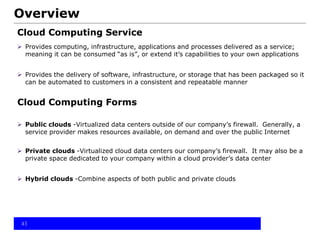
Cloud Computing Service
 Provides computing, infrastructure, applications and processes delivered as a service;
meaning it can be consumed “as is”, or extend it’s capabilities to your own applications
 Provides the delivery of software, infrastructure, or storage that has been packaged so it
can be automated to customers in a consistent and repeatable manner
Cloud Computing Forms
 Public clouds -Virtualized data centers outside of our company’s firewall. Generally, a
service provider makes resources available, on demand and over the public Internet
 Private clouds -Virtualized cloud data centers our company’s firewall. It may also be a
private space dedicated to your company within a cloud provider’s data center
 Hybrid clouds -Combine aspects of both public and private clouds
33
4
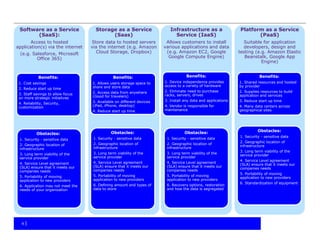
Software as a Service
(SaaS):
Access to hosted
application(s) via the internet
(e.g. Salesforce, Microsoft
Office 365)
Benefits:
1. Cost savings
2. Reduce start up time
3. Staff savings to allow focus
on more strategic initiaitves
4. Reliability, Security,
customization
Obstacles::
1. Security - sensitive data
2. Geographic location of
infrastructure
3. Long term viability of the
service provider
4. Service Level agreement
(SLA) ensure that it meets our
companies needs
5. Portability of moving
application to new providers
6. Application may not meet the
needs of your organization
Storage as a Service
(Saas)
Store data to hosted servers
via the internet (e.g. Amazon
Cloud Storage, Dropbox)
Benefits:
1. Allows users storage space to
share and store data
2. Access data from anywhere
(Good for travelers)
3. Available on different devices
(iPad, iPhone, desktop)
4. Reduce start up time
Obstacles:
1. Security - sensitive data
2. Geographic location of
infrastructure
3. Long term viability of the
service provider
4. Service Level agreement
(SLA) ensure that it meets our
companies needs
5. Portability of moving
application to new providers
6. Defining amount and types of
data to store
Infrastructure as a
Service (IaaS)
Allows customers to install
various applications and data
(e.g. Amazon EC2, Google
Google Compute Engine)
Benefits:
1. Device independence provides
access to a variety of hardware
2. Eliminate need to purchase
racks, servers, drives
3. Install any data and applications
4. Vendor is responsible for
maintenance
Obstacles:
1. Security - sensitive data
2. Geographic location of
infrastructure
3. Long term viability of the
service provider
4. Service Level agreement
(SLA) ensure that it meets our
companies needs
5. Portability of moving
application to new providers
6. Recovery options, restoration
and how the data is segregated
Platform as a Service
(PaaS)
Suitable for application
developers, design and
testing (e.g. Amazon Elastic
Beanstalk, Google App
Engine)
Benefits:
1. Shared resources and hosted
by provider
2. Supplies resources to build
application and services
3. Reduce start up time
4. Many data centers across
geographical sites
Obstacles:
1. Security - sensitive data
2. Geographic location of
infrastructure
3. Long term viability of the
service provider
4. Service Level agreement
(SLA) ensure that it meets our
companies needs
5. Portability of moving
application to new providers
6. Standardization of equipment
5
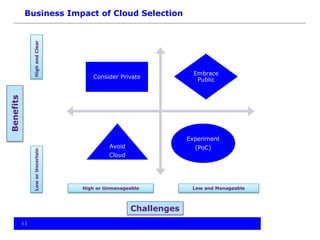
Consider Private
Embrace
Public
Avoid
Cloud
Experiment
(PoC)
HighandClearLoworUncertain
High or Unmanageable Low and Manageable
Business Impact of Cloud SelectionBenefits
Challenges
6
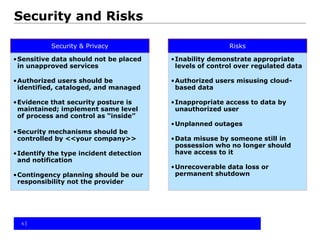
Security & Privacy
•Sensitive data should not be placed
in unapproved services
•Authorized users should be
identified, cataloged, and managed
•Evidence that security posture is
maintained; implement same level
of process and control as “inside”
•Security mechanisms should be
controlled by <<your company>>
•Identify the type incident detection
and notification
•Contingency planning should be our
responsibility not the provider
Risks
•Inability demonstrate appropriate
levels of control over regulated data
•Authorized users misusing cloud-
based data
•Inappropriate access to data by
unauthorized user
•Unplanned outages
•Data misuse by someone still in
possession who no longer should
have access to it
•Unrecoverable data loss or
permanent shutdown
Security and Risks
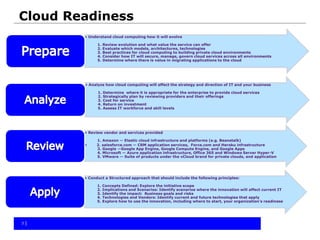
Cloud Readiness
7
• Understand cloud computing how it will evolve
1. Review evolution and what value the service can offer
2. Evaluate which models, architectures, technologies
3. Best practices for cloud computing to building private cloud environments
4. Consider how IT will secure, manage, govern cloud services across all environments
5. Determine where there is value in migrating applications to the cloud
• Analyze how cloud computing will affect the strategy and direction of IT and your business
1. Determine where it is appropriate for the enterprise to provide cloud services
2. Strategically plan by reviewing providers and their offerings
3. Cost for service
4. Return on investment
5. Assess IT workforce and skill levels
• Review vendor and services provided
1. Amazon — Elastic cloud infrastructure and platforms (e.g. Beanstalk)
• 2. salesforce.com — CRM application services, Force.com and Heroku infrastructure
3. Google —Google App Engine, Google Compute Engine, and Google Apps
4. Microsoft — Azure application infrastructure, Office 365 and Windows Server Hyper-V
5. VMware — Suite of products under the vCloud brand for private clouds, and application
• Conduct a Structured approach that should include the following principles:
1. Concepts Defined: Explore the initiative scope
2. Implications and Scenarios: Identify scenarios where the innovation will affect current IT
3. Identify the impact: Business goals and risks
4. Technologies and Vendors: Identify current and future technologies that apply
5. Explore how to use the innovation, including where to start, your organization's readiness
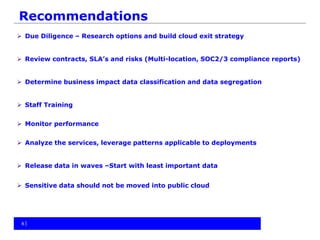
Recommendations
 Due Diligence – Research options and build cloud exit strategy
 Review contracts, SLA’s and risks (Multi-location, SOC2/3 compliance reports)
 Determine business impact data classification and data segregation
 Staff Training
 Monitor performance
 Analyze the services, leverage patterns applicable to deployments
 Release data in waves –Start with least important data
 Sensitive data should not be moved into public cloud
88

Cloud computing 101

  • 1.
  • 2.
    Agenda  Overview  CloudService Types  Business impact  Security & Privacy, Risks considerations  Cloud Readiness  Recommendations 22
  • 3.
    Overview Cloud Computing Service Provides computing, infrastructure, applications and processes delivered as a service; meaning it can be consumed “as is”, or extend it’s capabilities to your own applications  Provides the delivery of software, infrastructure, or storage that has been packaged so it can be automated to customers in a consistent and repeatable manner Cloud Computing Forms  Public clouds -Virtualized data centers outside of our company’s firewall. Generally, a service provider makes resources available, on demand and over the public Internet  Private clouds -Virtualized cloud data centers our company’s firewall. It may also be a private space dedicated to your company within a cloud provider’s data center  Hybrid clouds -Combine aspects of both public and private clouds 33
  • 4.
    4 Software as aService (SaaS): Access to hosted application(s) via the internet (e.g. Salesforce, Microsoft Office 365) Benefits: 1. Cost savings 2. Reduce start up time 3. Staff savings to allow focus on more strategic initiaitves 4. Reliability, Security, customization Obstacles:: 1. Security - sensitive data 2. Geographic location of infrastructure 3. Long term viability of the service provider 4. Service Level agreement (SLA) ensure that it meets our companies needs 5. Portability of moving application to new providers 6. Application may not meet the needs of your organization Storage as a Service (Saas) Store data to hosted servers via the internet (e.g. Amazon Cloud Storage, Dropbox) Benefits: 1. Allows users storage space to share and store data 2. Access data from anywhere (Good for travelers) 3. Available on different devices (iPad, iPhone, desktop) 4. Reduce start up time Obstacles: 1. Security - sensitive data 2. Geographic location of infrastructure 3. Long term viability of the service provider 4. Service Level agreement (SLA) ensure that it meets our companies needs 5. Portability of moving application to new providers 6. Defining amount and types of data to store Infrastructure as a Service (IaaS) Allows customers to install various applications and data (e.g. Amazon EC2, Google Google Compute Engine) Benefits: 1. Device independence provides access to a variety of hardware 2. Eliminate need to purchase racks, servers, drives 3. Install any data and applications 4. Vendor is responsible for maintenance Obstacles: 1. Security - sensitive data 2. Geographic location of infrastructure 3. Long term viability of the service provider 4. Service Level agreement (SLA) ensure that it meets our companies needs 5. Portability of moving application to new providers 6. Recovery options, restoration and how the data is segregated Platform as a Service (PaaS) Suitable for application developers, design and testing (e.g. Amazon Elastic Beanstalk, Google App Engine) Benefits: 1. Shared resources and hosted by provider 2. Supplies resources to build application and services 3. Reduce start up time 4. Many data centers across geographical sites Obstacles: 1. Security - sensitive data 2. Geographic location of infrastructure 3. Long term viability of the service provider 4. Service Level agreement (SLA) ensure that it meets our companies needs 5. Portability of moving application to new providers 6. Standardization of equipment
  • 5.
    5 Consider Private Embrace Public Avoid Cloud Experiment (PoC) HighandClearLoworUncertain High orUnmanageable Low and Manageable Business Impact of Cloud SelectionBenefits Challenges
  • 6.
    6 Security & Privacy •Sensitivedata should not be placed in unapproved services •Authorized users should be identified, cataloged, and managed •Evidence that security posture is maintained; implement same level of process and control as “inside” •Security mechanisms should be controlled by <<your company>> •Identify the type incident detection and notification •Contingency planning should be our responsibility not the provider Risks •Inability demonstrate appropriate levels of control over regulated data •Authorized users misusing cloud- based data •Inappropriate access to data by unauthorized user •Unplanned outages •Data misuse by someone still in possession who no longer should have access to it •Unrecoverable data loss or permanent shutdown Security and Risks
  • 7.
    Cloud Readiness 7 • Understandcloud computing how it will evolve 1. Review evolution and what value the service can offer 2. Evaluate which models, architectures, technologies 3. Best practices for cloud computing to building private cloud environments 4. Consider how IT will secure, manage, govern cloud services across all environments 5. Determine where there is value in migrating applications to the cloud • Analyze how cloud computing will affect the strategy and direction of IT and your business 1. Determine where it is appropriate for the enterprise to provide cloud services 2. Strategically plan by reviewing providers and their offerings 3. Cost for service 4. Return on investment 5. Assess IT workforce and skill levels • Review vendor and services provided 1. Amazon — Elastic cloud infrastructure and platforms (e.g. Beanstalk) • 2. salesforce.com — CRM application services, Force.com and Heroku infrastructure 3. Google —Google App Engine, Google Compute Engine, and Google Apps 4. Microsoft — Azure application infrastructure, Office 365 and Windows Server Hyper-V 5. VMware — Suite of products under the vCloud brand for private clouds, and application • Conduct a Structured approach that should include the following principles: 1. Concepts Defined: Explore the initiative scope 2. Implications and Scenarios: Identify scenarios where the innovation will affect current IT 3. Identify the impact: Business goals and risks 4. Technologies and Vendors: Identify current and future technologies that apply 5. Explore how to use the innovation, including where to start, your organization's readiness
  • 8.
    Recommendations  Due Diligence– Research options and build cloud exit strategy  Review contracts, SLA’s and risks (Multi-location, SOC2/3 compliance reports)  Determine business impact data classification and data segregation  Staff Training  Monitor performance  Analyze the services, leverage patterns applicable to deployments  Release data in waves –Start with least important data  Sensitive data should not be moved into public cloud 88