How do you use
LinkedIn?
Tell Us…
• Who You Are
• What You Do
• How Do You Utilize LinkedIn
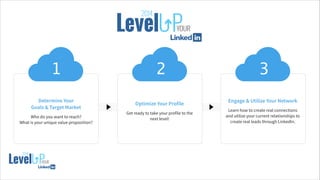
Determine Your
Goals & Target Market
!
Who do you want to reach?
What is your unique value proposition?
1
Optimize Your Profile
!
Get ready to take your profile to the
next level!
2
Engage & Utilize Your Network
!
Learn how to create real connections
and utilize your current relationships to
create real leads through LinkedIn.
3
18
!
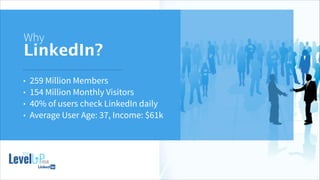
Why
LinkedIn?
• 259 Million Members
• 154 Million Monthly Visitors
• 40% of users check LinkedIn daily
• Average User Age: 37, Income: $61k
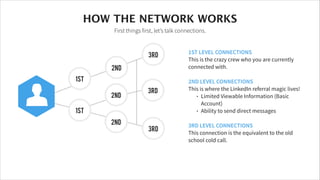
1ST LEVEL CONNECTIONS
This is the crazy crew who you are currently
connected with.
!
2ND LEVEL CONNECTIONS
This is where the LinkedIn referral magic lives!
• Limited Viewable Information (Basic
Account)
• Ability to send direct messages
!
3RD LEVEL CONNECTIONS
This connection is the equivalent to the old
school cold call.
HOW THE NETWORK WORKS
First things first, let’s talk connections.
24
2nd
1st
1st
2nd
2nd
3rd
3rd
3rd
Determine
Your Goal &
Target Market
16
Who do you want to reach?
What is your value proposition?
1
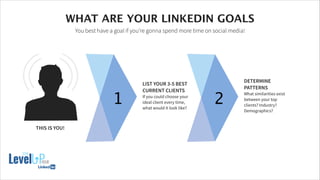
LIST YOUR 3-5 BEST
CURRENT CLIENTS
If you could choose your
ideal client every time,
what would it look like?
THIS IS YOU!
2
DETERMINE
PATTERNS
What similarities exist
between your top
clients? Industry?
Demographics?
20
WHAT ARE YOUR LINKEDIN GOALS
You best have a goal if you’re gonna spend more time on social media!
!
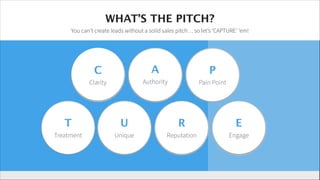
WHAT’S THE PITCH?
You can’t create leads without a solid sales pitch… so let’s ‘CAPTURE’ ‘em!
C
!
Clarity
A
!
Authority
P
!
Pain Point
T
!
Treatment
U
!
Unique
R
!
Reputation
E
!
Engage
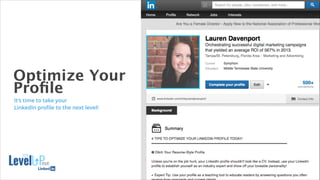
Optimize Your
Profile
16
It’s time to take your
LinkedIn profile to the next level!
PORTFOLIOFIRST THINGS FIRST…
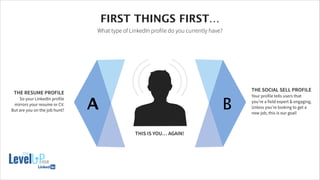
What type of LinkedIn profile do you currently have?
A B
THE RESUME PROFILE
So your LinkedIn profile
mirrors your resume or CV.
But are you on the job hunt?
THE SOCIAL SELL PROFILE
Your profile tells users that
you’re a field expert & engaging.
Unless you’re looking to get a
new job, this is our goal!
THIS IS YOU… AGAIN!
19
Let’s talk
Keywords
Try these awesome tools:
• Google Keyword Planner
• Soovle.com
!
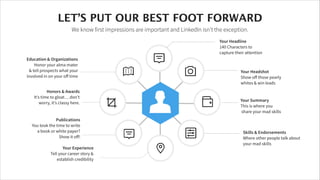
Your Headline
140 Characters to
capture their attention
!
!
Your Headshot
Show off those pearly
whites & win leads
Your Summary
This is where you
share your mad skills
Skills & Endorsements
Where other people talk about
your mad skills!
Your Experience
Tell your career story &
establish credibility
!
Publications
You took the time to write
a book or white paper?
Show it off!
!
Honors & Awards
It’s time to gloat… don’t
worry, it’s classy here.
!
!
Education & Organizations
Honor your alma mater
& tell prospects what your
involved in on your off time
LET’S PUT OUR BEST FOOT FORWARD
We know first impressions are important and LinkedIn isn’t the exception.
21
!
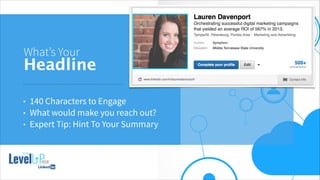
What’s Your
Headline
• 140 Characters to Engage
• What would make you reach out?
• Expert Tip: Hint To Your Summary
!
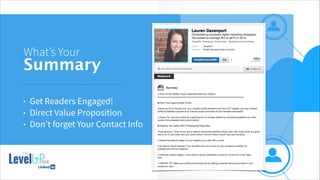
What’s Your
Summary
• Get Readers Engaged!
• Direct Value Proposition
• Don’t forget Your Contact Info
!
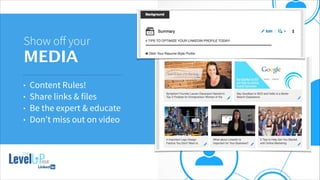
Show off your
MEDIA
• Content Rules!
• Share links & files
• Be the expert & educate
• Don’t miss out on video
Engage & 
Utilize
Your Network
16
Let’s create real connections and
unitize your current relationships to
build high-quality leads.
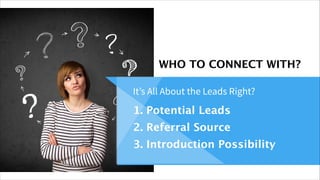
WHO TO CONNECT WITH?
It’s All About the Leads Right?
1. Potential Leads
2. Referral Source
3. Introduction Possibility
!
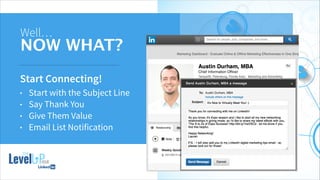
Well…
NOW WHAT?
Start Connecting!
• Start with the Subject Line
• Say Thank You
• Give Them Value
• Email List Notification
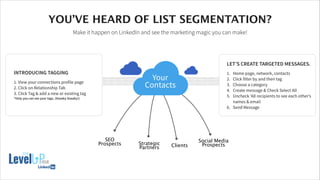
INTRODUCING TAGGING
!
1. View your connections profile page
2. Click on Relationship Tab
3. Click Tag & add a new or existing tag
*Only you can see your tags. (Sneaky Sneaky!)
LET’S CREATE TARGETED MESSAGES.
!
1. Home page, network, contacts
2. Click filter by and then tag
3. Choose a category
4. Create message & Check Select All
5. Uncheck ‘All recipients to see each other’s
names & email
6. Send Message
17
YOU’VE HEARD OF LIST SEGMENTATION?
Make it happen on LinkedIn and see the marketing magic you can make!
SEO
Prospects ClientsStrategic 
Partners
Social Media
Prospects
Your
Contacts
!
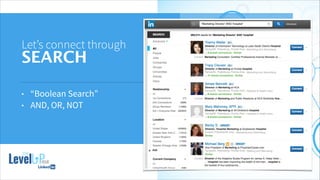
Let’s connect through
SEARCH
• “Boolean Search”
• AND, OR, NOT
!
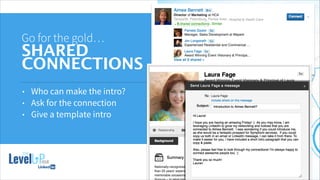
Go for the gold…
SHARED
CONNECTIONS
• Who can make the intro?
• Ask for the connection
• Give a template intro
!
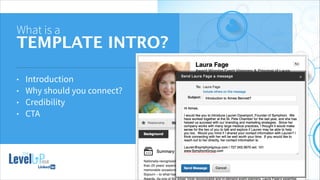
What is a
TEMPLATE INTRO?
• Introduction
• Why should you connect?
• Credibility
• CTA
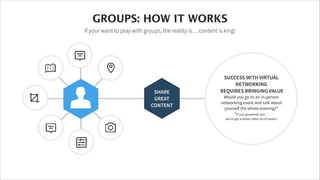
SUCCESS WITH VIRTUAL
NETWORKING
REQUIRES BRINGING VALUE
Would you go to an in-person
networking event and talk about
yourself the whole evening?*

*If you answered ‘yes’…
we’ve got a whole other set of issues!
SHARE
GREAT
CONTENT
GROUPS: HOW IT WORKS
If your want to play with groups, the reality is… content is king!
22
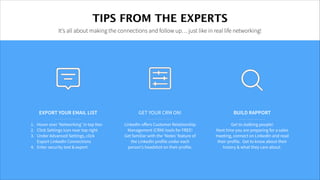
TIPS FROM THE EXPERTS
It’s all about making the connections and follow up… just like in real life networking!
GET YOUR CRM ON!
!
LinkedIn offers Customer Relationship
Management (CRM) tools for FREE!
Get familiar with the ‘Notes’ feature of
the LinkedIn profile under each
person’s headshot on their profile.
EXPORT YOUR EMAIL LIST
!
1. Hover over ‘Networking’ in top Nav
2. Click Settings icon near top right
3. Under Advanced Settings, click
Export LinkedIn Connections
4. Enter security text & export
07
BUILD RAPPORT
!
Get to stalking people!
Next time you are preparing for a sales
meeting, connect on LinkedIn and read
their profile. Get to know about their
history & what they care about.
WE ARE
SYMPHONI
A FULL SERVICE ADVERTISING AGENCY
727.343.3970
!
449 CENTRAL AVE, SUITE 204
ST. PETERSBURG, FLORIDA 33701

Level Up Your LinkedIn

  • 2.
    How do youuse LinkedIn? Tell Us… • Who You Are • What You Do • How Do You Utilize LinkedIn
  • 3.
    Determine Your Goals &Target Market ! Who do you want to reach? What is your unique value proposition? 1 Optimize Your Profile ! Get ready to take your profile to the next level! 2 Engage & Utilize Your Network ! Learn how to create real connections and utilize your current relationships to create real leads through LinkedIn. 3 18
  • 4.
    ! Why LinkedIn? • 259 MillionMembers • 154 Million Monthly Visitors • 40% of users check LinkedIn daily • Average User Age: 37, Income: $61k
  • 5.
    1ST LEVEL CONNECTIONS Thisis the crazy crew who you are currently connected with. ! 2ND LEVEL CONNECTIONS This is where the LinkedIn referral magic lives! • Limited Viewable Information (Basic Account) • Ability to send direct messages ! 3RD LEVEL CONNECTIONS This connection is the equivalent to the old school cold call. HOW THE NETWORK WORKS First things first, let’s talk connections. 24 2nd 1st 1st 2nd 2nd 3rd 3rd 3rd
  • 6.
    Determine Your Goal & TargetMarket 16 Who do you want to reach? What is your value proposition?
  • 7.
    1 LIST YOUR 3-5BEST CURRENT CLIENTS If you could choose your ideal client every time, what would it look like? THIS IS YOU! 2 DETERMINE PATTERNS What similarities exist between your top clients? Industry? Demographics? 20 WHAT ARE YOUR LINKEDIN GOALS You best have a goal if you’re gonna spend more time on social media!
  • 8.
    ! WHAT’S THE PITCH? Youcan’t create leads without a solid sales pitch… so let’s ‘CAPTURE’ ‘em! C ! Clarity A ! Authority P ! Pain Point T ! Treatment U ! Unique R ! Reputation E ! Engage
  • 9.
    Optimize Your Profile 16 It’s timeto take your LinkedIn profile to the next level!
  • 10.
    PORTFOLIOFIRST THINGS FIRST… Whattype of LinkedIn profile do you currently have? A B THE RESUME PROFILE So your LinkedIn profile mirrors your resume or CV. But are you on the job hunt? THE SOCIAL SELL PROFILE Your profile tells users that you’re a field expert & engaging. Unless you’re looking to get a new job, this is our goal! THIS IS YOU… AGAIN! 19
  • 11.
    Let’s talk Keywords Try theseawesome tools: • Google Keyword Planner • Soovle.com
  • 12.
    ! Your Headline 140 Charactersto capture their attention ! ! Your Headshot Show off those pearly whites & win leads Your Summary This is where you share your mad skills Skills & Endorsements Where other people talk about your mad skills! Your Experience Tell your career story & establish credibility ! Publications You took the time to write a book or white paper? Show it off! ! Honors & Awards It’s time to gloat… don’t worry, it’s classy here. ! ! Education & Organizations Honor your alma mater & tell prospects what your involved in on your off time LET’S PUT OUR BEST FOOT FORWARD We know first impressions are important and LinkedIn isn’t the exception. 21
  • 13.
    ! What’s Your Headline • 140Characters to Engage • What would make you reach out? • Expert Tip: Hint To Your Summary
  • 14.
    ! What’s Your Summary • GetReaders Engaged! • Direct Value Proposition • Don’t forget Your Contact Info
  • 15.
    ! Show off your MEDIA •Content Rules! • Share links & files • Be the expert & educate • Don’t miss out on video
  • 16.
    Engage & Utilize YourNetwork 16 Let’s create real connections and unitize your current relationships to build high-quality leads.
  • 17.
    WHO TO CONNECTWITH? It’s All About the Leads Right? 1. Potential Leads 2. Referral Source 3. Introduction Possibility
  • 18.
    ! Well… NOW WHAT? Start Connecting! •Start with the Subject Line • Say Thank You • Give Them Value • Email List Notification
  • 19.
    INTRODUCING TAGGING ! 1. Viewyour connections profile page 2. Click on Relationship Tab 3. Click Tag & add a new or existing tag *Only you can see your tags. (Sneaky Sneaky!) LET’S CREATE TARGETED MESSAGES. ! 1. Home page, network, contacts 2. Click filter by and then tag 3. Choose a category 4. Create message & Check Select All 5. Uncheck ‘All recipients to see each other’s names & email 6. Send Message 17 YOU’VE HEARD OF LIST SEGMENTATION? Make it happen on LinkedIn and see the marketing magic you can make! SEO Prospects ClientsStrategic Partners Social Media Prospects Your Contacts
  • 20.
    ! Let’s connect through SEARCH •“Boolean Search” • AND, OR, NOT
  • 21.
    ! Go for thegold… SHARED CONNECTIONS • Who can make the intro? • Ask for the connection • Give a template intro
  • 22.
    ! What is a TEMPLATEINTRO? • Introduction • Why should you connect? • Credibility • CTA
  • 23.
    SUCCESS WITH VIRTUAL NETWORKING REQUIRESBRINGING VALUE Would you go to an in-person networking event and talk about yourself the whole evening?*
 *If you answered ‘yes’… we’ve got a whole other set of issues! SHARE GREAT CONTENT GROUPS: HOW IT WORKS If your want to play with groups, the reality is… content is king! 22
  • 24.
    TIPS FROM THEEXPERTS It’s all about making the connections and follow up… just like in real life networking! GET YOUR CRM ON! ! LinkedIn offers Customer Relationship Management (CRM) tools for FREE! Get familiar with the ‘Notes’ feature of the LinkedIn profile under each person’s headshot on their profile. EXPORT YOUR EMAIL LIST ! 1. Hover over ‘Networking’ in top Nav 2. Click Settings icon near top right 3. Under Advanced Settings, click Export LinkedIn Connections 4. Enter security text & export 07 BUILD RAPPORT ! Get to stalking people! Next time you are preparing for a sales meeting, connect on LinkedIn and read their profile. Get to know about their history & what they care about.
  • 25.
    WE ARE SYMPHONI A FULLSERVICE ADVERTISING AGENCY 727.343.3970 ! 449 CENTRAL AVE, SUITE 204 ST. PETERSBURG, FLORIDA 33701