

KSnow: Let’s get to
know Snowflake
(A cloud data warehouse)
Presented By: Sarfaraz Hussain
Sr. Software Consultant
Knoldus Inc.
About Knoldus
Knoldus is a technology consulting firm with focus on modernizing the digital systems
at the pace your business demands.
DevOps
Functional. Reactive. Cloud Native
01 Introduction to Snowflake
02 Snowflake vs. Big Data Tools
03 Snowflake Architecture
04 Virtual Warehouse and Staging Area
05 Time Travel
Agenda
06 Demo
Snowflake is modern-day data processing system that is intended to make the best
use of the elasticity of the cloud so that it can scale to infinity.
Features:
- Cloud based data warehouse
- SaaS solution
- Pay per Use model (storage + compute)
- Supports standard ANSI SQL
- Supports ODBC and JDBC connectors
- Auto Scalable and Elastic (Virtual Warehouse)
- Unlimited storage of data (Uses AWS S3, Azure Blob Storage, Google Cloud
Storage)
What is Snowflake?
Advantages:
- Easy to process huge volume of data
- Provides ACID transaction
- No data backups required
- No need to worry about Optimization
- No need to maintain Indexes
- No Out of Memory issues
- Sharing data
Disadvantage:
- COST
Snowflake (contd.)
Apache Hive
- It is a data warehouse on top of HDFS
- It has performance challenges as it uses MapReduce for processing
Apache Spark (Batch SQL processing)
- Spark SQL has limited support for advanced SQL operation
- Advance optimizations are developer’s responsibility
- Resource allocation is developer’s responsibility
Snowflake vs. Big Data Tools
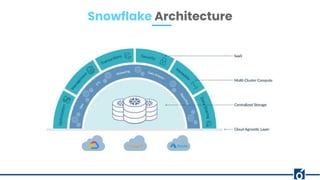
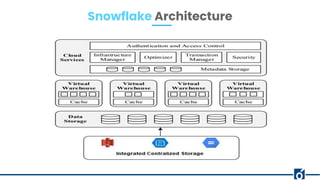
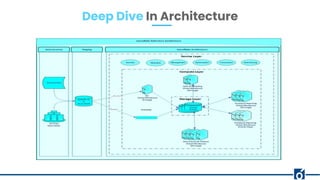
Snowflake Architecture
- When we create a Snowflake account, we select the underlying cloud provider.
- Cloud provider can be AWS, Azure, Google.
- According to our choice, the Data Storage Layer (DSL) is hosted on AWS S3, Azure
Blob Storage or Google Cloud Storage.
- DSL stores the actual data and provides unlimited space.
- Data in the DSL is stored as compressed columnar format using AES 256-bit
encryption.
Data Storage Layer
- Virtual Warehouse are cluster of nodes that process the data.
- In case of AWS, these nodes are EC2 instances and accordingly for Azure and
Google.
- Computation/processing is performed by Virtual Warehouse which helps in
loading and querying of data.
- It can be suspended when not in use.
- Suspended virtual warehouse can automatically resume upon running query.
- It can cache the data of a table that it has processed until it is suspended.
- Size of virtual warehouse can be scaled up or down (manual process).
- Elastic or Multi cluster virtual warehouse - can replicate multiple virtual warehouse
of the same size depending upon the workload (automatic process)
- WHEN TO SCALE UP AND DOWN CLUSTER?
Virtual Warehouse
- How many queries does Snowflake queues before it spins up additional cluster?
- STANDARD: Immediately when a query is queued, i.e. when the system detects that
there is one more query than the currently running cluster can execute.
- ECONOMY: Only if the system estimates there is enough query load to keep the
new cluster busy for at least 6 minutes.
Scaling Policy
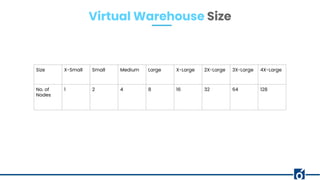
Virtual Warehouse Size
Size X-Small Small Medium Large X-Large 2X-Large 3X-Large 4X-Large
No. of
Nodes
1 2 4 8 16 32 64 128
Demo of Virtual Warehouse
Deep Dive In Architecture
- External storage from where data is loaded in Snowflake’s Data Storage Layer.
- External storage can be AWS S3, Azure Blob Storage, Google Cloud Storage.
- It is treated as Data Lake where land first lands into.
- From staging area we load data into Snowflake database, after performing
transformations if required.
- To load batch data:
Snowflake’s COPY command, Informatica, Talend, Matillion
- To load continuous data:
Snowpipe, Kafka, Kinesis
Staging Area
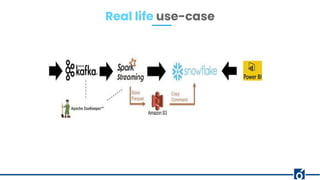
Real life use-case
Blog post: https://blog.knoldus.com/ksnow-time-travel-and-fail-safe-in-snowflake/
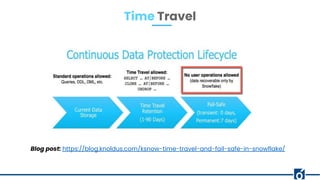
Time Travel
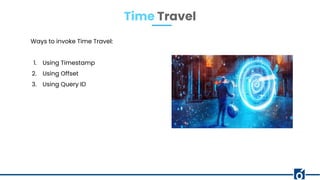
Ways to invoke Time Travel:
1. Using Timestamp
2. Using Offset
3. Using Query ID
Time Travel
1. Bulk Data Loading into Snowflake
2. Time Travel
3. Cloning in Snowflake
4. Continuous Data Loading into Snowflake (optional)
Demo
1. Blogs: https://blog.knoldus.com/?s=ksnow
2. Code Templates: https://techhub.knoldus.com/dashboard/projects/snowflake
3. LinkedIn: https://www.linkedin.com/showcase/ksnow/
Follow Us
Thank You!
linkedin.com/in/sarfaraz-hussai
n-8123b4132/
sarfaraz.hussain@knoldus.com

Let’s get to know Snowflake

  • 1.
    KSnow: Let’s getto know Snowflake (A cloud data warehouse) Presented By: Sarfaraz Hussain Sr. Software Consultant Knoldus Inc.
  • 2.
    About Knoldus Knoldus isa technology consulting firm with focus on modernizing the digital systems at the pace your business demands. DevOps Functional. Reactive. Cloud Native
  • 3.
    01 Introduction toSnowflake 02 Snowflake vs. Big Data Tools 03 Snowflake Architecture 04 Virtual Warehouse and Staging Area 05 Time Travel Agenda 06 Demo
  • 4.
    Snowflake is modern-daydata processing system that is intended to make the best use of the elasticity of the cloud so that it can scale to infinity. Features: - Cloud based data warehouse - SaaS solution - Pay per Use model (storage + compute) - Supports standard ANSI SQL - Supports ODBC and JDBC connectors - Auto Scalable and Elastic (Virtual Warehouse) - Unlimited storage of data (Uses AWS S3, Azure Blob Storage, Google Cloud Storage) What is Snowflake?
  • 5.
    Advantages: - Easy toprocess huge volume of data - Provides ACID transaction - No data backups required - No need to worry about Optimization - No need to maintain Indexes - No Out of Memory issues - Sharing data Disadvantage: - COST Snowflake (contd.)
  • 6.
    Apache Hive - Itis a data warehouse on top of HDFS - It has performance challenges as it uses MapReduce for processing Apache Spark (Batch SQL processing) - Spark SQL has limited support for advanced SQL operation - Advance optimizations are developer’s responsibility - Resource allocation is developer’s responsibility Snowflake vs. Big Data Tools
  • 7.
  • 8.
  • 9.
    - When wecreate a Snowflake account, we select the underlying cloud provider. - Cloud provider can be AWS, Azure, Google. - According to our choice, the Data Storage Layer (DSL) is hosted on AWS S3, Azure Blob Storage or Google Cloud Storage. - DSL stores the actual data and provides unlimited space. - Data in the DSL is stored as compressed columnar format using AES 256-bit encryption. Data Storage Layer
  • 10.
    - Virtual Warehouseare cluster of nodes that process the data. - In case of AWS, these nodes are EC2 instances and accordingly for Azure and Google. - Computation/processing is performed by Virtual Warehouse which helps in loading and querying of data. - It can be suspended when not in use. - Suspended virtual warehouse can automatically resume upon running query. - It can cache the data of a table that it has processed until it is suspended. - Size of virtual warehouse can be scaled up or down (manual process). - Elastic or Multi cluster virtual warehouse - can replicate multiple virtual warehouse of the same size depending upon the workload (automatic process) - WHEN TO SCALE UP AND DOWN CLUSTER? Virtual Warehouse
  • 11.
    - How manyqueries does Snowflake queues before it spins up additional cluster? - STANDARD: Immediately when a query is queued, i.e. when the system detects that there is one more query than the currently running cluster can execute. - ECONOMY: Only if the system estimates there is enough query load to keep the new cluster busy for at least 6 minutes. Scaling Policy
  • 12.
    Virtual Warehouse Size SizeX-Small Small Medium Large X-Large 2X-Large 3X-Large 4X-Large No. of Nodes 1 2 4 8 16 32 64 128
  • 13.
    Demo of VirtualWarehouse
  • 14.
    Deep Dive InArchitecture
  • 15.
    - External storagefrom where data is loaded in Snowflake’s Data Storage Layer. - External storage can be AWS S3, Azure Blob Storage, Google Cloud Storage. - It is treated as Data Lake where land first lands into. - From staging area we load data into Snowflake database, after performing transformations if required. - To load batch data: Snowflake’s COPY command, Informatica, Talend, Matillion - To load continuous data: Snowpipe, Kafka, Kinesis Staging Area
  • 16.
  • 17.
  • 18.
    Ways to invokeTime Travel: 1. Using Timestamp 2. Using Offset 3. Using Query ID Time Travel
  • 19.
    1. Bulk DataLoading into Snowflake 2. Time Travel 3. Cloning in Snowflake 4. Continuous Data Loading into Snowflake (optional) Demo
  • 20.
    1. Blogs: https://blog.knoldus.com/?s=ksnow 2.Code Templates: https://techhub.knoldus.com/dashboard/projects/snowflake 3. LinkedIn: https://www.linkedin.com/showcase/ksnow/ Follow Us
  • 21.