SNOWFLAKE CERTIFICATION CHEATSHEET
Source : Snowflake Documentation
How should you use this cheatsheet?
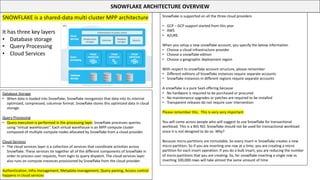
SNOWFLAKE ARCHITECTURE OVERVIEW
SNOWFLAKE is a shared-data multi cluster MPP architecture
It has three key layers
• Database storage
• Query Processing
• Cloud Services
Database Storage
• When data is loaded into Snowflake, Snowflake reorganizes that data into its internal
optimized, compressed, columnar format. Snowflake stores this optimized data in cloud
storage.
Query Processing
• Query execution is performed in the processing layer. Snowflake processes queries
using “virtual warehouses”. Each virtual warehouse is an MPP compute cluster
composed of multiple compute nodes allocated by Snowflake from a cloud provider.
Cloud Services
• The cloud services layer is a collection of services that coordinate activities across
Snowflake. These services tie together all of the different components of Snowflake in
order to process user requests, from login to query dispatch. The cloud services layer
also runs on compute instances provisioned by Snowflake from the cloud provider.
Authentication, Infra management, Metadata management, Query parsing, Access control
happens in cloud services
Snowflake is supported on all the three cloud providers
• GCP – GCP support started from this year
• AWS
• AZURE
When you setup a new snowflake account, you specify the below information
• Choose a cloud infrastructure provider
• Choose a snowflake edition
• Choose a geographic deployment region
With respect to snowflake account structure, please remember
• Different editions of Snowflake instances require separate accounts
• Snowflake instances in different regions require separate accounts
A snowflake is a pure SaaS offering because
• No hardware is required to be purchased or procured
• No maintenance upgrades or patches are required to be installed
• Transparent releases do not require user intervention
Please remember this. This is very very important
You will come across people who will suggest to use Snowflake for transactional
workload. This is a BIG NO. Snowflake should not be used for transactional workload
since it is not designed to do so. Why?
Because micro-partitions are immutable. So every insert in Snowflake creates a new
micro partition. So if you are inserting one row at a time, you are creating a micro
partition for each insert operation. If you do a bulk insert, you are reducing the number
of micro-partitions that you are creating. So, for snowflake inserting a single row vs
inserting 100,000 rows will take almost the same amount of time
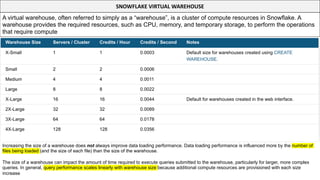
SNOWFLAKE VIRTUAL WAREHOUSE
A virtual warehouse, often referred to simply as a “warehouse”, is a cluster of compute resources in Snowflake. A
warehouse provides the required resources, such as CPU, memory, and temporary storage, to perform the operations
that require compute
Increasing the size of a warehouse does not always improve data loading performance. Data loading performance is influenced more by the number of
files being loaded (and the size of each file) than the size of the warehouse.
The size of a warehouse can impact the amount of time required to execute queries submitted to the warehouse, particularly for larger, more complex
queries. In general, query performance scales linearly with warehouse size because additional compute resources are provisioned with each size
increase
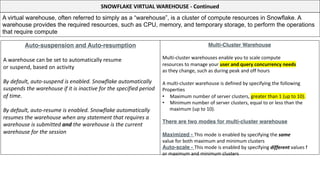
SNOWFLAKE VIRTUAL WAREHOUSE - Continued
A virtual warehouse, often referred to simply as a “warehouse”, is a cluster of compute resources in Snowflake. A
warehouse provides the required resources, such as CPU, memory, and temporary storage, to perform the operations
that require compute
Auto-suspension and Auto-resumption
A warehouse can be set to automatically resume
or suspend, based on activity
By default, auto-suspend is enabled. Snowflake automatically
suspends the warehouse if it is inactive for the specified period
of time.
By default, auto-resume is enabled. Snowflake automatically
resumes the warehouse when any statement that requires a
warehouse is submitted and the warehouse is the current
warehouse for the session
Multi-Cluster Warehouse
Multi-cluster warehouses enable you to scale compute
resources to manage your user and query concurrency needs
as they change, such as during peak and off hours
A multi-cluster warehouse is defined by specifying the following
Properties
• Maximum number of server clusters, greater than 1 (up to 10).
• Minimum number of server clusters, equal to or less than the
maximum (up to 10).
There are two modes for multi-cluster warehouse
Maximized - This mode is enabled by specifying the same
value for both maximum and minimum clusters
Auto-scale - This mode is enabled by specifying different values f
or maximum and minimum clusters
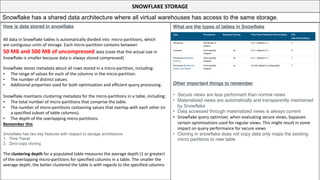
SNOWFLAKE STORAGE
Snowflake has a shared data architecture where all virtual warehouses has access to the same storage.
How is data stored in snowflake
All data in Snowflake tables is automatically divided into micro-partitions, which
are contiguous units of storage. Each micro-partition contains between
50 MB and 500 MB of uncompressed data (note that the actual size in
Snowflake is smaller because data is always stored compressed)
Snowflake stores metadata about all rows stored in a micro-partition, including:
• The range of values for each of the columns in the micro-partition.
• The number of distinct values.
• Additional properties used for both optimization and efficient query processing.
Snowflake maintains clustering metadata for the micro-partitions in a table, including:
• The total number of micro-partitions that comprise the table.
• The number of micro-partitions containing values that overlap with each other (in
a specified subset of table columns).
• The depth of the overlapping micro-partitions.
Remember this
Snowflake has two key features with respect to storage architecture
1. Time Travel
2. Zero-copy cloning
The clustering depth for a populated table measures the average depth (1 or greater)
of the overlapping micro-partitions for specified columns in a table. The smaller the
average depth, the better clustered the table is with regards to the specified columns
What are the types of tables in Snowflake
Other important things to remember
• Secure views are less performant than normal views
• Materialized views are automatically and transparently maintained
by Snowflake
• Data accessed through materialized views is always current
• Snowflake query optimizer, when evaluating secure views, bypasses
certain optimizations used for regular views. This might result in some
impact on query performance for secure views
• Cloning in snowflake does not copy data only maps the existing
micro partitions to new table
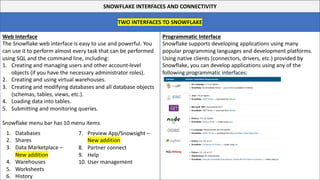
Programmatic Interface
Snowflake supports developing applications using many
popular programming languages and development platforms.
Using native clients (connectors, drivers, etc.) provided by
Snowflake, you can develop applications using any of the
following programmatic interfaces:
SNOWFLAKE INTERFACES AND CONNECTIVITY
TWO INTERFACES TO SNOWFLAKE
Web Interface
The Snowflake web interface is easy to use and powerful. You
can use it to perform almost every task that can be performed
using SQL and the command line, including:
1. Creating and managing users and other account-level
objects (if you have the necessary administrator roles).
2. Creating and using virtual warehouses.
3. Creating and modifying databases and all database objects
(schemas, tables, views, etc.).
4. Loading data into tables.
5. Submitting and monitoring queries.
Snowflake menu bar has 10 menu items
7. Preview App/Snowsight –
New addition
8. Partner connect
9. Help
10. User management
1. Databases
2. Shares
3. Data Marketplace –
New addition
4. Warehouses
5. Worksheets
6. History
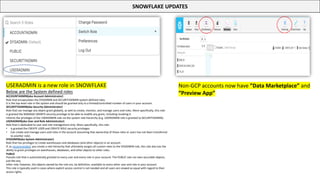
SNOWFLAKE UPDATES
USERADMIN is a new role in SNOWFLAKE
Below are the System defined roles
ACCOUNTADMIN(aka Account Administrator)
Role that encapsulates the SYSADMIN and SECURITYADMIN system-defined roles.
It is the top-level role in the system and should be granted only to a limited/controlled number of users in your account.
SECURITYADMIN(aka Security Administrator)
Role that can manage any object grant globally, as well as create, monitor, and manage users and roles. More specifically, this role:
Is granted the MANAGE GRANTS security privilege to be able to modify any grant, including revoking it.
Inherits the privileges of the USERADMIN role via the system role hierarchy (e.g. USERADMIN role is granted to SECURITYADMIN).
USERADMIN(aka User and Role Administrator)
Role that is dedicated to user and role management only. More specifically, this role:
• Is granted the CREATE USER and CREATE ROLE security privileges.
• Can create and manage users and roles in the account (assuming that ownership of those roles or users has not been transferred
to another role).
SYSADMIN(aka System Administrator)
Role that has privileges to create warehouses and databases (and other objects) in an account.
If, as recommended, you create a role hierarchy that ultimately assigns all custom roles to the SYSADMIN role, this role also has the
ability to grant privileges on warehouses, databases, and other objects to other roles.
PUBLIC
Pseudo-role that is automatically granted to every user and every role in your account. The PUBLIC role can own securable objects,
just like any
other role; however, the objects owned by the role are, by definition, available to every other user and role in your account.
This role is typically used in cases where explicit access control is not needed and all users are viewed as equal with regard to their
access rights.
Non-GCP accounts now have ”Data Marketplace” and
“Preview App”
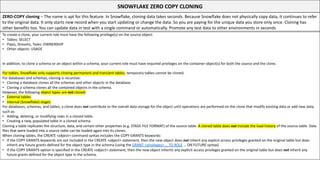
SNOWFLAKE ZERO COPY CLONING
ZERO-COPY cloning – The name is apt for this feature. In Snowflake, cloning data takes seconds. Because Snowflake does not physically copy data, it continues to refer
to the original data. It only starts new record when you start updating or change the data. So you are paying for the unique data you store only once. Cloning has
other benefits too. You can update data in test with a single command or automatically. Promote any test data to other environments in seconds
To create a clone, your current role must have the following privilege(s) on the source object:
• Tables: SELECT
• Pipes, Streams, Tasks: OWNERSHIP
• Other objects: USAGE
In addition, to clone a schema or an object within a schema, your current role must have required privileges on the container object(s) for both the source and the clone.
For tables, Snowflake only supports cloning permanent and transient tables; temporary tables cannot be cloned.
For databases and schemas, cloning is recursive:
• Cloning a database clones all the schemas and other objects in the database.
• Cloning a schema clones all the contained objects in the schema.
However, the following object types are not cloned:
• External tables
• Internal (Snowflake) stages
For databases, schemas, and tables, a clone does not contribute to the overall data storage for the object until operations are performed on the clone that modify existing data or add new data,
such as:
• Adding, deleting, or modifying rows in a cloned table.
• Creating a new, populated table in a cloned schema.
Cloning a table replicates the structure, data, and certain other properties (e.g. STAGE FILE FORMAT) of the source table. A cloned table does not include the load history of the source table. Data
files that were loaded into a source table can be loaded again into its clones.
When cloning tables, the CREATE <object> command syntax includes the COPY GRANTS keywords:
• If the COPY GRANTS keywords are not included in the CREATE <object> statement, then the new object does not inherit any explicit access privileges granted on the original table but does
inherit any future grants defined for the object type in the schema (using the GRANT <privileges> … TO ROLE … ON FUTURE syntax).
• If the COPY GRANTS option is specified in the CREATE <object> statement, then the new object inherits any explicit access privileges granted on the original table but does not inherit any
future grants defined for the object type in the schema.
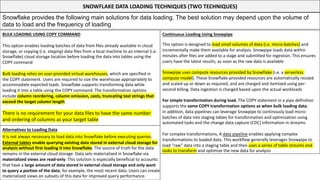
SNOWFLAKE DATA LOADING TECHNIQUES (TWO TECHNIQUES)
BULK LOADING USING COPY COMMAND
This option enables loading batches of data from files already available in cloud
storage, or copying (i.e. staging) data files from a local machine to an internal (i.e.
Snowflake) cloud storage location before loading the data into tables using the
COPY command
Bulk loading relies on user-provided virtual warehouses, which are specified in
the COPY statement. Users are required to size the warehouse appropriately to
accommodate expected loads. Snowflake supports transforming data while
loading it into a table using the COPY command. The transformation options
include column reordering, column omission, casts, truncating text strings that
exceed the target column length
There is no requirement for your data files to have the same number
and ordering of columns as your target table
Snowflake provides the following main solutions for data loading. The best solution may depend upon the volume of
data to load and the frequency of loading
Continuous Loading Using Snowpipe
This option is designed to load small volumes of data (i.e. micro-batches) and
incrementally make them available for analysis. Snowpipe loads data within
minutes after files are added to a stage and submitted for ingestion. This ensures
users have the latest results, as soon as the raw data is available
Snowpipe uses compute resources provided by Snowflake (i.e. a serverless
compute model). These Snowflake-provided resources are automatically resized
and scaled up or down as required, and are charged and itemized using per-
second billing. Data ingestion is charged based upon the actual workloads
For simple transformation during load, The COPY statement in a pipe definition
supports the same COPY transformation options as when bulk loading data.
In addition, data pipelines can leverage Snowpipe to continously load micro-
batches of data into staging tables for transformation and optimization using
automated tasks and the change data capture (CDC) information in streams.
For complex transformations, A data pipeline enables applying complex
transformations to loaded data. This workflow generally leverages Snowpipe to
load “raw” data into a staging table and then uses a series of table streams and
tasks to transform and optimize the new data for analysis
Alternatives to Loading Data
It is not always necessary to load data into Snowflake before executing queries.
External tables enable querying existing data stored in external cloud storage for
analysis without first loading it into Snowflake. The source of truth for the data
remains in the external cloud storage. Data sets materialized in Snowflake via
materialized views are read-only. This solution is especially beneficial to accounts
that have a large amount of data stored in external cloud storage and only want
to query a portion of the data; for example, the most recent data. Users can create
materialized views on subsets of this data for improved query performance.
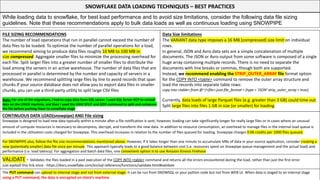
SNOWFLAKE DATA LOADING TECHNIQUES – BEST PRACTICES
FILE SIZING RECOMMENDATIONS
The number of load operations that run in parallel cannot exceed the number of
data files to be loaded. To optimize the number of parallel operations for a load,
we recommend aiming to produce data files roughly 10 MB to 100 MB in
size compressed. Aggregate smaller files to minimize the processing overhead for
each file. Split larger files into a greater number of smaller files to distribute the
load among the servers in an active warehouse. The number of data files that are
processed in parallel is determined by the number and capacity of servers in a
warehouse. We recommend splitting large files by line to avoid records that span
chunks.If your source database does not allow you to export data files in smaller
chunks, you can use a third-party utility to split large CSV files
Note: For one of the migrations, I had to copy data from SQL server. I used SQL Server BCP to unload
data on the LINUX machine, and then I used the UNIX SPLIT and GZIP command to split and compress
the file before pushing them to snowflake stage
While loading data to snowflake, for best load performance and to avoid size limitations, consider the following data file sizing
guidelines. Note that these recommendations apply to bulk data loads as well as continuous loading using SNOWPIPE
Data Size limitations
The VARIANT data type imposes a 16 MB (compressed) size limit on individual
rows.
In general, JSON and Avro data sets are a simple concatenation of multiple
documents. The JSON or Avro output from some software is composed of a single
huge array containing multiple records. There is no need to separate the
documents with line breaks or commas, though both are supported.
Instead, we recommend enabling the STRIP_OUTER_ARRAY file format option
for the COPY INTO <table> command to remove the outer array structure and
load the records into separate table rows:
copy into <table> from @~/<file>.json file_format = (type = 'JSON' strip_outer_array = true);
Currently, data loads of large Parquet files (e.g. greater than 3 GB) could time out.
Split large files into files 1 GB in size (or smaller) for loading.
CONTINUOUS DATA LOAD(snowpipe) AND File sizing
Snowpipe is designed to load new data typically within a minute after a file notification is sent; however, loading can take significantly longer for really large files or in cases where an unusual
amount of compute resources is necessary to decompress, decrypt, and transform the new data. In addition to resource consumption, an overhead to manage files in the internal load queue is
included in the utilization costs charged for Snowpipe. This overhead increases in relation to the number of files queued for loading. Snowpipe charges 0.06 credits per 1000 files queued.
For SNOWPIPE also, follow the file size recommendations mentioned above. However, If it takes longer than one minute to accumulate MBs of data in your source application, consider creating a
new (potentially smaller) data file once per minute. This approach typically leads to a good balance between cost (i.e. resources spent on Snowpipe queue management and the actual load) and
performance (i.e. load latency). For aggregation and batch data files, one convenient option is to use Amazon Kinesis Firehose
VALIDATE - Validates the files loaded in a past execution of the COPY INTO <table> command and returns all the errors encountered during the load, rather than just the first error
Just eyeball this link once - https://docs.snowflake.com/en/sql-reference/functions/validate.html#validate
The PUT command can upload to internal stage and not from external stage. It can be run from SNOWSQL or your python code but not from WEB UI. When data is staged to an internal stage
using a PUT command, the data is encrypted on client’s machine
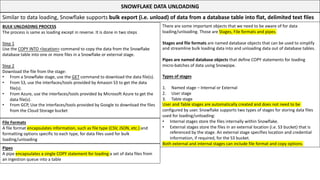
SNOWFLAKE DATA UNLOADING
BULK UNLOADING PROCESS
The process is same as loading except in reverse. It is done in two steps
Step 1
Use the COPY INTO <location> command to copy the data from the Snowflake
database table into one or more files in a Snowflake or external stage.
Step 2
Download the file from the stage:
• From a Snowflake stage, use the GET command to download the data file(s).
• From S3, use the interfaces/tools provided by Amazon S3 to get the data
file(s).
• From Azure, use the interfaces/tools provided by Microsoft Azure to get the
data file(s).
• From GCP, Use the interfaces/tools provided by Google to download the files
from the Cloud Storage bucket
Similar to data loading, Snowflake supports bulk export (i.e. unload) of data from a database table into flat, delimited text files
There are some important objects that we need to be aware of for data
loading/unloading. Those are Stages, File formats and pipes.
Stages and file formats are named database objects that can be used to simplify
and streamline bulk loading data into and unloading data out of database tables.
Pipes are named database objects that define COPY statements for loading
micro-batches of data using Snowpipe.
Types of stages
1. Named stage – Internal or External
2. User stage
3. Table stage
User and Table stages are automatically created and does not need to be
configured by user. Snowflake supports two types of stages for storing data files
used for loading/unloading:
• Internal stages store the files internally within Snowflake.
• External stages store the files in an external location (i.e. S3 bucket) that is
referenced by the stage. An external stage specifies location and credential
information, if required, for the S3 bucket.
Both external and internal stages can include file format and copy options.
File Formats
A file format encapsulates information, such as file type (CSV, JSON, etc.) and
formatting options specific to each type, for data files used for bulk
loading/unloading
Pipes
A pipe encapsulates a single COPY statement for loading a set of data files from
an ingestion queue into a table
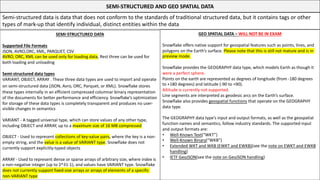
SEMI-STRUCTURED AND GEO SPATIAL DATA
SEMI-STRUCTURED DATA
Supported File Formats
JSON, AVRO,ORC, XML, PARQUET, CSV
AVRO, ORC, XML can be used only for loading data, Rest three can be used for
both loading and unloading
Semi-structured data types
VARIANT, OBJECT, ARRAY . These three data types are used to import and operate
on semi-structured data (JSON, Avro, ORC, Parquet, or XML). Snowflake stores
these types internally in an efficient compressed columnar binary representation
of the documents for better performance and efficiency. Snowflake’s optimization
for storage of these data types is completely transparent and produces no user-
visible changes in semantics
VARIANT - A tagged universal type, which can store values of any other type,
including OBJECT and ARRAY, up to a maximum size of 16 MB compressed
OBJECT - Used to represent collections of key-value pairs, where the key is a non-
empty string, and the value is a value of VARIANT type. Snowflake does not
currently support explicitly-typed objects
ARRAY - Used to represent dense or sparse arrays of arbitrary size, where index is
a non-negative integer (up to 2^31-1), and values have VARIANT type. Snowflake
does not currently support fixed-size arrays or arrays of elements of a specific
non-VARIANT type
Semi-structured data is data that does not conform to the standards of traditional structured data, but it contains tags or other
types of mark-up that identify individual, distinct entities within the data
GEO SPATIAL DATA – WILL NOT BE IN EXAM
Snowflake offers native support for geospatial features such as points, lines, and
polygons on the Earth’s surface. Please note that this is still not mature and is in
preview mode.
Snowflake provides the GEOGRAPHY data type, which models Earth as though it
were a perfect sphere.
Points on the earth are represented as degrees of longitude (from -180 degrees
to +180 degrees) and latitude (-90 to +90).
Altitude is currently not supported.
Line segments are interpreted as geodesic arcs on the Earth’s surface.
Snowflake also provides geospatial functions that operate on the GEOGRAPHY
data type.
The GEOGRAPHY data type’s input and output formats, as well as the geospatial
function names and semantics, follow industry standards. The supported input
and output formats are:
• Well-Known Text(“WKT”)
• Well-Known Binary(“WKB”)
• Extended WKT and WKB (EWKT and EWKB)(see the note on EWKT and EWKB
handling)
• IETF GeoJSON(see the note on GeoJSON handling)
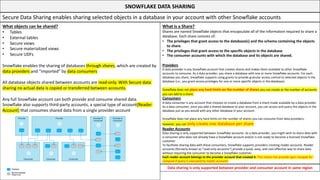
SNOWFLAKE DATA SHARING
What objects can be shared?
• Tables
• External tables
• Secure views
• Secure materialized views
• Secure UDFs
Snowflake enables the sharing of databases through shares, which are created by
data providers and “imported” by data consumers
All database objects shared between accounts are read-only. With Secure data
sharing no actual data is copied or transferred between accounts.
Any full Snowflake account can both provide and consume shared data.
Snowflake also supports third-party accounts, a special type of account(Reader
Account) that consumes shared data from a single provider account
Secure Data Sharing enables sharing selected objects in a database in your account with other Snowflake accounts
What is a Share?
Shares are named Snowflake objects that encapsulate all of the information required to share a
database. Each share consists of:
• The privileges that grant access to the database(s) and the schema containing the objects
to share.
• The privileges that grant access to the specific objects in the database.
• The consumer accounts with which the database and its objects are shared.
Providers
A data provider is any Snowflake account that creates shares and makes them available to other Snowflake
accounts to consume. As a data provider, you share a database with one or more Snowflake accounts. For each
database you share, Snowflake supports using grants to provide granular access control to selected objects in the
database (i.e., you grant access privileges for one or more specific objects in the database).
Snowflake does not place any hard limits on the number of shares you can create or the number of accounts
you can add to a share.
Consumers
A data consumer is any account that chooses to create a database from a share made available by a data provider.
As a data consumer, once you add a shared database to your account, you can access and query the objects in the
database just as you would with any other database in your account.
Snowflake does not place any hard limits on the number of shares you can consume from data providers;
however, you can only create one database per share
Reader Accounts
Data sharing is only supported between Snowflake accounts. As a data provider, you might wish to share data with
a consumer who does not already have a Snowflake account and/or is not ready to become a licensed Snowflake
customer.
To facilitate sharing data with these consumers, Snowflake supports providers creating reader accounts. Reader
accounts (formerly known as “read-only accounts”) provide a quick, easy, and cost-effective way to share data
without requiring the consumer to become a Snowflake customer.
Each reader account belongs to the provider account that created it. This means the provider gets charged for
compute if query is executed by reader accounts
Data sharing is only supported between provider and consumer account in same region
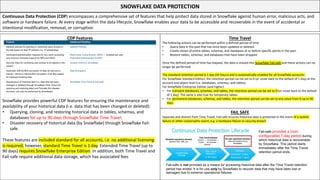
SNOWFLAKE DATA PROTECTION
CDP Features
Continuous Data Protection (CDP) encompasses a comprehensive set of features that help protect data stored in Snowflake against human error, malicious acts, and
software or hardware failure. At every stage within the data lifecycle, Snowflake enables your data to be accessible and recoverable in the event of accidental or
intentional modification, removal, or corruption
Time Travel
The following actions can be performed within a defined period of time
• Query data in the past that has since been updated or deleted.
• Create clones of entire tables, schemas, and databases at or before specific points in the past.
• Restore tables, schemas, and databases that have been dropped.
Once the defined period of time has elapsed, the data is moved into Snowflake Fail-safe and these actions can no
longer be performed.
The standard retention period is 1 day (24 hours) and is automatically enabled for all Snowflake accounts:
For Snowflake Standard Edition, the retention period can be set to 0 (or unset back to the default of 1 day) at the
account and object level (i.e. databases, schemas, and tables).
For Snowflake Enterprise Edition (and higher):
• For transient databases, schemas, and tables, the retention period can be set to 0 (or unset back to the default
of 1 day). The same is also true for temporary tables.
• For permanent databases, schemas, and tables, the retention period can be set to any value from 0 up to 90
days.
Snowflake provides powerful CDP features for ensuring the maintenance and
availability of your historical data (i.e. data that has been changed or deleted):
• Querying, cloning, and restoring historical data in tables, schemas, and
databases for up to 90 days through Snowflake Time Travel.
• Disaster recovery of historical data (by Snowflake) through Snowflake Fail-
safe.
These features are included standard for all accounts, i.e. no additional licensing
is required; however, standard Time Travel is 1 day. Extended Time Travel (up to
90 days) requires Snowflake Enterprise Edition. In addition, both Time Travel and
Fail-safe require additional data storage, which has associated fees
FAIL SAFE
Separate and distinct from Time Travel, Fail-safe ensures historical data is protected in the event of a system
failure or other catastrophic event, e.g. a hardware failure or security breach
Fail-safe provides a (non-
configurable) 7-day period during
which historical data is recoverable
by Snowflake. This period starts
immediately after the Time Travel
retention period ends.
Fail-safe is not provided as a means for accessing historical data after the Time Travel retention
period has ended. It is for use only by Snowflake to recover data that may have been lost or
damaged due to extreme operational failures
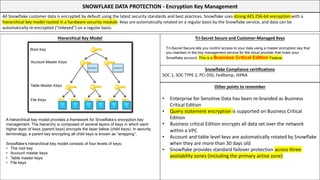
SNOWFLAKE DATA PROTECTION - Encryption Key Management
Hierarchical Key Model
All Snowflake customer data is encrypted by default using the latest security standards and best practices. Snowflake uses strong AES 256-bit encryption with a
hierarchical key model rooted in a hardware security module. Keys are automatically rotated on a regular basis by the Snowflake service, and data can be
automatically re-encrypted (“rekeyed”) on a regular basis.
Tri-Secret Secure and Customer-Managed Keys
A hierarchical key model provides a framework for Snowflake’s encryption key
management. The hierarchy is composed of several layers of keys in which each
higher layer of keys (parent keys) encrypts the layer below (child keys). In security
terminology, a parent key encrypting all child keys is known as “wrapping”.
Snowflake’s hierarchical key model consists of four levels of keys:
• The root key
• Account master keys
• Table master keys
• File keys
Tri-Secret Secure lets you control access to your data using a master encryption key that
you maintain in the key management service for the cloud provider that hosts your
Snowflake account. This is a Business Critical Edition Feature
Snowflake Compliance certifications
SOC 1, SOC TYPE 2, PCI DSS, FedRamp, HIPAA
Other points to remember
• Enterprise for Sensitive Data has been re-branded as Business
Critical Edition
• Query statement encryption is supported on Business Critical
Edition
• Business critical Edition encrypts all data set over the network
within a VPC
• Account and table level keys are automatically rotated by Snowflake
when they are more than 30 days old
• Snowflake provides standard failover protection across three
availability zones (including the primary active zone)
SNOWFLAKE PERFORMANCE
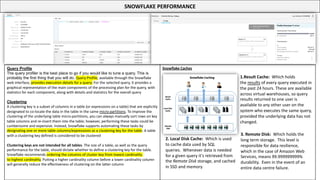
Query Profile
The query profiler is the best place to go if you would like to tune a query. This is
probably the first thing that you will do. Query Profile, available through the Snowflake
web interface, provides execution details for a query. For the selected query, it provides a
graphical representation of the main components of the processing plan for the query, with
statistics for each component, along with details and statistics for the overall query
Clustering
A clustering key is a subset of columns in a table (or expressions on a table) that are explicitly
designated to co-locate the data in the table in the same micro-partitions. To improve the
clustering of the underlying table micro-partitions, you can always manually sort rows on key
table columns and re-insert them into the table; however, performing these tasks could be
cumbersome and expensive. Instead, Snowflake supports automating these tasks by
designating one or more table columns/expressions as a clustering key for the table. A table
with a clustering key defined is considered to be clustered
Clustering keys are not intended for all tables. The size of a table, as well as the query
performance for the table, should dictate whether to define a clustering key for the table.
Snowflake recommends ordering the columns of cluster key from lowest cardinality
to highest cardinality. Putting a higher cardinality column before a lower cardinality column
will generally reduce the effectiveness of clustering on the latter column
Snowflake Caches
1.Result Cache: Which holds
the results of every query executed in
the past 24 hours. These are available
across virtual warehouses, so query
results returned to one user is
available to any other user on the
system who executes the same query,
provided the underlying data has not
changed.
2. Local Disk Cache: Which is used
to cache data used by SQL
queries. Whenever data is needed
for a given query it's retrieved from
the Remote Disk storage, and cached
in SSD and memory
3. Remote Disk: Which holds the
long term storage. This level is
responsible for data resilience,
which in the case of Amazon Web
Services, means 99.999999999%
durability. Even in the event of an
entire data centre failure.

Snowflake_Cheat_Sheet_Snowflake_Cheat_Sheet

  • 1.
  • 2.
    How should youuse this cheatsheet?
  • 3.
    SNOWFLAKE ARCHITECTURE OVERVIEW SNOWFLAKEis a shared-data multi cluster MPP architecture It has three key layers • Database storage • Query Processing • Cloud Services Database Storage • When data is loaded into Snowflake, Snowflake reorganizes that data into its internal optimized, compressed, columnar format. Snowflake stores this optimized data in cloud storage. Query Processing • Query execution is performed in the processing layer. Snowflake processes queries using “virtual warehouses”. Each virtual warehouse is an MPP compute cluster composed of multiple compute nodes allocated by Snowflake from a cloud provider. Cloud Services • The cloud services layer is a collection of services that coordinate activities across Snowflake. These services tie together all of the different components of Snowflake in order to process user requests, from login to query dispatch. The cloud services layer also runs on compute instances provisioned by Snowflake from the cloud provider. Authentication, Infra management, Metadata management, Query parsing, Access control happens in cloud services Snowflake is supported on all the three cloud providers • GCP – GCP support started from this year • AWS • AZURE When you setup a new snowflake account, you specify the below information • Choose a cloud infrastructure provider • Choose a snowflake edition • Choose a geographic deployment region With respect to snowflake account structure, please remember • Different editions of Snowflake instances require separate accounts • Snowflake instances in different regions require separate accounts A snowflake is a pure SaaS offering because • No hardware is required to be purchased or procured • No maintenance upgrades or patches are required to be installed • Transparent releases do not require user intervention Please remember this. This is very very important You will come across people who will suggest to use Snowflake for transactional workload. This is a BIG NO. Snowflake should not be used for transactional workload since it is not designed to do so. Why? Because micro-partitions are immutable. So every insert in Snowflake creates a new micro partition. So if you are inserting one row at a time, you are creating a micro partition for each insert operation. If you do a bulk insert, you are reducing the number of micro-partitions that you are creating. So, for snowflake inserting a single row vs inserting 100,000 rows will take almost the same amount of time
  • 4.
    SNOWFLAKE VIRTUAL WAREHOUSE Avirtual warehouse, often referred to simply as a “warehouse”, is a cluster of compute resources in Snowflake. A warehouse provides the required resources, such as CPU, memory, and temporary storage, to perform the operations that require compute Increasing the size of a warehouse does not always improve data loading performance. Data loading performance is influenced more by the number of files being loaded (and the size of each file) than the size of the warehouse. The size of a warehouse can impact the amount of time required to execute queries submitted to the warehouse, particularly for larger, more complex queries. In general, query performance scales linearly with warehouse size because additional compute resources are provisioned with each size increase
  • 5.
    SNOWFLAKE VIRTUAL WAREHOUSE- Continued A virtual warehouse, often referred to simply as a “warehouse”, is a cluster of compute resources in Snowflake. A warehouse provides the required resources, such as CPU, memory, and temporary storage, to perform the operations that require compute Auto-suspension and Auto-resumption A warehouse can be set to automatically resume or suspend, based on activity By default, auto-suspend is enabled. Snowflake automatically suspends the warehouse if it is inactive for the specified period of time. By default, auto-resume is enabled. Snowflake automatically resumes the warehouse when any statement that requires a warehouse is submitted and the warehouse is the current warehouse for the session Multi-Cluster Warehouse Multi-cluster warehouses enable you to scale compute resources to manage your user and query concurrency needs as they change, such as during peak and off hours A multi-cluster warehouse is defined by specifying the following Properties • Maximum number of server clusters, greater than 1 (up to 10). • Minimum number of server clusters, equal to or less than the maximum (up to 10). There are two modes for multi-cluster warehouse Maximized - This mode is enabled by specifying the same value for both maximum and minimum clusters Auto-scale - This mode is enabled by specifying different values f or maximum and minimum clusters
  • 6.
    SNOWFLAKE STORAGE Snowflake hasa shared data architecture where all virtual warehouses has access to the same storage. How is data stored in snowflake All data in Snowflake tables is automatically divided into micro-partitions, which are contiguous units of storage. Each micro-partition contains between 50 MB and 500 MB of uncompressed data (note that the actual size in Snowflake is smaller because data is always stored compressed) Snowflake stores metadata about all rows stored in a micro-partition, including: • The range of values for each of the columns in the micro-partition. • The number of distinct values. • Additional properties used for both optimization and efficient query processing. Snowflake maintains clustering metadata for the micro-partitions in a table, including: • The total number of micro-partitions that comprise the table. • The number of micro-partitions containing values that overlap with each other (in a specified subset of table columns). • The depth of the overlapping micro-partitions. Remember this Snowflake has two key features with respect to storage architecture 1. Time Travel 2. Zero-copy cloning The clustering depth for a populated table measures the average depth (1 or greater) of the overlapping micro-partitions for specified columns in a table. The smaller the average depth, the better clustered the table is with regards to the specified columns What are the types of tables in Snowflake Other important things to remember • Secure views are less performant than normal views • Materialized views are automatically and transparently maintained by Snowflake • Data accessed through materialized views is always current • Snowflake query optimizer, when evaluating secure views, bypasses certain optimizations used for regular views. This might result in some impact on query performance for secure views • Cloning in snowflake does not copy data only maps the existing micro partitions to new table
  • 7.
    Programmatic Interface Snowflake supportsdeveloping applications using many popular programming languages and development platforms. Using native clients (connectors, drivers, etc.) provided by Snowflake, you can develop applications using any of the following programmatic interfaces: SNOWFLAKE INTERFACES AND CONNECTIVITY TWO INTERFACES TO SNOWFLAKE Web Interface The Snowflake web interface is easy to use and powerful. You can use it to perform almost every task that can be performed using SQL and the command line, including: 1. Creating and managing users and other account-level objects (if you have the necessary administrator roles). 2. Creating and using virtual warehouses. 3. Creating and modifying databases and all database objects (schemas, tables, views, etc.). 4. Loading data into tables. 5. Submitting and monitoring queries. Snowflake menu bar has 10 menu items 7. Preview App/Snowsight – New addition 8. Partner connect 9. Help 10. User management 1. Databases 2. Shares 3. Data Marketplace – New addition 4. Warehouses 5. Worksheets 6. History
  • 8.
    SNOWFLAKE UPDATES USERADMIN isa new role in SNOWFLAKE Below are the System defined roles ACCOUNTADMIN(aka Account Administrator) Role that encapsulates the SYSADMIN and SECURITYADMIN system-defined roles. It is the top-level role in the system and should be granted only to a limited/controlled number of users in your account. SECURITYADMIN(aka Security Administrator) Role that can manage any object grant globally, as well as create, monitor, and manage users and roles. More specifically, this role: Is granted the MANAGE GRANTS security privilege to be able to modify any grant, including revoking it. Inherits the privileges of the USERADMIN role via the system role hierarchy (e.g. USERADMIN role is granted to SECURITYADMIN). USERADMIN(aka User and Role Administrator) Role that is dedicated to user and role management only. More specifically, this role: • Is granted the CREATE USER and CREATE ROLE security privileges. • Can create and manage users and roles in the account (assuming that ownership of those roles or users has not been transferred to another role). SYSADMIN(aka System Administrator) Role that has privileges to create warehouses and databases (and other objects) in an account. If, as recommended, you create a role hierarchy that ultimately assigns all custom roles to the SYSADMIN role, this role also has the ability to grant privileges on warehouses, databases, and other objects to other roles. PUBLIC Pseudo-role that is automatically granted to every user and every role in your account. The PUBLIC role can own securable objects, just like any other role; however, the objects owned by the role are, by definition, available to every other user and role in your account. This role is typically used in cases where explicit access control is not needed and all users are viewed as equal with regard to their access rights. Non-GCP accounts now have ”Data Marketplace” and “Preview App”
  • 9.
    SNOWFLAKE ZERO COPYCLONING ZERO-COPY cloning – The name is apt for this feature. In Snowflake, cloning data takes seconds. Because Snowflake does not physically copy data, it continues to refer to the original data. It only starts new record when you start updating or change the data. So you are paying for the unique data you store only once. Cloning has other benefits too. You can update data in test with a single command or automatically. Promote any test data to other environments in seconds To create a clone, your current role must have the following privilege(s) on the source object: • Tables: SELECT • Pipes, Streams, Tasks: OWNERSHIP • Other objects: USAGE In addition, to clone a schema or an object within a schema, your current role must have required privileges on the container object(s) for both the source and the clone. For tables, Snowflake only supports cloning permanent and transient tables; temporary tables cannot be cloned. For databases and schemas, cloning is recursive: • Cloning a database clones all the schemas and other objects in the database. • Cloning a schema clones all the contained objects in the schema. However, the following object types are not cloned: • External tables • Internal (Snowflake) stages For databases, schemas, and tables, a clone does not contribute to the overall data storage for the object until operations are performed on the clone that modify existing data or add new data, such as: • Adding, deleting, or modifying rows in a cloned table. • Creating a new, populated table in a cloned schema. Cloning a table replicates the structure, data, and certain other properties (e.g. STAGE FILE FORMAT) of the source table. A cloned table does not include the load history of the source table. Data files that were loaded into a source table can be loaded again into its clones. When cloning tables, the CREATE <object> command syntax includes the COPY GRANTS keywords: • If the COPY GRANTS keywords are not included in the CREATE <object> statement, then the new object does not inherit any explicit access privileges granted on the original table but does inherit any future grants defined for the object type in the schema (using the GRANT <privileges> … TO ROLE … ON FUTURE syntax). • If the COPY GRANTS option is specified in the CREATE <object> statement, then the new object inherits any explicit access privileges granted on the original table but does not inherit any future grants defined for the object type in the schema.
  • 10.
    SNOWFLAKE DATA LOADINGTECHNIQUES (TWO TECHNIQUES) BULK LOADING USING COPY COMMAND This option enables loading batches of data from files already available in cloud storage, or copying (i.e. staging) data files from a local machine to an internal (i.e. Snowflake) cloud storage location before loading the data into tables using the COPY command Bulk loading relies on user-provided virtual warehouses, which are specified in the COPY statement. Users are required to size the warehouse appropriately to accommodate expected loads. Snowflake supports transforming data while loading it into a table using the COPY command. The transformation options include column reordering, column omission, casts, truncating text strings that exceed the target column length There is no requirement for your data files to have the same number and ordering of columns as your target table Snowflake provides the following main solutions for data loading. The best solution may depend upon the volume of data to load and the frequency of loading Continuous Loading Using Snowpipe This option is designed to load small volumes of data (i.e. micro-batches) and incrementally make them available for analysis. Snowpipe loads data within minutes after files are added to a stage and submitted for ingestion. This ensures users have the latest results, as soon as the raw data is available Snowpipe uses compute resources provided by Snowflake (i.e. a serverless compute model). These Snowflake-provided resources are automatically resized and scaled up or down as required, and are charged and itemized using per- second billing. Data ingestion is charged based upon the actual workloads For simple transformation during load, The COPY statement in a pipe definition supports the same COPY transformation options as when bulk loading data. In addition, data pipelines can leverage Snowpipe to continously load micro- batches of data into staging tables for transformation and optimization using automated tasks and the change data capture (CDC) information in streams. For complex transformations, A data pipeline enables applying complex transformations to loaded data. This workflow generally leverages Snowpipe to load “raw” data into a staging table and then uses a series of table streams and tasks to transform and optimize the new data for analysis Alternatives to Loading Data It is not always necessary to load data into Snowflake before executing queries. External tables enable querying existing data stored in external cloud storage for analysis without first loading it into Snowflake. The source of truth for the data remains in the external cloud storage. Data sets materialized in Snowflake via materialized views are read-only. This solution is especially beneficial to accounts that have a large amount of data stored in external cloud storage and only want to query a portion of the data; for example, the most recent data. Users can create materialized views on subsets of this data for improved query performance.
  • 11.
    SNOWFLAKE DATA LOADINGTECHNIQUES – BEST PRACTICES FILE SIZING RECOMMENDATIONS The number of load operations that run in parallel cannot exceed the number of data files to be loaded. To optimize the number of parallel operations for a load, we recommend aiming to produce data files roughly 10 MB to 100 MB in size compressed. Aggregate smaller files to minimize the processing overhead for each file. Split larger files into a greater number of smaller files to distribute the load among the servers in an active warehouse. The number of data files that are processed in parallel is determined by the number and capacity of servers in a warehouse. We recommend splitting large files by line to avoid records that span chunks.If your source database does not allow you to export data files in smaller chunks, you can use a third-party utility to split large CSV files Note: For one of the migrations, I had to copy data from SQL server. I used SQL Server BCP to unload data on the LINUX machine, and then I used the UNIX SPLIT and GZIP command to split and compress the file before pushing them to snowflake stage While loading data to snowflake, for best load performance and to avoid size limitations, consider the following data file sizing guidelines. Note that these recommendations apply to bulk data loads as well as continuous loading using SNOWPIPE Data Size limitations The VARIANT data type imposes a 16 MB (compressed) size limit on individual rows. In general, JSON and Avro data sets are a simple concatenation of multiple documents. The JSON or Avro output from some software is composed of a single huge array containing multiple records. There is no need to separate the documents with line breaks or commas, though both are supported. Instead, we recommend enabling the STRIP_OUTER_ARRAY file format option for the COPY INTO <table> command to remove the outer array structure and load the records into separate table rows: copy into <table> from @~/<file>.json file_format = (type = 'JSON' strip_outer_array = true); Currently, data loads of large Parquet files (e.g. greater than 3 GB) could time out. Split large files into files 1 GB in size (or smaller) for loading. CONTINUOUS DATA LOAD(snowpipe) AND File sizing Snowpipe is designed to load new data typically within a minute after a file notification is sent; however, loading can take significantly longer for really large files or in cases where an unusual amount of compute resources is necessary to decompress, decrypt, and transform the new data. In addition to resource consumption, an overhead to manage files in the internal load queue is included in the utilization costs charged for Snowpipe. This overhead increases in relation to the number of files queued for loading. Snowpipe charges 0.06 credits per 1000 files queued. For SNOWPIPE also, follow the file size recommendations mentioned above. However, If it takes longer than one minute to accumulate MBs of data in your source application, consider creating a new (potentially smaller) data file once per minute. This approach typically leads to a good balance between cost (i.e. resources spent on Snowpipe queue management and the actual load) and performance (i.e. load latency). For aggregation and batch data files, one convenient option is to use Amazon Kinesis Firehose VALIDATE - Validates the files loaded in a past execution of the COPY INTO <table> command and returns all the errors encountered during the load, rather than just the first error Just eyeball this link once - https://docs.snowflake.com/en/sql-reference/functions/validate.html#validate The PUT command can upload to internal stage and not from external stage. It can be run from SNOWSQL or your python code but not from WEB UI. When data is staged to an internal stage using a PUT command, the data is encrypted on client’s machine
  • 12.
    SNOWFLAKE DATA UNLOADING BULKUNLOADING PROCESS The process is same as loading except in reverse. It is done in two steps Step 1 Use the COPY INTO <location> command to copy the data from the Snowflake database table into one or more files in a Snowflake or external stage. Step 2 Download the file from the stage: • From a Snowflake stage, use the GET command to download the data file(s). • From S3, use the interfaces/tools provided by Amazon S3 to get the data file(s). • From Azure, use the interfaces/tools provided by Microsoft Azure to get the data file(s). • From GCP, Use the interfaces/tools provided by Google to download the files from the Cloud Storage bucket Similar to data loading, Snowflake supports bulk export (i.e. unload) of data from a database table into flat, delimited text files There are some important objects that we need to be aware of for data loading/unloading. Those are Stages, File formats and pipes. Stages and file formats are named database objects that can be used to simplify and streamline bulk loading data into and unloading data out of database tables. Pipes are named database objects that define COPY statements for loading micro-batches of data using Snowpipe. Types of stages 1. Named stage – Internal or External 2. User stage 3. Table stage User and Table stages are automatically created and does not need to be configured by user. Snowflake supports two types of stages for storing data files used for loading/unloading: • Internal stages store the files internally within Snowflake. • External stages store the files in an external location (i.e. S3 bucket) that is referenced by the stage. An external stage specifies location and credential information, if required, for the S3 bucket. Both external and internal stages can include file format and copy options. File Formats A file format encapsulates information, such as file type (CSV, JSON, etc.) and formatting options specific to each type, for data files used for bulk loading/unloading Pipes A pipe encapsulates a single COPY statement for loading a set of data files from an ingestion queue into a table
  • 13.
    SEMI-STRUCTURED AND GEOSPATIAL DATA SEMI-STRUCTURED DATA Supported File Formats JSON, AVRO,ORC, XML, PARQUET, CSV AVRO, ORC, XML can be used only for loading data, Rest three can be used for both loading and unloading Semi-structured data types VARIANT, OBJECT, ARRAY . These three data types are used to import and operate on semi-structured data (JSON, Avro, ORC, Parquet, or XML). Snowflake stores these types internally in an efficient compressed columnar binary representation of the documents for better performance and efficiency. Snowflake’s optimization for storage of these data types is completely transparent and produces no user- visible changes in semantics VARIANT - A tagged universal type, which can store values of any other type, including OBJECT and ARRAY, up to a maximum size of 16 MB compressed OBJECT - Used to represent collections of key-value pairs, where the key is a non- empty string, and the value is a value of VARIANT type. Snowflake does not currently support explicitly-typed objects ARRAY - Used to represent dense or sparse arrays of arbitrary size, where index is a non-negative integer (up to 2^31-1), and values have VARIANT type. Snowflake does not currently support fixed-size arrays or arrays of elements of a specific non-VARIANT type Semi-structured data is data that does not conform to the standards of traditional structured data, but it contains tags or other types of mark-up that identify individual, distinct entities within the data GEO SPATIAL DATA – WILL NOT BE IN EXAM Snowflake offers native support for geospatial features such as points, lines, and polygons on the Earth’s surface. Please note that this is still not mature and is in preview mode. Snowflake provides the GEOGRAPHY data type, which models Earth as though it were a perfect sphere. Points on the earth are represented as degrees of longitude (from -180 degrees to +180 degrees) and latitude (-90 to +90). Altitude is currently not supported. Line segments are interpreted as geodesic arcs on the Earth’s surface. Snowflake also provides geospatial functions that operate on the GEOGRAPHY data type. The GEOGRAPHY data type’s input and output formats, as well as the geospatial function names and semantics, follow industry standards. The supported input and output formats are: • Well-Known Text(“WKT”) • Well-Known Binary(“WKB”) • Extended WKT and WKB (EWKT and EWKB)(see the note on EWKT and EWKB handling) • IETF GeoJSON(see the note on GeoJSON handling)
  • 14.
    SNOWFLAKE DATA SHARING Whatobjects can be shared? • Tables • External tables • Secure views • Secure materialized views • Secure UDFs Snowflake enables the sharing of databases through shares, which are created by data providers and “imported” by data consumers All database objects shared between accounts are read-only. With Secure data sharing no actual data is copied or transferred between accounts. Any full Snowflake account can both provide and consume shared data. Snowflake also supports third-party accounts, a special type of account(Reader Account) that consumes shared data from a single provider account Secure Data Sharing enables sharing selected objects in a database in your account with other Snowflake accounts What is a Share? Shares are named Snowflake objects that encapsulate all of the information required to share a database. Each share consists of: • The privileges that grant access to the database(s) and the schema containing the objects to share. • The privileges that grant access to the specific objects in the database. • The consumer accounts with which the database and its objects are shared. Providers A data provider is any Snowflake account that creates shares and makes them available to other Snowflake accounts to consume. As a data provider, you share a database with one or more Snowflake accounts. For each database you share, Snowflake supports using grants to provide granular access control to selected objects in the database (i.e., you grant access privileges for one or more specific objects in the database). Snowflake does not place any hard limits on the number of shares you can create or the number of accounts you can add to a share. Consumers A data consumer is any account that chooses to create a database from a share made available by a data provider. As a data consumer, once you add a shared database to your account, you can access and query the objects in the database just as you would with any other database in your account. Snowflake does not place any hard limits on the number of shares you can consume from data providers; however, you can only create one database per share Reader Accounts Data sharing is only supported between Snowflake accounts. As a data provider, you might wish to share data with a consumer who does not already have a Snowflake account and/or is not ready to become a licensed Snowflake customer. To facilitate sharing data with these consumers, Snowflake supports providers creating reader accounts. Reader accounts (formerly known as “read-only accounts”) provide a quick, easy, and cost-effective way to share data without requiring the consumer to become a Snowflake customer. Each reader account belongs to the provider account that created it. This means the provider gets charged for compute if query is executed by reader accounts Data sharing is only supported between provider and consumer account in same region
  • 15.
    SNOWFLAKE DATA PROTECTION CDPFeatures Continuous Data Protection (CDP) encompasses a comprehensive set of features that help protect data stored in Snowflake against human error, malicious acts, and software or hardware failure. At every stage within the data lifecycle, Snowflake enables your data to be accessible and recoverable in the event of accidental or intentional modification, removal, or corruption Time Travel The following actions can be performed within a defined period of time • Query data in the past that has since been updated or deleted. • Create clones of entire tables, schemas, and databases at or before specific points in the past. • Restore tables, schemas, and databases that have been dropped. Once the defined period of time has elapsed, the data is moved into Snowflake Fail-safe and these actions can no longer be performed. The standard retention period is 1 day (24 hours) and is automatically enabled for all Snowflake accounts: For Snowflake Standard Edition, the retention period can be set to 0 (or unset back to the default of 1 day) at the account and object level (i.e. databases, schemas, and tables). For Snowflake Enterprise Edition (and higher): • For transient databases, schemas, and tables, the retention period can be set to 0 (or unset back to the default of 1 day). The same is also true for temporary tables. • For permanent databases, schemas, and tables, the retention period can be set to any value from 0 up to 90 days. Snowflake provides powerful CDP features for ensuring the maintenance and availability of your historical data (i.e. data that has been changed or deleted): • Querying, cloning, and restoring historical data in tables, schemas, and databases for up to 90 days through Snowflake Time Travel. • Disaster recovery of historical data (by Snowflake) through Snowflake Fail- safe. These features are included standard for all accounts, i.e. no additional licensing is required; however, standard Time Travel is 1 day. Extended Time Travel (up to 90 days) requires Snowflake Enterprise Edition. In addition, both Time Travel and Fail-safe require additional data storage, which has associated fees FAIL SAFE Separate and distinct from Time Travel, Fail-safe ensures historical data is protected in the event of a system failure or other catastrophic event, e.g. a hardware failure or security breach Fail-safe provides a (non- configurable) 7-day period during which historical data is recoverable by Snowflake. This period starts immediately after the Time Travel retention period ends. Fail-safe is not provided as a means for accessing historical data after the Time Travel retention period has ended. It is for use only by Snowflake to recover data that may have been lost or damaged due to extreme operational failures
  • 16.
    SNOWFLAKE DATA PROTECTION- Encryption Key Management Hierarchical Key Model All Snowflake customer data is encrypted by default using the latest security standards and best practices. Snowflake uses strong AES 256-bit encryption with a hierarchical key model rooted in a hardware security module. Keys are automatically rotated on a regular basis by the Snowflake service, and data can be automatically re-encrypted (“rekeyed”) on a regular basis. Tri-Secret Secure and Customer-Managed Keys A hierarchical key model provides a framework for Snowflake’s encryption key management. The hierarchy is composed of several layers of keys in which each higher layer of keys (parent keys) encrypts the layer below (child keys). In security terminology, a parent key encrypting all child keys is known as “wrapping”. Snowflake’s hierarchical key model consists of four levels of keys: • The root key • Account master keys • Table master keys • File keys Tri-Secret Secure lets you control access to your data using a master encryption key that you maintain in the key management service for the cloud provider that hosts your Snowflake account. This is a Business Critical Edition Feature Snowflake Compliance certifications SOC 1, SOC TYPE 2, PCI DSS, FedRamp, HIPAA Other points to remember • Enterprise for Sensitive Data has been re-branded as Business Critical Edition • Query statement encryption is supported on Business Critical Edition • Business critical Edition encrypts all data set over the network within a VPC • Account and table level keys are automatically rotated by Snowflake when they are more than 30 days old • Snowflake provides standard failover protection across three availability zones (including the primary active zone)
  • 17.
    SNOWFLAKE PERFORMANCE Query Profile Thequery profiler is the best place to go if you would like to tune a query. This is probably the first thing that you will do. Query Profile, available through the Snowflake web interface, provides execution details for a query. For the selected query, it provides a graphical representation of the main components of the processing plan for the query, with statistics for each component, along with details and statistics for the overall query Clustering A clustering key is a subset of columns in a table (or expressions on a table) that are explicitly designated to co-locate the data in the table in the same micro-partitions. To improve the clustering of the underlying table micro-partitions, you can always manually sort rows on key table columns and re-insert them into the table; however, performing these tasks could be cumbersome and expensive. Instead, Snowflake supports automating these tasks by designating one or more table columns/expressions as a clustering key for the table. A table with a clustering key defined is considered to be clustered Clustering keys are not intended for all tables. The size of a table, as well as the query performance for the table, should dictate whether to define a clustering key for the table. Snowflake recommends ordering the columns of cluster key from lowest cardinality to highest cardinality. Putting a higher cardinality column before a lower cardinality column will generally reduce the effectiveness of clustering on the latter column Snowflake Caches 1.Result Cache: Which holds the results of every query executed in the past 24 hours. These are available across virtual warehouses, so query results returned to one user is available to any other user on the system who executes the same query, provided the underlying data has not changed. 2. Local Disk Cache: Which is used to cache data used by SQL queries. Whenever data is needed for a given query it's retrieved from the Remote Disk storage, and cached in SSD and memory 3. Remote Disk: Which holds the long term storage. This level is responsible for data resilience, which in the case of Amazon Web Services, means 99.999999999% durability. Even in the event of an entire data centre failure.