Branching and Loops
INFORMATION AND COMMUNICATION TECHNOLOGY – 9
GRAYZON L. GONZALES
Objectives
To be familiarize on the use of branching operation.
To know how endless execution works.
To understand the use and types of the Loops.
Branching
•Remember, in the second chapter you learned that the computer processes a
program one statement at a time, in order from the top to bottom.
•However, there’s a special statement that can make the computer jump to
another statement out of order.
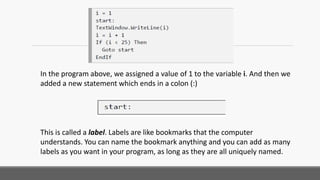
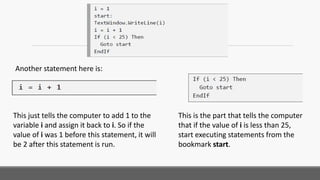
In the program above, we assigned a value of 1 to the variable i. And then we
added a new statement which ends in a colon (:)
This is called a label. Labels are like bookmarks that the computer
understands. You can name the bookmark anything and you can add as many
labels as you want in your program, as long as they are all uniquely named.
Another statement here is:
This just tells the computer to add 1 to the
variable i and assign it back to i. So if the
value of i was 1 before this statement, it will
be 2 after this statement is run.
This is the part that tells the computer
that if the value of i is less than 25,
start executing statements from the
bookmark start.
Endless Execution
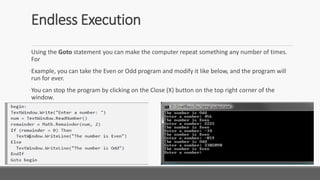
•Using the Goto statement you can make the computer repeat something any number of times.
For
•Example, you can take the Even or Odd program and modify it like below, and the program will
run for ever.
•You can stop the program by clicking on the Close (X) button on the top right corner of the
window.
For Loop
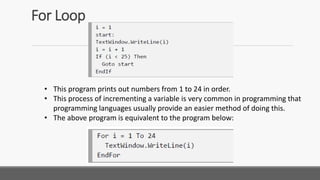
• This program prints out numbers from 1 to 24 in order.
• This process of incrementing a variable is very common in programming that
programming languages usually provide an easier method of doing this.
• The above program is equivalent to the program below:
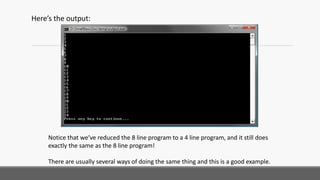
Here’s the output:
Notice that we’ve reduced the 8 line program to a 4 line program, and it still does
exactly the same as the 8 line program!
There are usually several ways of doing the same thing and this is a good example.
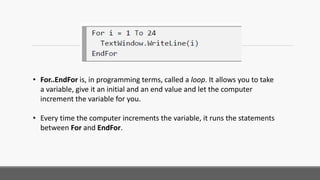
• For..EndFor is, in programming terms, called a loop. It allows you to take
a variable, give it an initial and an end value and let the computer
increment the variable for you.
• Every time the computer increments the variable, it runs the statements
between For and EndFor.
Step
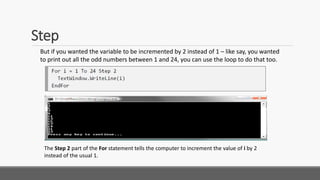
But if you wanted the variable to be incremented by 2 instead of 1 – like say, you wanted
to print out all the odd numbers between 1 and 24, you can use the loop to do that too.
The Step 2 part of the For statement tells the computer to increment the value of i by 2
instead of the usual 1.
Step
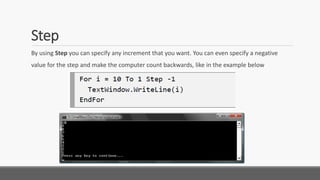
By using Step you can specify any increment that you want. You can even specify a negative
value for the step and make the computer count backwards, like in the example below
While Loop
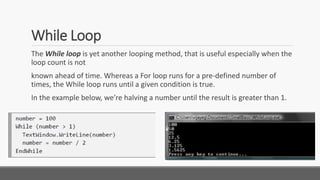
The While loop is yet another looping method, that is useful especially when the
loop count is not
known ahead of time. Whereas a For loop runs for a pre-defined number of
times, the While loop runs until a given condition is true.
In the example below, we’re halving a number until the result is greater than 1.
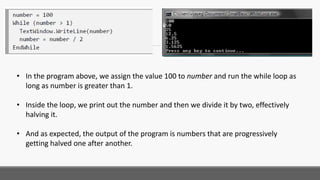
• In the program above, we assign the value 100 to number and run the while loop as
long as number is greater than 1.
• Inside the loop, we print out the number and then we divide it by two, effectively
halving it.
• And as expected, the output of the program is numbers that are progressively
getting halved one after another.
• It’ll be really hard to write this program using a For loop, because we don’t know how
many times the loop will run.
• With a while loop it’s easy to check for a condition and ask the computer to either
continue the loop or quit.
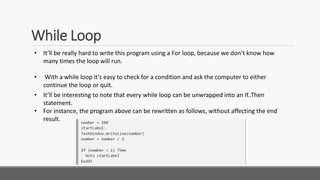
• It’ll be interesting to note that every while loop can be unwrapped into an If..Then
statement.
• For instance, the program above can be rewritten as follows, without affecting the end
result.
While Loop

Small Basic - Branching and Loop

  • 1.
    Branching and Loops INFORMATIONAND COMMUNICATION TECHNOLOGY – 9 GRAYZON L. GONZALES
  • 2.
    Objectives To be familiarizeon the use of branching operation. To know how endless execution works. To understand the use and types of the Loops.
  • 3.
    Branching •Remember, in thesecond chapter you learned that the computer processes a program one statement at a time, in order from the top to bottom. •However, there’s a special statement that can make the computer jump to another statement out of order.
  • 4.
    In the programabove, we assigned a value of 1 to the variable i. And then we added a new statement which ends in a colon (:) This is called a label. Labels are like bookmarks that the computer understands. You can name the bookmark anything and you can add as many labels as you want in your program, as long as they are all uniquely named.
  • 5.
    Another statement hereis: This just tells the computer to add 1 to the variable i and assign it back to i. So if the value of i was 1 before this statement, it will be 2 after this statement is run. This is the part that tells the computer that if the value of i is less than 25, start executing statements from the bookmark start.
  • 6.
    Endless Execution •Using theGoto statement you can make the computer repeat something any number of times. For •Example, you can take the Even or Odd program and modify it like below, and the program will run for ever. •You can stop the program by clicking on the Close (X) button on the top right corner of the window.
  • 8.
    For Loop • Thisprogram prints out numbers from 1 to 24 in order. • This process of incrementing a variable is very common in programming that programming languages usually provide an easier method of doing this. • The above program is equivalent to the program below:
  • 9.
    Here’s the output: Noticethat we’ve reduced the 8 line program to a 4 line program, and it still does exactly the same as the 8 line program! There are usually several ways of doing the same thing and this is a good example.
  • 10.
    • For..EndFor is,in programming terms, called a loop. It allows you to take a variable, give it an initial and an end value and let the computer increment the variable for you. • Every time the computer increments the variable, it runs the statements between For and EndFor.
  • 11.
    Step But if youwanted the variable to be incremented by 2 instead of 1 – like say, you wanted to print out all the odd numbers between 1 and 24, you can use the loop to do that too. The Step 2 part of the For statement tells the computer to increment the value of i by 2 instead of the usual 1.
  • 12.
    Step By using Stepyou can specify any increment that you want. You can even specify a negative value for the step and make the computer count backwards, like in the example below
  • 13.
    While Loop The Whileloop is yet another looping method, that is useful especially when the loop count is not known ahead of time. Whereas a For loop runs for a pre-defined number of times, the While loop runs until a given condition is true. In the example below, we’re halving a number until the result is greater than 1.
  • 14.
    • In theprogram above, we assign the value 100 to number and run the while loop as long as number is greater than 1. • Inside the loop, we print out the number and then we divide it by two, effectively halving it. • And as expected, the output of the program is numbers that are progressively getting halved one after another.
  • 15.
    • It’ll bereally hard to write this program using a For loop, because we don’t know how many times the loop will run. • With a while loop it’s easy to check for a condition and ask the computer to either continue the loop or quit. • It’ll be interesting to note that every while loop can be unwrapped into an If..Then statement. • For instance, the program above can be rewritten as follows, without affecting the end result. While Loop