
HIREVIETNAMESE


iPhone Training
     Lesson 2
http://www.hirevietnamese.com                           HIREVIETNAMESE

    Contents

               1      iPhone UI Design Considerations

               2      Application Layout

               3      iPhone UI Element Overview


               4      Example 2


               5      Exercise 2

                                                                    2
http://www.hirevietnamese.com                          HIREVIETNAMESE

    iPhone UI Design Considerations

     The iPhone is not a desktop system.


     The Apple iPhone is a powerful smart phone that is
      being used to improve the productivity of user. To
      design simple, successful iPhone app user interfaces,
      keep in mind the unique attributes of the iPhone.

     Eat with it, sleep with it, drink with it, live with it.


                                                                   3
http://www.hirevietnamese.com                                    HIREVIETNAMESE

    iPhone UI Design Considerations

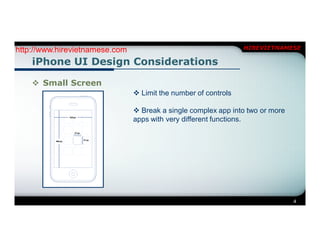
     Small Screen
                                 Limit the number of controls

                                 Break a single complex app into two or more
                                apps with very different functions.


                                                                                4
http://www.hirevietnamese.com         HIREVIETNAMESE

    iPhone UI Design Considerations

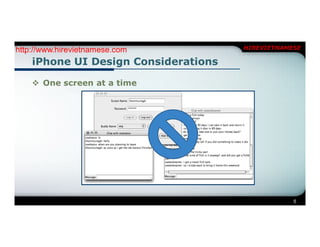
     One screen at a time


                                                  5
http://www.hirevietnamese.com                              HIREVIETNAMESE

    iPhone UI Design Considerations

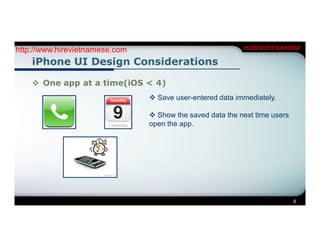
     One app at a time(iOS < 4)
                                 Save user-entered data immediately.

                                 Show the saved data the next time users
                                open the app.


                                                                            6
http://www.hirevietnamese.com                                   HIREVIETNAMESE

    iPhone UI Design Considerations

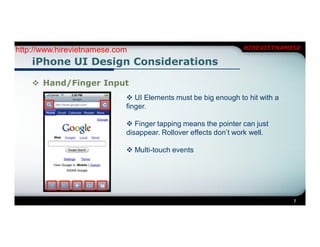
     Hand/Finger Input
                             UI Elements must be big enough to hit with a
                            finger.

                             Finger tapping means the pointer can just
                            disappear. Rollover effects don’t work well.

                             Multi-touch events


                                                                             7
http://www.hirevietnamese.com                                   HIREVIETNAMESE

    iPhone UI Design Considerations

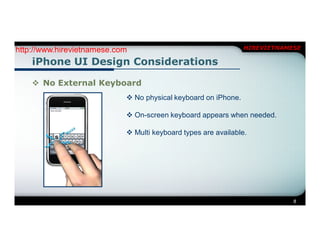
     No External Keyboard
                             No physical keyboard on iPhone.

                             On-screen keyboard appears when needed.

                             Multi keyboard types are available.


                                                                            8
http://www.hirevietnamese.com         HIREVIETNAMESE

    iPhone UI Design Considerations

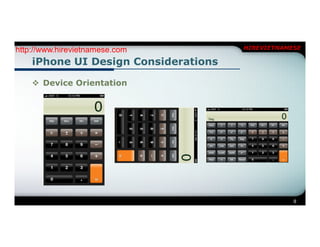
     Device Orientation


                                                  9
http://www.hirevietnamese.com                                        HIREVIETNAMESE

    iPhone UI Design Considerations

     Device Orientation
        Applications are notified when device rotates portrait to landscape and
       back.

        Can also find absolute orientation.


                                                                                   10
http://www.hirevietnamese.com                                           HIREVIETNAMESE

    iPhone UI Design Considerations

     No training
       The strongest asset of the iPhone is its ease of use. The simple user
       interface usually allows users to get their tasks done without training or
       reading online Help.


       Analyze your users, their needs and design a very simple, intuitive user
       interface that allows users to operate your app without training or Help


                                                                                    11
http://www.hirevietnamese.com          HIREVIETNAMESE

    Application Layout

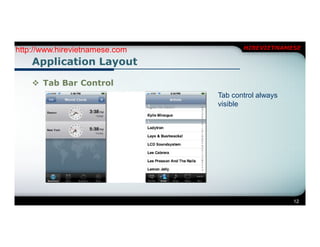
     Tab Bar Control
                                Tab control always
                                visible


                                                     12
http://www.hirevietnamese.com                                         HIREVIETNAMESE

    Application Layout

     Tab Bar Control
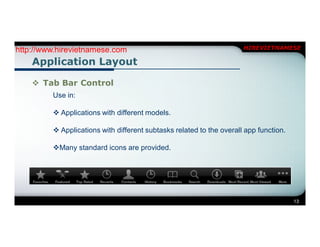
         Use in:

          Applications with different models.

          Applications with different subtasks related to the overall app function.

         Many standard icons are provided.


                                                                                       13
http://www.hirevietnamese.com   HIREVIETNAMESE

    Application Layout

     Navigation Bars


                                            14
http://www.hirevietnamese.com                  HIREVIETNAMESE

    Application Layout

     Navigation Bars
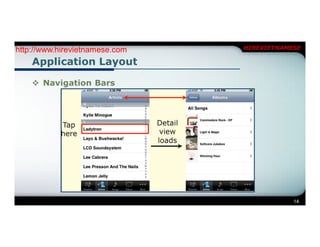
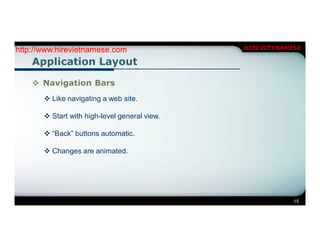
        Like navigating a web site.

        Start with high-level general view.

        “Back” buttons automatic.

        Changes are animated.


                                                           15
http://www.hirevietnamese.com   HIREVIETNAMESE

    Application Layout

     Table Views


                                            16
http://www.hirevietnamese.com                                    HIREVIETNAMESE

    Application Layout

     Table Views
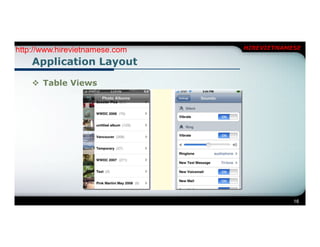
        Single column only.

        But custom cells can offer more flexibility.

        Can use multiple custom cell types in the same table.


                                                                             17
http://www.hirevietnamese.com   HIREVIETNAMESE

    Application Layout

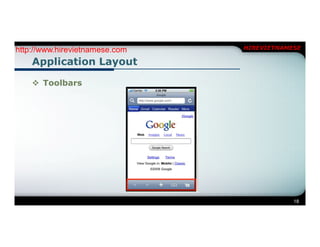
     Toolbars


                                            18
http://www.hirevietnamese.com                         HIREVIETNAMESE

    Application Layout

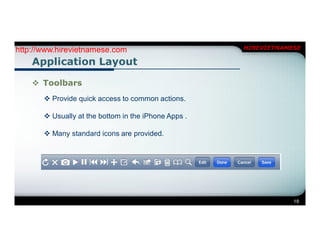
     Toolbars
        Provide quick access to common actions.

        Usually at the bottom in the iPhone Apps .

        Many standard icons are provided.


                                                                  19
http://www.hirevietnamese.com                    HIREVIETNAMESE

    iPhone UI Element Overview

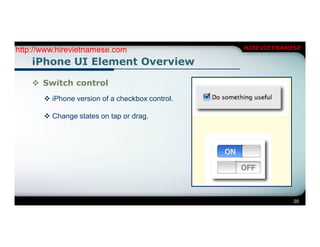
     Switch control
        iPhone version of a checkbox control.

        Change states on tap or drag.


                                                             20
http://www.hirevietnamese.com                 HIREVIETNAMESE

    iPhone UI Element Overview

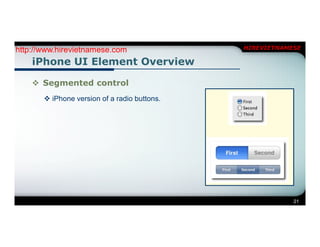
     Segmented control
        iPhone version of a radio buttons.


                                                          21
http://www.hirevietnamese.com               HIREVIETNAMESE

    iPhone UI Element Overview

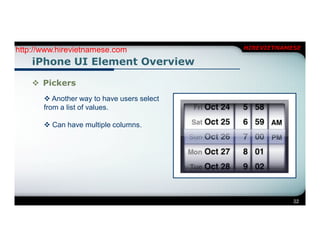
     Pickers
        Another way to have users select
       from a list of values.

        Can have multiple columns.


                                                        22
http://www.hirevietnamese.com                 HIREVIETNAMESE

    iPhone UI Element Overview

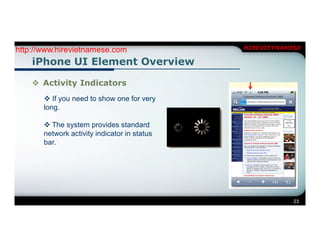
     Activity Indicators
        If you need to show one for very
       long.

        The system provides standard
       network activity indicator in status
       bar.


                                                          23
http://www.hirevietnamese.com                                  HIREVIETNAMESE

    iPhone UI Element Overview

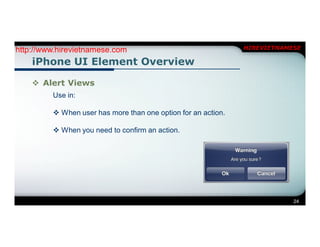
     Alert Views
         Use in:

          When user has more than one option for an action.

          When you need to confirm an action.


                                                                           24
http://www.hirevietnamese.com   HIREVIETNAMESE

    Example 2


                                            25
http://www.hirevietnamese.com   HIREVIETNAMESE

    Exercise 2


                                            26
HIREVIETNAMESE

HireVietnamese - Lesson 2

  • 1.
  • 2.
    http://www.hirevietnamese.com HIREVIETNAMESE Contents 1 iPhone UI Design Considerations 2 Application Layout 3 iPhone UI Element Overview 4 Example 2 5 Exercise 2 2
  • 3.
    http://www.hirevietnamese.com HIREVIETNAMESE iPhone UI Design Considerations  The iPhone is not a desktop system.  The Apple iPhone is a powerful smart phone that is being used to improve the productivity of user. To design simple, successful iPhone app user interfaces, keep in mind the unique attributes of the iPhone.  Eat with it, sleep with it, drink with it, live with it. 3
  • 4.
    http://www.hirevietnamese.com HIREVIETNAMESE iPhone UI Design Considerations  Small Screen  Limit the number of controls  Break a single complex app into two or more apps with very different functions. 4
  • 5.
    http://www.hirevietnamese.com HIREVIETNAMESE iPhone UI Design Considerations  One screen at a time 5
  • 6.
    http://www.hirevietnamese.com HIREVIETNAMESE iPhone UI Design Considerations  One app at a time(iOS < 4)  Save user-entered data immediately.  Show the saved data the next time users open the app. 6
  • 7.
    http://www.hirevietnamese.com HIREVIETNAMESE iPhone UI Design Considerations  Hand/Finger Input  UI Elements must be big enough to hit with a finger.  Finger tapping means the pointer can just disappear. Rollover effects don’t work well.  Multi-touch events 7
  • 8.
    http://www.hirevietnamese.com HIREVIETNAMESE iPhone UI Design Considerations  No External Keyboard  No physical keyboard on iPhone.  On-screen keyboard appears when needed.  Multi keyboard types are available. 8
  • 9.
    http://www.hirevietnamese.com HIREVIETNAMESE iPhone UI Design Considerations  Device Orientation 9
  • 10.
    http://www.hirevietnamese.com HIREVIETNAMESE iPhone UI Design Considerations  Device Orientation  Applications are notified when device rotates portrait to landscape and back.  Can also find absolute orientation. 10
  • 11.
    http://www.hirevietnamese.com HIREVIETNAMESE iPhone UI Design Considerations  No training The strongest asset of the iPhone is its ease of use. The simple user interface usually allows users to get their tasks done without training or reading online Help. Analyze your users, their needs and design a very simple, intuitive user interface that allows users to operate your app without training or Help 11
  • 12.
    http://www.hirevietnamese.com HIREVIETNAMESE Application Layout  Tab Bar Control Tab control always visible 12
  • 13.
    http://www.hirevietnamese.com HIREVIETNAMESE Application Layout  Tab Bar Control Use in:  Applications with different models.  Applications with different subtasks related to the overall app function. Many standard icons are provided. 13
  • 14.
    http://www.hirevietnamese.com HIREVIETNAMESE Application Layout  Navigation Bars 14
  • 15.
    http://www.hirevietnamese.com HIREVIETNAMESE Application Layout  Navigation Bars  Like navigating a web site.  Start with high-level general view.  “Back” buttons automatic.  Changes are animated. 15
  • 16.
    http://www.hirevietnamese.com HIREVIETNAMESE Application Layout  Table Views 16
  • 17.
    http://www.hirevietnamese.com HIREVIETNAMESE Application Layout  Table Views  Single column only.  But custom cells can offer more flexibility.  Can use multiple custom cell types in the same table. 17
  • 18.
    http://www.hirevietnamese.com HIREVIETNAMESE Application Layout  Toolbars 18
  • 19.
    http://www.hirevietnamese.com HIREVIETNAMESE Application Layout  Toolbars  Provide quick access to common actions.  Usually at the bottom in the iPhone Apps .  Many standard icons are provided. 19
  • 20.
    http://www.hirevietnamese.com HIREVIETNAMESE iPhone UI Element Overview  Switch control  iPhone version of a checkbox control.  Change states on tap or drag. 20
  • 21.
    http://www.hirevietnamese.com HIREVIETNAMESE iPhone UI Element Overview  Segmented control  iPhone version of a radio buttons. 21
  • 22.
    http://www.hirevietnamese.com HIREVIETNAMESE iPhone UI Element Overview  Pickers  Another way to have users select from a list of values.  Can have multiple columns. 22
  • 23.
    http://www.hirevietnamese.com HIREVIETNAMESE iPhone UI Element Overview  Activity Indicators  If you need to show one for very long.  The system provides standard network activity indicator in status bar. 23
  • 24.
    http://www.hirevietnamese.com HIREVIETNAMESE iPhone UI Element Overview  Alert Views Use in:  When user has more than one option for an action.  When you need to confirm an action. 24
  • 25.
    http://www.hirevietnamese.com HIREVIETNAMESE Example 2 25
  • 26.
    http://www.hirevietnamese.com HIREVIETNAMESE Exercise 2 26
  • 27.