JavaFX
-Rohit Vaidya
JUG Hyderabad
JavaFX
 JavaFX is a software platform for creating Rich
Internet Applications that can run across variety
of platforms[1]
 Collection of Java Packages with ability to add
fancy GUI’s to your Java application
 Groovy and Scala can also be used to write
JavaFX. JVM Languages indeed!!!
 JavaFX is official standard part of Java platform
JavaFX - History
 Formerly called F3 (Form Follows Function) and
developed by Chris Oliver at Sun Microsystems
 JavaFX was initially developed as a scripting
language however it was discontinued by Oracle
and declared dead in JavaOne (2010)[2]
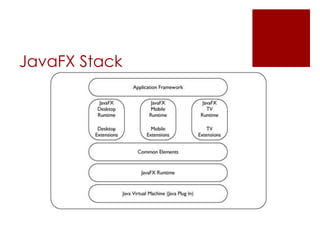
JavaFX Stack
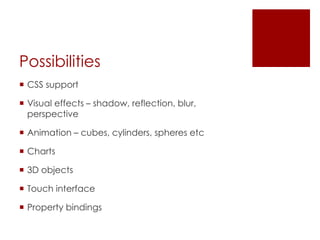
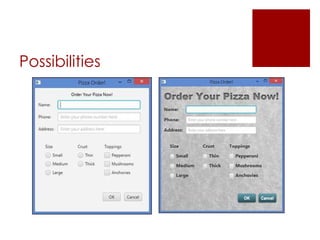
Possibilities
 CSS support
 Visual effects – shadow, reflection, blur,
perspective
 Animation – cubes, cylinders, spheres etc
 Charts
 3D objects
 Touch interface
 Property bindings
Possibilities
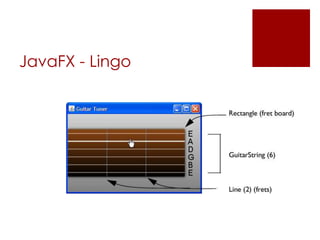
JavaFX - Lingo
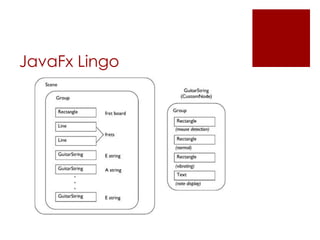
 Stage – Top level container for all JavaFX objects
 Scene – A scene is a hierarchical node structures
that contains all scene’s components
 Group – Group is a general purpose container
node
JavaFX - Lingo
JavaFx Lingo
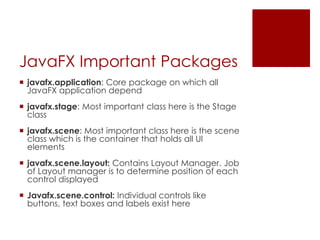
JavaFX Important Packages
 javafx.application: Core package on which all
JavaFX application depend
 javafx.stage: Most important class here is the Stage
class
 javafx.scene: Most important class here is the scene
class which is the container that holds all UI
elements
 javafx.scene.layout: Contains Layout Manager. Job
of Layout manager is to determine position of each
control displayed
 Javafx.scene.control: Individual controls like
buttons, text boxes and labels exist here
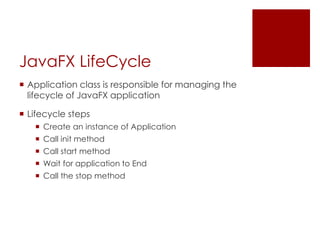
JavaFX LifeCycle
 Application class is responsible for managing the
lifecycle of JavaFX application
 Lifecycle steps
 Create an instance of Application
 Call init method
 Call start method
 Wait for application to End
 Call the stop method
JavaFX Lifecycle
 init (): Default implementation of init does nothing.
 One can override to perform any processing before
application UI is displayed
 start (): No default implementation and is declared
abstract.
 Your app must override this. Build and display the UI
 Wait for application to End. Typically happens when
user signals end of program
 stop(): Default implementation does not do
anything
 One can override to to perform any necessary
processing as program terminates.
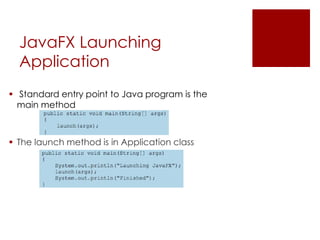
JavaFX Launching
Application
 Standard entry point to Java program is the
main method
 The launch method is in Application class
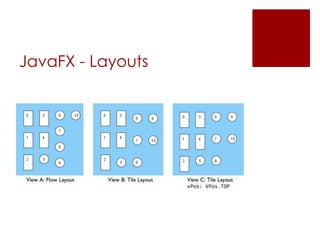
JavaFX - Layouts
 Hbox – Provides a horizontal layout of its contents
in a single row
 Vbox – Provides a vertical layout of its content in
a single column
 Flow – Provides a layout of content in either
horizontal or vertical flow wrapping at current
height or boundary
 Tile – Same as flow. But all cells are uniform size.
Controlled via tileHeight and tileWidth
JavaFX - Layouts
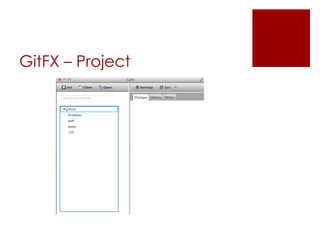
GitFX – Project
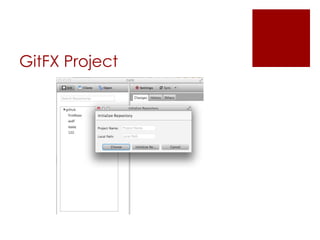
GitFX Project
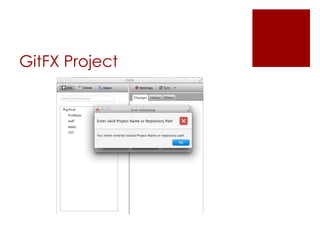
GitFX Project
JavaFX Deployments
1. Launch from command line using java launcher
2. Launch as a desktop application from a JAR or
self contained application
3. View in a web page
4. Launch by clicking a link in the browser to
download an application
References
 1 http://en.wikipedia.org/wiki/JavaFX
 2 http://java.dzone.com/articles/oracle-
discontinue-javafx
 3 JavaFX for Dummies
 4 Effective JavaFX
 Deployments:
http://docs.oracle.com/javafx/2/get_started/bas
ic_deployment.htm#BABFAFEC

Java fx

  • 1.
  • 2.
    JavaFX  JavaFX isa software platform for creating Rich Internet Applications that can run across variety of platforms[1]  Collection of Java Packages with ability to add fancy GUI’s to your Java application  Groovy and Scala can also be used to write JavaFX. JVM Languages indeed!!!  JavaFX is official standard part of Java platform
  • 3.
    JavaFX - History Formerly called F3 (Form Follows Function) and developed by Chris Oliver at Sun Microsystems  JavaFX was initially developed as a scripting language however it was discontinued by Oracle and declared dead in JavaOne (2010)[2]
  • 4.
  • 5.
    Possibilities  CSS support Visual effects – shadow, reflection, blur, perspective  Animation – cubes, cylinders, spheres etc  Charts  3D objects  Touch interface  Property bindings
  • 6.
  • 7.
    JavaFX - Lingo Stage – Top level container for all JavaFX objects  Scene – A scene is a hierarchical node structures that contains all scene’s components  Group – Group is a general purpose container node
  • 8.
  • 9.
  • 10.
    JavaFX Important Packages javafx.application: Core package on which all JavaFX application depend  javafx.stage: Most important class here is the Stage class  javafx.scene: Most important class here is the scene class which is the container that holds all UI elements  javafx.scene.layout: Contains Layout Manager. Job of Layout manager is to determine position of each control displayed  Javafx.scene.control: Individual controls like buttons, text boxes and labels exist here
  • 11.
    JavaFX LifeCycle  Applicationclass is responsible for managing the lifecycle of JavaFX application  Lifecycle steps  Create an instance of Application  Call init method  Call start method  Wait for application to End  Call the stop method
  • 12.
    JavaFX Lifecycle  init(): Default implementation of init does nothing.  One can override to perform any processing before application UI is displayed  start (): No default implementation and is declared abstract.  Your app must override this. Build and display the UI  Wait for application to End. Typically happens when user signals end of program  stop(): Default implementation does not do anything  One can override to to perform any necessary processing as program terminates.
  • 13.
    JavaFX Launching Application  Standardentry point to Java program is the main method  The launch method is in Application class
  • 15.
    JavaFX - Layouts Hbox – Provides a horizontal layout of its contents in a single row  Vbox – Provides a vertical layout of its content in a single column  Flow – Provides a layout of content in either horizontal or vertical flow wrapping at current height or boundary  Tile – Same as flow. But all cells are uniform size. Controlled via tileHeight and tileWidth
  • 16.
  • 17.
  • 18.
  • 19.
  • 20.
    JavaFX Deployments 1. Launchfrom command line using java launcher 2. Launch as a desktop application from a JAR or self contained application 3. View in a web page 4. Launch by clicking a link in the browser to download an application
  • 21.
    References  1 http://en.wikipedia.org/wiki/JavaFX 2 http://java.dzone.com/articles/oracle- discontinue-javafx  3 JavaFX for Dummies  4 Effective JavaFX  Deployments: http://docs.oracle.com/javafx/2/get_started/bas ic_deployment.htm#BABFAFEC