阿爾杜伊諾
     Arduino: Lv. 1


Mutienliao.TW    , 2013-03-18
Arduino
Introduction
Human Computer Interactive / Interface ??
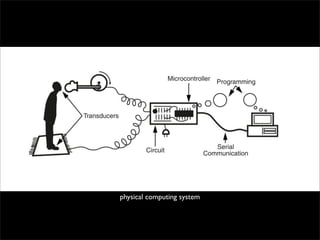
physical computing system
What is Arduino?
Open Source
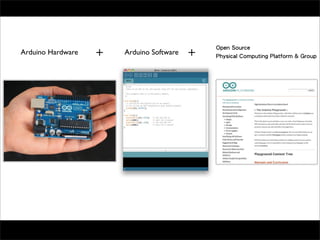
Arduino Hardware   Arduino Software   Physical Computing Platform & Group
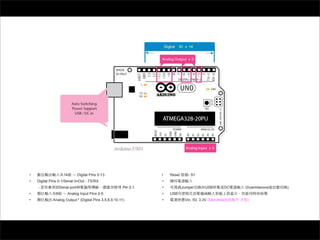
•                    14          Digital Pins 0-13                •   Reset      - S1
•   Digital Pins 0-1/Serial In/Out - TX/RX                        •
    -              Serial port                         Pin 0,1.   •           Jumper       USB        DC   (Duemilanove   )
•              6        Analog Input Pins 0-5                     •   USB
•            Analog Output * (Digital Pins 3,5,6,9,10,11)         •            Vin, 5V, 3.3V (Diecimila     )
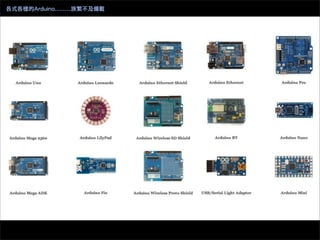
各式各樣的Arduino........族繁不及備載
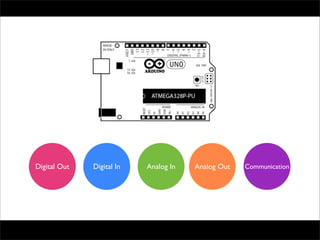
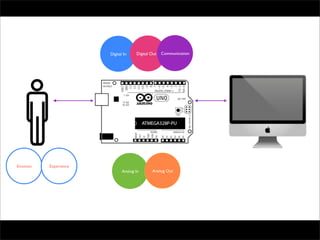
Digital Out   Digital In   Analog In   Analog Out   Communication
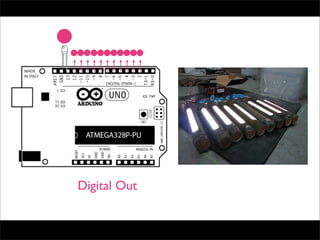
Digital Out
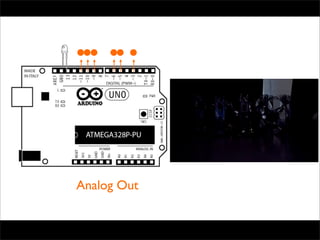
Analog Out
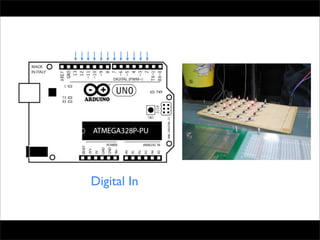
Digital In
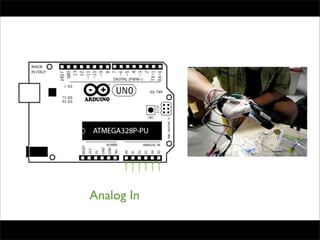
Analog In
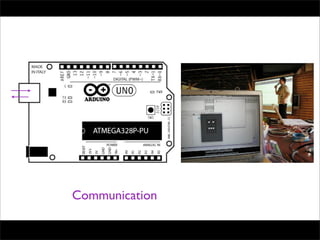
Communication
Digital In    Digital Out   Communication


Emotion   Experience
                              Analog In      Analog Out
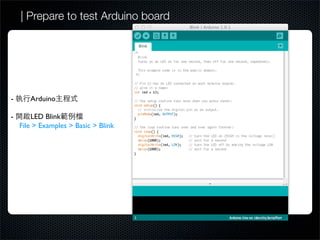
| Prepare to test Arduino board


-      Arduino

-       LED Blink
    File > Examples > Basic > Blink
| Set up your board
•                      : Tools > Board


                 [ Mac OS X ]                                       [ Windows ]


•    Arduino         serial port:             Tools > Serila Port


                 [ Mac OS X ]                                        [ Windows ]
           Mac          /dev/tty.usbserial-     *
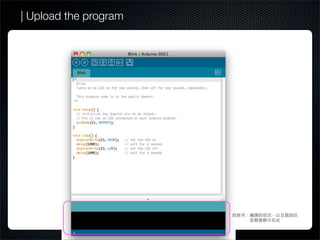
| Upload the program
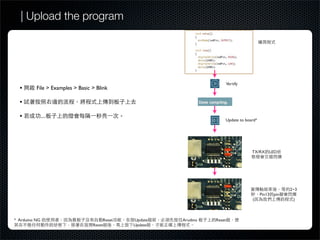
| Upload the program


                                                                          Vertify
  •       File > Examples > Basic > Blink

  •

  •            ....
                                                                      Update to board*


                                                                                    TX/RX LED


                                                                                                       2~3
                                                                                         Pin13   pin
                                                                                    (                   )


* Arduino NG                           Reset   Update   Arudino   Reset
                                  Reset        Update
# | Troubleshooting


•                          Serial port

•

• Serial Port                             Serila port

•               Jump                              Duemilanove/UNO

•                                 Reset                         Reset   Update

•                Arudino                         USB

•
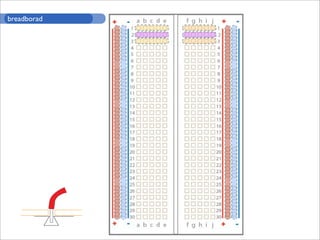
breadborad
Digital Out


              Digital Out
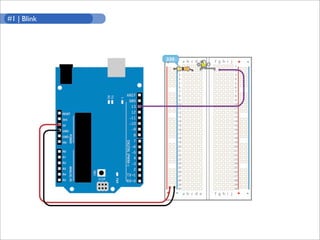
#1 | Blink
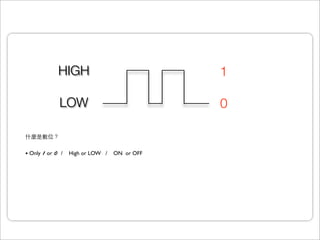
HIGH                            1

           LOW                            0


• Only 1 or 0 / High or LOW / ON or OFF
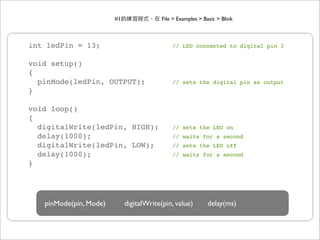
#1                File > Examples > Basic > Blink


int ledPin = 13;                              // LED connected to digital pin 3


void setup()
{
  pinMode(ledPin, OUTPUT);                    // sets the digital pin as output
}

void loop()
{
  digitalWrite(ledPin, HIGH);                 // sets the LED on
  delay(1000);                                // waits for a second
  digitalWrite(ledPin, LOW);                  // sets the LED off
  delay(1000);                                // waits for a second
}


   pinMode(pin, Mode)        digitalWrite(pin, value)         delay(ms)
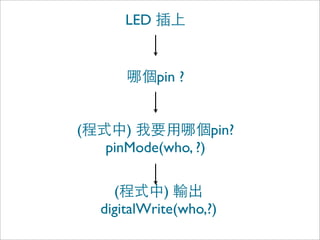
LED


              pin ?


(      )            pin?
    pinMode(who, ?)

      (        )
    digitalWrite(who,?)
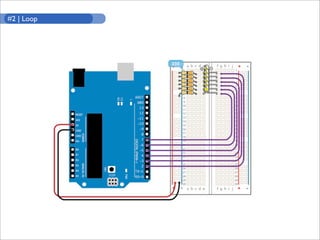
#2 | Loop
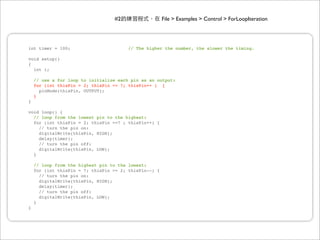
#2                   File > Examples > Control > ForLoopIteration


int timer = 100;                       // The higher the number, the slower the timing.

void setup()
{
  int i;

    // use a for loop to initialize each pin as an output:
    for (int thisPin = 2; thisPin <= 7; thisPin++ ) {
      pinMode(thisPin, OUTPUT);
    }
}

void loop() {
  // loop from the lowest pin to the highest:
  for (int thisPin = 2; thisPin <=7 ; thisPin++) {
    // turn the pin on:
    digitalWrite(thisPin, HIGH);
    delay(timer);
    // turn the pin off:
    digitalWrite(thisPin, LOW);
  }

    // loop from the highest pin to the lowest:
    for (int thisPin = 7; thisPin >= 2; thisPin--) {
      // turn the pin on:
      digitalWrite(thisPin, HIGH);
      delay(timer);
      // turn the pin off:
      digitalWrite(thisPin, LOW);
    }
}
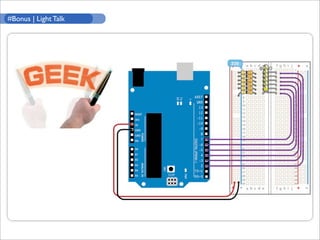
#Bonus | Light Talk
#Bonus                          http://mutienliao.tw/arduino/Light_Talk.pde

  int pins[] = { 2, 3, 4, 5, 6, 7 }; !!         // LED
  int lights = 6;                  ! !          // LED
  int pattens = 10;                ! !          //
  byte graphy[10][6] = { {0,1,1,1,0,0},
                         {1,1,1,1,0,0},
                         {1,1,1,1,1,0},
                         {0,1,1,1,1,0},
                         {0,0,1,1,1,1},
                         {0,0,1,1,1,1},
                         {0,1,1,1,1,0},                                                        [a]
                         {1,1,1,1,1,0},
                         {1,1,1,1,0,0},
                         {0,1,1,1,0,0} };       !
                                                //

  void setup()
  {
    for (int i = 0; i < lights; i++)    !       //                      0    light-1
      pinMode(pins[i], OUTPUT);      !!         //
  }

  void loop()
  {
    for(int k = 0; k < lights; k++) { !         //
      digitalWrite(pins[k], LOW);
    }                                                                                          [b]
    delay(40); !             !       !          //       40

      for (int i = 0; i < pattens; i++) { !     //              ...                    Fig.1
        for(int j = 0; j < lights; j++) {!      //            LED...
          if(patten[i][j]==1) {
            digitalWrite(pins[j], HIGH);    !   //                     LED
          }else {
            digitalWrite(pins[j], LOW);     !   //                     LED
          }
        }
        delay(1);                  !    !       //       1
      }

      for(int k = 0; k < lights; k++) {   !     //
        digitalWrite(pins[k], LOW);
      }
      delay(40);!              !        !       //       40
  }
byte graphy[10][6] = { {0,1,1,1,0,0},
                       {1,1,1,1,0,0},
                       {1,1,1,1,1,0},
                       {0,1,1,1,1,0},
                       {0,0,1,1,1,1},
                       {0,0,1,1,1,1},
                       {0,1,1,1,1,0},
                       {1,1,1,1,1,0},
                       {1,1,1,1,0,0},
                       {0,1,1,1,0,0} };   !
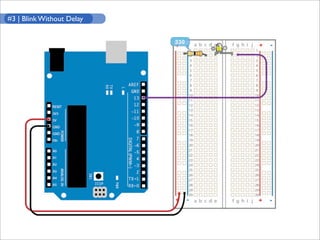
#3 | Blink Without Delay
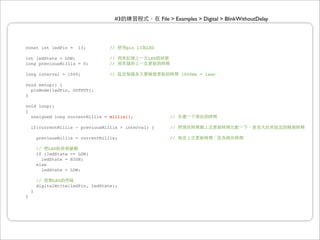
#3                  File > Examples > Digital > BlinkWithoutDelay


const int ledPin =      13;         //    pin 13   LED

int ledState = LOW;                 //             LED
long previousMillis = 0;            //

long interval = 1000;               //                           1000ms = 1sec

void setup() {
  pinMode(ledPin, OUTPUT);
}

void loop()
{
  unsigned long currentMillis = millis();                   //

    if(currentMillis - previousMillis > interval) {         //

        previousMillis = currentMillis;                     //

        //    LED
        if (ledState == LOW)
           ledState = HIGH;
        else
           ledState = LOW;

        //    LED
        digitalWrite(ledPin, ledState);
    }
}
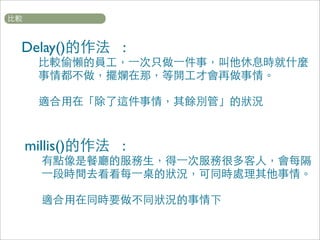
Delay()    :


millis()   :
輸入才是互動的精華
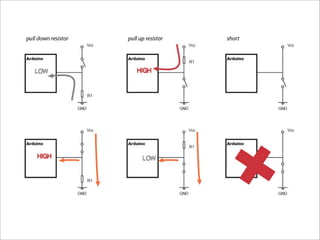
Digital In


         Digital Input
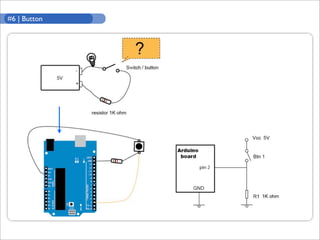
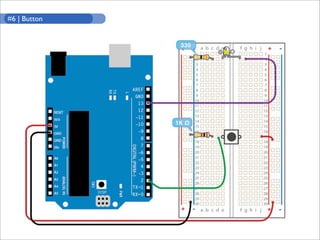
#6 | Button
#6 | Button
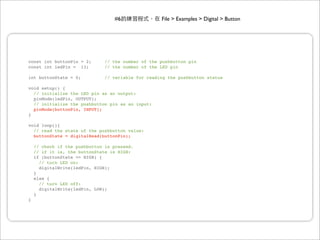
#6                File > Examples > Digital > Button


const int buttonPin = 2;       // the number of the pushbutton pin
const int ledPin = 13;         // the number of the LED pin

int buttonState = 0;           // variable for reading the pushbutton status

void setup() {
  // initialize the LED pin as an output:
  pinMode(ledPin, OUTPUT);
  // initialize the pushbutton pin as an input:
  pinMode(buttonPin, INPUT);
}

void loop(){
  // read the state of the pushbutton value:
  buttonState = digitalRead(buttonPin);

    // check if the pushbutton is pressed.
    // if it is, the buttonState is HIGH:
    if (buttonState == HIGH) {
      // turn LED on:
      digitalWrite(ledPin, HIGH);
    }
    else {
      // turn LED off:
      digitalWrite(ledPin, LOW);
    }
}
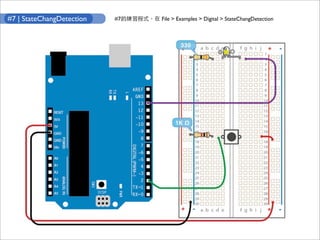
#7 | StateChangDetection   #7   File > Examples > Digital > StateChangDetection
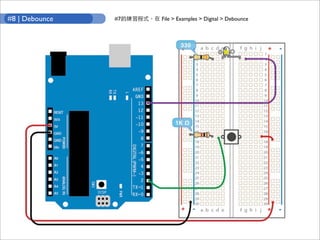
#8 | Debounce   #7   File > Examples > Digital > Debounce
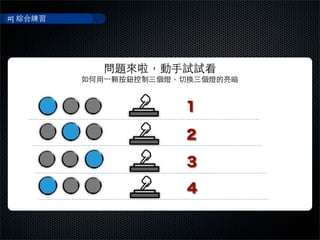
#|


     1

     2

     3

     4

Arduino: Intro and Digital I/O

  • 1.
    阿爾杜伊諾 Arduino: Lv. 1 Mutienliao.TW , 2013-03-18
  • 2.
  • 3.
  • 4.
  • 5.
  • 6.
    Open Source Arduino Hardware Arduino Software Physical Computing Platform & Group
  • 7.
    14 Digital Pins 0-13 • Reset - S1 • Digital Pins 0-1/Serial In/Out - TX/RX • - Serial port Pin 0,1. • Jumper USB DC (Duemilanove ) • 6 Analog Input Pins 0-5 • USB • Analog Output * (Digital Pins 3,5,6,9,10,11) • Vin, 5V, 3.3V (Diecimila )
  • 8.
  • 9.
    Digital Out Digital In Analog In Analog Out Communication
  • 10.
  • 11.
  • 12.
  • 13.
  • 14.
  • 15.
    Digital In Digital Out Communication Emotion Experience Analog In Analog Out
  • 16.
    | Prepare totest Arduino board - Arduino - LED Blink File > Examples > Basic > Blink
  • 17.
    | Set upyour board • : Tools > Board [ Mac OS X ] [ Windows ] • Arduino serial port: Tools > Serila Port [ Mac OS X ] [ Windows ] Mac /dev/tty.usbserial- *
  • 18.
    | Upload theprogram
  • 19.
    | Upload theprogram Vertify • File > Examples > Basic > Blink • • .... Update to board* TX/RX LED 2~3 Pin13 pin ( ) * Arduino NG Reset Update Arudino Reset Reset Update
  • 20.
    # | Troubleshooting • Serial port • • Serial Port Serila port • Jump Duemilanove/UNO • Reset Reset Update • Arudino USB •
  • 21.
  • 22.
    Digital Out Digital Out
  • 23.
  • 24.
    HIGH 1 LOW 0 • Only 1 or 0 / High or LOW / ON or OFF
  • 25.
    #1 File > Examples > Basic > Blink int ledPin = 13; // LED connected to digital pin 3 void setup() { pinMode(ledPin, OUTPUT); // sets the digital pin as output } void loop() { digitalWrite(ledPin, HIGH); // sets the LED on delay(1000); // waits for a second digitalWrite(ledPin, LOW); // sets the LED off delay(1000); // waits for a second } pinMode(pin, Mode) digitalWrite(pin, value) delay(ms)
  • 26.
    LED pin ? ( ) pin? pinMode(who, ?) ( ) digitalWrite(who,?)
  • 27.
  • 28.
    #2 File > Examples > Control > ForLoopIteration int timer = 100; // The higher the number, the slower the timing. void setup() { int i; // use a for loop to initialize each pin as an output: for (int thisPin = 2; thisPin <= 7; thisPin++ ) { pinMode(thisPin, OUTPUT); } } void loop() { // loop from the lowest pin to the highest: for (int thisPin = 2; thisPin <=7 ; thisPin++) { // turn the pin on: digitalWrite(thisPin, HIGH); delay(timer); // turn the pin off: digitalWrite(thisPin, LOW); } // loop from the highest pin to the lowest: for (int thisPin = 7; thisPin >= 2; thisPin--) { // turn the pin on: digitalWrite(thisPin, HIGH); delay(timer); // turn the pin off: digitalWrite(thisPin, LOW); } }
  • 29.
  • 30.
    #Bonus http://mutienliao.tw/arduino/Light_Talk.pde int pins[] = { 2, 3, 4, 5, 6, 7 }; !! // LED int lights = 6; ! ! // LED int pattens = 10; ! ! // byte graphy[10][6] = { {0,1,1,1,0,0}, {1,1,1,1,0,0}, {1,1,1,1,1,0}, {0,1,1,1,1,0}, {0,0,1,1,1,1}, {0,0,1,1,1,1}, {0,1,1,1,1,0}, [a] {1,1,1,1,1,0}, {1,1,1,1,0,0}, {0,1,1,1,0,0} }; ! // void setup() { for (int i = 0; i < lights; i++) ! // 0 light-1 pinMode(pins[i], OUTPUT); !! // } void loop() { for(int k = 0; k < lights; k++) { ! // digitalWrite(pins[k], LOW); } [b] delay(40); ! ! ! // 40 for (int i = 0; i < pattens; i++) { ! // ... Fig.1 for(int j = 0; j < lights; j++) {! // LED... if(patten[i][j]==1) { digitalWrite(pins[j], HIGH); ! // LED }else { digitalWrite(pins[j], LOW); ! // LED } } delay(1); ! ! // 1 } for(int k = 0; k < lights; k++) { ! // digitalWrite(pins[k], LOW); } delay(40);! ! ! // 40 }
  • 31.
    byte graphy[10][6] ={ {0,1,1,1,0,0}, {1,1,1,1,0,0}, {1,1,1,1,1,0}, {0,1,1,1,1,0}, {0,0,1,1,1,1}, {0,0,1,1,1,1}, {0,1,1,1,1,0}, {1,1,1,1,1,0}, {1,1,1,1,0,0}, {0,1,1,1,0,0} }; !
  • 32.
    #3 | BlinkWithout Delay
  • 33.
    #3 File > Examples > Digital > BlinkWithoutDelay const int ledPin = 13; // pin 13 LED int ledState = LOW; // LED long previousMillis = 0; // long interval = 1000; // 1000ms = 1sec void setup() { pinMode(ledPin, OUTPUT); } void loop() { unsigned long currentMillis = millis(); // if(currentMillis - previousMillis > interval) { // previousMillis = currentMillis; // // LED if (ledState == LOW) ledState = HIGH; else ledState = LOW; // LED digitalWrite(ledPin, ledState); } }
  • 34.
    Delay() : millis() :
  • 35.
  • 36.
    Digital In Digital Input
  • 37.
  • 38.
  • 39.
    #6 File > Examples > Digital > Button const int buttonPin = 2; // the number of the pushbutton pin const int ledPin = 13; // the number of the LED pin int buttonState = 0; // variable for reading the pushbutton status void setup() { // initialize the LED pin as an output: pinMode(ledPin, OUTPUT); // initialize the pushbutton pin as an input: pinMode(buttonPin, INPUT); } void loop(){ // read the state of the pushbutton value: buttonState = digitalRead(buttonPin); // check if the pushbutton is pressed. // if it is, the buttonState is HIGH: if (buttonState == HIGH) { // turn LED on: digitalWrite(ledPin, HIGH); } else { // turn LED off: digitalWrite(ledPin, LOW); } }
  • 41.
    #7 | StateChangDetection #7 File > Examples > Digital > StateChangDetection
  • 42.
    #8 | Debounce #7 File > Examples > Digital > Debounce
  • 43.
    #| 1 2 3 4