Introducing One-Dimensional
Arrays
Introducing Two-Dimensional
Arrays
2
Introducing Arrays
• Each array contains data using same variable
name and data type
• Each value or object stored at a position
– Position numbers start at zero
• Zeroth element is first element
– Position also called index or subscript
– Index must be zero, a positive Integer, or an Integer
expression
3
Introducing Arrays
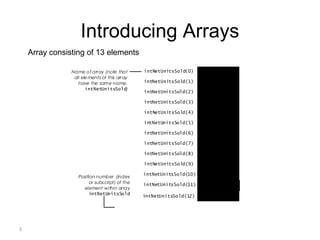
Name of array (note that
all elements of this array
have the same name,
intNetUnitsSold)
Position number (index
or subscript) of the
element within array
intNetUnitsSold
intNetUnitsSold(0)
intNetUnitsSold(1)
intNetUnitsSold(2)
intNetUnitsSold(3)
intNetUnitsSold(4)
intNetUnitsSold(5)
intNetUnitsSold(6)
intNetUnitsSold(7)
intNetUnitsSold(8)
intNetUnitsSold(9)
intNetUnitsSold(10)
intNetUnitsSold(11)
0
10
16
72
154
89
0
62
-3
90
453
178
78intNetUnitsSold(12)
Array consisting of 13 elements
4
Declaring and Allocating Arrays
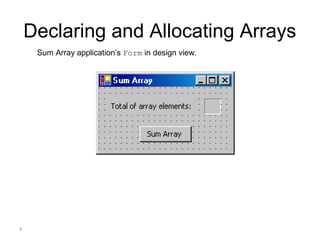
  Sum Array application’s Form in design view.
5
Declaring and Allocating Arrays
• You must specify the size, name and data type
for an array before using
• Allocating memory for the array
– Use New to create the array
– Initializer list
• Specifies initial values of elements
6
Declaring and Allocating Arrays
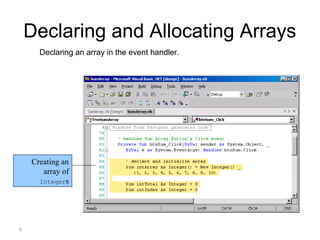
  Declaring an array in the event handler.
Creating an
array of
Integers
7
Declaring and Allocating Arrays
• GetUpperBound method
– Returns highest index in the array
• Length property
– Returns the length of the array
8
Declaring and Allocating Arrays
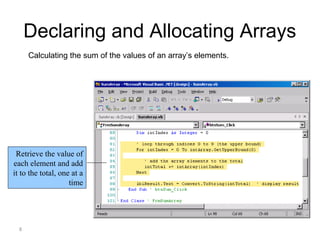
Calculating the sum of the values of an array’s elements.
Retrieve the value of
each element and add
it to the total, one at a
time
9
Declaring and Allocating Arrays
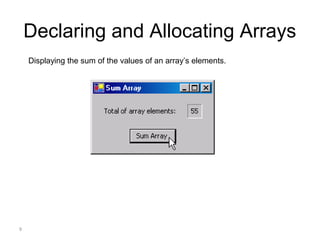
Displaying the sum of the values of an array’s elements.
Introducing Two-Dimensional
Arrays
Two-Dimensional Rectangular
Arrays
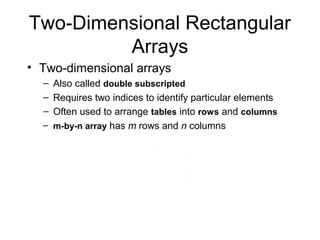
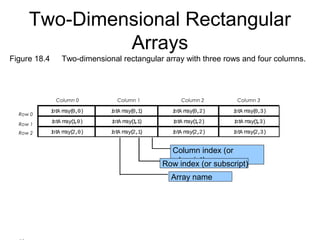
• Two-dimensional arrays
– Also called double subscripted
– Requires two indices to identify particular elements
– Often used to arrange tables into rows and columns
– m-by-n array has m rows and n columns
Row 0
Row 1
Column 0 Column 1 Column 2 Column 3
Column index (or
subscript)Row index (or subscript)
Row 2
intA rray(0,0) intA rray(0,1) intA rray(0,2) intA rray(0,3)
intA rray(1,0) intA rray(1,1) intA rray(1,2) intA rray(1,3)
intA rray(2,0) intA rray(2,1) intA rray(2,2) intA rray(2,3)
Array name
Figure 18.4   Two-dimensional rectangular array with three rows and four columns.
Two-Dimensional Rectangular
Arrays
13
Two-Dimensional Rectangular
Arrays
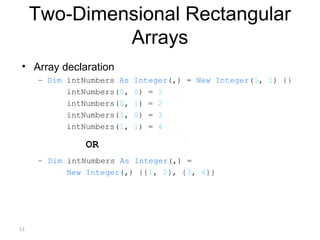
• Array declaration
– Dim intNumbers As Integer(,) = New Integer(1, 1) {}
intNumbers(0, 0) = 1
intNumbers(0, 1) = 2
intNumbers(1, 0) = 3
intNumbers(1, 1) = 4
OR
– Dim intNumbers As Integer(,) =
New Integer(,) {{1, 2}, {3, 4}}
Example
Add all elements in a two-
dimensional array

Lecture7

  • 1.
  • 2.
    2 Introducing Arrays • Eacharray contains data using same variable name and data type • Each value or object stored at a position – Position numbers start at zero • Zeroth element is first element – Position also called index or subscript – Index must be zero, a positive Integer, or an Integer expression
  • 3.
    3 Introducing Arrays Name ofarray (note that all elements of this array have the same name, intNetUnitsSold) Position number (index or subscript) of the element within array intNetUnitsSold intNetUnitsSold(0) intNetUnitsSold(1) intNetUnitsSold(2) intNetUnitsSold(3) intNetUnitsSold(4) intNetUnitsSold(5) intNetUnitsSold(6) intNetUnitsSold(7) intNetUnitsSold(8) intNetUnitsSold(9) intNetUnitsSold(10) intNetUnitsSold(11) 0 10 16 72 154 89 0 62 -3 90 453 178 78intNetUnitsSold(12) Array consisting of 13 elements
  • 4.
    4 Declaring and AllocatingArrays   Sum Array application’s Form in design view.
  • 5.
    5 Declaring and AllocatingArrays • You must specify the size, name and data type for an array before using • Allocating memory for the array – Use New to create the array – Initializer list • Specifies initial values of elements
  • 6.
    6 Declaring and AllocatingArrays   Declaring an array in the event handler. Creating an array of Integers
  • 7.
    7 Declaring and AllocatingArrays • GetUpperBound method – Returns highest index in the array • Length property – Returns the length of the array
  • 8.
    8 Declaring and AllocatingArrays Calculating the sum of the values of an array’s elements. Retrieve the value of each element and add it to the total, one at a time
  • 9.
    9 Declaring and AllocatingArrays Displaying the sum of the values of an array’s elements.
  • 10.
  • 11.
    Two-Dimensional Rectangular Arrays • Two-dimensionalarrays – Also called double subscripted – Requires two indices to identify particular elements – Often used to arrange tables into rows and columns – m-by-n array has m rows and n columns
  • 12.
    Row 0 Row 1 Column0 Column 1 Column 2 Column 3 Column index (or subscript)Row index (or subscript) Row 2 intA rray(0,0) intA rray(0,1) intA rray(0,2) intA rray(0,3) intA rray(1,0) intA rray(1,1) intA rray(1,2) intA rray(1,3) intA rray(2,0) intA rray(2,1) intA rray(2,2) intA rray(2,3) Array name Figure 18.4   Two-dimensional rectangular array with three rows and four columns. Two-Dimensional Rectangular Arrays
  • 13.
    13 Two-Dimensional Rectangular Arrays • Arraydeclaration – Dim intNumbers As Integer(,) = New Integer(1, 1) {} intNumbers(0, 0) = 1 intNumbers(0, 1) = 2 intNumbers(1, 0) = 3 intNumbers(1, 1) = 4 OR – Dim intNumbers As Integer(,) = New Integer(,) {{1, 2}, {3, 4}}
  • 14.
    Example Add all elementsin a two- dimensional array