Virtualization Fundamentals withVMware &
Virtualization Fundamentals with VMware &
Hyper-V
Hyper-V
Understanding Core Concepts, Technologies, and Comparisons
2.
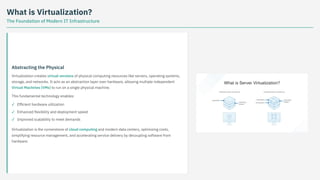
What is Virtualization?
TheFoundation of Modern IT Infrastructure
Abstracting the Physical
Virtualization creates virtual versions of physical computing resources like servers, operating systems,
storage, and networks. It acts as an abstraction layer over hardware, allowing multiple independent
Virtual Machines (VMs) to run on a single physical machine.
This fundamental technology enables:
Virtualization is the cornerstone of cloud computing and modern data centers, optimizing costs,
simplifying resource management, and accelerating service delivery by decoupling software from
hardware.
Efficient hardware utilization
✓
Enhanced flexibility and deployment speed
✓
Improved scalability to meet demands
✓
3.
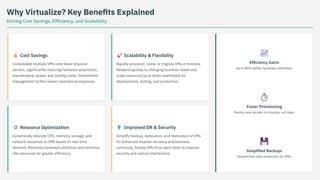
Why Virtualize? KeyBenefits Explained
Driving Cost Savings, Efficiency, and Scalability
💰 Cost Savings
Consolidate multiple VMs onto fewer physical
servers, significantly reducing hardware acquisition,
maintenance, power, and cooling costs. Streamlined
management further lowers operational expenses.
⚙️ Resource Optimization
Dynamically allocate CPU, memory, storage, and
network resources to VMs based on real-time
demand. Maximize hardware utilization and minimize
idle resources for greater efficiency.
🚀 Scalability & Flexibility
Rapidly provision, clone, or migrate VMs in minutes.
Respond quickly to changing business needs and
scale resources up or down seamlessly for
development, testing, and production.
🛡️ Improved DR & Security
Simplify backup, replication, and restoration of VMs
for enhanced disaster recovery and business
continuity. Isolate VMs from each other to improve
security and reduce interference.
📈
Efficiency Gains
Up to 80% better hardware utilization.
⏱️
Faster Provisioning
Deploy new servers in minutes, not days.
💾
Simplified Backups
Streamlined data protection for VMs.
4.
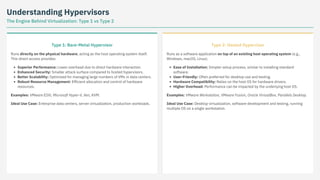
Understanding Hypervisors
The EngineBehind Virtualization: Type 1 vs Type 2
Type 1: Bare-Metal Hypervisor
Runs directly on the physical hardware, acting as the host operating system itself.
This direct access provides:
Superior Performance: Lower overhead due to direct hardware interaction.
Enhanced Security: Smaller attack surface compared to hosted hypervisors.
Better Scalability: Optimized for managing large numbers of VMs in data centers.
Robust Resource Management: Efficient allocation and control of hardware
resources.
Examples: VMware ESXi, Microsoft Hyper-V, Xen, KVM.
Ideal Use Case: Enterprise data centers, server virtualization, production workloads.
Type 2: Hosted Hypervisor
Runs as a software application on top of an existing host operating system (e.g.,
Windows, macOS, Linux).
Ease of Installation: Simpler setup process, similar to installing standard
software.
User-Friendly: Often preferred for desktop use and testing.
Hardware Compatibility: Relies on the host OS for hardware drivers.
Higher Overhead: Performance can be impacted by the underlying host OS.
Examples: VMware Workstation, VMware Fusion, Oracle VirtualBox, Parallels Desktop.
Ideal Use Case: Desktop virtualization, software development and testing, running
multiple OS on a single workstation.
5.
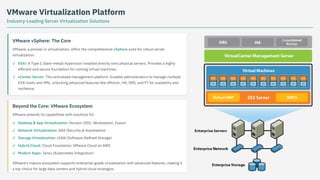
VMware Virtualization Platform
Industry-LeadingServer Virtualization Solutions
VMware vSphere: The Core
VMware, a pioneer in virtualization, offers the comprehensive vSphere suite for robust server
virtualization:
Beyond the Core: VMware Ecosystem
VMware extends its capabilities with solutions for:
VMware's mature ecosystem supports enterprise-grade virtualization with advanced features, making it
a top choice for large data centers and hybrid cloud strategies.
ESXi: A Type 1 (bare-metal) hypervisor installed directly onto physical servers. Provides a highly
efficient and secure foundation for running virtual machines.
✓
vCenter Server: The centralized management platform. Enables administrators to manage multiple
ESXi hosts and VMs, unlocking advanced features like vMotion, HA, DRS, and FT for scalability and
resilience.
✓
Desktop & App Virtualization: Horizon (VDI), Workstation, Fusion
✓
Network Virtualization: NSX (Security & Automation)
✓
Storage Virtualization: vSAN (Software-Defined Storage)
✓
Hybrid Cloud: Cloud Foundation, VMware Cloud on AWS
✓
Modern Apps: Tanzu (Kubernetes Integration)
✓
6.
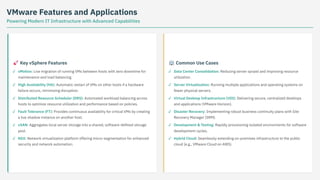
VMware Features andApplications
Powering Modern IT Infrastructure with Advanced Capabilities
🚀 Key vSphere Features 🏢 Common Use Cases
vMotion: Live migration of running VMs between hosts with zero downtime for
maintenance and load balancing.
✓
High Availability (HA): Automatic restart of VMs on other hosts if a hardware
failure occurs, minimizing disruption.
✓
Distributed Resource Scheduler (DRS): Automated workload balancing across
hosts to optimize resource utilization and performance based on policies.
✓
Fault Tolerance (FT): Provides continuous availability for critical VMs by creating
a live shadow instance on another host.
✓
vSAN: Aggregates local server storage into a shared, software-defined storage
pool.
✓
NSX: Network virtualization platform offering micro-segmentation for enhanced
security and network automation.
✓
Data Center Consolidation: Reducing server sprawl and improving resource
utilization.
✓
Server Virtualization: Running multiple applications and operating systems on
fewer physical servers.
✓
Virtual Desktop Infrastructure (VDI): Delivering secure, centralized desktops
and applications (VMware Horizon).
✓
Disaster Recovery: Implementing robust business continuity plans with Site
Recovery Manager (SRM).
✓
Development & Testing: Rapidly provisioning isolated environments for software
development cycles.
✓
Hybrid Cloud: Seamlessly extending on-premises infrastructure to the public
cloud (e.g., VMware Cloud on AWS).
✓
7.
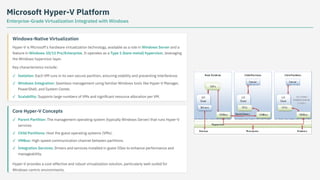
Microsoft Hyper-V Platform
Enterprise-GradeVirtualization Integrated with Windows
Windows-Native Virtualization
Hyper-V is Microsoft's hardware virtualization technology, available as a role in Windows Server and a
feature in Windows 10/11 Pro/Enterprise. It operates as a Type 1 (bare-metal) hypervisor, leveraging
the Windows hypervisor layer.
Key characteristics include:
Core Hyper-V Concepts
Hyper-V provides a cost-effective and robust virtualization solution, particularly well-suited for
Windows-centric environments.
Isolation: Each VM runs in its own secure partition, ensuring stability and preventing interference.
✓
Windows Integration: Seamless management using familiar Windows tools like Hyper-V Manager,
PowerShell, and System Center.
✓
Scalability: Supports large numbers of VMs and significant resource allocation per VM.
✓
Parent Partition: The management operating system (typically Windows Server) that runs Hyper-V
services.
✓
Child Partitions: Host the guest operating systems (VMs).
✓
VMBus: High-speed communication channel between partitions.
✓
Integration Services: Drivers and services installed in guest OSes to enhance performance and
manageability.
✓
8.
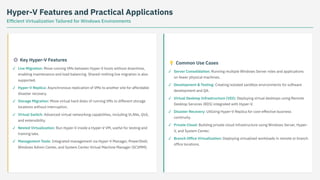
Hyper-V Features andPractical Applications
Efficient Virtualization Tailored for Windows Environments
⚙️ Key Hyper-V Features
💡 Common Use Cases
Live Migration: Move running VMs between Hyper-V hosts without downtime,
enabling maintenance and load balancing. Shared-nothing live migration is also
supported.
✓
Hyper-V Replica: Asynchronous replication of VMs to another site for affordable
disaster recovery.
✓
Storage Migration: Move virtual hard disks of running VMs to different storage
locations without interruption.
✓
Virtual Switch: Advanced virtual networking capabilities, including VLANs, QoS,
and extensibility.
✓
Nested Virtualization: Run Hyper-V inside a Hyper-V VM, useful for testing and
training labs.
✓
Management Tools: Integrated management via Hyper-V Manager, PowerShell,
Windows Admin Center, and System Center Virtual Machine Manager (SCVMM).
✓
Server Consolidation: Running multiple Windows Server roles and applications
on fewer physical machines.
✓
Development & Testing: Creating isolated sandbox environments for software
development and QA.
✓
Virtual Desktop Infrastructure (VDI): Deploying virtual desktops using Remote
Desktop Services (RDS) integrated with Hyper-V.
✓
Disaster Recovery: Utilizing Hyper-V Replica for cost-effective business
continuity.
✓
Private Cloud: Building private cloud infrastructure using Windows Server, Hyper-
V, and System Center.
✓
Branch Office Virtualization: Deploying virtualized workloads in remote or branch
office locations.
✓
9.
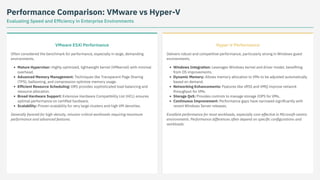
Performance Comparison: VMwarevs Hyper-V
Evaluating Speed and Efficiency in Enterprise Environments
VMware ESXi Performance
Often considered the benchmark for performance, especially in large, demanding
environments.
Mature Hypervisor: Highly optimized, lightweight kernel (VMkernel) with minimal
overhead.
Advanced Memory Management: Techniques like Transparent Page Sharing
(TPS), ballooning, and compression optimize memory usage.
Efficient Resource Scheduling: DRS provides sophisticated load balancing and
resource allocation.
Broad Hardware Support: Extensive Hardware Compatibility List (HCL) ensures
optimal performance on certified hardware.
Scalability: Proven scalability for very large clusters and high VM densities.
Generally favored for high-density, mission-critical workloads requiring maximum
performance and advanced features.
Hyper-V Performance
Delivers robust and competitive performance, particularly strong in Windows guest
environments.
Windows Integration: Leverages Windows kernel and driver model, benefiting
from OS improvements.
Dynamic Memory: Allows memory allocation to VMs to be adjusted automatically
based on demand.
Networking Enhancements: Features like vRSS and VMQ improve network
throughput for VMs.
Storage QoS: Provides controls to manage storage IOPS for VMs.
Continuous Improvement: Performance gaps have narrowed significantly with
recent Windows Server releases.
Excellent performance for most workloads, especially cost-effective in Microsoft-centric
environments. Performance differences often depend on specific configurations and
workloads.
10.
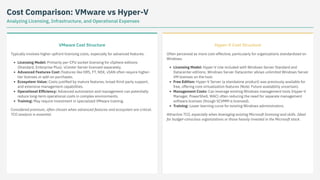
Cost Comparison: VMwarevs Hyper-V
Analyzing Licensing, Infrastructure, and Operational Expenses
VMware Cost Structure
Typically involves higher upfront licensing costs, especially for advanced features.
Licensing Model: Primarily per-CPU socket licensing for vSphere editions
(Standard, Enterprise Plus). vCenter Server licensed separately.
Advanced Features Cost: Features like DRS, FT, NSX, vSAN often require higher-
tier licenses or add-on purchases.
Ecosystem Value: Costs justified by mature features, broad third-party support,
and extensive management capabilities.
Operational Efficiency: Advanced automation and management can potentially
reduce long-term operational costs in complex environments.
Training: May require investment in specialized VMware training.
Considered premium, often chosen when advanced features and ecosystem are critical.
TCO analysis is essential.
Hyper-V Cost Structure
Often perceived as more cost-effective, particularly for organizations standardized on
Windows.
Licensing Model: Hyper-V role included with Windows Server Standard and
Datacenter editions. Windows Server Datacenter allows unlimited Windows Server
VM licenses on the host.
Free Edition: Hyper-V Server (a standalone product) was previously available for
free, offering core virtualization features (Note: Future availability uncertain).
Management Costs: Can leverage existing Windows management tools (Hyper-V
Manager, PowerShell, WAC) often reducing the need for separate management
software licenses (though SCVMM is licensed).
Training: Lower learning curve for existing Windows administrators.
Attractive TCO, especially when leveraging existing Microsoft licensing and skills. Ideal
for budget-conscious organizations or those heavily invested in the Microsoft stack.
11.
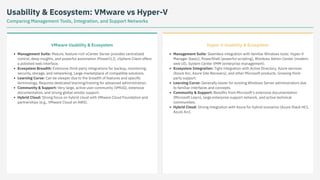
Usability & Ecosystem:VMware vs Hyper-V
Comparing Management Tools, Integration, and Support Networks
VMware Usability & Ecosystem
Management Suite: Mature, feature-rich vCenter Server provides centralized
control, deep insights, and powerful automation (PowerCLI). vSphere Client offers
a polished web interface.
Ecosystem Breadth: Extensive third-party integrations for backup, monitoring,
security, storage, and networking. Large marketplace of compatible solutions.
Learning Curve: Can be steeper due to the breadth of features and specific
terminology. Requires dedicated learning/training for advanced administration.
Community & Support: Very large, active user community (VMUG), extensive
documentation, and strong global vendor support.
Hybrid Cloud: Strong focus on hybrid cloud with VMware Cloud Foundation and
partnerships (e.g., VMware Cloud on AWS).
Hyper-V Usability & Ecosystem
Management Suite: Seamless integration with familiar Windows tools: Hyper-V
Manager (basic), PowerShell (powerful scripting), Windows Admin Center (modern
web UI), System Center VMM (enterprise management).
Ecosystem Integration: Tight integration with Active Directory, Azure services
(Azure Arc, Azure Site Recovery), and other Microsoft products. Growing third-
party support.
Learning Curve: Generally easier for existing Windows Server administrators due
to familiar interfaces and concepts.
Community & Support: Benefits from Microsoft's extensive documentation
(Microsoft Learn), large enterprise support network, and active technical
communities.
Hybrid Cloud: Strong integration with Azure for hybrid scenarios (Azure Stack HCI,
Azure Arc).
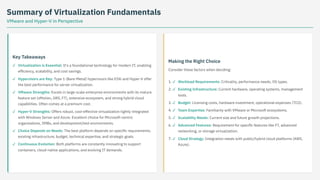
12.
Summary of VirtualizationFundamentals
VMware and Hyper-V in Perspective
Key Takeaways
Making the Right Choice
Consider these factors when deciding:
Virtualization is Essential: It's a foundational technology for modern IT, enabling
efficiency, scalability, and cost savings.
✓
Hypervisors are Key: Type 1 (Bare-Metal) hypervisors like ESXi and Hyper-V offer
the best performance for server virtualization.
✓
VMware Strengths: Excels in large-scale enterprise environments with its mature
feature set (vMotion, DRS, FT), extensive ecosystem, and strong hybrid cloud
capabilities. Often comes at a premium cost.
✓
Hyper-V Strengths: Offers robust, cost-effective virtualization tightly integrated
with Windows Server and Azure. Excellent choice for Microsoft-centric
organizations, SMBs, and development/test environments.
✓
Choice Depends on Needs: The best platform depends on specific requirements,
existing infrastructure, budget, technical expertise, and strategic goals.
✓
Continuous Evolution: Both platforms are constantly innovating to support
containers, cloud-native applications, and evolving IT demands.
✓
1. Workload Requirements: Criticality, performance needs, OS types.
✓
2. Existing Infrastructure: Current hardware, operating systems, management
tools.
✓
3. Budget: Licensing costs, hardware investment, operational expenses (TCO).
✓
4. Team Expertise: Familiarity with VMware or Microsoft ecosystems.
✓
5. Scalability Needs: Current size and future growth projections.
✓
6. Advanced Features: Requirement for specific features like FT, advanced
networking, or storage virtualization.
✓
7. Cloud Strategy: Integration needs with public/hybrid cloud platforms (AWS,
Azure).
✓
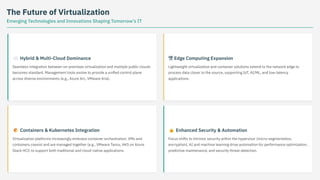
13.
The Future ofVirtualization
Emerging Technologies and Innovations Shaping Tomorrow's IT
☁️ Hybrid & Multi-Cloud Dominance
Seamless integration between on-premises virtualization and multiple public clouds
becomes standard. Management tools evolve to provide a unified control plane
across diverse environments (e.g., Azure Arc, VMware Aria).
📦 Containers & Kubernetes Integration
Virtualization platforms increasingly embrace container orchestration. VMs and
containers coexist and are managed together (e.g., VMware Tanzu, AKS on Azure
Stack HCI) to support both traditional and cloud-native applications.
엣 Edge Computing Expansion
Lightweight virtualization and container solutions extend to the network edge to
process data closer to the source, supporting IoT, AI/ML, and low-latency
applications.
🔒 Enhanced Security & Automation
Focus shifts to intrinsic security within the hypervisor (micro-segmentation,
encryption). AI and machine learning drive automation for performance optimization,
predictive maintenance, and security threat detection.
Thank You
Exploring theFundamentals of Virtualization
For further information or discussion:
📧 your.email@example.com
🔗 yourwebsite.com
🐦 @YourTwitterHandle


![Unit-2-final.pdf Cloud computingkltklgrfopsrt][hdc[png](https://cdn.slidesharecdn.com/ss_thumbnails/unit-2-final-260209155828-6f7d06cf-thumbnail.jpg?width=640&height=640&fit=bounds)


