www.eshikshak.co.in
   You can list out your items, subjects or menu in the
    form of a list.
   HTML gives you three different types of lists.
    ◦ <ul> - An unordered list. This will list items using bullets
    ◦ <ol> - A ordered list. This will use different schemes of
      numbers to list your items
    ◦ <dl> - A definition list. This is arrange your items in the
      same way as they are arranged in a dictionary.


                                           www.eshikshak.co.in
   An unordered list is a collection of related items that
    have no special order or sequence.
   The most common unordered list you will find on the
    Web is a collection of hyperlinks to other documents
   This list is created by using <ul> tag.


                                      www.eshikshak.co.in
   Each item in the list is marked with a bullet.
   bullet itself comes in three flavors: squares, discs, and
    circles.
   The default bullet displayed by most web browsers is
    the traditional full disc.


                                       www.eshikshak.co.in
<center>
                                           Movie List
<h2>Movie List</h2>
</center>
                               • Ram Teri Ganga Meli
<ul>
                               • Mera Naam Jocker
  <li>Ram Teri Ganga
                               • Titanic
  Meli</li>
                               • Ghost in the ship
  <li>Mera Naam
  Jocker</li>
  <li>Titanic</li>
  <li>Ghost in the ship</li>
</ul>


                                     www.eshikshak.co.in
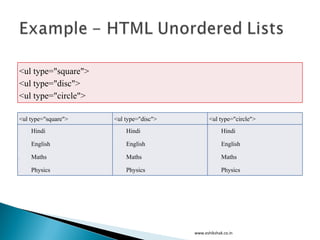
<ul type="square">
 <ul type="disc">
 <ul type="circle">

 <ul type="square">    <ul type="disc">           <ul type="circle">
    Hindi            •    Hindi                 o     Hindi

    English          •    English               o     English

    Maths            •    Maths                 o     Maths

    Physics          •    Physics               o     Physics


                                          www.eshikshak.co.in
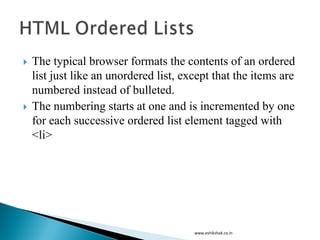
   The typical browser formats the contents of an ordered
    list just like an unordered list, except that the items are
    numbered instead of bulleted.
   The numbering starts at one and is incremented by one
    for each successive ordered list element tagged with
    <li>


                                        www.eshikshak.co.in
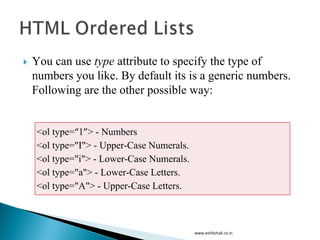
   You can use type attribute to specify the type of
    numbers you like. By default its is a generic numbers.
    Following are the other possible way:


    <ol type=“1”> - Numbers
    <ol type="I"> - Upper-Case Numerals.
    <ol type="i"> - Lower-Case Numerals.
    <ol type="a"> - Lower-Case Letters.
    <ol type="A"> - Upper-Case Letters.


                                           www.eshikshak.co.in
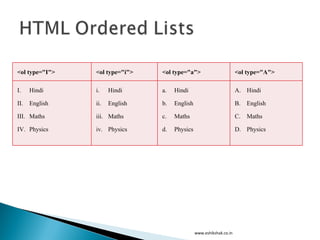
<ol type="I">   <ol type="i">   <ol type="a">                        <ol type="A">

I.    Hindi     i.    Hindi     a.   Hindi                           A. Hindi

II.   English   ii.   English   b.   English                         B.   English

III. Maths      iii. Maths      c.   Maths                           C.   Maths

IV. Physics     iv. Physics     d.   Physics                         D. Physics


                                               www.eshikshak.co.in
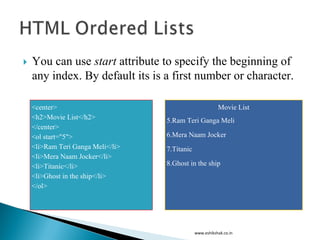
   You can use start attribute to specify the beginning of
    any index. By default its is a first number or character.

    <center>                                              Movie List
    <h2>Movie List</h2>            5.Ram Teri Ganga Meli
    </center>
    <ol start="5">                 6.Mera Naam Jocker
    <li>Ram Teri Ganga Meli</li>   7.Titanic
    <li>Mera Naam Jocker</li>
    <li>Titanic</li>               8.Ghost in the ship
    <li>Ghost in the ship</li>
    </ol>


                                               www.eshikshak.co.in
   HTML and XHTML also support a list style entirely
    different from the ordered and unordered lists.
   Like the entries you find in a dictionary or
    encyclopedia, complete with text, pictures, and other
    multimedia elements.
   The Definition List is the ideal way to present a
    glossary, list of terms, or other name/value list.


                                     www.eshikshak.co.in
   Definition List makes use of following three tags.
    <dl> - Defines the start of the list
    <dt> - A term
    <dd> - Term definition
    </dl> - Defines the end of the list


                                            www.eshikshak.co.in
<dl>
<dt><b>HTML</b></dt>
<dd>This stands for Hyper Text Markup Language</dd>
<dt><b>HTTP</b></dt>
<dd>This stands for Hyper Text Transfer Protocol</dd>
</dl>

HTML
This stands for Hyper Text Markup Language
HTTP
This stands for Hyper Text Transfer Protocol


                                                        www.eshikshak.co.in
   Use unordered lists for:

     Link collections

     Short, nonsequenced groups of text

     Emphasizing the high points of a presentation


                                           www.eshikshak.co.in
   Use ordered lists for:

     Tables of contents

     Sets of sequential sections of text

     Assigning numbers to short phrases that can be
      referenced elsewhere


                                            www.eshikshak.co.in
   Use definition lists for:

    Glossaries

    Custom bullets - make the item after the <dt> tag an icon-sized
     bullet image)

    Any list of name/value pairs


                                          www.eshikshak.co.in

Lecture 4 html lists

  • 1.
  • 2.
    You can list out your items, subjects or menu in the form of a list.  HTML gives you three different types of lists. ◦ <ul> - An unordered list. This will list items using bullets ◦ <ol> - A ordered list. This will use different schemes of numbers to list your items ◦ <dl> - A definition list. This is arrange your items in the same way as they are arranged in a dictionary. www.eshikshak.co.in
  • 3.
    An unordered list is a collection of related items that have no special order or sequence.  The most common unordered list you will find on the Web is a collection of hyperlinks to other documents  This list is created by using <ul> tag. www.eshikshak.co.in
  • 4.
    Each item in the list is marked with a bullet.  bullet itself comes in three flavors: squares, discs, and circles.  The default bullet displayed by most web browsers is the traditional full disc. www.eshikshak.co.in
  • 5.
    <center> Movie List <h2>Movie List</h2> </center> • Ram Teri Ganga Meli <ul> • Mera Naam Jocker <li>Ram Teri Ganga • Titanic Meli</li> • Ghost in the ship <li>Mera Naam Jocker</li> <li>Titanic</li> <li>Ghost in the ship</li> </ul> www.eshikshak.co.in
  • 6.
    <ul type="square"> <ultype="disc"> <ul type="circle"> <ul type="square"> <ul type="disc"> <ul type="circle">  Hindi • Hindi o Hindi  English • English o English  Maths • Maths o Maths  Physics • Physics o Physics www.eshikshak.co.in
  • 7.
    The typical browser formats the contents of an ordered list just like an unordered list, except that the items are numbered instead of bulleted.  The numbering starts at one and is incremented by one for each successive ordered list element tagged with <li> www.eshikshak.co.in
  • 8.
    You can use type attribute to specify the type of numbers you like. By default its is a generic numbers. Following are the other possible way: <ol type=“1”> - Numbers <ol type="I"> - Upper-Case Numerals. <ol type="i"> - Lower-Case Numerals. <ol type="a"> - Lower-Case Letters. <ol type="A"> - Upper-Case Letters. www.eshikshak.co.in
  • 9.
    <ol type="I"> <ol type="i"> <ol type="a"> <ol type="A"> I. Hindi i. Hindi a. Hindi A. Hindi II. English ii. English b. English B. English III. Maths iii. Maths c. Maths C. Maths IV. Physics iv. Physics d. Physics D. Physics www.eshikshak.co.in
  • 10.
    You can use start attribute to specify the beginning of any index. By default its is a first number or character. <center> Movie List <h2>Movie List</h2> 5.Ram Teri Ganga Meli </center> <ol start="5"> 6.Mera Naam Jocker <li>Ram Teri Ganga Meli</li> 7.Titanic <li>Mera Naam Jocker</li> <li>Titanic</li> 8.Ghost in the ship <li>Ghost in the ship</li> </ol> www.eshikshak.co.in
  • 11.
    HTML and XHTML also support a list style entirely different from the ordered and unordered lists.  Like the entries you find in a dictionary or encyclopedia, complete with text, pictures, and other multimedia elements.  The Definition List is the ideal way to present a glossary, list of terms, or other name/value list. www.eshikshak.co.in
  • 12.
    Definition List makes use of following three tags. <dl> - Defines the start of the list <dt> - A term <dd> - Term definition </dl> - Defines the end of the list www.eshikshak.co.in
  • 13.
    <dl> <dt><b>HTML</b></dt> <dd>This stands forHyper Text Markup Language</dd> <dt><b>HTTP</b></dt> <dd>This stands for Hyper Text Transfer Protocol</dd> </dl> HTML This stands for Hyper Text Markup Language HTTP This stands for Hyper Text Transfer Protocol www.eshikshak.co.in
  • 14.
    Use unordered lists for:  Link collections  Short, nonsequenced groups of text  Emphasizing the high points of a presentation www.eshikshak.co.in
  • 15.
    Use ordered lists for:  Tables of contents  Sets of sequential sections of text  Assigning numbers to short phrases that can be referenced elsewhere www.eshikshak.co.in
  • 16.
    Use definition lists for: Glossaries Custom bullets - make the item after the <dt> tag an icon-sized bullet image) Any list of name/value pairs www.eshikshak.co.in