Logical Design
(Relational Mapping)
DSE003 – DATABASE MANAGEMENT SYSTEM
HASANKA WIJESINGHE M I T, B . S c
Learning Outcomes
End of this lesson student will be able to
Understand logical design of databases
Transform ER diagram to logically equivalent set of relations
(Relational Mapping)
Hasanka Wijesinghe 2
Hasanka Wijesinghe 3
What is Relational Data Model?
Key Attributes
 Key attributes are used to ensure that each record within a table can be
uniquely identified by combination of one or more fields within a table.
 Also, they are used to establish and identify relation between tables.
 Super Key
 Candidate Key
 Primary Key
 Foreign Key
Hasanka Wijesinghe 4
Key Attributes cont.
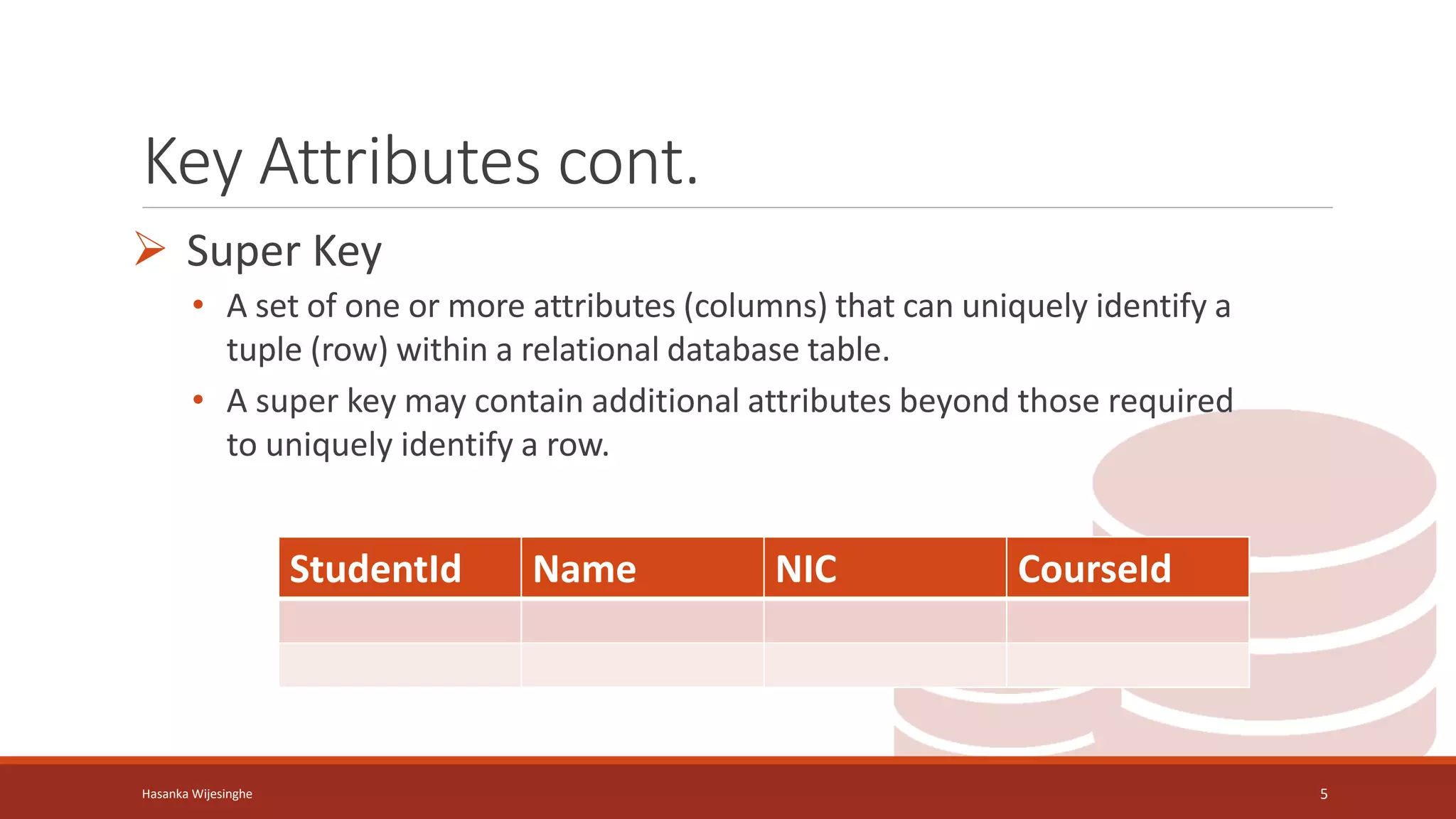
 Super Key
• A set of one or more attributes (columns) that can uniquely identify a
tuple (row) within a relational database table.
• A super key may contain additional attributes beyond those required
to uniquely identify a row.
Hasanka Wijesinghe 5
StudentId Name NIC CourseId
Key Attributes cont.
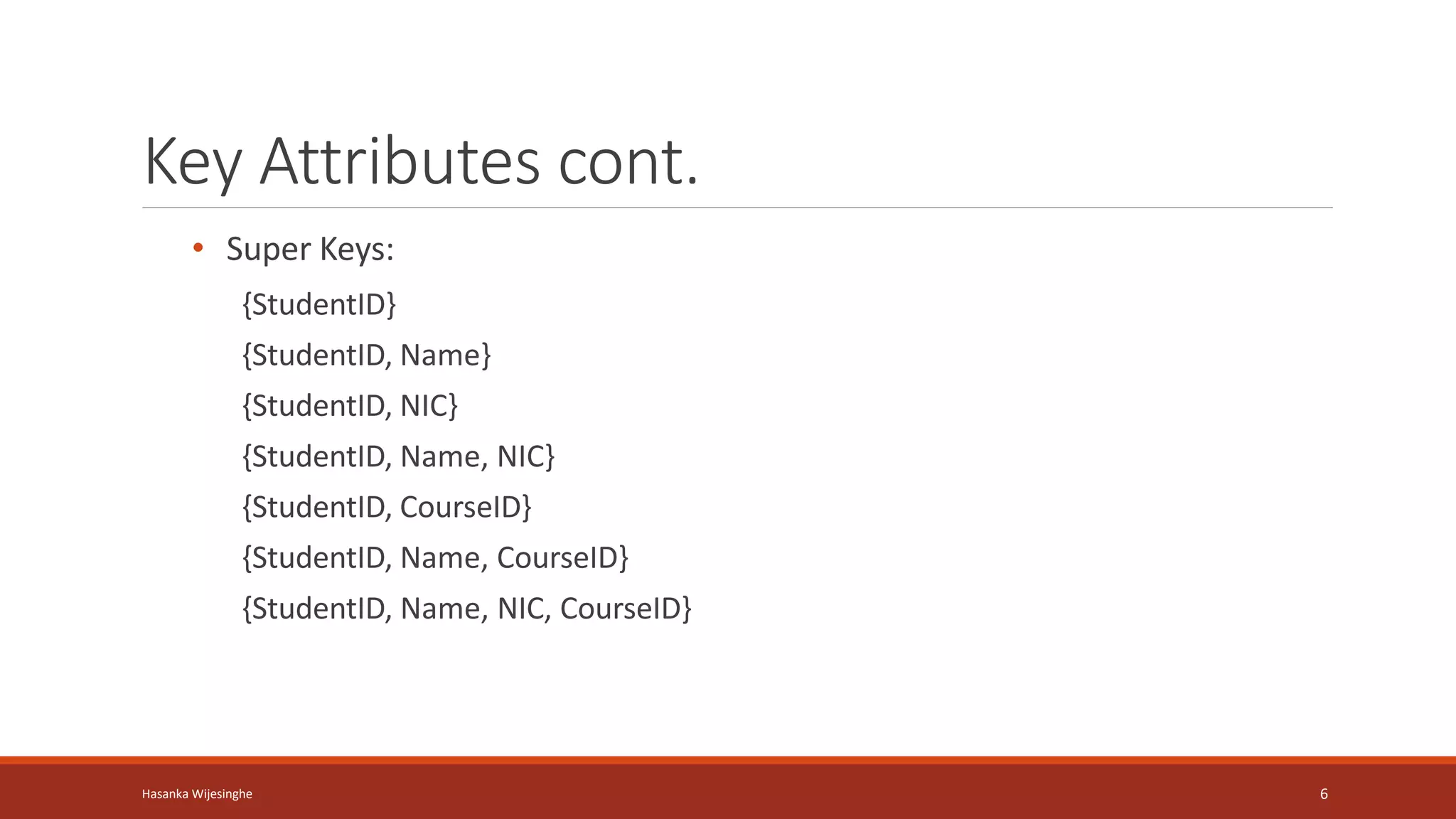
• Super Keys:
{StudentID}
{StudentID, Name}
{StudentID, NIC}
{StudentID, Name, NIC}
{StudentID, CourseID}
{StudentID, Name, CourseID}
{StudentID, Name, NIC, CourseID}
Hasanka Wijesinghe 6
Key Attributes cont.
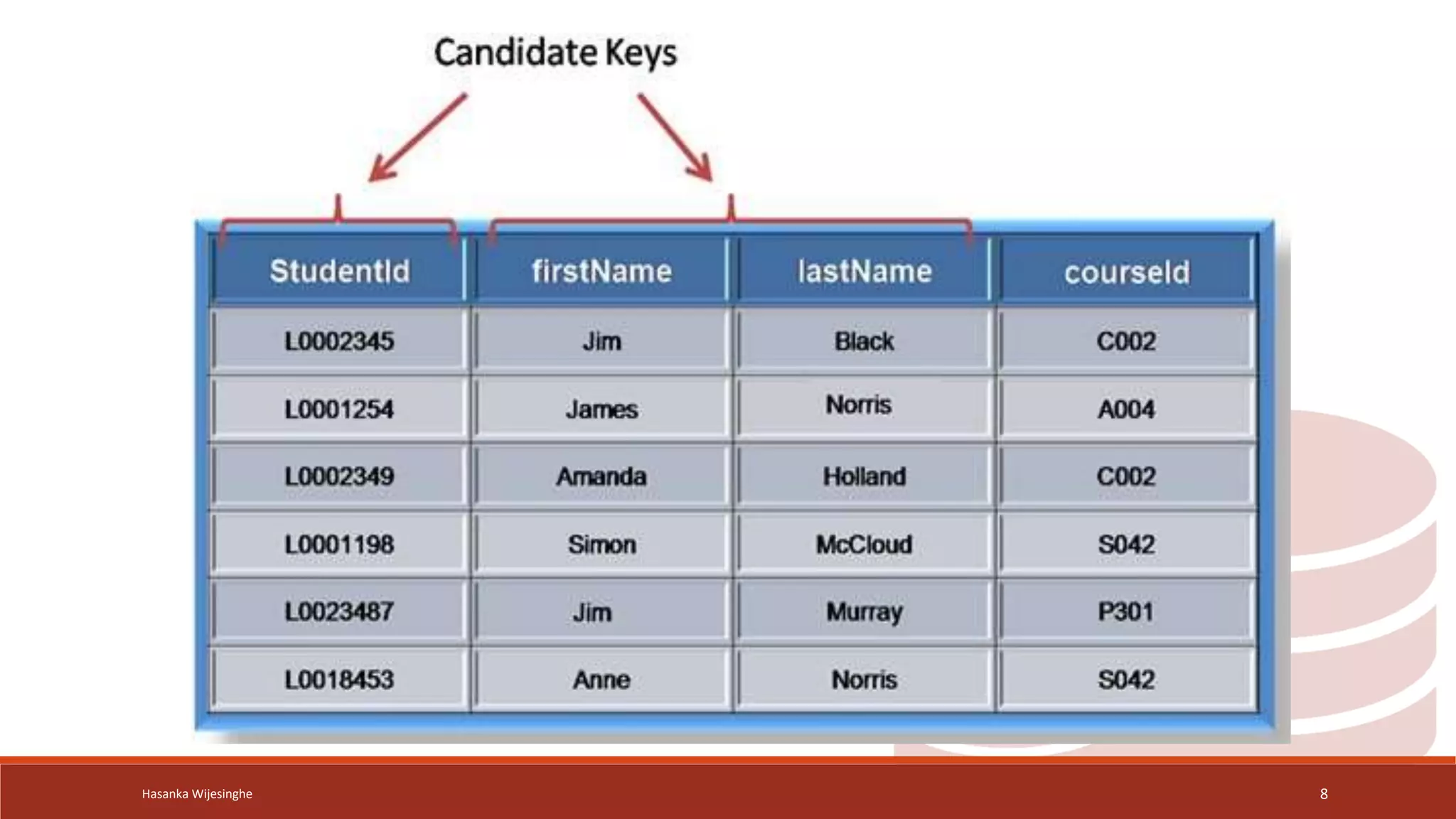
Candidate key
• A candidate key is a set of one or more attributes
(columns) within a relational database table that can
uniquely identify each tuple (row) in the table.
• A subset of a super key
• Every table must have a candidate key
Hasanka Wijesinghe 7
Hasanka Wijesinghe 8
Key Attributes cont.
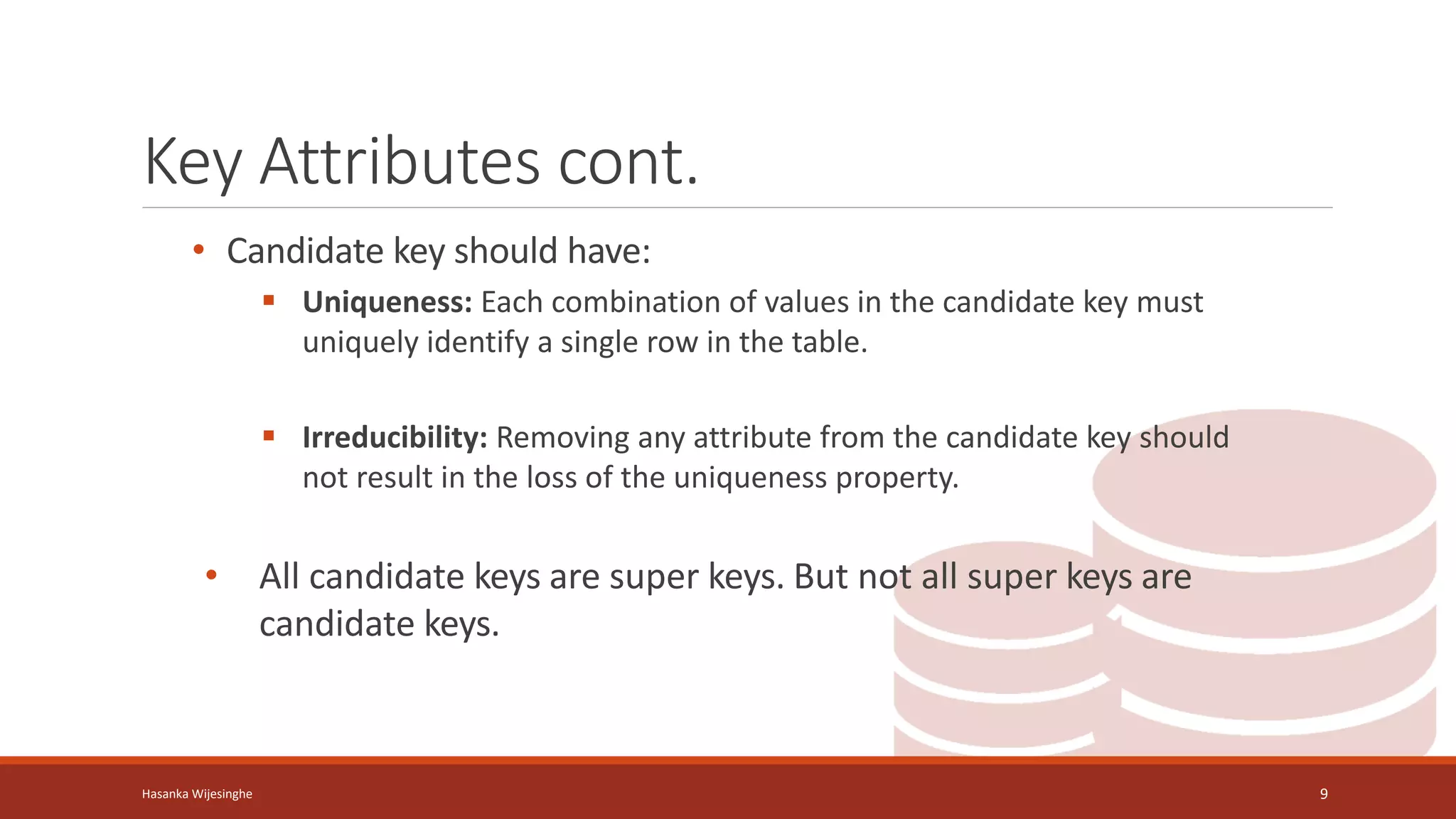
• Candidate key should have:
 Uniqueness: Each combination of values in the candidate key must
uniquely identify a single row in the table.
 Irreducibility: Removing any attribute from the candidate key should
not result in the loss of the uniqueness property.
• All candidate keys are super keys. But not all super keys are
candidate keys.
Hasanka Wijesinghe 9
Hasanka Wijesinghe 10
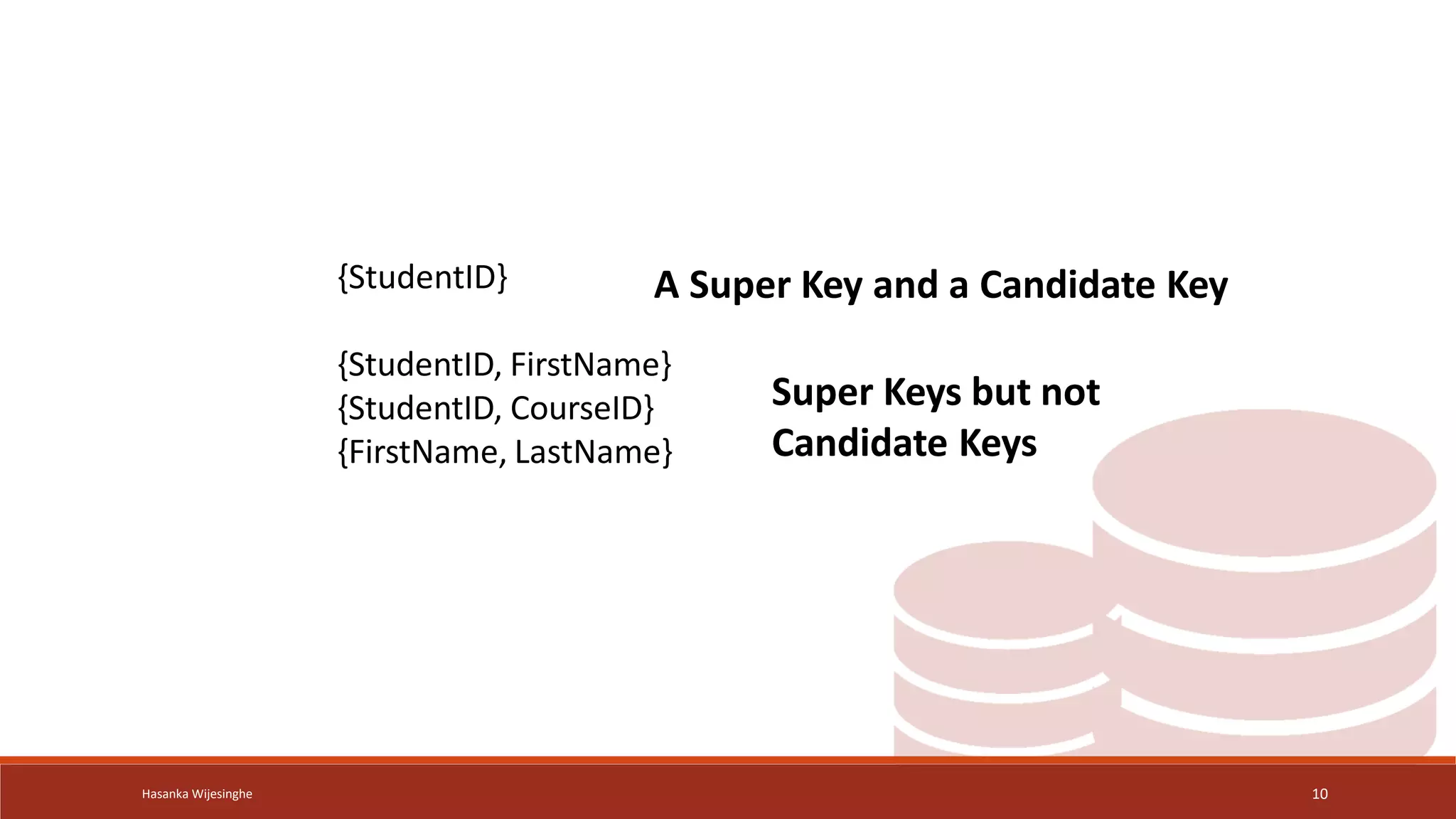
{StudentID}
{StudentID, FirstName}
{StudentID, CourseID}
{FirstName, LastName}
A Super Key and a Candidate Key
Super Keys but not
Candidate Keys
Key Attributes cont.
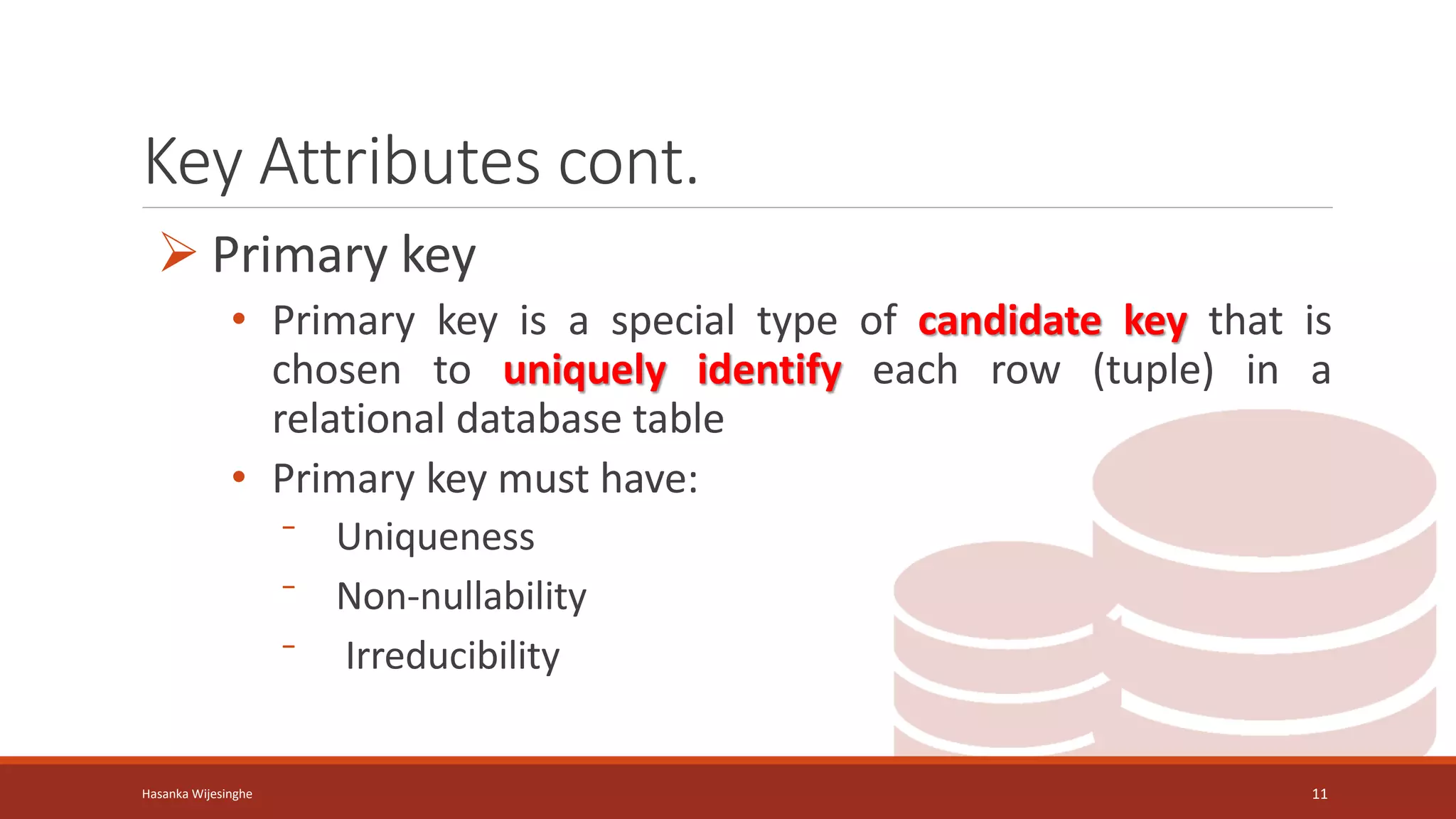
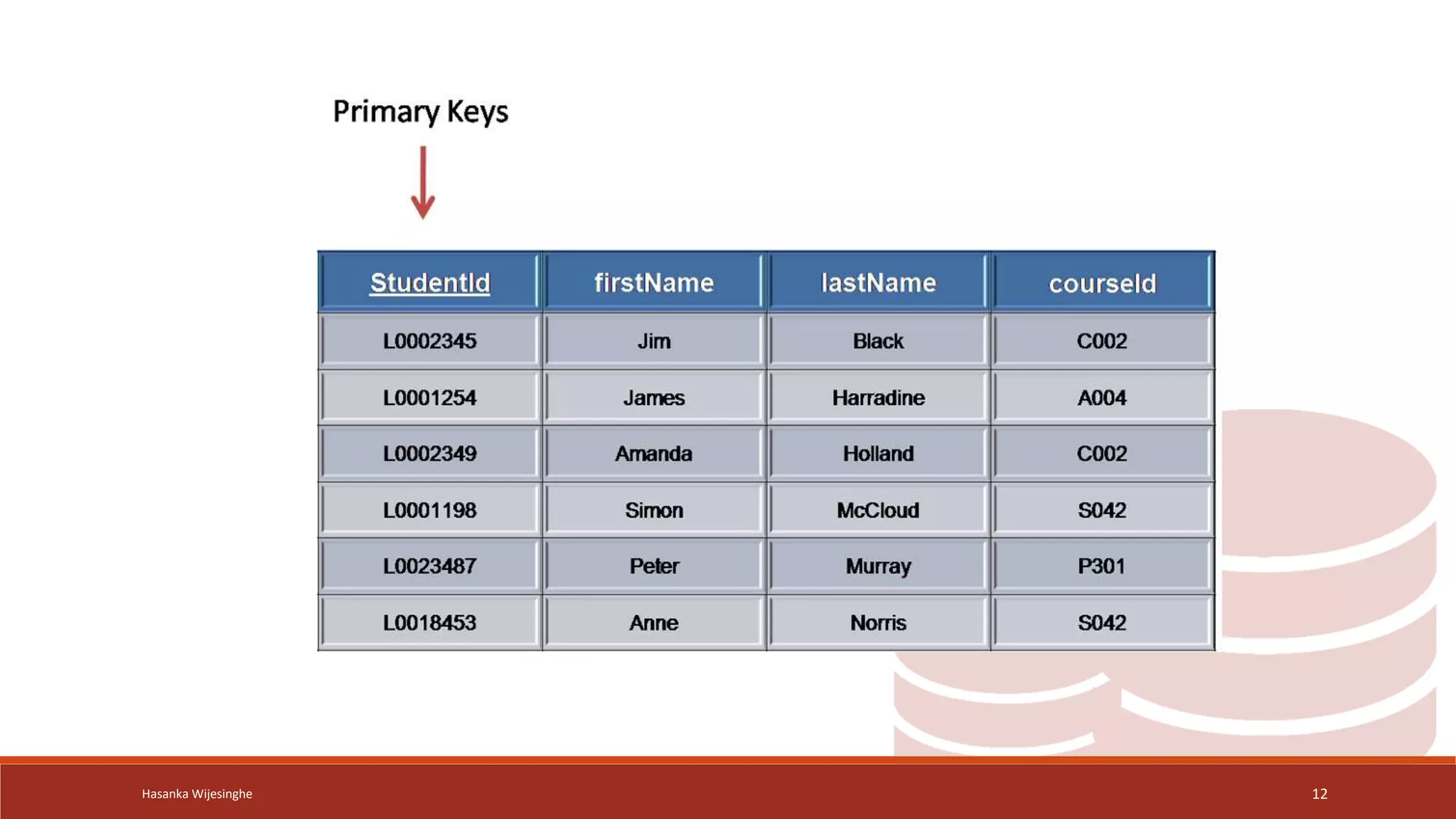
 Primary key
• Primary key is a special type of candidate key that is
chosen to uniquely identify each row (tuple) in a
relational database table
• Primary key must have:
⁻ Uniqueness
⁻ Non-nullability
⁻ Irreducibility
Hasanka Wijesinghe 11
Hasanka Wijesinghe 12
Key Attributes cont.
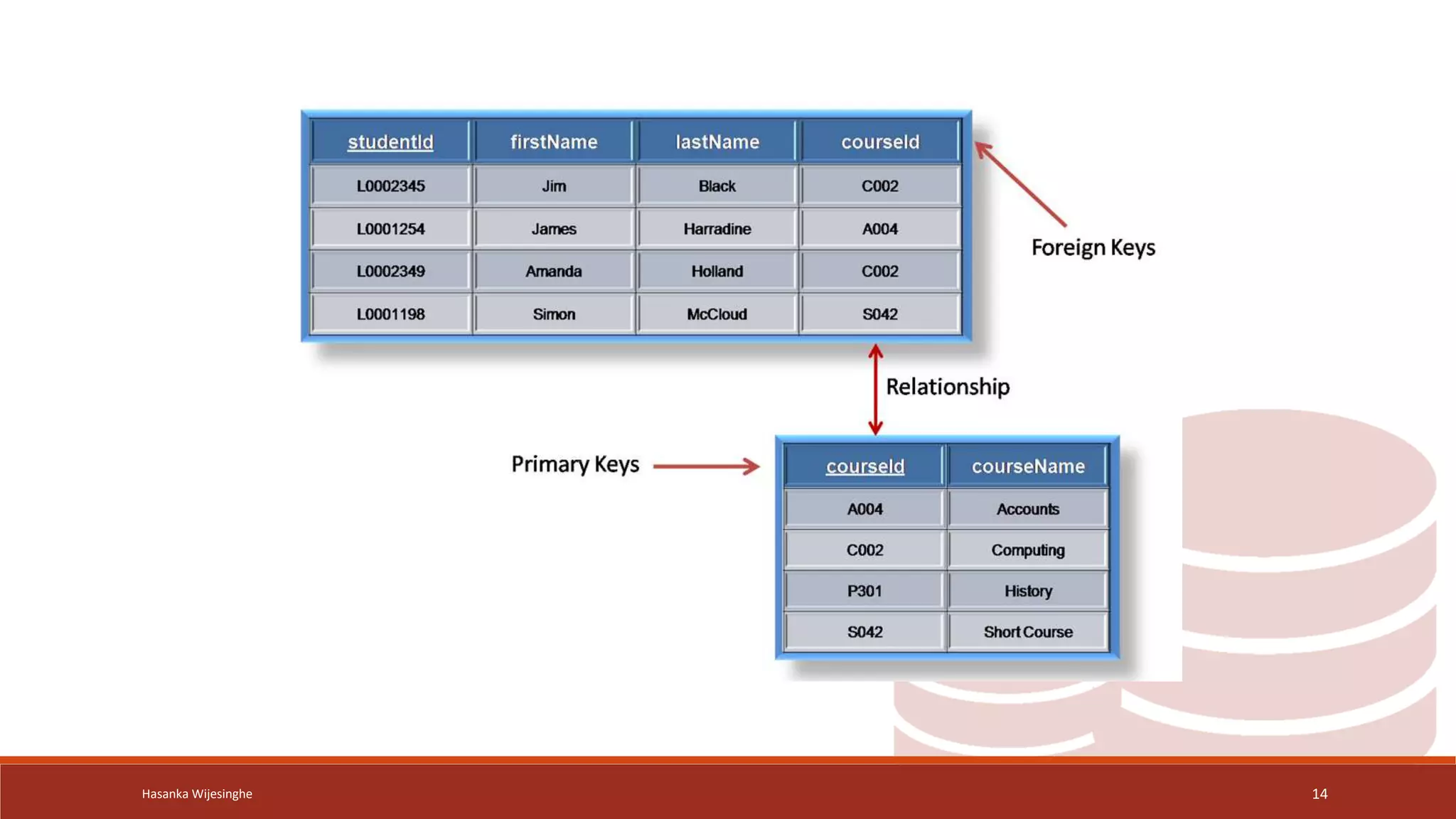
Foreign key
• foreign key is a column or a set of columns in a table
that establishes a link or relationship between the
data in two different tables.
Hasanka Wijesinghe 13
Hasanka Wijesinghe 14
Hasanka Wijesinghe 15
Converting ER Model to Relational
Schema
Hasanka Wijesinghe 16
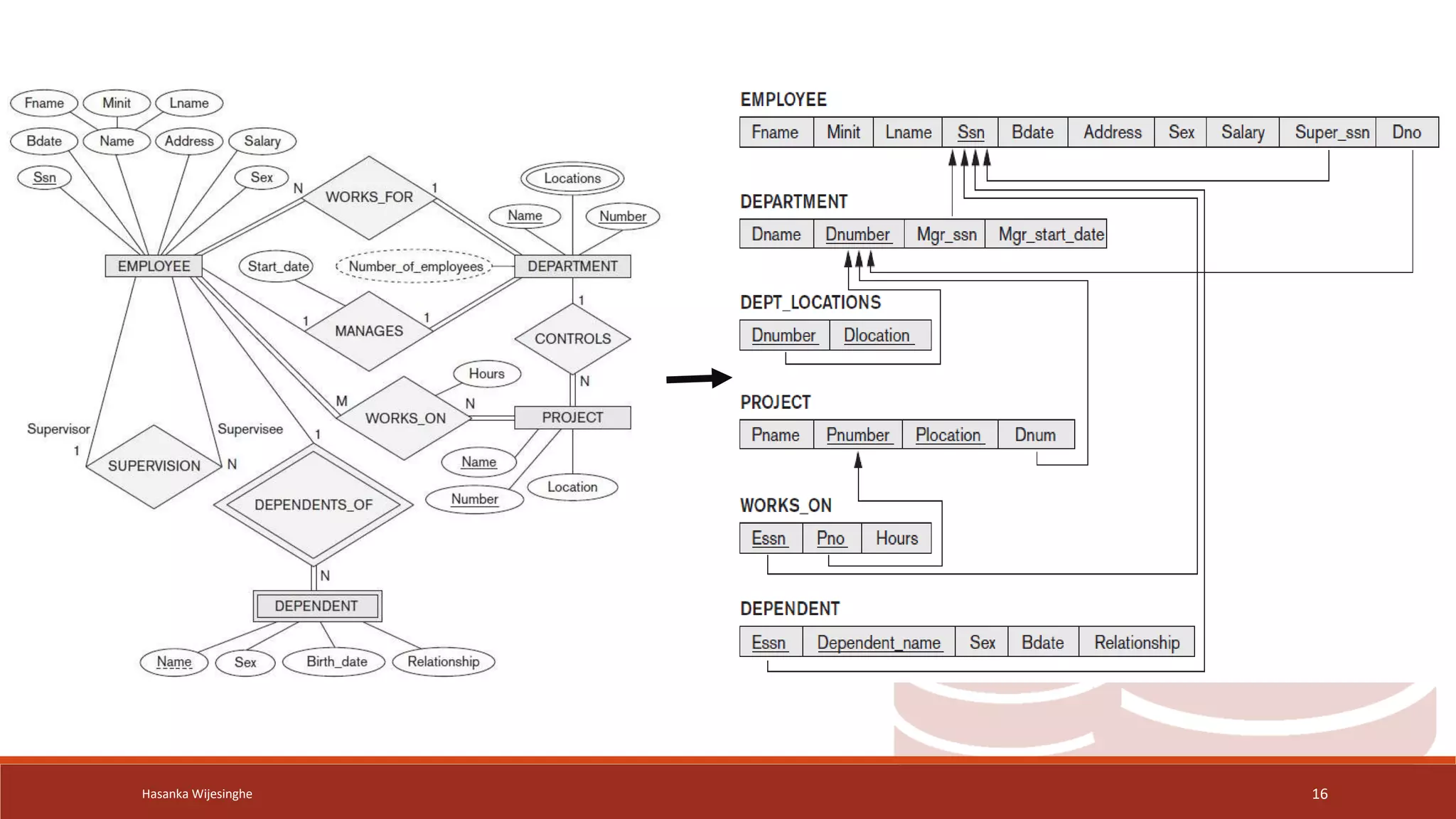
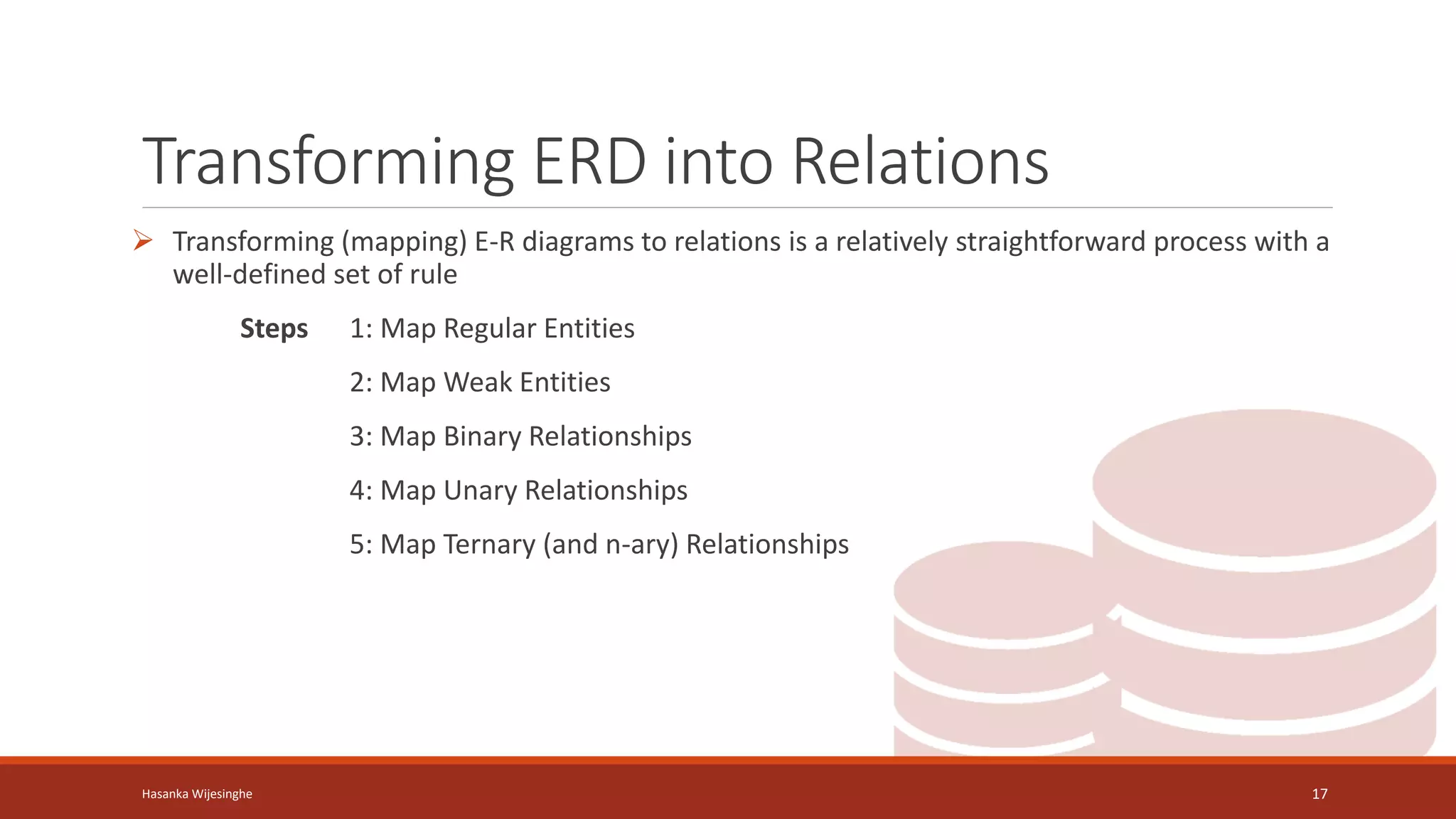
Transforming ERD into Relations
 Transforming (mapping) E-R diagrams to relations is a relatively straightforward process with a
well-defined set of rule
Steps 1: Map Regular Entities
2: Map Weak Entities
3: Map Binary Relationships
4: Map Unary Relationships
5: Map Ternary (and n-ary) Relationships
Hasanka Wijesinghe 17
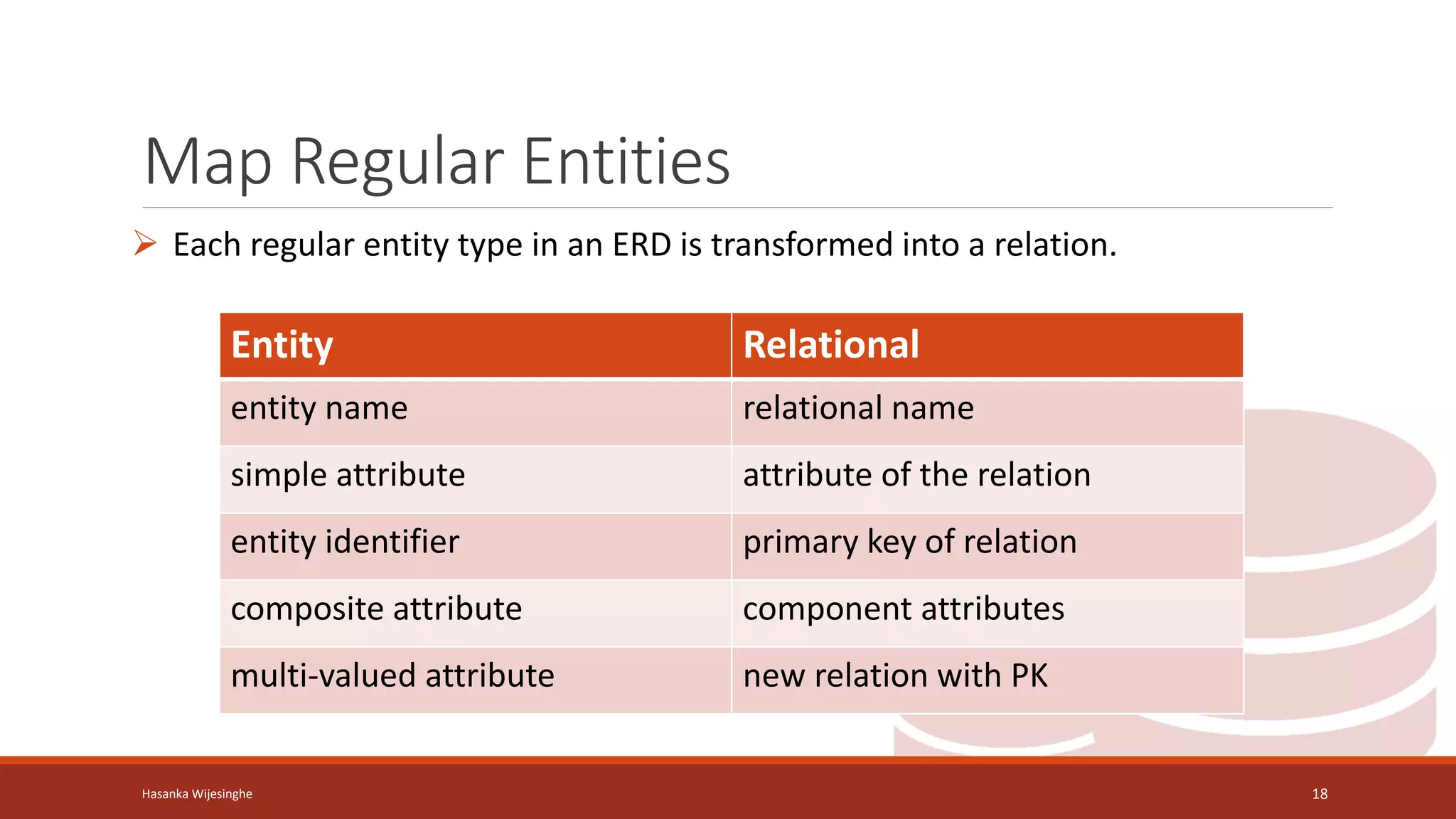
Map Regular Entities
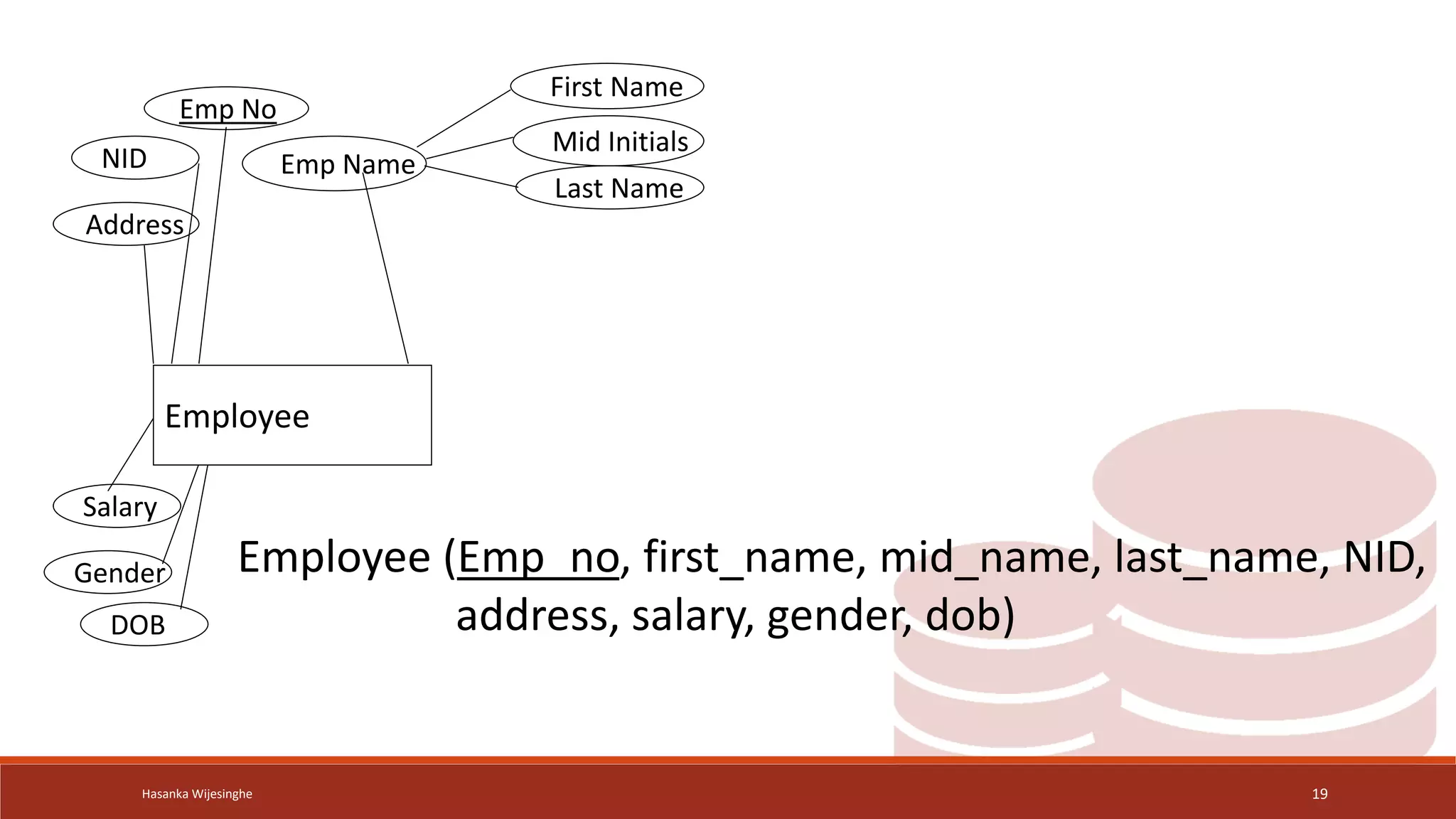
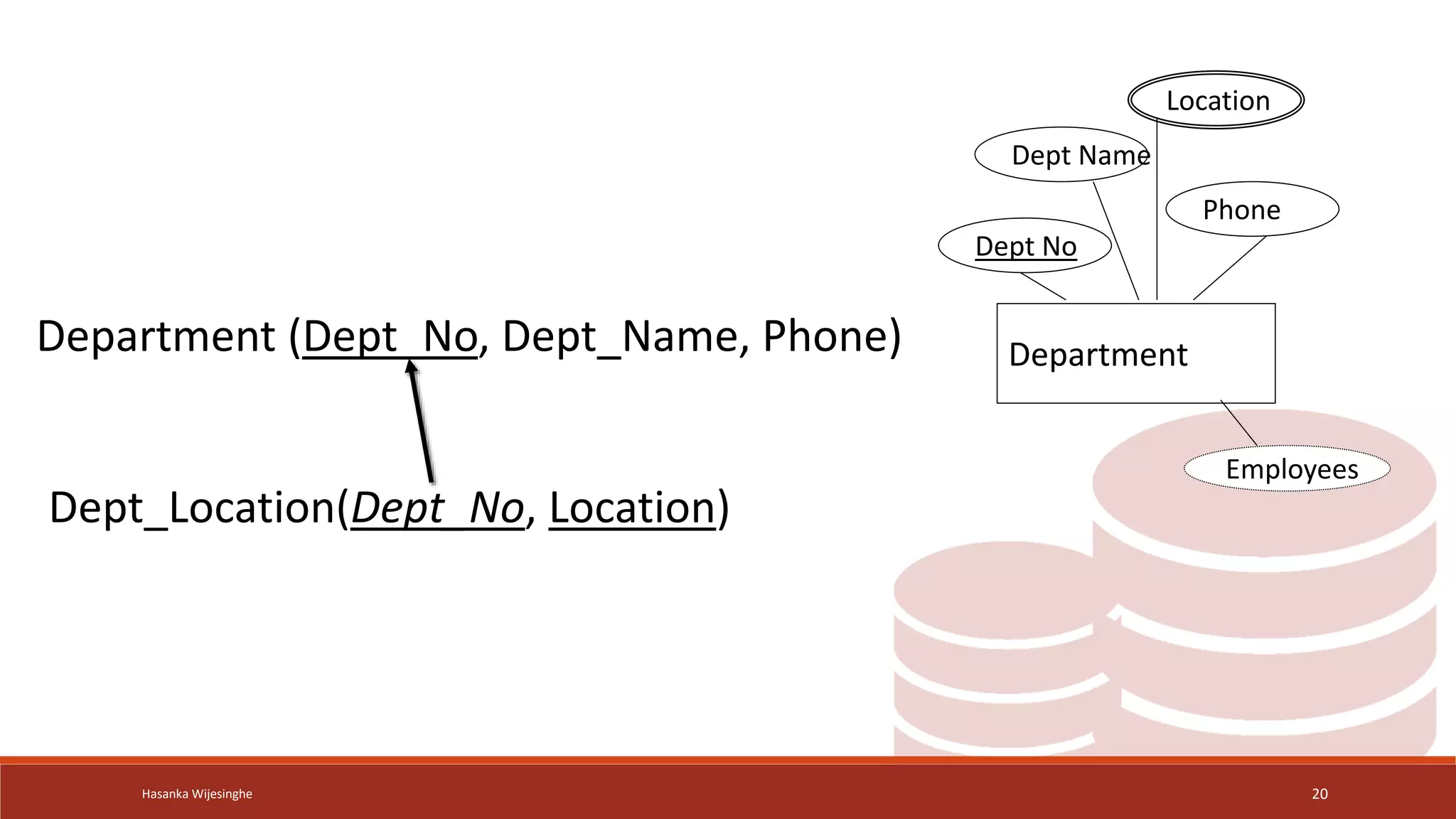
 Each regular entity type in an ERD is transformed into a relation.
Hasanka Wijesinghe 18
Entity Relational
entity name relational name
simple attribute attribute of the relation
entity identifier primary key of relation
composite attribute component attributes
multi-valued attribute new relation with PK
Hasanka Wijesinghe 19
Emp No
Emp Name
NID
Salary
Address
Gender
DOB
First Name
Mid Initials
Last Name
Employee
Employee (Emp_no, first_name, mid_name, last_name, NID,
address, salary, gender, dob)
Hasanka Wijesinghe 20
Department
Dept No
Dept Name
Location
Employees
Phone
Dept_Location(Dept_No, Location)
Department (Dept_No, Dept_Name, Phone)
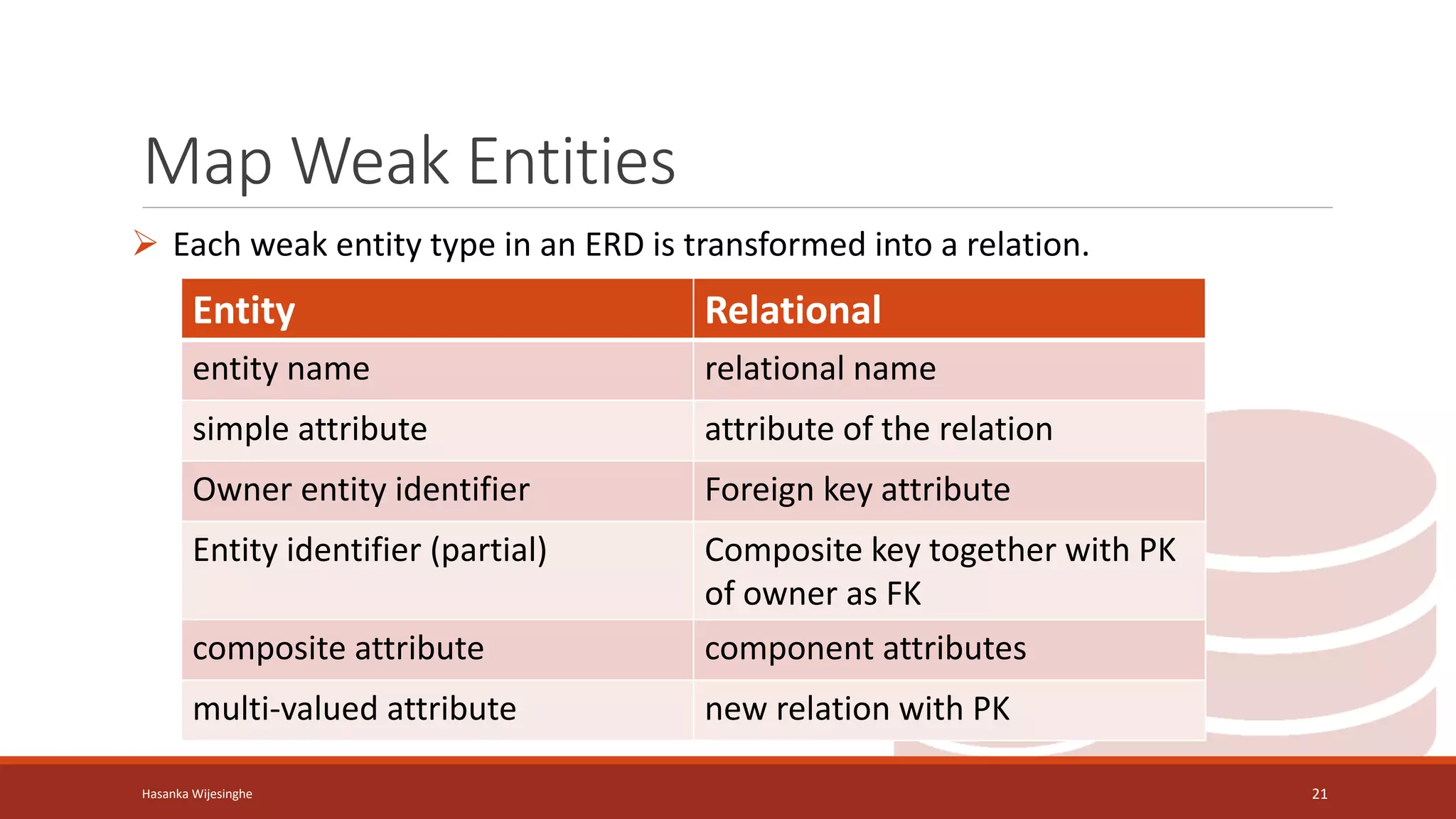
Map Weak Entities
 Each weak entity type in an ERD is transformed into a relation.
Hasanka Wijesinghe 21
Entity Relational
entity name relational name
simple attribute attribute of the relation
Owner entity identifier Foreign key attribute
Entity identifier (partial) Composite key together with PK
of owner as FK
composite attribute component attributes
multi-valued attribute new relation with PK
Hasanka Wijesinghe 22
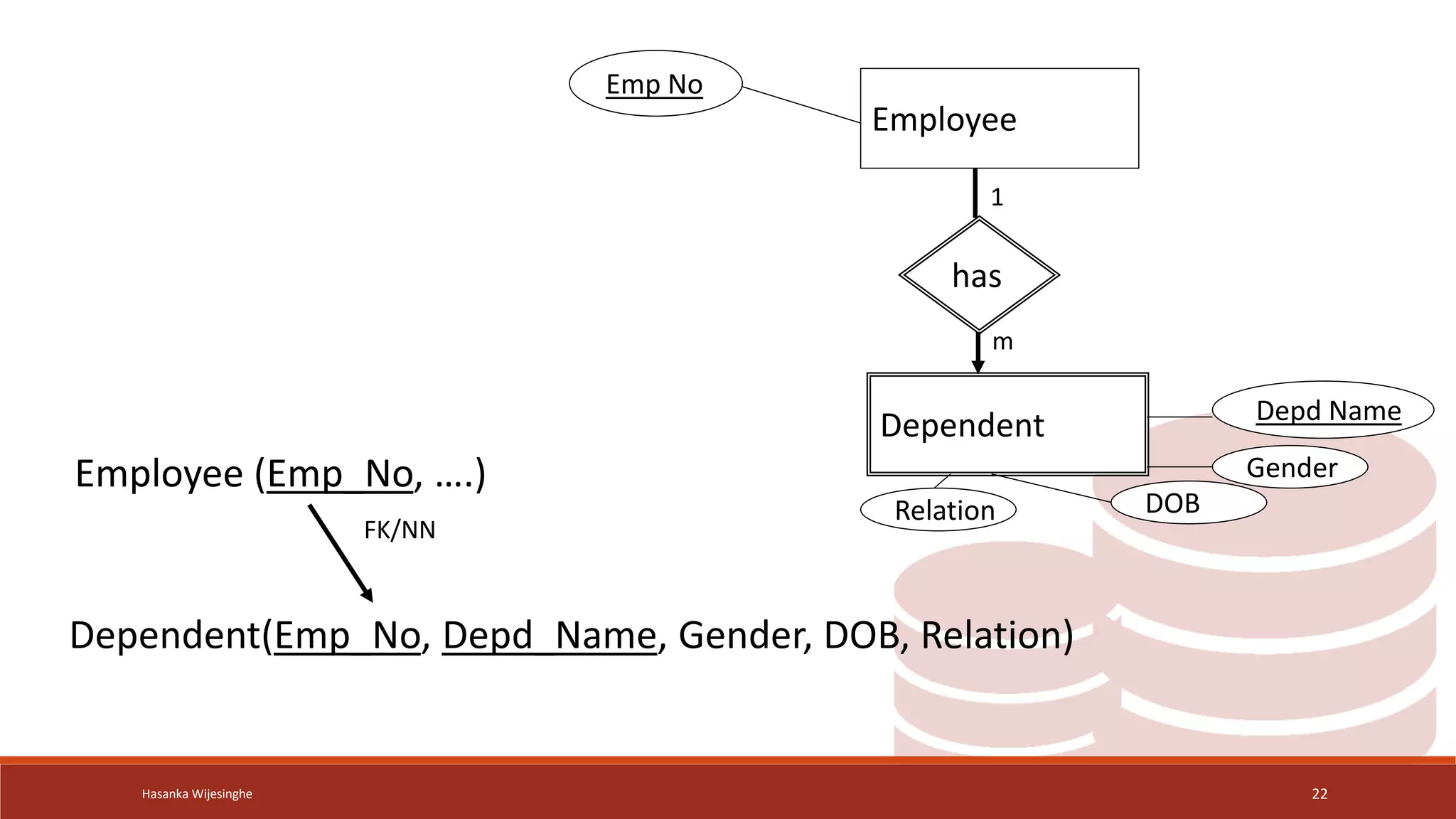
Employee
Dependent
has
Depd Name
Gender
DOB
Relation
Emp No
Dependent(Emp_No, Depd_Name, Gender, DOB, Relation)
Employee (Emp_No, ….)
FK/NN
1
m
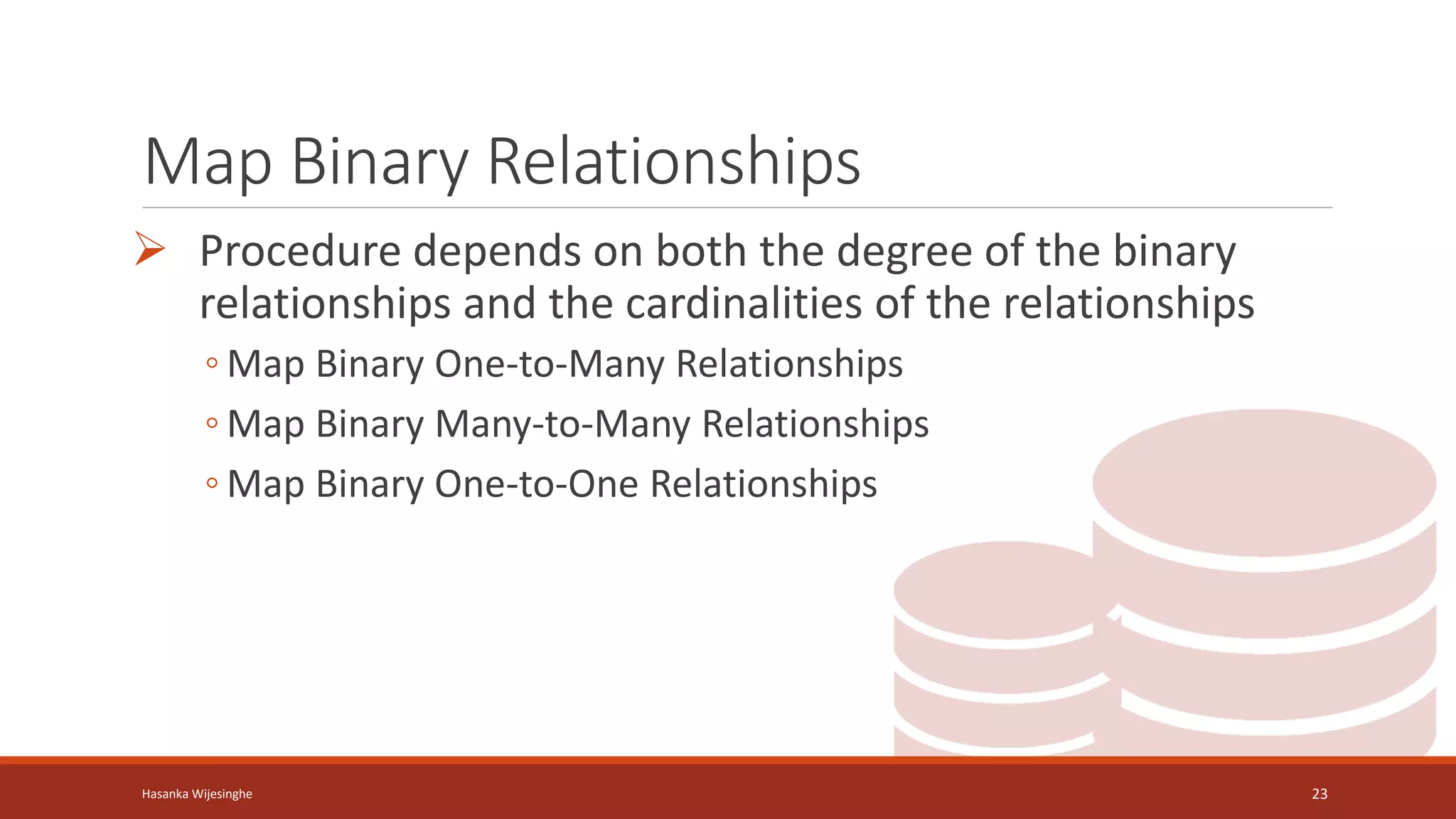
Map Binary Relationships
 Procedure depends on both the degree of the binary
relationships and the cardinalities of the relationships
◦ Map Binary One-to-Many Relationships
◦ Map Binary Many-to-Many Relationships
◦ Map Binary One-to-One Relationships
Hasanka Wijesinghe 23
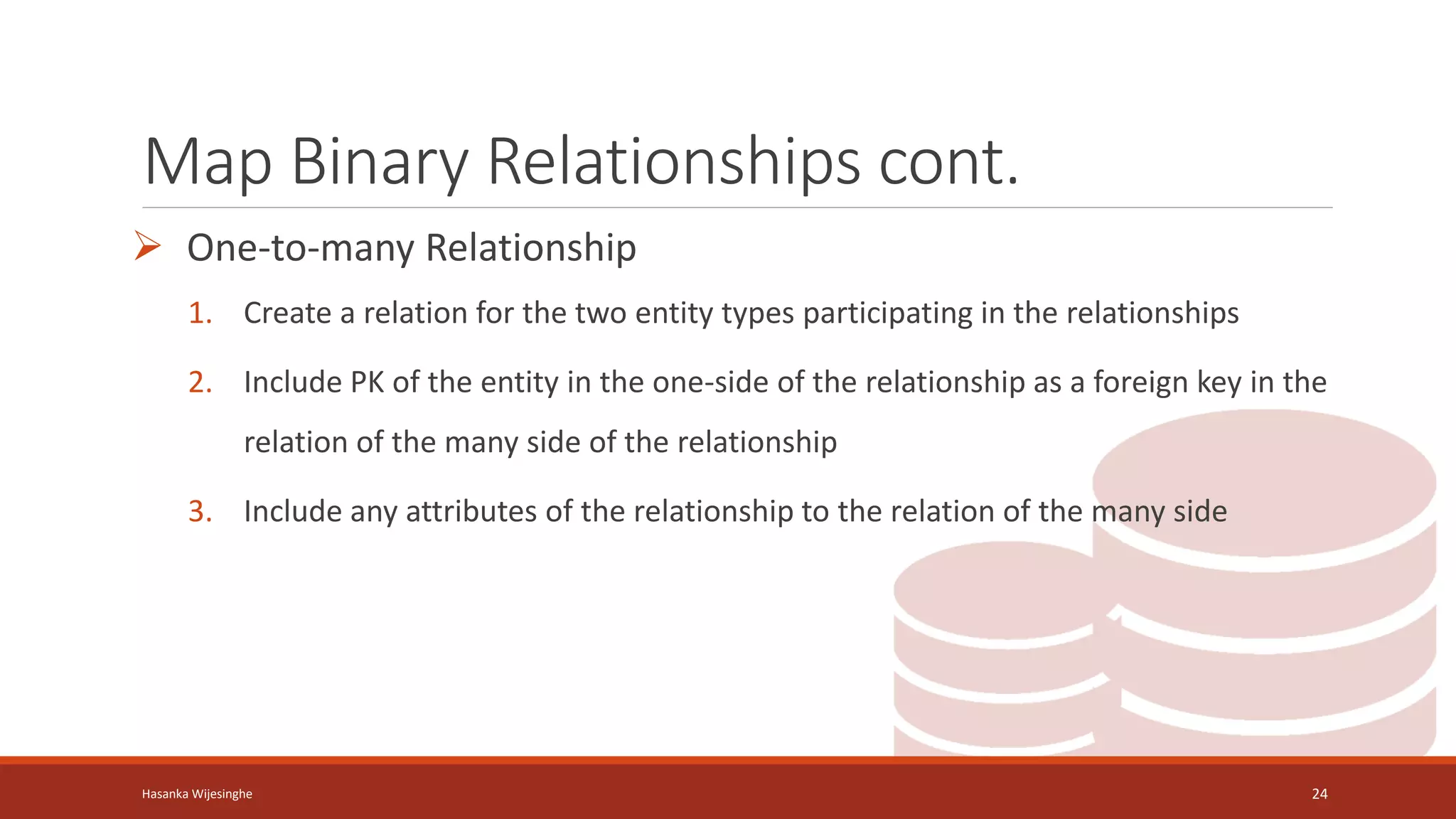
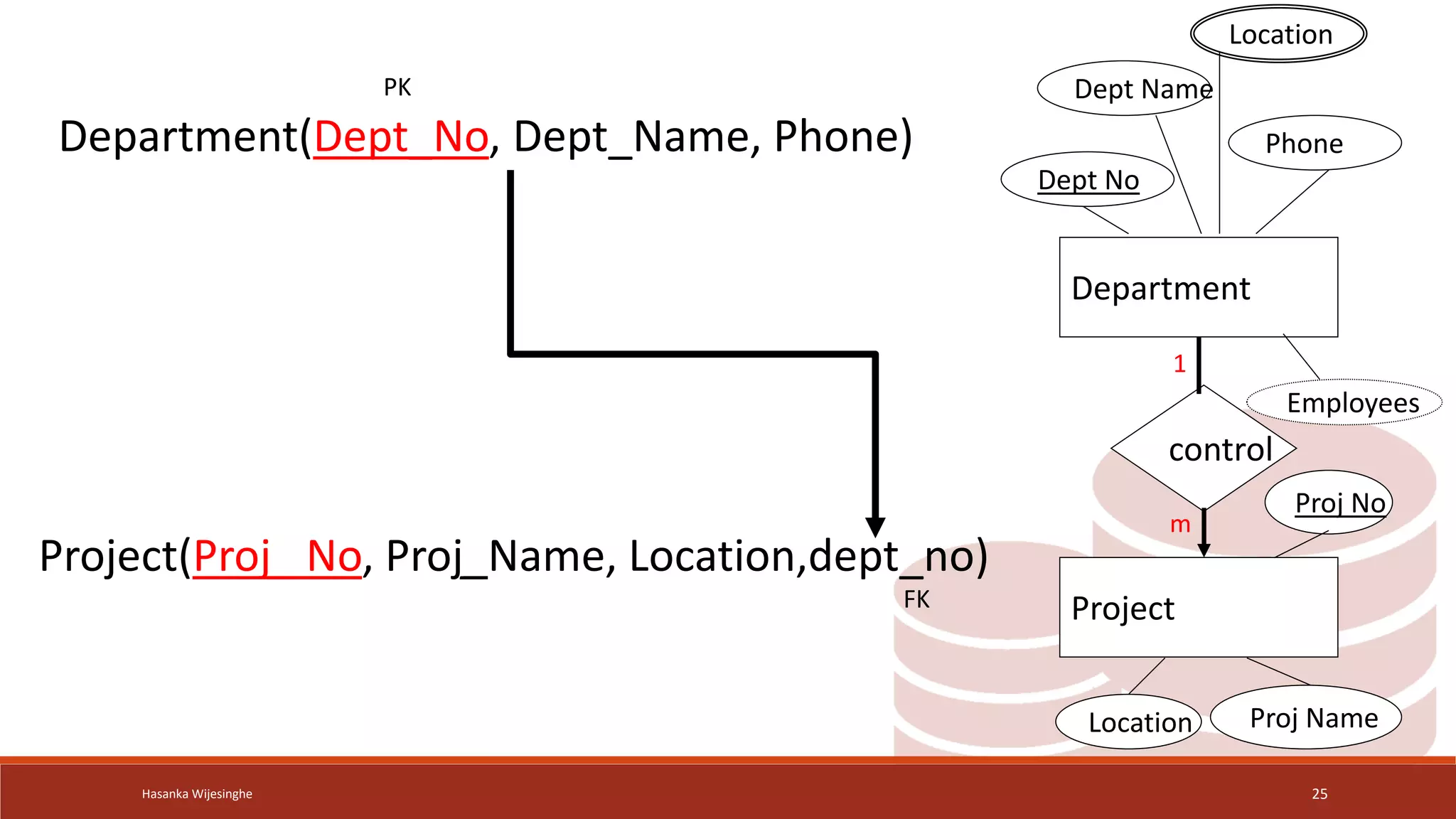
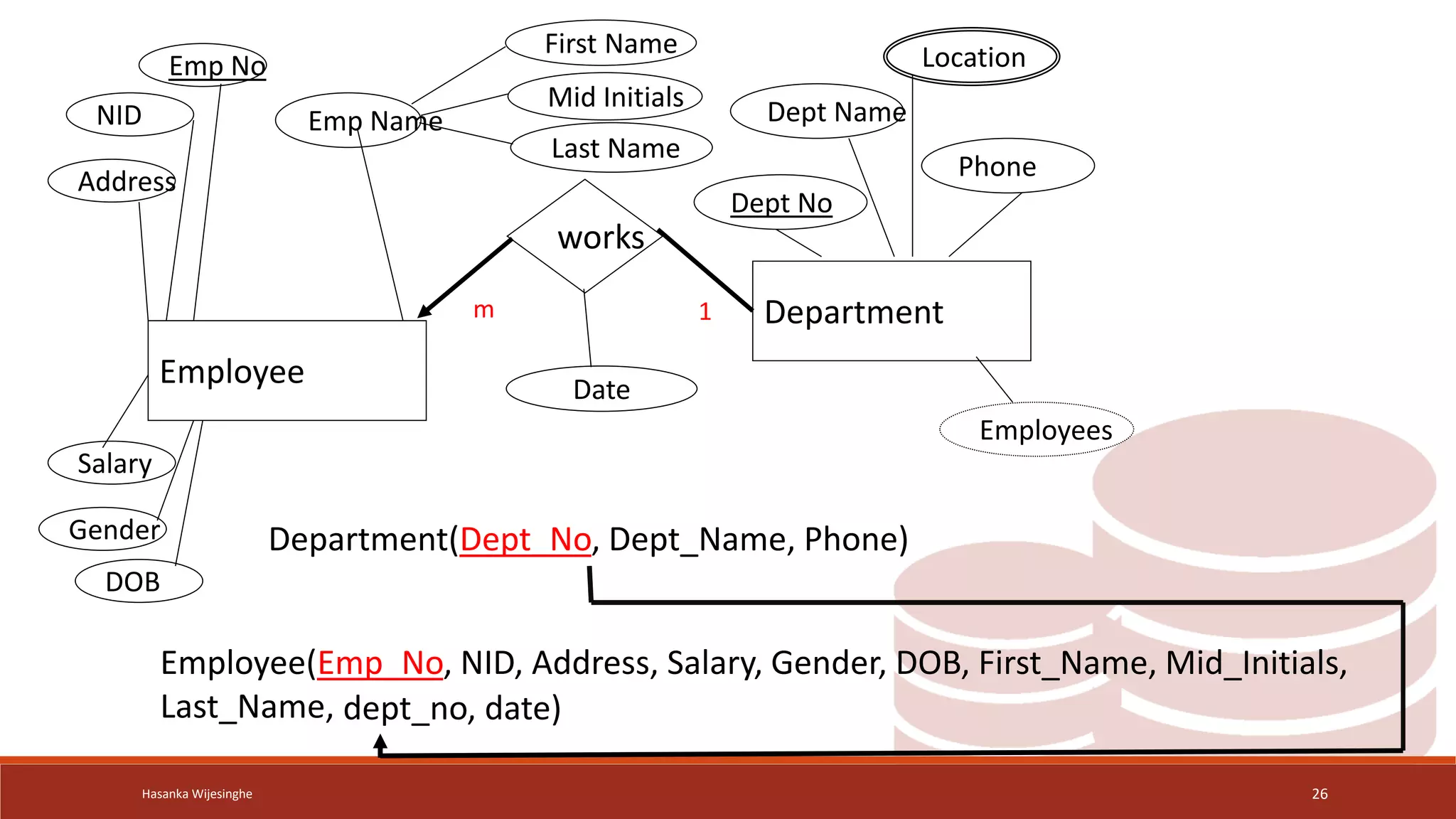
Map Binary Relationships cont.
 One-to-many Relationship
1. Create a relation for the two entity types participating in the relationships
2. Include PK of the entity in the one-side of the relationship as a foreign key in the
relation of the many side of the relationship
3. Include any attributes of the relationship to the relation of the many side
Hasanka Wijesinghe 24
Hasanka Wijesinghe 25
Department
Project
control
Proj No
Proj Name
Location
Dept No
Dept Name
Location
Employees
Phone
1
m
Department(Dept_No, Dept_Name, Phone)
Project(Proj_ No, Proj_Name, Location,dept_no)
PK
FK
Hasanka Wijesinghe 26
Employee
works
Department
Dept No
Dept Name
Location
Employees
Phone
Emp No
Emp Name
NID
Salary
Address
Gender
DOB
First Name
Mid Initials
Last Name
1
m
Employee(Emp_No, NID, Address, Salary, Gender, DOB, First_Name, Mid_Initials,
Last_Name,
Department(Dept_No, Dept_Name, Phone)
dept_no, date)
Date
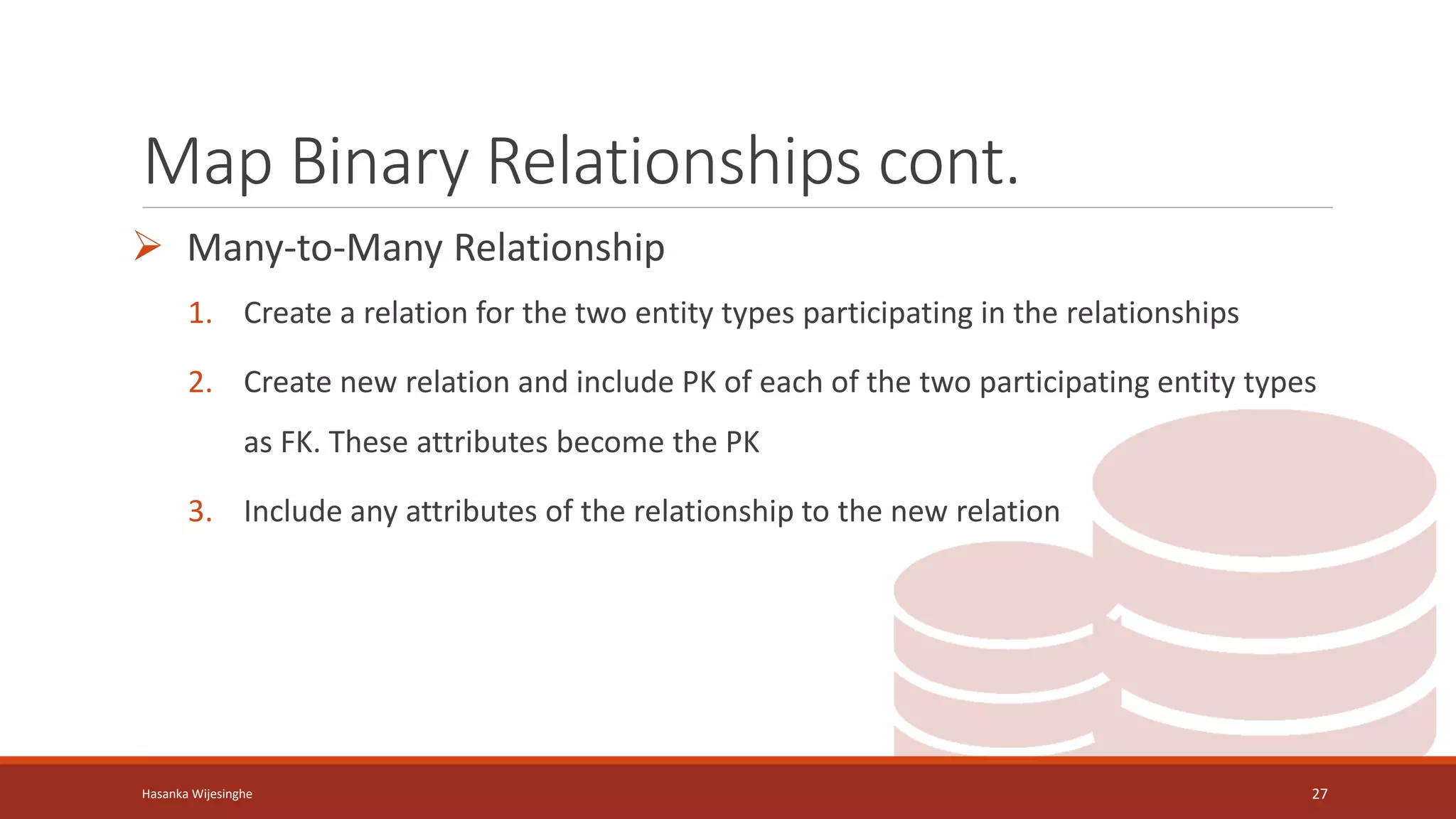
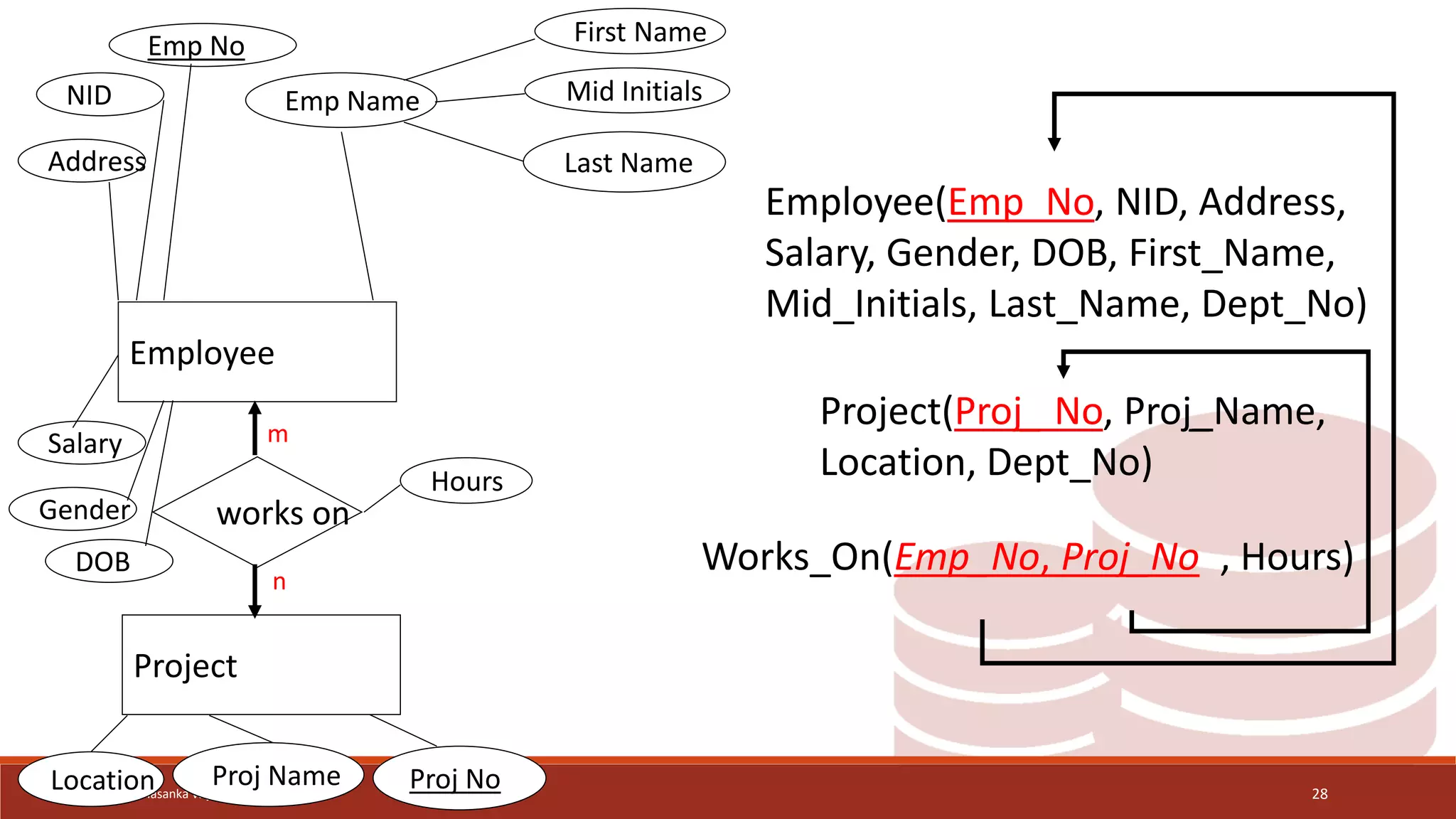
Map Binary Relationships cont.
 Many-to-Many Relationship
1. Create a relation for the two entity types participating in the relationships
2. Create new relation and include PK of each of the two participating entity types
as FK. These attributes become the PK
3. Include any attributes of the relationship to the new relation
Hasanka Wijesinghe 27
Hasanka Wijesinghe 28
Employee
Project
works on
Emp No
Emp Name
NID
Salary
Address
Gender
DOB
First Name
Mid Initials
Last Name
Proj No
Proj Name
Location
Hours
m
n
Employee(Emp_No, NID, Address,
Salary, Gender, DOB, First_Name,
Mid_Initials, Last_Name, Dept_No)
Project(Proj_ No, Proj_Name,
Location, Dept_No)
Works_On(Emp_No, Proj_No , Hours)
Map Binary Relationships cont.
 One-to-One Relationship
1. Specialized case of One-to-Many Create a relation for the two entity types
participating in the relationships
2. Include PK of one of the relations as a foreign key of the other relation (include
in partial participation side of the relationship that has full participation in the
1:1)
3. Include any attributes of the relationship to the same relation
Hasanka Wijesinghe 29
Hasanka Wijesinghe 30
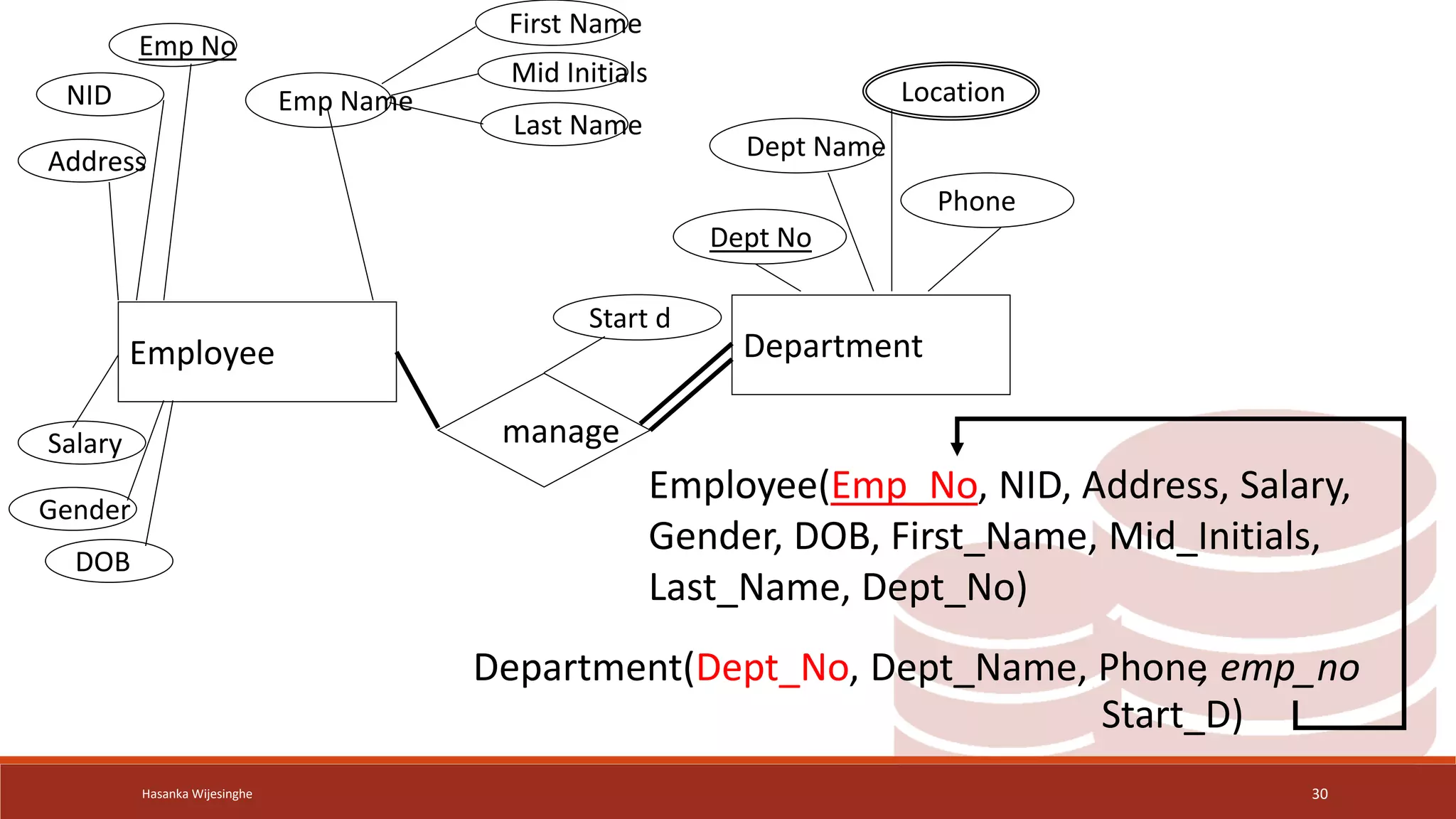
Employee Department
manage
Start d
Emp No
Emp Name
NID
Salary
Address
Gender
DOB
First Name
Mid Initials
Last Name
Dept No
Dept Name
Location
Phone
Employee(Emp_No, NID, Address, Salary,
Gender, DOB, First_Name, Mid_Initials,
Last_Name, Dept_No)
Department(Dept_No, Dept_Name, Phone, emp_no
Start_D)
Map Unary Relationships
 Procedure depends on both the degree of the binary
relationships and the cardinalities of the relationships
◦ Map Unary One-to-Many Relationships
◦ Map Unary Many-to-Many Relationships
◦ Map Unary One-to-One Relationships
Hasanka Wijesinghe 31
Map Unary Relationships cont.
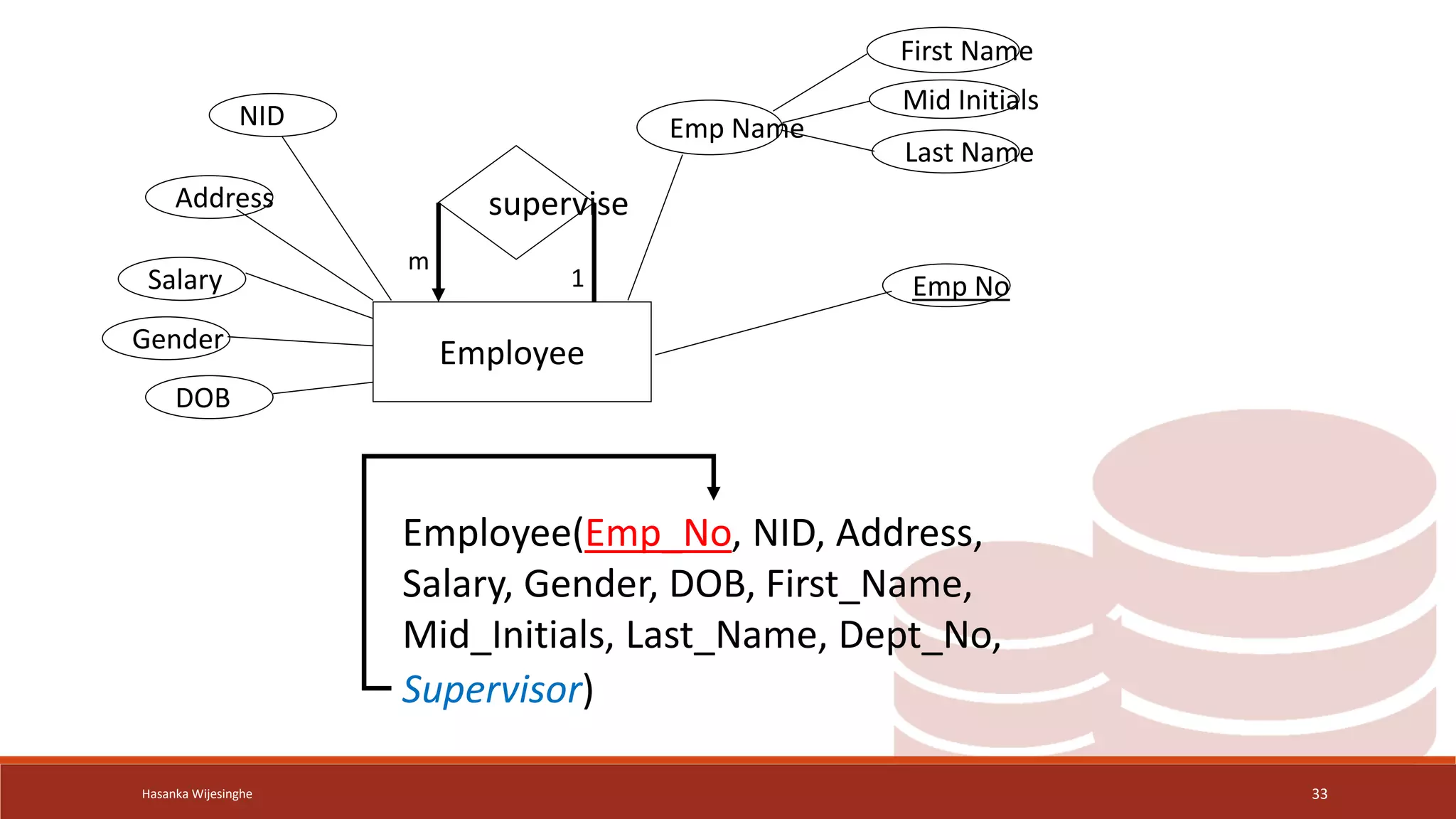
 One-to-many Relationship
1. Create a relation for the entity type
2. Include PK of the entity as a foreign key within the same relation
3. Include any attributes of the relationship to the relation of the many side
Hasanka Wijesinghe 32
Hasanka Wijesinghe 33
Employee
supervise
Emp No
Emp Name
NID
Salary
Address
Gender
DOB
First Name
Mid Initials
Last Name
Employee(Emp_No, NID, Address,
Salary, Gender, DOB, First_Name,
Mid_Initials, Last_Name, Dept_No,
Supervisor)
1
m
Map Unary Relationships cont.
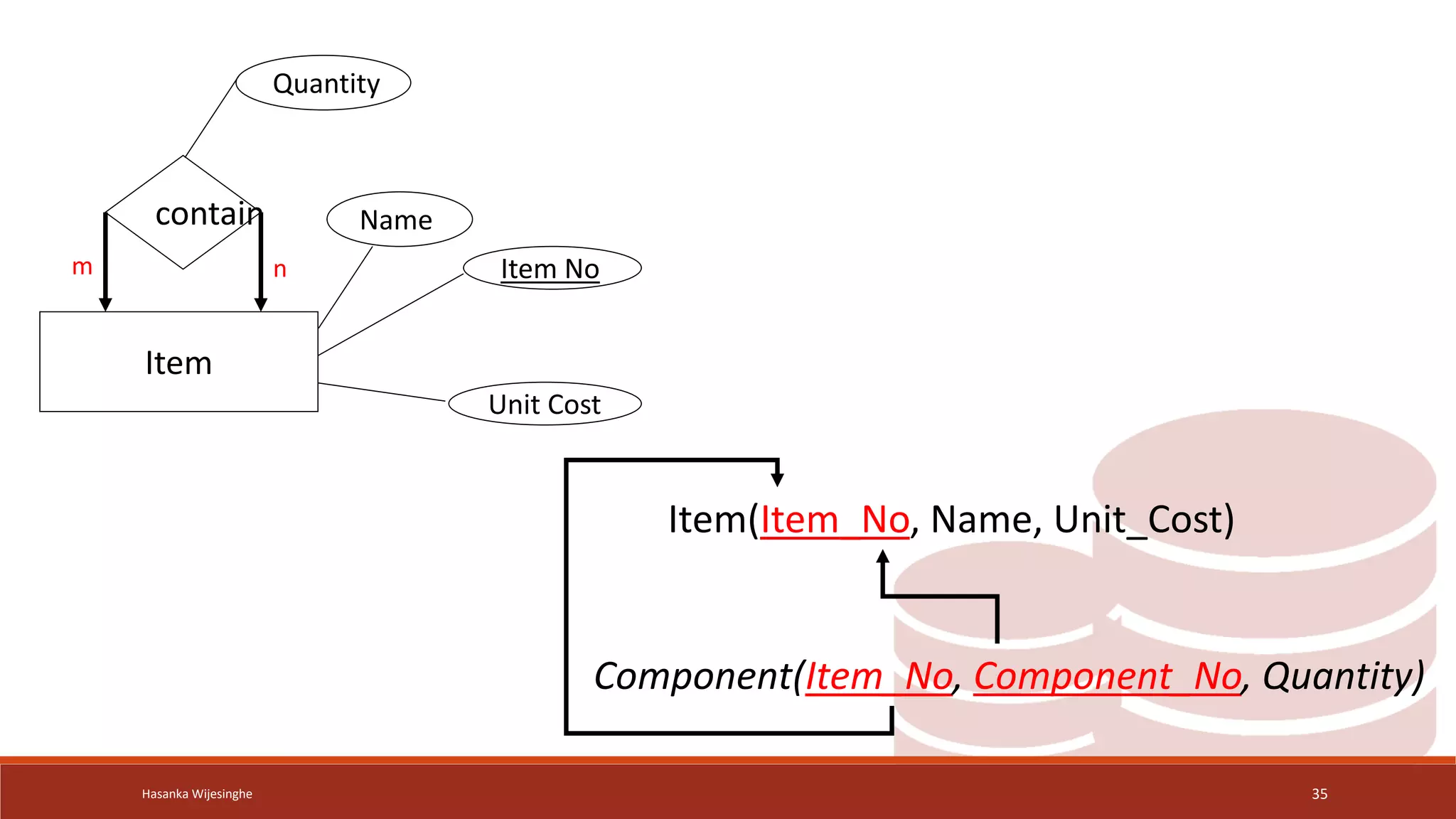
 Many-to-many Relationship
1. Create a relation for the entity type
2. Create new relation and include PK of the entity type as FK twice. These
attributes become the PK (composite)
3. Include any attributes of the relationship to the new relation
Hasanka Wijesinghe 34
Hasanka Wijesinghe 35
Item
contain
Item No
Name
Unit Cost
Quantity
m n
Item(Item_No, Name, Unit_Cost)
Component(Item_No, Component_No, Quantity)
Map Unary Relationships cont.
 One-to-One Relationship
1. Create a relation for the entity type
2. include PK of the entity as a foreign key within the same relation
3. include any attributes of the relationship to the relation of the many side
Hasanka Wijesinghe 36
Hasanka Wijesinghe 37
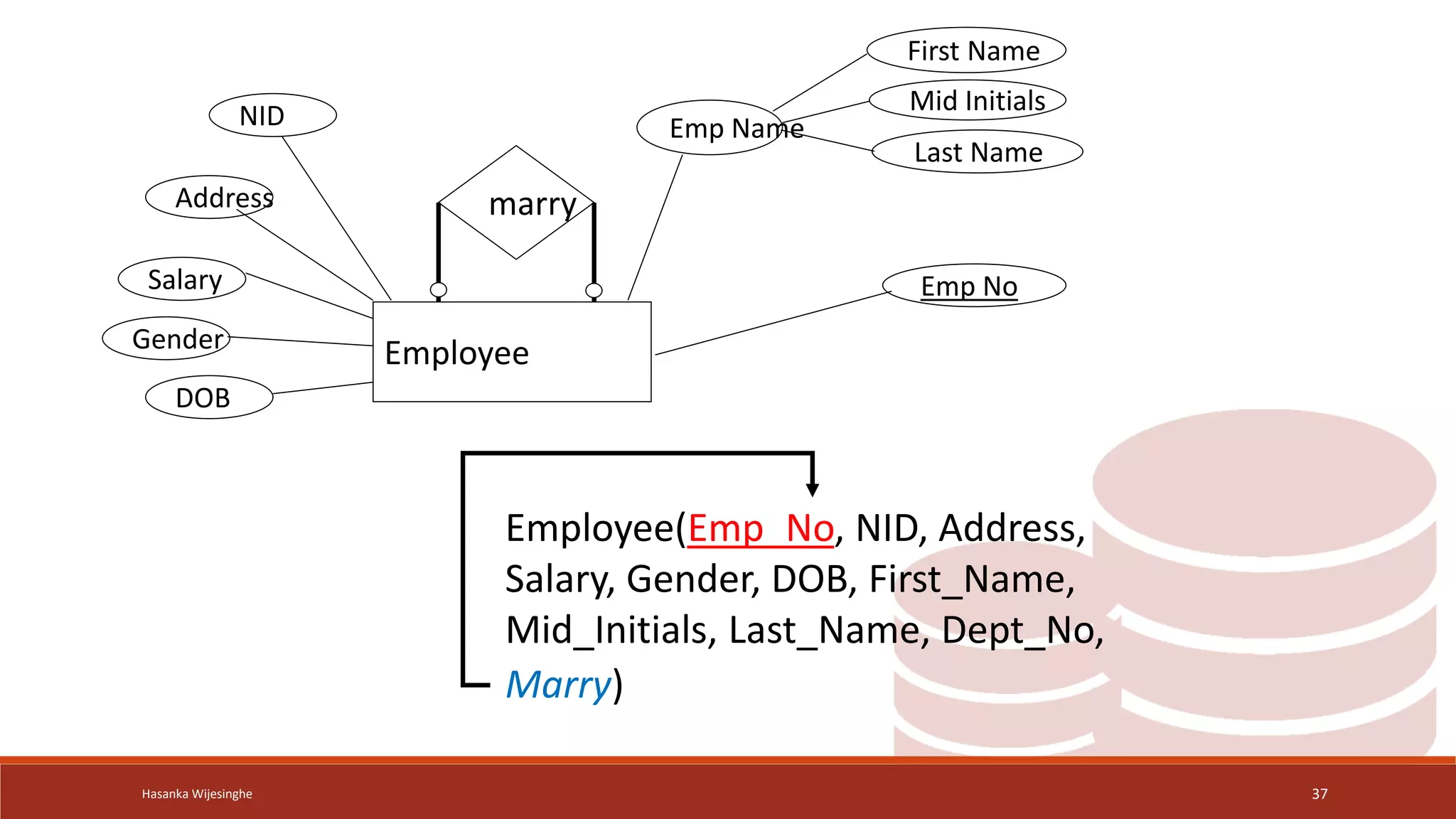
Employee
marry
Emp No
Emp Name
NID
Salary
Address
Gender
DOB
First Name
Mid Initials
Last Name
Employee(Emp_No, NID, Address,
Salary, Gender, DOB, First_Name,
Mid_Initials, Last_Name, Dept_No,
Marry)
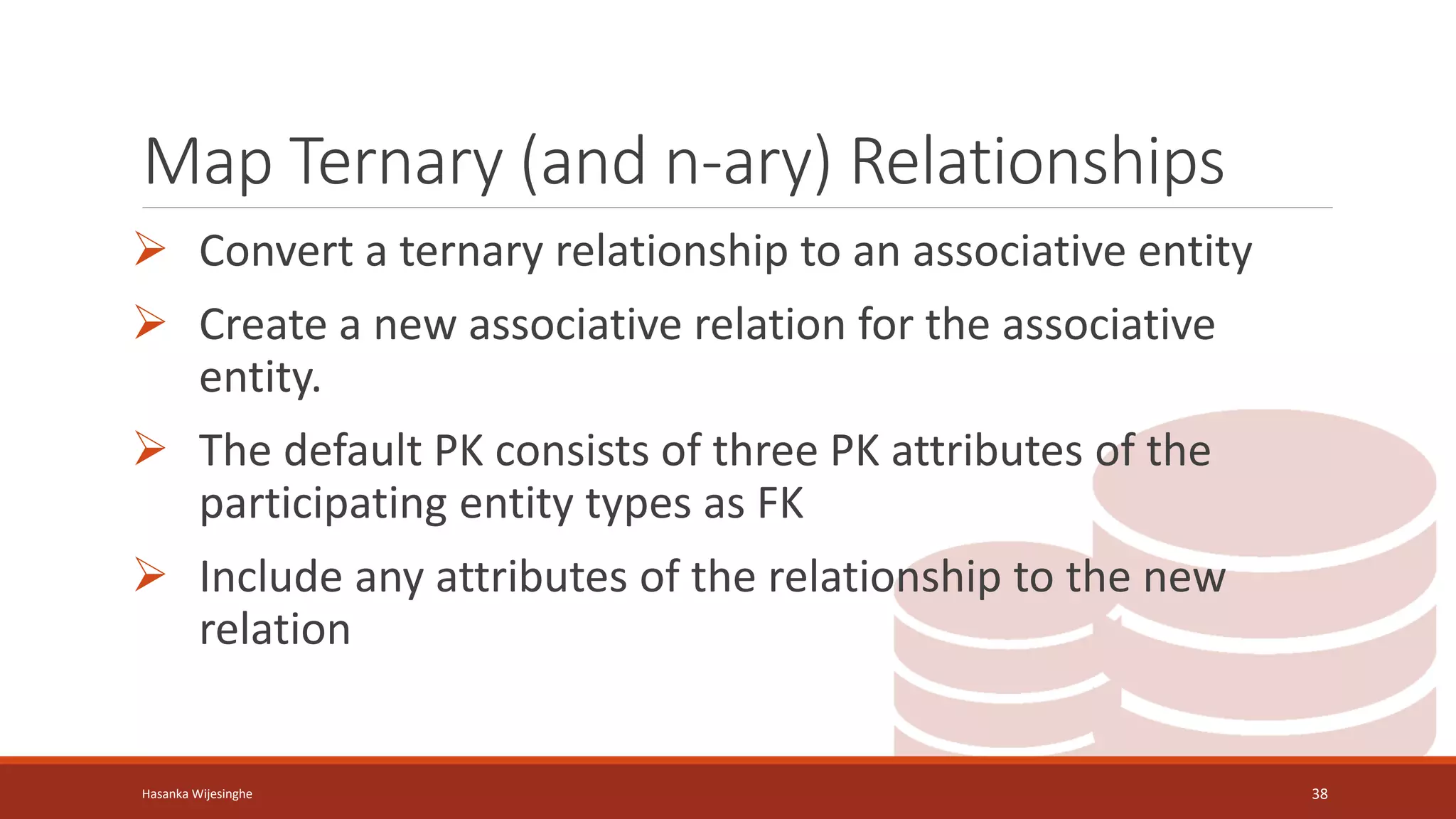
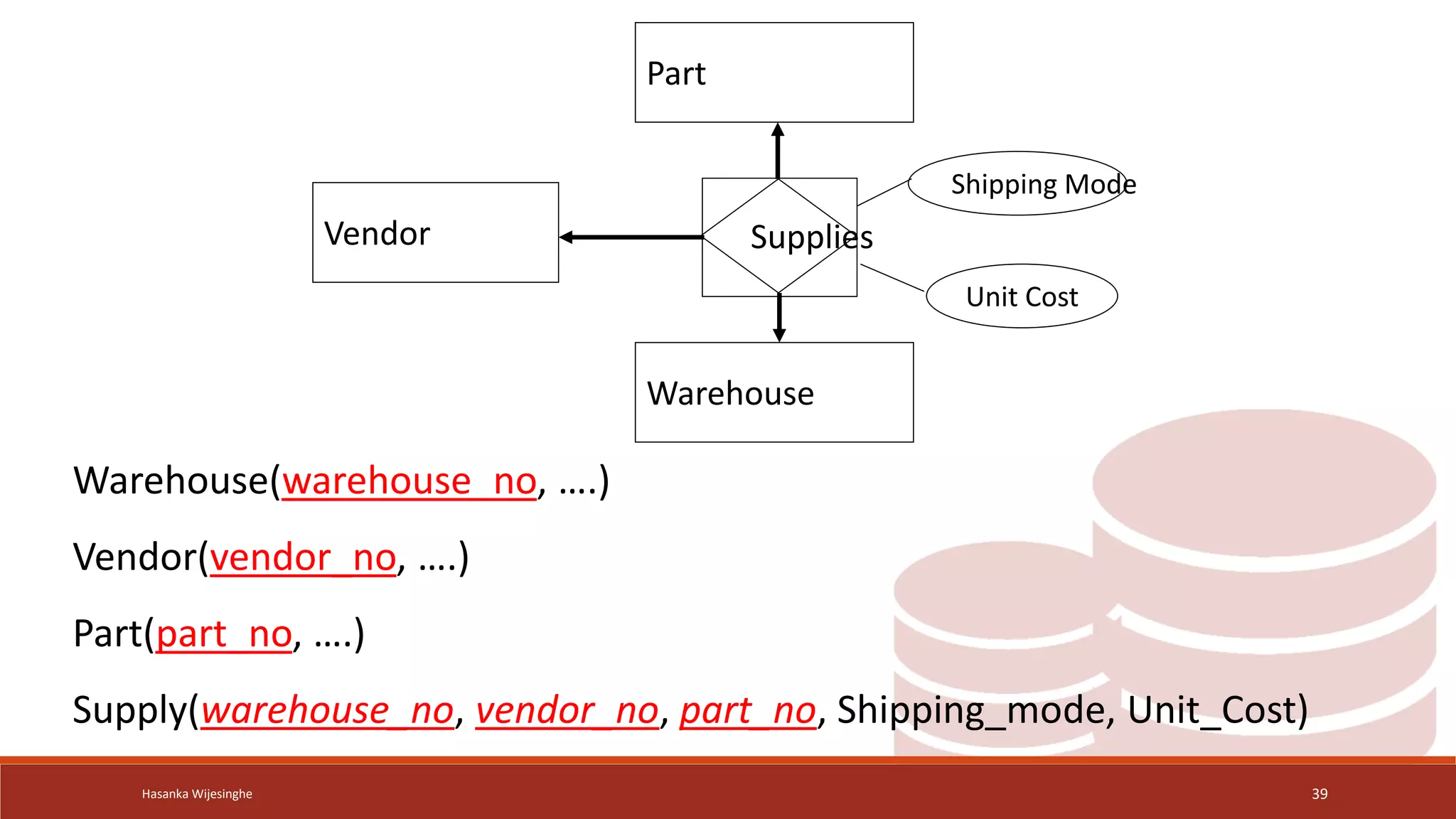
Map Ternary (and n-ary) Relationships
 Convert a ternary relationship to an associative entity
 Create a new associative relation for the associative
entity.
 The default PK consists of three PK attributes of the
participating entity types as FK
 Include any attributes of the relationship to the new
relation
Hasanka Wijesinghe 38
Hasanka Wijesinghe 39
Part
Warehouse
Supplies
Vendor
Shipping Mode
Unit Cost
Warehouse(warehouse_no, ….)
Vendor(vendor_no, ….)
Part(part_no, ….)
Supply(warehouse_no, vendor_no, part_no, Shipping_mode, Unit_Cost)
Hasanka Wijesinghe 40
Q & A
Hasanka Wijesinghe 41
Thank You!

Lec 04 - Logical Design (Relational Mapping).pptx

  • 1.
    Logical Design (Relational Mapping) DSE003– DATABASE MANAGEMENT SYSTEM HASANKA WIJESINGHE M I T, B . S c
  • 2.
    Learning Outcomes End ofthis lesson student will be able to Understand logical design of databases Transform ER diagram to logically equivalent set of relations (Relational Mapping) Hasanka Wijesinghe 2
  • 3.
    Hasanka Wijesinghe 3 Whatis Relational Data Model?
  • 4.
    Key Attributes  Keyattributes are used to ensure that each record within a table can be uniquely identified by combination of one or more fields within a table.  Also, they are used to establish and identify relation between tables.  Super Key  Candidate Key  Primary Key  Foreign Key Hasanka Wijesinghe 4
  • 5.
    Key Attributes cont. Super Key • A set of one or more attributes (columns) that can uniquely identify a tuple (row) within a relational database table. • A super key may contain additional attributes beyond those required to uniquely identify a row. Hasanka Wijesinghe 5 StudentId Name NIC CourseId
  • 6.
    Key Attributes cont. •Super Keys: {StudentID} {StudentID, Name} {StudentID, NIC} {StudentID, Name, NIC} {StudentID, CourseID} {StudentID, Name, CourseID} {StudentID, Name, NIC, CourseID} Hasanka Wijesinghe 6
  • 7.
    Key Attributes cont. Candidatekey • A candidate key is a set of one or more attributes (columns) within a relational database table that can uniquely identify each tuple (row) in the table. • A subset of a super key • Every table must have a candidate key Hasanka Wijesinghe 7
  • 8.
  • 9.
    Key Attributes cont. •Candidate key should have:  Uniqueness: Each combination of values in the candidate key must uniquely identify a single row in the table.  Irreducibility: Removing any attribute from the candidate key should not result in the loss of the uniqueness property. • All candidate keys are super keys. But not all super keys are candidate keys. Hasanka Wijesinghe 9
  • 10.
    Hasanka Wijesinghe 10 {StudentID} {StudentID,FirstName} {StudentID, CourseID} {FirstName, LastName} A Super Key and a Candidate Key Super Keys but not Candidate Keys
  • 11.
    Key Attributes cont. Primary key • Primary key is a special type of candidate key that is chosen to uniquely identify each row (tuple) in a relational database table • Primary key must have: ⁻ Uniqueness ⁻ Non-nullability ⁻ Irreducibility Hasanka Wijesinghe 11
  • 12.
  • 13.
    Key Attributes cont. Foreignkey • foreign key is a column or a set of columns in a table that establishes a link or relationship between the data in two different tables. Hasanka Wijesinghe 13
  • 14.
  • 15.
    Hasanka Wijesinghe 15 ConvertingER Model to Relational Schema
  • 16.
  • 17.
    Transforming ERD intoRelations  Transforming (mapping) E-R diagrams to relations is a relatively straightforward process with a well-defined set of rule Steps 1: Map Regular Entities 2: Map Weak Entities 3: Map Binary Relationships 4: Map Unary Relationships 5: Map Ternary (and n-ary) Relationships Hasanka Wijesinghe 17
  • 18.
    Map Regular Entities Each regular entity type in an ERD is transformed into a relation. Hasanka Wijesinghe 18 Entity Relational entity name relational name simple attribute attribute of the relation entity identifier primary key of relation composite attribute component attributes multi-valued attribute new relation with PK
  • 19.
    Hasanka Wijesinghe 19 EmpNo Emp Name NID Salary Address Gender DOB First Name Mid Initials Last Name Employee Employee (Emp_no, first_name, mid_name, last_name, NID, address, salary, gender, dob)
  • 20.
    Hasanka Wijesinghe 20 Department DeptNo Dept Name Location Employees Phone Dept_Location(Dept_No, Location) Department (Dept_No, Dept_Name, Phone)
  • 21.
    Map Weak Entities Each weak entity type in an ERD is transformed into a relation. Hasanka Wijesinghe 21 Entity Relational entity name relational name simple attribute attribute of the relation Owner entity identifier Foreign key attribute Entity identifier (partial) Composite key together with PK of owner as FK composite attribute component attributes multi-valued attribute new relation with PK
  • 22.
    Hasanka Wijesinghe 22 Employee Dependent has DepdName Gender DOB Relation Emp No Dependent(Emp_No, Depd_Name, Gender, DOB, Relation) Employee (Emp_No, ….) FK/NN 1 m
  • 23.
    Map Binary Relationships Procedure depends on both the degree of the binary relationships and the cardinalities of the relationships ◦ Map Binary One-to-Many Relationships ◦ Map Binary Many-to-Many Relationships ◦ Map Binary One-to-One Relationships Hasanka Wijesinghe 23
  • 24.
    Map Binary Relationshipscont.  One-to-many Relationship 1. Create a relation for the two entity types participating in the relationships 2. Include PK of the entity in the one-side of the relationship as a foreign key in the relation of the many side of the relationship 3. Include any attributes of the relationship to the relation of the many side Hasanka Wijesinghe 24
  • 25.
    Hasanka Wijesinghe 25 Department Project control ProjNo Proj Name Location Dept No Dept Name Location Employees Phone 1 m Department(Dept_No, Dept_Name, Phone) Project(Proj_ No, Proj_Name, Location,dept_no) PK FK
  • 26.
    Hasanka Wijesinghe 26 Employee works Department DeptNo Dept Name Location Employees Phone Emp No Emp Name NID Salary Address Gender DOB First Name Mid Initials Last Name 1 m Employee(Emp_No, NID, Address, Salary, Gender, DOB, First_Name, Mid_Initials, Last_Name, Department(Dept_No, Dept_Name, Phone) dept_no, date) Date
  • 27.
    Map Binary Relationshipscont.  Many-to-Many Relationship 1. Create a relation for the two entity types participating in the relationships 2. Create new relation and include PK of each of the two participating entity types as FK. These attributes become the PK 3. Include any attributes of the relationship to the new relation Hasanka Wijesinghe 27
  • 28.
    Hasanka Wijesinghe 28 Employee Project workson Emp No Emp Name NID Salary Address Gender DOB First Name Mid Initials Last Name Proj No Proj Name Location Hours m n Employee(Emp_No, NID, Address, Salary, Gender, DOB, First_Name, Mid_Initials, Last_Name, Dept_No) Project(Proj_ No, Proj_Name, Location, Dept_No) Works_On(Emp_No, Proj_No , Hours)
  • 29.
    Map Binary Relationshipscont.  One-to-One Relationship 1. Specialized case of One-to-Many Create a relation for the two entity types participating in the relationships 2. Include PK of one of the relations as a foreign key of the other relation (include in partial participation side of the relationship that has full participation in the 1:1) 3. Include any attributes of the relationship to the same relation Hasanka Wijesinghe 29
  • 30.
    Hasanka Wijesinghe 30 EmployeeDepartment manage Start d Emp No Emp Name NID Salary Address Gender DOB First Name Mid Initials Last Name Dept No Dept Name Location Phone Employee(Emp_No, NID, Address, Salary, Gender, DOB, First_Name, Mid_Initials, Last_Name, Dept_No) Department(Dept_No, Dept_Name, Phone, emp_no Start_D)
  • 31.
    Map Unary Relationships Procedure depends on both the degree of the binary relationships and the cardinalities of the relationships ◦ Map Unary One-to-Many Relationships ◦ Map Unary Many-to-Many Relationships ◦ Map Unary One-to-One Relationships Hasanka Wijesinghe 31
  • 32.
    Map Unary Relationshipscont.  One-to-many Relationship 1. Create a relation for the entity type 2. Include PK of the entity as a foreign key within the same relation 3. Include any attributes of the relationship to the relation of the many side Hasanka Wijesinghe 32
  • 33.
    Hasanka Wijesinghe 33 Employee supervise EmpNo Emp Name NID Salary Address Gender DOB First Name Mid Initials Last Name Employee(Emp_No, NID, Address, Salary, Gender, DOB, First_Name, Mid_Initials, Last_Name, Dept_No, Supervisor) 1 m
  • 34.
    Map Unary Relationshipscont.  Many-to-many Relationship 1. Create a relation for the entity type 2. Create new relation and include PK of the entity type as FK twice. These attributes become the PK (composite) 3. Include any attributes of the relationship to the new relation Hasanka Wijesinghe 34
  • 35.
    Hasanka Wijesinghe 35 Item contain ItemNo Name Unit Cost Quantity m n Item(Item_No, Name, Unit_Cost) Component(Item_No, Component_No, Quantity)
  • 36.
    Map Unary Relationshipscont.  One-to-One Relationship 1. Create a relation for the entity type 2. include PK of the entity as a foreign key within the same relation 3. include any attributes of the relationship to the relation of the many side Hasanka Wijesinghe 36
  • 37.
    Hasanka Wijesinghe 37 Employee marry EmpNo Emp Name NID Salary Address Gender DOB First Name Mid Initials Last Name Employee(Emp_No, NID, Address, Salary, Gender, DOB, First_Name, Mid_Initials, Last_Name, Dept_No, Marry)
  • 38.
    Map Ternary (andn-ary) Relationships  Convert a ternary relationship to an associative entity  Create a new associative relation for the associative entity.  The default PK consists of three PK attributes of the participating entity types as FK  Include any attributes of the relationship to the new relation Hasanka Wijesinghe 38
  • 39.
    Hasanka Wijesinghe 39 Part Warehouse Supplies Vendor ShippingMode Unit Cost Warehouse(warehouse_no, ….) Vendor(vendor_no, ….) Part(part_no, ….) Supply(warehouse_no, vendor_no, part_no, Shipping_mode, Unit_Cost)
  • 40.
  • 41.