Introduction to R
Venkat Reddy
•
•
•
•
•
•
•
•

What is R
R basics
Working with R
R packages
R Functions
Importing & Exporting data
Creating calculated fields
R Help & Tutorials

Data Analysis Course
Venkat Reddy

Contents

2
• Programming “environment”
• Runs on a variety of platforms including Windows, Unix and
MacOS.
• Provides an unparalleled platform for programming new
statistical methods in an easy and straightforward manner.
• Object-oriented
• Open source
• Excellent graphics capabilities
• Supported by a large user network

Data Analysis Course
Venkat Reddy

R

3
Downloading

Data Analysis Course
Venkat Reddy

• Google it using R or CRAN (Comprehensive R Archive
Network)
• http://www.r-project.org

4
Data Analysis Course
Venkat Reddy

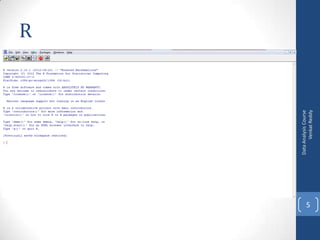
R

5
Data Analysis Course
Venkat Reddy

R Studio

6
•
•
•
•
•

2+2
log(10)
help(log)
summary(airquality)
demo(graphics) # pretty pictures...

Data Analysis Course
Venkat Reddy

R-Demo

7
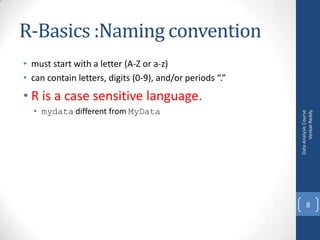
R-Basics :Naming convention
• must start with a letter (A-Z or a-z)
• can contain letters, digits (0-9), and/or periods “.”
• mydata different from MyData

Data Analysis Course
Venkat Reddy

• R is a case sensitive language.

8
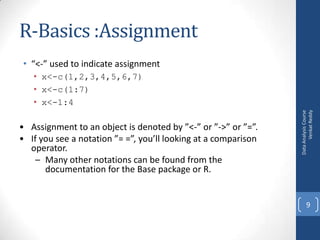
R-Basics :Assignment
• “<-” used to indicate assignment

• Assignment to an object is denoted by ”<-” or ”->” or ”=”.
• If you see a notation ”= =”, you’ll looking at a comparison
operator.
– Many other notations can be found from the
documentation for the Base package or R.

Data Analysis Course
Venkat Reddy

• x<-c(1,2,3,4,5,6,7)
• x<-c(1:7)
• x<-1:4

9
• during an R session, all objects are stored in a
temporary, working memory
• Commands are entered interactively at the R user prompt. Up
and down arrow keys scroll through your command history.
• list objects ls()
• remove objects rm()
• data()

Data Analysis Course
Venkat Reddy

Workspace

10
•
•
•
•
•
•
•
•
•
•

x <- round(rnorm(10,mean=20,sd=5)) # simulate data
x
mean(x)
m <- mean(x)
m
x- m # notice recycling
(x - m)^2
sum((x - m)^2)
data()
UKgas

Data Analysis Course
Venkat Reddy

Demo: Working with R

11
• R consists of a core and packages. Packages contain functions
that are not available in the core.
• Collections of R functions, data, and compiled code
• Well-defined format that ensures easy installation, a basic
standard of documentation, and enhances portability and
reliability
• When you download R, already a number (around 30) of
packages are downloaded as well.
• You can use the function search to see a list of packages that
are currently attached to the system, this list is also called the
search path.

• search()

Data Analysis Course
Venkat Reddy

R Packages

12
• Select the `Packages' menu and select `Install package...', a list
of available packages on your system will be displayed.
• Select one and click `OK', the package is now attached to your
current R session. Via the library function
• The library can also be used to list all the available libraries on
your system with a short description. Run the function
without any arguments

Data Analysis Course
Venkat Reddy

R packages

13
Demo: R packages

Data Analysis Course
Venkat Reddy

• Install cluster package
• Install plyr package (for string operations)

14
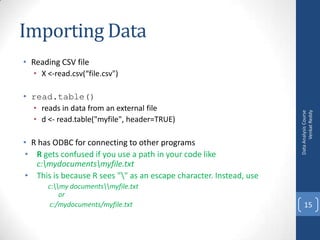
Importing Data
• Reading CSV file
• X <-read.csv(“file.csv")

• reads in data from an external file
• d <- read.table("myfile", header=TRUE)

• R has ODBC for connecting to other programs
• R gets confused if you use a path in your code like
c:mydocumentsmyfile.txt
• This is because R sees "" as an escape character. Instead, use
c:my documentsmyfile.txt
or
c:/mydocuments/myfile.txt

Data Analysis Course
Venkat Reddy

• read.table()

15
Demo: Importing data
• petrol<-read.csv("C:UsersVENKATGoogle
DriveTrainingRDataPetrol_Consuption.csv")
• sales_data<-read.table("C:UsersVENKATGoogle
DriveTrainingRDatasales.txt")
• sales_data<-read.table("C:UsersVENKATGoogle
DriveTrainingRDatasales.txt",header=TRUE)

Data Analysis Course
Venkat Reddy

• Reading CSV file

16
Exporting data
• To A Tab Delimited Text File
• write.table(mydata, "c:/mydata.txt", sep="t")
• library(xlsReadWrite)
• write.xls(mydata, "c:/mydata.xls")

• To SAS
• library(foreign)
• write.foreign(mydata, "c:/mydata.txt", "c:/mydata.sas", package="SAS")

Data Analysis Course
Venkat Reddy

• To an Excel Spreadsheet

17
Demo: Exporting data

Data Analysis Course
Venkat Reddy

• write.table(sales_data, "C:UsersVENKATGoogle
DriveTrainingRDatasales_export.txt", sep="t")
• write.table(sales_data, "C:UsersVENKATGoogle
DriveTrainingRDatasales_export.csv", sep=",")

18
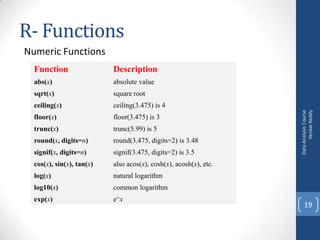
R- Functions
Numeric Functions
Description

abs(x)

absolute value

sqrt(x)

square root

ceiling(x)

ceiling(3.475) is 4

floor(x)

floor(3.475) is 3

trunc(x)

trunc(5.99) is 5

round(x, digits=n)

round(3.475, digits=2) is 3.48

signif(x, digits=n)

signif(3.475, digits=2) is 3.5

cos(x), sin(x), tan(x)

also acos(x), cosh(x), acosh(x), etc.

log(x)

natural logarithm

log10(x)

common logarithm

exp(x)

e^x

Data Analysis Course
Venkat Reddy

Function

19
•
•
•
•

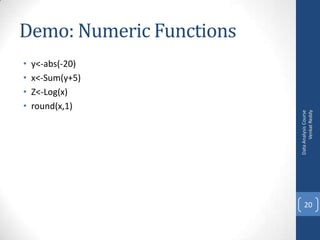
y<-abs(-20)
x<-Sum(y+5)
Z<-Log(x)
round(x,1)

Data Analysis Course
Venkat Reddy

Demo: Numeric Functions

20
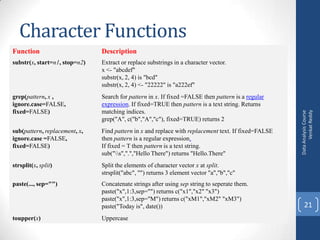
Character Functions
Description

substr(x, start=n1, stop=n2)

Extract or replace substrings in a character vector.
x <- "abcdef"
substr(x, 2, 4) is "bcd"
substr(x, 2, 4) <- "22222" is "a222ef"

grep(pattern, x ,
ignore.case=FALSE,
fixed=FALSE)

Search for pattern in x. If fixed =FALSE then pattern is a regular
expression. If fixed=TRUE then pattern is a text string. Returns
matching indices.
grep("A", c("b","A","c"), fixed=TRUE) returns 2

sub(pattern, replacement, x,
ignore.case =FALSE,
fixed=FALSE)

Find pattern in x and replace with replacement text. If fixed=FALSE
then pattern is a regular expression.
If fixed = T then pattern is a text string.
sub("s",".","Hello There") returns "Hello.There"

strsplit(x, split)

Split the elements of character vector x at split.
strsplit("abc", "") returns 3 element vector "a","b","c"

paste(..., sep="")

Concatenate strings after using sep string to seperate them.
paste("x",1:3,sep="") returns c("x1","x2" "x3")
paste("x",1:3,sep="M") returns c("xM1","xM2" "xM3")
paste("Today is", date())

toupper(x)

Uppercase

Data Analysis Course
Venkat Reddy

Function

21
Demo :Character Functions

Data Analysis Course
Venkat Reddy

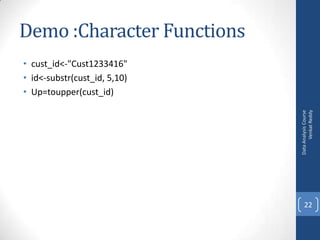
• cust_id<-"Cust1233416"
• id<-substr(cust_id, 5,10)
• Up=toupper(cust_id)

22
Calculated Fields in R
•
•
•
•
•
•

mydata$sum <- mydata$x1 + mydata$x2
mydata$mean <- (mydata$x1 + mydata$x2)/2
attach(mydata)
mydata$sum <- x1 + x2
mydata$mean <- (x1 + x2)/2
detach(mydata)

Data Analysis Course
Venkat Reddy

• Use the assignment operator <- to create new variables. A
wide array of operators and functions are available here.

23
•
•
•
•
•
•
•
•

sales_data$reduce<-(sales_data$Sales)*0.2
View(sales_data)
sales_data$new_sales<-sales_data$Sales- sales_data$reduce
attach(petrol)
ratio=Income/consum_mill_gallons
View(petrol)
petrol$ratio=Income/Consum_mill_gallons
View(petrol)

Data Analysis Course
Venkat Reddy

Demo Calculated Fields in R

24
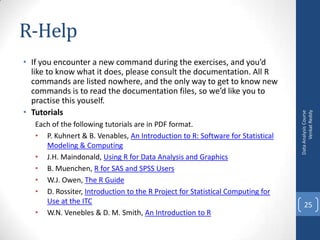
• If you encounter a new command during the exercises, and you’d
like to know what it does, please consult the documentation. All R
commands are listed nowhere, and the only way to get to know new
commands is to read the documentation files, so we’d like you to
practise this youself.
• Tutorials
Each of the following tutorials are in PDF format.
• P. Kuhnert & B. Venables, An Introduction to R: Software for Statistical
Modeling & Computing
• J.H. Maindonald, Using R for Data Analysis and Graphics
• B. Muenchen, R for SAS and SPSS Users
• W.J. Owen, The R Guide
• D. Rossiter, Introduction to the R Project for Statistical Computing for
Use at the ITC
• W.N. Venebles & D. M. Smith, An Introduction to R

Data Analysis Course
Venkat Reddy

R-Help

25
R-Tutorials
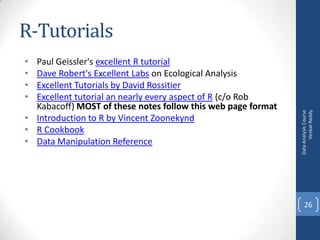
Paul Geissler's excellent R tutorial
Dave Robert's Excellent Labs on Ecological Analysis
Excellent Tutorials by David Rossitier
Excellent tutorial an nearly every aspect of R (c/o Rob
Kabacoff) MOST of these notes follow this web page format
• Introduction to R by Vincent Zoonekynd
• R Cookbook
• Data Manipulation Reference

Data Analysis Course
Venkat Reddy

•
•
•
•

26
Data Analysis Course
Venkat Reddy

Thank you

27

R- Introduction

  • 1.
  • 2.
    • • • • • • • • What is R Rbasics Working with R R packages R Functions Importing & Exporting data Creating calculated fields R Help & Tutorials Data Analysis Course Venkat Reddy Contents 2
  • 3.
    • Programming “environment” •Runs on a variety of platforms including Windows, Unix and MacOS. • Provides an unparalleled platform for programming new statistical methods in an easy and straightforward manner. • Object-oriented • Open source • Excellent graphics capabilities • Supported by a large user network Data Analysis Course Venkat Reddy R 3
  • 4.
    Downloading Data Analysis Course VenkatReddy • Google it using R or CRAN (Comprehensive R Archive Network) • http://www.r-project.org 4
  • 5.
  • 6.
  • 7.
  • 8.
    R-Basics :Naming convention •must start with a letter (A-Z or a-z) • can contain letters, digits (0-9), and/or periods “.” • mydata different from MyData Data Analysis Course Venkat Reddy • R is a case sensitive language. 8
  • 9.
    R-Basics :Assignment • “<-”used to indicate assignment • Assignment to an object is denoted by ”<-” or ”->” or ”=”. • If you see a notation ”= =”, you’ll looking at a comparison operator. – Many other notations can be found from the documentation for the Base package or R. Data Analysis Course Venkat Reddy • x<-c(1,2,3,4,5,6,7) • x<-c(1:7) • x<-1:4 9
  • 10.
    • during anR session, all objects are stored in a temporary, working memory • Commands are entered interactively at the R user prompt. Up and down arrow keys scroll through your command history. • list objects ls() • remove objects rm() • data() Data Analysis Course Venkat Reddy Workspace 10
  • 11.
    • • • • • • • • • • x <- round(rnorm(10,mean=20,sd=5))# simulate data x mean(x) m <- mean(x) m x- m # notice recycling (x - m)^2 sum((x - m)^2) data() UKgas Data Analysis Course Venkat Reddy Demo: Working with R 11
  • 12.
    • R consistsof a core and packages. Packages contain functions that are not available in the core. • Collections of R functions, data, and compiled code • Well-defined format that ensures easy installation, a basic standard of documentation, and enhances portability and reliability • When you download R, already a number (around 30) of packages are downloaded as well. • You can use the function search to see a list of packages that are currently attached to the system, this list is also called the search path. • search() Data Analysis Course Venkat Reddy R Packages 12
  • 13.
    • Select the`Packages' menu and select `Install package...', a list of available packages on your system will be displayed. • Select one and click `OK', the package is now attached to your current R session. Via the library function • The library can also be used to list all the available libraries on your system with a short description. Run the function without any arguments Data Analysis Course Venkat Reddy R packages 13
  • 14.
    Demo: R packages DataAnalysis Course Venkat Reddy • Install cluster package • Install plyr package (for string operations) 14
  • 15.
    Importing Data • ReadingCSV file • X <-read.csv(“file.csv") • reads in data from an external file • d <- read.table("myfile", header=TRUE) • R has ODBC for connecting to other programs • R gets confused if you use a path in your code like c:mydocumentsmyfile.txt • This is because R sees "" as an escape character. Instead, use c:my documentsmyfile.txt or c:/mydocuments/myfile.txt Data Analysis Course Venkat Reddy • read.table() 15
  • 16.
    Demo: Importing data •petrol<-read.csv("C:UsersVENKATGoogle DriveTrainingRDataPetrol_Consuption.csv") • sales_data<-read.table("C:UsersVENKATGoogle DriveTrainingRDatasales.txt") • sales_data<-read.table("C:UsersVENKATGoogle DriveTrainingRDatasales.txt",header=TRUE) Data Analysis Course Venkat Reddy • Reading CSV file 16
  • 17.
    Exporting data • ToA Tab Delimited Text File • write.table(mydata, "c:/mydata.txt", sep="t") • library(xlsReadWrite) • write.xls(mydata, "c:/mydata.xls") • To SAS • library(foreign) • write.foreign(mydata, "c:/mydata.txt", "c:/mydata.sas", package="SAS") Data Analysis Course Venkat Reddy • To an Excel Spreadsheet 17
  • 18.
    Demo: Exporting data DataAnalysis Course Venkat Reddy • write.table(sales_data, "C:UsersVENKATGoogle DriveTrainingRDatasales_export.txt", sep="t") • write.table(sales_data, "C:UsersVENKATGoogle DriveTrainingRDatasales_export.csv", sep=",") 18
  • 19.
    R- Functions Numeric Functions Description abs(x) absolutevalue sqrt(x) square root ceiling(x) ceiling(3.475) is 4 floor(x) floor(3.475) is 3 trunc(x) trunc(5.99) is 5 round(x, digits=n) round(3.475, digits=2) is 3.48 signif(x, digits=n) signif(3.475, digits=2) is 3.5 cos(x), sin(x), tan(x) also acos(x), cosh(x), acosh(x), etc. log(x) natural logarithm log10(x) common logarithm exp(x) e^x Data Analysis Course Venkat Reddy Function 19
  • 20.
  • 21.
    Character Functions Description substr(x, start=n1,stop=n2) Extract or replace substrings in a character vector. x <- "abcdef" substr(x, 2, 4) is "bcd" substr(x, 2, 4) <- "22222" is "a222ef" grep(pattern, x , ignore.case=FALSE, fixed=FALSE) Search for pattern in x. If fixed =FALSE then pattern is a regular expression. If fixed=TRUE then pattern is a text string. Returns matching indices. grep("A", c("b","A","c"), fixed=TRUE) returns 2 sub(pattern, replacement, x, ignore.case =FALSE, fixed=FALSE) Find pattern in x and replace with replacement text. If fixed=FALSE then pattern is a regular expression. If fixed = T then pattern is a text string. sub("s",".","Hello There") returns "Hello.There" strsplit(x, split) Split the elements of character vector x at split. strsplit("abc", "") returns 3 element vector "a","b","c" paste(..., sep="") Concatenate strings after using sep string to seperate them. paste("x",1:3,sep="") returns c("x1","x2" "x3") paste("x",1:3,sep="M") returns c("xM1","xM2" "xM3") paste("Today is", date()) toupper(x) Uppercase Data Analysis Course Venkat Reddy Function 21
  • 22.
    Demo :Character Functions DataAnalysis Course Venkat Reddy • cust_id<-"Cust1233416" • id<-substr(cust_id, 5,10) • Up=toupper(cust_id) 22
  • 23.
    Calculated Fields inR • • • • • • mydata$sum <- mydata$x1 + mydata$x2 mydata$mean <- (mydata$x1 + mydata$x2)/2 attach(mydata) mydata$sum <- x1 + x2 mydata$mean <- (x1 + x2)/2 detach(mydata) Data Analysis Course Venkat Reddy • Use the assignment operator <- to create new variables. A wide array of operators and functions are available here. 23
  • 24.
  • 25.
    • If youencounter a new command during the exercises, and you’d like to know what it does, please consult the documentation. All R commands are listed nowhere, and the only way to get to know new commands is to read the documentation files, so we’d like you to practise this youself. • Tutorials Each of the following tutorials are in PDF format. • P. Kuhnert & B. Venables, An Introduction to R: Software for Statistical Modeling & Computing • J.H. Maindonald, Using R for Data Analysis and Graphics • B. Muenchen, R for SAS and SPSS Users • W.J. Owen, The R Guide • D. Rossiter, Introduction to the R Project for Statistical Computing for Use at the ITC • W.N. Venebles & D. M. Smith, An Introduction to R Data Analysis Course Venkat Reddy R-Help 25
  • 26.
    R-Tutorials Paul Geissler's excellentR tutorial Dave Robert's Excellent Labs on Ecological Analysis Excellent Tutorials by David Rossitier Excellent tutorial an nearly every aspect of R (c/o Rob Kabacoff) MOST of these notes follow this web page format • Introduction to R by Vincent Zoonekynd • R Cookbook • Data Manipulation Reference Data Analysis Course Venkat Reddy • • • • 26
  • 27.
    Data Analysis Course VenkatReddy Thank you 27