ICP-1002: ICT Laboratory
Introduction to Linux      Lab 1 – Introduction Linux and UNIX File System


                                        ICT 1002 – Introduction to Linux

                                        Liam Kurmos
                                        Hashim Yaqub
ICP-1002: ICT Laboratory
Introduction to Linux         Lab 1b – Introduction And File System


                           Operating Systems

                  Kernel                     Shell
                                                                        User
                                                                        Application


                                      ●Microsoft DOS text only shell

                                      ●Windows 95 introduced Graphical Shell
                Device                (GUI)
                Drivers
                                      (Apple introduced GUIs much earlier)

                                      ...long before all this... there was UNIX
ICP-1002: ICT Laboratory
Introduction to Linux          Lab 1b – Introduction And File System


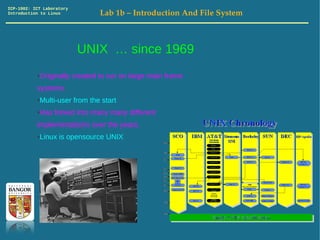
                           UNIX … since 1969
           ●Originally created to run on large main frame
           systems.
           ●Multi-user from the start
           ●Has forked into many many different
           implementations over the years.
           ●Linux is opensource UNIX
ICP-1002: ICT Laboratory
Introduction to Linux         Lab 1b – Introduction And File System


                       GNU / Linux – Open Source UNIX
           ●Open Source operating system.
           ●Linux is the Kernel. Developed by Linus Torvalds 1992
           ●Leading server operating system, and runs the 10
           fastest supercomputer
           ●Linux is open source, secure.
           ●Runs on the desktop too!
ICP-1002: ICT Laboratory
Introduction to Linux         Lab 1b – Introduction And File System


                       Log in to your Virtual Machine
           ●Find Putty TTY on the windows system
           ●Connect to your Virtual Machine 147.143.75.XX where
           XX is your unique machine.
           ●You have logged in as the root user. The superuser.
           First thing to do, change the password!
           ●Super user has power which can be dangerous. Create
           another user!
ICP-1002: ICT Laboratory
Introduction to Linux         Lab 1b – Introduction And File System


                       Change the root password... before
                       someone else does.

           ●Changing the password is easy. Just use the command:
                 passwd
           ●If in doubt you can always check what a command does
           with the man command (manual).
                 man passwd
ICP-1002: ICT Laboratory
Introduction to Linux         Lab 1b – Introduction And File System


                       Create a new user & change the
                       password

           ●useradd -m YourNewUsersName
           ●passwd YourNewUsersName


           ●Now type exit and log back in with your new user.
ICP-1002: ICT Laboratory
Introduction to Linux          Lab 1b – Introduction And File System


                           Heirarchical tree structures.


                                    Root Node                          Node


                                                                       Parent
                                                                       Node


                                                                       Child Node


                                                                       Leaf Node
ICP-1002: ICT Laboratory
Introduction to Linux            Lab 1b – Introduction And File System


                A filesystem is a heirarchical tree structure.


                                    Root
                             /      Directory


                 etc
                       etc          homedir


                                           eepa02


                             Documents          Pictures     Code


                                                           SomeJavaCode.java
ICP-1002: ICT Laboratory
Introduction to Linux           Lab 1b – Introduction And File System


            A path specifies a chain in the structure.

           /homedir/eepa02/Code/SomeJavaCode.java

                                                   •The first / represents the root dir.
                                                   •Then a slash after each dir.


                                 Root
                            /
                                 Directory

                 etc etc          homedir


                                       eepa02


                           Documents         Pictures      Code

                                                        SomeJavaCode.java
ICP-1002: ICT Laboratory
Introduction to Linux                Lab 1b – Introduction And File System


            Exercise: Create the following structure in
            your home dir. List the commands you used to
            make them.
                                                    YourHomeDir
    You will need the commands

    cd DirectoryName
    ls DirectoryName                              Ex 1-1
    mkdir DirectoryName
    pwd

    . is a special director that
    means the current directory                  Granny

    .. is a special directory that
    means the parent dir.
                                           Mum


                                     Daughter1      Daughter2     Daughter3
ICP-1002: ICT Laboratory
Introduction to Linux                 Lab 1b – Introduction And File System


            Exercise: Create the following structure in
            your home dir. List the commands you used to
            make them.
                                                     YourHomeDir


                                                     Animals
                           Reptiles
                                                                         Mammals
                                                 Birds
                    Snakes
                                                                                      Bats
                                            Eagles                  Falcons


                                                GoldenEagles                  Bears
ICP-1002: ICT Laboratory
Introduction to Linux             Lab 1c – Introduction And File System


            Exercise: Write down the absolute directory
            paths for the paths in green
                                                                  /


                                                           homedir


                                                         ee....

                                                    Animals
                               Reptiles
                                                                          Mammals
                                                 Birds
                              Snakes
                                                                                        Birds
                                           Eagles                     Falcons
                     Vipers
                                 Pythons
                                             GoldenEagles                       Birds

                                  RoyalPythons
ICP-1002: ICT Laboratory
Introduction to Linux             Lab 1c – Introduction And File System


            Exercise: Write down the absolute directory
            paths for the paths in green
                                                                  /


                                                           homedir


                                                         ee....

                                                    Animals
                               Reptiles
                                                                          Mammals
                                                 Birds
                              Snakes
                                                                                        Birds
                                           Eagles                     Falcons
                     Vipers
                                 Pythons
                                             GoldenEagles                       Birds

                                  RoyalPythons
ICP-1002: ICT Laboratory
Introduction to Linux                 Lab 1c – Introduction And File System


            Exercise: Write down the absolute directory
            paths for the paths in green
                                                                        /


                                                                 homedir


                                                               ee....

                                                          Animals
                                     Reptiles
                                                                                Mammals
                                                       Birds
                                    Snakes
                                                                                              Birds
                                                 Eagles                     Falcons
                           Vipers
                                       Pythons
                                                   GoldenEagles                       Birds

                                        RoyalPythons
ICP-1002: ICT Laboratory
Introduction to Linux               Lab 1c – Introduction And File System


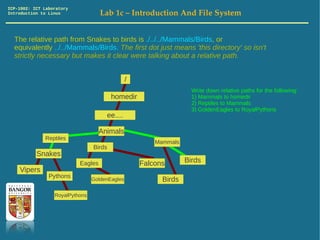
  The relative path from Snakes to birds is ./../../Mammals/Birds, or
  equivalently ../../Mammals/Birds. The first dot just means 'this directory' so isn't
  strictly necessary but makes it clear were talking about a relative path.


                                                /
                                                                    Write down relative paths for the following:
                                         homedir                    1) Mammals to homedir
                                                                    2) Reptiles to Mammals
                                                                    3) GoldenEagles to RoyalPythons
                                      ee....

                                    Animals
              Reptiles
                                                        Mammals
                                 Birds
           Snakes
                           Eagles                   Falcons       Birds
    Vipers
                Pythons          GoldenEagles             Birds

                  RoyalPythons
ICP-1002: ICT Laboratory
Introduction to Linux               Lab 1c – Introduction And File System


  The copy command (cp) can be used to copy both files and directories, however
  as a safety measure when you copy directory you need to use the r – switch. So if
  you had the structure on the left. Typing:
   cp -r /homedir/eeXYZ/Jones/Granny /homedir/eeXYZ/Hughes
  would give the structure on the right. (on most unix systems switches are allowed
  at the end of the command, after the paths instead)
                 /                                 /
               homedir                                 homedir
               ee....                                  ee....
             Jones         Hughes                    Jones      Hughes


         Granny                                 Granny                          Granny
      Mum                                     Mum                             Mum
 Daughter1   Daughter2 Daughter3         Daughter1   Daughter2 Daughter3 Daughter1   Daughter2 Daughter3


                     If you were currently in the home directory eeXYZ, which you can always get to
                     by typing:
                       cd ~
                     The you could use relative paths and just type:
                       cp -r ./Jones/Granny ./Hughes
ICP-1002: ICT Laboratory
Introduction to Linux                   Lab 1c – Introduction And File System


  You can rename a directory with the move command mv. So if you were in the
  home directory and had the structure on the left (which we created ealier). Typing
  mv ./Animals ./African
  Would give the structure on the right.


                                                                                   eeXYZ
                               eeXYZ
                                                                                  African
                              Animals                            Reptiles
          Reptiles                                                                                 Mammals
                                               Mammals                         Birds
                           Birds                                Snakes
        Snakes                                                                                               Bats
                                                         Bats               Eagles             Falcons
                     Eagles                Falcons

                                                                               Golden Eagles        Bears
                           Golden Eagles        Bears
ICP-1002: ICT Laboratory
Introduction to Linux                  Lab 1c – Introduction And File System


  Create the following structure. You can use mv and cp to save time. Use relative
  paths.
                                           /
                                                     homedir
                                                     ee....

                                                                                               European
                                                                                                Asian
                                                                                   Reptiles
                                                                                                                Mammals
                                                                                               Birds
                       African                                                    Snakes
         Reptiles
                                      Mammals                                               Eagles            Falcons   Bats
                     Birds
       Snakes                                                                                 Golden Eagles       Bears
                Eagles              Falcons   Bats                  Asian
                                                     Reptiles
                                                                                  Mammals
                                                                 Birds
                    Golden Eagles       Bears    Snakes
                                                              Eagles            Falcons    Bats

                                                                Golden Eagles       Bears

Lab1

  • 1.
    ICP-1002: ICT Laboratory Introductionto Linux Lab 1 – Introduction Linux and UNIX File System ICT 1002 – Introduction to Linux Liam Kurmos Hashim Yaqub
  • 2.
    ICP-1002: ICT Laboratory Introductionto Linux Lab 1b – Introduction And File System Operating Systems Kernel Shell User Application ●Microsoft DOS text only shell ●Windows 95 introduced Graphical Shell Device (GUI) Drivers (Apple introduced GUIs much earlier) ...long before all this... there was UNIX
  • 3.
    ICP-1002: ICT Laboratory Introductionto Linux Lab 1b – Introduction And File System UNIX … since 1969 ●Originally created to run on large main frame systems. ●Multi-user from the start ●Has forked into many many different implementations over the years. ●Linux is opensource UNIX
  • 4.
    ICP-1002: ICT Laboratory Introductionto Linux Lab 1b – Introduction And File System GNU / Linux – Open Source UNIX ●Open Source operating system. ●Linux is the Kernel. Developed by Linus Torvalds 1992 ●Leading server operating system, and runs the 10 fastest supercomputer ●Linux is open source, secure. ●Runs on the desktop too!
  • 5.
    ICP-1002: ICT Laboratory Introductionto Linux Lab 1b – Introduction And File System Log in to your Virtual Machine ●Find Putty TTY on the windows system ●Connect to your Virtual Machine 147.143.75.XX where XX is your unique machine. ●You have logged in as the root user. The superuser. First thing to do, change the password! ●Super user has power which can be dangerous. Create another user!
  • 6.
    ICP-1002: ICT Laboratory Introductionto Linux Lab 1b – Introduction And File System Change the root password... before someone else does. ●Changing the password is easy. Just use the command: passwd ●If in doubt you can always check what a command does with the man command (manual). man passwd
  • 7.
    ICP-1002: ICT Laboratory Introductionto Linux Lab 1b – Introduction And File System Create a new user & change the password ●useradd -m YourNewUsersName ●passwd YourNewUsersName ●Now type exit and log back in with your new user.
  • 8.
    ICP-1002: ICT Laboratory Introductionto Linux Lab 1b – Introduction And File System Heirarchical tree structures. Root Node Node Parent Node Child Node Leaf Node
  • 9.
    ICP-1002: ICT Laboratory Introductionto Linux Lab 1b – Introduction And File System A filesystem is a heirarchical tree structure. Root / Directory etc etc homedir eepa02 Documents Pictures Code SomeJavaCode.java
  • 10.
    ICP-1002: ICT Laboratory Introductionto Linux Lab 1b – Introduction And File System A path specifies a chain in the structure. /homedir/eepa02/Code/SomeJavaCode.java •The first / represents the root dir. •Then a slash after each dir. Root / Directory etc etc homedir eepa02 Documents Pictures Code SomeJavaCode.java
  • 11.
    ICP-1002: ICT Laboratory Introductionto Linux Lab 1b – Introduction And File System Exercise: Create the following structure in your home dir. List the commands you used to make them. YourHomeDir You will need the commands cd DirectoryName ls DirectoryName Ex 1-1 mkdir DirectoryName pwd . is a special director that means the current directory Granny .. is a special directory that means the parent dir. Mum Daughter1 Daughter2 Daughter3
  • 12.
    ICP-1002: ICT Laboratory Introductionto Linux Lab 1b – Introduction And File System Exercise: Create the following structure in your home dir. List the commands you used to make them. YourHomeDir Animals Reptiles Mammals Birds Snakes Bats Eagles Falcons GoldenEagles Bears
  • 13.
    ICP-1002: ICT Laboratory Introductionto Linux Lab 1c – Introduction And File System Exercise: Write down the absolute directory paths for the paths in green / homedir ee.... Animals Reptiles Mammals Birds Snakes Birds Eagles Falcons Vipers Pythons GoldenEagles Birds RoyalPythons
  • 14.
    ICP-1002: ICT Laboratory Introductionto Linux Lab 1c – Introduction And File System Exercise: Write down the absolute directory paths for the paths in green / homedir ee.... Animals Reptiles Mammals Birds Snakes Birds Eagles Falcons Vipers Pythons GoldenEagles Birds RoyalPythons
  • 15.
    ICP-1002: ICT Laboratory Introductionto Linux Lab 1c – Introduction And File System Exercise: Write down the absolute directory paths for the paths in green / homedir ee.... Animals Reptiles Mammals Birds Snakes Birds Eagles Falcons Vipers Pythons GoldenEagles Birds RoyalPythons
  • 16.
    ICP-1002: ICT Laboratory Introductionto Linux Lab 1c – Introduction And File System The relative path from Snakes to birds is ./../../Mammals/Birds, or equivalently ../../Mammals/Birds. The first dot just means 'this directory' so isn't strictly necessary but makes it clear were talking about a relative path. / Write down relative paths for the following: homedir 1) Mammals to homedir 2) Reptiles to Mammals 3) GoldenEagles to RoyalPythons ee.... Animals Reptiles Mammals Birds Snakes Eagles Falcons Birds Vipers Pythons GoldenEagles Birds RoyalPythons
  • 17.
    ICP-1002: ICT Laboratory Introductionto Linux Lab 1c – Introduction And File System The copy command (cp) can be used to copy both files and directories, however as a safety measure when you copy directory you need to use the r – switch. So if you had the structure on the left. Typing: cp -r /homedir/eeXYZ/Jones/Granny /homedir/eeXYZ/Hughes would give the structure on the right. (on most unix systems switches are allowed at the end of the command, after the paths instead) / / homedir homedir ee.... ee.... Jones Hughes Jones Hughes Granny Granny Granny Mum Mum Mum Daughter1 Daughter2 Daughter3 Daughter1 Daughter2 Daughter3 Daughter1 Daughter2 Daughter3 If you were currently in the home directory eeXYZ, which you can always get to by typing: cd ~ The you could use relative paths and just type: cp -r ./Jones/Granny ./Hughes
  • 18.
    ICP-1002: ICT Laboratory Introductionto Linux Lab 1c – Introduction And File System You can rename a directory with the move command mv. So if you were in the home directory and had the structure on the left (which we created ealier). Typing mv ./Animals ./African Would give the structure on the right. eeXYZ eeXYZ African Animals Reptiles Reptiles Mammals Mammals Birds Birds Snakes Snakes Bats Bats Eagles Falcons Eagles Falcons Golden Eagles Bears Golden Eagles Bears
  • 19.
    ICP-1002: ICT Laboratory Introductionto Linux Lab 1c – Introduction And File System Create the following structure. You can use mv and cp to save time. Use relative paths. / homedir ee.... European Asian Reptiles Mammals Birds African Snakes Reptiles Mammals Eagles Falcons Bats Birds Snakes Golden Eagles Bears Eagles Falcons Bats Asian Reptiles Mammals Birds Golden Eagles Bears Snakes Eagles Falcons Bats Golden Eagles Bears