
How to install Wildfly-10.1.0.Final
Prepared for
Solutions Architect팀
(주)오뉴이노베이션
Solutions Architect팀
2018년 4월 6일
How to install Wildfly-
10.1.0.Final
1/21 (주)오뉴이노베이션
08381. 서울특별시 구로구 디지털로 273 702 호 ( 구로동 , 에이스트윈타워 2 차 )
702, ACE Twin Tower 2Cha, 273, Digital-ro Guro-gu, Seoul, Korea 08381
Tel. 02-866-2179 Fax. 02-866-2189
Table of Contents
1. WildFly................................................................................................3
1.1. Download.........................................................................................3
1.2. Requirements.....................................................................................3
1.3. WildFly 10 Directory Structure...................................................................3
1.3.1. Standalone Directory Structure..............................................................4
1.3.2. Domain Directory Structure..................................................................4
1.4. WildFly 10 Configurations........................................................................5
1.4.1. Standalone Server Configurations............................................................5
1.4.2. Domain Server Configurations................................................................5
1.5. Starting WildFly 10..............................................................................5
1.5.1. standalone의 기본 구성으로 시작 하려면......................................................5
1.5.2. domain 구성으로 시작하려면..................................................................7
1.5.3. 다른 대체 구성으로 실행하기.................................................................8
1.5.4. Test Your Installation......................................................................8
2. Managing your WildFly 10..............................................................................10
2.1. Authentication..................................................................................10
2.2. Administration Console..........................................................................11
2.3. Command-Line Interface..........................................................................12
2.4. Modifying the Example DataSource................................................................12
2.4.1. as a deployment............................................................................13
2.4.1.1. MariaDB Connector/J 2.2..................................................................13
2.4.1.2. Add the JDBC Driver......................................................................13
2.4.1.3. 구성 된 Datasource 확인 및 수정하기......................................................19
2.4.2. as a module................................................................................19
2.4.2.1. Driver 복사와 module.xml 생성............................................................19
2.4.2.2. stnadalone.xml 파일 수정.................................................................20
2.4.3. as a CLI...................................................................................20
How to install Wildfly-
10.1.0.Final
2/21 (주)오뉴이노베이션
08381. 서울특별시 구로구 디지털로 273 702 호 ( 구로동 , 에이스트윈타워 2 차 )
702, ACE Twin Tower 2Cha, 273, Digital-ro Guro-gu, Seoul, Korea 08381
Tel. 02-866-2179 Fax. 02-866-2189
1. WildFly
https://docs.jboss.org/author/display/WFLY10/Getting+Started+Guide
1.1. Download
http://www.wildfly.org/downloads/
wildfly-10.1.0.Final.zip - http://download.jboss.org/wildfly/10.1.0.Final/wildfly-10.1.0.Final.zip
wildfly-11.0.0.Final.zip - http://download.jboss.org/wildfly/11.0.0.Final/wildfly-11.0.0.Final.zip
wildfly-12.0.0.Final.zip - http://download.jboss.org/wildfly/12.0.0.Final/wildfly-12.0.0.Final.zip
1.2. Requirements
• Java SE 8 or later
procyon@proycon:wildfly-10.1.0.Final$ java -version
openjdk version "1.8.0_151"
OpenJDK Runtime Environment (build 1.8.0_151-8u151-b12-0ubuntu0.17.10.2-b12)
OpenJDK 64-Bit Server VM (build 25.151-b12, mixed mode)
root@proycon:~# java -version
openjdk version "9-Ubuntu"
OpenJDK Runtime Environment (build 9-Ubuntu+0-9b181-4)
OpenJDK 64-Bit Server VM (build 9-Ubuntu+0-9b181-4, mixed mode)
root@proycon:~# update-alternatives --config java
There are 2 choices for the alternative java (providing /usr/bin/java).
Selection Path Priority Status
------------------------------------------------------------
0 /usr/lib/jvm/java-9-openjdk-amd64/bin/java 1091 auto mode
1 /usr/lib/jvm/java-8-openjdk-amd64/jre/bin/java 1081 manual mode
* 2 /usr/lib/jvm/java-9-openjdk-amd64/bin/java 1091 manual mode
root@proycon:~# java -version
openjdk version "1.8.0_151"
OpenJDK Runtime Environment (build 1.8.0_151-8u151-b12-0ubuntu0.17.10.2-b12)
OpenJDK 64-Bit Server VM (build 25.151-b12, mixed mode)
1.3. WildFly 10 Directory Structure
procyon@proycon:wildfly-10.1.0.Final$ ls
appclient docs LICENSE.txt standalone
bin domain modules welcome-content
copyright.txt jboss-modules.jar README.txt
DIRECTORY DESCRIPTION
appclient
Configuration files, deployment content, and writable areas used by the application
client container run from this installation.
bin Start up scripts, start up configuration files and various command line utilities
How to install Wildfly-
10.1.0.Final
3/21 (주)오뉴이노베이션
08381. 서울특별시 구로구 디지털로 273 702 호 ( 구로동 , 에이스트윈타워 2 차 )
702, ACE Twin Tower 2Cha, 273, Digital-ro Guro-gu, Seoul, Korea 08381
Tel. 02-866-2179 Fax. 02-866-2189
like Vault, add-user and Java diagnostic report available for Unix and Windows
environments
bin/client Contains a client jar for use by non-maven based clients
docs/schema XML schema definition files
docs/examples/confi
gs
Example configuration files representing specific use cases
domain
Configuration files, deployment content, and writable areas used by the domain mode
processes run from this installation
modules
WildFly 01 is based on a modular classloading architecture. The various modules used
in the server are stored here
standalone
Configuration files, deployment content, and writable areas used by the single
standalone server run from this installation
welcome-content Default Welcome Page content
1.3.1. Standalone Directory Structure
DIRECTORY DESCRIPTION
configuration
Configuration files for the standalone server that runs off of this installation.
All configuration information for the running server is located here and is the
single place for configuration modifications for the standalone server.
data Persistent information written by the server to survive a restart of the server
deployments
End user deployment content can be placed in this directory for automatic detection
and deployment of that content into the server's runtime.
NOTE: The server's management API is recommended for installing deployment content.
File system based deployment scanning capabilities remain for developer convenience.
lib/ext
Location for installed library jars referenced by applications using the Extension-
List mechanism
log standalone server log files
tmp location for temporary files written by the server
tmp/auth
Special location used to exchange authentication tokens with local clients so they
can confirm that they are local to the running AS process.
1.3.2. Domain Directory Structure
DIRECTORY DESCRIPTION
configuration
Configuration files for the domain and for the Host Controller and any servers
running off of this installation. All configuration information for the servers
managed wtihin the domain is located here and is the single place for configuration
information.
content
an internal working area for the Host Controller that controls this installation.
This is where it internally stores deployment content. This directory is not meant
to be manipulated by end users.
Note that "domain" mode does not support deploying content based on scanning a file
system.
lib/ext
Location for installed library jars referenced by applications using the Extension-
List mechanism
log
Location where the Host Controller process writes its logs. The Process Controller,
a small lightweight process that actually spawns the other Host Controller process
and any Application Server processes also writes a log here.
How to install Wildfly-
10.1.0.Final
4/21 (주)오뉴이노베이션
08381. 서울특별시 구로구 디지털로 273 702 호 ( 구로동 , 에이스트윈타워 2 차 )
702, ACE Twin Tower 2Cha, 273, Digital-ro Guro-gu, Seoul, Korea 08381
Tel. 02-866-2179 Fax. 02-866-2189
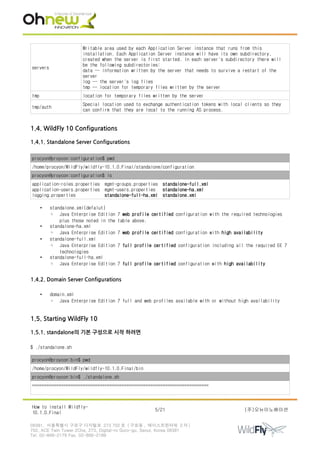
servers
Writable area used by each Application Server instance that runs from this
installation. Each Application Server instance will have its own subdirectory,
created when the server is first started. In each server's subdirectory there will
be the following subdirectories:
data -- information written by the server that needs to survive a restart of the
server
log -- the server's log files
tmp -- location for temporary files written by the server
tmp location for temporary files written by the server
tmp/auth
Special location used to exchange authentication tokens with local clients so they
can confirm that they are local to the running AS process.
1.4. WildFly 10 Configurations
1.4.1. Standalone Server Configurations
procyon@proycon:configuration$ pwd
/home/procyon/WildFly/wildfly-10.1.0.Final/standalone/configuration
procyon@proycon:configuration$ ls
application-roles.properties mgmt-groups.properties standalone-full.xml
application-users.properties mgmt-users.properties standalone-ha.xml
logging.properties standalone-full-ha.xml standalone.xml
• standalone.xml(defalut)
◦ Java Enterprise Edition 7 web profile certified configuration with the required technologies
plus those noted in the table above.
• standalone-ha.xml
◦ Java Enterprise Edition 7 web profile certified configuration with high availability
• standalone-full.xml
◦ Java Enterprise Edition 7 full profile certified configuration including all the required EE 7
technologies
• standalone-full-ha.xml
◦ Java Enterprise Edition 7 full profile certified configuration with high availability
1.4.2. Domain Server Configurations
• domain.xml
◦ Java Enterprise Edition 7 full and web profiles available with or without high availability
1.5. Starting WildFly 10
1.5.1. standalone의 기본 구성으로 시작 하려면
$ ./standalone.sh
procyon@proycon:bin$ pwd
/home/procyon/WildFly/wildfly-10.1.0.Final/bin
procyon@proycon:bin$ ./standalone.sh
=========================================================================
How to install Wildfly-
10.1.0.Final
5/21 (주)오뉴이노베이션
08381. 서울특별시 구로구 디지털로 273 702 호 ( 구로동 , 에이스트윈타워 2 차 )
702, ACE Twin Tower 2Cha, 273, Digital-ro Guro-gu, Seoul, Korea 08381
Tel. 02-866-2179 Fax. 02-866-2189
JBoss Bootstrap Environment
JBOSS_HOME: /home/procyon/WildFly/wildfly-10.1.0.Final
JAVA: java
JAVA_OPTS: -server -Xms64m -Xmx512m -XX:MetaspaceSize=96M -XX:MaxMetaspaceSize=256m
-Djava.net.preferIPv4Stack=true -Djboss.modules.system.pkgs=org.jboss.byteman -Djava.awt.headless=true
=========================================================================
…
<snip>
…
0:44:22,342 INFO [org.wildfly.extension.undertow] (MSC service thread 1-3) WFLYUT0018: Host default-host
starting
10:44:22,344 INFO [org.jboss.as.ejb3] (MSC service thread 1-1) WFLYEJB0482: Strict pool mdb-strict-max-
pool is using a max instance size of 16 (per class), which is derived from the number of CPUs on this
host.
10:44:22,345 INFO [org.jboss.as.ejb3] (MSC service thread 1-5) WFLYEJB0481: Strict pool slsb-strict-max-
pool is using a max instance size of 64 (per class), which is derived from thread worker pool sizing.
10:44:22,542 INFO [org.wildfly.extension.undertow] (MSC service thread 1-8) WFLYUT0006: Undertow HTTP
listener default listening on 127.0.0.1:8080
…
<snip>
…
10:44:23,821 INFO [org.jboss.ws.common.management] (MSC service thread 1-2) JBWS022052: Starting JBossWS
5.1.5.Final (Apache CXF 3.1.6)
10:44:24,021 INFO [org.jboss.as] (Controller Boot Thread) WFLYSRV0060: Http management interface
listening on http://127.0.0.1:9990/management
10:44:24,022 INFO [org.jboss.as] (Controller Boot Thread) WFLYSRV0051: Admin console listening on
http://127.0.0.1:9990
10:44:24,023 INFO [org.jboss.as] (Controller Boot Thread) WFLYSRV0025: WildFly Full 10.1.0.Final
(WildFly Core 2.2.0.Final) started in 5491ms - Started 331 of 577 services (393 services are lazy,
passive or on-demand)
Ctrl + C
10:51:20,171 INFO [org.jboss.as.server] (Thread-1) WFLYSRV0220: Server shutdown has been requested via
an OS signal
10:51:20,190 INFO [org.jboss.as.connector.subsystems.datasources] (MSC service thread 1-3) WFLYJCA0010:
Unbound data source [java:jboss/datasources/ExampleDS]
10:51:20,216 INFO [org.wildfly.extension.undertow] (MSC service thread 1-3) WFLYUT0008: Undertow HTTPS
listener https suspending
10:51:20,222 INFO [org.wildfly.extension.undertow] (MSC service thread 1-1) WFLYUT0019: Host default-
host stopping
10:51:20,241 INFO [org.wildfly.extension.undertow] (MSC service thread 1-3) WFLYUT0007: Undertow HTTPS
listener https stopped, was bound to 127.0.0.1:8443
10:51:20,272 INFO [org.wildfly.extension.undertow] (MSC service thread 1-4) WFLYUT0008: Undertow HTTP
listener default suspending
10:51:20,275 INFO [org.wildfly.extension.undertow] (MSC service thread 1-4) WFLYUT0007: Undertow HTTP
listener default stopped, was bound to 127.0.0.1:8080
10:51:20,284 INFO [org.wildfly.extension.undertow] (MSC service thread 1-4) WFLYUT0004: Undertow
1.4.0.Final stopping
10:51:20,285 INFO [org.jboss.as.connector.deployers.jdbc] (MSC service thread 1-3) WFLYJCA0019: Stopped
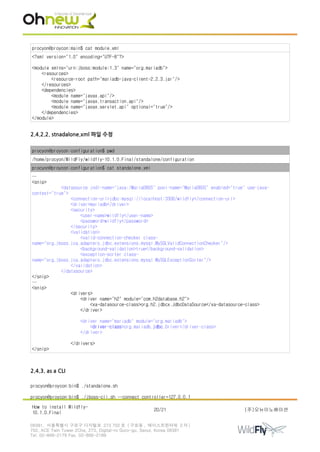
Driver service with driver-name = h2
10:51:20,340 INFO [org.jboss.as] (MSC service thread 1-4) WFLYSRV0050: WildFly Full 10.1.0.Final
(WildFly Core 2.2.0.Final) stopped in 100ms
열린 포트 확인
procyon@proycon:wildfly-10.1.0.Final$ netstat -antp | grep java
(Not all processes could be identified, non-owned process info
will not be shown, you would have to be root to see it all.)
How to install Wildfly-
10.1.0.Final
6/21 (주)오뉴이노베이션
08381. 서울특별시 구로구 디지털로 273 702 호 ( 구로동 , 에이스트윈타워 2 차 )
702, ACE Twin Tower 2Cha, 273, Digital-ro Guro-gu, Seoul, Korea 08381
Tel. 02-866-2179 Fax. 02-866-2189
tcp 0 0 127.0.0.1:8080 0.0.0.0:* LISTEN 14273/java
tcp 0 0 127.0.0.1:8443 0.0.0.0:* LISTEN 14273/java
tcp 0 0 127.0.0.1:9990 0.0.0.0:* LISTEN 14273/java
1.5.2. domain 구성으로 시작하려면
$ ./domain.sh
procyon@proycon:bin$ pwd
/home/procyon/WildFly/wildfly-10.1.0.Final/bin
procyon@proycon:bin$ ./domain.sh
=========================================================================
JBoss Bootstrap Environment
JBOSS_HOME: /home/procyon/WildFly/wildfly-10.1.0.Final
JAVA: java
JAVA_OPTS: -server -Xms64m -Xmx512m -XX:MaxMetaspaceSize=256m -Djava.net.preferIPv4Stack=true
-Djboss.modules.system.pkgs=org.jboss.byteman -Djava.awt.headless=true
=========================================================================
…
<snip>
…
[Server:server-two] 11:11:02,199 INFO [org.jboss.as.connector.deployment] (MSC service thread 1-5)
WFLYJCA0007: Registered connection factory java:/JmsXA
[Server:server-two] 11:11:02,283 INFO [org.apache.activemq.artemis.ra] (MSC service thread 1-5) Resource
adaptor started
[Server:server-two] 11:11:02,284 INFO
[org.jboss.as.connector.services.resourceadapters.ResourceAdapterActivatorService$ResourceAdapterActivato
r] (MSC service thread 1-5) IJ020002: Deployed: file://RaActivatoractivemq-ra
[Server:server-two] 11:11:02,287 INFO [org.jboss.as.connector.deployment] (MSC service thread 1-1)
WFLYJCA0002: Bound JCA ConnectionFactory [java:/JmsXA]
[Server:server-two] 11:11:02,287 INFO [org.wildfly.extension.messaging-activemq] (MSC service thread 1-
1) WFLYMSGAMQ0002: Bound messaging object to jndi name java:jboss/DefaultJMSConnectionFactory
[Server:server-two] 11:11:02,547 INFO [org.jboss.as] (Controller Boot Thread) WFLYSRV0025: WildFly Full
10.1.0.Final (WildFly Core 2.2.0.Final) started in 12316ms - Started 359 of 606 services (405 services
are lazy, passive or on-demand)
Ctrl + C
[Host Controller] 11:17:45,986 INFO [org.jboss.as.host.controller] (Thread-1) WFLYHC0181: Host
Controller shutdown has been requested via an OS signal
11:17:45,984 INFO [org.jboss.as.process] (Shutdown thread) WFLYPC0017: Shutting down process controller
11:17:45,989 INFO [org.jboss.as.process.Host Controller.status] (Shutdown thread) WFLYPC0019: Stopping
process 'Host Controller'
[Server:server-one] 11:17:45,989 INFO [org.jboss.as.server] (Thread-1) WFLYSRV0220: Server shutdown has
been requested via an OS signal
[Server:server-two] 11:17:45,986 INFO [org.jboss.as.server] (Thread-1) WFLYSRV0220: Server shutdown has
been requested via an OS signal
…
<snip>
…
[Host Controller] 11:17:47,021 INFO [org.jboss.as.host.controller] (ProcessControllerConnection-thread -
2) WFLYHC0027: Unregistering server server-two
[Host Controller] 11:17:47,025 INFO [org.jboss.as.host.controller] (ProcessControllerConnection-thread -
2) WFLYHC0027: Unregistering server server-one
[Host Controller] 11:17:47,078 INFO [org.jboss.as] (MSC service thread 1-2) WFLYSRV0050: WildFly Full
How to install Wildfly-
10.1.0.Final
7/21 (주)오뉴이노베이션
08381. 서울특별시 구로구 디지털로 273 702 호 ( 구로동 , 에이스트윈타워 2 차 )
702, ACE Twin Tower 2Cha, 273, Digital-ro Guro-gu, Seoul, Korea 08381
Tel. 02-866-2179 Fax. 02-866-2189
10.1.0.Final (WildFly Core 2.2.0.Final) stopped in 1081ms
[Host Controller]
11:17:47,100 INFO [org.jboss.as.process.Host Controller.status] (reaper for Host Controller) WFLYPC0011:
Process 'Host Controller' finished with an exit status of 130
11:17:47,101 INFO [org.jboss.as.process] (Shutdown thread) WFLYPC0016: All processes finished; exiting
열린 포트 확인
procyon@proycon:wildfly-10.1.0.Final$ netstat -antp | grep java
(Not all processes could be identified, non-owned process info
will not be shown, you would have to be root to see it all.)
tcp 0 0 127.0.0.1:3528 0.0.0.0:* LISTEN 16400/java
tcp 0 0 127.0.0.1:3529 0.0.0.0:* LISTEN 16400/java
tcp 0 0 127.0.0.1:9999 0.0.0.0:* LISTEN 16323/java
tcp 0 0 127.0.0.1:8080 0.0.0.0:* LISTEN 16400/java
tcp 0 0 127.0.0.1:8593 0.0.0.0:* LISTEN 16453/java
tcp 0 0 127.0.0.1:8443 0.0.0.0:* LISTEN 16400/java
tcp 0 0 127.0.0.1:3678 0.0.0.0:* LISTEN 16453/java
tcp 0 0 127.0.0.1:3679 0.0.0.0:* LISTEN 16453/java
tcp 0 0 127.0.0.1:44063 0.0.0.0:* LISTEN 16297/java
tcp 0 0 127.0.0.1:8230 0.0.0.0:* LISTEN 16453/java
tcp 0 0 127.0.0.1:9990 0.0.0.0:* LISTEN 16323/java
tcp 0 0 127.0.0.1:46405 127.0.0.1:9999 ESTABLISHED 16453/java
tcp 0 0 127.0.0.1:9999 127.0.0.1:46405 ESTABLISHED 16323/java
tcp 0 0 127.0.0.1:35767 127.0.0.1:44063 ESTABLISHED 16323/java
tcp 0 0 127.0.0.1:44063 127.0.0.1:35767 ESTABLISHED 16297/java
tcp 0 0 127.0.0.1:9999 127.0.0.1:46689 ESTABLISHED 16323/java
tcp 0 0 127.0.0.1:46689 127.0.0.1:9999 ESTABLISHED 16400/java
1.5.3. 다른 대체 구성으로 실행하기
$ ./standalone.sh --server-config=standalone-full-ha.xml
열린 포트 확인
procyon@proycon:wildfly-10.1.0.Final$ netstat -antp | grep java
(Not all processes could be identified, non-owned process info
will not be shown, you would have to be root to see it all.)
tcp 0 0 127.0.0.1:3528 0.0.0.0:* LISTEN 19086/java
tcp 0 0 127.0.0.1:3529 0.0.0.0:* LISTEN 19086/java
tcp 0 0 127.0.0.1:8009 0.0.0.0:* LISTEN 19086/java
tcp 0 0 127.0.0.1:8080 0.0.0.0:* LISTEN 19086/java
tcp 0 0 127.0.0.1:54200 0.0.0.0:* LISTEN 19086/java
tcp 0 0 127.0.0.1:8443 0.0.0.0:* LISTEN 19086/java
tcp 0 0 127.0.0.1:9990 0.0.0.0:* LISTEN 19086/java
tcp 0 0 127.0.0.1:50008 127.0.0.1:8080 ESTABLISHED 19086/java
tcp 0 0 127.0.0.1:8080 127.0.0.1:50008 ESTABLISHED 19086/java
$ ./domain.sh --domain-config=my-domain-configuration.xml
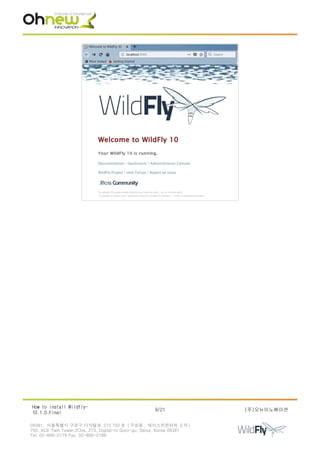
1.5.4. Test Your Installation
http://localhost:8080
How to install Wildfly-
10.1.0.Final
8/21 (주)오뉴이노베이션
08381. 서울특별시 구로구 디지털로 273 702 호 ( 구로동 , 에이스트윈타워 2 차 )
702, ACE Twin Tower 2Cha, 273, Digital-ro Guro-gu, Seoul, Korea 08381
Tel. 02-866-2179 Fax. 02-866-2189
How to install Wildfly-
10.1.0.Final
9/21 (주)오뉴이노베이션
08381. 서울특별시 구로구 디지털로 273 702 호 ( 구로동 , 에이스트윈타워 2 차 )
702, ACE Twin Tower 2Cha, 273, Digital-ro Guro-gu, Seoul, Korea 08381
Tel. 02-866-2179 Fax. 02-866-2189
2. Managing your WildFly 10
• WildFly 10은 인스턴르를 관리하기 위한 두가지 방법을 제공
◦ web-based Administration Console
◦ command-line interface
2.1. Authentication
사용자 생성
procyon@proycon:bin$ pwd
/home/procyon/WildFly/wildfly-10.1.0.Final/bin
procyon@proycon:bin$ ./add-user.sh
What type of user do you wish to add?
a) Management User (mgmt-users.properties)
b) Application User (application-users.properties)
(a): a
Enter the details of the new user to add.
Using realm 'ManagementRealm' as discovered from the existing property files.
Username : ohnewfly
Password recommendations are listed below. To modify these restrictions edit the add-user.properties
configuration file.
- The password should be different from the username
- The password should not be one of the following restricted values {root, admin, administrator}
- The password should contain at least 8 characters, 1 alphabetic character(s), 1 digit(s), 1 non-
alphanumeric symbol(s)
Password : !12abcde
Re-enter Password : !12abcde
What groups do you want this user to belong to? (Please enter a comma separated list, or leave blank for
none)[ ]:
About to add user 'ohnewfly' for realm 'ManagementRealm'
Is this correct yes/no? yes
Added user 'ohnewfly' to file '/home/procyon/WildFly/wildfly-10.1.0.Final/standalone/configuration/mgmt-
users.properties'
Added user 'ohnewfly' to file '/home/procyon/WildFly/wildfly-10.1.0.Final/domain/configuration/mgmt-
users.properties'
Added user 'ohnewfly' with groups to file '/home/procyon/WildFly/wildfly-
10.1.0.Final/standalone/configuration/mgmt-groups.properties'
Added user 'ohnewfly' with groups to file '/home/procyon/WildFly/wildfly-
10.1.0.Final/domain/configuration/mgmt-groups.properties'
Is this new user going to be used for one AS process to connect to another AS process?
e.g. for a slave host controller connecting to the master or for a Remoting connection for server to
server EJB calls.
yes/no? yes
To represent the user add the following to the server-identities definition <secret
value="MSh3bilkaHNi" />
설정 된 파일 내용
procyon@proycon:configuration$ pwd
/home/procyon/WildFly/wildfly-10.1.0.Final/standalone/configuration
procyon@proycon:configuration$ cat mgmt-users.properties | grep ohnewfly
How to install Wildfly-
10.1.0.Final
10/21 (주)오뉴이노베이션
08381. 서울특별시 구로구 디지털로 273 702 호 ( 구로동 , 에이스트윈타워 2 차 )
702, ACE Twin Tower 2Cha, 273, Digital-ro Guro-gu, Seoul, Korea 08381
Tel. 02-866-2179 Fax. 02-866-2189
ohnewfly=2fccdf0499c1ce27d238b24b0ddb223c
procyon@proycon:configuration$ pwd
/home/procyon/WildFly/wildfly-10.1.0.Final/domain/configuration
procyon@proycon:configuration$ grep ohnewfly mgmt-users.properties
ohnewfly=2fccdf0499c1ce27d238b24b0ddb223c
2.2. Administration Console
http://localhost:9990/console
procyon@proycon:configuration$ pwd
/home/procyon/WildFly/wildfly-10.1.0.Final/standalone/configuration
procyon@proycon:configuration$ cat standalone.xml | grep -A 11 <socket-binding-group
<socket-binding-group name="standard-sockets" default-interface="public" port-offset="$
{jboss.socket.binding.port-offset:0}">
<socket-binding name="management-http" interface="management" port="$
{jboss.management.http.port:9990}"/>
<socket-binding name="management-https" interface="management" port="$
{jboss.management.https.port:9993}"/>
<socket-binding name="ajp" port="${jboss.ajp.port:8009}"/>
<socket-binding name="http" port="${jboss.http.port:8080}"/>
<socket-binding name="https" port="${jboss.https.port:8443}"/>
<socket-binding name="txn-recovery-environment" port="4712"/>
<socket-binding name="txn-status-manager" port="4713"/>
<outbound-socket-binding name="mail-smtp">
<remote-destination host="localhost" port="25"/>
</outbound-socket-binding>
</socket-binding-group>
How to install Wildfly-
10.1.0.Final
11/21 (주)오뉴이노베이션
08381. 서울특별시 구로구 디지털로 273 702 호 ( 구로동 , 에이스트윈타워 2 차 )
702, ACE Twin Tower 2Cha, 273, Digital-ro Guro-gu, Seoul, Korea 08381
Tel. 02-866-2179 Fax. 02-866-2189
2.3. Command-Line Interface
procyon@proycon:bin$ ./jboss-cli.sh --connect
[standalone@localhost:9990 /] [tab][tab]
: deploy jms-topic set
alias deployment-info ls shutdown
batch deployment-overlay module try
cd echo patch unalias
clear echo-dmr pwd undeploy
command help quit unset
connect history read-attribute version
connection-factory if read-operation xa-data-source
connection-info jdbc-driver-info reload
data-source jms-queue run-batch
[standalone@localhost:9990 /]
[standalone@localhost:9990 /]
[standalone@localhost:9990 /]
2.4. Modifying the Example DataSource
• 두 가지 구성 방법
◦ as a module
◦ as a deployment
How to install Wildfly-
10.1.0.Final
12/21 (주)오뉴이노베이션
08381. 서울특별시 구로구 디지털로 273 702 호 ( 구로동 , 에이스트윈타워 2 차 )
702, ACE Twin Tower 2Cha, 273, Digital-ro Guro-gu, Seoul, Korea 08381
Tel. 02-866-2179 Fax. 02-866-2189
2.4.1. as a deployment
2.4.1.1. MariaDB Connector/J 2.2
https://downloads.mariadb.org/connector-java/+releases/
mariadb-java-client-2.2.3.jar
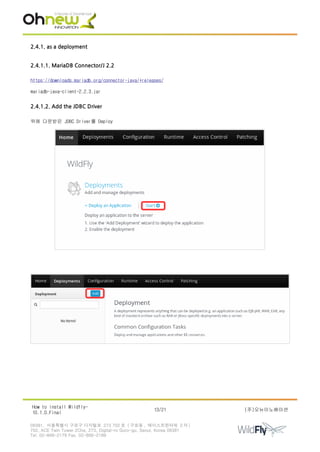
2.4.1.2. Add the JDBC Driver
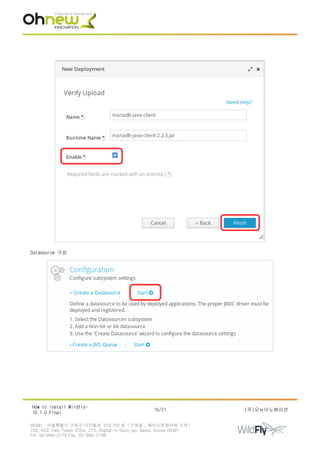
위에 다운받은 JDBC Driver를 Deploy
How to install Wildfly-
10.1.0.Final
13/21 (주)오뉴이노베이션
08381. 서울특별시 구로구 디지털로 273 702 호 ( 구로동 , 에이스트윈타워 2 차 )
702, ACE Twin Tower 2Cha, 273, Digital-ro Guro-gu, Seoul, Korea 08381
Tel. 02-866-2179 Fax. 02-866-2189
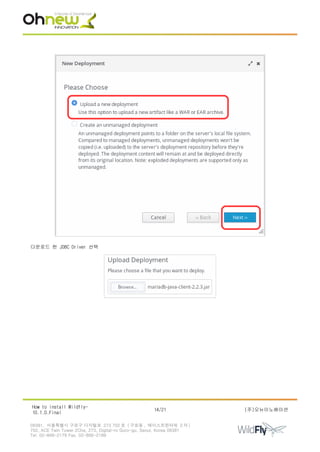
다운로드 한 JDBC Driver 선택
How to install Wildfly-
10.1.0.Final
14/21 (주)오뉴이노베이션
08381. 서울특별시 구로구 디지털로 273 702 호 ( 구로동 , 에이스트윈타워 2 차 )
702, ACE Twin Tower 2Cha, 273, Digital-ro Guro-gu, Seoul, Korea 08381
Tel. 02-866-2179 Fax. 02-866-2189
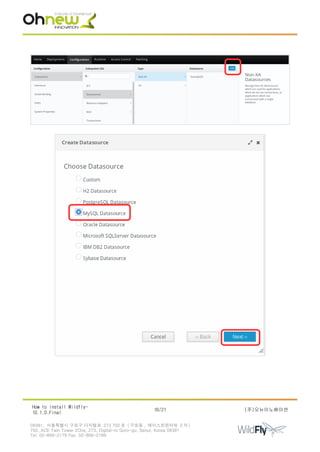
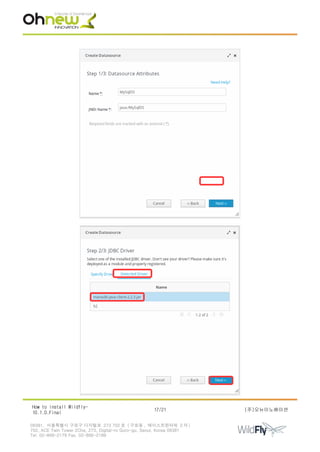
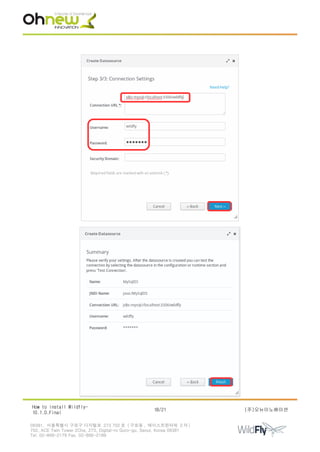
Datasource 구성
How to install Wildfly-
10.1.0.Final
15/21 (주)오뉴이노베이션
08381. 서울특별시 구로구 디지털로 273 702 호 ( 구로동 , 에이스트윈타워 2 차 )
702, ACE Twin Tower 2Cha, 273, Digital-ro Guro-gu, Seoul, Korea 08381
Tel. 02-866-2179 Fax. 02-866-2189
How to install Wildfly-
10.1.0.Final
16/21 (주)오뉴이노베이션
08381. 서울특별시 구로구 디지털로 273 702 호 ( 구로동 , 에이스트윈타워 2 차 )
702, ACE Twin Tower 2Cha, 273, Digital-ro Guro-gu, Seoul, Korea 08381
Tel. 02-866-2179 Fax. 02-866-2189
How to install Wildfly-
10.1.0.Final
17/21 (주)오뉴이노베이션
08381. 서울특별시 구로구 디지털로 273 702 호 ( 구로동 , 에이스트윈타워 2 차 )
702, ACE Twin Tower 2Cha, 273, Digital-ro Guro-gu, Seoul, Korea 08381
Tel. 02-866-2179 Fax. 02-866-2189
How to install Wildfly-
10.1.0.Final
18/21 (주)오뉴이노베이션
08381. 서울특별시 구로구 디지털로 273 702 호 ( 구로동 , 에이스트윈타워 2 차 )
702, ACE Twin Tower 2Cha, 273, Digital-ro Guro-gu, Seoul, Korea 08381
Tel. 02-866-2179 Fax. 02-866-2189
2.4.1.3. 구성 된 Datasource 확인 및 수정하기
[standalone@localhost:9990 /] /subsystem=datasources:read-resource(recursive=true)
[standalone@localhost:9990 /]
[standalone@localhost:9990 /] /subsystem=datasources:installed-drivers-list
2.4.2. as a module
2.4.2.1. Driver 복사와 module.xml 생성
procyon@proycon:base$ pwd
/home/procyon/WildFly/wildfly-10.1.0.Final/modules/system/layers/base
procyon@proycon:base$ mkdir -p org/mariadb/main
procyon@proycon:base$ cp ~procyon/WildFly/mariadb/mariadb-java-client-2.2.3.jar org/mariadb/main/
How to install Wildfly-
10.1.0.Final
19/21 (주)오뉴이노베이션
08381. 서울특별시 구로구 디지털로 273 702 호 ( 구로동 , 에이스트윈타워 2 차 )
702, ACE Twin Tower 2Cha, 273, Digital-ro Guro-gu, Seoul, Korea 08381
Tel. 02-866-2179 Fax. 02-866-2189
procyon@proycon:main$ cat module.xml
<?xml version="1.0" encoding="UTF-8"?>
<module xmlns="urn:jboss:module:1.3" name="org.mariadb">
<resources>
<resource-root path="mariadb-java-client-2.2.3.jar"/>
</resources>
<dependencies>
<module name="javax.api"/>
<module name="javax.transaction.api"/>
<module name="javax.servlet.api" optional="true"/>
</dependencies>
</module>
2.4.2.2. stnadalone.xml 파일 수정
procyon@proycon:configuration$ pwd
/home/procyon/WildFly/wildfly-10.1.0.Final/standalone/configuration
procyon@proycon:configuration$ cat standalone.xml
…
<snip>
<datasource jndi-name="java:/MariaDBDS" pool-name="MariaDBDS" enabled="true" use-java-
context="true">
<connection-url>jdbc:mysql://localhost:3306/wildfly</connection-url>
<driver>mariadb</driver>
<security>
<user-name>wildfly</user-name>
<password>wildfly</password>
</security>
<validation>
<valid-connection-checker class-
name="org.jboss.jca.adapters.jdbc.extensions.mysql.MySQLValidConnectionChecker"/>
<background-validation>true</background-validation>
<exception-sorter class-
name="org.jboss.jca.adapters.jdbc.extensions.mysql.MySQLExceptionSorter"/>
</validation>
</datasource>
</snip>
…
<snip>
<drivers>
<driver name="h2" module="com.h2database.h2">
<xa-datasource-class>org.h2.jdbcx.JdbcDataSource</xa-datasource-class>
</driver>
<driver name="mariadb" module="org.mariadb">
<driver-class>org.mariadb.jdbc.Driver</driver-class>
</driver>
</drivers>
</snip>
2.4.3. as a CLI
procyon@proycon:bin$ ./standalone.sh
procyon@proycon:bin$ ./jboss-cli.sh --connect controller=127.0.0.1
How to install Wildfly-
10.1.0.Final
20/21 (주)오뉴이노베이션
08381. 서울특별시 구로구 디지털로 273 702 호 ( 구로동 , 에이스트윈타워 2 차 )
702, ACE Twin Tower 2Cha, 273, Digital-ro Guro-gu, Seoul, Korea 08381
Tel. 02-866-2179 Fax. 02-866-2189
[standalone@127.0.0.1:9990 /]
[standalone@127.0.0.1:9990 /] module add --name=org.mariadb
--resources=/home/procyon/WildFly/mariadb/mariadb-java-client-2.2.3.jar
--dependencies=javax.api,javax.transaction.api
[standalone@127.0.0.1:9990 /] /subsystem=datasources/jdbc-driver=mariadb:add(driver-name="mariadb",driver-
module-name="org.mariadb",driver-class-name=org.mariadb.jdbc.Driver)
{"outcome" => "success"}
[standalone@127.0.0.1:9990 /] data-source add --jndi-name=java:/MariaDB --name=MariaDB --connection-
url=jdbc:mysql://localhost:3306/wildfly --driver-name=mariadb --user-name=wildfly --password=wildfly
How to install Wildfly-
10.1.0.Final
21/21 (주)오뉴이노베이션
08381. 서울특별시 구로구 디지털로 273 702 호 ( 구로동 , 에이스트윈타워 2 차 )
702, ACE Twin Tower 2Cha, 273, Digital-ro Guro-gu, Seoul, Korea 08381
Tel. 02-866-2179 Fax. 02-866-2189

How to installation wildfly 10.1.0 final

  • 1.
    How to installWildfly-10.1.0.Final Prepared for Solutions Architect팀 (주)오뉴이노베이션 Solutions Architect팀 2018년 4월 6일 How to install Wildfly- 10.1.0.Final 1/21 (주)오뉴이노베이션 08381. 서울특별시 구로구 디지털로 273 702 호 ( 구로동 , 에이스트윈타워 2 차 ) 702, ACE Twin Tower 2Cha, 273, Digital-ro Guro-gu, Seoul, Korea 08381 Tel. 02-866-2179 Fax. 02-866-2189
  • 2.
    Table of Contents 1.WildFly................................................................................................3 1.1. Download.........................................................................................3 1.2. Requirements.....................................................................................3 1.3. WildFly 10 Directory Structure...................................................................3 1.3.1. Standalone Directory Structure..............................................................4 1.3.2. Domain Directory Structure..................................................................4 1.4. WildFly 10 Configurations........................................................................5 1.4.1. Standalone Server Configurations............................................................5 1.4.2. Domain Server Configurations................................................................5 1.5. Starting WildFly 10..............................................................................5 1.5.1. standalone의 기본 구성으로 시작 하려면......................................................5 1.5.2. domain 구성으로 시작하려면..................................................................7 1.5.3. 다른 대체 구성으로 실행하기.................................................................8 1.5.4. Test Your Installation......................................................................8 2. Managing your WildFly 10..............................................................................10 2.1. Authentication..................................................................................10 2.2. Administration Console..........................................................................11 2.3. Command-Line Interface..........................................................................12 2.4. Modifying the Example DataSource................................................................12 2.4.1. as a deployment............................................................................13 2.4.1.1. MariaDB Connector/J 2.2..................................................................13 2.4.1.2. Add the JDBC Driver......................................................................13 2.4.1.3. 구성 된 Datasource 확인 및 수정하기......................................................19 2.4.2. as a module................................................................................19 2.4.2.1. Driver 복사와 module.xml 생성............................................................19 2.4.2.2. stnadalone.xml 파일 수정.................................................................20 2.4.3. as a CLI...................................................................................20 How to install Wildfly- 10.1.0.Final 2/21 (주)오뉴이노베이션 08381. 서울특별시 구로구 디지털로 273 702 호 ( 구로동 , 에이스트윈타워 2 차 ) 702, ACE Twin Tower 2Cha, 273, Digital-ro Guro-gu, Seoul, Korea 08381 Tel. 02-866-2179 Fax. 02-866-2189
  • 3.
    1. WildFly https://docs.jboss.org/author/display/WFLY10/Getting+Started+Guide 1.1. Download http://www.wildfly.org/downloads/ wildfly-10.1.0.Final.zip- http://download.jboss.org/wildfly/10.1.0.Final/wildfly-10.1.0.Final.zip wildfly-11.0.0.Final.zip - http://download.jboss.org/wildfly/11.0.0.Final/wildfly-11.0.0.Final.zip wildfly-12.0.0.Final.zip - http://download.jboss.org/wildfly/12.0.0.Final/wildfly-12.0.0.Final.zip 1.2. Requirements • Java SE 8 or later procyon@proycon:wildfly-10.1.0.Final$ java -version openjdk version "1.8.0_151" OpenJDK Runtime Environment (build 1.8.0_151-8u151-b12-0ubuntu0.17.10.2-b12) OpenJDK 64-Bit Server VM (build 25.151-b12, mixed mode) root@proycon:~# java -version openjdk version "9-Ubuntu" OpenJDK Runtime Environment (build 9-Ubuntu+0-9b181-4) OpenJDK 64-Bit Server VM (build 9-Ubuntu+0-9b181-4, mixed mode) root@proycon:~# update-alternatives --config java There are 2 choices for the alternative java (providing /usr/bin/java). Selection Path Priority Status ------------------------------------------------------------ 0 /usr/lib/jvm/java-9-openjdk-amd64/bin/java 1091 auto mode 1 /usr/lib/jvm/java-8-openjdk-amd64/jre/bin/java 1081 manual mode * 2 /usr/lib/jvm/java-9-openjdk-amd64/bin/java 1091 manual mode root@proycon:~# java -version openjdk version "1.8.0_151" OpenJDK Runtime Environment (build 1.8.0_151-8u151-b12-0ubuntu0.17.10.2-b12) OpenJDK 64-Bit Server VM (build 25.151-b12, mixed mode) 1.3. WildFly 10 Directory Structure procyon@proycon:wildfly-10.1.0.Final$ ls appclient docs LICENSE.txt standalone bin domain modules welcome-content copyright.txt jboss-modules.jar README.txt DIRECTORY DESCRIPTION appclient Configuration files, deployment content, and writable areas used by the application client container run from this installation. bin Start up scripts, start up configuration files and various command line utilities How to install Wildfly- 10.1.0.Final 3/21 (주)오뉴이노베이션 08381. 서울특별시 구로구 디지털로 273 702 호 ( 구로동 , 에이스트윈타워 2 차 ) 702, ACE Twin Tower 2Cha, 273, Digital-ro Guro-gu, Seoul, Korea 08381 Tel. 02-866-2179 Fax. 02-866-2189
  • 4.
    like Vault, add-userand Java diagnostic report available for Unix and Windows environments bin/client Contains a client jar for use by non-maven based clients docs/schema XML schema definition files docs/examples/confi gs Example configuration files representing specific use cases domain Configuration files, deployment content, and writable areas used by the domain mode processes run from this installation modules WildFly 01 is based on a modular classloading architecture. The various modules used in the server are stored here standalone Configuration files, deployment content, and writable areas used by the single standalone server run from this installation welcome-content Default Welcome Page content 1.3.1. Standalone Directory Structure DIRECTORY DESCRIPTION configuration Configuration files for the standalone server that runs off of this installation. All configuration information for the running server is located here and is the single place for configuration modifications for the standalone server. data Persistent information written by the server to survive a restart of the server deployments End user deployment content can be placed in this directory for automatic detection and deployment of that content into the server's runtime. NOTE: The server's management API is recommended for installing deployment content. File system based deployment scanning capabilities remain for developer convenience. lib/ext Location for installed library jars referenced by applications using the Extension- List mechanism log standalone server log files tmp location for temporary files written by the server tmp/auth Special location used to exchange authentication tokens with local clients so they can confirm that they are local to the running AS process. 1.3.2. Domain Directory Structure DIRECTORY DESCRIPTION configuration Configuration files for the domain and for the Host Controller and any servers running off of this installation. All configuration information for the servers managed wtihin the domain is located here and is the single place for configuration information. content an internal working area for the Host Controller that controls this installation. This is where it internally stores deployment content. This directory is not meant to be manipulated by end users. Note that "domain" mode does not support deploying content based on scanning a file system. lib/ext Location for installed library jars referenced by applications using the Extension- List mechanism log Location where the Host Controller process writes its logs. The Process Controller, a small lightweight process that actually spawns the other Host Controller process and any Application Server processes also writes a log here. How to install Wildfly- 10.1.0.Final 4/21 (주)오뉴이노베이션 08381. 서울특별시 구로구 디지털로 273 702 호 ( 구로동 , 에이스트윈타워 2 차 ) 702, ACE Twin Tower 2Cha, 273, Digital-ro Guro-gu, Seoul, Korea 08381 Tel. 02-866-2179 Fax. 02-866-2189
  • 5.
    servers Writable area usedby each Application Server instance that runs from this installation. Each Application Server instance will have its own subdirectory, created when the server is first started. In each server's subdirectory there will be the following subdirectories: data -- information written by the server that needs to survive a restart of the server log -- the server's log files tmp -- location for temporary files written by the server tmp location for temporary files written by the server tmp/auth Special location used to exchange authentication tokens with local clients so they can confirm that they are local to the running AS process. 1.4. WildFly 10 Configurations 1.4.1. Standalone Server Configurations procyon@proycon:configuration$ pwd /home/procyon/WildFly/wildfly-10.1.0.Final/standalone/configuration procyon@proycon:configuration$ ls application-roles.properties mgmt-groups.properties standalone-full.xml application-users.properties mgmt-users.properties standalone-ha.xml logging.properties standalone-full-ha.xml standalone.xml • standalone.xml(defalut) ◦ Java Enterprise Edition 7 web profile certified configuration with the required technologies plus those noted in the table above. • standalone-ha.xml ◦ Java Enterprise Edition 7 web profile certified configuration with high availability • standalone-full.xml ◦ Java Enterprise Edition 7 full profile certified configuration including all the required EE 7 technologies • standalone-full-ha.xml ◦ Java Enterprise Edition 7 full profile certified configuration with high availability 1.4.2. Domain Server Configurations • domain.xml ◦ Java Enterprise Edition 7 full and web profiles available with or without high availability 1.5. Starting WildFly 10 1.5.1. standalone의 기본 구성으로 시작 하려면 $ ./standalone.sh procyon@proycon:bin$ pwd /home/procyon/WildFly/wildfly-10.1.0.Final/bin procyon@proycon:bin$ ./standalone.sh ========================================================================= How to install Wildfly- 10.1.0.Final 5/21 (주)오뉴이노베이션 08381. 서울특별시 구로구 디지털로 273 702 호 ( 구로동 , 에이스트윈타워 2 차 ) 702, ACE Twin Tower 2Cha, 273, Digital-ro Guro-gu, Seoul, Korea 08381 Tel. 02-866-2179 Fax. 02-866-2189
  • 6.
    JBoss Bootstrap Environment JBOSS_HOME:/home/procyon/WildFly/wildfly-10.1.0.Final JAVA: java JAVA_OPTS: -server -Xms64m -Xmx512m -XX:MetaspaceSize=96M -XX:MaxMetaspaceSize=256m -Djava.net.preferIPv4Stack=true -Djboss.modules.system.pkgs=org.jboss.byteman -Djava.awt.headless=true ========================================================================= … <snip> … 0:44:22,342 INFO [org.wildfly.extension.undertow] (MSC service thread 1-3) WFLYUT0018: Host default-host starting 10:44:22,344 INFO [org.jboss.as.ejb3] (MSC service thread 1-1) WFLYEJB0482: Strict pool mdb-strict-max- pool is using a max instance size of 16 (per class), which is derived from the number of CPUs on this host. 10:44:22,345 INFO [org.jboss.as.ejb3] (MSC service thread 1-5) WFLYEJB0481: Strict pool slsb-strict-max- pool is using a max instance size of 64 (per class), which is derived from thread worker pool sizing. 10:44:22,542 INFO [org.wildfly.extension.undertow] (MSC service thread 1-8) WFLYUT0006: Undertow HTTP listener default listening on 127.0.0.1:8080 … <snip> … 10:44:23,821 INFO [org.jboss.ws.common.management] (MSC service thread 1-2) JBWS022052: Starting JBossWS 5.1.5.Final (Apache CXF 3.1.6) 10:44:24,021 INFO [org.jboss.as] (Controller Boot Thread) WFLYSRV0060: Http management interface listening on http://127.0.0.1:9990/management 10:44:24,022 INFO [org.jboss.as] (Controller Boot Thread) WFLYSRV0051: Admin console listening on http://127.0.0.1:9990 10:44:24,023 INFO [org.jboss.as] (Controller Boot Thread) WFLYSRV0025: WildFly Full 10.1.0.Final (WildFly Core 2.2.0.Final) started in 5491ms - Started 331 of 577 services (393 services are lazy, passive or on-demand) Ctrl + C 10:51:20,171 INFO [org.jboss.as.server] (Thread-1) WFLYSRV0220: Server shutdown has been requested via an OS signal 10:51:20,190 INFO [org.jboss.as.connector.subsystems.datasources] (MSC service thread 1-3) WFLYJCA0010: Unbound data source [java:jboss/datasources/ExampleDS] 10:51:20,216 INFO [org.wildfly.extension.undertow] (MSC service thread 1-3) WFLYUT0008: Undertow HTTPS listener https suspending 10:51:20,222 INFO [org.wildfly.extension.undertow] (MSC service thread 1-1) WFLYUT0019: Host default- host stopping 10:51:20,241 INFO [org.wildfly.extension.undertow] (MSC service thread 1-3) WFLYUT0007: Undertow HTTPS listener https stopped, was bound to 127.0.0.1:8443 10:51:20,272 INFO [org.wildfly.extension.undertow] (MSC service thread 1-4) WFLYUT0008: Undertow HTTP listener default suspending 10:51:20,275 INFO [org.wildfly.extension.undertow] (MSC service thread 1-4) WFLYUT0007: Undertow HTTP listener default stopped, was bound to 127.0.0.1:8080 10:51:20,284 INFO [org.wildfly.extension.undertow] (MSC service thread 1-4) WFLYUT0004: Undertow 1.4.0.Final stopping 10:51:20,285 INFO [org.jboss.as.connector.deployers.jdbc] (MSC service thread 1-3) WFLYJCA0019: Stopped Driver service with driver-name = h2 10:51:20,340 INFO [org.jboss.as] (MSC service thread 1-4) WFLYSRV0050: WildFly Full 10.1.0.Final (WildFly Core 2.2.0.Final) stopped in 100ms 열린 포트 확인 procyon@proycon:wildfly-10.1.0.Final$ netstat -antp | grep java (Not all processes could be identified, non-owned process info will not be shown, you would have to be root to see it all.) How to install Wildfly- 10.1.0.Final 6/21 (주)오뉴이노베이션 08381. 서울특별시 구로구 디지털로 273 702 호 ( 구로동 , 에이스트윈타워 2 차 ) 702, ACE Twin Tower 2Cha, 273, Digital-ro Guro-gu, Seoul, Korea 08381 Tel. 02-866-2179 Fax. 02-866-2189
  • 7.
    tcp 0 0127.0.0.1:8080 0.0.0.0:* LISTEN 14273/java tcp 0 0 127.0.0.1:8443 0.0.0.0:* LISTEN 14273/java tcp 0 0 127.0.0.1:9990 0.0.0.0:* LISTEN 14273/java 1.5.2. domain 구성으로 시작하려면 $ ./domain.sh procyon@proycon:bin$ pwd /home/procyon/WildFly/wildfly-10.1.0.Final/bin procyon@proycon:bin$ ./domain.sh ========================================================================= JBoss Bootstrap Environment JBOSS_HOME: /home/procyon/WildFly/wildfly-10.1.0.Final JAVA: java JAVA_OPTS: -server -Xms64m -Xmx512m -XX:MaxMetaspaceSize=256m -Djava.net.preferIPv4Stack=true -Djboss.modules.system.pkgs=org.jboss.byteman -Djava.awt.headless=true ========================================================================= … <snip> … [Server:server-two] 11:11:02,199 INFO [org.jboss.as.connector.deployment] (MSC service thread 1-5) WFLYJCA0007: Registered connection factory java:/JmsXA [Server:server-two] 11:11:02,283 INFO [org.apache.activemq.artemis.ra] (MSC service thread 1-5) Resource adaptor started [Server:server-two] 11:11:02,284 INFO [org.jboss.as.connector.services.resourceadapters.ResourceAdapterActivatorService$ResourceAdapterActivato r] (MSC service thread 1-5) IJ020002: Deployed: file://RaActivatoractivemq-ra [Server:server-two] 11:11:02,287 INFO [org.jboss.as.connector.deployment] (MSC service thread 1-1) WFLYJCA0002: Bound JCA ConnectionFactory [java:/JmsXA] [Server:server-two] 11:11:02,287 INFO [org.wildfly.extension.messaging-activemq] (MSC service thread 1- 1) WFLYMSGAMQ0002: Bound messaging object to jndi name java:jboss/DefaultJMSConnectionFactory [Server:server-two] 11:11:02,547 INFO [org.jboss.as] (Controller Boot Thread) WFLYSRV0025: WildFly Full 10.1.0.Final (WildFly Core 2.2.0.Final) started in 12316ms - Started 359 of 606 services (405 services are lazy, passive or on-demand) Ctrl + C [Host Controller] 11:17:45,986 INFO [org.jboss.as.host.controller] (Thread-1) WFLYHC0181: Host Controller shutdown has been requested via an OS signal 11:17:45,984 INFO [org.jboss.as.process] (Shutdown thread) WFLYPC0017: Shutting down process controller 11:17:45,989 INFO [org.jboss.as.process.Host Controller.status] (Shutdown thread) WFLYPC0019: Stopping process 'Host Controller' [Server:server-one] 11:17:45,989 INFO [org.jboss.as.server] (Thread-1) WFLYSRV0220: Server shutdown has been requested via an OS signal [Server:server-two] 11:17:45,986 INFO [org.jboss.as.server] (Thread-1) WFLYSRV0220: Server shutdown has been requested via an OS signal … <snip> … [Host Controller] 11:17:47,021 INFO [org.jboss.as.host.controller] (ProcessControllerConnection-thread - 2) WFLYHC0027: Unregistering server server-two [Host Controller] 11:17:47,025 INFO [org.jboss.as.host.controller] (ProcessControllerConnection-thread - 2) WFLYHC0027: Unregistering server server-one [Host Controller] 11:17:47,078 INFO [org.jboss.as] (MSC service thread 1-2) WFLYSRV0050: WildFly Full How to install Wildfly- 10.1.0.Final 7/21 (주)오뉴이노베이션 08381. 서울특별시 구로구 디지털로 273 702 호 ( 구로동 , 에이스트윈타워 2 차 ) 702, ACE Twin Tower 2Cha, 273, Digital-ro Guro-gu, Seoul, Korea 08381 Tel. 02-866-2179 Fax. 02-866-2189
  • 8.
    10.1.0.Final (WildFly Core2.2.0.Final) stopped in 1081ms [Host Controller] 11:17:47,100 INFO [org.jboss.as.process.Host Controller.status] (reaper for Host Controller) WFLYPC0011: Process 'Host Controller' finished with an exit status of 130 11:17:47,101 INFO [org.jboss.as.process] (Shutdown thread) WFLYPC0016: All processes finished; exiting 열린 포트 확인 procyon@proycon:wildfly-10.1.0.Final$ netstat -antp | grep java (Not all processes could be identified, non-owned process info will not be shown, you would have to be root to see it all.) tcp 0 0 127.0.0.1:3528 0.0.0.0:* LISTEN 16400/java tcp 0 0 127.0.0.1:3529 0.0.0.0:* LISTEN 16400/java tcp 0 0 127.0.0.1:9999 0.0.0.0:* LISTEN 16323/java tcp 0 0 127.0.0.1:8080 0.0.0.0:* LISTEN 16400/java tcp 0 0 127.0.0.1:8593 0.0.0.0:* LISTEN 16453/java tcp 0 0 127.0.0.1:8443 0.0.0.0:* LISTEN 16400/java tcp 0 0 127.0.0.1:3678 0.0.0.0:* LISTEN 16453/java tcp 0 0 127.0.0.1:3679 0.0.0.0:* LISTEN 16453/java tcp 0 0 127.0.0.1:44063 0.0.0.0:* LISTEN 16297/java tcp 0 0 127.0.0.1:8230 0.0.0.0:* LISTEN 16453/java tcp 0 0 127.0.0.1:9990 0.0.0.0:* LISTEN 16323/java tcp 0 0 127.0.0.1:46405 127.0.0.1:9999 ESTABLISHED 16453/java tcp 0 0 127.0.0.1:9999 127.0.0.1:46405 ESTABLISHED 16323/java tcp 0 0 127.0.0.1:35767 127.0.0.1:44063 ESTABLISHED 16323/java tcp 0 0 127.0.0.1:44063 127.0.0.1:35767 ESTABLISHED 16297/java tcp 0 0 127.0.0.1:9999 127.0.0.1:46689 ESTABLISHED 16323/java tcp 0 0 127.0.0.1:46689 127.0.0.1:9999 ESTABLISHED 16400/java 1.5.3. 다른 대체 구성으로 실행하기 $ ./standalone.sh --server-config=standalone-full-ha.xml 열린 포트 확인 procyon@proycon:wildfly-10.1.0.Final$ netstat -antp | grep java (Not all processes could be identified, non-owned process info will not be shown, you would have to be root to see it all.) tcp 0 0 127.0.0.1:3528 0.0.0.0:* LISTEN 19086/java tcp 0 0 127.0.0.1:3529 0.0.0.0:* LISTEN 19086/java tcp 0 0 127.0.0.1:8009 0.0.0.0:* LISTEN 19086/java tcp 0 0 127.0.0.1:8080 0.0.0.0:* LISTEN 19086/java tcp 0 0 127.0.0.1:54200 0.0.0.0:* LISTEN 19086/java tcp 0 0 127.0.0.1:8443 0.0.0.0:* LISTEN 19086/java tcp 0 0 127.0.0.1:9990 0.0.0.0:* LISTEN 19086/java tcp 0 0 127.0.0.1:50008 127.0.0.1:8080 ESTABLISHED 19086/java tcp 0 0 127.0.0.1:8080 127.0.0.1:50008 ESTABLISHED 19086/java $ ./domain.sh --domain-config=my-domain-configuration.xml 1.5.4. Test Your Installation http://localhost:8080 How to install Wildfly- 10.1.0.Final 8/21 (주)오뉴이노베이션 08381. 서울특별시 구로구 디지털로 273 702 호 ( 구로동 , 에이스트윈타워 2 차 ) 702, ACE Twin Tower 2Cha, 273, Digital-ro Guro-gu, Seoul, Korea 08381 Tel. 02-866-2179 Fax. 02-866-2189
  • 9.
    How to installWildfly- 10.1.0.Final 9/21 (주)오뉴이노베이션 08381. 서울특별시 구로구 디지털로 273 702 호 ( 구로동 , 에이스트윈타워 2 차 ) 702, ACE Twin Tower 2Cha, 273, Digital-ro Guro-gu, Seoul, Korea 08381 Tel. 02-866-2179 Fax. 02-866-2189
  • 10.
    2. Managing yourWildFly 10 • WildFly 10은 인스턴르를 관리하기 위한 두가지 방법을 제공 ◦ web-based Administration Console ◦ command-line interface 2.1. Authentication 사용자 생성 procyon@proycon:bin$ pwd /home/procyon/WildFly/wildfly-10.1.0.Final/bin procyon@proycon:bin$ ./add-user.sh What type of user do you wish to add? a) Management User (mgmt-users.properties) b) Application User (application-users.properties) (a): a Enter the details of the new user to add. Using realm 'ManagementRealm' as discovered from the existing property files. Username : ohnewfly Password recommendations are listed below. To modify these restrictions edit the add-user.properties configuration file. - The password should be different from the username - The password should not be one of the following restricted values {root, admin, administrator} - The password should contain at least 8 characters, 1 alphabetic character(s), 1 digit(s), 1 non- alphanumeric symbol(s) Password : !12abcde Re-enter Password : !12abcde What groups do you want this user to belong to? (Please enter a comma separated list, or leave blank for none)[ ]: About to add user 'ohnewfly' for realm 'ManagementRealm' Is this correct yes/no? yes Added user 'ohnewfly' to file '/home/procyon/WildFly/wildfly-10.1.0.Final/standalone/configuration/mgmt- users.properties' Added user 'ohnewfly' to file '/home/procyon/WildFly/wildfly-10.1.0.Final/domain/configuration/mgmt- users.properties' Added user 'ohnewfly' with groups to file '/home/procyon/WildFly/wildfly- 10.1.0.Final/standalone/configuration/mgmt-groups.properties' Added user 'ohnewfly' with groups to file '/home/procyon/WildFly/wildfly- 10.1.0.Final/domain/configuration/mgmt-groups.properties' Is this new user going to be used for one AS process to connect to another AS process? e.g. for a slave host controller connecting to the master or for a Remoting connection for server to server EJB calls. yes/no? yes To represent the user add the following to the server-identities definition <secret value="MSh3bilkaHNi" /> 설정 된 파일 내용 procyon@proycon:configuration$ pwd /home/procyon/WildFly/wildfly-10.1.0.Final/standalone/configuration procyon@proycon:configuration$ cat mgmt-users.properties | grep ohnewfly How to install Wildfly- 10.1.0.Final 10/21 (주)오뉴이노베이션 08381. 서울특별시 구로구 디지털로 273 702 호 ( 구로동 , 에이스트윈타워 2 차 ) 702, ACE Twin Tower 2Cha, 273, Digital-ro Guro-gu, Seoul, Korea 08381 Tel. 02-866-2179 Fax. 02-866-2189
  • 11.
    ohnewfly=2fccdf0499c1ce27d238b24b0ddb223c procyon@proycon:configuration$ pwd /home/procyon/WildFly/wildfly-10.1.0.Final/domain/configuration procyon@proycon:configuration$ grepohnewfly mgmt-users.properties ohnewfly=2fccdf0499c1ce27d238b24b0ddb223c 2.2. Administration Console http://localhost:9990/console procyon@proycon:configuration$ pwd /home/procyon/WildFly/wildfly-10.1.0.Final/standalone/configuration procyon@proycon:configuration$ cat standalone.xml | grep -A 11 <socket-binding-group <socket-binding-group name="standard-sockets" default-interface="public" port-offset="$ {jboss.socket.binding.port-offset:0}"> <socket-binding name="management-http" interface="management" port="$ {jboss.management.http.port:9990}"/> <socket-binding name="management-https" interface="management" port="$ {jboss.management.https.port:9993}"/> <socket-binding name="ajp" port="${jboss.ajp.port:8009}"/> <socket-binding name="http" port="${jboss.http.port:8080}"/> <socket-binding name="https" port="${jboss.https.port:8443}"/> <socket-binding name="txn-recovery-environment" port="4712"/> <socket-binding name="txn-status-manager" port="4713"/> <outbound-socket-binding name="mail-smtp"> <remote-destination host="localhost" port="25"/> </outbound-socket-binding> </socket-binding-group> How to install Wildfly- 10.1.0.Final 11/21 (주)오뉴이노베이션 08381. 서울특별시 구로구 디지털로 273 702 호 ( 구로동 , 에이스트윈타워 2 차 ) 702, ACE Twin Tower 2Cha, 273, Digital-ro Guro-gu, Seoul, Korea 08381 Tel. 02-866-2179 Fax. 02-866-2189
  • 12.
    2.3. Command-Line Interface procyon@proycon:bin$./jboss-cli.sh --connect [standalone@localhost:9990 /] [tab][tab] : deploy jms-topic set alias deployment-info ls shutdown batch deployment-overlay module try cd echo patch unalias clear echo-dmr pwd undeploy command help quit unset connect history read-attribute version connection-factory if read-operation xa-data-source connection-info jdbc-driver-info reload data-source jms-queue run-batch [standalone@localhost:9990 /] [standalone@localhost:9990 /] [standalone@localhost:9990 /] 2.4. Modifying the Example DataSource • 두 가지 구성 방법 ◦ as a module ◦ as a deployment How to install Wildfly- 10.1.0.Final 12/21 (주)오뉴이노베이션 08381. 서울특별시 구로구 디지털로 273 702 호 ( 구로동 , 에이스트윈타워 2 차 ) 702, ACE Twin Tower 2Cha, 273, Digital-ro Guro-gu, Seoul, Korea 08381 Tel. 02-866-2179 Fax. 02-866-2189
  • 13.
    2.4.1. as adeployment 2.4.1.1. MariaDB Connector/J 2.2 https://downloads.mariadb.org/connector-java/+releases/ mariadb-java-client-2.2.3.jar 2.4.1.2. Add the JDBC Driver 위에 다운받은 JDBC Driver를 Deploy How to install Wildfly- 10.1.0.Final 13/21 (주)오뉴이노베이션 08381. 서울특별시 구로구 디지털로 273 702 호 ( 구로동 , 에이스트윈타워 2 차 ) 702, ACE Twin Tower 2Cha, 273, Digital-ro Guro-gu, Seoul, Korea 08381 Tel. 02-866-2179 Fax. 02-866-2189
  • 14.
    다운로드 한 JDBCDriver 선택 How to install Wildfly- 10.1.0.Final 14/21 (주)오뉴이노베이션 08381. 서울특별시 구로구 디지털로 273 702 호 ( 구로동 , 에이스트윈타워 2 차 ) 702, ACE Twin Tower 2Cha, 273, Digital-ro Guro-gu, Seoul, Korea 08381 Tel. 02-866-2179 Fax. 02-866-2189
  • 15.
    Datasource 구성 How toinstall Wildfly- 10.1.0.Final 15/21 (주)오뉴이노베이션 08381. 서울특별시 구로구 디지털로 273 702 호 ( 구로동 , 에이스트윈타워 2 차 ) 702, ACE Twin Tower 2Cha, 273, Digital-ro Guro-gu, Seoul, Korea 08381 Tel. 02-866-2179 Fax. 02-866-2189
  • 16.
    How to installWildfly- 10.1.0.Final 16/21 (주)오뉴이노베이션 08381. 서울특별시 구로구 디지털로 273 702 호 ( 구로동 , 에이스트윈타워 2 차 ) 702, ACE Twin Tower 2Cha, 273, Digital-ro Guro-gu, Seoul, Korea 08381 Tel. 02-866-2179 Fax. 02-866-2189
  • 17.
    How to installWildfly- 10.1.0.Final 17/21 (주)오뉴이노베이션 08381. 서울특별시 구로구 디지털로 273 702 호 ( 구로동 , 에이스트윈타워 2 차 ) 702, ACE Twin Tower 2Cha, 273, Digital-ro Guro-gu, Seoul, Korea 08381 Tel. 02-866-2179 Fax. 02-866-2189
  • 18.
    How to installWildfly- 10.1.0.Final 18/21 (주)오뉴이노베이션 08381. 서울특별시 구로구 디지털로 273 702 호 ( 구로동 , 에이스트윈타워 2 차 ) 702, ACE Twin Tower 2Cha, 273, Digital-ro Guro-gu, Seoul, Korea 08381 Tel. 02-866-2179 Fax. 02-866-2189
  • 19.
    2.4.1.3. 구성 된Datasource 확인 및 수정하기 [standalone@localhost:9990 /] /subsystem=datasources:read-resource(recursive=true) [standalone@localhost:9990 /] [standalone@localhost:9990 /] /subsystem=datasources:installed-drivers-list 2.4.2. as a module 2.4.2.1. Driver 복사와 module.xml 생성 procyon@proycon:base$ pwd /home/procyon/WildFly/wildfly-10.1.0.Final/modules/system/layers/base procyon@proycon:base$ mkdir -p org/mariadb/main procyon@proycon:base$ cp ~procyon/WildFly/mariadb/mariadb-java-client-2.2.3.jar org/mariadb/main/ How to install Wildfly- 10.1.0.Final 19/21 (주)오뉴이노베이션 08381. 서울특별시 구로구 디지털로 273 702 호 ( 구로동 , 에이스트윈타워 2 차 ) 702, ACE Twin Tower 2Cha, 273, Digital-ro Guro-gu, Seoul, Korea 08381 Tel. 02-866-2179 Fax. 02-866-2189
  • 20.
    procyon@proycon:main$ cat module.xml <?xmlversion="1.0" encoding="UTF-8"?> <module xmlns="urn:jboss:module:1.3" name="org.mariadb"> <resources> <resource-root path="mariadb-java-client-2.2.3.jar"/> </resources> <dependencies> <module name="javax.api"/> <module name="javax.transaction.api"/> <module name="javax.servlet.api" optional="true"/> </dependencies> </module> 2.4.2.2. stnadalone.xml 파일 수정 procyon@proycon:configuration$ pwd /home/procyon/WildFly/wildfly-10.1.0.Final/standalone/configuration procyon@proycon:configuration$ cat standalone.xml … <snip> <datasource jndi-name="java:/MariaDBDS" pool-name="MariaDBDS" enabled="true" use-java- context="true"> <connection-url>jdbc:mysql://localhost:3306/wildfly</connection-url> <driver>mariadb</driver> <security> <user-name>wildfly</user-name> <password>wildfly</password> </security> <validation> <valid-connection-checker class- name="org.jboss.jca.adapters.jdbc.extensions.mysql.MySQLValidConnectionChecker"/> <background-validation>true</background-validation> <exception-sorter class- name="org.jboss.jca.adapters.jdbc.extensions.mysql.MySQLExceptionSorter"/> </validation> </datasource> </snip> … <snip> <drivers> <driver name="h2" module="com.h2database.h2"> <xa-datasource-class>org.h2.jdbcx.JdbcDataSource</xa-datasource-class> </driver> <driver name="mariadb" module="org.mariadb"> <driver-class>org.mariadb.jdbc.Driver</driver-class> </driver> </drivers> </snip> 2.4.3. as a CLI procyon@proycon:bin$ ./standalone.sh procyon@proycon:bin$ ./jboss-cli.sh --connect controller=127.0.0.1 How to install Wildfly- 10.1.0.Final 20/21 (주)오뉴이노베이션 08381. 서울특별시 구로구 디지털로 273 702 호 ( 구로동 , 에이스트윈타워 2 차 ) 702, ACE Twin Tower 2Cha, 273, Digital-ro Guro-gu, Seoul, Korea 08381 Tel. 02-866-2179 Fax. 02-866-2189
  • 21.
    [standalone@127.0.0.1:9990 /] [standalone@127.0.0.1:9990 /]module add --name=org.mariadb --resources=/home/procyon/WildFly/mariadb/mariadb-java-client-2.2.3.jar --dependencies=javax.api,javax.transaction.api [standalone@127.0.0.1:9990 /] /subsystem=datasources/jdbc-driver=mariadb:add(driver-name="mariadb",driver- module-name="org.mariadb",driver-class-name=org.mariadb.jdbc.Driver) {"outcome" => "success"} [standalone@127.0.0.1:9990 /] data-source add --jndi-name=java:/MariaDB --name=MariaDB --connection- url=jdbc:mysql://localhost:3306/wildfly --driver-name=mariadb --user-name=wildfly --password=wildfly How to install Wildfly- 10.1.0.Final 21/21 (주)오뉴이노베이션 08381. 서울특별시 구로구 디지털로 273 702 호 ( 구로동 , 에이스트윈타워 2 차 ) 702, ACE Twin Tower 2Cha, 273, Digital-ro Guro-gu, Seoul, Korea 08381 Tel. 02-866-2179 Fax. 02-866-2189