Kudu Voodoo
–Project Kudu Overview & Advanced Azure Web Apps
Features
Azure Dublin Meetup | Feb 2016
Aidan Casey |Microsoft Azure MVP| @AIDANJCASEY
Azure Web Apps
• PaaS – fully managed web application hosting
• Supports .NET, Java, PHP, Node.js, and Python
• Autoscale and load balancing
• High availability with auto patching
• Continuous deployment with Git, TFS, GitHub, Dropbox, and Visual Studio
Team Services
• Many ways to work with the platform - Azure Portal, Azure CLI, Azure
SDK’s
Project Kudu
• Open source .NET Foundation https://github.com/projectkudu/kudu
• Powers deployments for
 WebApps / WebSites
 WebJobs
 Mobile Services
• Can also run outside of Azure
• Git deployments
• Configurable build steps
• Sandboxing
• Hosting & Metering
• Diagnostic tools & API’s
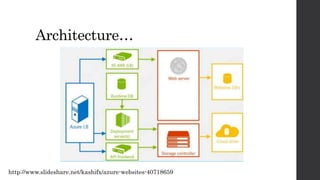
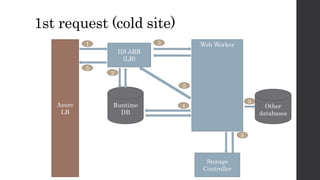
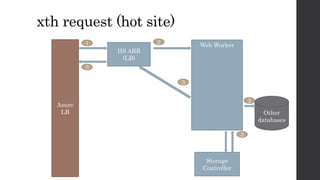
Architecture…
http://www.slideshare.net/kashifx/azure-websites-40718659
Azure
LB
Runtime
DB
Storage
Controller
IIS ARR
(LB)
Web Worker
Other
databases
1st request (cold site)
Storage
Controller
IIS ARR
(LB)
Web Worker
Other
databases
xth request (hot site)
Azure
LB
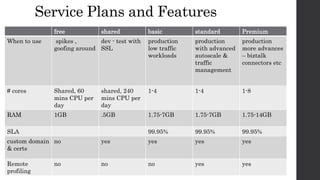
Service Plans and Features
free shared basic standard Premium
When to use spikes ,
goofing around
dev - test with
SSL
production
low traffic
workloads
production
with advanced
autoscale &
traffic
management
production
more advances
– biztalk
connectors etc
# cores Shared, 60
mins CPU per
day
shared, 240
mins CPU per
day
1-4 1-4 1-8
RAM 1GB .5GB 1.75-7GB 1.75-7GB 1.75-14GB
SLA 99.95% 99.95% 99.95%
custom domain
& certs
no yes yes yes yes
Remote
profiling
no no no yes yes
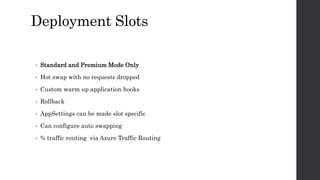
Deployment Slots
• Standard and Premium Mode Only
• Hot swap with no requests dropped
• Custom warm up application hooks
• Rollback
• AppSettings can be made slot specific
• Can configure auto swapping
• % traffic routing via Azure Traffic Routing
Demo
zero downtime with deployment
slots
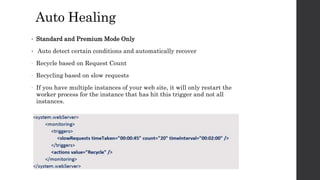
Auto Healing
• Standard and Premium Mode Only
• Auto detect certain conditions and automatically recover
- Recycle based on Request Count
- Recycling based on slow requests
- If you have multiple instances of your web site, it will only restart the
worker process for the instance that has hit this trigger and not all
instances.
Application Log Streaming
• 3 types of logs
 Detailed Error Logging
 Failed Request Tracing
 Web Server Logging (W3C extended log format)
• Can log to the file system (rolling files) , table storage or blob storage
• When you enable application logging in azure websites its on for 12 hours….
Demo
log tailing from the Azure CLI
Kudu Site
{yoursite}.scm.azurewebsites.net
• The Kudu site runs in the same sandbox as your real site. This has some
important implications
• It cannot do anything that the site itself wouldn't be able to do itself
• It shares the same quotas as the site. That is, the CPU/RAM/Disk used by
the Kudu service is counted toward the site's quota
• It relies on the security model of the Azure Web Site runtime
Kudu Console & API
both command line and file browser access to your sites
• Diagnostic dumps
• Process Explorer
• WebHooks
• File Explorer
• Site Extensions
• Runtime Environment & Variables
Demo
post deployment webhooks
Demo
remote profiling a .NET Web
App
Demo
remote debugging a .NET Web
App
Customising the deployment pipeline
The Azure CLI command “$ azure site deploymentscript ” generates
deployment scripts that are used by kudu, you can customise these files
• .deployment file
 [config]
command=<whatever command>
• Write in batch file, bash script, PHP, JavaScript, …
 Can do things like
 download extra tools
 pull in external repos / packages
 shell out to command line tools ( msbuild, nugget, curl etc)
Demo
running unit tests in Azure as
part of a deployment pipeline
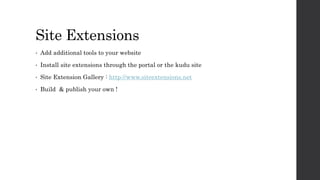
Site Extensions
• Add additional tools to your website
• Install site extensions through the portal or the kudu site
• Site Extension Gallery : http://www.siteextensions.net
• Build & publish your own !
Demo
Using site extensions -visual
studio online monaco code
editor
Best Practices
• Autoscale on & Stick sessions off
• Back up your database
• Load test before going live
• Configure automatic failover using Azure Global Traffic Manager
• Automate deployments using slots
• Test site recovery
• Use azure resource groups
• Set billing alerts
• Bundle & minify web resources
• Use Azure CDN to edge cache static files
• Implement the appropriate DB retry policies
Key Takeaways
• Azure Web Apps features- deploy slots, hot swapping, auto scaling, git
deployments , customisable pipeline, remote profiling, site extensions
• Your Web App is only loaded into IIS when its in use
• Kudu is the open source deployment engine behind web apps
• Advanced support for .NET apps via remote profiling and remote debugging
• No SLA availale for basic of free tier offering
Kudu voodoo   slideshare

Kudu voodoo slideshare

  • 1.
    Kudu Voodoo –Project KuduOverview & Advanced Azure Web Apps Features Azure Dublin Meetup | Feb 2016
  • 2.
    Aidan Casey |MicrosoftAzure MVP| @AIDANJCASEY
  • 3.
    Azure Web Apps •PaaS – fully managed web application hosting • Supports .NET, Java, PHP, Node.js, and Python • Autoscale and load balancing • High availability with auto patching • Continuous deployment with Git, TFS, GitHub, Dropbox, and Visual Studio Team Services • Many ways to work with the platform - Azure Portal, Azure CLI, Azure SDK’s
  • 4.
    Project Kudu • Opensource .NET Foundation https://github.com/projectkudu/kudu • Powers deployments for  WebApps / WebSites  WebJobs  Mobile Services • Can also run outside of Azure • Git deployments • Configurable build steps • Sandboxing • Hosting & Metering • Diagnostic tools & API’s
  • 5.
  • 6.
  • 7.
  • 8.
    Service Plans andFeatures free shared basic standard Premium When to use spikes , goofing around dev - test with SSL production low traffic workloads production with advanced autoscale & traffic management production more advances – biztalk connectors etc # cores Shared, 60 mins CPU per day shared, 240 mins CPU per day 1-4 1-4 1-8 RAM 1GB .5GB 1.75-7GB 1.75-7GB 1.75-14GB SLA 99.95% 99.95% 99.95% custom domain & certs no yes yes yes yes Remote profiling no no no yes yes
  • 9.
    Deployment Slots • Standardand Premium Mode Only • Hot swap with no requests dropped • Custom warm up application hooks • Rollback • AppSettings can be made slot specific • Can configure auto swapping • % traffic routing via Azure Traffic Routing
  • 10.
    Demo zero downtime withdeployment slots
  • 11.
    Auto Healing • Standardand Premium Mode Only • Auto detect certain conditions and automatically recover - Recycle based on Request Count - Recycling based on slow requests - If you have multiple instances of your web site, it will only restart the worker process for the instance that has hit this trigger and not all instances.
  • 12.
    Application Log Streaming •3 types of logs  Detailed Error Logging  Failed Request Tracing  Web Server Logging (W3C extended log format) • Can log to the file system (rolling files) , table storage or blob storage • When you enable application logging in azure websites its on for 12 hours….
  • 13.
    Demo log tailing fromthe Azure CLI
  • 14.
    Kudu Site {yoursite}.scm.azurewebsites.net • TheKudu site runs in the same sandbox as your real site. This has some important implications • It cannot do anything that the site itself wouldn't be able to do itself • It shares the same quotas as the site. That is, the CPU/RAM/Disk used by the Kudu service is counted toward the site's quota • It relies on the security model of the Azure Web Site runtime
  • 15.
    Kudu Console &API both command line and file browser access to your sites • Diagnostic dumps • Process Explorer • WebHooks • File Explorer • Site Extensions • Runtime Environment & Variables
  • 16.
  • 17.
  • 18.
  • 19.
    Customising the deploymentpipeline The Azure CLI command “$ azure site deploymentscript ” generates deployment scripts that are used by kudu, you can customise these files • .deployment file  [config] command=<whatever command> • Write in batch file, bash script, PHP, JavaScript, …  Can do things like  download extra tools  pull in external repos / packages  shell out to command line tools ( msbuild, nugget, curl etc)
  • 20.
    Demo running unit testsin Azure as part of a deployment pipeline
  • 21.
    Site Extensions • Addadditional tools to your website • Install site extensions through the portal or the kudu site • Site Extension Gallery : http://www.siteextensions.net • Build & publish your own !
  • 22.
    Demo Using site extensions-visual studio online monaco code editor
  • 23.
    Best Practices • Autoscaleon & Stick sessions off • Back up your database • Load test before going live • Configure automatic failover using Azure Global Traffic Manager • Automate deployments using slots • Test site recovery • Use azure resource groups • Set billing alerts • Bundle & minify web resources • Use Azure CDN to edge cache static files • Implement the appropriate DB retry policies
  • 24.
    Key Takeaways • AzureWeb Apps features- deploy slots, hot swapping, auto scaling, git deployments , customisable pipeline, remote profiling, site extensions • Your Web App is only loaded into IIS when its in use • Kudu is the open source deployment engine behind web apps • Advanced support for .NET apps via remote profiling and remote debugging • No SLA availale for basic of free tier offering