











Drupal DevOps on 
Azure Websites 
Cory Fowler 
Technical Evangelist 
Microsoft Azure
What is Azure?
Azure 
footprint 
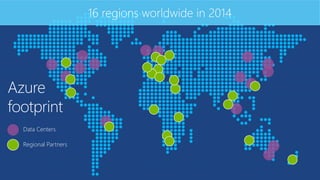
16 regions worldwide in 2014 
Data Centers 
Regional Partners
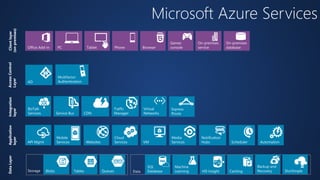
Microsoft Azure Services 
Client layer 
(on-premises) 
Tablet Phone 
Games 
PC console 
On-premises 
On-premises 
service 
Office Add-in Browser database 
AD 
Multifactor 
Authentication 
Access Control 
Layer 
Integration 
layer 
Service Bus CDN 
BizTalk 
Services 
Traffic 
Manager 
Virtual 
Networks 
Express 
Route 
Application 
layer 
API Mgmt Websites 
Cloud 
Services VM 
Mobile 
Services 
Media 
Services 
Notification 
Hubs Scheduler Automation 
Data Layer 
Storage Blobs Tables Queues Data 
Machine 
Learning HD Insight 
Backup and 
Recovery 
SQL 
Database Caching StorSimple
Memory Optimized Disk Optimized 
Portal 
Puppet Chef Docker 
Traffic Mgr 
.NET Support2014 
Powershell Automation 
Remote Apps 
Mobile Services 
Offline Sync 
Virtual Machines 
SQL Database 
.NET 4.5 
Active GEO replication 
Networking Visual Studio & .NET 
Resource Manager 
Point-to-site VPN Xamarin 
Dynamic Routing 
VSO GA 
Web Sites 
SMB File System 
IBIZA 
Remote Debug 
VM Management 
Powershell and DSC 
Capture / Deploy 
Autoscale 
Subnet Routing 
Static IP 
Storage 
Autoscale 
Web Jobs 
Backup 
Java Support 
ASP.NET MVC 5.1 
ASP.NET Web API 2.1 
AD support 
Node.JS project support 
Kindle Support 
Remote Debugging 
BD’s up to 500GB 
99.95% SLA 
Self Service Site Recovery 
HDInsight 
Hadoop 2.2 
YARN support 
.NET Foundation 
Azure Redis Cache 
API Management 
Site Recovery 
Cordova 
VSO Open 
Api’s 
Event Hub
Support for Open Source 
Languages 
CMS 
Devices 
Databases / 
Apps 
Operating 
systems 
Management
What is Azure 
Websites?
Fastest way to build for the cloud
Open and Flexible for Everyone
Continuous 
Deployment
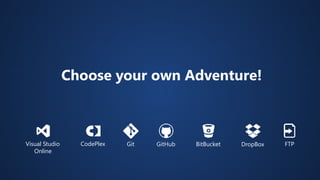
Choose your own Adventure! 
Visual Studio GitHub 
Online 
CodePlex Git BitBucket DropBox FTP
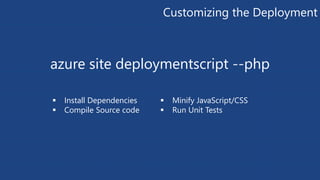
Customizing the Deployment 
azure site deploymentscript --php 
 Install Dependencies 
 Compile Source code 
 Minify JavaScript/CSS 
 Run Unit Tests
Extend the 
Environment
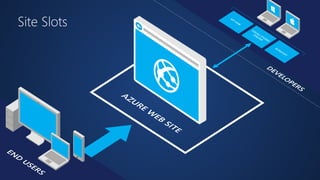
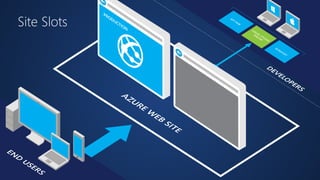
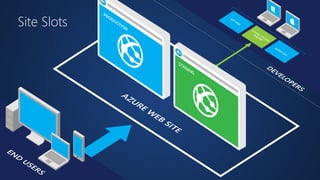
Site Slots
Site Slots
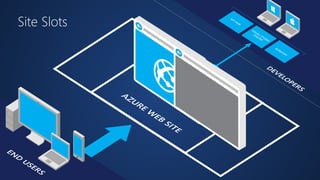
Site Slots
Site Slots
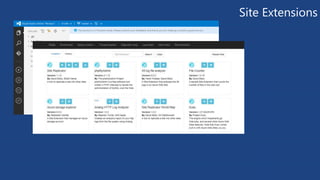
Site Extensions
Cron Jobs 
with Web Jobs
WebJobs
WebJobs
Azure Virtual Machines 
 Launch Windows Server and Linux in minutes 
 Scale from 1 to 1000s of VM Instances 
 Save money with per-minute billing 
 Open and extensible
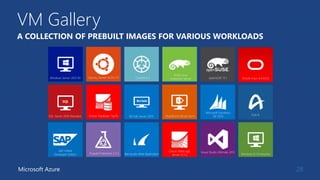
VM Gallery 
28 
A COLLECTION OF PREBUILT IMAGES FOR VARIOUS WORKLOADS 
Windows Server 2012 R2 Ubuntu Server 14.04 LTS CentOS 6.5 
Microsoft Azure 
SUSE Linux 
openSUSE 13.1 
Enterprise Server Oracle Linux 6.4.0.0.0 
Windows 8.1 Enterprise 
SQL Server 2014 Standard Oracle Database 11g R2 BizTalk Server 2013 SharePoint Server Farm 
Microsoft Dynamics 
GP 2013 
Zulu 8 
SAP HANA 
Developer Edition Puppet Enterprise 3.2.3 Barracuda Web Application 
Oracle WebLogic 
Server 12.1.2 
Visual Studio Ultimate 2013
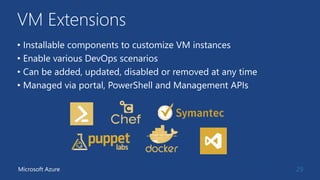
VM Extensions 
• Installable components to customize VM instances 
• Enable various DevOps scenarios 
• Can be added, updated, disabled or removed at any time 
• Managed via portal, PowerShell and Management APIs 
Microsoft Azure 29
30
31 
vagrant plugin install vagrant-azure
Thanks! 
We are done now.
Get started 
Visit aka.ms/drupal
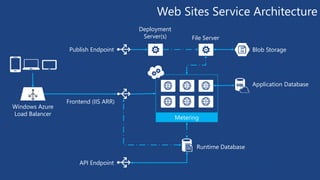
Web Sites Service Architecture 
Windows Azure 
Load Balancer 
Publish Endpoint Blob Storage 
Runtime Database 
Application Database 
Frontend (IIS ARR) 
API Endpoint 
File Server 
Metering 
Deployment 
Server(s)
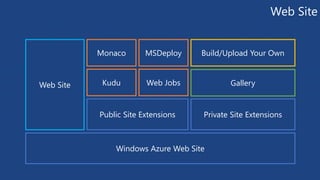
Web Site 
Monaco MSDeploy Build/Upload Your Own 
Web Site Kudu Web Jobs 
Public Site Extensions Private Site Extensions 
Windows Azure Web Site 
Gallery
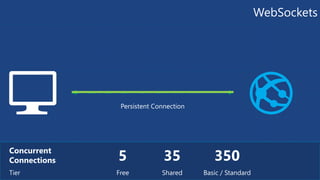
WebSockets 
5 Concurrent 
Connections 
Tier Free 
35 
Shared 
350 
Basic / Standard 
Persistent Connection
Drupal DevOps on Microsoft Azure Websites

Drupal DevOps on Microsoft Azure Websites

  • 1.
    Drupal DevOps on Azure Websites Cory Fowler Technical Evangelist Microsoft Azure
  • 3.
  • 4.
    Azure footprint 16regions worldwide in 2014 Data Centers Regional Partners
  • 5.
    Microsoft Azure Services Client layer (on-premises) Tablet Phone Games PC console On-premises On-premises service Office Add-in Browser database AD Multifactor Authentication Access Control Layer Integration layer Service Bus CDN BizTalk Services Traffic Manager Virtual Networks Express Route Application layer API Mgmt Websites Cloud Services VM Mobile Services Media Services Notification Hubs Scheduler Automation Data Layer Storage Blobs Tables Queues Data Machine Learning HD Insight Backup and Recovery SQL Database Caching StorSimple
  • 6.
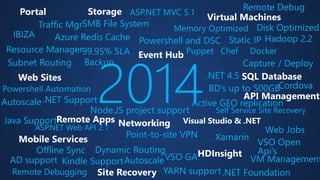
    Memory Optimized DiskOptimized Portal Puppet Chef Docker Traffic Mgr .NET Support2014 Powershell Automation Remote Apps Mobile Services Offline Sync Virtual Machines SQL Database .NET 4.5 Active GEO replication Networking Visual Studio & .NET Resource Manager Point-to-site VPN Xamarin Dynamic Routing VSO GA Web Sites SMB File System IBIZA Remote Debug VM Management Powershell and DSC Capture / Deploy Autoscale Subnet Routing Static IP Storage Autoscale Web Jobs Backup Java Support ASP.NET MVC 5.1 ASP.NET Web API 2.1 AD support Node.JS project support Kindle Support Remote Debugging BD’s up to 500GB 99.95% SLA Self Service Site Recovery HDInsight Hadoop 2.2 YARN support .NET Foundation Azure Redis Cache API Management Site Recovery Cordova VSO Open Api’s Event Hub
  • 7.
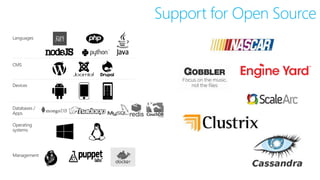
    Support for OpenSource Languages CMS Devices Databases / Apps Operating systems Management
  • 8.
    What is Azure Websites?
  • 9.
    Fastest way tobuild for the cloud
  • 10.
    Open and Flexiblefor Everyone
  • 12.
  • 13.
    Choose your ownAdventure! Visual Studio GitHub Online CodePlex Git BitBucket DropBox FTP
  • 14.
    Customizing the Deployment azure site deploymentscript --php  Install Dependencies  Compile Source code  Minify JavaScript/CSS  Run Unit Tests
  • 16.
  • 17.
  • 18.
  • 19.
  • 20.
  • 21.
  • 23.
  • 24.
  • 25.
  • 27.
    Azure Virtual Machines  Launch Windows Server and Linux in minutes  Scale from 1 to 1000s of VM Instances  Save money with per-minute billing  Open and extensible
  • 28.
    VM Gallery 28 A COLLECTION OF PREBUILT IMAGES FOR VARIOUS WORKLOADS Windows Server 2012 R2 Ubuntu Server 14.04 LTS CentOS 6.5 Microsoft Azure SUSE Linux openSUSE 13.1 Enterprise Server Oracle Linux 6.4.0.0.0 Windows 8.1 Enterprise SQL Server 2014 Standard Oracle Database 11g R2 BizTalk Server 2013 SharePoint Server Farm Microsoft Dynamics GP 2013 Zulu 8 SAP HANA Developer Edition Puppet Enterprise 3.2.3 Barracuda Web Application Oracle WebLogic Server 12.1.2 Visual Studio Ultimate 2013
  • 29.
    VM Extensions •Installable components to customize VM instances • Enable various DevOps scenarios • Can be added, updated, disabled or removed at any time • Managed via portal, PowerShell and Management APIs Microsoft Azure 29
  • 30.
  • 31.
    31 vagrant plugininstall vagrant-azure
  • 32.
    Thanks! We aredone now.
  • 33.
    Get started Visitaka.ms/drupal
  • 35.
    Web Sites ServiceArchitecture Windows Azure Load Balancer Publish Endpoint Blob Storage Runtime Database Application Database Frontend (IIS ARR) API Endpoint File Server Metering Deployment Server(s)
  • 36.
    Web Site MonacoMSDeploy Build/Upload Your Own Web Site Kudu Web Jobs Public Site Extensions Private Site Extensions Windows Azure Web Site Gallery
  • 37.
    WebSockets 5 Concurrent Connections Tier Free 35 Shared 350 Basic / Standard Persistent Connection

Editor's Notes

  • #14 Slide Objectives: Objective #1 Transition: Transition statement(s) to setup the slide Speaking Points: Speaking Point #1 Speaking Point #2 Notes: Any notes go here
  • #22 Available for Administrative Purposes, Authentication is Required!
  • #23 Install phpMyAdmin site extension to show off site extensions.
  • #28 Slide Objectives: High-level selling points of virtual machines. Speaker Notes: Both Linux and Windows are supported. It’s important to reiterate on this as many developers are still not aware of this. Mention scaling at enterprise level using DSC, Puppet or Chef. Emphasize on the openness – we are not forcing your to lock on Microsoft technologies. Instead, Azure is more open than ever. You can leverage your existing skills, tools and services, and Azure is providing more and more first-class supports for them.
  • #29 Slide Objective: Explain a wide variety of images that you can choose from. Speaker Notes: First of all, you can choose from different Windows Servers and a variety of Linux implementations. [Click] As well as pre-built images for different flavors of SQL Database and Oracle databases. [Click] You can also choose from a number of first-party and certified third-party images for various application servers and infrastructural components. [Click] And last but not least, if you are a MSDN subscriber, you also have access to Visual Studio images and client Windows systems such as Windows 7 and Windows 8.1 for your DevTest purposes.
  • #30 Slide Objective: Introduce VM extensions. Speaker Notes: No matter how big the image gallery is, your projects may have specific needs that can’t be satisfied by standard images. Some components such as anti-virus, configuration management agents are required on most machines for compliance and management purposes. This allows use to innovate faster to meet with your project needs. And you have flexibility to pick and combine extensions for your goals. Point out some of existing extensions: Custom Script Extension, which allows you to download and execute PowerShell scripts. Chef Extension and Puppet Extension for automated management at scale. Symantec Endpoint Protection etc. for protection. Docker (Linux only). Visual Studio Remote Debugger.