k8s
Diego Pacheco
Companies using k8s
Concepts
❏ Containers
❏ Pods, ReplicaSets, Volumes, PersistentVolumes...
❏ Deployments, Loadbalancer, Labels, Selectors...
❏ Controllers, HPA, ConfigMaps, Secrets...
❏ Master, Worker nodes, Etcd
❏ GitOps
Containers
❏ Isolation (Cpu, memry)
❏ Linux Kernel Features
❏ Packing / Specification
❏ Images, Image Repositories
❏ RuntimeClasses: Alpha == CRI
K8s files: Specs
❏ Declarative
❏ Spected State
❏ Version Control
❏ Rollout and Rollback
❏ All in one Vs one concept per yaml file
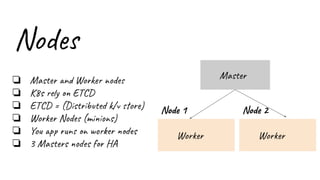
Nodes
❏ Master and Worker nodes
❏ K8s rely on ETCD
❏ ETCD = (Distributed k/v store)
❏ Worker Nodes (minions)
❏ You app runs on worker nodes
❏ 3 Masters nodes for HA
Worker
Node 1
Worker
Node 2
Master
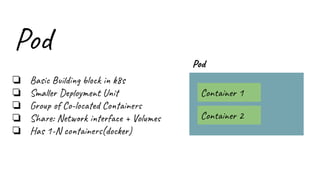
Pod
❏ Basic Building block in k8s
❏ Smaller Deployment Unit
❏ Group of Co-located Containers
❏ Share: Network interface + Volumes
❏ Has 1-N containers(docker)
Pod
Container 1
Container 2
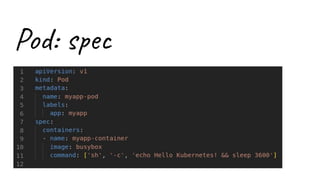
Pod: spec
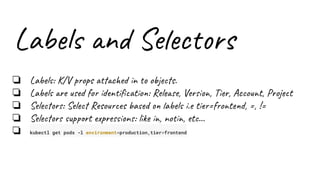
Labels and Selectors
❏ Labels: K/V props attached in to objects.
❏ Labels are used for identification: Release, Version, Tier, Account, Project
❏ Selectors: Select Resources based on labels i.e tier=frontend, =, !=
❏ Selectors support expressions: like in, notin, etc…
❏ kubectl get pods -l environment=production,tier=frontend
ConfigMaps
❏ K/V pairs
❏ Decouple Images(Containers) from configurations
❏ For non-sensitive information - Application specific
❏ Can be exposed via: Environment vars or Volumes.
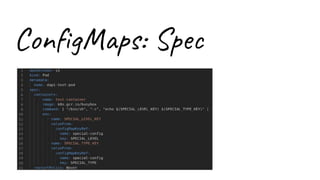
ConfigMaps: Spec
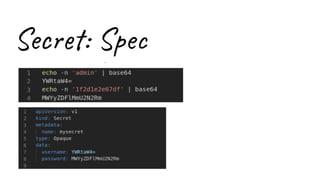
Secrets
❏ K/V pairs
❏ Secret: Hold sensitive information: Tokens, passwords, ssh keys.
❏ Secrets are safer than putting info into Pods.
❏ Secrets can be exposed via Environment vars or Volumes.
Secret: Spec
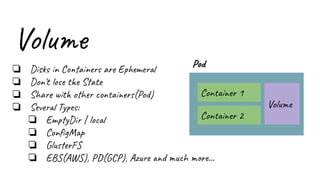
Volume
❏ Disks in Containers are Ephemeral
❏ Don't lose the State
❏ Share with other containers(Pod)
❏ Several Types:
❏ EmptyDir | local
❏ ConfigMap
❏ GlusterFS
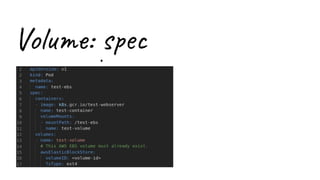
❏ EBS(AWS), PD(GCP), Azure and much more...
Pod
Container 1
Container 2
Volume
Volume: spec
Controller (RCs)
❏ Old Pattern - now ReplicaSets are Recommended.
❏ Similar to a Supervisor process
❏ Use Cases: Rescheduling, Scaling, Rolling Updates
❏ Liveness and Readiness probes
DaemonSet and Job
❏ Similar to ReplicationController (RCS)
❏ DaemonSet: Nodes are Copy or Deleted from Pods.
❏ DaemonSet: Used for: Gluster, Ceph,FluentD, logstash, mon agents
❏ Job: Make sure pods successfully terminate.
❏ Job: Used for Batch Processing: One time tasks, Spark / Flink
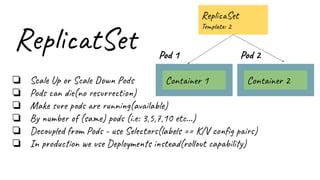
ReplicatSet
❏ Scale Up or Scale Down Pods
❏ Pods can die(no resurrection)
❏ Make sure pods are running(available)
❏ By number of (same) pods (i.e: 3,5,7,10 etc…)
❏ Decoupled from Pods - use Selectors(labels == K/V config pairs)
❏ In production we use Deployments instead(rollout capability)
Pod 1
Container 1
Pod 2
Container 2
ReplicaSet
Template: 2
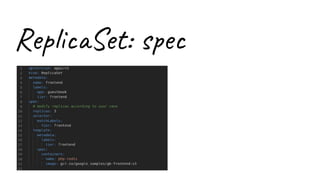
ReplicaSet: spec
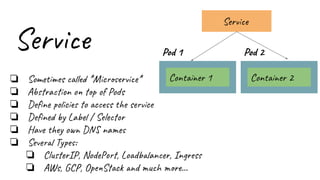
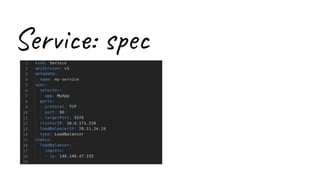
Service
❏ Sometimes called *Microservice*
❏ Abstraction on top of Pods
❏ Define policies to access the service
❏ Defined by Label / Selector
❏ Have they own DNS names
❏ Several Types:
❏ ClusterIP, NodePort, Loadbalancer, Ingress
❏ AWs, GCP, OpenStack and much more...
Pod 1
Container 1
Pod 2
Container 2
Service
Types of Service
❏ ClusterIp:
❏ Good for: Debugging
❏ Good for: Dashboarding
❏ No External Access (need to use: kubectl proxy --port=8080)
http://localhost:8080/api/v1/proxy/namespaces/<NAMESPACE>/services/<SERVICE-NAME>
:<PORT-NAME>/
Types of Service
❏ NodePort:
❏ Open a Port on a NODE VM
❏ Only 1 Service per Port (ports available: 30000–32767)
❏ If Node/VM Ip change you need to deal with it
❏ Good for: Temporary access
❏ Not recommended for production
Types of Service
❏ Loadbalancer:
❏ Classical LoadBalancer as name says :-)
❏ Several Protocols: HTTP, TCP, UDP, Websockets, gRPC
❏ Great for Production
❏ BUT It can be expensive == 1 LB per Service
Types of Service
❏ Ingress:
❏ Multiple service under same IP
❏ Smart Routing
❏ It can get complex easily
❏ Several Options: Nginx, Istio, Google Load Balancer, and more...
Service: spec
Deployment
❏ Production way to do things :-)
❏ Declarative Updates for Pods and ReplicaSets
❏ Scaling for Cpu Utilization
❏ Support for Selectors
❏ Pause / Resuming
❏ Strategies:
❏ Rolling updates
❏ Destroy/Create
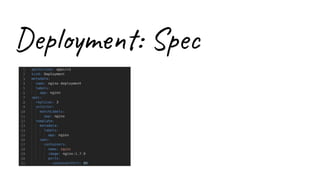
Deployment: Spec
HPA
❏ Beta
❏ Horizontal Pod Autoscaler (HPA)
❏ Works with the Metrics Server component
❏ Scale RCs by CPU
❏ Scale by App custom metrics. I.e: queue_depth or Inflight-Connections.
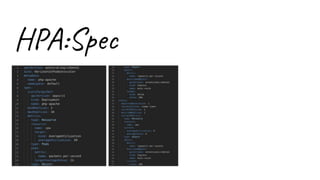
HPA:Spec
CA
❏ Beta
❏ Cluster Autoscaler
❏ More | Less Worker Nodes onDemand
❏ 2 Conditions to trigger:
❏ Fail to schulle pods due lack of resource
❏ Pods that are not being used can be replaced
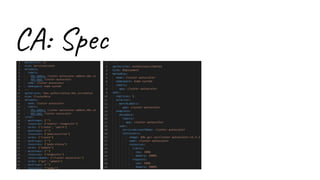
CA: Spec
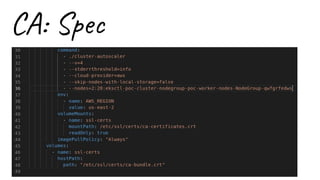
CA: Spec
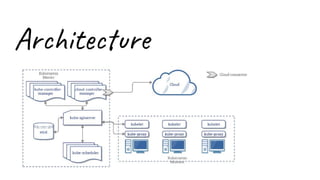
Architecture
k8s
Diego Pacheco

Kubernetes

  • 1.
  • 3.
  • 4.
    Concepts ❏ Containers ❏ Pods,ReplicaSets, Volumes, PersistentVolumes... ❏ Deployments, Loadbalancer, Labels, Selectors... ❏ Controllers, HPA, ConfigMaps, Secrets... ❏ Master, Worker nodes, Etcd ❏ GitOps
  • 5.
    Containers ❏ Isolation (Cpu,memry) ❏ Linux Kernel Features ❏ Packing / Specification ❏ Images, Image Repositories ❏ RuntimeClasses: Alpha == CRI
  • 6.
    K8s files: Specs ❏Declarative ❏ Spected State ❏ Version Control ❏ Rollout and Rollback ❏ All in one Vs one concept per yaml file
  • 7.
    Nodes ❏ Master andWorker nodes ❏ K8s rely on ETCD ❏ ETCD = (Distributed k/v store) ❏ Worker Nodes (minions) ❏ You app runs on worker nodes ❏ 3 Masters nodes for HA Worker Node 1 Worker Node 2 Master
  • 8.
    Pod ❏ Basic Buildingblock in k8s ❏ Smaller Deployment Unit ❏ Group of Co-located Containers ❏ Share: Network interface + Volumes ❏ Has 1-N containers(docker) Pod Container 1 Container 2
  • 9.
  • 10.
    Labels and Selectors ❏Labels: K/V props attached in to objects. ❏ Labels are used for identification: Release, Version, Tier, Account, Project ❏ Selectors: Select Resources based on labels i.e tier=frontend, =, != ❏ Selectors support expressions: like in, notin, etc… ❏ kubectl get pods -l environment=production,tier=frontend
  • 11.
    ConfigMaps ❏ K/V pairs ❏Decouple Images(Containers) from configurations ❏ For non-sensitive information - Application specific ❏ Can be exposed via: Environment vars or Volumes.
  • 12.
  • 13.
    Secrets ❏ K/V pairs ❏Secret: Hold sensitive information: Tokens, passwords, ssh keys. ❏ Secrets are safer than putting info into Pods. ❏ Secrets can be exposed via Environment vars or Volumes.
  • 14.
  • 15.
    Volume ❏ Disks inContainers are Ephemeral ❏ Don't lose the State ❏ Share with other containers(Pod) ❏ Several Types: ❏ EmptyDir | local ❏ ConfigMap ❏ GlusterFS ❏ EBS(AWS), PD(GCP), Azure and much more... Pod Container 1 Container 2 Volume
  • 16.
  • 17.
    Controller (RCs) ❏ OldPattern - now ReplicaSets are Recommended. ❏ Similar to a Supervisor process ❏ Use Cases: Rescheduling, Scaling, Rolling Updates ❏ Liveness and Readiness probes
  • 18.
    DaemonSet and Job ❏Similar to ReplicationController (RCS) ❏ DaemonSet: Nodes are Copy or Deleted from Pods. ❏ DaemonSet: Used for: Gluster, Ceph,FluentD, logstash, mon agents ❏ Job: Make sure pods successfully terminate. ❏ Job: Used for Batch Processing: One time tasks, Spark / Flink
  • 19.
    ReplicatSet ❏ Scale Upor Scale Down Pods ❏ Pods can die(no resurrection) ❏ Make sure pods are running(available) ❏ By number of (same) pods (i.e: 3,5,7,10 etc…) ❏ Decoupled from Pods - use Selectors(labels == K/V config pairs) ❏ In production we use Deployments instead(rollout capability) Pod 1 Container 1 Pod 2 Container 2 ReplicaSet Template: 2
  • 20.
  • 21.
    Service ❏ Sometimes called*Microservice* ❏ Abstraction on top of Pods ❏ Define policies to access the service ❏ Defined by Label / Selector ❏ Have they own DNS names ❏ Several Types: ❏ ClusterIP, NodePort, Loadbalancer, Ingress ❏ AWs, GCP, OpenStack and much more... Pod 1 Container 1 Pod 2 Container 2 Service
  • 22.
    Types of Service ❏ClusterIp: ❏ Good for: Debugging ❏ Good for: Dashboarding ❏ No External Access (need to use: kubectl proxy --port=8080) http://localhost:8080/api/v1/proxy/namespaces/<NAMESPACE>/services/<SERVICE-NAME> :<PORT-NAME>/
  • 23.
    Types of Service ❏NodePort: ❏ Open a Port on a NODE VM ❏ Only 1 Service per Port (ports available: 30000–32767) ❏ If Node/VM Ip change you need to deal with it ❏ Good for: Temporary access ❏ Not recommended for production
  • 24.
    Types of Service ❏Loadbalancer: ❏ Classical LoadBalancer as name says :-) ❏ Several Protocols: HTTP, TCP, UDP, Websockets, gRPC ❏ Great for Production ❏ BUT It can be expensive == 1 LB per Service
  • 25.
    Types of Service ❏Ingress: ❏ Multiple service under same IP ❏ Smart Routing ❏ It can get complex easily ❏ Several Options: Nginx, Istio, Google Load Balancer, and more...
  • 26.
  • 27.
    Deployment ❏ Production wayto do things :-) ❏ Declarative Updates for Pods and ReplicaSets ❏ Scaling for Cpu Utilization ❏ Support for Selectors ❏ Pause / Resuming ❏ Strategies: ❏ Rolling updates ❏ Destroy/Create
  • 28.
  • 29.
    HPA ❏ Beta ❏ HorizontalPod Autoscaler (HPA) ❏ Works with the Metrics Server component ❏ Scale RCs by CPU ❏ Scale by App custom metrics. I.e: queue_depth or Inflight-Connections.
  • 30.
  • 31.
    CA ❏ Beta ❏ ClusterAutoscaler ❏ More | Less Worker Nodes onDemand ❏ 2 Conditions to trigger: ❏ Fail to schulle pods due lack of resource ❏ Pods that are not being used can be replaced
  • 32.
  • 33.
  • 34.
  • 35.