


Konsep Pembangunan & Pengurusan Tapak & Laman WEB Oleh Ahmad Faizar Jaafar  Unit Web & Digital Komponen  Jabatan Pengurusan Sistem & Teknologi Maklumat  (JPSTM) PTAR, UiTM  http://faizar.atspace.com/courses.html http://faizaronestop.blogspot.com http://faizar.multiply.com
Konsep Pembangunan serta Pengurusan Tapak & Laman WEB   Tahap   : Asas  Panjang Kursus  : 2 hari Objektif Kursus Untuk mengetahui konsep-konsep asas pembanguan sesebuah tapak  &  laman web Menyediakan satu tapak & laman web dengan menggunakan aplikasi web page editor  Menghantar web page yang telah siap ke laman web percuma
 
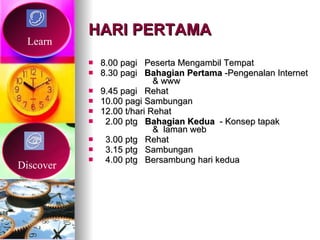
HARI PERTAMA 8.00 pagi  Peserta Mengambil Tempat 8.30 pagi  Bahagian Pertama  -Pengenalan Internet  & www 9.45 pagi  Rehat  10.00 pagi Sambungan  12.00 t/hari Rehat 2.00 ptg  Bahagian Kedua   - Konsep tapak  &  laman web 3.00 ptg  Rehat 3.15 ptg  Sambungan  4.00 ptg  Bersambung hari kedua Learn Discover
HARI KEDUA 8.00 pagi Peserta Mengambil Tempat 8.30 pagi  Bahagian Ketiga  -  Membangunkan  Laman Web 9.45 pagi Rehat  10.00 pagi Sambungan 12.00 t/hari Rehat 2.00 ptg  Bahagian Keempat  - Daftar laman web  percuma 3.00 ptg  Rehat 3.15 ptg  Sambungan 4.00 ptg  Tamat Experience
Overview Of Internet Classful IP Addressing Subnetting a Network   Planning IP Addressing   Assigning TCP/IP Addresses
Classful IP Addressing IP Addresses   IP Address Classes
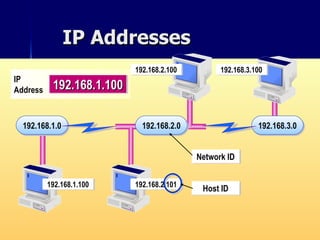
IP Addresses 192.168.1.0 192.168.3.0 192.168.1.100 192.168.2.101 192.168.2.100 192.168.3.100 192.168.2.0 Host  ID Network  ID 192.168.1.100 IP Address
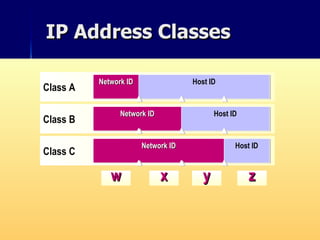
IP Address Classes w x y z Class A Network ID Host ID Class B Network ID Host   ID Class C Network ID Host ID
Subnetting a Network Subnets Subnet Masks   Determining Local and Remote Hosts
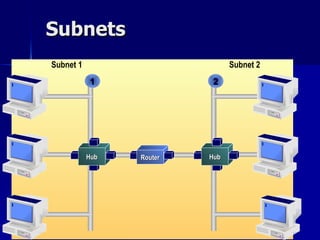
Subnets Router Subnet 1 Subnet 2 1 2 Hub Hub
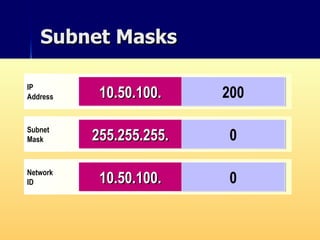
Subnet Masks IP Address Host ID Network ID 192.168. 2.200 Subnet Mask 255.255. 0.0 192.168. IP Address 10. 50.100.200 Subnet Mask 255. 0.0.0 Network ID 10. 0.0.0 IP Address 10.50. 100.200 Subnet Mask 255.255. 0.0 Network ID 10.50. 0.0 IP Address 10.50.100. 200 Subnet Mask 255.255.255. 0 Network ID 10.50.100. 0
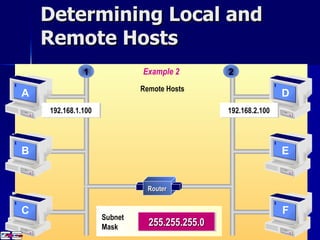
Determining Local and Remote Hosts Example 1 1 192.168.1.100 Local Hosts 192.168.2.100 2 Router 255.255.0.0 Subnet  Mask A B C D E F Example 2 1 192.168.1.100 2 Remote Hosts 192.168.2.100 Router 255.255.255.0 Subnet  Mask A B C D E F
Lab A: Determining Class Addresses and Subnet Masks
Planning IP Addressing Addressing Guidelines   Assigning Network IDs   Assigning Host IDs
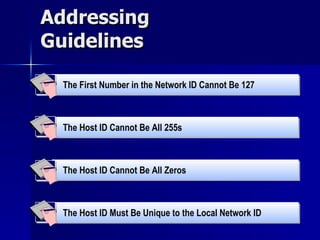
Addressing Guidelines The Host ID Cannot Be All Zeros  The Host ID Cannot Be All 255s   The First Number in the Network ID Cannot Be 127   The Host ID Must Be Unique to the Local Network ID
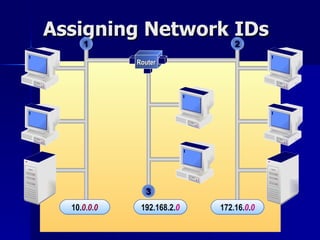
Assigning Network IDs 1 2 3 10. 0 . 0 . 0 192.168.2 . 0 172.16 . 0 . 0 Router
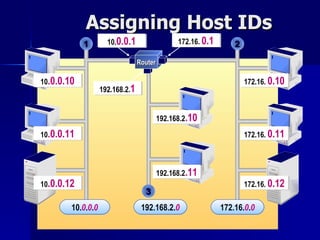
Assigning Host IDs 1 2 172.16.   0.12 172.16.   0.11 172.16.   0.10 10 .0.0.12 10 .0.0.11 10 .0.0.10 192.168.2 .11 192.168.2 .10 192.168.2. 1 10. 0.0.1 172.16.   0.1 3 10 . 0 . 0 . 0 192.168.2 . 0 172.16 . 0 . 0 Router
Lab B:  Identifying Valid IP Addresses
Assigning TCP/IP Addresses Static IP Addressing   Automatic IP Addressing Viewing TCP/IP Configuration Viewing TCP/IP Configuration  Using Ipconfig
 
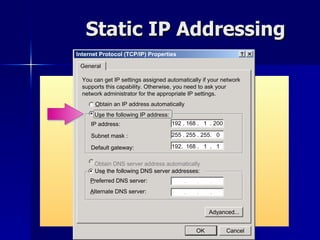
Static IP Addressing Internet Protocol (TCP/IP) Properties General You can get IP settings assigned automatically if your network supports this capability. Otherwise, you need to ask your network administrator for the appropriate IP settings. O btain an IP address automatically U s e the following IP address : IP address: Us e  the following DNS server addresses: P referred DNS server: Obtain DNS server address automatically Ad v anced... A lternate DNS server: 192 . 168 .  1  . 200 192.  168 .  1  .  1 255 . 255 . 255.  0 Subnet mask : Default gateway: OK Cancel
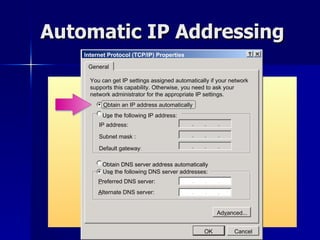
Automatic IP Addressing Internet Protocol (TCP/IP) Properties General You can get IP settings assigned automatically if your network supports this capability. Otherwise, you need to ask your network administrator for the appropriate IP settings . O btain an IP address automatically U s e the following IP address: IP address: Us e  the following DNS server addresses: P referred DNS server: Obtain DNS server address automatically Ad v anced... A lternate DNS server: Subnet mask : Default gateway : OK Cancel
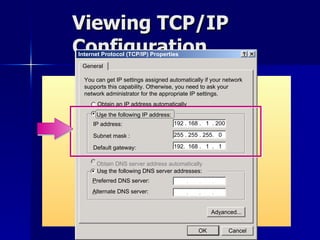
Viewing TCP/IP Configuration Internet Protocol (TCP/IP) Properties General You can get IP settings assigned automatically if your network supports this capability. Otherwise, you need to ask your network administrator for the appropriate IP settings. O btain an IP address automatically U s e the following IP address: IP address: Us e  the following DNS server addresses: P referred DNS server: Obtain DNS server address automatically Ad v anced... A lternate DNS server: 192 . 168 .  1  . 200 192.  168 .  1  .  1 255 . 255 . 255.  0 Subnet mask : Default gateway: OK Cancel
Viewing TCP/IP Configuration Using c:\>ipconfig Command Prompt Microsoft Windows 2000 [version 5.00.2195] (C) Copyright 1985-1999 Microsoft Corp. C:\>ipconfig Windows 2000 IP Configuration Ethernet adapter Local Area Connection: Connection-specific DNS Suffix  . : IP Address. . . . . . . . . . . . : 192.168.1.200 Subnet Mask . . . . . . . . . . . : 255.255.255.0 Default Gateway . . . . . . . . . : 192.168.1.1 C:\>_
Lab C:  Examining the Configuration of TCP/IP
Identifying Internet Concepts The Internet   Internet Services Intranets   Domain Naming
Overview Identifying Internet Concepts   Using Client Technologies Connecting to the Internet Identifying Web Server Concepts
History of the Web History of the Web •  Tim Berners- Lee “invented” the Web in 1990 writing the first Web server and browser. •  Marc Andreesen exposed the Web to the masses with Mosaic the first GUI Web browser in 1993. •  The rest is history... History Internet & WWW
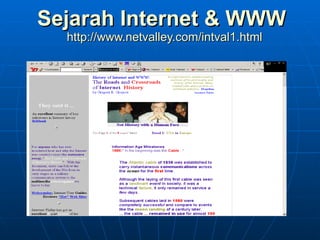
Sejarah  Internet & WWW   http://www.netvalley.com/intval1.html
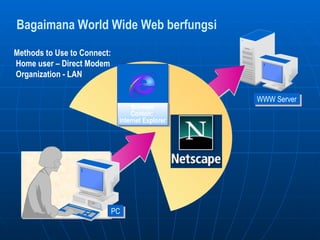
Bagaimana World Wide Web berfungsi WWW Server Methods to Use to Connect:  Home user – Direct Modem  Organization - LAN PC Browser Contoh:  Internet Explorer
Lab B: Identifying Web Concepts
Review Identifying Internet Concepts   Using Client Technologies Connecting to the Internet Identifying Web Server Concepts
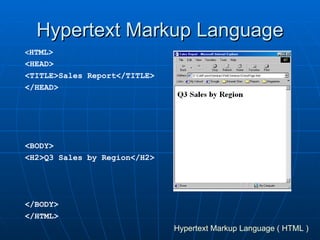
Hypertext Markup Language < HTML> <HEAD> <TITLE>Sales Report</TITLE> </HEAD> <BODY> <H2>Q3 Sales by Region</H2> </BODY> </HTML> Hypertext Markup Language ( HTML )
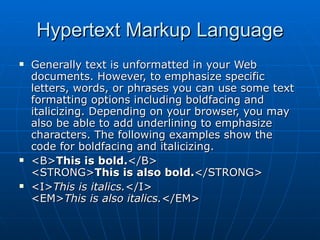
Hypertext Markup Language Generally text is unformatted in your Web documents. However, to emphasize specific letters, words, or phrases you can use some text formatting options including boldfacing and italicizing. Depending on your browser, you may also be able to add underlining to emphasize characters. The following examples show the code for boldfacing and italicizing.  <B> This is bold. </B> <STRONG> This is also bold. </STRONG> <I> This is italics. </I> <EM> This is also italics. </EM>
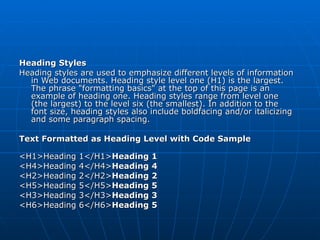
Heading Styles Heading styles are used to emphasize different levels of information in Web documents. Heading style level one (H1) is the largest. The phrase &quot;formatting basics&quot; at the top of this page is an example of heading one. Heading styles range from level one (the largest) to the level six (the smallest). In addition to the font size, heading styles also include boldfacing and/or italicizing and some paragraph spacing.  Text Formatted as Heading Level with Code Sample  <H1>Heading 1</H1> Heading 1 <H4>Heading 4</H4> Heading 4 <H2>Heading 2</H2> Heading 2 <H5>Heading 5</H5> Heading 5 <H3>Heading 3</H3> Heading 3 <H6>Heading 6</H6> Heading 5
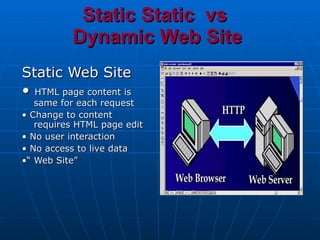
Static Static  vs  Dynamic Web Site Static Web Site •  HTML page content is same for each request •  Change to content requires HTML page edit •  No user interaction •  No access to live data •“  Web Site”
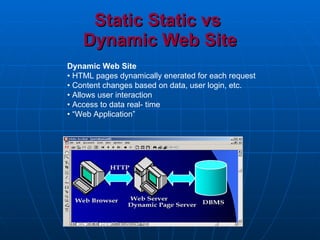
Static Static vs  Dynamic Web Site Dynamic Web Site •  HTML pages dynamically enerated for each request •  Content changes based on data, user login, etc. •  Allows user interaction •  Access to data real- time • “ Web Application”
Dynamic Web Sites •  Web server •  responds to HTTP requests and retrieves resources •  Expand Web server capabilities by providing a gateway between it and external programs •  Common Gateway Interface (CGI) •  uses standard I/ O •  new process for each request •  slow and inefficient
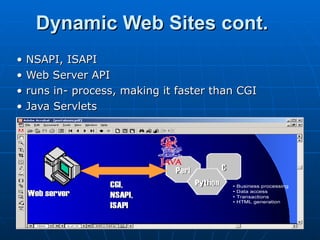
Dynamic Web Sites cont. •  NSAPI, ISAPI •  Web Server API •  runs in- process, making it faster than CGI •  Java Servlets
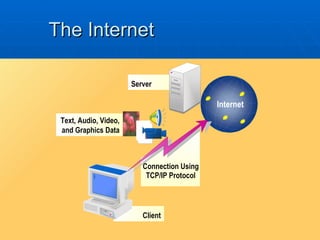
The Internet Client Connection Using TCP/IP Protocol Server Text, Audio, Video, and Graphics Data Internet
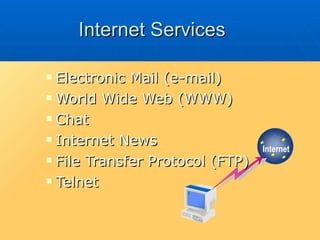
Internet Services Electronic Mail  (e-mail) World Wide Web (WWW) Chat   Internet News File Transfer Protocol (FTP) Telnet Internet
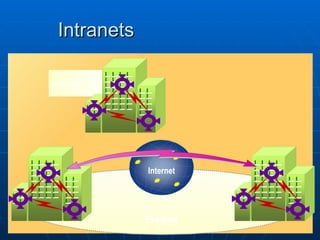
Intranets Intranet Extranet Internet
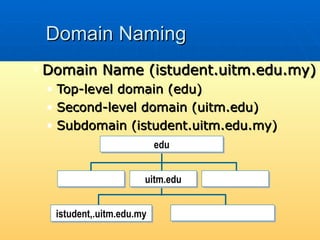
Domain Naming Domain Name (istudent.uitm.edu.my) Top-level domain (edu) Second-level domain (uitm.edu) Subdomain (istudent.uitm.edu.my) edu istudent,.uitm.edu.my uitm.edu
Using Client Technologies Newsreaders Web Browsers Internet Protocols Uniform Resource Locator (URL)
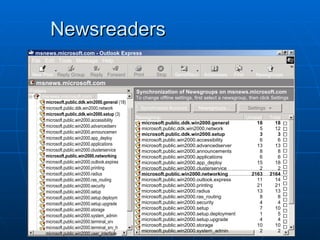
Newsreaders msnews.microsoft.com - Outlook Express File  Edit  Tools  Message  Help New Post Reply Group Reply Forward Print Stop Send/Recv Addresses Find Newsgroups msnews.microsoft.com Folders msnews.microsoft.com Synchronization of Newsgroups on msnews.microsoft.com To change offline settings, first select a newsgroup, then click Settings Synchronize Account Newsgroups... Settings Newsgroup Unread Total microsoft.public.ddk.win2000.general  (18) microsoft.public.ddk.win2000.network microsoft.public.ddk.win2000.setup  (3) microsoft.public.win2000.accessibility microsoft.public.win2000.advancedserv microsoft.public.win2000.announcemen microsoft.public.win2000.app_deploy microsoft.public.win2000.applications microsoft.public.win2000.clusterservice microsoft.public.win2000.networking microsoft.public.win2000.outlook.expires microsoft.public.win2000.printing microsoft.public.win2000.radius microsoft.public.win2000.ras_routing microsoft.public.win2000.security microsoft.public.win2000.setup microsoft.public.win2000.setup.deploym microsoft.public.win2000.setup.upgrade microsoft.public.win2000.storage microsoft.public.win2000.system_admin microsoft.public.win2000.terminal_srv microsoft.public.win2000.terminal_srv_h microsoft.public.win2000.user_interface microsoft.public.ddk.win2000.general microsoft.public.ddk.win2000.network microsoft.public.ddk.win2000.setup  microsoft.public.win2000.accessibility microsoft.public.win2000.advancedserver microsoft.public.win2000.announcements microsoft.public.win2000.applications  microsoft.public.win2000.app_deploy microsoft.public.win2000.clusterservice microsoft.public.win2000.networking microsoft.public.win2000.outlook.express microsoft.public.win2000.printing microsoft.public.win2000.radius microsoft.public.win2000.ras_routing microsoft.public.win2000.security microsoft.public.win2000.setup microsoft.public.win2000.setup.deployment microsoft.public.win2000.setup.upgrade microsoft.public.win2000.storage microsoft.public.win2000.system_admin 18 5 3 6 13 8 6 15 2 2163 11 21 13 8 4 7 1 4 10 2 18 12 3 6 13 8 6 18 2 2164 14 21 13 8 4 10 5 4 10 2
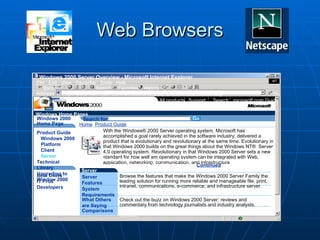
Web Browsers Windows 2000 Server Overview - Microsoft Internet Explorer F ile  E dit  V iew  F avorites  T ools  Help Back Search Favorites History Address http://www.microsoft.com/windows2000/server/overview/default.asp Go All products Support Search microsoft.com Guide Windows Home Pages Windows 2000 Home Page Product Guide Windows 2000  Platform Client Server Technical Library Upgrading to Window 2000 Beta Users IT Pros Developers Search for: Go Home Product Guide Windows 2000 Server Family Server Server Features System Requirements What Others are Saying Comparisons With the Windows® 2000 Server operating system, Microsoft has accomplished a goal rarely achieved in the software industry: delivered a product that is evolutionary and revolutionary at the same time. Evolutionary in that Windows 2000 builds on the great things about the Windows NT®  Server 4.0 operating system. Revolutionary in that Windows 2000 Server sets a new standard for how well am operating system can be integrated with Web, application, networking, communication, and infrastructure services. For the first time, you have an easy choice to make about the next server operating system you deploy - whatever your needs.  Continued Browse the features that make the Windows 2000 Server Family the leading solution for running more reliable and manageable file, print, intranet, communications, e-commerce, and infrastructure server. Find out what it takes to run Windows 2000 Server and Windows 2000 Advanced Server. Check out the buzz on Windows 2000 Server: reviews and commentary from technology journalists and industry analysts. See how Windows 2000 Server compares with other operating systems. Browser Contoh:  Internet Explorer
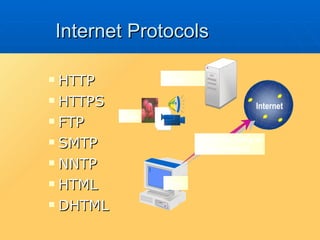
Internet Protocols HTTP HTTPS FTP SMTP NNTP HTML DHTML Server Data Client Connection Using an Internet Protocol Internet
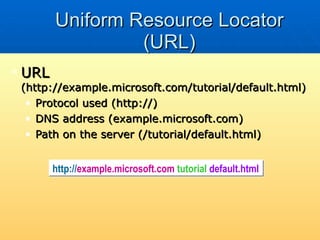
Uniform Resource Locator (URL) URL  (http://example.microsoft.com/tutorial/default.html) Protocol used (http://) DNS address (example.microsoft.com) Path on the server (/tutorial/default.html) http:// example.microsoft.com / tutorial / default.html
Lab A: Accessing an FTP Site by Using Internet Explorer
Connecting to the Internet Network Address Translators (NATs) Proxy Servers Firewalls Microsoft Proxy Server
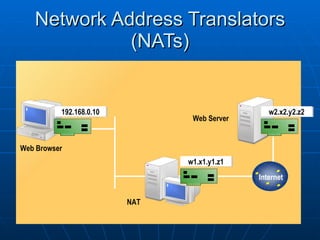
Network Address Translators (NATs) Internet 192.168.0.10 w1.x1.y1.z1 w2.x2.y2.z2 Web Browser NAT Web Server
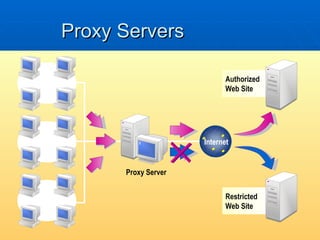
Proxy Servers Proxy Server Authorized Web Site Restricted  Web Site Internet LAN LAN LAN
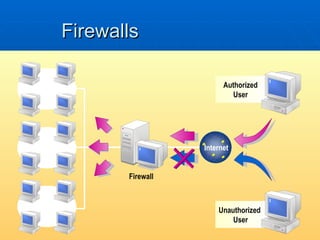
Firewalls Firewall Authorized User Unauthorized  User LAN LAN LAN Internet
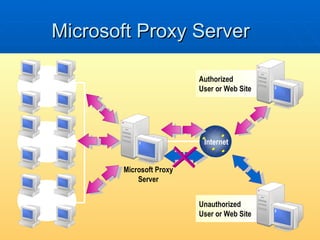
Microsoft Proxy Server Microsoft Proxy Server Authorized User or Web Site Unauthorized  User or Web Site LAN LAN LAN Internet
Defining a Web Server   Microsoft Internet Information Services (IIS)  Identifying Web Server Concepts
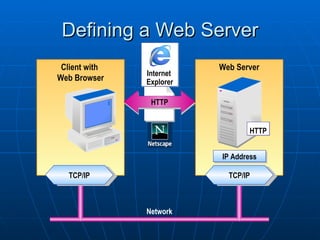
Defining a Web Server Web Server Client with  Web Browser Network TCP/IP TCP/IP HTTP IP Address HTTP Internet  Explorer
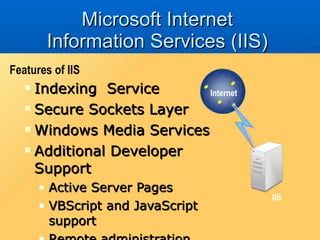
Microsoft Internet Information Services (IIS) Indexing  Service Secure Sockets Layer Windows Media Services Additional Developer Support Active Server Pages VBScript and JavaScript support Remote administration Features of IIS IIS Internet
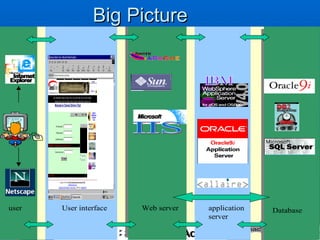
Big Picture
Keperluan host laman web Perkakasan / Hardware  Ada beberapa jenama Perisian / Software Ada beberapa jenama http://www.serverwatch.com/stypes/ http://search.about.com/fullsearch.htm?terms=Internet%20%20HTTP%20%20web%20%20server
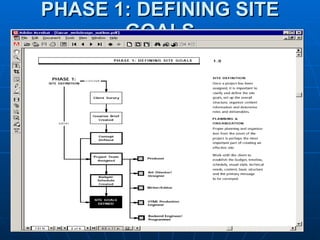
PHASE 1: DEFINING SITE GOALS
Asas Laman Web Berkualiti Apa Siapa Dimana Bagaimana Bila Temuramah
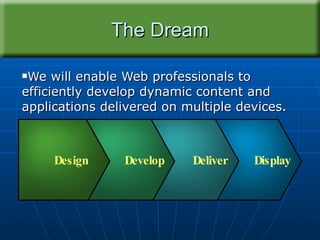
The Dream We will enable Web professionals to efficiently develop dynamic content and applications delivered on multiple devices. Display Deliver Develop Design
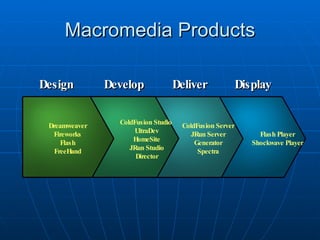
Macromedia Products Flash Player Shockwave Player Deliver Display Develop Design ColdFusion Server JRun Server Generator Spectra ColdFusion Studio  UltraDev HomeSite JRun Studio Director Dreamweaver Fireworks Flash FreeHand Flash Player Shockwave Player
Perkara Yang Perlu Di Ambil Kira Gaya Laman Web Imbangan Grafik dan Teks Susun Atur Laman Web Jangka Masa Muat Turun Mengimbang Setiap Laman Web Konsisten dan Identiti Isu Hakcipta
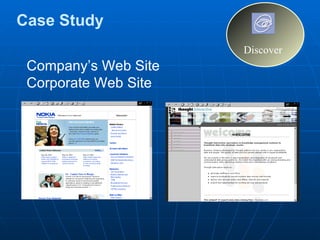
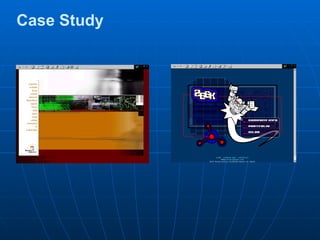
Case Study Company’s Web Site Corporate Web Site Discover
Case Study
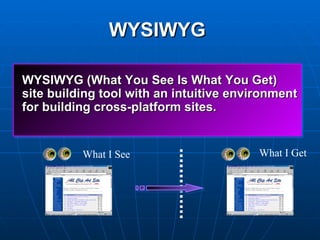
WYSIWYG   What I See What I Get WYSIWYG (What You See Is What You Get)  site building tool with an intuitive environment for building cross-platform sites.
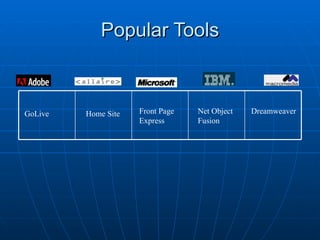
Popular Tools Dreamweaver Net Object Fusion Front Page Express Home Site GoLive
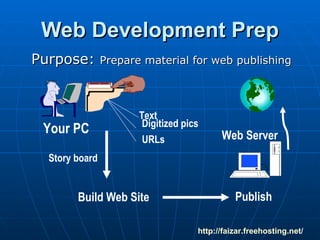
Web Development Prep Purpose:  Prepare material for web publishing http:// faizar.freehosting.net / Web Server Your PC Text Digitized pics URLs Build Web Site  Publish Story board
Text Prepare  in MS Word Save it using short meaningful file  name in your  web folder (unitone) http:// faizar.freehosting.net /
Graphics Digitize graphics - Digital Camera Prepare graphics - crop, size in  Photoshop / Graphics program Save it as a jpg/gif file yourname.jpg Save in images folder http:// faizar.freehosting.net /
Linked Resources Write a short notation about the site Write the exact URL for the site http://faizar.atspace.com http:// faizar.freehosting.net /
Checkout  the Samples Home Page Course Name TOC  Samples - Portfolio Page / Tech Page Components of Culminating Product Samples - http:// faizar.freehosting.net /
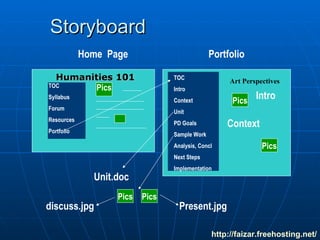
Storyboard Humanities 101 TOC Syllabus Forum Resources Portfolio Home  Page Portfolio TOC Intro Context Unit PD Goals Sample Work Analysis, Concl Next Steps Implementation Art Perspectives Pics Pics Intro Pics Context Unit.doc Pics Pics discuss.jpg Present.jpg http:// faizar.freehosting.net /
NEXT STEP Build Site Publish Site http:// faizar.freehosting.net /
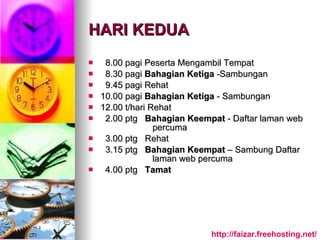
HARI KEDUA 8.00 pagi Peserta Mengambil Tempat 8.30 pagi  Bahagian Ketiga  -Sambungan 9.45 pagi Rehat  10.00 pagi  Bahagian Ketiga  - Sambungan 12.00 t/hari Rehat 2.00 ptg  Bahagian Keempat  - Daftar laman web  percuma 3.00 ptg  Rehat 3.15 ptg  Bahagian Keempat  – Sambung Daftar  laman web percuma 4.00 ptg  Tamat http:// faizar.freehosting.net /
Buat  Laman WEB http:// faizar.freehosting.net /
NEXT STEP Build Site Using Adobe Dreamweaver/ Microsoft Front Page/ Microsoft Microsoft Expression Web/Studio /  Notepad / textedit and other web editing tools  http:// faizar.freehosting.net / http://webdesign.about.com/od/windowshtmleditors/tp/windows-web-editing-suites.htm   Experience
NEXT STEP Publish Site http://faizar.atspace.com http:// faizar.freehosting.net /
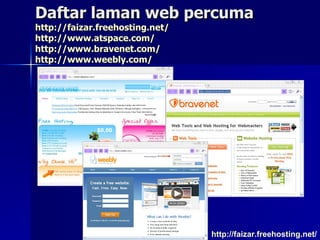
Daftar laman web percuma http:// faizar.freehosting.net / http:// www.atspace.com / http:// www.bravenet.com / http:// www.weebly.com / http:// faizar.freehosting.net /

Konsep pembangunan tapak web & laman web

  • 1.
    Konsep Pembangunan &Pengurusan Tapak & Laman WEB Oleh Ahmad Faizar Jaafar Unit Web & Digital Komponen  Jabatan Pengurusan Sistem & Teknologi Maklumat  (JPSTM) PTAR, UiTM  http://faizar.atspace.com/courses.html http://faizaronestop.blogspot.com http://faizar.multiply.com
  • 2.
    Konsep Pembangunan sertaPengurusan Tapak & Laman WEB Tahap : Asas Panjang Kursus : 2 hari Objektif Kursus Untuk mengetahui konsep-konsep asas pembanguan sesebuah tapak & laman web Menyediakan satu tapak & laman web dengan menggunakan aplikasi web page editor Menghantar web page yang telah siap ke laman web percuma
  • 3.
  • 4.
    HARI PERTAMA 8.00pagi Peserta Mengambil Tempat 8.30 pagi Bahagian Pertama -Pengenalan Internet & www 9.45 pagi Rehat 10.00 pagi Sambungan 12.00 t/hari Rehat 2.00 ptg Bahagian Kedua - Konsep tapak & laman web 3.00 ptg Rehat 3.15 ptg Sambungan 4.00 ptg Bersambung hari kedua Learn Discover
  • 5.
    HARI KEDUA 8.00pagi Peserta Mengambil Tempat 8.30 pagi Bahagian Ketiga - Membangunkan Laman Web 9.45 pagi Rehat 10.00 pagi Sambungan 12.00 t/hari Rehat 2.00 ptg Bahagian Keempat - Daftar laman web percuma 3.00 ptg Rehat 3.15 ptg Sambungan 4.00 ptg Tamat Experience
  • 6.
    Overview Of InternetClassful IP Addressing Subnetting a Network Planning IP Addressing Assigning TCP/IP Addresses
  • 7.
    Classful IP AddressingIP Addresses IP Address Classes
  • 8.
    IP Addresses 192.168.1.0192.168.3.0 192.168.1.100 192.168.2.101 192.168.2.100 192.168.3.100 192.168.2.0 Host ID Network ID 192.168.1.100 IP Address
  • 9.
    IP Address Classesw x y z Class A Network ID Host ID Class B Network ID Host ID Class C Network ID Host ID
  • 10.
    Subnetting a NetworkSubnets Subnet Masks Determining Local and Remote Hosts
  • 11.
    Subnets Router Subnet1 Subnet 2 1 2 Hub Hub
  • 12.
    Subnet Masks IPAddress Host ID Network ID 192.168. 2.200 Subnet Mask 255.255. 0.0 192.168. IP Address 10. 50.100.200 Subnet Mask 255. 0.0.0 Network ID 10. 0.0.0 IP Address 10.50. 100.200 Subnet Mask 255.255. 0.0 Network ID 10.50. 0.0 IP Address 10.50.100. 200 Subnet Mask 255.255.255. 0 Network ID 10.50.100. 0
  • 13.
    Determining Local andRemote Hosts Example 1 1 192.168.1.100 Local Hosts 192.168.2.100 2 Router 255.255.0.0 Subnet Mask A B C D E F Example 2 1 192.168.1.100 2 Remote Hosts 192.168.2.100 Router 255.255.255.0 Subnet Mask A B C D E F
  • 14.
    Lab A: DeterminingClass Addresses and Subnet Masks
  • 15.
    Planning IP AddressingAddressing Guidelines Assigning Network IDs Assigning Host IDs
  • 16.
    Addressing Guidelines TheHost ID Cannot Be All Zeros The Host ID Cannot Be All 255s The First Number in the Network ID Cannot Be 127 The Host ID Must Be Unique to the Local Network ID
  • 17.
    Assigning Network IDs1 2 3 10. 0 . 0 . 0 192.168.2 . 0 172.16 . 0 . 0 Router
  • 18.
    Assigning Host IDs1 2 172.16. 0.12 172.16. 0.11 172.16. 0.10 10 .0.0.12 10 .0.0.11 10 .0.0.10 192.168.2 .11 192.168.2 .10 192.168.2. 1 10. 0.0.1 172.16. 0.1 3 10 . 0 . 0 . 0 192.168.2 . 0 172.16 . 0 . 0 Router
  • 19.
    Lab B: Identifying Valid IP Addresses
  • 20.
    Assigning TCP/IP AddressesStatic IP Addressing Automatic IP Addressing Viewing TCP/IP Configuration Viewing TCP/IP Configuration Using Ipconfig
  • 21.
  • 22.
    Static IP AddressingInternet Protocol (TCP/IP) Properties General You can get IP settings assigned automatically if your network supports this capability. Otherwise, you need to ask your network administrator for the appropriate IP settings. O btain an IP address automatically U s e the following IP address : IP address: Us e the following DNS server addresses: P referred DNS server: Obtain DNS server address automatically Ad v anced... A lternate DNS server: 192 . 168 . 1 . 200 192. 168 . 1 . 1 255 . 255 . 255. 0 Subnet mask : Default gateway: OK Cancel
  • 23.
    Automatic IP AddressingInternet Protocol (TCP/IP) Properties General You can get IP settings assigned automatically if your network supports this capability. Otherwise, you need to ask your network administrator for the appropriate IP settings . O btain an IP address automatically U s e the following IP address: IP address: Us e the following DNS server addresses: P referred DNS server: Obtain DNS server address automatically Ad v anced... A lternate DNS server: Subnet mask : Default gateway : OK Cancel
  • 24.
    Viewing TCP/IP ConfigurationInternet Protocol (TCP/IP) Properties General You can get IP settings assigned automatically if your network supports this capability. Otherwise, you need to ask your network administrator for the appropriate IP settings. O btain an IP address automatically U s e the following IP address: IP address: Us e the following DNS server addresses: P referred DNS server: Obtain DNS server address automatically Ad v anced... A lternate DNS server: 192 . 168 . 1 . 200 192. 168 . 1 . 1 255 . 255 . 255. 0 Subnet mask : Default gateway: OK Cancel
  • 25.
    Viewing TCP/IP ConfigurationUsing c:\>ipconfig Command Prompt Microsoft Windows 2000 [version 5.00.2195] (C) Copyright 1985-1999 Microsoft Corp. C:\>ipconfig Windows 2000 IP Configuration Ethernet adapter Local Area Connection: Connection-specific DNS Suffix . : IP Address. . . . . . . . . . . . : 192.168.1.200 Subnet Mask . . . . . . . . . . . : 255.255.255.0 Default Gateway . . . . . . . . . : 192.168.1.1 C:\>_
  • 26.
    Lab C: Examining the Configuration of TCP/IP
  • 27.
    Identifying Internet ConceptsThe Internet Internet Services Intranets Domain Naming
  • 28.
    Overview Identifying InternetConcepts Using Client Technologies Connecting to the Internet Identifying Web Server Concepts
  • 29.
    History of theWeb History of the Web • Tim Berners- Lee “invented” the Web in 1990 writing the first Web server and browser. • Marc Andreesen exposed the Web to the masses with Mosaic the first GUI Web browser in 1993. • The rest is history... History Internet & WWW
  • 30.
    Sejarah Internet& WWW http://www.netvalley.com/intval1.html
  • 31.
    Bagaimana World WideWeb berfungsi WWW Server Methods to Use to Connect: Home user – Direct Modem Organization - LAN PC Browser Contoh: Internet Explorer
  • 32.
    Lab B: IdentifyingWeb Concepts
  • 33.
    Review Identifying InternetConcepts Using Client Technologies Connecting to the Internet Identifying Web Server Concepts
  • 34.
    Hypertext Markup Language< HTML> <HEAD> <TITLE>Sales Report</TITLE> </HEAD> <BODY> <H2>Q3 Sales by Region</H2> </BODY> </HTML> Hypertext Markup Language ( HTML )
  • 35.
    Hypertext Markup LanguageGenerally text is unformatted in your Web documents. However, to emphasize specific letters, words, or phrases you can use some text formatting options including boldfacing and italicizing. Depending on your browser, you may also be able to add underlining to emphasize characters. The following examples show the code for boldfacing and italicizing. <B> This is bold. </B> <STRONG> This is also bold. </STRONG> <I> This is italics. </I> <EM> This is also italics. </EM>
  • 36.
    Heading Styles Headingstyles are used to emphasize different levels of information in Web documents. Heading style level one (H1) is the largest. The phrase &quot;formatting basics&quot; at the top of this page is an example of heading one. Heading styles range from level one (the largest) to the level six (the smallest). In addition to the font size, heading styles also include boldfacing and/or italicizing and some paragraph spacing. Text Formatted as Heading Level with Code Sample <H1>Heading 1</H1> Heading 1 <H4>Heading 4</H4> Heading 4 <H2>Heading 2</H2> Heading 2 <H5>Heading 5</H5> Heading 5 <H3>Heading 3</H3> Heading 3 <H6>Heading 6</H6> Heading 5
  • 37.
    Static Static vs Dynamic Web Site Static Web Site • HTML page content is same for each request • Change to content requires HTML page edit • No user interaction • No access to live data •“ Web Site”
  • 38.
    Static Static vs Dynamic Web Site Dynamic Web Site • HTML pages dynamically enerated for each request • Content changes based on data, user login, etc. • Allows user interaction • Access to data real- time • “ Web Application”
  • 39.
    Dynamic Web Sites• Web server • responds to HTTP requests and retrieves resources • Expand Web server capabilities by providing a gateway between it and external programs • Common Gateway Interface (CGI) • uses standard I/ O • new process for each request • slow and inefficient
  • 40.
    Dynamic Web Sitescont. • NSAPI, ISAPI • Web Server API • runs in- process, making it faster than CGI • Java Servlets
  • 41.
    The Internet ClientConnection Using TCP/IP Protocol Server Text, Audio, Video, and Graphics Data Internet
  • 42.
    Internet Services ElectronicMail (e-mail) World Wide Web (WWW) Chat Internet News File Transfer Protocol (FTP) Telnet Internet
  • 43.
  • 44.
    Domain Naming DomainName (istudent.uitm.edu.my) Top-level domain (edu) Second-level domain (uitm.edu) Subdomain (istudent.uitm.edu.my) edu istudent,.uitm.edu.my uitm.edu
  • 45.
    Using Client TechnologiesNewsreaders Web Browsers Internet Protocols Uniform Resource Locator (URL)
  • 46.
    Newsreaders msnews.microsoft.com -Outlook Express File Edit Tools Message Help New Post Reply Group Reply Forward Print Stop Send/Recv Addresses Find Newsgroups msnews.microsoft.com Folders msnews.microsoft.com Synchronization of Newsgroups on msnews.microsoft.com To change offline settings, first select a newsgroup, then click Settings Synchronize Account Newsgroups... Settings Newsgroup Unread Total microsoft.public.ddk.win2000.general (18) microsoft.public.ddk.win2000.network microsoft.public.ddk.win2000.setup (3) microsoft.public.win2000.accessibility microsoft.public.win2000.advancedserv microsoft.public.win2000.announcemen microsoft.public.win2000.app_deploy microsoft.public.win2000.applications microsoft.public.win2000.clusterservice microsoft.public.win2000.networking microsoft.public.win2000.outlook.expires microsoft.public.win2000.printing microsoft.public.win2000.radius microsoft.public.win2000.ras_routing microsoft.public.win2000.security microsoft.public.win2000.setup microsoft.public.win2000.setup.deploym microsoft.public.win2000.setup.upgrade microsoft.public.win2000.storage microsoft.public.win2000.system_admin microsoft.public.win2000.terminal_srv microsoft.public.win2000.terminal_srv_h microsoft.public.win2000.user_interface microsoft.public.ddk.win2000.general microsoft.public.ddk.win2000.network microsoft.public.ddk.win2000.setup microsoft.public.win2000.accessibility microsoft.public.win2000.advancedserver microsoft.public.win2000.announcements microsoft.public.win2000.applications microsoft.public.win2000.app_deploy microsoft.public.win2000.clusterservice microsoft.public.win2000.networking microsoft.public.win2000.outlook.express microsoft.public.win2000.printing microsoft.public.win2000.radius microsoft.public.win2000.ras_routing microsoft.public.win2000.security microsoft.public.win2000.setup microsoft.public.win2000.setup.deployment microsoft.public.win2000.setup.upgrade microsoft.public.win2000.storage microsoft.public.win2000.system_admin 18 5 3 6 13 8 6 15 2 2163 11 21 13 8 4 7 1 4 10 2 18 12 3 6 13 8 6 18 2 2164 14 21 13 8 4 10 5 4 10 2
  • 47.
    Web Browsers Windows2000 Server Overview - Microsoft Internet Explorer F ile E dit V iew F avorites T ools Help Back Search Favorites History Address http://www.microsoft.com/windows2000/server/overview/default.asp Go All products Support Search microsoft.com Guide Windows Home Pages Windows 2000 Home Page Product Guide Windows 2000 Platform Client Server Technical Library Upgrading to Window 2000 Beta Users IT Pros Developers Search for: Go Home Product Guide Windows 2000 Server Family Server Server Features System Requirements What Others are Saying Comparisons With the Windows® 2000 Server operating system, Microsoft has accomplished a goal rarely achieved in the software industry: delivered a product that is evolutionary and revolutionary at the same time. Evolutionary in that Windows 2000 builds on the great things about the Windows NT® Server 4.0 operating system. Revolutionary in that Windows 2000 Server sets a new standard for how well am operating system can be integrated with Web, application, networking, communication, and infrastructure services. For the first time, you have an easy choice to make about the next server operating system you deploy - whatever your needs. Continued Browse the features that make the Windows 2000 Server Family the leading solution for running more reliable and manageable file, print, intranet, communications, e-commerce, and infrastructure server. Find out what it takes to run Windows 2000 Server and Windows 2000 Advanced Server. Check out the buzz on Windows 2000 Server: reviews and commentary from technology journalists and industry analysts. See how Windows 2000 Server compares with other operating systems. Browser Contoh: Internet Explorer
  • 48.
    Internet Protocols HTTPHTTPS FTP SMTP NNTP HTML DHTML Server Data Client Connection Using an Internet Protocol Internet
  • 49.
    Uniform Resource Locator(URL) URL (http://example.microsoft.com/tutorial/default.html) Protocol used (http://) DNS address (example.microsoft.com) Path on the server (/tutorial/default.html) http:// example.microsoft.com / tutorial / default.html
  • 50.
    Lab A: Accessingan FTP Site by Using Internet Explorer
  • 51.
    Connecting to theInternet Network Address Translators (NATs) Proxy Servers Firewalls Microsoft Proxy Server
  • 52.
    Network Address Translators(NATs) Internet 192.168.0.10 w1.x1.y1.z1 w2.x2.y2.z2 Web Browser NAT Web Server
  • 53.
    Proxy Servers ProxyServer Authorized Web Site Restricted Web Site Internet LAN LAN LAN
  • 54.
    Firewalls Firewall AuthorizedUser Unauthorized User LAN LAN LAN Internet
  • 55.
    Microsoft Proxy ServerMicrosoft Proxy Server Authorized User or Web Site Unauthorized User or Web Site LAN LAN LAN Internet
  • 56.
    Defining a WebServer Microsoft Internet Information Services (IIS) Identifying Web Server Concepts
  • 57.
    Defining a WebServer Web Server Client with Web Browser Network TCP/IP TCP/IP HTTP IP Address HTTP Internet Explorer
  • 58.
    Microsoft Internet InformationServices (IIS) Indexing Service Secure Sockets Layer Windows Media Services Additional Developer Support Active Server Pages VBScript and JavaScript support Remote administration Features of IIS IIS Internet
  • 59.
  • 60.
    Keperluan host lamanweb Perkakasan / Hardware Ada beberapa jenama Perisian / Software Ada beberapa jenama http://www.serverwatch.com/stypes/ http://search.about.com/fullsearch.htm?terms=Internet%20%20HTTP%20%20web%20%20server
  • 61.
  • 62.
    Asas Laman WebBerkualiti Apa Siapa Dimana Bagaimana Bila Temuramah
  • 63.
    The Dream Wewill enable Web professionals to efficiently develop dynamic content and applications delivered on multiple devices. Display Deliver Develop Design
  • 64.
    Macromedia Products FlashPlayer Shockwave Player Deliver Display Develop Design ColdFusion Server JRun Server Generator Spectra ColdFusion Studio UltraDev HomeSite JRun Studio Director Dreamweaver Fireworks Flash FreeHand Flash Player Shockwave Player
  • 65.
    Perkara Yang PerluDi Ambil Kira Gaya Laman Web Imbangan Grafik dan Teks Susun Atur Laman Web Jangka Masa Muat Turun Mengimbang Setiap Laman Web Konsisten dan Identiti Isu Hakcipta
  • 66.
    Case Study Company’sWeb Site Corporate Web Site Discover
  • 67.
  • 68.
    WYSIWYG What I See What I Get WYSIWYG (What You See Is What You Get) site building tool with an intuitive environment for building cross-platform sites.
  • 69.
    Popular Tools DreamweaverNet Object Fusion Front Page Express Home Site GoLive
  • 70.
    Web Development PrepPurpose: Prepare material for web publishing http:// faizar.freehosting.net / Web Server Your PC Text Digitized pics URLs Build Web Site Publish Story board
  • 71.
    Text Prepare in MS Word Save it using short meaningful file name in your web folder (unitone) http:// faizar.freehosting.net /
  • 72.
    Graphics Digitize graphics- Digital Camera Prepare graphics - crop, size in Photoshop / Graphics program Save it as a jpg/gif file yourname.jpg Save in images folder http:// faizar.freehosting.net /
  • 73.
    Linked Resources Writea short notation about the site Write the exact URL for the site http://faizar.atspace.com http:// faizar.freehosting.net /
  • 74.
    Checkout theSamples Home Page Course Name TOC Samples - Portfolio Page / Tech Page Components of Culminating Product Samples - http:// faizar.freehosting.net /
  • 75.
    Storyboard Humanities 101TOC Syllabus Forum Resources Portfolio Home Page Portfolio TOC Intro Context Unit PD Goals Sample Work Analysis, Concl Next Steps Implementation Art Perspectives Pics Pics Intro Pics Context Unit.doc Pics Pics discuss.jpg Present.jpg http:// faizar.freehosting.net /
  • 76.
    NEXT STEP BuildSite Publish Site http:// faizar.freehosting.net /
  • 77.
    HARI KEDUA 8.00pagi Peserta Mengambil Tempat 8.30 pagi Bahagian Ketiga -Sambungan 9.45 pagi Rehat 10.00 pagi Bahagian Ketiga - Sambungan 12.00 t/hari Rehat 2.00 ptg Bahagian Keempat - Daftar laman web percuma 3.00 ptg Rehat 3.15 ptg Bahagian Keempat – Sambung Daftar laman web percuma 4.00 ptg Tamat http:// faizar.freehosting.net /
  • 78.
    Buat LamanWEB http:// faizar.freehosting.net /
  • 79.
    NEXT STEP BuildSite Using Adobe Dreamweaver/ Microsoft Front Page/ Microsoft Microsoft Expression Web/Studio / Notepad / textedit and other web editing tools http:// faizar.freehosting.net / http://webdesign.about.com/od/windowshtmleditors/tp/windows-web-editing-suites.htm Experience
  • 80.
    NEXT STEP PublishSite http://faizar.atspace.com http:// faizar.freehosting.net /
  • 81.
    Daftar laman webpercuma http:// faizar.freehosting.net / http:// www.atspace.com / http:// www.bravenet.com / http:// www.weebly.com / http:// faizar.freehosting.net /

Editor's Notes

  • #35 KEY OBJECTIVES: Establish a baseline of a simple HTML page that everyone can understand Show that just by looking at the tags, it’s possible to see what a page will look like Now the key to understanding how easy it is to use ColdFusion is to take a look at how the dynamic pages are created. To begin with here on the screen we have a very basic HTML page that is not being dynamically generated. Those of you familiar with HTML know what this page will display by just looking at the HTML code. [CLICK1] This page will simply place a heading of ‘Sales Report’ on our web page and a title “Q3 Sales by Region” Now let’s create a dynamic ColdFusion page using this HTML file as a foundation.
  • #64 KEY OBJECTIVES: Demonstrate that Macromedia’s goal is to provide a complete solution for Web professionals Macromedia’s vision is to provide a complete software platform that enables Web professionals to build the next generation of Web applications and deliver innovative user experiences across devices. That includes design tools that enable you to build highly engaging content, as well as best-in-class tools and servers for building the back-end logic to drive dynamic Web sites and applications. Finally, we provide also leading-edge player technology that enables rich user experiences not only in HTML, but also in Flash and Shockwave.
  • #65 KEY OBJECTIVES: Demonstrate that Macromedia has the industry-leading products to deliver on the vision described in the previous slide. In support of that vision, we have award-winning products that are leaders in their respective markets.
  • #71 Purpose of session: 1. Review the Conference Presentation / the culminating Products 2. Share samples developed by teachers
  • #72 Focusing on Group A Products 1. Review the PD Requirements for Group A 2. Focus on the presentation
  • #73 Up to now focusing on developing the Standards-Based Learning Unit
  • #74 We will be sharing components of and samples of Conference Presentation Teacher Portfolio Tech Products Professional Journal They will focus on your PD process as they planned / Designed / Implement / Manage / Assess the Unit - If you were reading a journnal, going to a conference, looking at a tech project What would be a couple of things that you’d look for in the writing or Presentation that would be interesting, useful for you?
  • #75 1. As the teachers share - notice how they have woven the basic components into their culminating products. 2. Whether doing the presentation, portfolio, Journal - there are common threads that are basic no matter which product you will work on. a. Introduction - A description, the purpose, executive summary b. Context - your teaching context - such as course, grade level, student need / strengths c. Professional development goals - outcomes you hope to accomplish through the design, implementation, management, assessment of your SBL unit d. Artifacts Your - Unit / reflection Students - Quantitative / Qualitative Samples e. Analysis, Conclusion , Projection What worked, didn’t work, adjustments made Match between goals, practice and outcome Your next steps f. Professional Resources
  • #76 Tech Products Student or Teacher Tech Products that will support the unit Communication - building collaboration through the forum Gathering, Managing and Use of Online Resources Publication and Production - PowerPoint, Student / Teacher Web Page Creating Online Learning Environment Theresa share student tech project
  • #77 1. There are resourcces - among the teachers 2. Assembled resources on the MoHS Website Remember - resources are only samplers that may not be representative of the best - 3. No one right way to do any of the culminating products - You determine what would be most meaningful for you and will enhance your own professional development 4. We will customize future workshops to accommodate your needs - in completing the products
  • #80 1. There are resourcces - among the teachers 2. Assembled resources on the MoHS Website Remember - resources are only samplers that may not be representative of the best - 3. No one right way to do any of the culminating products - You determine what would be most meaningful for you and will enhance your own professional development 4. We will customize future workshops to accommodate your needs - in completing the products
  • #81 1. There are resourcces - among the teachers 2. Assembled resources on the MoHS Website Remember - resources are only samplers that may not be representative of the best - 3. No one right way to do any of the culminating products - You determine what would be most meaningful for you and will enhance your own professional development 4. We will customize future workshops to accommodate your needs - in completing the products