The Digital Divide
   Natives & Immigrants
Cate Brosseau Indiano


                      desktopmedia
                        consulting & training
   marketing, advertising, communications, graphic arts
what divide?
economics & access?
the audience of the entire Internet for the
first time, globally, crossed one billion
users in December 2008

China: 180 million, USA: 163 million
Middle East & Africa: only 4.8%
the tide is turning
•An April 2009 survey by the Pew Research Center’s
  Internet & American Life Project shows 63% of adult
  Americans now have broadband internet connections at
  home, a 15% increases from a year earlier. April’s level
  of high-speed adoption represents a significant jump from
  figures gathered by the Project since the end of 2007
  (54%).
•2008 marked the first year data-enabled phones outsold
  desktop pc’s.
•second largest twitter demographic: 35-54 year olds
•71% of linkedin users 35+
utilization
The Digital Native
A digital native is a person who has grown up with digital
technology such as computers, the internet, mobile phones and
MP3. — Wikipedia

“They have spent their entire lives surrounded by and using
computers, video games, digital music players, video cams, cell
phones, and all the other toys and tools of the digital age.
Today's average college grads have spent less than 5,000 hours
of their lives reading, but over 10,000 hours playing video games”
— Mark Prensky

Generation Y, sometimes referred to as "Millennials" or "Net
Generation", who were born between 1978-1995 and grew up in
the 1990s and 2000s.
The Digital Immigrant
A digital immigrant is an individual who grew up
without digital technology and adopted it later. —
Wikipedia
Those of us who were not born into the digital
world but have, at some later point in our lives,
become fascinated by and adopted many or most
aspects of the new technology — Mark Prensky
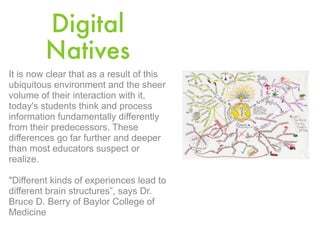
Digital
         Natives
It is now clear that as a result of this
ubiquitous environment and the sheer
volume of their interaction with it,
today's students think and process
information fundamentally differently
from their predecessors. These
differences go far further and deeper
than most educators suspect or
realize.

"Different kinds of experiences lead to
different brain structures”, says Dr.
Bruce D. Berry of Baylor College of
Medicine
Digital Immigrants
As Digital Immigrants learn - like all immigrants,
some better than others - to adapt to their
environment, they always retain, to some degree,
their "accent," that is, their foot in the past.
- Printing your email
- Print a document to edit it
- The “did you get the email?” phone call
Take the Pew
Internet Challenge
• What type of technology user are you?
• pew technology quiz
Digital
  Natives
everywhere
Young people may be
newcomers to the world of
work, but it's their bosses
who are immigrants into
the digital world — 2006,
Pew Internet
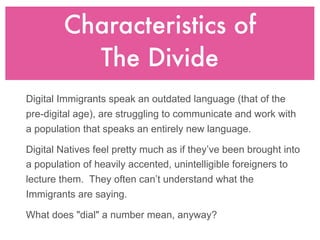
Characteristics of
          The Divide
Digital Immigrants speak an outdated language (that of the
pre-digital age), are struggling to communicate and work with
a population that speaks an entirely new language.

Digital Natives feel pretty much as if they’ve been brought into
a population of heavily accented, unintelligible foreigners to
lecture them. They often can’t understand what the
Immigrants are saying.

What does "dial" a number mean, anyway?
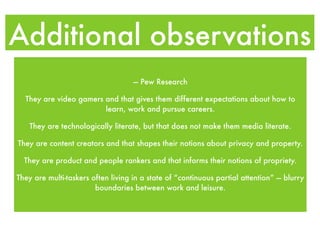
Additional observations
                                    — Pew Research

  They are video gamers and that gives them different expectations about how to
                        learn, work and pursue careers.

   They are technologically literate, but that does not make them media literate.

They are content creators and that shapes their notions about privacy and property.

  They are product and people rankers and that informs their notions of propriety.

They are multi-taskers often living in a state of “continuous partial attention” — blurry
                        boundaries between work and leisure.
Technologies Natives Use Daily

  •   Cell phones (with sms & mms)
  •   Google – first stop for their       •   Digital Camera and Video
      information                             Recorder
  •   Digital music – no tapes,           •   File Sharing
      albums, cd or radios - iPod         •   Thumb Drives
  •   Digital Social Networks             •   Gaming – xbox, PS2, etc.
      Participant (active in a virtual    •   Create and publish with Youtube
      community) like Facebook &              & Blogs
      MySpace                             •   Wikipedia as reference
  •   Chat - via IM, via social network   •   cloud computing
  •   Multiple person chat (we use to     •   rich media experiences
      call a “conference”)                •   Always had a computer
  •   Video Chat                          •   Expectation of Mobility –
  •   Voice Over IP                           wireless is everywhere
  •   TiVo
Digital Natives prefer to use their
technologies to interact, communicate,
and collaborate with others.

Meet them where they are.
Make an effort to bridge the divide.
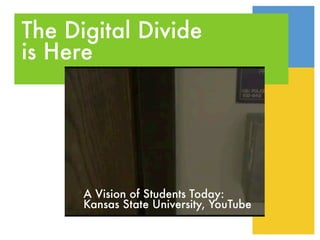
The Digital Divide
is Here


      A Vision of Students Today:
      Kansas State University, YouTube
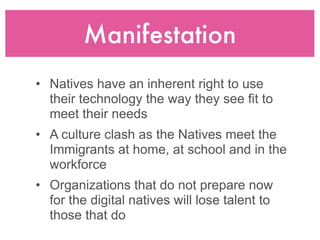
Manifestation
• Natives have an inherent right to use
  their technology the way they see fit to
  meet their needs
• A culture clash as the Natives meet the
  Immigrants at home, at school and in the
  workforce
• Organizations that do not prepare now
  for the digital natives will lose talent to
  those that do
the barrier of fear
Your Challenges

• available technology
• skill set
• connectivity
• common ground
Bridging the divide
Our New President

            ...is bridging the divide
• first via his campaign site, then via
  change.gov, and now via whitehouse.gov
•   whitehouse.gov/open/
•   mixedink.com/OpenGov/
•   data.gov
acknowledgement
Step #1: Recognition of the phenomenon

 -   do feel you are making best use of available
     technologies?

 -   would your constituents agree with you?

 -   be open to acquiring new applications and
     skills

 -   ask for help from your natives, it’s in their best
     interest

 -   this could be a great service project!
technology
Step #2: Inventory Your Information Technology
-   what resources do you already have?
-   it doesn’t have to be expensive, in fact there are many
    solutions that are free
-   connectivity is a huge consideration, some of you or
    your constituents may not have a computer, access to
    a computer or access to the internet
-   the local library, high school and/or continuing ed may
    be able to help
-   consider cloud computing, like a google docs or build
    your own cms where you can store, share, and
    collaborate
people
Step #3: Assess All Skills Sets
• Coach or Mentor your Natives
  - make sure they understand where you are
    strong and weak in technology
  - all they know is their own skills and make
    assumptions or take for granted yours
• Natives: Coach/Train immigrant counterparts
  - remember, your immigrant parents, they paid
    for your technology
• Ask for help
• Set goals for technology adoption and skills
  improvement
embrace
Step #4: Embrace some of the new technologies
natives are already using and acknowledging its
adoption will encourage everyone.


•   blogs                •   video
•   wikis                •   mobile apps
•   forums               •   tagging
•   social networks      •   online
                             collaboration
•   user voice
•   cloud computing
Education Resources
•   office of education technology
•   pewinternet.org
•   edutopia.org
•   project tomorrow
•   sitepoint.com
•   comscore.com
•   internetworldstats.com
•   wsisforum2009
•   nat’l telecomm and info admin
questions?
QUESTIONS?
network
317.955.9300
cate@dm-corp.com
www.dm-corp.com
www.desktopmediatraining.com
www.desktopmediaclass.com
linkedin: www.linkedin.com/in/cateindiano
facebook: the marketing technology training program
delicious: marketing technology bookmarks
skype: desktopmedia
twitter: desktopmedia

Kiwanis Digital Divide

  • 2.
    The Digital Divide Natives & Immigrants
  • 3.
    Cate Brosseau Indiano desktopmedia consulting & training marketing, advertising, communications, graphic arts
  • 4.
    what divide? economics &access? the audience of the entire Internet for the first time, globally, crossed one billion users in December 2008 China: 180 million, USA: 163 million Middle East & Africa: only 4.8%
  • 5.
    the tide isturning •An April 2009 survey by the Pew Research Center’s Internet & American Life Project shows 63% of adult Americans now have broadband internet connections at home, a 15% increases from a year earlier. April’s level of high-speed adoption represents a significant jump from figures gathered by the Project since the end of 2007 (54%). •2008 marked the first year data-enabled phones outsold desktop pc’s. •second largest twitter demographic: 35-54 year olds •71% of linkedin users 35+
  • 6.
  • 7.
    The Digital Native Adigital native is a person who has grown up with digital technology such as computers, the internet, mobile phones and MP3. — Wikipedia “They have spent their entire lives surrounded by and using computers, video games, digital music players, video cams, cell phones, and all the other toys and tools of the digital age. Today's average college grads have spent less than 5,000 hours of their lives reading, but over 10,000 hours playing video games” — Mark Prensky Generation Y, sometimes referred to as "Millennials" or "Net Generation", who were born between 1978-1995 and grew up in the 1990s and 2000s.
  • 8.
    The Digital Immigrant Adigital immigrant is an individual who grew up without digital technology and adopted it later. — Wikipedia Those of us who were not born into the digital world but have, at some later point in our lives, become fascinated by and adopted many or most aspects of the new technology — Mark Prensky
  • 9.
    Digital Natives It is now clear that as a result of this ubiquitous environment and the sheer volume of their interaction with it, today's students think and process information fundamentally differently from their predecessors. These differences go far further and deeper than most educators suspect or realize. "Different kinds of experiences lead to different brain structures”, says Dr. Bruce D. Berry of Baylor College of Medicine
  • 10.
    Digital Immigrants As DigitalImmigrants learn - like all immigrants, some better than others - to adapt to their environment, they always retain, to some degree, their "accent," that is, their foot in the past. - Printing your email - Print a document to edit it - The “did you get the email?” phone call
  • 11.
    Take the Pew InternetChallenge • What type of technology user are you? • pew technology quiz
  • 12.
    Digital Natives everywhere Youngpeople may be newcomers to the world of work, but it's their bosses who are immigrants into the digital world — 2006, Pew Internet
  • 13.
    Characteristics of The Divide Digital Immigrants speak an outdated language (that of the pre-digital age), are struggling to communicate and work with a population that speaks an entirely new language. Digital Natives feel pretty much as if they’ve been brought into a population of heavily accented, unintelligible foreigners to lecture them. They often can’t understand what the Immigrants are saying. What does "dial" a number mean, anyway?
  • 14.
    Additional observations — Pew Research They are video gamers and that gives them different expectations about how to learn, work and pursue careers. They are technologically literate, but that does not make them media literate. They are content creators and that shapes their notions about privacy and property. They are product and people rankers and that informs their notions of propriety. They are multi-taskers often living in a state of “continuous partial attention” — blurry boundaries between work and leisure.
  • 15.
    Technologies Natives UseDaily • Cell phones (with sms & mms) • Google – first stop for their • Digital Camera and Video information Recorder • Digital music – no tapes, • File Sharing albums, cd or radios - iPod • Thumb Drives • Digital Social Networks • Gaming – xbox, PS2, etc. Participant (active in a virtual • Create and publish with Youtube community) like Facebook & & Blogs MySpace • Wikipedia as reference • Chat - via IM, via social network • cloud computing • Multiple person chat (we use to • rich media experiences call a “conference”) • Always had a computer • Video Chat • Expectation of Mobility – • Voice Over IP wireless is everywhere • TiVo
  • 16.
    Digital Natives preferto use their technologies to interact, communicate, and collaborate with others. Meet them where they are. Make an effort to bridge the divide.
  • 17.
    The Digital Divide isHere A Vision of Students Today: Kansas State University, YouTube
  • 18.
    Manifestation • Natives havean inherent right to use their technology the way they see fit to meet their needs • A culture clash as the Natives meet the Immigrants at home, at school and in the workforce • Organizations that do not prepare now for the digital natives will lose talent to those that do
  • 19.
  • 20.
    Your Challenges • availabletechnology • skill set • connectivity • common ground
  • 21.
  • 22.
    Our New President ...is bridging the divide • first via his campaign site, then via change.gov, and now via whitehouse.gov • whitehouse.gov/open/ • mixedink.com/OpenGov/ • data.gov
  • 23.
    acknowledgement Step #1: Recognitionof the phenomenon - do feel you are making best use of available technologies? - would your constituents agree with you? - be open to acquiring new applications and skills - ask for help from your natives, it’s in their best interest - this could be a great service project!
  • 24.
    technology Step #2: InventoryYour Information Technology - what resources do you already have? - it doesn’t have to be expensive, in fact there are many solutions that are free - connectivity is a huge consideration, some of you or your constituents may not have a computer, access to a computer or access to the internet - the local library, high school and/or continuing ed may be able to help - consider cloud computing, like a google docs or build your own cms where you can store, share, and collaborate
  • 25.
    people Step #3: AssessAll Skills Sets • Coach or Mentor your Natives - make sure they understand where you are strong and weak in technology - all they know is their own skills and make assumptions or take for granted yours • Natives: Coach/Train immigrant counterparts - remember, your immigrant parents, they paid for your technology • Ask for help • Set goals for technology adoption and skills improvement
  • 26.
    embrace Step #4: Embracesome of the new technologies natives are already using and acknowledging its adoption will encourage everyone. • blogs • video • wikis • mobile apps • forums • tagging • social networks • online collaboration • user voice • cloud computing
  • 27.
    Education Resources • office of education technology • pewinternet.org • edutopia.org • project tomorrow • sitepoint.com • comscore.com • internetworldstats.com • wsisforum2009 • nat’l telecomm and info admin
  • 28.
  • 29.
    network 317.955.9300 cate@dm-corp.com www.dm-corp.com www.desktopmediatraining.com www.desktopmediaclass.com linkedin: www.linkedin.com/in/cateindiano facebook: themarketing technology training program delicious: marketing technology bookmarks skype: desktopmedia twitter: desktopmedia