ARDIC 2010ARDIC 2010
KURUMSAL SUNUMKURUMSAL SUNUM
KINECT ON ANDROIDKINECT ON ANDROID
PANDABOARDPANDABOARD
ÜMİT UZUNÜMİT UZUN
Senior Software Engineer
1ARDIC A.S CONFIDENTIAL
Agenda
2© ARDIC, Inc. 2013
• Introduce most known Kinect sensor device
• Introduce PrimeSense technology behind
Kinect
• Introduce OpenNI library and architecture
leaded by PrimeSense
• Introduce NITE middleware library developed
by PrimeSense
• Show Demo
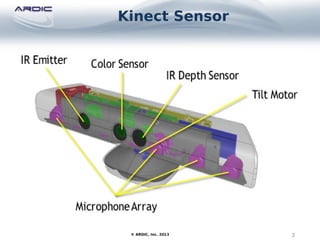
Kinect Sensor
3© ARDIC, Inc. 2013
Kinect Sensor
4© ARDIC, Inc. 2013
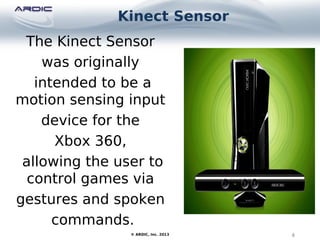
The Kinect Sensor
was originally
intended to be a
motion sensing input
device for the
Xbox 360,
allowing the user to
control games via
gestures and spoken
commands.
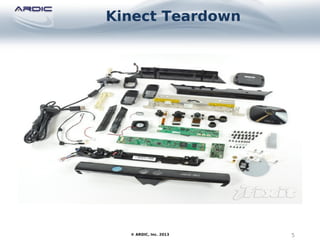
Kinect Teardown
5© ARDIC, Inc. 2013
Kinect IR Depth Sensor
6© ARDIC, Inc. 2013
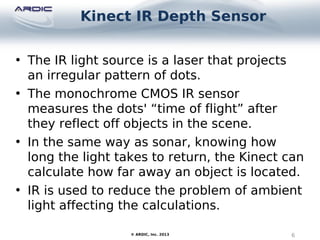
• The IR light source is a laser that projects
an irregular pattern of dots.
• The monochrome CMOS IR sensor
measures the dots' “time of flight” after
they reflect off objects in the scene.
• In the same way as sonar, knowing how
long the light takes to return, the Kinect can
calculate how far away an object is located.
• IR is used to reduce the problem of ambient
light affecting the calculations.
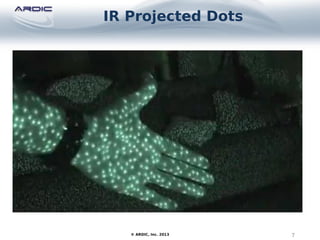
IR Projected Dots
7© ARDIC, Inc. 2013
Kinect Development Software
8© ARDIC, Inc. 2013
There are four main Kinect development libraries:
• OpenKinect's libfreenect (
http://openkinect.org/wiki/Main_Page)
• CLNUI (http://codelaboratories.com/nui/)
• OpenNI (http://www.openni.org/)
• Microsoft's Kinect for Windows SDK (
http://www.microsoft.com/en-us/kinectforwindow
)
Kinect Development Software
9© ARDIC, Inc. 2013
• OpenKinect's libfreenect is derived from a reverse-
engineered/hacked Kinect driver, which works across
Windows, Linux and MacOS X.
• CLNUI (http://codelaboratories.com/nui/) is aimed at
Windows only, but allows multiple Kinects to work
together.
• It's really not fair to compare libfreenect or CLNUI with
OpenNI, which is intended to act as an interface
between a variety of sensor drivers (including a Kinect
driver) and middleware for manipulating the sensor
data in a higher-level manner (e.g. for recognizing
user gestures as commands).
PrimeSense - Technology
10© ARDIC, Inc. 2013
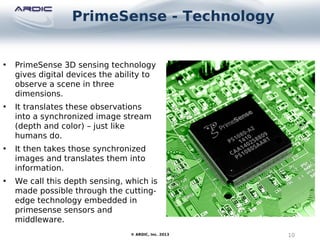
• PrimeSense 3D sensing technology
gives digital devices the ability to
observe a scene in three
dimensions.
• It translates these observations
into a synchronized image stream
(depth and color) – just like
humans do.
• It then takes those synchronized
images and translates them into
information.
• We call this depth sensing, which is
made possible through the cutting-
edge technology embedded in
primesense sensors and
middleware.
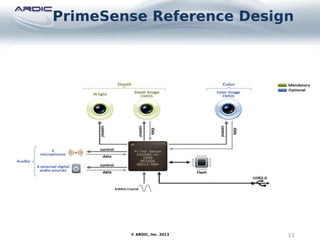
PrimeSense Reference Design
11© ARDIC, Inc. 2013
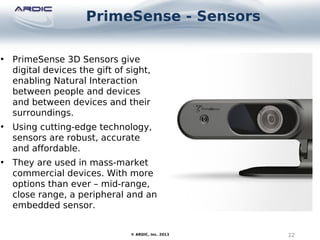
PrimeSense - Sensors
12© ARDIC, Inc. 2013
• PrimeSense 3D Sensors give
digital devices the gift of sight,
enabling Natural Interaction
between people and devices
and between devices and their
surroundings.
• Using cutting-edge technology,
sensors are robust, accurate
and affordable.
• They are used in mass-market
commercial devices. With more
options than ever – mid-range,
close range, a peripheral and an
embedded sensor.
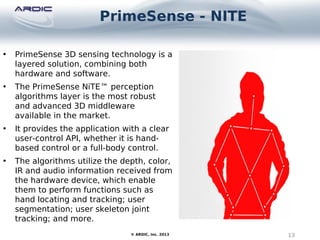
PrimeSense - NITE
13© ARDIC, Inc. 2013
• PrimeSense 3D sensing technology is a
layered solution, combining both
hardware and software.
• The PrimeSense NiTE™ perception
algorithms layer is the most robust
and advanced 3D middleware
available in the market.
• It provides the application with a clear
user-control API, whether it is hand-
based control or a full-body control.
• The algorithms utilize the depth, color,
IR and audio information received from
the hardware device, which enable
them to perform functions such as
hand locating and tracking; user
segmentation; user skeleton joint
tracking; and more.
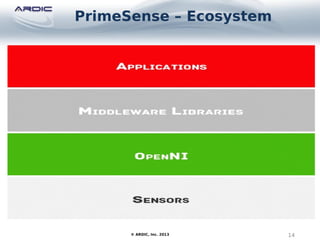
PrimeSense – Ecosystem
14© ARDIC, Inc. 2013
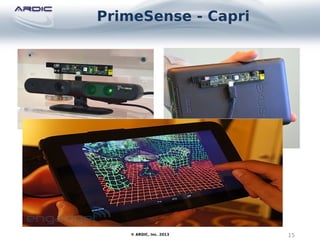
PrimeSense - Capri
15© ARDIC, Inc. 2013
PrimeSense – Capri
16© ARDIC, Inc. 2013
• Take the 3D sensor inside the Microsoft
Kinect, shrink it down to a tenth of its original
size and add a bunch of mobile capabilities,
and you have yourself PrimeSense’s latest
conquest, better known as Capri.
• The company, which is the brains behind the
Kinect, has been openly working on bringing
a tiny-yet-advanced 3D experience to tablets,
televisions and smartphones for quite some
time now.
OpenNI Layers
17© ARDIC, Inc. 2013
OpenNI Kinect Driver
18© ARDIC, Inc. 2013
• OpenNI's Kinect driver is called
SensorKinect, and is derived from open
sourced (LGPL) code from PrimeSense,
the company behind Kinect's depth
sensor technology.
• One advantage of libfreenect is API
support for controlling the Kinect's tilt
motor, status light, and accelerometer,
which is missing from the SensorKinect
driver.
KinectSDK vs OpenNI
19© ARDIC, Inc. 2013
• The main area where the SDK wins over
OpenNI is audio. Although OpenNI contains
audio-related APIs, not fully implemented.
• Other pluses for Microsoft's SDK are its
extensive documentation and examples,
and its ease of installation on Windows 7.
• The main drawback of the SDK is that it
only works on Windows 7, not XP or any
non-windows platform.
• The KinectSDK is free, but limited to non-
commercial purposes.
NITE – Natural Interaction
Middleware
20© ARDIC, Inc. 2013
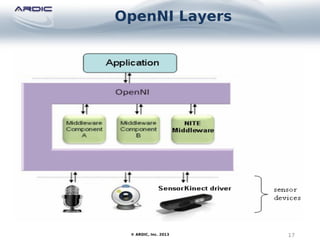
• An important reason for using OpenNI is
its support for middleware.
• The NITE library understands different
hand movements as gesture types
based on how 'hand points' change over
time.
• NITE gestures include pushing, swiping,
holding steady (i.e. no hand movement),
waving, and hand circling.

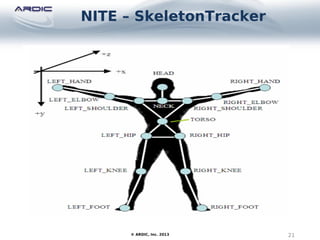
NITE – SkeletonTracker
21© ARDIC, Inc. 2013
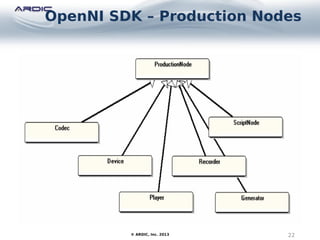
OpenNI SDK – Production Nodes
22© ARDIC, Inc. 2013
OpenNI SDK – Production Nodes
23© ARDIC, Inc. 2013
• The main functional element in OpenNI is
the production node.
• A node may represent a sensor's
functionality (e.g. depth detection,
infrared, audio) or a higher-level
abstraction (e.g. user positioning, hand
tracking).
• An OpenNI application always starts by
initializing the nodes it needs for its
particular task.
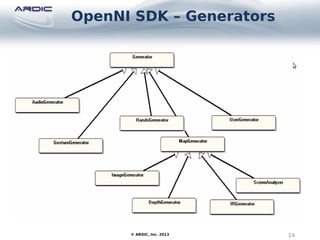
OpenNI SDK – Generators
24© ARDIC, Inc. 2013
OpenNI SDK – Generators
25© ARDIC, Inc. 2013
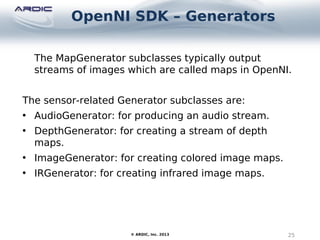
The MapGenerator subclasses typically output
streams of images which are called maps in OpenNI.
The sensor-related Generator subclasses are:
• AudioGenerator: for producing an audio stream.
• DepthGenerator: for creating a stream of depth
maps.
• ImageGenerator: for creating colored image maps.
• IRGenerator: for creating infrared image maps.
OpenNI SDK – Generators
26© ARDIC, Inc. 2013
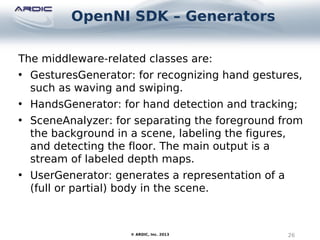
The middleware-related classes are:
• GesturesGenerator: for recognizing hand gestures,
such as waving and swiping.

• HandsGenerator: for hand detection and tracking;
• SceneAnalyzer: for separating the foreground from
the background in a scene, labeling the figures,
and detecting the floor. The main output is a
stream of labeled depth maps.
• UserGenerator: generates a representation of a
(full or partial) body in the scene.
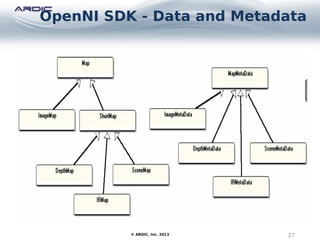
OpenNI SDK - Data and Metadata
27© ARDIC, Inc. 2013
OpenNI SDK - Data and Metadata
28© ARDIC, Inc. 2013
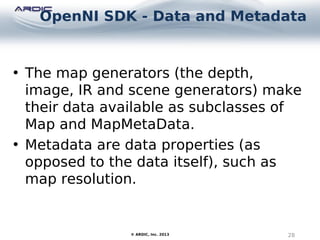
• The map generators (the depth,
image, IR and scene generators) make
their data available as subclasses of
Map and MapMetaData.
• Metadata are data properties (as
opposed to the data itself), such as
map resolution.
OpenNI SDK - Listeners
29© ARDIC, Inc. 2013
OpenNI SDK - Listeners
30© ARDIC, Inc. 2013
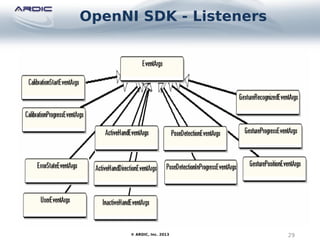
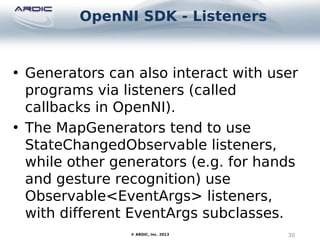
• Generators can also interact with user
programs via listeners (called
callbacks in OpenNI).
• The MapGenerators tend to use
StateChangedObservable listeners,
while other generators (e.g. for hands

and gesture recognition) use
Observable<EventArgs> listeners,
with different EventArgs subclasses.
OpenNI SDK - Capabilities
31© ARDIC, Inc. 2013
OpenNI SDK - Capabilities
32© ARDIC, Inc. 2013
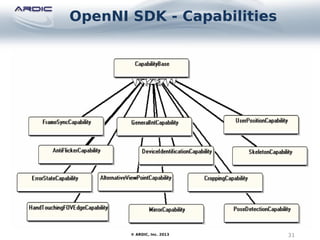
• OpenNI is intended to work with
different sensors, so the capabilities
of an instantiated production node
may vary. For instance, some
webcams may allow an image map to
be cropped.
• Each capability is represented by a
subclass of CapabilityBase.
NiSimpleViewer
33© ARDIC, Inc. 2013
NiUserTracker
34© ARDIC, Inc. 2013
35© ARDIC, Inc. 2013
36© ARDIC, Inc. 2013
TEŞEKKÜRLER
THANK YOU
www.ardictech.com
© ARDIC, Inc. 2013

Kinect on Android Pandaboard

  • 1.
    ARDIC 2010ARDIC 2010 KURUMSALSUNUMKURUMSAL SUNUM KINECT ON ANDROIDKINECT ON ANDROID PANDABOARDPANDABOARD ÜMİT UZUNÜMİT UZUN Senior Software Engineer 1ARDIC A.S CONFIDENTIAL
  • 2.
    Agenda 2© ARDIC, Inc.2013 • Introduce most known Kinect sensor device • Introduce PrimeSense technology behind Kinect • Introduce OpenNI library and architecture leaded by PrimeSense • Introduce NITE middleware library developed by PrimeSense • Show Demo
  • 3.
  • 4.
    Kinect Sensor 4© ARDIC,Inc. 2013 The Kinect Sensor was originally intended to be a motion sensing input device for the Xbox 360, allowing the user to control games via gestures and spoken commands.
  • 5.
  • 6.
    Kinect IR DepthSensor 6© ARDIC, Inc. 2013 • The IR light source is a laser that projects an irregular pattern of dots. • The monochrome CMOS IR sensor measures the dots' “time of flight” after they reflect off objects in the scene. • In the same way as sonar, knowing how long the light takes to return, the Kinect can calculate how far away an object is located. • IR is used to reduce the problem of ambient light affecting the calculations.
  • 7.
    IR Projected Dots 7©ARDIC, Inc. 2013
  • 8.
    Kinect Development Software 8©ARDIC, Inc. 2013 There are four main Kinect development libraries: • OpenKinect's libfreenect ( http://openkinect.org/wiki/Main_Page) • CLNUI (http://codelaboratories.com/nui/) • OpenNI (http://www.openni.org/) • Microsoft's Kinect for Windows SDK ( http://www.microsoft.com/en-us/kinectforwindow )
  • 9.
    Kinect Development Software 9©ARDIC, Inc. 2013 • OpenKinect's libfreenect is derived from a reverse- engineered/hacked Kinect driver, which works across Windows, Linux and MacOS X. • CLNUI (http://codelaboratories.com/nui/) is aimed at Windows only, but allows multiple Kinects to work together. • It's really not fair to compare libfreenect or CLNUI with OpenNI, which is intended to act as an interface between a variety of sensor drivers (including a Kinect driver) and middleware for manipulating the sensor data in a higher-level manner (e.g. for recognizing user gestures as commands).
  • 10.
    PrimeSense - Technology 10©ARDIC, Inc. 2013 • PrimeSense 3D sensing technology gives digital devices the ability to observe a scene in three dimensions. • It translates these observations into a synchronized image stream (depth and color) – just like humans do. • It then takes those synchronized images and translates them into information. • We call this depth sensing, which is made possible through the cutting- edge technology embedded in primesense sensors and middleware.
  • 11.
  • 12.
    PrimeSense - Sensors 12©ARDIC, Inc. 2013 • PrimeSense 3D Sensors give digital devices the gift of sight, enabling Natural Interaction between people and devices and between devices and their surroundings. • Using cutting-edge technology, sensors are robust, accurate and affordable. • They are used in mass-market commercial devices. With more options than ever – mid-range, close range, a peripheral and an embedded sensor.
  • 13.
    PrimeSense - NITE 13©ARDIC, Inc. 2013 • PrimeSense 3D sensing technology is a layered solution, combining both hardware and software. • The PrimeSense NiTE™ perception algorithms layer is the most robust and advanced 3D middleware available in the market. • It provides the application with a clear user-control API, whether it is hand- based control or a full-body control. • The algorithms utilize the depth, color, IR and audio information received from the hardware device, which enable them to perform functions such as hand locating and tracking; user segmentation; user skeleton joint tracking; and more.
  • 14.
  • 15.
    PrimeSense - Capri 15©ARDIC, Inc. 2013
  • 16.
    PrimeSense – Capri 16©ARDIC, Inc. 2013 • Take the 3D sensor inside the Microsoft Kinect, shrink it down to a tenth of its original size and add a bunch of mobile capabilities, and you have yourself PrimeSense’s latest conquest, better known as Capri. • The company, which is the brains behind the Kinect, has been openly working on bringing a tiny-yet-advanced 3D experience to tablets, televisions and smartphones for quite some time now.
  • 17.
  • 18.
    OpenNI Kinect Driver 18©ARDIC, Inc. 2013 • OpenNI's Kinect driver is called SensorKinect, and is derived from open sourced (LGPL) code from PrimeSense, the company behind Kinect's depth sensor technology. • One advantage of libfreenect is API support for controlling the Kinect's tilt motor, status light, and accelerometer, which is missing from the SensorKinect driver.
  • 19.
    KinectSDK vs OpenNI 19©ARDIC, Inc. 2013 • The main area where the SDK wins over OpenNI is audio. Although OpenNI contains audio-related APIs, not fully implemented. • Other pluses for Microsoft's SDK are its extensive documentation and examples, and its ease of installation on Windows 7. • The main drawback of the SDK is that it only works on Windows 7, not XP or any non-windows platform. • The KinectSDK is free, but limited to non- commercial purposes.
  • 20.
    NITE – NaturalInteraction Middleware 20© ARDIC, Inc. 2013 • An important reason for using OpenNI is its support for middleware. • The NITE library understands different hand movements as gesture types based on how 'hand points' change over time. • NITE gestures include pushing, swiping, holding steady (i.e. no hand movement), waving, and hand circling.
  • 21.
  • 22.
    OpenNI SDK –Production Nodes 22© ARDIC, Inc. 2013
  • 23.
    OpenNI SDK –Production Nodes 23© ARDIC, Inc. 2013 • The main functional element in OpenNI is the production node. • A node may represent a sensor's functionality (e.g. depth detection, infrared, audio) or a higher-level abstraction (e.g. user positioning, hand tracking). • An OpenNI application always starts by initializing the nodes it needs for its particular task.
  • 24.
    OpenNI SDK –Generators 24© ARDIC, Inc. 2013
  • 25.
    OpenNI SDK –Generators 25© ARDIC, Inc. 2013 The MapGenerator subclasses typically output streams of images which are called maps in OpenNI. The sensor-related Generator subclasses are: • AudioGenerator: for producing an audio stream. • DepthGenerator: for creating a stream of depth maps. • ImageGenerator: for creating colored image maps. • IRGenerator: for creating infrared image maps.
  • 26.
    OpenNI SDK –Generators 26© ARDIC, Inc. 2013 The middleware-related classes are: • GesturesGenerator: for recognizing hand gestures, such as waving and swiping. • HandsGenerator: for hand detection and tracking; • SceneAnalyzer: for separating the foreground from the background in a scene, labeling the figures, and detecting the floor. The main output is a stream of labeled depth maps. • UserGenerator: generates a representation of a (full or partial) body in the scene.
  • 27.
    OpenNI SDK -Data and Metadata 27© ARDIC, Inc. 2013
  • 28.
    OpenNI SDK -Data and Metadata 28© ARDIC, Inc. 2013 • The map generators (the depth, image, IR and scene generators) make their data available as subclasses of Map and MapMetaData. • Metadata are data properties (as opposed to the data itself), such as map resolution.
  • 29.
    OpenNI SDK -Listeners 29© ARDIC, Inc. 2013
  • 30.
    OpenNI SDK -Listeners 30© ARDIC, Inc. 2013 • Generators can also interact with user programs via listeners (called callbacks in OpenNI). • The MapGenerators tend to use StateChangedObservable listeners, while other generators (e.g. for hands and gesture recognition) use Observable<EventArgs> listeners, with different EventArgs subclasses.
  • 31.
    OpenNI SDK -Capabilities 31© ARDIC, Inc. 2013
  • 32.
    OpenNI SDK -Capabilities 32© ARDIC, Inc. 2013 • OpenNI is intended to work with different sensors, so the capabilities of an instantiated production node may vary. For instance, some webcams may allow an image map to be cropped. • Each capability is represented by a subclass of CapabilityBase.
  • 33.
  • 34.
  • 35.
  • 36.
  • 37.