kayobe Documentation
OpenStack Foundation
Feb 15, 2019
Contents
1 Kayobe 1
1.1 Features . . . . . . . . . . . . . . . . . . . . . . . . . . . . . . . . . . . . . . . . . . . . . . . . . . 2
1.2 Documentation . . . . . . . . . . . . . . . . . . . . . . . . . . . . . . . . . . . . . . . . . . . . . . 2
1.3 Advanced Documentation . . . . . . . . . . . . . . . . . . . . . . . . . . . . . . . . . . . . . . . . 64
1.4 Developer Documentation . . . . . . . . . . . . . . . . . . . . . . . . . . . . . . . . . . . . . . . . 69
i
ii
CHAPTER 1
Kayobe
Kayobe enables deployment of containerised OpenStack to bare metal.
Containers offer a compelling solution for isolating OpenStack services, but running the control plane on an orches-
trator such as Kubernetes or Docker Swarm adds significant complexity and operational overheads.
The hosts in an OpenStack control plane must somehow be provisioned, but deploying a secondary OpenStack cloud
to do this seems like overkill.
Kayobe stands on the shoulders of giants:
• OpenStack bifrost discovers and provisions the cloud
• OpenStack kolla builds container images for OpenStack services
• OpenStack kolla-ansible delivers painless deployment and upgrade of containerised OpenStack services
To this solid base, kayobe adds:
• Configuration of cloud host OS & flexible networking
• Management of physical network devices
• A friendly openstack-like CLI
All this and more, automated from top to bottom using Ansible.
• Free software: Apache license
• Documentation: https://kayobe.readthedocs.io/en/latest/
• Source: https://git.openstack.org/cgit/openstack/kayobe
• Bugs: https://storyboard.openstack.org/#!/project/openstack/kayobe
• Release Notes: https://kayobe-release-notes.readthedocs.io/en/latest/
• IRC: #openstack-kayobe
1
kayobe Documentation
1.1 Features
• Heavily automated using Ansible
• kayobe Command Line Interface (CLI) for cloud operators
• Deployment of a seed VM used to manage the OpenStack control plane
• Configuration of physical network infrastructure
• Discovery, introspection and provisioning of control plane hardware using OpenStack bifrost
• Deployment of an OpenStack control plane using OpenStack kolla-ansible
• Discovery, introspection and provisioning of bare metal compute hosts using OpenStack ironic and ironic in-
spector
• Virtualised compute using OpenStack nova
• Containerised workloads on bare metal using OpenStack magnum
• Big data on bare metal using OpenStack sahara
In the near future we aim to add support for the following:
• Control plane and workload monitoring and log aggregation using OpenStack monasca
1.2 Documentation
Note: Kayobe and its documentation is currently under heavy development, and therefore may be incomplete or out
of date. If in doubt, contact the project’s maintainers.
1.2.1 Architecture
Hosts in the System
In a system deployed by Kayobe we define a number of classes of hosts.
Ansible control host The Ansible control host is the host on which kayobe, kolla and kolla-ansible will be installed,
and is typically where the cloud will be managed from.
Seed host The seed host runs the bifrost deploy container and is used to provision the cloud hosts. By default,
container images are built on the seed. Typically the seed host is deployed as a VM but this is not mandatory.
Cloud hosts The cloud hosts run the OpenStack control plane, network, monitoring, storage, and virtualised compute
services. Typically the cloud hosts run on bare metal but this is not mandatory.
Bare metal compute hosts In a cloud providing bare metal compute services to tenants via ironic, these hosts will
run the bare metal tenant workloads. In a cloud with only virtualised compute this category of hosts does not
exist.
Note: In many cases the control and seed host will be the same, although this is not mandatory.
2 Chapter 1. Kayobe
kayobe Documentation
Cloud Hosts
Cloud hosts can further be divided into subclasses.
Controllers Controller hosts run the OpenStack control plane services.
Network Network hosts run the neutron networking services and load balancers for the OpenStack API services.
Monitoring Monitoring host run the control plane and workload monitoring services. Currently, kayobe does not
deploy any services onto monitoring hosts.
Virtualised compute hypervisors Virtualised compute hypervisors run the tenant Virtual Machines (VMs) and asso-
ciated OpenStack services for compute, networking and storage.
Networks
Kayobe’s network configuration is very flexible but does define a few default classes of networks. These are logical
networks and may map to one or more physical networks in the system.
Overcloud out-of-band network Name of the network used by the seed to access the out-of-band management con-
trollers of the bare metal overcloud hosts.
Overcloud provisioning network The overcloud provisioning network is used by the seed host to provision the cloud
hosts.
Workload out-of-band network Name of the network used by the overcloud hosts to access the out-of-band man-
agement controllers of the bare metal workload hosts.
Workload provisioning network The workload provisioning network is used by the cloud hosts to provision the bare
metal compute hosts.
Internal network The internal network hosts the internal and admin OpenStack API endpoints.
Public network The public network hosts the public OpenStack API endpoints.
External network The external network provides external network access for the hosts in the system.
1.2.2 Installation
Kayobe can be installed via the released Python packages on PyPI, or from source. Installing from PyPI ensures the
use of well used and tested software, whereas installing from source allows for the use of unreleased or patched code.
Installing from a Python package is supported from Kayobe 5.0.0 onwards.
Prerequisites
Currently Kayobe supports the following Operating Systems on the Ansible control host:
• CentOS 7.3
• Ubuntu 16.04
To avoid conflicts with python packages installed by the system package manager it is recommended to install Kayobe
in a virtualenv. Ensure that the virtualenv python module is available on the Ansible control host. It is necessary
to install the GCC compiler chain in order to build the extensions of some of kayobe’s python dependencies.
On CentOS:
$ yum install -y python-devel python-virtualenv gcc
1.2. Documentation 3
kayobe Documentation
On Ubuntu:
$ apt install -y python-dev python-virtualenv gcc
If installing Kayobe from source, then Git is required for cloning and working with the source code repository.
On CentOS:
$ yum install -y git
On Ubuntu:
$ apt install -y git
Local directory structure
The directory structure for a Kayobe Ansible control host environment is configurable, but the following is recom-
mended, where <base_path> is the path to a top level directory:
<base_path>/
src/
kayobe/
kayobe-config/
kolla-ansible/
venvs/
kayobe/
kolla-ansible/
This pattern ensures that all dependencies for a particular environment are installed under a single top level path, and
nothing is installed to a shared location. This allows for the option of using multiple Kayobe environments on the
same control host.
Creation of a kayobe-config source code repository will be covered in the configuration guide. The Kolla Ansible
source code checkout and Python virtual environment will be created automatically by kayobe.
Not all of these directories will be used in all scenarios - if Kayobe or Kolla Ansible are installed from a Python
package then the source code repository is not required.
Installation from PyPI
This section describes how to install Kayobe from a Python package in a virtualenv. This is supported from Kayobe
5.0.0 onwards.
First, change to the top level directory, and make the directories for source code repositories and python virtual envi-
ronments:
$ cd <base_path>
$ mkdir -p src venvs
Create a virtualenv for Kayobe:
$ virtualenv <base_path>/venvs/kayobe
Activate the virtualenv and update pip:
4 Chapter 1. Kayobe
kayobe Documentation
$ source <base_path>/venvs/kayobe/bin/activate
(kayobe) $ pip install -U pip
If using the latest version of Kayobe:
(kayobe) $ pip install kayobe
Alternatively, to install a specific release of Kayobe:
(kayobe) $ pip install kayobe==5.0.0
Finally, deactivate the virtualenv:
(kayobe) $ deactivate
Installation from source
This section describes how to install Kayobe from source in a virtualenv.
First, change to the top level directory, and make the directories for source code repositories and python virtual envi-
ronments:
$ cd <base_path>
$ mkdir -p src venvs
Next, obtain the Kayobe source code. For example:
$ cd <base_path>/src
$ git clone https://git.openstack.org/openstack/kayobe.git
Create a virtualenv for Kayobe:
$ virtualenv <base_path>/venvs/kayobe
Activate the virtualenv and update pip:
$ source <base_path>/venvs/kayobe/bin/activate
(kayobe) $ pip install -U pip
Install Kayobe and its dependencies using the source code checkout:
(kayobe) $ cd <base_path>/src/kayobe
(kayobe) $ pip install .
Finally, deactivate the virtualenv:
(kayobe) $ deactivate
Editable source installation
From Kayobe 5.0.0 onwards it is possible to create an editable install of Kayobe. In an editable install, any changes
to the Kayobe source tree will immediately be visible when running any Kayobe commands. To create an editable
install, add the -e flag:
1.2. Documentation 5
kayobe Documentation
(kayobe) $ cd <base_path>/src/kayobe
(kayobe) $ pip install -e .
This is particularly useful when installing Kayobe for development.
1.2.3 Usage
Command Line Interface
Note: Where a prompt starts with (kayobe) it is implied that the user has activated the Kayobe virtualenv. This
can be done as follows:
$ source /path/to/venv/bin/activate
To deactivate the virtualenv:
(kayobe) $ deactivate
To see information on how to use the kayobe CLI and the commands it provides:
(kayobe) $ kayobe help
As the kayobe CLI is based on the cliff package (as used by the openstack client), it supports tab auto-
completion of subcommands. This can be activated by generating and then sourcing the bash completion script:
(kayobe) $ kayobe complete > kayobe-complete
(kayobe) $ source kayobe-complete
Working with Ansible Vault
If Ansible vault has been used to encrypt Kayobe configuration files, it will be necessary to provide the kayobe
command with access to vault password. There are three options for doing this:
Prompt Use kayobe --ask-vault-pass to prompt for the password.
File Use kayobe --vault-password-file <file> to read the password from a (plain text) file.
Environment variable Export the environment variable KAYOBE_VAULT_PASSWORD to read the password from
the environment.
Limiting Hosts
Sometimes it may be necessary to limit execution of kayobe or kolla-ansible plays to a subset of the hosts. The
--limit <SUBSET> argument allows the kayobe ansible hosts to be limited. The --kolla-limit <SUBSET>
argument allows the kolla-ansible hosts to be limited. These two options may be combined in a single com-
mand. In both cases, the argument provided should be an Ansible host pattern, and will ultimately be passed to
ansible-playbook as a --limit argument.
6 Chapter 1. Kayobe
kayobe Documentation
Tags
Ansible tags provide a useful mechanism for executing a subset of the plays or tasks in a playbook. The --tags
<TAGS> argument allows execution of kayobe ansible playbooks to be limited to matching plays and tasks. The
--kolla-tags <TAGS> argument allows execution of kolla-ansible ansible playbooks to be limited to matching
plays and tasks. The --skip-tags <TAGS> and --kolla-skip-tags <TAGS> arguments allow for avoiding
execution of matching plays and tasks.
1.2.4 Configuration Guide
Kayobe Configuration
This section covers configuration of Kayobe. As an Ansible-based project, Kayobe is for the most part configured
using YAML files.
Configuration Location
Kayobe configuration is by default located in /etc/kayobe on the Ansible control host. This location can be over-
ridden to a different location to avoid touching the system configuration directory by setting the environment variable
KAYOBE_CONFIG_PATH. Similarly, kolla configuration on the Ansible control host will by default be located in
/etc/kolla and can be overridden via KOLLA_CONFIG_PATH.
Configuration Directory Layout
The Kayobe configuration directory contains Ansible extra-vars files and the Ansible inventory. An example of
the directory structure is as follows:
extra-vars1.yml
extra-vars2.yml
inventory/
group_vars/
group1-vars
group2-vars
groups
host_vars/
host1-vars
host2-vars
hosts
Configuration Patterns
Ansible’s variable precedence rules are fairly well documented and provide a mechanism we can use for providing
site localisation and customisation of OpenStack in combination with some reasonable default values. For global
configuration options, Kayobe typically uses the following patterns:
• Playbook group variables for the all group in <kayobe repo>/ansible/group_vars/all/* set
global defaults. These files should not be modified.
• Playbook group variables for other groups in <kayobe repo>/ansible/group_vars/<group>/* set
defaults for some subsets of hosts. These files should not be modified.
1.2. Documentation 7
kayobe Documentation
• Extra-vars files in ${KAYOBE_CONFIG_PATH}/*.yml set custom values for global variables and should
be used to apply global site localisation and customisation. By default these variables are commented out.
Additionally, variables can be set on a per-host basis using inventory host variables files in
${KAYOBE_CONFIG_PATH}/inventory/host_vars/*. It should be noted that variables set in extra-
vars files take precedence over per-host variables.
Configuring Kayobe
The kayobe-config git repository contains a Kayobe configuration directory structure and unmodified configuration
files. This repository can be used as a mechanism for version controlling Kayobe configuration. As Kayobe is updated,
the configuration should be merged to incorporate any upstream changes with local modifications.
Alternatively, the baseline Kayobe configuration may be copied from a checkout of the Kayobe repository to the
Kayobe configuration path:
$ mkdir -p ${KAYOBE_CONFIG_PATH:-/etc/kayobe/}
$ cp -r etc/kayobe/* ${KAYOBE_CONFIG_PATH:-/etc/kayobe/}
Once in place, each of the YAML and inventory files should be manually inspected and configured as required.
Inventory
The inventory should contain the following hosts:
Ansible Control host This should be localhost.
Seed hypervisor If provisioning a seed VM, a host should exist for the hypervisor that will run the VM, and should
be a member of the seed-hypervisor group.
Seed The seed host, whether provisioned as a VM by Kayobe or externally managed, should exist in the seed group.
Cloud hosts and bare metal compute hosts are not required to exist in the inventory if discovery of the control plane
hardware is planned, although entries for groups may still be required.
Use of advanced control planes with multiple server roles and customised service placement across those servers is
covered in Control Plane Service Placement.
Site Localisation and Customisation
Site localisation and customisation is applied using Ansible extra-vars files in ${KAYOBE_CONFIG_PATH}/*.
yml.
Encryption of Secrets
Kayobe supports the use of Ansible vault to encrypt sensitive information in its configuration. The ansible-vault
tool should be used to manage individual files for which encryption is required. Any of the configuration files may
be encrypted. Since encryption can make working with Kayobe difficult, it is recommended to follow best practice,
adding a layer of indirection and using encryption only where necessary.
8 Chapter 1. Kayobe
kayobe Documentation
Physical Network Configuration
Kayobe supports configuration of physical network devices. This feature is optional, and this section may be skipped
if network device configuration will be managed via other means.
Devices are added to the Ansible inventory, and configured using Ansible’s networking modules. Configuration is
applied via the kayobe physical network configure command. See Physical Network for details.
The following switches are currently supported:
• Dell OS 6
• Dell OS 9
• Dell PowerConnect
• Juniper Junos OS
• Mellanox MLNX OS
Adding Devices to the Inventory
Network devices should be added to the Kayobe Ansible inventory, and should be members of the switches group.
Listing 1: inventory/hosts
[switches]
switch0
switch1
In some cases it may be useful to differentiate different types of switches, For example, a mgmt network might carry
out-of-band management traffic, and a ctl network might carry control plane traffic. A group could be created for
each of these networks, with each group being a child of the switches group.
Listing 2: inventory/hosts
[switches:children]
mgmt-switches
ctl-switches
[mgmt-switches]
switch0
[ctl-switches]
switch1
Network Device Configuration
Configuration is typically specific to each network device. It is therefore usually best to add a host_vars file to the
inventory for each device. Common configuration for network devices can be added in a group_vars file for the
switches group or one of its child groups.
Listing 3: inventory/host_vars/switch0
---
# Host configuration for switch0
ansible_host: 1.2.3.4
1.2. Documentation 9
kayobe Documentation
Listing 4: inventory/host_vars/switch1
---
# Host configuration for switch1
ansible_host: 1.2.3.5
Listing 5: inventory/group_vars/switches
---
# Group configuration for 'switches' group.
ansible_user: alice
Common Configuration Variables
The type of switch should be configured via the switch_type variable. See Device-specific Configuration Variables
for details of the value to set for each device type.
ansible_host should be set to the management IP address used to access the device. ansible_user should be
set to the user used to access the device.
Global switch configuration is specified via the switch_config variable. It should be a list of configuration lines
to apply.
Per-interface configuration is specified via the switch_interface_config variable. It should be an object
mapping switch interface names to configuration objects. Each configuration object contains a description item
and a config item. The config item should contain a list of per-interface configuration lines.
The switch_interface_config_enable_discovery and switch_interface_config_disable_discovery
variables take the same format as the switch_interface_config variable. They define interface configuration
to apply to enable or disable hardware discovery of bare metal compute nodes.
Listing 6: inventory/host_vars/switch0
---
ansible_host: 1.2.3.4
ansible_user: alice
switch_config:
- global config line 1
- global config line 2
switch_interface_config:
interface-0:
description: controller0
config:
- interface-0 config line 1
- interface-0 config line 2
interface-1:
description: compute0
config:
- interface-1 config line 1
- interface-1 config line 2
Network device configuration can become quite repetitive, so it can be helpful to define group variables that can be
referenced by multiple devices. For example:
10 Chapter 1. Kayobe
kayobe Documentation
Listing 7: inventory/group_vars/switches
---
# Group configuration for the 'switches' group.
switch_config_default:
- default global config line 1
- default global config line 2
switch_interface_config_controller:
- controller interface config line 1
- controller interface config line 2
switch_interface_config_compute:
- compute interface config line 1
- compute interface config line 2
Listing 8: inventory/host_vars/switch0
---
ansible_host: 1.2.3.4
ansible_user: alice
switch_config: "{{ switch_config_default }}"
switch_interface_config:
interface-0:
description: controller0
config: "{{ switch_interface_config_controller }}"
interface-1:
description: compute0
config: "{{ switch_interface_config_compute }}"
Device-specific Configuration Variables
Dell OS6 and OS9
Configuration for these devices is applied using the dellos6_config and dellos9_config Ansible modules.
switch_type should be set to dellos6 or dellos9.
Provider
• ansible_host is the hostname or IP address. Optional.
• ansible_user is the SSH username.
• ansible_ssh_pass is the SSH password.
• switch_auth_pass is the ‘enable’ password.
Alternatively, set switch_dellos_provider to the value to be passed as the provider argument to the
dellos*_config module.
1.2. Documentation 11
kayobe Documentation
Dell PowerConnect
Configuration for these devices is applied using the stackhpc.dell-powerconnect-switch Ansible role.
The role uses the expect Ansible module to automate interaction with the switch CLI via SSH.
switch_type should be set to dell-powerconnect.
Provider
• ansible_host is the hostname or IP address. Optional.
• ansible_user is the SSH username.
• switch_auth_pass is the SSH password.
Juniper Junos OS
Configuration for these devices is applied using the junos_config Ansible module.
switch_type should be set to junos.
switch_junos_config_format may be used to set the format of the configuration. The variable is passed as
the src_format argument to the junos_config module. The default value is text.
Provider
• ansible_host is the hostname or IP address. Optional.
• ansible_user is the SSH username.
• ansible_ssh_pass is the SSH password. Mutually exclusive with
ansible_ssh_private_key_file.
• ansible_ssh_private_key_file is the SSH private key file. Mutually exclusive with
ansible_ssh_pass.
• switch_junos_timeout may be set to a timeout in seconds for communicating with the device.
Alternatively, set switch_junos_provider to the value to be passed as the provider argument to the
junos_config module.
Mellanox MLNX OS
Configuration for these devices is applied using the stackhpc.mellanox-switch Ansible role. The role uses
the expect Ansible module to automate interaction with the switch CLI via SSH.
switch_type should be set to mellanox.
Provider
• ansible_host is the hostname or IP address. Optional.
• ansible_user is the SSH username.
• switch_auth_pass is the SSH password.
12 Chapter 1. Kayobe
kayobe Documentation
Network Configuration
Kayobe provides a flexible mechanism for configuring the networks in a system. Kayobe networks are assigned a
name which is used as a prefix for variables that define the network’s attributes. For example, to configure the cidr
attribute of a network named arpanet, we would use a variable named arpanet_cidr.
Global Network Configuration
Global network configuration is stored in ${KAYOBE_CONFIG_PATH}/networks.yml. The following attributes
are supported:
cidr CIDR representation (<IP>/<prefix length>) of the network’s IP subnet.
allocation_pool_start IP address of the start of Kayobe’s allocation pool range.
allocation_pool_end IP address of the end of Kayobe’s allocation pool range.
inspection_allocation_pool_start IP address of the start of ironic inspector’s allocation pool range.
inspection_allocation_pool_end IP address of the end of ironic inspector’s allocation pool range.
neutron_allocation_pool_start IP address of the start of neutron’s allocation pool range.
neutron_allocation_pool_end IP address of the end of neutron’s allocation pool range.
gateway IP address of the network’s default gateway.
inspection_gateway IP address of the gateway for the hardware introspection network.
neutron_gateway IP address of the gateway for a neutron subnet based on this network.
vlan VLAN ID.
mtu Maximum Transmission Unit (MTU).
vip_address Virtual IP address (VIP) used by API services on this network.
fqdn Fully Qualified Domain Name (FQDN) used by API services on this network.
routes List of static IP routes. Each item should be a dict containing the item cidr, and optionally gateway and
table. cidr is the CIDR representation of the route’s destination. gateway is the IP address of the next
hop. table is the name or ID of a routing table to which the route will be added.
rules List of IP routing rules. Each item should be an iproute2 IP routing rule.
physical_network Name of the physical network on which this network exists. This aligns with the physical
network concept in neutron.
libvirt_network_name A name to give to a Libvirt network representing this network on the seed hypervisor.
Configuring an IP Subnet
An IP subnet may be configured by setting the cidr attribute for a network to the CIDR representation of the subnet.
To configure a network called example with the 10.0.0.0/24 IP subnet:
Listing 9: networks.yml
example_cidr: 10.0.0.0/24
1.2. Documentation 13
kayobe Documentation
Configuring an IP Gateway
An IP gateway may be configured by setting the gateway attribute for a network to the IP address of the gateway.
To configure a network called example with a gateway at 10.0.0.1:
Listing 10: networks.yml
example_gateway: 10.0.0.1
This gateway will be configured on all hosts to which the network is mapped. Note that configuring multiple IP
gateways on a single host will lead to unpredictable results.
Configuring an API Virtual IP Address
A virtual IP (VIP) address may be configured for use by Kolla Ansible on the internal and external networks, on which
the API services will be exposed. The variable will be passed through to the kolla_internal_vip_address
or kolla_external_vip_address Kolla Ansible variable.
To configure a network called example with a VIP at 10.0.0.2:
Listing 11: networks.yml
example_vip_address: 10.0.0.2
Configuring an API Fully Qualified Domain Name
A Fully Qualified Domain Name (FQDN) may be configured for use by Kolla Ansible on the internal and
external networks, on which the API services will be exposed. The variable will be passed through to the
kolla_internal_fqdn or kolla_external_fqdn Kolla Ansible variable.
To configure a network called example with an FQDN at api.example.com:
Listing 12: networks.yml
example_fqdn: api.example.com
Configuring Static IP Routes
Static IP routes may be configured by setting the routes attribute for a network to a list of routes.
To configure a network called example with a single IP route to the 10.1.0.0/24 subnet via 10.0.0.1:
Listing 13: networks.yml
example_routes:
- cidr: 10.1.0.0/24
gateway: 10.0.0.1
These routes will be configured on all hosts to which the network is mapped.
14 Chapter 1. Kayobe
kayobe Documentation
Configuring a VLAN
A VLAN network may be configured by setting the vlan attribute for a network to the ID of the VLAN.
To configure a network called example with VLAN ID 123:
Listing 14: networks.yml
example_vlan: 123
IP Address Allocation
IP addresses are allocated automatically by Kayobe from the allocation pool defined by
allocation_pool_start and allocation_pool_end. The allocated addresses are stored in
${KAYOBE_CONFIG_PATH}/network-allocation.yml using the global per-network attribute ips
which maps Ansible inventory hostnames to allocated IPs.
If static IP address allocation is required, the IP allocation file network-allocation.yml may be manually
populated with the required addresses.
Configuring Dynamic IP Address Allocation
To configure a network called example with the 10.0.0.0/24 IP subnet and an allocation pool spanning from
10.0.0.4 to 10.0.0.254:
Listing 15: networks.yml
example_cidr: 10.0.0.0/24
example_allocation_pool_start: 10.0.0.4
example_allocation_pool_end: 10.0.0.254
Note: This pool should not overlap with an inspection or neutron allocation pool on the same network.
Configuring Static IP Address Allocation
To configure a network called example with statically allocated IP addresses for hosts host1 and host2:
Listing 16: network-allocation.yml
example_ips:
host1: 10.0.0.1
host2: 10.0.0.2
Advanced: Policy-Based Routing
Policy-based routing can be useful in complex networking environments, particularly where asymmetric routes exist,
and strict reverse path filtering is enabled.
1.2. Documentation 15
kayobe Documentation
Configuring IP Routing Tables
Custom IP routing tables may be configured by setting the global variable network_route_tables in
${KAYOBE_CONFIG_PATH}/networks.yml to a list of route tables. These route tables will be added to /
etc/iproute2/rt_tables.
To configure a routing table called exampleroutetable with ID 1:
Listing 17: networks.yml
network_route_tables:
- name: exampleroutetable
id: 1
To configure route tables on specific hosts, use a host or group variables file.
Configuring IP Routing Policy Rules
IP routing policy rules may be configured by setting the rules attribute for a network to a list of rules. The format
of a rule is the string which would be appended to ip rule <add|del> to create or delete the rule.
To configure a network called example with an IP routing policy rule to handle traffic from the subnet 10.1.0.0/
24 using the routing table exampleroutetable:
Listing 18: networks.yml
example_rules:
- from 10.1.0.0/24 table exampleroutetable
These rules will be configured on all hosts to which the network is mapped.
Configuring IP Routes on Specific Tables
A route may be added to a specific routing table by adding the name or ID of the table to a table attribute of the
route:
To configure a network called example with a default route and a ‘connected’ (local subnet) route to the subnet
10.1.0.0/24 on the table exampleroutetable:
Listing 19: networks.yml
example_routes:
- cidr: 0.0.0.0/0
gateway 10.1.0.1
table: exampleroutetable
- cidr: 10.1.0.0/24
table: exampleroutetable
Per-host Network Configuration
Some network attributes are specific to a host’s role in the system, and these are stored in
${KAYOBE_CONFIG_PATH}/inventory/group_vars/<group>/network-interfaces. The follow-
ing attributes are supported:
16 Chapter 1. Kayobe
kayobe Documentation
interface The name of the network interface attached to the network.
bootproto Boot protocol for the interface. Valid values are static and dhcp. The default is static. When
set to dhcp, an external DHCP server must be provided.
defroute Whether to set the interface as the default route. This attribute can be used to disable configuration of
the default gateway by a specific interface. This is particularly useful to ignore a gateway address provided via
DHCP. Should be set to a boolean value. The default is unset. This attribute is only supported on distributions
of the Red Hat family.
bridge_ports For bridge interfaces, a list of names of network interfaces to add to the bridge.
bond_mode For bond interfaces, the bond’s mode, e.g. 802.3ad.
bond_slaves For bond interfaces, a list of names of network interfaces to act as slaves for the bond.
bond_miimon For bond interfaces, the time in milliseconds between MII link monitoring.
bond_updelay For bond interfaces, the time in milliseconds to wait before declaring an interface up (should be
multiple of bond_miimon).
bond_downdelay For bond interfaces, the time in milliseconds to wait before declaring an interface down (should
be multiple of bond_miimon).
bond_xmit_hash_policy For bond interfaces, the xmit_hash_policy to use for the bond.
bond_lacp_rate For bond interfaces, the lacp_rate to use for the bond.
IP Addresses
An interface will be assigned an IP address if the associated network has a cidr attribute. The IP address will be
assigned from the range defined by the allocation_pool_start and allocation_pool_end attributes, if
one has not been statically assigned in network-allocation.yml.
Configuring Ethernet Interfaces
An Ethernet interface may be configured by setting the interface attribute for a network to the name of the Ethernet
interface.
To configure a network called example with an Ethernet interface on eth0:
Listing 20: inventory/group_vars/<group>/
network-interfaces
example_interface: eth0
Configuring Bridge Interfaces
A Linux bridge interface may be configured by setting the interface attribute of a network to the name of the
bridge interface, and the bridge_ports attribute to a list of interfaces which will be added as member ports on the
bridge.
To configure a network called example with a bridge interface on breth1, and a single port eth1:
1.2. Documentation 17
kayobe Documentation
Listing 21: inventory/group_vars/<group>/
network-interfaces
example_interface: breth1
example_bridge_ports:
- eth1
Bridge member ports may be Ethernet interfaces, bond interfaces, or VLAN interfaces. In the case of bond interfaces,
the bond must be configured separately in addition to the bridge, as a different named network. In the case of VLAN
interfaces, the underlying Ethernet interface must be configured separately in addition to the bridge, as a different
named network.
Configuring Bond Interfaces
A bonded interface may be configured by setting the interface attribute of a network to the name of the bond’s
master interface, and the bond_slaves attribute to a list of interfaces which will be added as slaves to the master.
To configure a network called example with a bond with master interface bond0 and two slaves eth0 and eth1:
Listing 22: inventory/group_vars/<group>/
network-interfaces
example_interface: bond0
example_bond_slaves:
- eth0
- eth1
Optionally, the bond mode and MII monitoring interval may also be configured:
Listing 23: inventory/group_vars/<group>/
network-interfaces
example_bond_mode: 802.3ad
example_bond_miimon: 100
Bond slaves may be Ethernet interfaces, or VLAN interfaces. In the case of VLAN interfaces, underlying Ethernet
interface must be configured separately in addition to the bond, as a different named network.
Configuring VLAN Interfaces
A VLAN interface may be configured by setting the interface attribute of a network to the name of the VLAN
interface. The interface name must be of the form <parent interface>.<VLAN ID>.
To configure a network called example with a VLAN interface with a parent interface of eth2 for VLAN 123:
Listing 24: inventory/group_vars/<group>/
network-interfaces
example_interface: eth2.123
To keep the configuration DRY, reference the network’s vlan attribute:
18 Chapter 1. Kayobe
kayobe Documentation
Listing 25: inventory/group_vars/<group>/
network-interfaces
example_interface: "eth2.{{ example_vlan }}"
Ethernet interfaces, bridges, and bond master interfaces may all be parents to a VLAN interface.
Bridges and VLANs
Adding a VLAN interface to a bridge directly will allow tagged traffic for that VLAN to be forwarded by the bridge,
whereas adding a VLAN interface to an Ethernet or bond interface that is a bridge member port will prevent tagged
traffic for that VLAN being forwarded by the bridge.
Domain Name Service (DNS) Resolver Configuration
Kayobe supports configuration of hosts’ DNS resolver via resolv.conf. DNS configuration should be added to
dns.yml. For example:
Listing 26: dns.yml
resolv_nameservers:
- 8.8.8.8
- 8.8.4.4
resolv_domain: example.com
resolv_search:
- kayobe.example.com
It is also possible to prevent kayobe from modifying resolv.conf by setting resolv_is_managed to false.
Network Role Configuration
In order to provide flexibility in the system’s network topology, Kayobe maps the named networks to logical network
roles. A single named network may perform multiple roles, or even none at all. The available roles are:
Overcloud admin network (admin_oc_net_name) Name of the network used to access the overcloud for admin
purposes, e.g for remote SSH access.
Overcloud out-of-band network (oob_oc_net_name) Name of the network used by the seed to access the out-
of-band management controllers of the bare metal overcloud hosts.
Overcloud provisioning network (provision_oc_net_name) Name of the network used by the seed to provi-
sion the bare metal overcloud hosts.
Workload out-of-band network (oob_wl_net_name) Name of the network used by the overcloud hosts to access
the out-of-band management controllers of the bare metal workload hosts.
Workload provisioning network (provision_wl_net_name) Name of the network used by the overcloud hosts
to provision the bare metal workload hosts.
Workload cleaning network (cleaning_net_name) Name of the network used by the overcloud hosts to clean
the baremetal workload hosts.
Internal network (internal_net_name) Name of the network used to expose the internal OpenStack API end-
points.
1.2. Documentation 19
kayobe Documentation
Public network (public_net_name) Name of the network used to expose the public OpenStack API endpoints.
Tunnel network (tunnel_net_name) Name of the network used by Neutron to carry tenant overlay network traf-
fic.
External networks (external_net_names, deprecated: external_net_name) List of names of networks
used to provide external network access via Neutron. If external_net_name is defined,
external_net_names defaults to a list containing only that network.
Storage network (storage_net_name) Name of the network used to carry storage data traffic.
Storage management network (storage_mgmt_net_name) Name of the network used to carry storage man-
agement traffic.
Workload inspection network (inspection_net_name) Name of the network used to perform hardware intro-
spection on the bare metal workload hosts.
These roles are configured in ${KAYOBE_CONFIG_PATH}/networks.yml.
Configuring Network Roles
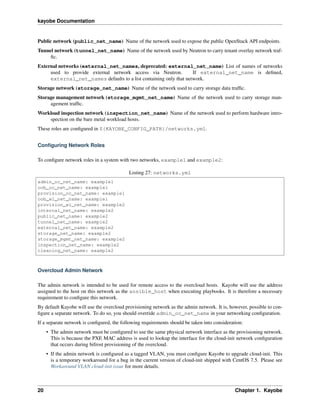
To configure network roles in a system with two networks, example1 and example2:
Listing 27: networks.yml
admin_oc_net_name: example1
oob_oc_net_name: example1
provision_oc_net_name: example1
oob_wl_net_name: example1
provision_wl_net_name: example2
internal_net_name: example2
public_net_name: example2
tunnel_net_name: example2
external_net_name: example2
storage_net_name: example2
storage_mgmt_net_name: example2
inspection_net_name: example2
cleaning_net_name: example2
Overcloud Admin Network
The admin network is intended to be used for remote access to the overcloud hosts. Kayobe will use the address
assigned to the host on this network as the ansible_host when executing playbooks. It is therefore a necessary
requirement to configure this network.
By default Kayobe will use the overcloud provisioning network as the admin network. It is, however, possible to con-
figure a separate network. To do so, you should override admin_oc_net_name in your networking configuration.
If a separate network is configured, the following requirements should be taken into consideration:
• The admin network must be configured to use the same physical network interface as the provisioning network.
This is because the PXE MAC address is used to lookup the interface for the cloud-init network configuration
that occurs during bifrost provisioning of the overcloud.
• If the admin network is configured as a tagged VLAN, you must configure Kayobe to upgrade cloud-init. This
is a temporary workaround for a bug in the current version of cloud-init shipped with CentOS 7.5. Please see
Workaround VLAN cloud-init issue for more details.
20 Chapter 1. Kayobe
kayobe Documentation
Overcloud Provisioning Network
If using a seed to inspect the bare metal overcloud hosts, it is necessary to define a DHCP allocation
pool for the seed’s ironic inspector DHCP server using the inspection_allocation_pool_start and
inspection_allocation_pool_end attributes of the overcloud provisioning network.
Note: This example assumes that the example network is mapped to provision_oc_net_name.
To configure a network called example with an inspection allocation pool:
example_inspection_allocation_pool_start: 10.0.0.128
example_inspection_allocation_pool_end: 10.0.0.254
Note: This pool should not overlap with a kayobe allocation pool on the same network.
Workload Cleaning Network
A separate cleaning network, which is used by the overcloud to clean baremetal workload (compute) hosts, may
optionally be specified. Otherwise, the Workload Provisoning network is used. It is necessary to define an IP allocation
pool for neutron using the neutron_allocation_pool_start and neutron_allocation_pool_end
attributes of the cleaning network. This controls the IP addresses that are assigned to workload hosts during cleaning.
Note: This example assumes that the example network is mapped to cleaning_net_name.
To configure a network called example with a neutron provisioning allocation pool:
example_neutron_allocation_pool_start: 10.0.1.128
example_neutron_allocation_pool_end: 10.0.1.195
Note: This pool should not overlap with a kayobe or inspection allocation pool on the same network.
Workload Provisioning Network
If using the overcloud to provision bare metal workload (compute) hosts, it is necessary to define an IP alloca-
tion pool for the overcloud’s neutron provisioning network using the neutron_allocation_pool_start and
neutron_allocation_pool_end attributes of the workload provisioning network.
Note: This example assumes that the example network is mapped to provision_wl_net_name.
To configure a network called example with a neutron provisioning allocation pool:
example_neutron_allocation_pool_start: 10.0.1.128
example_neutron_allocation_pool_end: 10.0.1.195
1.2. Documentation 21
kayobe Documentation
Note: This pool should not overlap with a kayobe or inspection allocation pool on the same network.
Workload Inspection Network
If using the overcloud to inspect bare metal workload (compute) hosts, it is necessary to define a DHCP allocation
pool for the overcloud’s ironic inspector DHCP server using the inspection_allocation_pool_start and
inspection_allocation_pool_end attributes of the workload provisioning network.
Note: This example assumes that the example network is mapped to provision_wl_net_name.
To configure a network called example with an inspection allocation pool:
example_inspection_allocation_pool_start: 10.0.1.196
example_inspection_allocation_pool_end: 10.0.1.254
Note: This pool should not overlap with a kayobe or neutron allocation pool on the same network.
Neutron Networking
Note: This assumes the use of the neutron openvswitch ML2 mechanism driver for control plane networking.
Certain modes of operation of neutron require layer 2 access to physical networks in the system. Hosts in the network
group (by default, this is the same as the controllers group) run the neutron networking services (Open vSwitch
agent, DHCP agent, L3 agent, metadata agent, etc.).
The kayobe network configuration must ensure that the neutron Open vSwitch bridges on the network hosts have
access to the external network. If bare metal compute nodes are in use, then they must also have access to the
workload provisioning network. This can be done by ensuring that the external and workload provisioning network
interfaces are bridges. Kayobe will ensure connectivity between these Linux bridges and the neutron Open vSwitch
bridges via a virtual Ethernet pair. See Configuring Bridge Interfaces.
Network to Host Mapping
Networks are mapped to hosts using the variable network_interfaces. Kayobe’s playbook group variables
define some sensible defaults for this variable for hosts in the top level standard groups. These defaults are set using
the network roles typically required by the group.
Seed
By default, the seed is attached to the following networks:
• overcloud admin network
• overcloud out-of-band network
• overcloud provisioning network
22 Chapter 1. Kayobe
kayobe Documentation
This list may be extended by setting seed_extra_network_interfaces to a list of names of additional net-
works to attach. Alternatively, the list may be completely overridden by setting seed_network_interfaces.
These variables are found in ${KAYOBE_CONFIG_PATH}/seed.yml.
Seed Hypervisor
By default, the seed hypervisor is attached to the same networks as the seed.
This list may be extended by setting seed_hypervisor_extra_network_interfaces to a list of
names of additional networks to attach. Alternatively, the list may be completely overridden by setting
seed_hypervisor_network_interfaces. These variables are found in ${KAYOBE_CONFIG_PATH}/
seed-hypervisor.yml.
Controllers
By default, controllers are attached to the following networks:
• overcloud admin network
• workload (compute) out-of-band network
• workload (compute) provisioning network
• workload (compute) inspection network
• workload (compute) cleaning network
• internal network
• storage network
• storage management network
In addition, if the controllers are also in the network group, they are attached to the following networks:
• public network
• external network
• tunnel network
This list may be extended by setting controller_extra_network_interfaces to a list of names
of additional networks to attach. Alternatively, the list may be completely overridden by setting
controller_network_interfaces. These variables are found in ${KAYOBE_CONFIG_PATH}/
controllers.yml.
Monitoring Hosts
By default, the monitoring hosts are attached to the same networks as the controllers when they are in the
controllers group. If the monitoring hosts are not in the controllers group, they are attached to the fol-
lowing networks by default:
• overcloud admin network
• internal network
• public network
1.2. Documentation 23
kayobe Documentation
This list may be extended by setting monitoring_extra_network_interfaces to a list of names
of additional networks to attach. Alternatively, the list may be completely overridden by setting
monitoring_network_interfaces. These variables are found in ${KAYOBE_CONFIG_PATH}/
monitoring.yml.
Virtualised Compute Hosts
By default, virtualised compute hosts are attached to the following networks:
• overcloud admin network
• internal network
• storage network
• tunnel network
This list may be extended by setting compute_extra_network_interfaces to a list of names
of additional networks to attach. Alternatively, the list may be completely overridden by setting
compute_network_interfaces. These variables are found in ${KAYOBE_CONFIG_PATH}/compute.
yml.
Other Hosts
If additional hosts are managed by kayobe, the networks to which these hosts are attached may be defined in a host or
group variables file. See Control Plane Service Placement for further details.
Complete Example
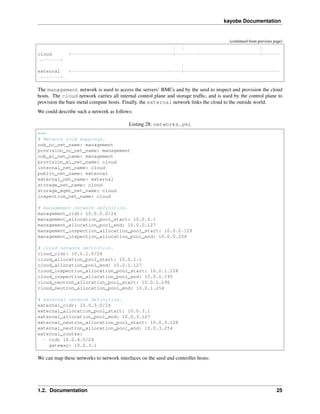
The following example combines the complete network configuration into a single system configuration. In our
example cloud we have three networks: management, cloud and external:
+------------+ +----------------+ +----------------+
| | | +-+ |
˓→+-+
| | | | +-+ | Bare metal
˓→| +-+
| Seed | | Cloud hosts | | | | compute hosts
˓→| | |
| | | | | | |
˓→| | |
| | | | | | |
˓→| | |
+-----+------+ +----------------+ | | +----------------
˓→+ | |
| +-----------------+ | +----------------
˓→-+ |
| +-----------------+ +--------------
˓→---+
| | | | |
| | | | |
| | | | |
| | | | |
management +--------+------------------------+----------------------------------------
˓→------+
(continues on next page)
24 Chapter 1. Kayobe
kayobe Documentation
(continued from previous page)
| | |
cloud +------------------------------------+------------------------------+------
˓→------+
|
external +---------------------------------------+----------------------------------
˓→------+
The management network is used to access the servers’ BMCs and by the seed to inspect and provision the cloud
hosts. The cloud network carries all internal control plane and storage traffic, and is used by the control plane to
provision the bare metal compute hosts. Finally, the external network links the cloud to the outside world.
We could describe such a network as follows:
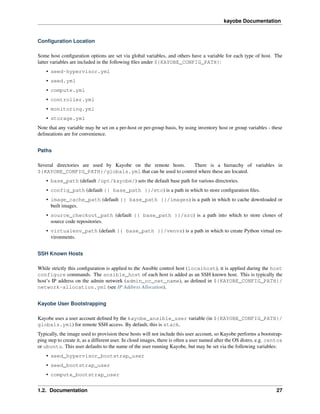
Listing 28: networks.yml
---
# Network role mappings.
oob_oc_net_name: management
provision_oc_net_name: management
oob_wl_net_name: management
provision_wl_net_name: cloud
internal_net_name: cloud
public_net_name: external
external_net_name: external
storage_net_name: cloud
storage_mgmt_net_name: cloud
inspection_net_name: cloud
# management network definition.
management_cidr: 10.0.0.0/24
management_allocation_pool_start: 10.0.0.1
management_allocation_pool_end: 10.0.0.127
management_inspection_allocation_pool_start: 10.0.0.128
management_inspection_allocation_pool_end: 10.0.0.254
# cloud network definition.
cloud_cidr: 10.0.1.0/24
cloud_allocation_pool_start: 10.0.1.1
cloud_allocation_pool_end: 10.0.1.127
cloud_inspection_allocation_pool_start: 10.0.1.128
cloud_inspection_allocation_pool_end: 10.0.1.195
cloud_neutron_allocation_pool_start: 10.0.1.196
cloud_neutron_allocation_pool_end: 10.0.1.254
# external network definition.
external_cidr: 10.0.3.0/24
external_allocation_pool_start: 10.0.3.1
external_allocation_pool_end: 10.0.3.127
external_neutron_allocation_pool_start: 10.0.3.128
external_neutron_allocation_pool_end: 10.0.3.254
external_routes:
- cidr 10.0.4.0/24
gateway: 10.0.3.1
We can map these networks to network interfaces on the seed and controller hosts:
1.2. Documentation 25
kayobe Documentation
Listing 29: inventory/group_vars/seed/
network-interfaces
---
management_interface: eth0
Listing 30: inventory/group_vars/controllers/
network-interfaces
---
management_interface: eth0
cloud_interface: breth1
cloud_bridge_ports:
- eth1
external_interface: eth2
We have defined a bridge for the cloud network on the controllers as this will allow it to be plugged into a neutron
Open vSwitch bridge.
Kayobe will allocate IP addresses for the hosts that it manages:
Listing 31: network-allocation.yml
---
management_ips:
seed: 10.0.0.1
control0: 10.0.0.2
control1: 10.0.0.3
control2: 10.0.0.4
cloud_ips:
control0: 10.0.1.1
control1: 10.0.1.2
control2: 10.0.1.3
external_ips:
control0: 10.0.3.1
control1: 10.0.3.2
control2: 10.0.3.3
Note that although this file does not need to be created manually, doing so allows for a predictable IP address mapping
which may be desirable in some cases.
Host Configuration
This section covers configuration of hosts. It does not cover configuration or deployment of containers. Hosts that are
configured by Kayobe include:
• Seed hypervisor (kayobe seed hypervisor host configure)
• Seed (kayobe seed host configure)
• Overcloud (kayobe overcloud host configure)
Unless otherwise stated, all host configuration described here is applied to each of these types of host.
26 Chapter 1. Kayobe
kayobe Documentation
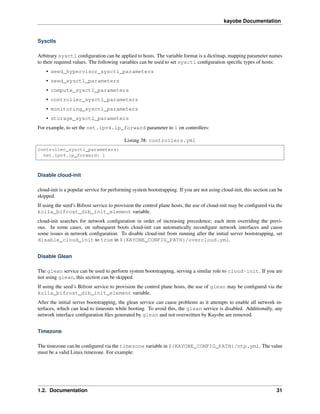
Configuration Location
Some host configuration options are set via global variables, and others have a variable for each type of host. The
latter variables are included in the following files under ${KAYOBE_CONFIG_PATH}:
• seed-hypervisor.yml
• seed.yml
• compute.yml
• controller.yml
• monitoring.yml
• storage.yml
Note that any variable may be set on a per-host or per-group basis, by using inventory host or group variables - these
delineations are for convenience.
Paths
Several directories are used by Kayobe on the remote hosts. There is a hierarchy of variables in
${KAYOBE_CONFIG_PATH}/globals.yml that can be used to control where these are located.
• base_path (default /opt/kayobe/) sets the default base path for various directories.
• config_path (default {{ base_path }}/etc) is a path in which to store configuration files.
• image_cache_path (default {{ base_path }}/images) is a path in which to cache downloaded or
built images.
• source_checkout_path (default {{ base_path }}/src) is a path into which to store clones of
source code repositories.
• virtualenv_path (default {{ base_path }}/venvs) is a path in which to create Python virtual en-
vironments.
SSH Known Hosts
While strictly this configuration is applied to the Ansible control host (localhost), it is applied during the host
configure commands. The ansible_host of each host is added as an SSH known host. This is typically the
host’s IP address on the admin network (admin_oc_net_name), as defined in ${KAYOBE_CONFIG_PATH}/
network-allocation.yml (see IP Address Allocation).
Kayobe User Bootstrapping
Kayobe uses a user account defined by the kayobe_ansible_user variable (in ${KAYOBE_CONFIG_PATH}/
globals.yml) for remote SSH access. By default, this is stack.
Typically, the image used to provision these hosts will not include this user account, so Kayobe performs a bootstrap-
ping step to create it, as a different user. In cloud images, there is often a user named after the OS distro, e.g. centos
or ubuntu. This user defaults to the name of the user running Kayobe, but may be set via the following variables:
• seed_hypervisor_bootstrap_user
• seed_bootstrap_user
• compute_bootstrap_user
1.2. Documentation 27
kayobe Documentation
• controller_bootstrap_user
• monitoring_bootstrap_user
• storage_bootstrap_user
For example, to set the bootstrap user for controllers to centos:
Listing 32: controllers.yml
controller_bootstrap_user: centos
PyPI Mirror
Kayobe supports configuration of a PyPI mirror, via variables in ${KAYOBE_CONFIG_PATH}/pip.yml. This
functionality is enabled by setting the pip_local_mirror variable to true.
Kayobe will generate configuration for pip and easy_install to use the mirror, for the list of users de-
fined by pip_applicable_users (default kayobe_ansible_user and root), in addition to the user
used for Kolla Ansible (kolla_ansible_user). The mirror URL is configured via pip_index_url, and
pip_trusted_hosts is a list of ‘trusted’ hosts, for which SSL verification will be disabled.
For example, to configure use of the test PyPI mirror at https://test.pypi.org/simple/:
Listing 33: pip.yml
pip_local_mirror: true
pip_index_url: https://test.pypi.org/simple/
Kayobe Remote Virtual Environment
By default, Ansible executes modules remotely using the system python interpreter, even if the Ansible control process
is executed from within a virtual environment (unless the local connection plugin is used). This is not ideal if there
are python dependencies that must be installed with isolation from the system python packages. Ansible can be
configured to use a virtualenv by setting the host variable ansible_python_interpreter to a path to a python
interpreter in an existing virtual environment.
If kayobe detects that ansible_python_interpreter is set and references a virtual environment, it will create
the virtual environment if it does not exist. Typically this variable should be set via a group variable in the inventory
for hosts in the seed, seed-hypervisor, and/or overcloud groups.
The default Kayobe configuration in the kayobe-config repository sets ansible_python_interpreter
to {{ virtualenv_path }}/kayobe/bin/python for the seed, seed-hypervisor, and overcloud
groups.
Disk Wiping
Using hosts that may have stale data on their disks could affect the deployment of the cloud. This is not a config-
uration option, since it should only be performed once to avoid losing useful data. It is triggered by passing the
--wipe-disks argument to the host configure commands.
28 Chapter 1. Kayobe
kayobe Documentation
Users and Groups
Linux user accounts and groups can be configured using the users_default variable in
${KAYOBE_CONFIG_PATH}/users.yml. The format of the list is that used by the users variable of
the singleplatform-eng.users role. The following variables can be used to set the users for specific types of hosts:
• seed_hypervisor_users
• seed_users
• compute_users
• controller_users
• monitoring_users
• storage_users
In the following example, a single user named bob is created. A password hash has been generated via mkpasswd
--method=sha-512. The user is added to the wheel group, and an SSH key is authorised. The SSH public key
should be added to the Kayobe configuration.
Listing 34: users.yml
users_default:
- username: bob
name: Bob
password: "$6$wJt9MLWrHlWN8$oXJHbdaslm9guD5EC3Dry1mphuqF9NPeQ43OXk3cXZa2ze/
˓→F9FOTxm2KvvDkbdxBDs7ouwdiLTUJ1Ff40.cFU."
groups:
- wheel
append: True
ssh_key:
- "{{ lookup('file', kayobe_config_path ~ '/ssh-keys/id_rsa_bob.pub') }}"
Package Repositories
Kayobe supports configuration of package repositories via Yum, via variables in ${KAYOBE_CONFIG_PATH}/
yum.yml.
Configuration of yum.conf
Global configuration of Yum is stored in /etc/yum.conf, and options can be set via the yum_config variable.
Options are added to the [main] section of the file. For example, to configure Yum to use a proxy server:
Listing 35: yum.yml
yum_config:
proxy: https://proxy.example.com
CentOS and EPEL Mirrors
CentOS and EPEL mirrors can be enabled by setting yum_use_local_mirror to true. CentOS repository
mirrors are configured via the following variables:
1.2. Documentation 29
kayobe Documentation
• yum_centos_mirror_host (default mirror.centos.org) is the mirror hostname.
• yum_centos_mirror_directory (default centos) is a directory on the mirror in which repositories
may be accessed.
EPEL repository mirrors are configured via the following variables:
• yum_epel_mirror_host (default download.fedoraproject.org) is the mirror hostname.
• yum_epel_mirror_directory (default pub/epel) is a directory on the mirror in which repositories
may be accessed.
For example, to configure CentOS and EPEL mirrors at mirror.example.com:
Listing 36: yum.yml
yum_use_local_mirror: true
yum_centos_mirror_host: mirror.example.com
yum_epel_mirror_host: mirror.example.com
Custom Yum Repositories
It is also possible to configure a list of custom Yum repositories via the yum_custom_repos variable. The format
is a dict/map, with repository names mapping to a dict/map of arguments to pass to the Ansible yum module.
For example, the following configuration defines a single Yum repository called widgets.
Listing 37: yum.yml
yum_custom_repos:
widgets:
baseurl: http://example.com/repo
file: widgets
gpgkey: http://example.com/gpgkey
gpgcheck: yes
Disabling EPEL
It is possible to disable the EPEL Yum repository by setting yum_install_epel to false.
SELinux
SELinux is not supported by Kolla Ansible currently, so it is disabled by Kayobe. If necessary, Kayobe will
reboot systems in order to apply a change to the SELinux configuration. The timeout for waiting for systems
to reboot is disable_selinux_reboot_timeout. Alternatively, the reboot may be avoided by setting
disable_selinux_do_reboot to false.
Network Configuration
Configuration of host networking is covered in depth in Network Configuration.
30 Chapter 1. Kayobe
kayobe Documentation
Sysctls
Arbitrary sysctl configuration can be applied to hosts. The variable format is a dict/map, mapping parameter names
to their required values. The following variables can be used to set sysctl configuration specific types of hosts:
• seed_hypervisor_sysctl_parameters
• seed_sysctl_parameters
• compute_sysctl_parameters
• controller_sysctl_parameters
• monitoring_sysctl_parameters
• storage_sysctl_parameters
For example, to set the net.ipv4.ip_forward parameter to 1 on controllers:
Listing 38: controllers.yml
controller_sysctl_parameters:
net.ipv4.ip_forward: 1
Disable cloud-init
cloud-init is a popular service for performing system bootstrapping. If you are not using cloud-init, this section can be
skipped.
If using the seed’s Bifrost service to provision the control plane hosts, the use of cloud-init may be configured via the
kolla_bifrost_dib_init_element variable.
cloud-init searches for network configuration in order of increasing precedence; each item overriding the previ-
ous. In some cases, on subsequent boots cloud-init can automatically reconfigure network interfaces and cause
some issues in network configuration. To disable cloud-init from running after the initial server bootstrapping, set
disable_cloud_init to true in ${KAYOBE_CONFIG_PATH}/overcloud.yml.
Disable Glean
The glean service can be used to perform system bootstrapping, serving a similar role to cloud-init. If you are
not using glean, this section can be skipped.
If using the seed’s Bifrost service to provision the control plane hosts, the use of glean may be configured via the
kolla_bifrost_dib_init_element variable.
After the initial server bootstrapping, the glean service can cause problems as it attempts to enable all network in-
terfaces, which can lead to timeouts while booting. To avoid this, the glean service is disabled. Additionally, any
network interface configuration files generated by glean and not overwritten by Kayobe are removed.
Timezone
The timezone can be configured via the timezone variable in ${KAYOBE_CONFIG_PATH}/ntp.yml. The value
must be a valid Linux timezone. For example:
1.2. Documentation 31
kayobe Documentation
Listing 39: ntp.yml
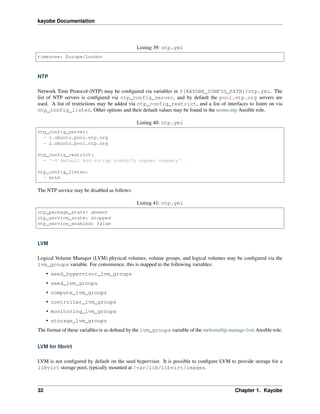
timezone: Europe/London
NTP
Network Time Protocol (NTP) may be configured via variables in ${KAYOBE_CONFIG_PATH}/ntp.yml. The
list of NTP servers is configured via ntp_config_server, and by default the pool.ntp.org servers are
used. A list of restrictions may be added via ntp_config_restrict, and a list of interfaces to listen on via
ntp_config_listen. Other options and their default values may be found in the resmo.ntp Ansible role.
Listing 40: ntp.yml
ntp_config_server:
- 1.ubuntu.pool.ntp.org
- 2.ubuntu.pool.ntp.org
ntp_config_restrict:
- '-4 default kod notrap nomodify nopeer noquery'
ntp_config_listen:
- eth0
The NTP service may be disabled as follows:
Listing 41: ntp.yml
ntp_package_state: absent
ntp_service_state: stopped
ntp_service_enabled: false
LVM
Logical Volume Manager (LVM) physical volumes, volume groups, and logical volumes may be configured via the
lvm_groups variable. For convenience, this is mapped to the following variables:
• seed_hypervisor_lvm_groups
• seed_lvm_groups
• compute_lvm_groups
• controller_lvm_groups
• monitoring_lvm_groups
• storage_lvm_groups
The format of these variables is as defined by the lvm_groups variable of the mrlesmithjr.manage-lvm Ansible role.
LVM for libvirt
LVM is not configured by default on the seed hypervisor. It is possible to configure LVM to provide storage for a
libvirt storage pool, typically mounted at /var/lib/libvirt/images.
32 Chapter 1. Kayobe
kayobe Documentation
To use this configuration, set the seed_hypervisor_lvm_groups variable to "{{
seed_hypervisor_lvm_groups_with_data }}" and provide a list of disks via the
seed_hypervisor_lvm_group_data_disks variable.
LVM for Docker
The default LVM configuration is optimised for the devicemapper Docker storage driver, which requires a thin
provisioned LVM volume. A second logical volume is used for storing Docker volume data, mounted at /var/lib/
docker/volumes. Both logical volumes are created from a single data volume group.
To use this configuration, a list of disks must be configured via the following variables:
• seed_lvm_group_data_disks
• compute_lvm_group_data_disks
• controller_lvm_group_data_disks
• monitoring_lvm_group_data_disks
• storage_lvm_group_data_disks
For example, to configure two of the seed’s disks for use by LVM:
Listing 42: seed.yml
seed_lvm_group_data_disks:
- /dev/sdb
- /dev/sdc
The Docker volumes LVM volume is assigned a size given by the following variables, with a default value of 75% (of
the volume group’s capacity):
• seed_lvm_group_data_lv_docker_volumes_size
• compute_lvm_group_data_lv_docker_volumes_size
• controller_lvm_group_data_lv_docker_volumes_size
• monitoring_lvm_group_data_lv_docker_volumes_size
• storage_lvm_group_data_lv_docker_volumes_size
If using a Docker storage driver other than devicemapper, the remaining 25% of the volume group can be used for
Docker volume data. In this case, the LVM volume’s size can be increased to 100%:
Listing 43: controllers.yml
controller_lvm_group_data_lv_docker_volumes_size: 100%
If using a Docker storage driver other than devicemapper, it is possible to avoid using LVM entirely, thus avoiding
the requirement for multiple disks. In this case, set the appropriate <host>_lvm_groups variable to an empty list:
Listing 44: storage.yml
storage_lvm_groups: []
Custom LVM
To define additional logical logical volumes in the default data volume group, modify one of the following variables:
1.2. Documentation 33
kayobe Documentation
• seed_lvm_group_data_lvs
• compute_lvm_group_data_lvs
• controller_lvm_group_data_lvs
• monitoring_lvm_group_data_lvs
• storage_lvm_group_data_lvs
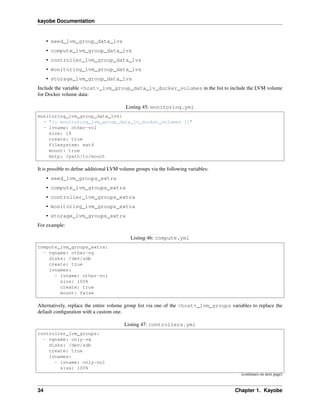
Include the variable <host>_lvm_group_data_lv_docker_volumes in the list to include the LVM volume
for Docker volume data:
Listing 45: monitoring.yml
monitoring_lvm_group_data_lvs:
- "{{ monitoring_lvm_group_data_lv_docker_volumes }}"
- lvname: other-vol
size: 1%
create: true
filesystem: ext4
mount: true
mntp: /path/to/mount
It is possible to define additional LVM volume groups via the following variables:
• seed_lvm_groups_extra
• compute_lvm_groups_extra
• controller_lvm_groups_extra
• monitoring_lvm_groups_extra
• storage_lvm_groups_extra
For example:
Listing 46: compute.yml
compute_lvm_groups_extra:
- vgname: other-vg
disks: /dev/sdb
create: true
lvnames:
- lvname: other-vol
size: 100%
create: true
mount: false
Alternatively, replace the entire volume group list via one of the <host>_lvm_groups variables to replace the
default configuration with a custom one.
Listing 47: controllers.yml
controller_lvm_groups:
- vgname: only-vg
disks: /dev/sdb
create: true
lvnames:
- lvname: only-vol
size: 100%
(continues on next page)
34 Chapter 1. Kayobe
kayobe Documentation
(continued from previous page)
create: true
mount: false
Kolla-ansible bootstrap-servers
Kolla Ansible provides some host configuration functionality via the bootstrap-servers command, which may
be leveraged by Kayobe. Due to the bootstrapping nature of the command, Kayobe uses kayobe_ansible_user
to execute it, and uses the Kayobe remote Python virtual environment (or the system Python interpreter if no virtual
environment is in use).
See the Kolla Ansible documentation for more information on the functions performed by this command, and how to
configure it.
Kolla-ansible Remote Virtual Environment
See Remote Execution Environment for information about remote Python virtual environments for Kolla Ansible.
Docker Engine
Docker engine configuration is applied by both Kayobe and Kolla Ansible (during bootstrap-servers).
The docker_storage_driver variable sets the Docker storage driver, and by default the devicemapper driver
is used. If using this driver, see LVM for information about configuring LVM for Docker.
Various options are defined in ${KAYOBE_CONFIG_PATH}/docker.yml for configuring the devicemapper
storage.
A private Docker registry may be configured via docker_registry, with a Certificate Authority (CA) file config-
ured via docker_registry_ca.
To use one or more Docker Registry mirrors, use the docker_registry_mirrors variable.
If using an MTU other than 1500, docker_daemon_mtu can be used to configure this. This setting does not apply
to containers using net=host (as Kolla Ansible’s containers do), but may be necessary when building images.
Docker’s live restore feature can be configured via docker_daemon_live_restore, although it is disabled by
default due to issues observed.
Ceph Block Devices
If using Kolla Ansible to deploy Ceph, some preparation of block devices is required. The list of disks to configure
for use by Ceph is specified via ceph_disks. This is mapped to the following variables:
• compute_ceph_disks
• controller_ceph_disks
• storage_ceph_disks
The format of the variable is a list of dict/mapping objects. Each mapping should contain an osd item that defines the
full path to a block device to use for data. Optionally, each mapping may contain a journal item that specifies the
full path to a block device to use for journal data.
The following example defines two OSDs for use by controllers, one of which has a journal:
1.2. Documentation 35
kayobe Documentation
Listing 48: controller.yml
controller_ceph_disks:
- osd: /dev/sdb
- osd: /dev/sdc
journal: /dev/sdd
Kolla Configuration
Anyone using Kayobe to build images should familiarise themselves with the Kolla project’s documentation.
Container Image Build Host
Images are built on hosts in the container-image-builders group. The default Kayobe Ansible inventory
places the seed host in this group, although it is possible to put a different host in the group, by modifying the
inventory.
For example, to build images on localhost:
Listing 49: inventory/groups
[container-image-builders:children]
Listing 50: inventory/hosts
[container-image-builders]
localhost
Kolla Installation
Prior to building container images, Kolla and its dependencies will be installed on the container image build host. The
following variables affect the installation of Kolla:
kolla_ctl_install_type Type of installation, either binary (PyPI) or source (git). Default is source.
kolla_source_path Path to directory for Kolla source code checkout. Default is {{
source_checkout_path ~ '/kolla' }}.
kolla_source_url URL of Kolla source code repository if type is source. Default is https://git.openstack.org/
openstack/kolla.
kolla_source_version Version (branch, tag, etc.) of Kolla source code repository if type is source. Default
is the same as the Kayobe upstream branch name.
kolla_venv Path to virtualenv in which to install Kolla on the container image build host. Default is {{
virtualenv_path ~ '/kolla' }}.
kolla_build_config_path Path in which to generate kolla configuration. Default is {{ config_path ~
'/kolla' }}.
For example, to install from a custom Git repository:
36 Chapter 1. Kayobe
kayobe Documentation
Listing 51: kolla.yml
kolla_source_url: https://git.example.com/kolla
kolla_source_version: downstream
Global Configuration
The following variables are global, affecting all container images. They are used to generate the Kolla configuration
file, kolla-build.conf.
kolla_base_distro Kolla base container image distribution. Default is centos.
kolla_install_type Kolla container image type: binary or source. Default is binary.
kolla_docker_namespace Docker namespace to use for Kolla images. Default is kolla.
kolla_docker_registry URL of docker registry to use for Kolla images. Default is to use the value of
docker_registry variable (see Docker Engine).
kolla_docker_registry_username Username to use to access a docker registry. Default is not set, in which
case the registry will be used without authentication.
kolla_docker_registry_password Password to use to access a docker registry. Default is not set, in which
case the registry will be used without authentication.
kolla_openstack_release Kolla OpenStack release version. This should be a Docker image tag. Default is
the OpenStack release name (e.g. rocky) on stable branches and tagged releases, or master on the Kayobe
master branch.
For example, to build the Kolla centos binary images with a namespace of example, and a private Docker
registry at registry.example.com:4000, tagged with 7.0.0.1:
Listing 52: kolla.yml
kolla_base_distro: centos
kolla_install_type: binary
kolla_docker_namespace: example
kolla_docker_registry: registry.example.com:4000
kolla_openstack_release: 7.0.0.1
The ironic-api image built with this configuration would be referenced as follows:
registry.example.com:4000/example/centos-binary-ironic-api:7.0.0.1
Further customisation of the Kolla configuration file can be performed by writing a file at
${KAYOBE_CONFIG_PATH/kolla/kolla-build.conf. For example, to enable debug logging:
Listing 53: kolla/kolla-build.conf
[DEFAULT]
debug = True
Seed Images
The kayobe seed container image build command builds images for the seed services. The only image
required for the seed services is the bifrost-deploy image.
1.2. Documentation 37
kayobe Documentation
Overcloud Images
The kayobe overcloud container image build command builds images for the control plane. The de-
fault set of images built depends on which services and features are enabled via the kolla_enable_<service>
flags in $KAYOBE_CONFIG_PATH/kolla.yml.
For example, the following configuration will enable the Magnum service and add the magnum-api and
magnum-conductor containers to the set of overcloud images that will be built:
Listing 54: kolla.yml
kolla_enable_magnum: true
If a required image is not built when the corresponding flag is set, check the image sets defined in
overcloud_container_image_sets in ansible/group_vars/all/kolla.
Image Customisation
There are three main approaches to customising the Kolla container images:
1. Overriding Jinja2 blocks
2. Overriding Jinja2 variables
3. Source code locations
Overriding Jinja2 blocks
Kolla’s images are defined via Jinja2 templates that generate Dockerfiles. Jinja2 blocks are frequently used to allow
specific statements in one or more Dockerfiles to be replaced with custom statements. See the Kolla documentation
for details.
Blocks are configured via the kolla_build_blocks variable, which is a dict mapping Jinja2 block names in to
their contents.
For example, to override the block header to add a custom label to every image:
Listing 55: kolla.yml
kolla_build_blocks:
header: |
LABEL foo="bar"
This will result in Kayobe generating a template-override.j2 file with the following content:
Listing 56: template-override.j2
{% extends parent_template %}
{% block header %}
LABEL foo="bar"
{% endblock %}
38 Chapter 1. Kayobe
kayobe Documentation
Overriding Jinja2 variables
Jinja2 variables offer another way to customise images. See the Kolla documentation for details of using variable
overrides to modify the list of packages to install in an image.
Variable overrides are configured via the kolla_build_customizations variable, which is a dict/map mapping
names of variables to override to their values.
For example, to add mod_auth_openidc to the list of packages installed in the keystone-base image, we can
set the variable keystone_base_packages_append to a list containing mod_auth_openidc.
Listing 57: kolla.yml
kolla_build_customizations:
keystone_base_packages_append:
- mod_auth_openidc
This will result in Kayobe generating a template-override.j2 file with the following content:
Listing 58: template-override.j2
{% extends parent_template %}
{% set keystone_base_packages_append = ["mod_auth_openidc"] %}
Note that the variable value will be JSON-encoded in template-override.j2.
Source code locations
For source image builds, configuration of source code locations for packages installed in containers by Kolla is
possible via the kolla_sources variable. The format is a dict/map mapping names of sources to their definitions.
See the Kolla documentation for details. The default is to specify the URL and version of Bifrost, as defined in
${KAYOBE_CONFIG_PATH}/bifrost.yml.
For example, to specify a custom source location for the ironic-base package:
Listing 59: kolla.yml
kolla_sources:
bifrost-base:
type: "git"
location: "{{ kolla_bifrost_source_url }}"
reference: "{{ kolla_bifrost_source_version }}"
ironic-base:
type: "git"
location: https://git.example.com/ironic
reference: downstream
This will result in Kayobe adding the following configuration to kolla-build.conf:
Listing 60: kolla-build.conf
[bifrost-base]
type = git
location = https://git.openstack.org/openstack/bifrost
reference = stable/rocky
(continues on next page)
1.2. Documentation 39
kayobe Documentation
(continued from previous page)
[ironic-base]
type = git
location = https://git.example.com/ironic
reference = downstream
Note that is is currently necessary to include the Bifrost source location if using a seed.
Plugins & additions
These features can also be used for installing plugins and additions to source type images.
For example, to install a networking-ansible plugin in the neutron-server image:
Listing 61: kolla.yml
kolla_sources:
bifrost-base:
type: "git"
location: "{{ kolla_bifrost_source_url }}"
reference: "{{ kolla_bifrost_source_version }}"
neutron-server-plugin-networking-ansible:
type: "git"
location: https://git.example.com/networking-ansible
reference: downstream
The neutron-server image automatically installs any plugins provided to it. For images that do not, a block such
as the following may be required:
Listing 62: kolla.yml
kolla_build_blocks:
neutron_server_footer: |
ADD plugins-archive /
pip --no-cache-dir install /plugins/*
A similar approach may be used for additions.
Kolla-ansible Configuration
Kayobe relies heavily on kolla-ansible for deployment of the OpenStack control plane. Kolla-ansible is installed
locally on the Ansible control host (the host from which kayobe commands are executed), and kolla-ansible commands
are executed from there.
Local Environment
Environment variables are used to configure the environment in which kolla-ansible is installed and executed.
40 Chapter 1. Kayobe
kayobe Documentation
Table 1: Kolla-ansible environment variables
Variable Purpose Default
$KOLLA_CONFIG_PATHPath on the Ansible control host in which the kolla-ansible configuration
will be generated. These files should not be manually edited.
/etc/kolla
$KOLLA_SOURCE_PATHPath on the Ansible control host in which the kolla-ansible source code
will be cloned.
$PWD/src/
kolla-ansible
$KOLLA_VENV_PATHPath on the Ansible control host in which the kolla-ansible virtualenv will
be created.
$PWD/venvs/
kolla-ansible
Extra Python packages can be installed inside the kolla-ansible virtualenv, such as when required by Ansible plu-
gins, using the kolla_ansible_venv_extra_requirements list variable in $KAYOBE_CONFIG_PATH/
kolla.yml. For example, to use the hashi_vault Ansible lookup plugin, its hvac dependency can be installed
using:
Listing 63: $KAYOBE_CONFIG_PATH/kolla.yml
---
# Extra requirements to install inside the kolla-ansible virtualenv.
kolla_ansible_venv_extra_requirements:
- "hvac"
Remote Execution Environment
By default, ansible executes modules remotely using the system python interpreter, even if the ansible control process
is executed from within a virtual environment (unless the local connection plugin is used). This is not ideal if
there are python dependencies that must be installed with isolation from the system python packages. Ansible can be
configured to use a virtualenv by setting the host variable ansible_python_interpreter to a path to a python
interpreter in an existing virtual environment.
If the variable kolla_ansible_target_venv is set, kolla-ansible will be configured to create and use a
virtual environment on the remote hosts. This variable is by default set to {{ virtualenv_path }}/
kolla-ansible. The previous behaviour of installing python dependencies directly to the host can be used by
setting kolla_ansible_target_venv to None.
Control Plane Services
Kolla-ansible provides a flexible mechanism for configuring the services that it deploys. Kayobe adds some commonly
required configuration options to the defaults provided by kolla-ansible, but also allows for the free-form configuration
supported by kolla-ansible. The kolla-ansible documentation should be used as a reference.
Global Variables
Kolla-ansible uses a single file for global variables, globals.yml. Kayobe provides configuration variables
for all required variables and many of the most commonly used the variables in this file. Some of these are in
$KAYOBE_CONFIG_PATH/kolla.yml, and others are determined from other sources such as the networking
configuration in $KAYOBE_CONFIG_PATH/networks.yml.
1.2. Documentation 41
kayobe Documentation
Configuring Custom Global Variables
Additional global configuration may be provided by creating $KAYOBE_CONFIG_PATH/kolla/globals.yml.
Variables in this file will be templated using Jinja2, and merged with the Kayobe globals.yml configuration.
Listing 64: $KAYOBE_CONFIG_PATH/kolla/globals.yml
---
# Use a custom tag for the nova-api container image.
nova_api_tag: v1.2.3
Passwords
Kolla-ansible auto-generates passwords to a file, passwords.yml. Kayobe handles the orchestration of this, as well
as encryption of the file using an ansible vault password specified in the KAYOBE_VAULT_PASSWORD environment
variable, if present. The file is generated to $KAYOBE_CONFIG_PATH/kolla/passwords.yml, and should be
stored along with other kayobe configuration files. This file should not be manually modified.
Configuring Custom Passwords
In order to write additional passwords to passwords.yml, set the kayobe variable
kolla_ansible_custom_passwords in $KAYOBE_CONFIG_PATH/kolla.yml.
Listing 65: $KAYOBE_CONFIG_PATH/kolla.yml
---
# Dictionary containing custom passwords to add or override in the Kolla
# passwords file.
kolla_ansible_custom_passwords: >
{{ kolla_ansible_default_custom_passwords |
combine({'my_custom_password': 'correcthorsebatterystaple'}) }}
Service Configuration
Kolla-ansible’s flexible configuration is described in the kolla-ansible service configuration documentation. We won’t
duplicate that here, but essentially it involves creating files under a directory which for users of kayobe will be
$KOLLA_CONFIG_PATH/config. In kayobe, files in this directory are auto-generated and managed by kay-
obe. Instead, users should create files under $KAYOBE_CONFIG_PATH/kolla/config with the same directory
structure. These files will be templated using Jinja2, merged with kayobe’s own configuration, and written out to
$KOLLA_CONFIG_PATH/config.
The following files, if present, will be templated and provided to kolla-ansible. All paths are relative to
$KAYOBE_CONFIG_PATH/kolla/config. Note that typically kolla-ansible does not use the same wildcard
patterns, and has a more restricted set of files that it will process. In some cases, it may be necessary to inspect the
kolla-ansible configuration tasks to determine which files are supported.
Configuring an OpenStack Component
To provide custom configuration to be applied to all glance services, create $KAYOBE_CONFIG_PATH/kolla/
config/glance.conf. For example:
42 Chapter 1. Kayobe
kayobe Documentation
Listing 66: $KAYOBE_CONFIG_PATH/kolla/config/glance.
conf
[DEFAULT]
api_limit_max = 500
Configuring an OpenStack Service
To provide custom configuration for the glance API service, create $KAYOBE_CONFIG_PATH/kolla/config/
glance/glance-api.conf. For example:
Listing 67: $KAYOBE_CONFIG_PATH/kolla/config/glance/
glance-api.conf
[DEFAULT]
api_limit_max = 500
1.2.5 Deployment
This section describes usage of Kayobe to install an OpenStack cloud onto a set of bare metal servers. We assume
access is available to a node which will act as the hypervisor hosting the seed node in a VM. We also assume that this
seed hypervisor has access to the bare metal nodes that will form the OpenStack control plane. Finally, we assume
that the control plane nodes have access to the bare metal nodes that will form the workload node pool.
Ansible Control Host
Before starting deployment we must bootstrap the Ansible control host. Tasks performed here include:
• Install Ansible and role dependencies from Ansible Galaxy.
• Generate an SSH key if necessary and add it to the current user’s authorised keys.
To bootstrap the Ansible control host:
(kayobe) $ kayobe control host bootstrap
Physical Network
The physical network can be managed by Kayobe, which uses Ansible’s network modules. Currently Dell Network
OS 6 and Dell Network OS 9 switches are supported but this could easily be extended. To provision the physical
network:
(kayobe) $ kayobe physical network configure --group <group> [--enable-discovery]
The --group argument is used to specify an Ansible group containing the switches to be configured.
The --enable-discovery argument enables a one-time configuration of ports attached to baremetal compute
nodes to support hardware discovery via ironic inspector.
It is possible to limit the switch interfaces that will be configured, either by interface name or interface description:
1.2. Documentation 43
kayobe Documentation
(kayobe) $ kayobe physical network configure --group <group> --interface-limit
˓→<interface names>
(kayobe) $ kayobe physical network configure --group <group> --interface-description-
˓→limit <interface descriptions>
The names or descriptions should be separated by commas. This may be useful when adding compute nodes to an
existing deployment, in order to avoid changing the configuration interfaces in use by active nodes.
The --display argument will display the candidate switch configuration, without actually applying it.
Seed Hypervisor
Note: It is not necessary to run the seed services in a VM. To use an existing bare metal host or a VM provisioned
outside of Kayobe, this section may be skipped.
Host Configuration
To configure the seed hypervisor’s host OS, and the Libvirt/KVM virtualisation support:
(kayobe) $ kayobe seed hypervisor host configure
Seed
VM Provisioning
Note: It is not necessary to run the seed services in a VM. To use an existing bare metal host or a VM provisioned
outside of Kayobe, this step may be skipped. Ensure that the Ansible inventory contains a host for the seed.
The seed hypervisor should have CentOS and libvirt installed. It should have libvirt networks configured for
all networks that the seed VM needs access to and a libvirt storage pool available for the seed VM’s volumes. To
provision the seed VM:
(kayobe) $ kayobe seed vm provision
When this command has completed the seed VM should be active and accessible via SSH. Kayobe will update the
Ansible inventory with the IP address of the VM.
Host Configuration
To configure the seed host OS:
(kayobe) $ kayobe seed host configure
Note: If the seed host uses disks that have been in use in a previous installation, it may be necessary to wipe partition
and LVM data from those disks. To wipe all disks that are not mounted during host configuration:
44 Chapter 1. Kayobe
kayobe Documentation
(kayobe) $ kayobe seed host configure --wipe-disks
Building Container Images
Note: It is possible to use prebuilt container images from an image registry such as Dockerhub. In this case, this step
can be skipped.
It is possible to use prebuilt container images from an image registry such as Dockerhub. In some cases it may be
necessary to build images locally either to apply local image customisation or to use a downstream version of kolla.
Images are built by hosts in the container-image-builders group, which by default includes the seed.
To build container images:
(kayobe) $ kayobe seed container image build
It is possible to build a specific set of images by supplying one or more image name regular expressions:
(kayobe) $ kayobe seed container image build bifrost-deploy
In order to push images to a registry after they are built, add the --push argument.
Workaround VLAN cloud-init issue
If you wish to configure the overcloud hosts to use a tagged VLAN for the admin network in-
terface, you must set overcloud_host_image_workaround_cloud_init_enabled to True in
${KAYOBE_CONFIG_PATH}/etc/kayobe/overcloud.yml:
overcloud_host_image_workaround_cloud_init_enabled: True
prior to deploying the containerised services with:
(kayobe) $ kayobe seed service deploy
Kayobe will then patch the overcloud host image to include a more recent version of cloud-init. This is to workaround
a bug in the version of cloud-init currently shipped with CentOS 7.5 (0.7.9-24 at the time of writing), which doesn’t
set the IP address of VLAN subinterfaces. See: https://bugs.centos.org/view.php?id=14964.
The default repository used to obtain the package is currently hosted on github in the cloud-init-repo repos-
itory. You can override this by setting overcloud_host_image_workaround_cloud_init_repo in
${KAYOBE_CONFIG_PATH}/etc/kayobe/overcloud.yml:
overcloud_host_image_workaround_cloud_init_repo: https://stackhpc.github.io/cloud-
˓→init-repo/
The source code used to build the updated package can be obtained from the cloud-init-repo-source repository.
As this is not an offical package, there may be latent bugs when using functionality the kayobe developers have not
used themselves.
1.2. Documentation 45
kayobe Documentation
Deploying Containerised Services
At this point the seed services need to be deployed on the seed VM. These services are deployed in the
bifrost_deploy container. This command will also build the Operating System image that will be used to deploy
the overcloud nodes using Disk Image Builder (DIB).
To deploy the seed services in containers:
(kayobe) $ kayobe seed service deploy
After this command has completed the seed services will be active.
Building Deployment Images
Note: It is possible to use prebuilt deployment images. In this case, this step can be skipped.
It is possible to use prebuilt deployment images from the OpenStack hosted tarballs or another source. In some cases it
may be necessary to build images locally either to apply local image customisation or to use a downstream version of
Ironic Python Agent (IPA). In order to build IPA images, the ipa_build_images variable should be set to True.
To build images locally:
(kayobe) $ kayobe seed deployment image build
If images have been built previously, they will not be rebuilt. To force rebuilding images, use the --force-rebuild
argument.
Accessing the Seed via SSH (Optional)
For SSH access to the seed, first determine the seed’s IP address. We can use the kayobe configuration dump
command to inspect the seed’s IP address:
(kayobe) $ kayobe configuration dump --host seed --var-name ansible_host
The kayobe_ansible_user variable determines which user account will be used by Kayobe when accessing the
machine via SSH. By default this is stack. Use this user to access the seed:
$ ssh <kayobe ansible user>@<seed VM IP>
To see the active Docker containers:
$ docker ps
Leave the seed VM and return to the shell on the Ansible control host:
$ exit
Overcloud
Discovery
46 Chapter 1. Kayobe
kayobe Documentation
Note: If discovery of the overcloud is not possible, a static inventory of servers using the bifrost servers.yml
file format may be configured using the kolla_bifrost_servers variable in ${KAYOBE_CONFIG_PATH}/
bifrost.yml.
Discovery of the overcloud is supported by the ironic inspector service running in the bifrost_deploy container
on the seed. The service is configured to PXE boot unrecognised MAC addresses with an IPA ramdisk for intro-
spection. If an introspected node does not exist in the ironic inventory, ironic inspector will create a new entry for
it.
Discovery of the overcloud is triggered by causing the nodes to PXE boot using a NIC attached to the overcloud
provisioning network. For many servers this will be the factory default and can be performed by powering them on.
On completion of the discovery process, the overcloud nodes should be registered with the ironic service running in
the seed host’s bifrost_deploy container. The node inventory can be viewed by executing the following on the
seed:
$ docker exec -it bifrost_deploy bash
(bifrost_deploy) $ source env-vars
(bifrost_deploy) $ ironic node-list
In order to interact with these nodes using Kayobe, run the following command to add them to the Kayobe and Kolla-
Ansible inventories:
(kayobe) $ kayobe overcloud inventory discover
Saving Hardware Introspection Data
If ironic inspector is in use on the seed host, introspection data will be stored in the local nginx service. This data may
be saved to the control host:
(kayobe) $ kayobe overcloud introspection data save
--output-dir may be used to specify the directory in which introspection data files will be saved.
--output-format may be used to set the format of the files.
BIOS and RAID Configuration
Note: BIOS and RAID configuration may require one or more power cycles of the hardware to complete the operation.
These will be performed automatically.
Configuration of BIOS settings and RAID volumes is currently performed out of band as a separate task from hardware
provisioning. To configure the BIOS and RAID:
(kayobe) $ kayobe overcloud bios raid configure
After configuring the nodes’ RAID volumes it may be necessary to perform hardware inspection of the nodes to
reconfigure the ironic nodes’ scheduling properties and root device hints. To perform manual hardware inspection:
(kayobe) $ kayobe overcloud hardware inspect
1.2. Documentation 47
kayobe Documentation
Provisioning
Provisioning of the overcloud is performed by the ironic service running in the bifrost container on the seed. To
provision the overcloud nodes:
(kayobe) $ kayobe overcloud provision
After this command has completed the overcloud nodes should have been provisioned with an OS image. The com-
mand will wait for the nodes to become active in ironic and accessible via SSH.
Host Configuration
To configure the overcloud hosts’ OS:
(kayobe) $ kayobe overcloud host configure
Note: If the controller hosts use disks that have been in use in a previous installation, it may be necessary to wipe
partition and LVM data from those disks. To wipe all disks that are not mounted during host configuration:
(kayobe) $ kayobe overcloud host configure --wipe-disks
Building Container Images
Note: It is possible to use prebuilt container images from an image registry such as Dockerhub. In this case, this step
can be skipped.
In some cases it may be necessary to build images locally either to apply local image customisation or to use a
downstream version of kolla. Images are built by hosts in the container-image-builders group, which by
default includes the seed. If no seed host is in use, for example in an all-in-one controller development environment,
this group may be modified to cause containers to be built on the controllers.
To build container images:
(kayobe) $ kayobe overcloud container image build
It is possible to build a specific set of images by supplying one or more image name regular expressions:
(kayobe) $ kayobe overcloud container image build ironic- nova-api
In order to push images to a registry after they are built, add the --push argument.
Pulling Container Images
Note: It is possible to build container images locally avoiding the need for an image registry such as Dockerhub. In
this case, this step can be skipped.
48 Chapter 1. Kayobe
kayobe Documentation
In most cases suitable prebuilt kolla images will be available on Dockerhub. The stackhpc account provides image
repositories suitable for use with kayobe and will be used by default. To pull images from the configured image
registry:
(kayobe) $ kayobe overcloud container image pull
Building Deployment Images
Note: It is possible to use prebuilt deployment images. In this case, this step can be skipped.
Note: Deployment images are only required for the overcloud when Ironic is in use. Otherwise, this step can be
skipped.
It is possible to use prebuilt deployment images from the OpenStack hosted tarballs or another source. In some cases it
may be necessary to build images locally either to apply local image customisation or to use a downstream version of
Ironic Python Agent (IPA). In order to build IPA images, the ipa_build_images variable should be set to True.
To build images locally:
(kayobe) $ kayobe overcloud deployment image build
If images have been built previously, they will not be rebuilt. To force rebuilding images, use the --force-rebuild
argument.
Deploying Containerised Services
To deploy the overcloud services in containers:
(kayobe) $ kayobe overcloud service deploy
Once this command has completed the overcloud nodes should have OpenStack services running in Docker containers.
Interacting with the Control Plane
Kolla-ansible writes out an environment file that can be used to access the OpenStack admin endpoints as the admin
user:
$ source ${KOLLA_CONFIG_PATH:-/etc/kolla}/admin-openrc.sh
Kayobe also generates an environment file that can be used to access the OpenStack public endpoints as the admin
user which may be required if the admin endpoints are not available from the Ansible control host:
$ source ${KOLLA_CONFIG_PATH:-/etc/kolla}/public-openrc.sh
Performing Post-deployment Configuration
To perform post deployment configuration of the overcloud services:
1.2. Documentation 49
kayobe Documentation
(kayobe) $ source ${KOLLA_CONFIG_PATH:-/etc/kolla}/admin-openrc.sh
(kayobe) $ kayobe overcloud post configure
This will perform the following tasks:
• Register Ironic Python Agent (IPA) images with glance
• Register introspection rules with ironic inspector
• Register a provisioning network and subnet with neutron
• Configure Grafana organisations, dashboards and datasources
1.2.6 Upgrading
This section describes how to upgrade from one OpenStack release to another.
Preparation
Before you start, be sure to back up any local changes, configuration, and data.
Upgrading Kayobe
If a new, suitable version of kayobe is available, it should be installed. As described in Installation, Kayobe can be
installed via the released Python packages on PyPI, or from source. Installation from a Python package is supported
from Kayobe 5.0.0 onwards.
Upgrading from PyPI
This section describes how to upgrade Kayobe from a Python package in a virtualenv. This is supported from Kayobe
5.0.0 onwards.
Ensure that the virtualenv is activated:
$ source <base_path>/venvs/kayobe/bin/activate
Update the pip package:
(kayobe) $ pip install -U pip
If upgrading to the latest version of Kayobe:
(kayobe) $ pip install -U kayobe
Alternatively, to upgrade to a specific release of Kayobe:
(kayobe) $ pip install kayobe==5.0.0
50 Chapter 1. Kayobe
kayobe Documentation
Upgrading from source
This section describes how to install Kayobe from source in a virtualenv.
First, check out the required version of the Kayobe source code. This may be done by pulling down the new version
from Github. Make sure that any local changes to kayobe are committed and merged with the new upstream code as
necessary. For example, to pull version 5.0.0 from the origin remote:
$ cd <base_path>/src/kayobe
$ git pull origin 5.0.0
Ensure that the virtualenv is activated:
$ source <base_path>/venvs/kayobe/bin/activate
Update the pip package:
(kayobe) $ pip install -U pip
If using a non-editable install of Kayobe:
(kayobe) $ cd <base_path>/src/kayobe
(kayobe) $ pip install -U .
Alternatively, if using an editable install of Kayobe (version 5.0.0 onwards, see Editable source installation for details):
(kayobe) $ cd <base_path>/src/kayobe
(kayobe) $ pip install -U -e .
Migrating Kayobe Configuration
Kayobe configuration options may be changed between releases of kayobe. Ensure that all site local configuration
is migrated to the target version format. If using the kayobe-config git repository to manage local configuration, this
process can be managed via git. For example, to fetch version 1.0.0 of the configuration from the origin remote and
merge it into the current branch:
$ git fetch origin 1.0.0
$ git merge 1.0.0
The configuration should be manually inspected after the merge to ensure that it is correct. Any new configuration
options may be set at this point. In particular, the following options may need to be changed if not using their default
values:
• kolla_openstack_release
• kolla_sources
• kolla_build_blocks
• kolla_build_customizations
Once the configuration has been migrated, it is possible to view the global variables for all hosts:
(kayobe) $ kayobe configuration dump
The output of this command is a JSON object mapping hosts to their configuration. The output of the command may
be restricted using the --host, --hosts, --var-name and --dump-facts options.
1.2. Documentation 51
kayobe Documentation
If using the kayobe-env environment file in kayobe-config, this should also be inspected for changes and
modified to suit the local ansible control host environment if necessary. When ready, source the environment file:
$ source kayobe-env
Upgrading the Ansible Control Host
Before starting the upgrade we must upgrade the Ansible control host. Tasks performed here include:
• Install updated Ansible role dependencies from Ansible Galaxy.
• Generate an SSH key if necessary and add it to the current user’s authorised keys.
To upgrade the Ansible control host:
(kayobe) $ kayobe control host upgrade
Upgrading the Seed Hypervisor
Currently, upgrading the seed hypervisor services is not supported. It may however be necessary to upgrade some host
services:
(kayobe) $ kayobe seed hypervisor host upgrade
Note that this will not perform full configuration of the host, and will instead perform a targeted upgrade of specific
services where necessary.
Upgrading the Seed
The seed services are upgraded in two steps. First, new container images should be obtained either by building them
locally or pulling them from an image registry. Second, the seed services should be replaced with new containers
created from the new container images.
Upgrading Host Packages
Prior to upgrading the seed, it may be desirable to upgrade system packages on the seed host.
To update all eligible packages, use *, escaping if necessary:
(kayobe) $ kayobe seed host package update --packages *
To only install updates that have been marked security related:
(kayobe) $ kayobe seed host package update --packages <packages> --security
Note that these commands do not affect packages installed in containers, only those installed on the host.
Building Ironic Deployment Images
Note: It is possible to use prebuilt deployment images. In this case, this step can be skipped.
52 Chapter 1. Kayobe
kayobe Documentation
It is possible to use prebuilt deployment images from the OpenStack hosted tarballs or another source. In some cases it
may be necessary to build images locally either to apply local image customisation or to use a downstream version of
Ironic Python Agent (IPA). In order to build IPA images, the ipa_build_images variable should be set to True.
To build images locally:
(kayobe) $ kayobe seed deployment image build
To overwrite existing images, add the --force-rebuild argument.
Upgrading Host Services
It may be necessary to upgrade some host services:
(kayobe) $ kayobe seed host upgrade
Note that this will not perform full configuration of the host, and will instead perform a targeted upgrade of specific
services where necessary.
Building Container Images
Note: It is possible to use prebuilt container images from an image registry such as Dockerhub. In this case, this step
can be skipped.
In some cases it may be necessary to build images locally either to apply local image customisation or to use a
downstream version of kolla. To build images locally:
(kayobe) $ kayobe seed container image build
In order to push images to a registry after they are built, add the --push argument.
Migrating to Ironic Hardware Types
Classic drivers in ironic were deprecated in the Queens release, and removed in the Rocky release. Nodes registered
with ironic in Pike and earlier releases of Bifrost use the classic drivers by default, and will need to be migrated to
use the new hardware types. The ironic documentation provides details for how to do this, but for the default case of
the agent_ipmitool driver the following procedure may be used, replacing <node> with the name of the host to
migrate:
$ docker exec -it bifrost_deploy bash
(bifrost_deploy) $ export OS_URL=http://localhost:6385
(bifrost_deploy) $ export OS_TOKEN=fake
(bifrost_deploy) $ openstack baremetal node maintenance set <node>
(bifrost_deploy) $ openstack baremetal node set <node> --driver ipmi
(bifrost_deploy) $ openstack baremetal node maintenance unset <node>
Upgrading Containerised Services
Containerised seed services may be upgraded by replacing existing containers with new containers using updated
images which have been pulled from a registry or built locally.
1.2. Documentation 53
kayobe Documentation
To upgrade the containerised seed services:
(kayobe) $ kayobe seed service upgrade
Upgrading the Overcloud
The overcloud services are upgraded in two steps. First, new container images should be obtained either by building
them locally or pulling them from an image registry. Second, the overcloud services should be replaced with new
containers created from the new container images.
Upgrading Host Packages
Prior to upgrading the OpenStack control plane, it may be desirable to upgrade system packages on the overcloud
hosts.
To update all eligible packages, use *, escaping if necessary:
(kayobe) $ kayobe overcloud host package update --packages *
To only install updates that have been marked security related:
(kayobe) $ kayobe overcloud host package update --packages <packages> --security
Note that these commands do not affect packages installed in containers, only those installed on the host.
Upgrading Host Services
Prior to upgrading the OpenStack control plane, the overcloud host services should be upgraded:
(kayobe) $ kayobe overcloud host upgrade
Note that this will not perform full configuration of the host, and will instead perform a targeted upgrade of specific
services where necessary.
Building Ironic Deployment Images
Note: It is possible to use prebuilt deployment images. In this case, this step can be skipped.
It is possible to use prebuilt deployment images from the OpenStack hosted tarballs or another source. In some cases it
may be necessary to build images locally either to apply local image customisation or to use a downstream version of
Ironic Python Agent (IPA). In order to build IPA images, the ipa_build_images variable should be set to True.
To build images locally:
(kayobe) $ kayobe overcloud deployment image build
To overwrite existing images, add the --force-rebuild argument.
54 Chapter 1. Kayobe
kayobe Documentation
Upgrading Ironic Deployment Images
Prior to upgrading the OpenStack control plane you should upgrade the deployment images. If you are using prebuilt
images, update the following variables in etc/kayobe/ipa.yml accordingly:
• ipa_kernel_upstream_url
• ipa_kernel_checksum_url
• ipa_kernel_checksum_algorithm
• ipa_ramdisk_upstream_url
• ipa_ramdisk_checksum_url
• ipa_ramdisk_checksum_algorithm
Alternatively, you can update the files that the URLs point to. If building the images locally, follow the process
outlined in Building Ironic Deployment Images.
To get Ironic to use an updated set of overcloud deployment images, you can run:
(kayobe) $ kayobe baremetal compute update deployment image
This will register the images in Glance and update the deploy_ramdisk and deploy_kernel properties of the
Ironic nodes.
Before rolling out the update to all nodes, it can be useful to test the image on a limited subset. To do this, you can use
the baremetal-compute-limit option. See Update Deployment Image for more details.
Building Container Images
Note: It is possible to use prebuilt container images from an image registry such as Dockerhub. In this case, this step
can be skipped.
In some cases it may be necessary to build images locally either to apply local image customisation or to use a
downstream version of kolla. To build images locally:
(kayobe) $ kayobe overcloud container image build
It is possible to build a specific set of images by supplying one or more image name regular expressions:
(kayobe) $ kayobe overcloud container image build ironic- nova-api
In order to push images to a registry after they are built, add the --push argument.
Pulling Container Images
Note: It is possible to build container images locally avoiding the need for an image registry such as Dockerhub. In
this case, this step can be skipped.
In most cases suitable prebuilt kolla images will be available on Dockerhub. The stackhpc account provides image
repositories suitable for use with kayobe and will be used by default. To pull images from the configured image
registry:
1.2. Documentation 55
kayobe Documentation
(kayobe) $ kayobe overcloud container image pull
Saving Overcloud Service Configuration
It is often useful to be able to save the configuration of the control plane services for inspection or comparison with
another configuration set prior to a reconfiguration or upgrade. This command will gather and save the control plane
configuration for all hosts to the Ansible control host:
(kayobe) $ kayobe overcloud service configuration save
The default location for the saved configuration is $PWD/overcloud-config, but this can be changed via the
output-dir argument. To gather configuration from a directory other than the default /etc/kolla, use the
node-config-dir argument.
Generating Overcloud Service Configuration
Prior to deploying, reconfiguring, or upgrading a control plane, it may be useful to generate the configuration that will
be applied, without actually applying it to the running containers. The configuration should typically be generated in a
directory other than the default configuration directory of /etc/kolla, to avoid overwriting the active configuration:
(kayobe) $ kayobe overcloud service configuration generate --node-config-dir /path/to/
˓→generated/config
The configuration will be generated remotely on the overcloud hosts in the specified directory, with one subdirectory
per container. This command may be followed by kayobe ovecloud service configuration save to
gather the generated configuration to the Ansible control host.
Upgrading Containerised Services
Containerised control plane services may be upgraded by replacing existing containers with new containers using
updated images which have been pulled from a registry or built locally.
To upgrade the containerised control plane services:
(kayobe) $ kayobe overcloud service upgrade
It is possible to specify tags for Kayobe and/or kolla-ansible to restrict the scope of the upgrade:
(kayobe) $ kayobe overcloud service upgrade --tags config --kolla-tags keystone
1.2.7 Administration
This section describes how to use kayobe to simplify post-deployment administrative tasks.
General Administration
Running Kayobe Playbooks on Demand
In some situations it may be necessary to run an individual Kayobe playbook. Playbooks are stored in <kayobe
repo>/ansible/*.yml. To run an arbitrary Kayobe playbook:
56 Chapter 1. Kayobe
kayobe Documentation
(kayobe) $ kayobe playbook run <playbook> [<playbook>]
Running Kolla-ansible Commands
To execute a kolla-ansible command:
(kayobe) $ kayobe kolla ansible run <command>
Dumping Kayobe Configuration
The Ansible configuration space is quite large, and it can be hard to determine the final values of Ansible variables.
We can use Kayobe’s configuration dump command to view individual variables or the variables for one or
more hosts. To dump Kayobe configuration for one or more hosts:
(kayobe) $ kayobe configuration dump
The output is a JSON-formatted object mapping hosts to their hostvars.
We can use the --var-name argument to inspect a particular variable or the --host or --hosts arguments to
view a variable or variables for a specific host or set of hosts.
Checking Network Connectivity
In complex networking environments it can be useful to be able to automatically check network connectivity and
diagnose networking issues. To perform some simple connectivity checks:
(kayobe) $ kayobe network connectivity check
Note that this will run on the seed, seed hypervisor, and overcloud hosts. If any of these hosts are not expected to be
active (e.g. prior to overcloud deployment), the set of target hosts may be limited using the --limit argument.
Seed Administration
Deprovisioning The Seed VM
Note: This step will destroy the seed VM and its data volumes.
To deprovision the seed VM:
(kayobe) $ kayobe seed vm deprovision
Updating Packages
It is possible to update packages on the seed host. To update one or more packages:
(kayobe) $ kayobe seed host package update --packages <package1>,<package2>
1.2. Documentation 57
kayobe Documentation
To update all eligible packages, use *, escaping if necessary:
(kayobe) $ kayobe seed host package update --packages *
To only install updates that have been marked security related:
(kayobe) $ kayobe seed host package update --packages <packages> --security
Note that these commands do not affect packages installed in containers, only those installed on the host.
Examining the Bifrost Container
The seed host runs various services required for a standalone Ironic deployment. These all run in a single
bifrost_deploy container.
It can often be helpful to execute a shell in the bifrost container for diagnosing operational issues:
$ docker exec -it bifrost_deploy bash
Services are run via Systemd:
(bifrost_deploy) systemctl
Logs are stored in /var/log/kolla/, which is mounted to the kolla_logs Docker volume.
Accessing the Seed Services
The Ironic API can be accessed via the openstack command line interface:
(bifrost_deploy) $ source env-vars
(bifrost_deploy) $ openstack baremetal node list
Ironic inspector API requires some environment variables to be set:
(bifrost_deploy) $ unset OS_CLOUD
(bifrost_deploy) $ export OS_URL=http://localhost:5050
(bifrost_deploy) $ export OS_TOKEN=fake-token
(bifrost_deploy) $ openstack baremetal introspection list
Backup & Restore
There are two main approaches to backing up and restoring data on the seed. A backup may be taken of the Ironic
databases. Alternatively, a Virtual Machine backup may be used if running the seed services in a VM. The former
will consume less storage. Virtual Machine backups are not yet covered here, neither is scheduling of backups. Any
backup and restore procedure should be tested in advance.
Database Backup & Restore
A backup may be taken of the database, using one of the many tools that exist for backing up MariaDB databases.
A simple approach that should work for the typically modestly sized seed database is mysqldump. The following
commands should all be executed on the seed.
58 Chapter 1. Kayobe
kayobe Documentation
Backup
It should be safe to keep services running during the backup, but for maximum safety they may optionally be stopped:
docker exec -it bifrost_deploy 
systemctl stop ironic-api ironic-conductor ironic-inspector
Then, to perform the backup:
docker exec -it bifrost_deploy 
mysqldump --all-databases --single-transaction --routines --triggers > seed-backup.sql
If the services were stopped prior to the backup, start them again:
docker exec -it bifrost_deploy 
systemctl start ironic-api ironic-conductor ironic-inspector
Restore
Prior to restoring the database, the Ironic and Ironic Inspector services should be stopped:
docker exec -it bifrost_deploy 
systemctl stop ironic-api ironic-conductor ironic-inspector
The database may then safely be restored:
docker exec -i bifrost_deploy 
mysql < seed-backup.sql
Finally, start the Ironic and Ironic Inspector services again:
docker exec -it bifrost_deploy 
systemctl start ironic-api ironic-conductor ironic-inspector
Running Commands
It is possible to run a command on the seed host:
(kayobe) $ kayobe seed host command run --command "<command>"
For example:
(kayobe) $ kayobe seed host command run --command "service docker restart"
Commands can also be run on the seed hypervisor host, if one is in use:
(kayobe) $ kayobe seed hypervisor host command run --command "<command>"
To execute the command with root privileges, add the --become argument. Adding the --verbose argument
allows the output of the command to be seen.
1.2. Documentation 59
kayobe Documentation
Overcloud Administration
Updating Packages
It is possible to update packages on the overcloud hosts. To update one or more packages:
(kayobe) $ kayobe overcloud host package update --packages <package1>,<package2>
To update all eligible packages, use *, escaping if necessary:
(kayobe) $ kayobe overcloud host package update --packages *
To only install updates that have been marked security related:
(kayobe) $ kayobe overcloud host package update --packages <packages> --security
Note that these commands do not affect packages installed in containers, only those installed on the host.
Running Commands
It is possible to run a command on the overcloud hosts:
(kayobe) $ kayobe overcloud host command run --command "<command>"
For example:
(kayobe) $ kayobe overcloud host command run --command "service docker restart"
To execute the command with root privileges, add the --become argument. Adding the --verbose argument
allows the output of the command to be seen.
Reconfiguring Containerised Services
When configuration is changed, it is necessary to apply these changes across the system in an automated manner. To
reconfigure the overcloud, first make any changes required to the configuration on the Ansible control host. Next, run
the following command:
(kayobe) $ kayobe overcloud service reconfigure
In case not all services’ configuration have been modified, performance can be improved by specifying Ansible tags
to limit the tasks run in kayobe and/or kolla-ansible’s playbooks. This may require knowledge of the inner workings
of these tools but in general, kolla-ansible tags the play used to configure each service by the name of that service. For
example: nova, neutron or ironic. Use -t or --tags to specify kayobe tags and -kt or --kolla-tags to
specify kolla-ansible tags. For example:
(kayobe) $ kayobe overcloud service reconfigure --tags config --kolla-tags nova,ironic
Upgrading Containerised Services
Containerised control plane services may be upgraded by replacing existing containers with new containers using
updated images which have been pulled from a registry or built locally. If using an updated version of Kayobe or
60 Chapter 1. Kayobe
kayobe Documentation
upgrading from one release of OpenStack to another, be sure to follow the kayobe upgrade guide. It may be necessary
to upgrade one or more services within a release, for example to apply a patch or minor release.
To upgrade the containerised control plane services:
(kayobe) $ kayobe overcloud service upgrade
As for the reconfiguration command, it is possible to specify tags for Kayobe and/or kolla-ansible:
(kayobe) $ kayobe overcloud service upgrade --tags config --kolla-tags keystone
Destroying the Overcloud Services
Note: This step will destroy all containers, container images, volumes and data on the overcloud hosts.
To destroy the overcloud services:
(kayobe) $ kayobe overcloud service destroy --yes-i-really-really-mean-it
Deprovisioning The Cloud
Note: This step will power down the overcloud hosts and delete their nodes’ instance state from the seed’s ironic
service.
To deprovision the overcloud:
(kayobe) $ kayobe overcloud deprovision
Saving Overcloud Service Configuration
It is often useful to be able to save the configuration of the control plane services for inspection or comparison with
another configuration set prior to a reconfiguration or upgrade. This command will gather and save the control plane
configuration for all hosts to the Ansible control host:
(kayobe) $ kayobe overcloud service configuration save
The default location for the saved configuration is $PWD/overcloud-config, but this can be changed via the
output-dir argument. To gather configuration from a directory other than the default /etc/kolla, use the
node-config-dir argument.
Generating Overcloud Service Configuration
Prior to deploying, reconfiguring, or upgrading a control plane, it may be useful to generate the configuration that will
be applied, without actually applying it to the running containers. The configuration should typically be generated in a
directory other than the default configuration directory of /etc/kolla, to avoid overwriting the active configuration:
1.2. Documentation 61
kayobe Documentation
(kayobe) $ kayobe overcloud service configuration generate --node-config-dir /path/to/
˓→generated/config
The configuration will be generated remotely on the overcloud hosts in the specified directory, with one subdirectory
per container. This command may be followed by kayobe ovecloud service configuration save to
gather the generated configuration to the Ansible control host.
Baremetal Compute Node Management
When enrolling new hardware or performing maintenance, it can be useful to be able to manage many bare metal
compute nodes simultaneously.
In all cases, commands are delegated to one of the controller hosts, and executed concurrently. Note that ansible’s
forks configuration option, which defaults to 5, may limit the number of nodes configured concurrently.
By default these commands wait for the state transition to complete for each node. This behavior can be changed by
overriding the variable baremetal_compute_wait via -e baremetal_compute_wait=False
Manage
A node may need to be set to the manageable provision state in order to perform certain management operations,
or when an enrolled node is transitioned into service. In order to manage a node, it must be in one of these states:
enroll, available, cleaning, clean failed, adopt failed or inspect failed. To move the
baremetal compute nodes to the manageable provision state:
(kayobe) $ kayobe baremetal compute manage
Provide
In order for nodes to be scheduled by nova, they must be available. To move the baremetal compute nodes from
the manageable state to the available provision state:
(kayobe) $ kayobe baremetal compute provide
Inspect
Nodes must be in one of the following states: manageable, inspect failed, or available. To trigger
hardware inspection on the baremetal compute nodes:
(kayobe) $ kayobe baremetal compute inspect
Rename
Once nodes have been discovered, it is helpful to associate them with a name to make them easier to work with. If you
would like the nodes to be named according to their inventory host names, you can run the following command:
(kayobe) $ kayobe baremetal compute rename
This command will use the ipmi_address host variable from the inventory to map the inventory host name to the
correct node.
62 Chapter 1. Kayobe
kayobe Documentation
Update Deployment Image
When the overcloud deployment images have been rebuilt or there has been a change to one of the following variables:
• ipa_kernel_upstream_url
• ipa_ramdisk_upstream_url
either by changing the url, or if the image to which they point has been changed, you need to update the
deploy_ramdisk and deploy_kernel properties on the Ironic nodes. To do this you can run:
(kayobe) $ kayobe baremetal compute update deployment image
You can optionally limit the nodes in which this affects by setting baremetal-compute-limit:
(kayobe) $ kayobe baremetal compute update deployment image --baremetal-compute-limit
˓→sand-6-1
which should take the form of an ansible host pattern. This is matched against the Ironic node name.
Ironic Serial Console
To access the baremetal nodes from within Horizon you need to enable the serial console. For this to work the you
must set kolla_enable_nova_serialconsole_proxy to true in etc/kayobe/kolla.yml:
kolla_enable_nova_serialconsole_proxy: true
The console interface on the Ironic nodes is expected to be ipmitool-socat, you can check this with:
openstack baremetal node show <node_id> --fields console_interface
where <node_id> should be the UUID or name of the Ironic node you want to check.
If you have set kolla_ironic_enabled_console_interfaces in etc/kayobe/ironic.yml, it should
include ipmitool-socat in the list of enabled interfaces.
The playbook to enable the serial console currently only works if the Ironic node name matches the inventory host-
name.
Once these requirements have been satisfied, you can run:
(kayobe) $ kayobe baremetal compute serial console enable
This will reserve a TCP port for each node to use for the serial console interface. The alloca-
tions are stored in ${KAYOBE_CONFIG_PATH}/console-allocation.yml. The current implemen-
tation uses a global pool, which is specified by ironic_serial_console_tcp_pool_start and
ironic_serial_console_tcp_pool_end; these variables can set in etc/kayobe/ironic.yml.
To disable the serial console you can use:
(kayobe) $ kayobe baremetal compute serial console disable
The port allocated for each node is retained and must be manually removed from ${KAYOBE_CONFIG_PATH}/
console-allocation.yml if you want it to be reused by another Ironic node with a different name.
You can optionally limit the nodes targeted by setting baremetal-compute-limit:
1.2. Documentation 63
kayobe Documentation
(kayobe) $ kayobe baremetal compute serial console enable --baremetal-compute-limit
˓→sand-6-1
which should take the form of an ansible host pattern.
Serial console auto-enable
To enable the serial consoles automatically on kayobe overcloud post configure, you can set
ironic_serial_console_autoenable in etc/kayobe/ironic.yml:
ironic_serial_console_autoenable: true
1.3 Advanced Documentation
1.3.1 Control Plane Service Placement
Note: This is an advanced topic and should only be attempted when familiar with kayobe and OpenStack.
The default configuration in kayobe places all control plane services on a single set of servers described as ‘controllers’.
In some cases it may be necessary to introduce more than one server role into the control plane, and control which
services are placed onto the different server roles.
Configuration
Overcloud Inventory Discovery
If using a seed host to enable discovery of the control plane services, it is necessary to configure how the discovered
hosts map into kayobe groups. This is done using the overcloud_group_hosts_map variable, which maps
names of kayobe groups to a list of the hosts to be added to that group.
This variable will be used during the command kayobe overcloud inventory discover. An inventory
file will be generated in ${KAYOBE_CONFIG_PATH}/inventory/overcloud with discovered hosts added to
appropriate kayobe groups based on overcloud_group_hosts_map.
Kolla-ansible Inventory Mapping
Once hosts have been discovered and enrolled into the kayobe inventory, they must be added to the kolla-ansible
inventory. This is done by mapping from top level kayobe groups to top level kolla-ansible groups using the
kolla_overcloud_inventory_top_level_group_map variable. This variable maps from kolla-ansible
groups to lists of kayobe groups, and variables to define for those groups in the kolla-ansible inventory.
Variables For Custom Server Roles
Certain variables must be defined for hosts in the overcloud group. For hosts in the controllers group,
many variables are mapped to other variables with a controller_ prefix in files under ansible/group_vars/
controllers/. This is done in order that they may be set in a global extra variables file, typically controllers.
64 Chapter 1. Kayobe
kayobe Documentation
yml, with defaults set in ansible/group_vars/all/controllers. A similar scheme is used for hosts in the
monitoring group.
Table 2: Overcloud host variables
Variable Purpose
ansible_user Username with which to access the host via SSH.
bootstrap_user Username with which to access the host before ansible_user is configured.
lvm_groups List of LVM volume groups to configure. See mrlesmithjr.manage-lvm role for for-
mat.
network_interfaces List of names of networks to which the host is connected.
sysctl_parameters Dict of sysctl parameters to set.
users List of users to create. See singleplatform-eng.users role
If configuring BIOS and RAID via kayobe overcloud bios raid configure, the following variables
should also be defined:
Table 3: Overcloud BIOS & RAID host variables
Variable Purpose
bios_config Dict mapping BIOS configuration options to their required values. See stackhpc.drac role for
format.
raid_config List of RAID virtual disks to configure. See stackhpc.drac role for format.
These variables can be defined in inventory host or group variables files, under ${KAYOBE_CONFIG_PATH}/
inventory/host_vars/<host> or ${KAYOBE_CONFIG_PATH}/inventory/group_vars/<group>
respectively.
Custom Kolla-ansible Inventories
As an advanced option, it is possible to fully customise the content of the kolla-ansible inventory, at various levels. To
facilitate this, kayobe breaks the kolla-ansible inventory into three separate sections.
Top level groups define the roles of hosts, e.g. controller or compute, and it is to these groups that hosts are
mapped directly.
Components define groups of services, e.g. nova or ironic, which are mapped to top level groups.
Services define single containers, e.g. nova-compute or ironic-api, which are mapped to components.
The default top level inventory is generated from kolla_overcloud_inventory_top_level_group_map.
Kayobe’s component- and service-level inventory for kolla-ansible is static, and taken from the kolla-ansible example
multinode inventory. The complete inventory is generated by concatenating these inventories.
Each level may be separately overridden by setting the following variables:
Table 4: Custom kolla-ansible inventory variables
Variable Purpose
kolla_overcloud_inventory_custom_top_levelOvercloud inventory containing a mapping from top level
groups to hosts.
kolla_overcloud_inventory_custom_componentsOvercloud inventory containing a mapping from components
to top level groups.
kolla_overcloud_inventory_custom_servicesOvercloud inventory containing a mapping from services to
components.
kolla_overcloud_inventory_custom Full overcloud inventory contents.
1.3. Advanced Documentation 65
kayobe Documentation
Examples
Example 1: Adding Network Hosts
This example walks through the configuration that could be applied to enable the use of separate hosts for neutron
network services and load balancing. The control plane consists of three controllers, controller-[0-2], and two
network hosts, network-[0-1]. All file paths are relative to ${KAYOBE_CONFIG_PATH}.
First, we must map the hosts to kayobe groups.
Listing 68: overcloud.yml
overcloud_group_hosts_map:
controllers:
- controller-0
- controller-1
- controller-2
network:
- network-0
- network-1
Next, we must map these groups to kolla-ansible groups.
Listing 69: kolla.yml
kolla_overcloud_inventory_top_level_group_map:
control:
groups:
- controllers
network:
groups:
- network
Finally, we create a group variables file for hosts in the network group, providing the necessary variables for a control
plane host.
Listing 70: inventory/group_vars/network
ansible_user: "{{ kayobe_ansible_user }}"
bootstrap_user: "{{ controller_bootstrap_user }}"
lvm_groups: "{{ controller_lvm_groups }}"
network_interfaces: "{{ controller_network_host_network_interfaces }}"
sysctl_parameters: "{{ controller_sysctl_parameters }}"
users: "{{ controller_users }}"
Here we are using the controller-specific values for some of these variables, but they could equally be different.
Example 2: Overriding the Kolla-ansible Inventory
This example shows how to override one or more sections of the kolla-ansible inventory. All file paths are relative to
${KAYOBE_CONFIG_PATH}.
First, create a file containing the customised inventory section. We’ll use the components section in this example.
66 Chapter 1. Kayobe
kayobe Documentation
Listing 71: kolla/inventory/overcloud-components.j2
[nova]
control
[ironic]
{% if kolla_enable_ironic | bool %}
control
{% endif %}
...
Next, we must configure kayobe to use this inventory template.
Listing 72: kolla.yml
kolla_overcloud_inventory_custom_components: "{{ lookup('template', kayobe_config_
˓→path ~ '/kolla/inventory/overcloud-components.j2') }}"
Here we use the template lookup plugin to render the Jinja2-formatted inventory template.
1.3.2 Custom Ansible Playbooks
Kayobe supports running custom Ansible playbooks located outside of the kayobe project. This provides a flexible
mechanism for customising a control plane. Access to the kayobe variables is possible, ensuring configuration does
not need to be repeated.
Kayobe Custom Playbook API
Explicitly allowing users to run custom playbooks with access to the kayobe variables elevates the variable namespace
and inventory to become an interface. This raises questions about the stability of this interface, and the guarantees it
provides.
The following guidelines apply to the custom playbook API:
• Only variables defined in the kayobe configuration files under etc/kayobe are supported.
• The groups defined in etc/kayobe/inventory/groups are supported.
• Any change to a supported variable (rename, schema change, default value change, or removal) or supported
group (rename or removal) will follow a deprecation period of one release cycle.
• Kayobe’s internal roles may not be used.
Note that these are guidelines, and exceptions may be made where appropriate.
Running Custom Ansible Playbooks
Run one or more custom ansible playbooks:
(kayobe) $ kayobe playbook run <playbook>[, <playbook>...]
Playbooks do not by default have access to the Kayobe playbook group variables, filter plugins, and test plugins, since
these are relative to the current playbook’s directory. This can be worked around by creating symbolic links to the
Kayobe repository from the Kayobe configuration.
1.3. Advanced Documentation 67
kayobe Documentation
Packaging Custom Playbooks With Configuration
The kayobe project encourages its users to manage configuration for a cloud using version control, based on the
kayobe-config repository. Storing custom Ansible playbooks in this repository makes a lot of sense, and kayobe has
special support for this.
It is recommended to store custom playbooks in $KAYOBE_CONFIG_PATH/ansible/. Roles located in
$KAYOBE_CONFIG_PATH/ansible/roles/ will be automatically available to playbooks in this directory.
With this directory layout, the following commands could be used to create symlinks that allow access to Kayobe’s
filter plugins, group variables and test plugins:
cd ${KAYOBE_CONFIG_PATH}/ansible/
ln -s ../../../../kayobe/ansible/filter_plugins/ filter_plugins
ln -s ../../../../kayobe/ansible/group_vars/ group_vars
ln -s ../../../../kayobe/ansible/test_plugins/ test_plugins
These symlinks can even be committed to the kayobe-config Git repository.
Ansible Galaxy
Ansible Galaxy provides a means for sharing Ansible roles. Kayobe configuration may provide a Galaxy requirements
file that defines roles to be installed from Galaxy. These roles may then be used by custom playbooks.
Galaxy role dependencies may be defined in $KAYOBE_CONFIG_PATH/ansible/requirements.yml. These
roles will be installed in $KAYOBE_CONFIG_PATH/ansible/roles/ when bootstrapping the Ansible control
host:
(kayobe) $ kayobe control host bootstrap
And updated when upgrading the Ansible control host:
(kayobe) $ kayobe control host upgrade
Example
The following example adds a foo.yml playbook to a set of kayobe configuration. The playbook uses a Galaxy role,
bar.baz.
Here is the kayobe configuration repository structure:
etc/kayobe/
ansible/
foo.yml
requirements.yml
roles/
bifrost.yml
...
Here is the playbook, ansible/foo.yml:
---
- hosts: controllers
roles:
- name: bar.baz
68 Chapter 1. Kayobe
kayobe Documentation
Here is the Galaxy requirements file, ansible/requirements.yml:
---
- bar.baz
We should first install the Galaxy role dependencies, to download the bar.baz role:
(kayobe) $ kayobe control host bootstrap
Then, to run the foo.yml playbook:
(kayobe) $ kayobe playbook run $KAYOBE_CONFIG_PATH/ansible/foo.yml
1.4 Developer Documentation
1.4.1 Kayobe Development Guide
Vagrant
Kayobe provides a Vagrantfile that can be used to bring up a virtual machine for use as a development environment.
The VM is based on the stackhpc/centos-7 CentOS 7 image, and supports the following providers:
• VirtualBox
• VMWare Fusion
The VM is configured with 4GB RAM. It has a single private network in addition to the standard Vagrant NAT network.
Preparation
First, ensure that Vagrant is installed and correctly configured to use the required provider. Also install the following
vagrant plugin:
vagrant plugin install vagrant-reload
If using the VirtualBox provider, install the following vagrant plugin:
vagrant plugin install vagrant-vbguest
Note: if using Ubuntu 16.04 LTS, you may be unable to install any plugins. To work around this install the upstream
version from www.virtualbox.org.
Usage
Later sections in the development guide cover in more detail how to use the development VM in different configura-
tions. These steps cover bringing up and accessing the VM.
Clone the kayobe repository:
git clone https://git.openstack.org/openstack/kayobe.git
Change the current directory to the kayobe repository:
1.4. Developer Documentation 69
kayobe Documentation
cd kayobe
Inspect kayobe’s Vagrantfile, noting the provisioning steps:
less Vagrantfile
Bring up a virtual machine:
vagrant up
Wait for the VM to boot, then SSH in:
vagrant ssh
Manual Setup
This section provides a set of manual steps to set up a development environment for an OpenStack controller in a
virtual machine using Vagrant and Kayobe.
For a more automated and flexible procedure, see Automated Setup.
Preparation
Follow the steps in Vagrant to prepare your environment for use with Vagrant and bring up a Vagrant VM.
Manual Installation
Sometimes the best way to learn a tool is to ditch the scripts and perform a manual installation.
SSH into the controller VM:
vagrant ssh
Source the kayobe virtualenv activation script:
source kayobe-venv/bin/activate
Change the current directory to the Vagrant shared directory:
cd /vagrant
Source the kayobe environment file:
source kayobe-env
Bootstrap the kayobe Ansible control host:
kayobe control host bootstrap
Configure the controller host:
kayobe overcloud host configure
70 Chapter 1. Kayobe
kayobe Documentation
At this point, container images must be acquired. They can either be built locally or pulled from an image repository
if appropriate images are available.
Either build container images:
kayobe overcloud container image build
Or pull container images:
kayobe overcloud container image pull
Deploy the control plane services:
kayobe overcloud service deploy
Source the OpenStack environment file:
source ${KOLLA_CONFIG_PATH:-/etc/kolla}/admin-openrc.sh
Perform post-deployment configuration:
kayobe overcloud post configure
Next Steps
The OpenStack control plane should now be active. Try out the following:
• register a user
• create an image
• upload an SSH keypair
• access the horizon dashboard
The cloud is your oyster!
To Do
Create virtual baremetal nodes to be managed by the OpenStack control plane.
Automated Setup
This section provides information on the development tools provided by kayobe to automate the deployment of various
development environments.
For a manual procedure, see Manual Setup.
Overview
The kayobe development environment automation tooling is built using simple shell scripts. Some minimal config-
uration can be applied by setting the environment variables in dev/config.sh. Control plane configuration is typically
provided via the kayobe-config-dev repository, although it is also possible to use your own kayobe configuration. This
allows us to build a development environment that is as close to production as possible.
1.4. Developer Documentation 71
kayobe Documentation
Environments
The following development environments are supported:
• Overcloud (single OpenStack controller)
• Seed hypervisor
• Seed VM
The seed VM environment may be used in an environment already deployed as a seed hypervisor.
Overcloud
Preparation
Clone the kayobe repository:
git clone https://git.openstack.org/openstack/kayobe.git
Change the current directory to the kayobe repository:
cd kayobe
Clone the kayobe-config-dev repository to config/src/kayobe-config:
mkdir -p config/src
git clone https://git.openstack.org/openstack/kayobe-config-dev.git config/src/kayobe-
˓→config
Inspect the kayobe configuration and make any changes necessary for your environment.
If using Vagrant, follow the steps in Vagrant to prepare your environment for use with Vagrant and bring up a Vagrant
VM.
If not using Vagrant, the default development configuration expects the presence of a bridge interface on the Open-
Stack controller host to carry control plane traffic. The bridge should be named breth1 with a single port eth1,
and an IP address of 192.168.33.3/24. This can be modified by editing config/src/kayobe-config/
etc/kayobe/inventory/group_vars/controllers/network-interfaces. Alternatively, this can
be added using the following commands:
sudo ip l add breth1 type bridge
sudo ip l set breth1 up
sudo ip a add 192.168.33.3/24 dev breth1
sudo ip l add eth1 type dummy
sudo ip l set eth1 up
sudo ip l set eth1 master breth1
Usage
If using Vagrant, SSH into the Vagrant VM and change to the shared directory:
vagrant ssh
cd /vagrant
72 Chapter 1. Kayobe
kayobe Documentation
If not using Vagrant, run the dev/install-dev.sh script to install kayobe and its dependencies in a virtual
environment:
./dev/install-dev.sh
Note: This will create an editable install. It is also possible to install kayobe in a non-editable way, such that changes
will not been seen until you reinstall the package. To do this you can run ./dev/install.sh.
Run the dev/overcloud-deploy.sh script to deploy the OpenStack control plane:
./dev/overcloud-deploy.sh
Upon successful completion of this script, the control plane will be active.
The control plane can be tested by running the dev/overcloud-test.sh script. This will run the
init-runonce setup script provided by Kolla Ansible that registers images, networks, flavors etc. It will then
deploy a virtual server instance, and delete it once it becomes active:
./dev/overcloud-test.sh
It is possible to test an upgrade by running the dev/overcloud-upgrade.sh script:
./dev/overcloud-upgrade.sh
Seed
These instructions cover deploying the seed services directly rather than in a VM. See Seed VM for instructions
covering deployment of the seed services in a VM.
Preparation
Clone the kayobe repository:
git clone https://git.openstack.org/openstack/kayobe.git
Change to the kayobe directory:
cd kayobe
Clone the kayobe-config-dev repository to config/src/kayobe-config:
mkdir -p config/src
git clone https://git.openstack.org/openstack/kayobe-config-dev.git config/src/kayobe-
˓→config
Inspect the kayobe configuration and make any changes necessary for your environment.
The default development configuration expects the presence of a bridge interface on the seed host to carry provisioning
traffic. The bridge should be named breth1 with a single port eth1, and an IP address of 192.168.33.5/24.
This can be modified by editing config/src/kayobe-config/etc/kayobe/inventory/group_vars/
seed/network-interfaces. Alternatively, this can be added using the following commands:
1.4. Developer Documentation 73
kayobe Documentation
sudo ip l add breth1 type bridge
sudo ip l set breth1 up
sudo ip a add 192.168.33.5/24 dev breth1
sudo ip l add eth1 type dummy
sudo ip l set eth1 up
sudo ip l set eth1 master breth1
Usage
Run the dev/install.sh script to install kayobe and its dependencies in a virtual environment:
./dev/install.sh
Run the dev/seed-deploy.sh script to deploy the seed services:
./dev/seed-deploy.sh
Upon successful completion of this script, the seed will be active.
Testing
The seed services may be tested using the Tenks project to create fake bare metal nodes.
Clone the tenks repository:
git clone https://git.openstack.org/openstack/tenks.git
Edit the Tenks configuration file, dev/tenks-deploy-config-seed.yml.
Run the dev/tenks-deploy.sh script to deploy Tenks:
./dev/tenks-deploy.sh ./tenks
Check that Tenks has created a VM called controller0:
sudo virsh list --all
Verify that VirtualBMC is running:
~/tenks-venv/bin/vbmc list
The machines and networking created by Tenks can be cleaned up via dev/tenks-teardown.sh:
./dev/tenks-teardown.sh ./tenks
Seed Hypervisor
The seed hypervisor development environment is supported for CentOS 7. The system must be either bare metal, or a
VM on a system with nested virtualisation enabled.
74 Chapter 1. Kayobe
kayobe Documentation
Preparation
The following commands should be executed on the seed hypervisor.
Clone the kayobe repository:
git clone https://git.openstack.org/openstack/kayobe.git
Change the current directory to the kayobe repository:
cd kayobe
Clone the add-seed-and-hv branch of the kayobe-config-dev repository to config/src/
kayobe-config:
mkdir -p config/src
git clone https://github.com/markgoddard/dev-kayobe-config -b add-seed-and-hv config/
˓→src/kayobe-config
Inspect the kayobe configuration and make any changes necessary for your environment.
Usage
Run the dev/install-dev.sh script to install kayobe and its dependencies in a virtual environment:
./dev/install-dev.sh
Note: This will create an editable install. It is also possible to install kayobe in a non-editable way, such that changes
will not been seen until you reinstall the package. To do this you can run ./dev/install.sh.
Run the dev/seed-hypervisor-deploy.sh script to deploy the seed hypervisor:
./dev/seed-hypervisor-deploy.sh
Upon successful completion of this script, the seed hypervisor will be active.
Seed VM
The seed VM should be deployed on a system configured as a libvirt/KVM hypervisor, using Seed Hypervisor or
otherwise.
Preparation
The following commands should be executed on the seed hypervisor.
Clone the kayobe repository:
git clone https://git.openstack.org/openstack/kayobe.git
Change to the kayobe directory:
1.4. Developer Documentation 75
kayobe Documentation
cd kayobe
Clone the add-seed-and-hv branch of the kayobe-config-dev repository to config/src/
kayobe-config:
mkdir -p config/src
git clone https://github.com/markgoddard/dev-kayobe-config -b add-seed-and-hv config/
˓→src/kayobe-config
Inspect the kayobe configuration and make any changes necessary for your environment.
Usage
Run the dev/install-dev.sh script to install kayobe and its dependencies in a virtual environment:
./dev/install-dev.sh
Note: This will create an editable install. It is also possible to install kayobe in a non-editable way, such that changes
will not been seen until you reinstall the package. To do this you can run ./dev/install.sh.
Run the dev/seed-deploy.sh script to deploy the seed VM:
./dev/seed-deploy.sh
Upon successful completion of this script, the seed VM will be active. The seed VM may be accessed via SSH as the
stack user:
ssh stack@192.168.33.5
It is possible to test an upgrade by running the dev/seed-upgrade.sh script:
./dev/seed-upgrade.sh
Development
Ansible Galaxy
Kayobe uses a number of Ansible roles hosted on Ansible Galaxy. The role dependencies are tracked in
requirements.yml, and specify required versions. The process for changing a Galaxy role is as follows:
1. If required, develop changes for the role. This may be done outside of Kayobe, or by modifying the role in place
during development. If upstream changes to the role have already been made, this step can be skipped.
2. Commit changes to the role, typically via a Github pull request.
3. Request that a tagged release of the role be made, or make one if you have the necessary privileges.
4. Ensure that automatic imports are configured for the role using e.g. a TravisCI webhook notification, or perform
a manual import of the role on Ansible Galaxy.
5. Modify the version in requirements.yml to match the new release of the role.
76 Chapter 1. Kayobe
kayobe Documentation
Testing
Kayobe has a number of test suites covering different areas of code. Many tests are run in virtual environments using
tox.
Preparation
System Prerequisites
The following packages should be installed on the development system prior to running kayobe’s tests.
• Ubuntu/Debian:
sudo apt-get install build-essential python-dev libssl-dev python-pip git
• Fedora 21/RHEL7/CentOS7:
sudo yum install python-devel openssl-devel python-pip git gcc
• Fedora 22 or higher:
sudo dnf install python-devel openssl-devel python-pip git gcc
• OpenSUSE/SLE 12:
sudo zypper install python-devel python-pip libopenssl-devel git
Python Prerequisites
If your distro has at least tox 1.8, use your system package manager to install the python-tox package. Other-
wise install this on all distros:
sudo pip install -U tox
You may need to explicitly upgrade virtualenv if you’ve installed the one from your OS distribution and it is too
old (tox will complain). You can upgrade it individually, if you need to:
sudo pip install -U virtualenv
Running Unit Tests Locally
If you haven’t already, the kayobe source code should be pulled directly from git:
# from your home or source directory
cd ~
git clone https://git.openstack.org/openstack/kayobe.git
cd kayobe
1.4. Developer Documentation 77
kayobe Documentation
Running Unit and Style Tests
Kayobe defines a number of different tox environments in tox.ini. The default environments may be displayed:
tox -list
To run all default environments:
tox
To run one or more specific environments, including any of the non-default environments:
tox -e <environment>[,<environment>]
Environments
The following tox environments are provided:
alint Run Ansible linter.
ansible Run Ansible tests for some ansible roles using Ansible playbooks.
ansible-syntax Run a syntax check for all Ansible files.
docs Build Sphinx documentation.
molecule Run Ansible tests for some Ansible roles using the molecule test framework.
pep8 Run style checks for all shell, python and documentation files.
py27,py34 Run python unit tests for kayobe python module.
Writing Tests
Unit Tests
Unit tests follow the lead of OpenStack, and use unittest. One difference is that tests are run using the discov-
ery functionality built into unittest, rather than ostestr/stestr. Unit tests are found in kayobe/tests/
unit/, and should be added to cover all new python code.
Ansible Role Tests
Two types of test exist for Ansible roles - pure Ansible and molecule tests.
Pure Ansible Role Tests
These tests exist for the kolla-ansible role, and are found in ansible/<role>/tests/*.yml. The role is
exercised using an ansible playbook.
78 Chapter 1. Kayobe
kayobe Documentation
Molecule Role Tests
Molecule is an Ansible role testing framework that allows roles to be tested in isolation, in a stable environment, under
multiple scenarios. Kayobe uses Docker engine to provide the test environment, so this must be installed and running
on the development system.
Molecule scenarios are found in ansible/<role>/molecule/<scenario>, and defined by the config file
ansible/<role>/molecule/<scenario>/molecule.yml Tests are written in python using the pytest
framework, and are found in ansible/<role>/molecule/<scenario>/tests/test_*.py.
Molecule tests currently exist for the kolla-openstack role, and should be added for all new roles where practical.
Releases
The project creator’s guide provides information on release management. As Kayobe is not an official project, it
cannot use the official release tooling in the openstack/releases repository.
There are various useful files in the openstack-infra/project-config repository. In particular, see the
releases.sh and make_branch.sh scripts.
Preparing for a release
Synchronise kayobe-config
Ensure that configuration defaults in kayobe-config are in sync with those under etc/kayobe in kayobe. This
can be done via:
cp -aR kayobe/etc/kayobe/* kayobe-config/etc/kayobe
Commit the changes and submit for review.
Synchronise kayobe-config-dev
Ensure that configuration defaults in kayobe-config-dev are in sync with those in kayobe-config. This
requires a little more care, since some configuration options have been changed from the defaults. Choose a method
to suit you and be careful not to lose any configuration.
Commit the changes and submit for review.
Add a prelude to release notes
It’s possible to add a prelude to the release notes for a particular release using a prelude section in a reno note.
Creating a stable branch
Stable branches should be cut for each Kayobe deliverable (kayobe, kayobe-config, kayobe-config-dev).
To create a branch <new branch> at commit <ref>:
1.4. Developer Documentation 79
kayobe Documentation
cd /path/to/repo
git checkout -b <new branch> <ref>
git review -s
git push gerrit <new branch>
After creating the branch, on the new branch:
• update the .gitreview file on the new branch, for example: https://review.openstack.org/609735
• update the references to upper-constraints to use the stable branch, For example https://review.openstack.org/#/
c/568804.
For the kayobe repo only, on the master branch:
• update the release notes for the new release series: https://review.openstack.org/609742
Creating a release
Prerequisites
Creating a signed tagged release requires a GPG key to be used. There are various resources for how to set this up,
including https://help.ubuntu.com/community/GnuPrivacyGuardHowto. Your default Gerrit email should be added to
the key, and the key should be trusted ultimately, see https://wiki.openstack.org/wiki/Oslo/ReleaseProcess#Setting_
Up_GPG for information.
Tagging a release
Tags should be created for each deliverable (kayobe, kayobe-config, kayobe-config-dev). Currently the
same version is used for each.
The tools/release.sh script in the kayobe repository can be used to tag a release and push it to Gerrit. For
example, to tag and release the kayobe deliverable version 4.0.0 in the Queens series from the tip of the stable/
queens branch:
./tools/release.sh kayobe 4.0.0 origin/stable/queens queens
Post-release activites
An email will be sent to the release-announce mailing list about the new release.
The release notes need to be rebuilt manually since there is no readthedocs webhook integration for these yet.
How to Contribute
If you would like to contribute to the development of OpenStack, you must follow the steps in this page:
http://docs.openstack.org/infra/manual/developers.html
If you already have a good understanding of how the system works and your OpenStack accounts are set up, you
can skip to the development workflow section of this documentation to learn how changes to OpenStack should be
submitted for review via the Gerrit tool:
http://docs.openstack.org/infra/manual/developers.html#development-workflow
80 Chapter 1. Kayobe
kayobe Documentation
Pull requests submitted through GitHub will be ignored.
Bugs should be filed on StoryBoard, not GitHub:
https://storyboard.openstack.org/
1.4. Developer Documentation 81

Kayobe_desc

  • 1.
  • 3.
    Contents 1 Kayobe 1 1.1Features . . . . . . . . . . . . . . . . . . . . . . . . . . . . . . . . . . . . . . . . . . . . . . . . . . 2 1.2 Documentation . . . . . . . . . . . . . . . . . . . . . . . . . . . . . . . . . . . . . . . . . . . . . . 2 1.3 Advanced Documentation . . . . . . . . . . . . . . . . . . . . . . . . . . . . . . . . . . . . . . . . 64 1.4 Developer Documentation . . . . . . . . . . . . . . . . . . . . . . . . . . . . . . . . . . . . . . . . 69 i
  • 4.
  • 5.
    CHAPTER 1 Kayobe Kayobe enablesdeployment of containerised OpenStack to bare metal. Containers offer a compelling solution for isolating OpenStack services, but running the control plane on an orches- trator such as Kubernetes or Docker Swarm adds significant complexity and operational overheads. The hosts in an OpenStack control plane must somehow be provisioned, but deploying a secondary OpenStack cloud to do this seems like overkill. Kayobe stands on the shoulders of giants: • OpenStack bifrost discovers and provisions the cloud • OpenStack kolla builds container images for OpenStack services • OpenStack kolla-ansible delivers painless deployment and upgrade of containerised OpenStack services To this solid base, kayobe adds: • Configuration of cloud host OS & flexible networking • Management of physical network devices • A friendly openstack-like CLI All this and more, automated from top to bottom using Ansible. • Free software: Apache license • Documentation: https://kayobe.readthedocs.io/en/latest/ • Source: https://git.openstack.org/cgit/openstack/kayobe • Bugs: https://storyboard.openstack.org/#!/project/openstack/kayobe • Release Notes: https://kayobe-release-notes.readthedocs.io/en/latest/ • IRC: #openstack-kayobe 1
  • 6.
    kayobe Documentation 1.1 Features •Heavily automated using Ansible • kayobe Command Line Interface (CLI) for cloud operators • Deployment of a seed VM used to manage the OpenStack control plane • Configuration of physical network infrastructure • Discovery, introspection and provisioning of control plane hardware using OpenStack bifrost • Deployment of an OpenStack control plane using OpenStack kolla-ansible • Discovery, introspection and provisioning of bare metal compute hosts using OpenStack ironic and ironic in- spector • Virtualised compute using OpenStack nova • Containerised workloads on bare metal using OpenStack magnum • Big data on bare metal using OpenStack sahara In the near future we aim to add support for the following: • Control plane and workload monitoring and log aggregation using OpenStack monasca 1.2 Documentation Note: Kayobe and its documentation is currently under heavy development, and therefore may be incomplete or out of date. If in doubt, contact the project’s maintainers. 1.2.1 Architecture Hosts in the System In a system deployed by Kayobe we define a number of classes of hosts. Ansible control host The Ansible control host is the host on which kayobe, kolla and kolla-ansible will be installed, and is typically where the cloud will be managed from. Seed host The seed host runs the bifrost deploy container and is used to provision the cloud hosts. By default, container images are built on the seed. Typically the seed host is deployed as a VM but this is not mandatory. Cloud hosts The cloud hosts run the OpenStack control plane, network, monitoring, storage, and virtualised compute services. Typically the cloud hosts run on bare metal but this is not mandatory. Bare metal compute hosts In a cloud providing bare metal compute services to tenants via ironic, these hosts will run the bare metal tenant workloads. In a cloud with only virtualised compute this category of hosts does not exist. Note: In many cases the control and seed host will be the same, although this is not mandatory. 2 Chapter 1. Kayobe
  • 7.
    kayobe Documentation Cloud Hosts Cloudhosts can further be divided into subclasses. Controllers Controller hosts run the OpenStack control plane services. Network Network hosts run the neutron networking services and load balancers for the OpenStack API services. Monitoring Monitoring host run the control plane and workload monitoring services. Currently, kayobe does not deploy any services onto monitoring hosts. Virtualised compute hypervisors Virtualised compute hypervisors run the tenant Virtual Machines (VMs) and asso- ciated OpenStack services for compute, networking and storage. Networks Kayobe’s network configuration is very flexible but does define a few default classes of networks. These are logical networks and may map to one or more physical networks in the system. Overcloud out-of-band network Name of the network used by the seed to access the out-of-band management con- trollers of the bare metal overcloud hosts. Overcloud provisioning network The overcloud provisioning network is used by the seed host to provision the cloud hosts. Workload out-of-band network Name of the network used by the overcloud hosts to access the out-of-band man- agement controllers of the bare metal workload hosts. Workload provisioning network The workload provisioning network is used by the cloud hosts to provision the bare metal compute hosts. Internal network The internal network hosts the internal and admin OpenStack API endpoints. Public network The public network hosts the public OpenStack API endpoints. External network The external network provides external network access for the hosts in the system. 1.2.2 Installation Kayobe can be installed via the released Python packages on PyPI, or from source. Installing from PyPI ensures the use of well used and tested software, whereas installing from source allows for the use of unreleased or patched code. Installing from a Python package is supported from Kayobe 5.0.0 onwards. Prerequisites Currently Kayobe supports the following Operating Systems on the Ansible control host: • CentOS 7.3 • Ubuntu 16.04 To avoid conflicts with python packages installed by the system package manager it is recommended to install Kayobe in a virtualenv. Ensure that the virtualenv python module is available on the Ansible control host. It is necessary to install the GCC compiler chain in order to build the extensions of some of kayobe’s python dependencies. On CentOS: $ yum install -y python-devel python-virtualenv gcc 1.2. Documentation 3
  • 8.
    kayobe Documentation On Ubuntu: $apt install -y python-dev python-virtualenv gcc If installing Kayobe from source, then Git is required for cloning and working with the source code repository. On CentOS: $ yum install -y git On Ubuntu: $ apt install -y git Local directory structure The directory structure for a Kayobe Ansible control host environment is configurable, but the following is recom- mended, where <base_path> is the path to a top level directory: <base_path>/ src/ kayobe/ kayobe-config/ kolla-ansible/ venvs/ kayobe/ kolla-ansible/ This pattern ensures that all dependencies for a particular environment are installed under a single top level path, and nothing is installed to a shared location. This allows for the option of using multiple Kayobe environments on the same control host. Creation of a kayobe-config source code repository will be covered in the configuration guide. The Kolla Ansible source code checkout and Python virtual environment will be created automatically by kayobe. Not all of these directories will be used in all scenarios - if Kayobe or Kolla Ansible are installed from a Python package then the source code repository is not required. Installation from PyPI This section describes how to install Kayobe from a Python package in a virtualenv. This is supported from Kayobe 5.0.0 onwards. First, change to the top level directory, and make the directories for source code repositories and python virtual envi- ronments: $ cd <base_path> $ mkdir -p src venvs Create a virtualenv for Kayobe: $ virtualenv <base_path>/venvs/kayobe Activate the virtualenv and update pip: 4 Chapter 1. Kayobe
  • 9.
    kayobe Documentation $ source<base_path>/venvs/kayobe/bin/activate (kayobe) $ pip install -U pip If using the latest version of Kayobe: (kayobe) $ pip install kayobe Alternatively, to install a specific release of Kayobe: (kayobe) $ pip install kayobe==5.0.0 Finally, deactivate the virtualenv: (kayobe) $ deactivate Installation from source This section describes how to install Kayobe from source in a virtualenv. First, change to the top level directory, and make the directories for source code repositories and python virtual envi- ronments: $ cd <base_path> $ mkdir -p src venvs Next, obtain the Kayobe source code. For example: $ cd <base_path>/src $ git clone https://git.openstack.org/openstack/kayobe.git Create a virtualenv for Kayobe: $ virtualenv <base_path>/venvs/kayobe Activate the virtualenv and update pip: $ source <base_path>/venvs/kayobe/bin/activate (kayobe) $ pip install -U pip Install Kayobe and its dependencies using the source code checkout: (kayobe) $ cd <base_path>/src/kayobe (kayobe) $ pip install . Finally, deactivate the virtualenv: (kayobe) $ deactivate Editable source installation From Kayobe 5.0.0 onwards it is possible to create an editable install of Kayobe. In an editable install, any changes to the Kayobe source tree will immediately be visible when running any Kayobe commands. To create an editable install, add the -e flag: 1.2. Documentation 5
  • 10.
    kayobe Documentation (kayobe) $cd <base_path>/src/kayobe (kayobe) $ pip install -e . This is particularly useful when installing Kayobe for development. 1.2.3 Usage Command Line Interface Note: Where a prompt starts with (kayobe) it is implied that the user has activated the Kayobe virtualenv. This can be done as follows: $ source /path/to/venv/bin/activate To deactivate the virtualenv: (kayobe) $ deactivate To see information on how to use the kayobe CLI and the commands it provides: (kayobe) $ kayobe help As the kayobe CLI is based on the cliff package (as used by the openstack client), it supports tab auto- completion of subcommands. This can be activated by generating and then sourcing the bash completion script: (kayobe) $ kayobe complete > kayobe-complete (kayobe) $ source kayobe-complete Working with Ansible Vault If Ansible vault has been used to encrypt Kayobe configuration files, it will be necessary to provide the kayobe command with access to vault password. There are three options for doing this: Prompt Use kayobe --ask-vault-pass to prompt for the password. File Use kayobe --vault-password-file <file> to read the password from a (plain text) file. Environment variable Export the environment variable KAYOBE_VAULT_PASSWORD to read the password from the environment. Limiting Hosts Sometimes it may be necessary to limit execution of kayobe or kolla-ansible plays to a subset of the hosts. The --limit <SUBSET> argument allows the kayobe ansible hosts to be limited. The --kolla-limit <SUBSET> argument allows the kolla-ansible hosts to be limited. These two options may be combined in a single com- mand. In both cases, the argument provided should be an Ansible host pattern, and will ultimately be passed to ansible-playbook as a --limit argument. 6 Chapter 1. Kayobe
  • 11.
    kayobe Documentation Tags Ansible tagsprovide a useful mechanism for executing a subset of the plays or tasks in a playbook. The --tags <TAGS> argument allows execution of kayobe ansible playbooks to be limited to matching plays and tasks. The --kolla-tags <TAGS> argument allows execution of kolla-ansible ansible playbooks to be limited to matching plays and tasks. The --skip-tags <TAGS> and --kolla-skip-tags <TAGS> arguments allow for avoiding execution of matching plays and tasks. 1.2.4 Configuration Guide Kayobe Configuration This section covers configuration of Kayobe. As an Ansible-based project, Kayobe is for the most part configured using YAML files. Configuration Location Kayobe configuration is by default located in /etc/kayobe on the Ansible control host. This location can be over- ridden to a different location to avoid touching the system configuration directory by setting the environment variable KAYOBE_CONFIG_PATH. Similarly, kolla configuration on the Ansible control host will by default be located in /etc/kolla and can be overridden via KOLLA_CONFIG_PATH. Configuration Directory Layout The Kayobe configuration directory contains Ansible extra-vars files and the Ansible inventory. An example of the directory structure is as follows: extra-vars1.yml extra-vars2.yml inventory/ group_vars/ group1-vars group2-vars groups host_vars/ host1-vars host2-vars hosts Configuration Patterns Ansible’s variable precedence rules are fairly well documented and provide a mechanism we can use for providing site localisation and customisation of OpenStack in combination with some reasonable default values. For global configuration options, Kayobe typically uses the following patterns: • Playbook group variables for the all group in <kayobe repo>/ansible/group_vars/all/* set global defaults. These files should not be modified. • Playbook group variables for other groups in <kayobe repo>/ansible/group_vars/<group>/* set defaults for some subsets of hosts. These files should not be modified. 1.2. Documentation 7
  • 12.
    kayobe Documentation • Extra-varsfiles in ${KAYOBE_CONFIG_PATH}/*.yml set custom values for global variables and should be used to apply global site localisation and customisation. By default these variables are commented out. Additionally, variables can be set on a per-host basis using inventory host variables files in ${KAYOBE_CONFIG_PATH}/inventory/host_vars/*. It should be noted that variables set in extra- vars files take precedence over per-host variables. Configuring Kayobe The kayobe-config git repository contains a Kayobe configuration directory structure and unmodified configuration files. This repository can be used as a mechanism for version controlling Kayobe configuration. As Kayobe is updated, the configuration should be merged to incorporate any upstream changes with local modifications. Alternatively, the baseline Kayobe configuration may be copied from a checkout of the Kayobe repository to the Kayobe configuration path: $ mkdir -p ${KAYOBE_CONFIG_PATH:-/etc/kayobe/} $ cp -r etc/kayobe/* ${KAYOBE_CONFIG_PATH:-/etc/kayobe/} Once in place, each of the YAML and inventory files should be manually inspected and configured as required. Inventory The inventory should contain the following hosts: Ansible Control host This should be localhost. Seed hypervisor If provisioning a seed VM, a host should exist for the hypervisor that will run the VM, and should be a member of the seed-hypervisor group. Seed The seed host, whether provisioned as a VM by Kayobe or externally managed, should exist in the seed group. Cloud hosts and bare metal compute hosts are not required to exist in the inventory if discovery of the control plane hardware is planned, although entries for groups may still be required. Use of advanced control planes with multiple server roles and customised service placement across those servers is covered in Control Plane Service Placement. Site Localisation and Customisation Site localisation and customisation is applied using Ansible extra-vars files in ${KAYOBE_CONFIG_PATH}/*. yml. Encryption of Secrets Kayobe supports the use of Ansible vault to encrypt sensitive information in its configuration. The ansible-vault tool should be used to manage individual files for which encryption is required. Any of the configuration files may be encrypted. Since encryption can make working with Kayobe difficult, it is recommended to follow best practice, adding a layer of indirection and using encryption only where necessary. 8 Chapter 1. Kayobe
  • 13.
    kayobe Documentation Physical NetworkConfiguration Kayobe supports configuration of physical network devices. This feature is optional, and this section may be skipped if network device configuration will be managed via other means. Devices are added to the Ansible inventory, and configured using Ansible’s networking modules. Configuration is applied via the kayobe physical network configure command. See Physical Network for details. The following switches are currently supported: • Dell OS 6 • Dell OS 9 • Dell PowerConnect • Juniper Junos OS • Mellanox MLNX OS Adding Devices to the Inventory Network devices should be added to the Kayobe Ansible inventory, and should be members of the switches group. Listing 1: inventory/hosts [switches] switch0 switch1 In some cases it may be useful to differentiate different types of switches, For example, a mgmt network might carry out-of-band management traffic, and a ctl network might carry control plane traffic. A group could be created for each of these networks, with each group being a child of the switches group. Listing 2: inventory/hosts [switches:children] mgmt-switches ctl-switches [mgmt-switches] switch0 [ctl-switches] switch1 Network Device Configuration Configuration is typically specific to each network device. It is therefore usually best to add a host_vars file to the inventory for each device. Common configuration for network devices can be added in a group_vars file for the switches group or one of its child groups. Listing 3: inventory/host_vars/switch0 --- # Host configuration for switch0 ansible_host: 1.2.3.4 1.2. Documentation 9
  • 14.
    kayobe Documentation Listing 4:inventory/host_vars/switch1 --- # Host configuration for switch1 ansible_host: 1.2.3.5 Listing 5: inventory/group_vars/switches --- # Group configuration for 'switches' group. ansible_user: alice Common Configuration Variables The type of switch should be configured via the switch_type variable. See Device-specific Configuration Variables for details of the value to set for each device type. ansible_host should be set to the management IP address used to access the device. ansible_user should be set to the user used to access the device. Global switch configuration is specified via the switch_config variable. It should be a list of configuration lines to apply. Per-interface configuration is specified via the switch_interface_config variable. It should be an object mapping switch interface names to configuration objects. Each configuration object contains a description item and a config item. The config item should contain a list of per-interface configuration lines. The switch_interface_config_enable_discovery and switch_interface_config_disable_discovery variables take the same format as the switch_interface_config variable. They define interface configuration to apply to enable or disable hardware discovery of bare metal compute nodes. Listing 6: inventory/host_vars/switch0 --- ansible_host: 1.2.3.4 ansible_user: alice switch_config: - global config line 1 - global config line 2 switch_interface_config: interface-0: description: controller0 config: - interface-0 config line 1 - interface-0 config line 2 interface-1: description: compute0 config: - interface-1 config line 1 - interface-1 config line 2 Network device configuration can become quite repetitive, so it can be helpful to define group variables that can be referenced by multiple devices. For example: 10 Chapter 1. Kayobe
  • 15.
    kayobe Documentation Listing 7:inventory/group_vars/switches --- # Group configuration for the 'switches' group. switch_config_default: - default global config line 1 - default global config line 2 switch_interface_config_controller: - controller interface config line 1 - controller interface config line 2 switch_interface_config_compute: - compute interface config line 1 - compute interface config line 2 Listing 8: inventory/host_vars/switch0 --- ansible_host: 1.2.3.4 ansible_user: alice switch_config: "{{ switch_config_default }}" switch_interface_config: interface-0: description: controller0 config: "{{ switch_interface_config_controller }}" interface-1: description: compute0 config: "{{ switch_interface_config_compute }}" Device-specific Configuration Variables Dell OS6 and OS9 Configuration for these devices is applied using the dellos6_config and dellos9_config Ansible modules. switch_type should be set to dellos6 or dellos9. Provider • ansible_host is the hostname or IP address. Optional. • ansible_user is the SSH username. • ansible_ssh_pass is the SSH password. • switch_auth_pass is the ‘enable’ password. Alternatively, set switch_dellos_provider to the value to be passed as the provider argument to the dellos*_config module. 1.2. Documentation 11
  • 16.
    kayobe Documentation Dell PowerConnect Configurationfor these devices is applied using the stackhpc.dell-powerconnect-switch Ansible role. The role uses the expect Ansible module to automate interaction with the switch CLI via SSH. switch_type should be set to dell-powerconnect. Provider • ansible_host is the hostname or IP address. Optional. • ansible_user is the SSH username. • switch_auth_pass is the SSH password. Juniper Junos OS Configuration for these devices is applied using the junos_config Ansible module. switch_type should be set to junos. switch_junos_config_format may be used to set the format of the configuration. The variable is passed as the src_format argument to the junos_config module. The default value is text. Provider • ansible_host is the hostname or IP address. Optional. • ansible_user is the SSH username. • ansible_ssh_pass is the SSH password. Mutually exclusive with ansible_ssh_private_key_file. • ansible_ssh_private_key_file is the SSH private key file. Mutually exclusive with ansible_ssh_pass. • switch_junos_timeout may be set to a timeout in seconds for communicating with the device. Alternatively, set switch_junos_provider to the value to be passed as the provider argument to the junos_config module. Mellanox MLNX OS Configuration for these devices is applied using the stackhpc.mellanox-switch Ansible role. The role uses the expect Ansible module to automate interaction with the switch CLI via SSH. switch_type should be set to mellanox. Provider • ansible_host is the hostname or IP address. Optional. • ansible_user is the SSH username. • switch_auth_pass is the SSH password. 12 Chapter 1. Kayobe
  • 17.
    kayobe Documentation Network Configuration Kayobeprovides a flexible mechanism for configuring the networks in a system. Kayobe networks are assigned a name which is used as a prefix for variables that define the network’s attributes. For example, to configure the cidr attribute of a network named arpanet, we would use a variable named arpanet_cidr. Global Network Configuration Global network configuration is stored in ${KAYOBE_CONFIG_PATH}/networks.yml. The following attributes are supported: cidr CIDR representation (<IP>/<prefix length>) of the network’s IP subnet. allocation_pool_start IP address of the start of Kayobe’s allocation pool range. allocation_pool_end IP address of the end of Kayobe’s allocation pool range. inspection_allocation_pool_start IP address of the start of ironic inspector’s allocation pool range. inspection_allocation_pool_end IP address of the end of ironic inspector’s allocation pool range. neutron_allocation_pool_start IP address of the start of neutron’s allocation pool range. neutron_allocation_pool_end IP address of the end of neutron’s allocation pool range. gateway IP address of the network’s default gateway. inspection_gateway IP address of the gateway for the hardware introspection network. neutron_gateway IP address of the gateway for a neutron subnet based on this network. vlan VLAN ID. mtu Maximum Transmission Unit (MTU). vip_address Virtual IP address (VIP) used by API services on this network. fqdn Fully Qualified Domain Name (FQDN) used by API services on this network. routes List of static IP routes. Each item should be a dict containing the item cidr, and optionally gateway and table. cidr is the CIDR representation of the route’s destination. gateway is the IP address of the next hop. table is the name or ID of a routing table to which the route will be added. rules List of IP routing rules. Each item should be an iproute2 IP routing rule. physical_network Name of the physical network on which this network exists. This aligns with the physical network concept in neutron. libvirt_network_name A name to give to a Libvirt network representing this network on the seed hypervisor. Configuring an IP Subnet An IP subnet may be configured by setting the cidr attribute for a network to the CIDR representation of the subnet. To configure a network called example with the 10.0.0.0/24 IP subnet: Listing 9: networks.yml example_cidr: 10.0.0.0/24 1.2. Documentation 13
  • 18.
    kayobe Documentation Configuring anIP Gateway An IP gateway may be configured by setting the gateway attribute for a network to the IP address of the gateway. To configure a network called example with a gateway at 10.0.0.1: Listing 10: networks.yml example_gateway: 10.0.0.1 This gateway will be configured on all hosts to which the network is mapped. Note that configuring multiple IP gateways on a single host will lead to unpredictable results. Configuring an API Virtual IP Address A virtual IP (VIP) address may be configured for use by Kolla Ansible on the internal and external networks, on which the API services will be exposed. The variable will be passed through to the kolla_internal_vip_address or kolla_external_vip_address Kolla Ansible variable. To configure a network called example with a VIP at 10.0.0.2: Listing 11: networks.yml example_vip_address: 10.0.0.2 Configuring an API Fully Qualified Domain Name A Fully Qualified Domain Name (FQDN) may be configured for use by Kolla Ansible on the internal and external networks, on which the API services will be exposed. The variable will be passed through to the kolla_internal_fqdn or kolla_external_fqdn Kolla Ansible variable. To configure a network called example with an FQDN at api.example.com: Listing 12: networks.yml example_fqdn: api.example.com Configuring Static IP Routes Static IP routes may be configured by setting the routes attribute for a network to a list of routes. To configure a network called example with a single IP route to the 10.1.0.0/24 subnet via 10.0.0.1: Listing 13: networks.yml example_routes: - cidr: 10.1.0.0/24 gateway: 10.0.0.1 These routes will be configured on all hosts to which the network is mapped. 14 Chapter 1. Kayobe
  • 19.
    kayobe Documentation Configuring aVLAN A VLAN network may be configured by setting the vlan attribute for a network to the ID of the VLAN. To configure a network called example with VLAN ID 123: Listing 14: networks.yml example_vlan: 123 IP Address Allocation IP addresses are allocated automatically by Kayobe from the allocation pool defined by allocation_pool_start and allocation_pool_end. The allocated addresses are stored in ${KAYOBE_CONFIG_PATH}/network-allocation.yml using the global per-network attribute ips which maps Ansible inventory hostnames to allocated IPs. If static IP address allocation is required, the IP allocation file network-allocation.yml may be manually populated with the required addresses. Configuring Dynamic IP Address Allocation To configure a network called example with the 10.0.0.0/24 IP subnet and an allocation pool spanning from 10.0.0.4 to 10.0.0.254: Listing 15: networks.yml example_cidr: 10.0.0.0/24 example_allocation_pool_start: 10.0.0.4 example_allocation_pool_end: 10.0.0.254 Note: This pool should not overlap with an inspection or neutron allocation pool on the same network. Configuring Static IP Address Allocation To configure a network called example with statically allocated IP addresses for hosts host1 and host2: Listing 16: network-allocation.yml example_ips: host1: 10.0.0.1 host2: 10.0.0.2 Advanced: Policy-Based Routing Policy-based routing can be useful in complex networking environments, particularly where asymmetric routes exist, and strict reverse path filtering is enabled. 1.2. Documentation 15
  • 20.
    kayobe Documentation Configuring IPRouting Tables Custom IP routing tables may be configured by setting the global variable network_route_tables in ${KAYOBE_CONFIG_PATH}/networks.yml to a list of route tables. These route tables will be added to / etc/iproute2/rt_tables. To configure a routing table called exampleroutetable with ID 1: Listing 17: networks.yml network_route_tables: - name: exampleroutetable id: 1 To configure route tables on specific hosts, use a host or group variables file. Configuring IP Routing Policy Rules IP routing policy rules may be configured by setting the rules attribute for a network to a list of rules. The format of a rule is the string which would be appended to ip rule <add|del> to create or delete the rule. To configure a network called example with an IP routing policy rule to handle traffic from the subnet 10.1.0.0/ 24 using the routing table exampleroutetable: Listing 18: networks.yml example_rules: - from 10.1.0.0/24 table exampleroutetable These rules will be configured on all hosts to which the network is mapped. Configuring IP Routes on Specific Tables A route may be added to a specific routing table by adding the name or ID of the table to a table attribute of the route: To configure a network called example with a default route and a ‘connected’ (local subnet) route to the subnet 10.1.0.0/24 on the table exampleroutetable: Listing 19: networks.yml example_routes: - cidr: 0.0.0.0/0 gateway 10.1.0.1 table: exampleroutetable - cidr: 10.1.0.0/24 table: exampleroutetable Per-host Network Configuration Some network attributes are specific to a host’s role in the system, and these are stored in ${KAYOBE_CONFIG_PATH}/inventory/group_vars/<group>/network-interfaces. The follow- ing attributes are supported: 16 Chapter 1. Kayobe
  • 21.
    kayobe Documentation interface Thename of the network interface attached to the network. bootproto Boot protocol for the interface. Valid values are static and dhcp. The default is static. When set to dhcp, an external DHCP server must be provided. defroute Whether to set the interface as the default route. This attribute can be used to disable configuration of the default gateway by a specific interface. This is particularly useful to ignore a gateway address provided via DHCP. Should be set to a boolean value. The default is unset. This attribute is only supported on distributions of the Red Hat family. bridge_ports For bridge interfaces, a list of names of network interfaces to add to the bridge. bond_mode For bond interfaces, the bond’s mode, e.g. 802.3ad. bond_slaves For bond interfaces, a list of names of network interfaces to act as slaves for the bond. bond_miimon For bond interfaces, the time in milliseconds between MII link monitoring. bond_updelay For bond interfaces, the time in milliseconds to wait before declaring an interface up (should be multiple of bond_miimon). bond_downdelay For bond interfaces, the time in milliseconds to wait before declaring an interface down (should be multiple of bond_miimon). bond_xmit_hash_policy For bond interfaces, the xmit_hash_policy to use for the bond. bond_lacp_rate For bond interfaces, the lacp_rate to use for the bond. IP Addresses An interface will be assigned an IP address if the associated network has a cidr attribute. The IP address will be assigned from the range defined by the allocation_pool_start and allocation_pool_end attributes, if one has not been statically assigned in network-allocation.yml. Configuring Ethernet Interfaces An Ethernet interface may be configured by setting the interface attribute for a network to the name of the Ethernet interface. To configure a network called example with an Ethernet interface on eth0: Listing 20: inventory/group_vars/<group>/ network-interfaces example_interface: eth0 Configuring Bridge Interfaces A Linux bridge interface may be configured by setting the interface attribute of a network to the name of the bridge interface, and the bridge_ports attribute to a list of interfaces which will be added as member ports on the bridge. To configure a network called example with a bridge interface on breth1, and a single port eth1: 1.2. Documentation 17
  • 22.
    kayobe Documentation Listing 21:inventory/group_vars/<group>/ network-interfaces example_interface: breth1 example_bridge_ports: - eth1 Bridge member ports may be Ethernet interfaces, bond interfaces, or VLAN interfaces. In the case of bond interfaces, the bond must be configured separately in addition to the bridge, as a different named network. In the case of VLAN interfaces, the underlying Ethernet interface must be configured separately in addition to the bridge, as a different named network. Configuring Bond Interfaces A bonded interface may be configured by setting the interface attribute of a network to the name of the bond’s master interface, and the bond_slaves attribute to a list of interfaces which will be added as slaves to the master. To configure a network called example with a bond with master interface bond0 and two slaves eth0 and eth1: Listing 22: inventory/group_vars/<group>/ network-interfaces example_interface: bond0 example_bond_slaves: - eth0 - eth1 Optionally, the bond mode and MII monitoring interval may also be configured: Listing 23: inventory/group_vars/<group>/ network-interfaces example_bond_mode: 802.3ad example_bond_miimon: 100 Bond slaves may be Ethernet interfaces, or VLAN interfaces. In the case of VLAN interfaces, underlying Ethernet interface must be configured separately in addition to the bond, as a different named network. Configuring VLAN Interfaces A VLAN interface may be configured by setting the interface attribute of a network to the name of the VLAN interface. The interface name must be of the form <parent interface>.<VLAN ID>. To configure a network called example with a VLAN interface with a parent interface of eth2 for VLAN 123: Listing 24: inventory/group_vars/<group>/ network-interfaces example_interface: eth2.123 To keep the configuration DRY, reference the network’s vlan attribute: 18 Chapter 1. Kayobe
  • 23.
    kayobe Documentation Listing 25:inventory/group_vars/<group>/ network-interfaces example_interface: "eth2.{{ example_vlan }}" Ethernet interfaces, bridges, and bond master interfaces may all be parents to a VLAN interface. Bridges and VLANs Adding a VLAN interface to a bridge directly will allow tagged traffic for that VLAN to be forwarded by the bridge, whereas adding a VLAN interface to an Ethernet or bond interface that is a bridge member port will prevent tagged traffic for that VLAN being forwarded by the bridge. Domain Name Service (DNS) Resolver Configuration Kayobe supports configuration of hosts’ DNS resolver via resolv.conf. DNS configuration should be added to dns.yml. For example: Listing 26: dns.yml resolv_nameservers: - 8.8.8.8 - 8.8.4.4 resolv_domain: example.com resolv_search: - kayobe.example.com It is also possible to prevent kayobe from modifying resolv.conf by setting resolv_is_managed to false. Network Role Configuration In order to provide flexibility in the system’s network topology, Kayobe maps the named networks to logical network roles. A single named network may perform multiple roles, or even none at all. The available roles are: Overcloud admin network (admin_oc_net_name) Name of the network used to access the overcloud for admin purposes, e.g for remote SSH access. Overcloud out-of-band network (oob_oc_net_name) Name of the network used by the seed to access the out- of-band management controllers of the bare metal overcloud hosts. Overcloud provisioning network (provision_oc_net_name) Name of the network used by the seed to provi- sion the bare metal overcloud hosts. Workload out-of-band network (oob_wl_net_name) Name of the network used by the overcloud hosts to access the out-of-band management controllers of the bare metal workload hosts. Workload provisioning network (provision_wl_net_name) Name of the network used by the overcloud hosts to provision the bare metal workload hosts. Workload cleaning network (cleaning_net_name) Name of the network used by the overcloud hosts to clean the baremetal workload hosts. Internal network (internal_net_name) Name of the network used to expose the internal OpenStack API end- points. 1.2. Documentation 19
  • 24.
    kayobe Documentation Public network(public_net_name) Name of the network used to expose the public OpenStack API endpoints. Tunnel network (tunnel_net_name) Name of the network used by Neutron to carry tenant overlay network traf- fic. External networks (external_net_names, deprecated: external_net_name) List of names of networks used to provide external network access via Neutron. If external_net_name is defined, external_net_names defaults to a list containing only that network. Storage network (storage_net_name) Name of the network used to carry storage data traffic. Storage management network (storage_mgmt_net_name) Name of the network used to carry storage man- agement traffic. Workload inspection network (inspection_net_name) Name of the network used to perform hardware intro- spection on the bare metal workload hosts. These roles are configured in ${KAYOBE_CONFIG_PATH}/networks.yml. Configuring Network Roles To configure network roles in a system with two networks, example1 and example2: Listing 27: networks.yml admin_oc_net_name: example1 oob_oc_net_name: example1 provision_oc_net_name: example1 oob_wl_net_name: example1 provision_wl_net_name: example2 internal_net_name: example2 public_net_name: example2 tunnel_net_name: example2 external_net_name: example2 storage_net_name: example2 storage_mgmt_net_name: example2 inspection_net_name: example2 cleaning_net_name: example2 Overcloud Admin Network The admin network is intended to be used for remote access to the overcloud hosts. Kayobe will use the address assigned to the host on this network as the ansible_host when executing playbooks. It is therefore a necessary requirement to configure this network. By default Kayobe will use the overcloud provisioning network as the admin network. It is, however, possible to con- figure a separate network. To do so, you should override admin_oc_net_name in your networking configuration. If a separate network is configured, the following requirements should be taken into consideration: • The admin network must be configured to use the same physical network interface as the provisioning network. This is because the PXE MAC address is used to lookup the interface for the cloud-init network configuration that occurs during bifrost provisioning of the overcloud. • If the admin network is configured as a tagged VLAN, you must configure Kayobe to upgrade cloud-init. This is a temporary workaround for a bug in the current version of cloud-init shipped with CentOS 7.5. Please see Workaround VLAN cloud-init issue for more details. 20 Chapter 1. Kayobe
  • 25.
    kayobe Documentation Overcloud ProvisioningNetwork If using a seed to inspect the bare metal overcloud hosts, it is necessary to define a DHCP allocation pool for the seed’s ironic inspector DHCP server using the inspection_allocation_pool_start and inspection_allocation_pool_end attributes of the overcloud provisioning network. Note: This example assumes that the example network is mapped to provision_oc_net_name. To configure a network called example with an inspection allocation pool: example_inspection_allocation_pool_start: 10.0.0.128 example_inspection_allocation_pool_end: 10.0.0.254 Note: This pool should not overlap with a kayobe allocation pool on the same network. Workload Cleaning Network A separate cleaning network, which is used by the overcloud to clean baremetal workload (compute) hosts, may optionally be specified. Otherwise, the Workload Provisoning network is used. It is necessary to define an IP allocation pool for neutron using the neutron_allocation_pool_start and neutron_allocation_pool_end attributes of the cleaning network. This controls the IP addresses that are assigned to workload hosts during cleaning. Note: This example assumes that the example network is mapped to cleaning_net_name. To configure a network called example with a neutron provisioning allocation pool: example_neutron_allocation_pool_start: 10.0.1.128 example_neutron_allocation_pool_end: 10.0.1.195 Note: This pool should not overlap with a kayobe or inspection allocation pool on the same network. Workload Provisioning Network If using the overcloud to provision bare metal workload (compute) hosts, it is necessary to define an IP alloca- tion pool for the overcloud’s neutron provisioning network using the neutron_allocation_pool_start and neutron_allocation_pool_end attributes of the workload provisioning network. Note: This example assumes that the example network is mapped to provision_wl_net_name. To configure a network called example with a neutron provisioning allocation pool: example_neutron_allocation_pool_start: 10.0.1.128 example_neutron_allocation_pool_end: 10.0.1.195 1.2. Documentation 21
  • 26.
    kayobe Documentation Note: Thispool should not overlap with a kayobe or inspection allocation pool on the same network. Workload Inspection Network If using the overcloud to inspect bare metal workload (compute) hosts, it is necessary to define a DHCP allocation pool for the overcloud’s ironic inspector DHCP server using the inspection_allocation_pool_start and inspection_allocation_pool_end attributes of the workload provisioning network. Note: This example assumes that the example network is mapped to provision_wl_net_name. To configure a network called example with an inspection allocation pool: example_inspection_allocation_pool_start: 10.0.1.196 example_inspection_allocation_pool_end: 10.0.1.254 Note: This pool should not overlap with a kayobe or neutron allocation pool on the same network. Neutron Networking Note: This assumes the use of the neutron openvswitch ML2 mechanism driver for control plane networking. Certain modes of operation of neutron require layer 2 access to physical networks in the system. Hosts in the network group (by default, this is the same as the controllers group) run the neutron networking services (Open vSwitch agent, DHCP agent, L3 agent, metadata agent, etc.). The kayobe network configuration must ensure that the neutron Open vSwitch bridges on the network hosts have access to the external network. If bare metal compute nodes are in use, then they must also have access to the workload provisioning network. This can be done by ensuring that the external and workload provisioning network interfaces are bridges. Kayobe will ensure connectivity between these Linux bridges and the neutron Open vSwitch bridges via a virtual Ethernet pair. See Configuring Bridge Interfaces. Network to Host Mapping Networks are mapped to hosts using the variable network_interfaces. Kayobe’s playbook group variables define some sensible defaults for this variable for hosts in the top level standard groups. These defaults are set using the network roles typically required by the group. Seed By default, the seed is attached to the following networks: • overcloud admin network • overcloud out-of-band network • overcloud provisioning network 22 Chapter 1. Kayobe
  • 27.
    kayobe Documentation This listmay be extended by setting seed_extra_network_interfaces to a list of names of additional net- works to attach. Alternatively, the list may be completely overridden by setting seed_network_interfaces. These variables are found in ${KAYOBE_CONFIG_PATH}/seed.yml. Seed Hypervisor By default, the seed hypervisor is attached to the same networks as the seed. This list may be extended by setting seed_hypervisor_extra_network_interfaces to a list of names of additional networks to attach. Alternatively, the list may be completely overridden by setting seed_hypervisor_network_interfaces. These variables are found in ${KAYOBE_CONFIG_PATH}/ seed-hypervisor.yml. Controllers By default, controllers are attached to the following networks: • overcloud admin network • workload (compute) out-of-band network • workload (compute) provisioning network • workload (compute) inspection network • workload (compute) cleaning network • internal network • storage network • storage management network In addition, if the controllers are also in the network group, they are attached to the following networks: • public network • external network • tunnel network This list may be extended by setting controller_extra_network_interfaces to a list of names of additional networks to attach. Alternatively, the list may be completely overridden by setting controller_network_interfaces. These variables are found in ${KAYOBE_CONFIG_PATH}/ controllers.yml. Monitoring Hosts By default, the monitoring hosts are attached to the same networks as the controllers when they are in the controllers group. If the monitoring hosts are not in the controllers group, they are attached to the fol- lowing networks by default: • overcloud admin network • internal network • public network 1.2. Documentation 23
  • 28.
    kayobe Documentation This listmay be extended by setting monitoring_extra_network_interfaces to a list of names of additional networks to attach. Alternatively, the list may be completely overridden by setting monitoring_network_interfaces. These variables are found in ${KAYOBE_CONFIG_PATH}/ monitoring.yml. Virtualised Compute Hosts By default, virtualised compute hosts are attached to the following networks: • overcloud admin network • internal network • storage network • tunnel network This list may be extended by setting compute_extra_network_interfaces to a list of names of additional networks to attach. Alternatively, the list may be completely overridden by setting compute_network_interfaces. These variables are found in ${KAYOBE_CONFIG_PATH}/compute. yml. Other Hosts If additional hosts are managed by kayobe, the networks to which these hosts are attached may be defined in a host or group variables file. See Control Plane Service Placement for further details. Complete Example The following example combines the complete network configuration into a single system configuration. In our example cloud we have three networks: management, cloud and external: +------------+ +----------------+ +----------------+ | | | +-+ | ˓→+-+ | | | | +-+ | Bare metal ˓→| +-+ | Seed | | Cloud hosts | | | | compute hosts ˓→| | | | | | | | | | ˓→| | | | | | | | | | ˓→| | | +-----+------+ +----------------+ | | +---------------- ˓→+ | | | +-----------------+ | +---------------- ˓→-+ | | +-----------------+ +-------------- ˓→---+ | | | | | | | | | | | | | | | | | | | | management +--------+------------------------+---------------------------------------- ˓→------+ (continues on next page) 24 Chapter 1. Kayobe
  • 29.
    kayobe Documentation (continued fromprevious page) | | | cloud +------------------------------------+------------------------------+------ ˓→------+ | external +---------------------------------------+---------------------------------- ˓→------+ The management network is used to access the servers’ BMCs and by the seed to inspect and provision the cloud hosts. The cloud network carries all internal control plane and storage traffic, and is used by the control plane to provision the bare metal compute hosts. Finally, the external network links the cloud to the outside world. We could describe such a network as follows: Listing 28: networks.yml --- # Network role mappings. oob_oc_net_name: management provision_oc_net_name: management oob_wl_net_name: management provision_wl_net_name: cloud internal_net_name: cloud public_net_name: external external_net_name: external storage_net_name: cloud storage_mgmt_net_name: cloud inspection_net_name: cloud # management network definition. management_cidr: 10.0.0.0/24 management_allocation_pool_start: 10.0.0.1 management_allocation_pool_end: 10.0.0.127 management_inspection_allocation_pool_start: 10.0.0.128 management_inspection_allocation_pool_end: 10.0.0.254 # cloud network definition. cloud_cidr: 10.0.1.0/24 cloud_allocation_pool_start: 10.0.1.1 cloud_allocation_pool_end: 10.0.1.127 cloud_inspection_allocation_pool_start: 10.0.1.128 cloud_inspection_allocation_pool_end: 10.0.1.195 cloud_neutron_allocation_pool_start: 10.0.1.196 cloud_neutron_allocation_pool_end: 10.0.1.254 # external network definition. external_cidr: 10.0.3.0/24 external_allocation_pool_start: 10.0.3.1 external_allocation_pool_end: 10.0.3.127 external_neutron_allocation_pool_start: 10.0.3.128 external_neutron_allocation_pool_end: 10.0.3.254 external_routes: - cidr 10.0.4.0/24 gateway: 10.0.3.1 We can map these networks to network interfaces on the seed and controller hosts: 1.2. Documentation 25
  • 30.
    kayobe Documentation Listing 29:inventory/group_vars/seed/ network-interfaces --- management_interface: eth0 Listing 30: inventory/group_vars/controllers/ network-interfaces --- management_interface: eth0 cloud_interface: breth1 cloud_bridge_ports: - eth1 external_interface: eth2 We have defined a bridge for the cloud network on the controllers as this will allow it to be plugged into a neutron Open vSwitch bridge. Kayobe will allocate IP addresses for the hosts that it manages: Listing 31: network-allocation.yml --- management_ips: seed: 10.0.0.1 control0: 10.0.0.2 control1: 10.0.0.3 control2: 10.0.0.4 cloud_ips: control0: 10.0.1.1 control1: 10.0.1.2 control2: 10.0.1.3 external_ips: control0: 10.0.3.1 control1: 10.0.3.2 control2: 10.0.3.3 Note that although this file does not need to be created manually, doing so allows for a predictable IP address mapping which may be desirable in some cases. Host Configuration This section covers configuration of hosts. It does not cover configuration or deployment of containers. Hosts that are configured by Kayobe include: • Seed hypervisor (kayobe seed hypervisor host configure) • Seed (kayobe seed host configure) • Overcloud (kayobe overcloud host configure) Unless otherwise stated, all host configuration described here is applied to each of these types of host. 26 Chapter 1. Kayobe
  • 31.
    kayobe Documentation Configuration Location Somehost configuration options are set via global variables, and others have a variable for each type of host. The latter variables are included in the following files under ${KAYOBE_CONFIG_PATH}: • seed-hypervisor.yml • seed.yml • compute.yml • controller.yml • monitoring.yml • storage.yml Note that any variable may be set on a per-host or per-group basis, by using inventory host or group variables - these delineations are for convenience. Paths Several directories are used by Kayobe on the remote hosts. There is a hierarchy of variables in ${KAYOBE_CONFIG_PATH}/globals.yml that can be used to control where these are located. • base_path (default /opt/kayobe/) sets the default base path for various directories. • config_path (default {{ base_path }}/etc) is a path in which to store configuration files. • image_cache_path (default {{ base_path }}/images) is a path in which to cache downloaded or built images. • source_checkout_path (default {{ base_path }}/src) is a path into which to store clones of source code repositories. • virtualenv_path (default {{ base_path }}/venvs) is a path in which to create Python virtual en- vironments. SSH Known Hosts While strictly this configuration is applied to the Ansible control host (localhost), it is applied during the host configure commands. The ansible_host of each host is added as an SSH known host. This is typically the host’s IP address on the admin network (admin_oc_net_name), as defined in ${KAYOBE_CONFIG_PATH}/ network-allocation.yml (see IP Address Allocation). Kayobe User Bootstrapping Kayobe uses a user account defined by the kayobe_ansible_user variable (in ${KAYOBE_CONFIG_PATH}/ globals.yml) for remote SSH access. By default, this is stack. Typically, the image used to provision these hosts will not include this user account, so Kayobe performs a bootstrap- ping step to create it, as a different user. In cloud images, there is often a user named after the OS distro, e.g. centos or ubuntu. This user defaults to the name of the user running Kayobe, but may be set via the following variables: • seed_hypervisor_bootstrap_user • seed_bootstrap_user • compute_bootstrap_user 1.2. Documentation 27
  • 32.
    kayobe Documentation • controller_bootstrap_user •monitoring_bootstrap_user • storage_bootstrap_user For example, to set the bootstrap user for controllers to centos: Listing 32: controllers.yml controller_bootstrap_user: centos PyPI Mirror Kayobe supports configuration of a PyPI mirror, via variables in ${KAYOBE_CONFIG_PATH}/pip.yml. This functionality is enabled by setting the pip_local_mirror variable to true. Kayobe will generate configuration for pip and easy_install to use the mirror, for the list of users de- fined by pip_applicable_users (default kayobe_ansible_user and root), in addition to the user used for Kolla Ansible (kolla_ansible_user). The mirror URL is configured via pip_index_url, and pip_trusted_hosts is a list of ‘trusted’ hosts, for which SSL verification will be disabled. For example, to configure use of the test PyPI mirror at https://test.pypi.org/simple/: Listing 33: pip.yml pip_local_mirror: true pip_index_url: https://test.pypi.org/simple/ Kayobe Remote Virtual Environment By default, Ansible executes modules remotely using the system python interpreter, even if the Ansible control process is executed from within a virtual environment (unless the local connection plugin is used). This is not ideal if there are python dependencies that must be installed with isolation from the system python packages. Ansible can be configured to use a virtualenv by setting the host variable ansible_python_interpreter to a path to a python interpreter in an existing virtual environment. If kayobe detects that ansible_python_interpreter is set and references a virtual environment, it will create the virtual environment if it does not exist. Typically this variable should be set via a group variable in the inventory for hosts in the seed, seed-hypervisor, and/or overcloud groups. The default Kayobe configuration in the kayobe-config repository sets ansible_python_interpreter to {{ virtualenv_path }}/kayobe/bin/python for the seed, seed-hypervisor, and overcloud groups. Disk Wiping Using hosts that may have stale data on their disks could affect the deployment of the cloud. This is not a config- uration option, since it should only be performed once to avoid losing useful data. It is triggered by passing the --wipe-disks argument to the host configure commands. 28 Chapter 1. Kayobe
  • 33.
    kayobe Documentation Users andGroups Linux user accounts and groups can be configured using the users_default variable in ${KAYOBE_CONFIG_PATH}/users.yml. The format of the list is that used by the users variable of the singleplatform-eng.users role. The following variables can be used to set the users for specific types of hosts: • seed_hypervisor_users • seed_users • compute_users • controller_users • monitoring_users • storage_users In the following example, a single user named bob is created. A password hash has been generated via mkpasswd --method=sha-512. The user is added to the wheel group, and an SSH key is authorised. The SSH public key should be added to the Kayobe configuration. Listing 34: users.yml users_default: - username: bob name: Bob password: "$6$wJt9MLWrHlWN8$oXJHbdaslm9guD5EC3Dry1mphuqF9NPeQ43OXk3cXZa2ze/ ˓→F9FOTxm2KvvDkbdxBDs7ouwdiLTUJ1Ff40.cFU." groups: - wheel append: True ssh_key: - "{{ lookup('file', kayobe_config_path ~ '/ssh-keys/id_rsa_bob.pub') }}" Package Repositories Kayobe supports configuration of package repositories via Yum, via variables in ${KAYOBE_CONFIG_PATH}/ yum.yml. Configuration of yum.conf Global configuration of Yum is stored in /etc/yum.conf, and options can be set via the yum_config variable. Options are added to the [main] section of the file. For example, to configure Yum to use a proxy server: Listing 35: yum.yml yum_config: proxy: https://proxy.example.com CentOS and EPEL Mirrors CentOS and EPEL mirrors can be enabled by setting yum_use_local_mirror to true. CentOS repository mirrors are configured via the following variables: 1.2. Documentation 29
  • 34.
    kayobe Documentation • yum_centos_mirror_host(default mirror.centos.org) is the mirror hostname. • yum_centos_mirror_directory (default centos) is a directory on the mirror in which repositories may be accessed. EPEL repository mirrors are configured via the following variables: • yum_epel_mirror_host (default download.fedoraproject.org) is the mirror hostname. • yum_epel_mirror_directory (default pub/epel) is a directory on the mirror in which repositories may be accessed. For example, to configure CentOS and EPEL mirrors at mirror.example.com: Listing 36: yum.yml yum_use_local_mirror: true yum_centos_mirror_host: mirror.example.com yum_epel_mirror_host: mirror.example.com Custom Yum Repositories It is also possible to configure a list of custom Yum repositories via the yum_custom_repos variable. The format is a dict/map, with repository names mapping to a dict/map of arguments to pass to the Ansible yum module. For example, the following configuration defines a single Yum repository called widgets. Listing 37: yum.yml yum_custom_repos: widgets: baseurl: http://example.com/repo file: widgets gpgkey: http://example.com/gpgkey gpgcheck: yes Disabling EPEL It is possible to disable the EPEL Yum repository by setting yum_install_epel to false. SELinux SELinux is not supported by Kolla Ansible currently, so it is disabled by Kayobe. If necessary, Kayobe will reboot systems in order to apply a change to the SELinux configuration. The timeout for waiting for systems to reboot is disable_selinux_reboot_timeout. Alternatively, the reboot may be avoided by setting disable_selinux_do_reboot to false. Network Configuration Configuration of host networking is covered in depth in Network Configuration. 30 Chapter 1. Kayobe
  • 35.
    kayobe Documentation Sysctls Arbitrary sysctlconfiguration can be applied to hosts. The variable format is a dict/map, mapping parameter names to their required values. The following variables can be used to set sysctl configuration specific types of hosts: • seed_hypervisor_sysctl_parameters • seed_sysctl_parameters • compute_sysctl_parameters • controller_sysctl_parameters • monitoring_sysctl_parameters • storage_sysctl_parameters For example, to set the net.ipv4.ip_forward parameter to 1 on controllers: Listing 38: controllers.yml controller_sysctl_parameters: net.ipv4.ip_forward: 1 Disable cloud-init cloud-init is a popular service for performing system bootstrapping. If you are not using cloud-init, this section can be skipped. If using the seed’s Bifrost service to provision the control plane hosts, the use of cloud-init may be configured via the kolla_bifrost_dib_init_element variable. cloud-init searches for network configuration in order of increasing precedence; each item overriding the previ- ous. In some cases, on subsequent boots cloud-init can automatically reconfigure network interfaces and cause some issues in network configuration. To disable cloud-init from running after the initial server bootstrapping, set disable_cloud_init to true in ${KAYOBE_CONFIG_PATH}/overcloud.yml. Disable Glean The glean service can be used to perform system bootstrapping, serving a similar role to cloud-init. If you are not using glean, this section can be skipped. If using the seed’s Bifrost service to provision the control plane hosts, the use of glean may be configured via the kolla_bifrost_dib_init_element variable. After the initial server bootstrapping, the glean service can cause problems as it attempts to enable all network in- terfaces, which can lead to timeouts while booting. To avoid this, the glean service is disabled. Additionally, any network interface configuration files generated by glean and not overwritten by Kayobe are removed. Timezone The timezone can be configured via the timezone variable in ${KAYOBE_CONFIG_PATH}/ntp.yml. The value must be a valid Linux timezone. For example: 1.2. Documentation 31
  • 36.
    kayobe Documentation Listing 39:ntp.yml timezone: Europe/London NTP Network Time Protocol (NTP) may be configured via variables in ${KAYOBE_CONFIG_PATH}/ntp.yml. The list of NTP servers is configured via ntp_config_server, and by default the pool.ntp.org servers are used. A list of restrictions may be added via ntp_config_restrict, and a list of interfaces to listen on via ntp_config_listen. Other options and their default values may be found in the resmo.ntp Ansible role. Listing 40: ntp.yml ntp_config_server: - 1.ubuntu.pool.ntp.org - 2.ubuntu.pool.ntp.org ntp_config_restrict: - '-4 default kod notrap nomodify nopeer noquery' ntp_config_listen: - eth0 The NTP service may be disabled as follows: Listing 41: ntp.yml ntp_package_state: absent ntp_service_state: stopped ntp_service_enabled: false LVM Logical Volume Manager (LVM) physical volumes, volume groups, and logical volumes may be configured via the lvm_groups variable. For convenience, this is mapped to the following variables: • seed_hypervisor_lvm_groups • seed_lvm_groups • compute_lvm_groups • controller_lvm_groups • monitoring_lvm_groups • storage_lvm_groups The format of these variables is as defined by the lvm_groups variable of the mrlesmithjr.manage-lvm Ansible role. LVM for libvirt LVM is not configured by default on the seed hypervisor. It is possible to configure LVM to provide storage for a libvirt storage pool, typically mounted at /var/lib/libvirt/images. 32 Chapter 1. Kayobe
  • 37.
    kayobe Documentation To usethis configuration, set the seed_hypervisor_lvm_groups variable to "{{ seed_hypervisor_lvm_groups_with_data }}" and provide a list of disks via the seed_hypervisor_lvm_group_data_disks variable. LVM for Docker The default LVM configuration is optimised for the devicemapper Docker storage driver, which requires a thin provisioned LVM volume. A second logical volume is used for storing Docker volume data, mounted at /var/lib/ docker/volumes. Both logical volumes are created from a single data volume group. To use this configuration, a list of disks must be configured via the following variables: • seed_lvm_group_data_disks • compute_lvm_group_data_disks • controller_lvm_group_data_disks • monitoring_lvm_group_data_disks • storage_lvm_group_data_disks For example, to configure two of the seed’s disks for use by LVM: Listing 42: seed.yml seed_lvm_group_data_disks: - /dev/sdb - /dev/sdc The Docker volumes LVM volume is assigned a size given by the following variables, with a default value of 75% (of the volume group’s capacity): • seed_lvm_group_data_lv_docker_volumes_size • compute_lvm_group_data_lv_docker_volumes_size • controller_lvm_group_data_lv_docker_volumes_size • monitoring_lvm_group_data_lv_docker_volumes_size • storage_lvm_group_data_lv_docker_volumes_size If using a Docker storage driver other than devicemapper, the remaining 25% of the volume group can be used for Docker volume data. In this case, the LVM volume’s size can be increased to 100%: Listing 43: controllers.yml controller_lvm_group_data_lv_docker_volumes_size: 100% If using a Docker storage driver other than devicemapper, it is possible to avoid using LVM entirely, thus avoiding the requirement for multiple disks. In this case, set the appropriate <host>_lvm_groups variable to an empty list: Listing 44: storage.yml storage_lvm_groups: [] Custom LVM To define additional logical logical volumes in the default data volume group, modify one of the following variables: 1.2. Documentation 33
  • 38.
    kayobe Documentation • seed_lvm_group_data_lvs •compute_lvm_group_data_lvs • controller_lvm_group_data_lvs • monitoring_lvm_group_data_lvs • storage_lvm_group_data_lvs Include the variable <host>_lvm_group_data_lv_docker_volumes in the list to include the LVM volume for Docker volume data: Listing 45: monitoring.yml monitoring_lvm_group_data_lvs: - "{{ monitoring_lvm_group_data_lv_docker_volumes }}" - lvname: other-vol size: 1% create: true filesystem: ext4 mount: true mntp: /path/to/mount It is possible to define additional LVM volume groups via the following variables: • seed_lvm_groups_extra • compute_lvm_groups_extra • controller_lvm_groups_extra • monitoring_lvm_groups_extra • storage_lvm_groups_extra For example: Listing 46: compute.yml compute_lvm_groups_extra: - vgname: other-vg disks: /dev/sdb create: true lvnames: - lvname: other-vol size: 100% create: true mount: false Alternatively, replace the entire volume group list via one of the <host>_lvm_groups variables to replace the default configuration with a custom one. Listing 47: controllers.yml controller_lvm_groups: - vgname: only-vg disks: /dev/sdb create: true lvnames: - lvname: only-vol size: 100% (continues on next page) 34 Chapter 1. Kayobe
  • 39.
    kayobe Documentation (continued fromprevious page) create: true mount: false Kolla-ansible bootstrap-servers Kolla Ansible provides some host configuration functionality via the bootstrap-servers command, which may be leveraged by Kayobe. Due to the bootstrapping nature of the command, Kayobe uses kayobe_ansible_user to execute it, and uses the Kayobe remote Python virtual environment (or the system Python interpreter if no virtual environment is in use). See the Kolla Ansible documentation for more information on the functions performed by this command, and how to configure it. Kolla-ansible Remote Virtual Environment See Remote Execution Environment for information about remote Python virtual environments for Kolla Ansible. Docker Engine Docker engine configuration is applied by both Kayobe and Kolla Ansible (during bootstrap-servers). The docker_storage_driver variable sets the Docker storage driver, and by default the devicemapper driver is used. If using this driver, see LVM for information about configuring LVM for Docker. Various options are defined in ${KAYOBE_CONFIG_PATH}/docker.yml for configuring the devicemapper storage. A private Docker registry may be configured via docker_registry, with a Certificate Authority (CA) file config- ured via docker_registry_ca. To use one or more Docker Registry mirrors, use the docker_registry_mirrors variable. If using an MTU other than 1500, docker_daemon_mtu can be used to configure this. This setting does not apply to containers using net=host (as Kolla Ansible’s containers do), but may be necessary when building images. Docker’s live restore feature can be configured via docker_daemon_live_restore, although it is disabled by default due to issues observed. Ceph Block Devices If using Kolla Ansible to deploy Ceph, some preparation of block devices is required. The list of disks to configure for use by Ceph is specified via ceph_disks. This is mapped to the following variables: • compute_ceph_disks • controller_ceph_disks • storage_ceph_disks The format of the variable is a list of dict/mapping objects. Each mapping should contain an osd item that defines the full path to a block device to use for data. Optionally, each mapping may contain a journal item that specifies the full path to a block device to use for journal data. The following example defines two OSDs for use by controllers, one of which has a journal: 1.2. Documentation 35
  • 40.
    kayobe Documentation Listing 48:controller.yml controller_ceph_disks: - osd: /dev/sdb - osd: /dev/sdc journal: /dev/sdd Kolla Configuration Anyone using Kayobe to build images should familiarise themselves with the Kolla project’s documentation. Container Image Build Host Images are built on hosts in the container-image-builders group. The default Kayobe Ansible inventory places the seed host in this group, although it is possible to put a different host in the group, by modifying the inventory. For example, to build images on localhost: Listing 49: inventory/groups [container-image-builders:children] Listing 50: inventory/hosts [container-image-builders] localhost Kolla Installation Prior to building container images, Kolla and its dependencies will be installed on the container image build host. The following variables affect the installation of Kolla: kolla_ctl_install_type Type of installation, either binary (PyPI) or source (git). Default is source. kolla_source_path Path to directory for Kolla source code checkout. Default is {{ source_checkout_path ~ '/kolla' }}. kolla_source_url URL of Kolla source code repository if type is source. Default is https://git.openstack.org/ openstack/kolla. kolla_source_version Version (branch, tag, etc.) of Kolla source code repository if type is source. Default is the same as the Kayobe upstream branch name. kolla_venv Path to virtualenv in which to install Kolla on the container image build host. Default is {{ virtualenv_path ~ '/kolla' }}. kolla_build_config_path Path in which to generate kolla configuration. Default is {{ config_path ~ '/kolla' }}. For example, to install from a custom Git repository: 36 Chapter 1. Kayobe
  • 41.
    kayobe Documentation Listing 51:kolla.yml kolla_source_url: https://git.example.com/kolla kolla_source_version: downstream Global Configuration The following variables are global, affecting all container images. They are used to generate the Kolla configuration file, kolla-build.conf. kolla_base_distro Kolla base container image distribution. Default is centos. kolla_install_type Kolla container image type: binary or source. Default is binary. kolla_docker_namespace Docker namespace to use for Kolla images. Default is kolla. kolla_docker_registry URL of docker registry to use for Kolla images. Default is to use the value of docker_registry variable (see Docker Engine). kolla_docker_registry_username Username to use to access a docker registry. Default is not set, in which case the registry will be used without authentication. kolla_docker_registry_password Password to use to access a docker registry. Default is not set, in which case the registry will be used without authentication. kolla_openstack_release Kolla OpenStack release version. This should be a Docker image tag. Default is the OpenStack release name (e.g. rocky) on stable branches and tagged releases, or master on the Kayobe master branch. For example, to build the Kolla centos binary images with a namespace of example, and a private Docker registry at registry.example.com:4000, tagged with 7.0.0.1: Listing 52: kolla.yml kolla_base_distro: centos kolla_install_type: binary kolla_docker_namespace: example kolla_docker_registry: registry.example.com:4000 kolla_openstack_release: 7.0.0.1 The ironic-api image built with this configuration would be referenced as follows: registry.example.com:4000/example/centos-binary-ironic-api:7.0.0.1 Further customisation of the Kolla configuration file can be performed by writing a file at ${KAYOBE_CONFIG_PATH/kolla/kolla-build.conf. For example, to enable debug logging: Listing 53: kolla/kolla-build.conf [DEFAULT] debug = True Seed Images The kayobe seed container image build command builds images for the seed services. The only image required for the seed services is the bifrost-deploy image. 1.2. Documentation 37
  • 42.
    kayobe Documentation Overcloud Images Thekayobe overcloud container image build command builds images for the control plane. The de- fault set of images built depends on which services and features are enabled via the kolla_enable_<service> flags in $KAYOBE_CONFIG_PATH/kolla.yml. For example, the following configuration will enable the Magnum service and add the magnum-api and magnum-conductor containers to the set of overcloud images that will be built: Listing 54: kolla.yml kolla_enable_magnum: true If a required image is not built when the corresponding flag is set, check the image sets defined in overcloud_container_image_sets in ansible/group_vars/all/kolla. Image Customisation There are three main approaches to customising the Kolla container images: 1. Overriding Jinja2 blocks 2. Overriding Jinja2 variables 3. Source code locations Overriding Jinja2 blocks Kolla’s images are defined via Jinja2 templates that generate Dockerfiles. Jinja2 blocks are frequently used to allow specific statements in one or more Dockerfiles to be replaced with custom statements. See the Kolla documentation for details. Blocks are configured via the kolla_build_blocks variable, which is a dict mapping Jinja2 block names in to their contents. For example, to override the block header to add a custom label to every image: Listing 55: kolla.yml kolla_build_blocks: header: | LABEL foo="bar" This will result in Kayobe generating a template-override.j2 file with the following content: Listing 56: template-override.j2 {% extends parent_template %} {% block header %} LABEL foo="bar" {% endblock %} 38 Chapter 1. Kayobe
  • 43.
    kayobe Documentation Overriding Jinja2variables Jinja2 variables offer another way to customise images. See the Kolla documentation for details of using variable overrides to modify the list of packages to install in an image. Variable overrides are configured via the kolla_build_customizations variable, which is a dict/map mapping names of variables to override to their values. For example, to add mod_auth_openidc to the list of packages installed in the keystone-base image, we can set the variable keystone_base_packages_append to a list containing mod_auth_openidc. Listing 57: kolla.yml kolla_build_customizations: keystone_base_packages_append: - mod_auth_openidc This will result in Kayobe generating a template-override.j2 file with the following content: Listing 58: template-override.j2 {% extends parent_template %} {% set keystone_base_packages_append = ["mod_auth_openidc"] %} Note that the variable value will be JSON-encoded in template-override.j2. Source code locations For source image builds, configuration of source code locations for packages installed in containers by Kolla is possible via the kolla_sources variable. The format is a dict/map mapping names of sources to their definitions. See the Kolla documentation for details. The default is to specify the URL and version of Bifrost, as defined in ${KAYOBE_CONFIG_PATH}/bifrost.yml. For example, to specify a custom source location for the ironic-base package: Listing 59: kolla.yml kolla_sources: bifrost-base: type: "git" location: "{{ kolla_bifrost_source_url }}" reference: "{{ kolla_bifrost_source_version }}" ironic-base: type: "git" location: https://git.example.com/ironic reference: downstream This will result in Kayobe adding the following configuration to kolla-build.conf: Listing 60: kolla-build.conf [bifrost-base] type = git location = https://git.openstack.org/openstack/bifrost reference = stable/rocky (continues on next page) 1.2. Documentation 39
  • 44.
    kayobe Documentation (continued fromprevious page) [ironic-base] type = git location = https://git.example.com/ironic reference = downstream Note that is is currently necessary to include the Bifrost source location if using a seed. Plugins & additions These features can also be used for installing plugins and additions to source type images. For example, to install a networking-ansible plugin in the neutron-server image: Listing 61: kolla.yml kolla_sources: bifrost-base: type: "git" location: "{{ kolla_bifrost_source_url }}" reference: "{{ kolla_bifrost_source_version }}" neutron-server-plugin-networking-ansible: type: "git" location: https://git.example.com/networking-ansible reference: downstream The neutron-server image automatically installs any plugins provided to it. For images that do not, a block such as the following may be required: Listing 62: kolla.yml kolla_build_blocks: neutron_server_footer: | ADD plugins-archive / pip --no-cache-dir install /plugins/* A similar approach may be used for additions. Kolla-ansible Configuration Kayobe relies heavily on kolla-ansible for deployment of the OpenStack control plane. Kolla-ansible is installed locally on the Ansible control host (the host from which kayobe commands are executed), and kolla-ansible commands are executed from there. Local Environment Environment variables are used to configure the environment in which kolla-ansible is installed and executed. 40 Chapter 1. Kayobe
  • 45.
    kayobe Documentation Table 1:Kolla-ansible environment variables Variable Purpose Default $KOLLA_CONFIG_PATHPath on the Ansible control host in which the kolla-ansible configuration will be generated. These files should not be manually edited. /etc/kolla $KOLLA_SOURCE_PATHPath on the Ansible control host in which the kolla-ansible source code will be cloned. $PWD/src/ kolla-ansible $KOLLA_VENV_PATHPath on the Ansible control host in which the kolla-ansible virtualenv will be created. $PWD/venvs/ kolla-ansible Extra Python packages can be installed inside the kolla-ansible virtualenv, such as when required by Ansible plu- gins, using the kolla_ansible_venv_extra_requirements list variable in $KAYOBE_CONFIG_PATH/ kolla.yml. For example, to use the hashi_vault Ansible lookup plugin, its hvac dependency can be installed using: Listing 63: $KAYOBE_CONFIG_PATH/kolla.yml --- # Extra requirements to install inside the kolla-ansible virtualenv. kolla_ansible_venv_extra_requirements: - "hvac" Remote Execution Environment By default, ansible executes modules remotely using the system python interpreter, even if the ansible control process is executed from within a virtual environment (unless the local connection plugin is used). This is not ideal if there are python dependencies that must be installed with isolation from the system python packages. Ansible can be configured to use a virtualenv by setting the host variable ansible_python_interpreter to a path to a python interpreter in an existing virtual environment. If the variable kolla_ansible_target_venv is set, kolla-ansible will be configured to create and use a virtual environment on the remote hosts. This variable is by default set to {{ virtualenv_path }}/ kolla-ansible. The previous behaviour of installing python dependencies directly to the host can be used by setting kolla_ansible_target_venv to None. Control Plane Services Kolla-ansible provides a flexible mechanism for configuring the services that it deploys. Kayobe adds some commonly required configuration options to the defaults provided by kolla-ansible, but also allows for the free-form configuration supported by kolla-ansible. The kolla-ansible documentation should be used as a reference. Global Variables Kolla-ansible uses a single file for global variables, globals.yml. Kayobe provides configuration variables for all required variables and many of the most commonly used the variables in this file. Some of these are in $KAYOBE_CONFIG_PATH/kolla.yml, and others are determined from other sources such as the networking configuration in $KAYOBE_CONFIG_PATH/networks.yml. 1.2. Documentation 41
  • 46.
    kayobe Documentation Configuring CustomGlobal Variables Additional global configuration may be provided by creating $KAYOBE_CONFIG_PATH/kolla/globals.yml. Variables in this file will be templated using Jinja2, and merged with the Kayobe globals.yml configuration. Listing 64: $KAYOBE_CONFIG_PATH/kolla/globals.yml --- # Use a custom tag for the nova-api container image. nova_api_tag: v1.2.3 Passwords Kolla-ansible auto-generates passwords to a file, passwords.yml. Kayobe handles the orchestration of this, as well as encryption of the file using an ansible vault password specified in the KAYOBE_VAULT_PASSWORD environment variable, if present. The file is generated to $KAYOBE_CONFIG_PATH/kolla/passwords.yml, and should be stored along with other kayobe configuration files. This file should not be manually modified. Configuring Custom Passwords In order to write additional passwords to passwords.yml, set the kayobe variable kolla_ansible_custom_passwords in $KAYOBE_CONFIG_PATH/kolla.yml. Listing 65: $KAYOBE_CONFIG_PATH/kolla.yml --- # Dictionary containing custom passwords to add or override in the Kolla # passwords file. kolla_ansible_custom_passwords: > {{ kolla_ansible_default_custom_passwords | combine({'my_custom_password': 'correcthorsebatterystaple'}) }} Service Configuration Kolla-ansible’s flexible configuration is described in the kolla-ansible service configuration documentation. We won’t duplicate that here, but essentially it involves creating files under a directory which for users of kayobe will be $KOLLA_CONFIG_PATH/config. In kayobe, files in this directory are auto-generated and managed by kay- obe. Instead, users should create files under $KAYOBE_CONFIG_PATH/kolla/config with the same directory structure. These files will be templated using Jinja2, merged with kayobe’s own configuration, and written out to $KOLLA_CONFIG_PATH/config. The following files, if present, will be templated and provided to kolla-ansible. All paths are relative to $KAYOBE_CONFIG_PATH/kolla/config. Note that typically kolla-ansible does not use the same wildcard patterns, and has a more restricted set of files that it will process. In some cases, it may be necessary to inspect the kolla-ansible configuration tasks to determine which files are supported. Configuring an OpenStack Component To provide custom configuration to be applied to all glance services, create $KAYOBE_CONFIG_PATH/kolla/ config/glance.conf. For example: 42 Chapter 1. Kayobe
  • 47.
    kayobe Documentation Listing 66:$KAYOBE_CONFIG_PATH/kolla/config/glance. conf [DEFAULT] api_limit_max = 500 Configuring an OpenStack Service To provide custom configuration for the glance API service, create $KAYOBE_CONFIG_PATH/kolla/config/ glance/glance-api.conf. For example: Listing 67: $KAYOBE_CONFIG_PATH/kolla/config/glance/ glance-api.conf [DEFAULT] api_limit_max = 500 1.2.5 Deployment This section describes usage of Kayobe to install an OpenStack cloud onto a set of bare metal servers. We assume access is available to a node which will act as the hypervisor hosting the seed node in a VM. We also assume that this seed hypervisor has access to the bare metal nodes that will form the OpenStack control plane. Finally, we assume that the control plane nodes have access to the bare metal nodes that will form the workload node pool. Ansible Control Host Before starting deployment we must bootstrap the Ansible control host. Tasks performed here include: • Install Ansible and role dependencies from Ansible Galaxy. • Generate an SSH key if necessary and add it to the current user’s authorised keys. To bootstrap the Ansible control host: (kayobe) $ kayobe control host bootstrap Physical Network The physical network can be managed by Kayobe, which uses Ansible’s network modules. Currently Dell Network OS 6 and Dell Network OS 9 switches are supported but this could easily be extended. To provision the physical network: (kayobe) $ kayobe physical network configure --group <group> [--enable-discovery] The --group argument is used to specify an Ansible group containing the switches to be configured. The --enable-discovery argument enables a one-time configuration of ports attached to baremetal compute nodes to support hardware discovery via ironic inspector. It is possible to limit the switch interfaces that will be configured, either by interface name or interface description: 1.2. Documentation 43
  • 48.
    kayobe Documentation (kayobe) $kayobe physical network configure --group <group> --interface-limit ˓→<interface names> (kayobe) $ kayobe physical network configure --group <group> --interface-description- ˓→limit <interface descriptions> The names or descriptions should be separated by commas. This may be useful when adding compute nodes to an existing deployment, in order to avoid changing the configuration interfaces in use by active nodes. The --display argument will display the candidate switch configuration, without actually applying it. Seed Hypervisor Note: It is not necessary to run the seed services in a VM. To use an existing bare metal host or a VM provisioned outside of Kayobe, this section may be skipped. Host Configuration To configure the seed hypervisor’s host OS, and the Libvirt/KVM virtualisation support: (kayobe) $ kayobe seed hypervisor host configure Seed VM Provisioning Note: It is not necessary to run the seed services in a VM. To use an existing bare metal host or a VM provisioned outside of Kayobe, this step may be skipped. Ensure that the Ansible inventory contains a host for the seed. The seed hypervisor should have CentOS and libvirt installed. It should have libvirt networks configured for all networks that the seed VM needs access to and a libvirt storage pool available for the seed VM’s volumes. To provision the seed VM: (kayobe) $ kayobe seed vm provision When this command has completed the seed VM should be active and accessible via SSH. Kayobe will update the Ansible inventory with the IP address of the VM. Host Configuration To configure the seed host OS: (kayobe) $ kayobe seed host configure Note: If the seed host uses disks that have been in use in a previous installation, it may be necessary to wipe partition and LVM data from those disks. To wipe all disks that are not mounted during host configuration: 44 Chapter 1. Kayobe
  • 49.
    kayobe Documentation (kayobe) $kayobe seed host configure --wipe-disks Building Container Images Note: It is possible to use prebuilt container images from an image registry such as Dockerhub. In this case, this step can be skipped. It is possible to use prebuilt container images from an image registry such as Dockerhub. In some cases it may be necessary to build images locally either to apply local image customisation or to use a downstream version of kolla. Images are built by hosts in the container-image-builders group, which by default includes the seed. To build container images: (kayobe) $ kayobe seed container image build It is possible to build a specific set of images by supplying one or more image name regular expressions: (kayobe) $ kayobe seed container image build bifrost-deploy In order to push images to a registry after they are built, add the --push argument. Workaround VLAN cloud-init issue If you wish to configure the overcloud hosts to use a tagged VLAN for the admin network in- terface, you must set overcloud_host_image_workaround_cloud_init_enabled to True in ${KAYOBE_CONFIG_PATH}/etc/kayobe/overcloud.yml: overcloud_host_image_workaround_cloud_init_enabled: True prior to deploying the containerised services with: (kayobe) $ kayobe seed service deploy Kayobe will then patch the overcloud host image to include a more recent version of cloud-init. This is to workaround a bug in the version of cloud-init currently shipped with CentOS 7.5 (0.7.9-24 at the time of writing), which doesn’t set the IP address of VLAN subinterfaces. See: https://bugs.centos.org/view.php?id=14964. The default repository used to obtain the package is currently hosted on github in the cloud-init-repo repos- itory. You can override this by setting overcloud_host_image_workaround_cloud_init_repo in ${KAYOBE_CONFIG_PATH}/etc/kayobe/overcloud.yml: overcloud_host_image_workaround_cloud_init_repo: https://stackhpc.github.io/cloud- ˓→init-repo/ The source code used to build the updated package can be obtained from the cloud-init-repo-source repository. As this is not an offical package, there may be latent bugs when using functionality the kayobe developers have not used themselves. 1.2. Documentation 45
  • 50.
    kayobe Documentation Deploying ContainerisedServices At this point the seed services need to be deployed on the seed VM. These services are deployed in the bifrost_deploy container. This command will also build the Operating System image that will be used to deploy the overcloud nodes using Disk Image Builder (DIB). To deploy the seed services in containers: (kayobe) $ kayobe seed service deploy After this command has completed the seed services will be active. Building Deployment Images Note: It is possible to use prebuilt deployment images. In this case, this step can be skipped. It is possible to use prebuilt deployment images from the OpenStack hosted tarballs or another source. In some cases it may be necessary to build images locally either to apply local image customisation or to use a downstream version of Ironic Python Agent (IPA). In order to build IPA images, the ipa_build_images variable should be set to True. To build images locally: (kayobe) $ kayobe seed deployment image build If images have been built previously, they will not be rebuilt. To force rebuilding images, use the --force-rebuild argument. Accessing the Seed via SSH (Optional) For SSH access to the seed, first determine the seed’s IP address. We can use the kayobe configuration dump command to inspect the seed’s IP address: (kayobe) $ kayobe configuration dump --host seed --var-name ansible_host The kayobe_ansible_user variable determines which user account will be used by Kayobe when accessing the machine via SSH. By default this is stack. Use this user to access the seed: $ ssh <kayobe ansible user>@<seed VM IP> To see the active Docker containers: $ docker ps Leave the seed VM and return to the shell on the Ansible control host: $ exit Overcloud Discovery 46 Chapter 1. Kayobe
  • 51.
    kayobe Documentation Note: Ifdiscovery of the overcloud is not possible, a static inventory of servers using the bifrost servers.yml file format may be configured using the kolla_bifrost_servers variable in ${KAYOBE_CONFIG_PATH}/ bifrost.yml. Discovery of the overcloud is supported by the ironic inspector service running in the bifrost_deploy container on the seed. The service is configured to PXE boot unrecognised MAC addresses with an IPA ramdisk for intro- spection. If an introspected node does not exist in the ironic inventory, ironic inspector will create a new entry for it. Discovery of the overcloud is triggered by causing the nodes to PXE boot using a NIC attached to the overcloud provisioning network. For many servers this will be the factory default and can be performed by powering them on. On completion of the discovery process, the overcloud nodes should be registered with the ironic service running in the seed host’s bifrost_deploy container. The node inventory can be viewed by executing the following on the seed: $ docker exec -it bifrost_deploy bash (bifrost_deploy) $ source env-vars (bifrost_deploy) $ ironic node-list In order to interact with these nodes using Kayobe, run the following command to add them to the Kayobe and Kolla- Ansible inventories: (kayobe) $ kayobe overcloud inventory discover Saving Hardware Introspection Data If ironic inspector is in use on the seed host, introspection data will be stored in the local nginx service. This data may be saved to the control host: (kayobe) $ kayobe overcloud introspection data save --output-dir may be used to specify the directory in which introspection data files will be saved. --output-format may be used to set the format of the files. BIOS and RAID Configuration Note: BIOS and RAID configuration may require one or more power cycles of the hardware to complete the operation. These will be performed automatically. Configuration of BIOS settings and RAID volumes is currently performed out of band as a separate task from hardware provisioning. To configure the BIOS and RAID: (kayobe) $ kayobe overcloud bios raid configure After configuring the nodes’ RAID volumes it may be necessary to perform hardware inspection of the nodes to reconfigure the ironic nodes’ scheduling properties and root device hints. To perform manual hardware inspection: (kayobe) $ kayobe overcloud hardware inspect 1.2. Documentation 47
  • 52.
    kayobe Documentation Provisioning Provisioning ofthe overcloud is performed by the ironic service running in the bifrost container on the seed. To provision the overcloud nodes: (kayobe) $ kayobe overcloud provision After this command has completed the overcloud nodes should have been provisioned with an OS image. The com- mand will wait for the nodes to become active in ironic and accessible via SSH. Host Configuration To configure the overcloud hosts’ OS: (kayobe) $ kayobe overcloud host configure Note: If the controller hosts use disks that have been in use in a previous installation, it may be necessary to wipe partition and LVM data from those disks. To wipe all disks that are not mounted during host configuration: (kayobe) $ kayobe overcloud host configure --wipe-disks Building Container Images Note: It is possible to use prebuilt container images from an image registry such as Dockerhub. In this case, this step can be skipped. In some cases it may be necessary to build images locally either to apply local image customisation or to use a downstream version of kolla. Images are built by hosts in the container-image-builders group, which by default includes the seed. If no seed host is in use, for example in an all-in-one controller development environment, this group may be modified to cause containers to be built on the controllers. To build container images: (kayobe) $ kayobe overcloud container image build It is possible to build a specific set of images by supplying one or more image name regular expressions: (kayobe) $ kayobe overcloud container image build ironic- nova-api In order to push images to a registry after they are built, add the --push argument. Pulling Container Images Note: It is possible to build container images locally avoiding the need for an image registry such as Dockerhub. In this case, this step can be skipped. 48 Chapter 1. Kayobe
  • 53.
    kayobe Documentation In mostcases suitable prebuilt kolla images will be available on Dockerhub. The stackhpc account provides image repositories suitable for use with kayobe and will be used by default. To pull images from the configured image registry: (kayobe) $ kayobe overcloud container image pull Building Deployment Images Note: It is possible to use prebuilt deployment images. In this case, this step can be skipped. Note: Deployment images are only required for the overcloud when Ironic is in use. Otherwise, this step can be skipped. It is possible to use prebuilt deployment images from the OpenStack hosted tarballs or another source. In some cases it may be necessary to build images locally either to apply local image customisation or to use a downstream version of Ironic Python Agent (IPA). In order to build IPA images, the ipa_build_images variable should be set to True. To build images locally: (kayobe) $ kayobe overcloud deployment image build If images have been built previously, they will not be rebuilt. To force rebuilding images, use the --force-rebuild argument. Deploying Containerised Services To deploy the overcloud services in containers: (kayobe) $ kayobe overcloud service deploy Once this command has completed the overcloud nodes should have OpenStack services running in Docker containers. Interacting with the Control Plane Kolla-ansible writes out an environment file that can be used to access the OpenStack admin endpoints as the admin user: $ source ${KOLLA_CONFIG_PATH:-/etc/kolla}/admin-openrc.sh Kayobe also generates an environment file that can be used to access the OpenStack public endpoints as the admin user which may be required if the admin endpoints are not available from the Ansible control host: $ source ${KOLLA_CONFIG_PATH:-/etc/kolla}/public-openrc.sh Performing Post-deployment Configuration To perform post deployment configuration of the overcloud services: 1.2. Documentation 49
  • 54.
    kayobe Documentation (kayobe) $source ${KOLLA_CONFIG_PATH:-/etc/kolla}/admin-openrc.sh (kayobe) $ kayobe overcloud post configure This will perform the following tasks: • Register Ironic Python Agent (IPA) images with glance • Register introspection rules with ironic inspector • Register a provisioning network and subnet with neutron • Configure Grafana organisations, dashboards and datasources 1.2.6 Upgrading This section describes how to upgrade from one OpenStack release to another. Preparation Before you start, be sure to back up any local changes, configuration, and data. Upgrading Kayobe If a new, suitable version of kayobe is available, it should be installed. As described in Installation, Kayobe can be installed via the released Python packages on PyPI, or from source. Installation from a Python package is supported from Kayobe 5.0.0 onwards. Upgrading from PyPI This section describes how to upgrade Kayobe from a Python package in a virtualenv. This is supported from Kayobe 5.0.0 onwards. Ensure that the virtualenv is activated: $ source <base_path>/venvs/kayobe/bin/activate Update the pip package: (kayobe) $ pip install -U pip If upgrading to the latest version of Kayobe: (kayobe) $ pip install -U kayobe Alternatively, to upgrade to a specific release of Kayobe: (kayobe) $ pip install kayobe==5.0.0 50 Chapter 1. Kayobe
  • 55.
    kayobe Documentation Upgrading fromsource This section describes how to install Kayobe from source in a virtualenv. First, check out the required version of the Kayobe source code. This may be done by pulling down the new version from Github. Make sure that any local changes to kayobe are committed and merged with the new upstream code as necessary. For example, to pull version 5.0.0 from the origin remote: $ cd <base_path>/src/kayobe $ git pull origin 5.0.0 Ensure that the virtualenv is activated: $ source <base_path>/venvs/kayobe/bin/activate Update the pip package: (kayobe) $ pip install -U pip If using a non-editable install of Kayobe: (kayobe) $ cd <base_path>/src/kayobe (kayobe) $ pip install -U . Alternatively, if using an editable install of Kayobe (version 5.0.0 onwards, see Editable source installation for details): (kayobe) $ cd <base_path>/src/kayobe (kayobe) $ pip install -U -e . Migrating Kayobe Configuration Kayobe configuration options may be changed between releases of kayobe. Ensure that all site local configuration is migrated to the target version format. If using the kayobe-config git repository to manage local configuration, this process can be managed via git. For example, to fetch version 1.0.0 of the configuration from the origin remote and merge it into the current branch: $ git fetch origin 1.0.0 $ git merge 1.0.0 The configuration should be manually inspected after the merge to ensure that it is correct. Any new configuration options may be set at this point. In particular, the following options may need to be changed if not using their default values: • kolla_openstack_release • kolla_sources • kolla_build_blocks • kolla_build_customizations Once the configuration has been migrated, it is possible to view the global variables for all hosts: (kayobe) $ kayobe configuration dump The output of this command is a JSON object mapping hosts to their configuration. The output of the command may be restricted using the --host, --hosts, --var-name and --dump-facts options. 1.2. Documentation 51
  • 56.
    kayobe Documentation If usingthe kayobe-env environment file in kayobe-config, this should also be inspected for changes and modified to suit the local ansible control host environment if necessary. When ready, source the environment file: $ source kayobe-env Upgrading the Ansible Control Host Before starting the upgrade we must upgrade the Ansible control host. Tasks performed here include: • Install updated Ansible role dependencies from Ansible Galaxy. • Generate an SSH key if necessary and add it to the current user’s authorised keys. To upgrade the Ansible control host: (kayobe) $ kayobe control host upgrade Upgrading the Seed Hypervisor Currently, upgrading the seed hypervisor services is not supported. It may however be necessary to upgrade some host services: (kayobe) $ kayobe seed hypervisor host upgrade Note that this will not perform full configuration of the host, and will instead perform a targeted upgrade of specific services where necessary. Upgrading the Seed The seed services are upgraded in two steps. First, new container images should be obtained either by building them locally or pulling them from an image registry. Second, the seed services should be replaced with new containers created from the new container images. Upgrading Host Packages Prior to upgrading the seed, it may be desirable to upgrade system packages on the seed host. To update all eligible packages, use *, escaping if necessary: (kayobe) $ kayobe seed host package update --packages * To only install updates that have been marked security related: (kayobe) $ kayobe seed host package update --packages <packages> --security Note that these commands do not affect packages installed in containers, only those installed on the host. Building Ironic Deployment Images Note: It is possible to use prebuilt deployment images. In this case, this step can be skipped. 52 Chapter 1. Kayobe
  • 57.
    kayobe Documentation It ispossible to use prebuilt deployment images from the OpenStack hosted tarballs or another source. In some cases it may be necessary to build images locally either to apply local image customisation or to use a downstream version of Ironic Python Agent (IPA). In order to build IPA images, the ipa_build_images variable should be set to True. To build images locally: (kayobe) $ kayobe seed deployment image build To overwrite existing images, add the --force-rebuild argument. Upgrading Host Services It may be necessary to upgrade some host services: (kayobe) $ kayobe seed host upgrade Note that this will not perform full configuration of the host, and will instead perform a targeted upgrade of specific services where necessary. Building Container Images Note: It is possible to use prebuilt container images from an image registry such as Dockerhub. In this case, this step can be skipped. In some cases it may be necessary to build images locally either to apply local image customisation or to use a downstream version of kolla. To build images locally: (kayobe) $ kayobe seed container image build In order to push images to a registry after they are built, add the --push argument. Migrating to Ironic Hardware Types Classic drivers in ironic were deprecated in the Queens release, and removed in the Rocky release. Nodes registered with ironic in Pike and earlier releases of Bifrost use the classic drivers by default, and will need to be migrated to use the new hardware types. The ironic documentation provides details for how to do this, but for the default case of the agent_ipmitool driver the following procedure may be used, replacing <node> with the name of the host to migrate: $ docker exec -it bifrost_deploy bash (bifrost_deploy) $ export OS_URL=http://localhost:6385 (bifrost_deploy) $ export OS_TOKEN=fake (bifrost_deploy) $ openstack baremetal node maintenance set <node> (bifrost_deploy) $ openstack baremetal node set <node> --driver ipmi (bifrost_deploy) $ openstack baremetal node maintenance unset <node> Upgrading Containerised Services Containerised seed services may be upgraded by replacing existing containers with new containers using updated images which have been pulled from a registry or built locally. 1.2. Documentation 53
  • 58.
    kayobe Documentation To upgradethe containerised seed services: (kayobe) $ kayobe seed service upgrade Upgrading the Overcloud The overcloud services are upgraded in two steps. First, new container images should be obtained either by building them locally or pulling them from an image registry. Second, the overcloud services should be replaced with new containers created from the new container images. Upgrading Host Packages Prior to upgrading the OpenStack control plane, it may be desirable to upgrade system packages on the overcloud hosts. To update all eligible packages, use *, escaping if necessary: (kayobe) $ kayobe overcloud host package update --packages * To only install updates that have been marked security related: (kayobe) $ kayobe overcloud host package update --packages <packages> --security Note that these commands do not affect packages installed in containers, only those installed on the host. Upgrading Host Services Prior to upgrading the OpenStack control plane, the overcloud host services should be upgraded: (kayobe) $ kayobe overcloud host upgrade Note that this will not perform full configuration of the host, and will instead perform a targeted upgrade of specific services where necessary. Building Ironic Deployment Images Note: It is possible to use prebuilt deployment images. In this case, this step can be skipped. It is possible to use prebuilt deployment images from the OpenStack hosted tarballs or another source. In some cases it may be necessary to build images locally either to apply local image customisation or to use a downstream version of Ironic Python Agent (IPA). In order to build IPA images, the ipa_build_images variable should be set to True. To build images locally: (kayobe) $ kayobe overcloud deployment image build To overwrite existing images, add the --force-rebuild argument. 54 Chapter 1. Kayobe
  • 59.
    kayobe Documentation Upgrading IronicDeployment Images Prior to upgrading the OpenStack control plane you should upgrade the deployment images. If you are using prebuilt images, update the following variables in etc/kayobe/ipa.yml accordingly: • ipa_kernel_upstream_url • ipa_kernel_checksum_url • ipa_kernel_checksum_algorithm • ipa_ramdisk_upstream_url • ipa_ramdisk_checksum_url • ipa_ramdisk_checksum_algorithm Alternatively, you can update the files that the URLs point to. If building the images locally, follow the process outlined in Building Ironic Deployment Images. To get Ironic to use an updated set of overcloud deployment images, you can run: (kayobe) $ kayobe baremetal compute update deployment image This will register the images in Glance and update the deploy_ramdisk and deploy_kernel properties of the Ironic nodes. Before rolling out the update to all nodes, it can be useful to test the image on a limited subset. To do this, you can use the baremetal-compute-limit option. See Update Deployment Image for more details. Building Container Images Note: It is possible to use prebuilt container images from an image registry such as Dockerhub. In this case, this step can be skipped. In some cases it may be necessary to build images locally either to apply local image customisation or to use a downstream version of kolla. To build images locally: (kayobe) $ kayobe overcloud container image build It is possible to build a specific set of images by supplying one or more image name regular expressions: (kayobe) $ kayobe overcloud container image build ironic- nova-api In order to push images to a registry after they are built, add the --push argument. Pulling Container Images Note: It is possible to build container images locally avoiding the need for an image registry such as Dockerhub. In this case, this step can be skipped. In most cases suitable prebuilt kolla images will be available on Dockerhub. The stackhpc account provides image repositories suitable for use with kayobe and will be used by default. To pull images from the configured image registry: 1.2. Documentation 55
  • 60.
    kayobe Documentation (kayobe) $kayobe overcloud container image pull Saving Overcloud Service Configuration It is often useful to be able to save the configuration of the control plane services for inspection or comparison with another configuration set prior to a reconfiguration or upgrade. This command will gather and save the control plane configuration for all hosts to the Ansible control host: (kayobe) $ kayobe overcloud service configuration save The default location for the saved configuration is $PWD/overcloud-config, but this can be changed via the output-dir argument. To gather configuration from a directory other than the default /etc/kolla, use the node-config-dir argument. Generating Overcloud Service Configuration Prior to deploying, reconfiguring, or upgrading a control plane, it may be useful to generate the configuration that will be applied, without actually applying it to the running containers. The configuration should typically be generated in a directory other than the default configuration directory of /etc/kolla, to avoid overwriting the active configuration: (kayobe) $ kayobe overcloud service configuration generate --node-config-dir /path/to/ ˓→generated/config The configuration will be generated remotely on the overcloud hosts in the specified directory, with one subdirectory per container. This command may be followed by kayobe ovecloud service configuration save to gather the generated configuration to the Ansible control host. Upgrading Containerised Services Containerised control plane services may be upgraded by replacing existing containers with new containers using updated images which have been pulled from a registry or built locally. To upgrade the containerised control plane services: (kayobe) $ kayobe overcloud service upgrade It is possible to specify tags for Kayobe and/or kolla-ansible to restrict the scope of the upgrade: (kayobe) $ kayobe overcloud service upgrade --tags config --kolla-tags keystone 1.2.7 Administration This section describes how to use kayobe to simplify post-deployment administrative tasks. General Administration Running Kayobe Playbooks on Demand In some situations it may be necessary to run an individual Kayobe playbook. Playbooks are stored in <kayobe repo>/ansible/*.yml. To run an arbitrary Kayobe playbook: 56 Chapter 1. Kayobe
  • 61.
    kayobe Documentation (kayobe) $kayobe playbook run <playbook> [<playbook>] Running Kolla-ansible Commands To execute a kolla-ansible command: (kayobe) $ kayobe kolla ansible run <command> Dumping Kayobe Configuration The Ansible configuration space is quite large, and it can be hard to determine the final values of Ansible variables. We can use Kayobe’s configuration dump command to view individual variables or the variables for one or more hosts. To dump Kayobe configuration for one or more hosts: (kayobe) $ kayobe configuration dump The output is a JSON-formatted object mapping hosts to their hostvars. We can use the --var-name argument to inspect a particular variable or the --host or --hosts arguments to view a variable or variables for a specific host or set of hosts. Checking Network Connectivity In complex networking environments it can be useful to be able to automatically check network connectivity and diagnose networking issues. To perform some simple connectivity checks: (kayobe) $ kayobe network connectivity check Note that this will run on the seed, seed hypervisor, and overcloud hosts. If any of these hosts are not expected to be active (e.g. prior to overcloud deployment), the set of target hosts may be limited using the --limit argument. Seed Administration Deprovisioning The Seed VM Note: This step will destroy the seed VM and its data volumes. To deprovision the seed VM: (kayobe) $ kayobe seed vm deprovision Updating Packages It is possible to update packages on the seed host. To update one or more packages: (kayobe) $ kayobe seed host package update --packages <package1>,<package2> 1.2. Documentation 57
  • 62.
    kayobe Documentation To updateall eligible packages, use *, escaping if necessary: (kayobe) $ kayobe seed host package update --packages * To only install updates that have been marked security related: (kayobe) $ kayobe seed host package update --packages <packages> --security Note that these commands do not affect packages installed in containers, only those installed on the host. Examining the Bifrost Container The seed host runs various services required for a standalone Ironic deployment. These all run in a single bifrost_deploy container. It can often be helpful to execute a shell in the bifrost container for diagnosing operational issues: $ docker exec -it bifrost_deploy bash Services are run via Systemd: (bifrost_deploy) systemctl Logs are stored in /var/log/kolla/, which is mounted to the kolla_logs Docker volume. Accessing the Seed Services The Ironic API can be accessed via the openstack command line interface: (bifrost_deploy) $ source env-vars (bifrost_deploy) $ openstack baremetal node list Ironic inspector API requires some environment variables to be set: (bifrost_deploy) $ unset OS_CLOUD (bifrost_deploy) $ export OS_URL=http://localhost:5050 (bifrost_deploy) $ export OS_TOKEN=fake-token (bifrost_deploy) $ openstack baremetal introspection list Backup & Restore There are two main approaches to backing up and restoring data on the seed. A backup may be taken of the Ironic databases. Alternatively, a Virtual Machine backup may be used if running the seed services in a VM. The former will consume less storage. Virtual Machine backups are not yet covered here, neither is scheduling of backups. Any backup and restore procedure should be tested in advance. Database Backup & Restore A backup may be taken of the database, using one of the many tools that exist for backing up MariaDB databases. A simple approach that should work for the typically modestly sized seed database is mysqldump. The following commands should all be executed on the seed. 58 Chapter 1. Kayobe
  • 63.
    kayobe Documentation Backup It shouldbe safe to keep services running during the backup, but for maximum safety they may optionally be stopped: docker exec -it bifrost_deploy systemctl stop ironic-api ironic-conductor ironic-inspector Then, to perform the backup: docker exec -it bifrost_deploy mysqldump --all-databases --single-transaction --routines --triggers > seed-backup.sql If the services were stopped prior to the backup, start them again: docker exec -it bifrost_deploy systemctl start ironic-api ironic-conductor ironic-inspector Restore Prior to restoring the database, the Ironic and Ironic Inspector services should be stopped: docker exec -it bifrost_deploy systemctl stop ironic-api ironic-conductor ironic-inspector The database may then safely be restored: docker exec -i bifrost_deploy mysql < seed-backup.sql Finally, start the Ironic and Ironic Inspector services again: docker exec -it bifrost_deploy systemctl start ironic-api ironic-conductor ironic-inspector Running Commands It is possible to run a command on the seed host: (kayobe) $ kayobe seed host command run --command "<command>" For example: (kayobe) $ kayobe seed host command run --command "service docker restart" Commands can also be run on the seed hypervisor host, if one is in use: (kayobe) $ kayobe seed hypervisor host command run --command "<command>" To execute the command with root privileges, add the --become argument. Adding the --verbose argument allows the output of the command to be seen. 1.2. Documentation 59
  • 64.
    kayobe Documentation Overcloud Administration UpdatingPackages It is possible to update packages on the overcloud hosts. To update one or more packages: (kayobe) $ kayobe overcloud host package update --packages <package1>,<package2> To update all eligible packages, use *, escaping if necessary: (kayobe) $ kayobe overcloud host package update --packages * To only install updates that have been marked security related: (kayobe) $ kayobe overcloud host package update --packages <packages> --security Note that these commands do not affect packages installed in containers, only those installed on the host. Running Commands It is possible to run a command on the overcloud hosts: (kayobe) $ kayobe overcloud host command run --command "<command>" For example: (kayobe) $ kayobe overcloud host command run --command "service docker restart" To execute the command with root privileges, add the --become argument. Adding the --verbose argument allows the output of the command to be seen. Reconfiguring Containerised Services When configuration is changed, it is necessary to apply these changes across the system in an automated manner. To reconfigure the overcloud, first make any changes required to the configuration on the Ansible control host. Next, run the following command: (kayobe) $ kayobe overcloud service reconfigure In case not all services’ configuration have been modified, performance can be improved by specifying Ansible tags to limit the tasks run in kayobe and/or kolla-ansible’s playbooks. This may require knowledge of the inner workings of these tools but in general, kolla-ansible tags the play used to configure each service by the name of that service. For example: nova, neutron or ironic. Use -t or --tags to specify kayobe tags and -kt or --kolla-tags to specify kolla-ansible tags. For example: (kayobe) $ kayobe overcloud service reconfigure --tags config --kolla-tags nova,ironic Upgrading Containerised Services Containerised control plane services may be upgraded by replacing existing containers with new containers using updated images which have been pulled from a registry or built locally. If using an updated version of Kayobe or 60 Chapter 1. Kayobe
  • 65.
    kayobe Documentation upgrading fromone release of OpenStack to another, be sure to follow the kayobe upgrade guide. It may be necessary to upgrade one or more services within a release, for example to apply a patch or minor release. To upgrade the containerised control plane services: (kayobe) $ kayobe overcloud service upgrade As for the reconfiguration command, it is possible to specify tags for Kayobe and/or kolla-ansible: (kayobe) $ kayobe overcloud service upgrade --tags config --kolla-tags keystone Destroying the Overcloud Services Note: This step will destroy all containers, container images, volumes and data on the overcloud hosts. To destroy the overcloud services: (kayobe) $ kayobe overcloud service destroy --yes-i-really-really-mean-it Deprovisioning The Cloud Note: This step will power down the overcloud hosts and delete their nodes’ instance state from the seed’s ironic service. To deprovision the overcloud: (kayobe) $ kayobe overcloud deprovision Saving Overcloud Service Configuration It is often useful to be able to save the configuration of the control plane services for inspection or comparison with another configuration set prior to a reconfiguration or upgrade. This command will gather and save the control plane configuration for all hosts to the Ansible control host: (kayobe) $ kayobe overcloud service configuration save The default location for the saved configuration is $PWD/overcloud-config, but this can be changed via the output-dir argument. To gather configuration from a directory other than the default /etc/kolla, use the node-config-dir argument. Generating Overcloud Service Configuration Prior to deploying, reconfiguring, or upgrading a control plane, it may be useful to generate the configuration that will be applied, without actually applying it to the running containers. The configuration should typically be generated in a directory other than the default configuration directory of /etc/kolla, to avoid overwriting the active configuration: 1.2. Documentation 61
  • 66.
    kayobe Documentation (kayobe) $kayobe overcloud service configuration generate --node-config-dir /path/to/ ˓→generated/config The configuration will be generated remotely on the overcloud hosts in the specified directory, with one subdirectory per container. This command may be followed by kayobe ovecloud service configuration save to gather the generated configuration to the Ansible control host. Baremetal Compute Node Management When enrolling new hardware or performing maintenance, it can be useful to be able to manage many bare metal compute nodes simultaneously. In all cases, commands are delegated to one of the controller hosts, and executed concurrently. Note that ansible’s forks configuration option, which defaults to 5, may limit the number of nodes configured concurrently. By default these commands wait for the state transition to complete for each node. This behavior can be changed by overriding the variable baremetal_compute_wait via -e baremetal_compute_wait=False Manage A node may need to be set to the manageable provision state in order to perform certain management operations, or when an enrolled node is transitioned into service. In order to manage a node, it must be in one of these states: enroll, available, cleaning, clean failed, adopt failed or inspect failed. To move the baremetal compute nodes to the manageable provision state: (kayobe) $ kayobe baremetal compute manage Provide In order for nodes to be scheduled by nova, they must be available. To move the baremetal compute nodes from the manageable state to the available provision state: (kayobe) $ kayobe baremetal compute provide Inspect Nodes must be in one of the following states: manageable, inspect failed, or available. To trigger hardware inspection on the baremetal compute nodes: (kayobe) $ kayobe baremetal compute inspect Rename Once nodes have been discovered, it is helpful to associate them with a name to make them easier to work with. If you would like the nodes to be named according to their inventory host names, you can run the following command: (kayobe) $ kayobe baremetal compute rename This command will use the ipmi_address host variable from the inventory to map the inventory host name to the correct node. 62 Chapter 1. Kayobe
  • 67.
    kayobe Documentation Update DeploymentImage When the overcloud deployment images have been rebuilt or there has been a change to one of the following variables: • ipa_kernel_upstream_url • ipa_ramdisk_upstream_url either by changing the url, or if the image to which they point has been changed, you need to update the deploy_ramdisk and deploy_kernel properties on the Ironic nodes. To do this you can run: (kayobe) $ kayobe baremetal compute update deployment image You can optionally limit the nodes in which this affects by setting baremetal-compute-limit: (kayobe) $ kayobe baremetal compute update deployment image --baremetal-compute-limit ˓→sand-6-1 which should take the form of an ansible host pattern. This is matched against the Ironic node name. Ironic Serial Console To access the baremetal nodes from within Horizon you need to enable the serial console. For this to work the you must set kolla_enable_nova_serialconsole_proxy to true in etc/kayobe/kolla.yml: kolla_enable_nova_serialconsole_proxy: true The console interface on the Ironic nodes is expected to be ipmitool-socat, you can check this with: openstack baremetal node show <node_id> --fields console_interface where <node_id> should be the UUID or name of the Ironic node you want to check. If you have set kolla_ironic_enabled_console_interfaces in etc/kayobe/ironic.yml, it should include ipmitool-socat in the list of enabled interfaces. The playbook to enable the serial console currently only works if the Ironic node name matches the inventory host- name. Once these requirements have been satisfied, you can run: (kayobe) $ kayobe baremetal compute serial console enable This will reserve a TCP port for each node to use for the serial console interface. The alloca- tions are stored in ${KAYOBE_CONFIG_PATH}/console-allocation.yml. The current implemen- tation uses a global pool, which is specified by ironic_serial_console_tcp_pool_start and ironic_serial_console_tcp_pool_end; these variables can set in etc/kayobe/ironic.yml. To disable the serial console you can use: (kayobe) $ kayobe baremetal compute serial console disable The port allocated for each node is retained and must be manually removed from ${KAYOBE_CONFIG_PATH}/ console-allocation.yml if you want it to be reused by another Ironic node with a different name. You can optionally limit the nodes targeted by setting baremetal-compute-limit: 1.2. Documentation 63
  • 68.
    kayobe Documentation (kayobe) $kayobe baremetal compute serial console enable --baremetal-compute-limit ˓→sand-6-1 which should take the form of an ansible host pattern. Serial console auto-enable To enable the serial consoles automatically on kayobe overcloud post configure, you can set ironic_serial_console_autoenable in etc/kayobe/ironic.yml: ironic_serial_console_autoenable: true 1.3 Advanced Documentation 1.3.1 Control Plane Service Placement Note: This is an advanced topic and should only be attempted when familiar with kayobe and OpenStack. The default configuration in kayobe places all control plane services on a single set of servers described as ‘controllers’. In some cases it may be necessary to introduce more than one server role into the control plane, and control which services are placed onto the different server roles. Configuration Overcloud Inventory Discovery If using a seed host to enable discovery of the control plane services, it is necessary to configure how the discovered hosts map into kayobe groups. This is done using the overcloud_group_hosts_map variable, which maps names of kayobe groups to a list of the hosts to be added to that group. This variable will be used during the command kayobe overcloud inventory discover. An inventory file will be generated in ${KAYOBE_CONFIG_PATH}/inventory/overcloud with discovered hosts added to appropriate kayobe groups based on overcloud_group_hosts_map. Kolla-ansible Inventory Mapping Once hosts have been discovered and enrolled into the kayobe inventory, they must be added to the kolla-ansible inventory. This is done by mapping from top level kayobe groups to top level kolla-ansible groups using the kolla_overcloud_inventory_top_level_group_map variable. This variable maps from kolla-ansible groups to lists of kayobe groups, and variables to define for those groups in the kolla-ansible inventory. Variables For Custom Server Roles Certain variables must be defined for hosts in the overcloud group. For hosts in the controllers group, many variables are mapped to other variables with a controller_ prefix in files under ansible/group_vars/ controllers/. This is done in order that they may be set in a global extra variables file, typically controllers. 64 Chapter 1. Kayobe
  • 69.
    kayobe Documentation yml, withdefaults set in ansible/group_vars/all/controllers. A similar scheme is used for hosts in the monitoring group. Table 2: Overcloud host variables Variable Purpose ansible_user Username with which to access the host via SSH. bootstrap_user Username with which to access the host before ansible_user is configured. lvm_groups List of LVM volume groups to configure. See mrlesmithjr.manage-lvm role for for- mat. network_interfaces List of names of networks to which the host is connected. sysctl_parameters Dict of sysctl parameters to set. users List of users to create. See singleplatform-eng.users role If configuring BIOS and RAID via kayobe overcloud bios raid configure, the following variables should also be defined: Table 3: Overcloud BIOS & RAID host variables Variable Purpose bios_config Dict mapping BIOS configuration options to their required values. See stackhpc.drac role for format. raid_config List of RAID virtual disks to configure. See stackhpc.drac role for format. These variables can be defined in inventory host or group variables files, under ${KAYOBE_CONFIG_PATH}/ inventory/host_vars/<host> or ${KAYOBE_CONFIG_PATH}/inventory/group_vars/<group> respectively. Custom Kolla-ansible Inventories As an advanced option, it is possible to fully customise the content of the kolla-ansible inventory, at various levels. To facilitate this, kayobe breaks the kolla-ansible inventory into three separate sections. Top level groups define the roles of hosts, e.g. controller or compute, and it is to these groups that hosts are mapped directly. Components define groups of services, e.g. nova or ironic, which are mapped to top level groups. Services define single containers, e.g. nova-compute or ironic-api, which are mapped to components. The default top level inventory is generated from kolla_overcloud_inventory_top_level_group_map. Kayobe’s component- and service-level inventory for kolla-ansible is static, and taken from the kolla-ansible example multinode inventory. The complete inventory is generated by concatenating these inventories. Each level may be separately overridden by setting the following variables: Table 4: Custom kolla-ansible inventory variables Variable Purpose kolla_overcloud_inventory_custom_top_levelOvercloud inventory containing a mapping from top level groups to hosts. kolla_overcloud_inventory_custom_componentsOvercloud inventory containing a mapping from components to top level groups. kolla_overcloud_inventory_custom_servicesOvercloud inventory containing a mapping from services to components. kolla_overcloud_inventory_custom Full overcloud inventory contents. 1.3. Advanced Documentation 65
  • 70.
    kayobe Documentation Examples Example 1:Adding Network Hosts This example walks through the configuration that could be applied to enable the use of separate hosts for neutron network services and load balancing. The control plane consists of three controllers, controller-[0-2], and two network hosts, network-[0-1]. All file paths are relative to ${KAYOBE_CONFIG_PATH}. First, we must map the hosts to kayobe groups. Listing 68: overcloud.yml overcloud_group_hosts_map: controllers: - controller-0 - controller-1 - controller-2 network: - network-0 - network-1 Next, we must map these groups to kolla-ansible groups. Listing 69: kolla.yml kolla_overcloud_inventory_top_level_group_map: control: groups: - controllers network: groups: - network Finally, we create a group variables file for hosts in the network group, providing the necessary variables for a control plane host. Listing 70: inventory/group_vars/network ansible_user: "{{ kayobe_ansible_user }}" bootstrap_user: "{{ controller_bootstrap_user }}" lvm_groups: "{{ controller_lvm_groups }}" network_interfaces: "{{ controller_network_host_network_interfaces }}" sysctl_parameters: "{{ controller_sysctl_parameters }}" users: "{{ controller_users }}" Here we are using the controller-specific values for some of these variables, but they could equally be different. Example 2: Overriding the Kolla-ansible Inventory This example shows how to override one or more sections of the kolla-ansible inventory. All file paths are relative to ${KAYOBE_CONFIG_PATH}. First, create a file containing the customised inventory section. We’ll use the components section in this example. 66 Chapter 1. Kayobe
  • 71.
    kayobe Documentation Listing 71:kolla/inventory/overcloud-components.j2 [nova] control [ironic] {% if kolla_enable_ironic | bool %} control {% endif %} ... Next, we must configure kayobe to use this inventory template. Listing 72: kolla.yml kolla_overcloud_inventory_custom_components: "{{ lookup('template', kayobe_config_ ˓→path ~ '/kolla/inventory/overcloud-components.j2') }}" Here we use the template lookup plugin to render the Jinja2-formatted inventory template. 1.3.2 Custom Ansible Playbooks Kayobe supports running custom Ansible playbooks located outside of the kayobe project. This provides a flexible mechanism for customising a control plane. Access to the kayobe variables is possible, ensuring configuration does not need to be repeated. Kayobe Custom Playbook API Explicitly allowing users to run custom playbooks with access to the kayobe variables elevates the variable namespace and inventory to become an interface. This raises questions about the stability of this interface, and the guarantees it provides. The following guidelines apply to the custom playbook API: • Only variables defined in the kayobe configuration files under etc/kayobe are supported. • The groups defined in etc/kayobe/inventory/groups are supported. • Any change to a supported variable (rename, schema change, default value change, or removal) or supported group (rename or removal) will follow a deprecation period of one release cycle. • Kayobe’s internal roles may not be used. Note that these are guidelines, and exceptions may be made where appropriate. Running Custom Ansible Playbooks Run one or more custom ansible playbooks: (kayobe) $ kayobe playbook run <playbook>[, <playbook>...] Playbooks do not by default have access to the Kayobe playbook group variables, filter plugins, and test plugins, since these are relative to the current playbook’s directory. This can be worked around by creating symbolic links to the Kayobe repository from the Kayobe configuration. 1.3. Advanced Documentation 67
  • 72.
    kayobe Documentation Packaging CustomPlaybooks With Configuration The kayobe project encourages its users to manage configuration for a cloud using version control, based on the kayobe-config repository. Storing custom Ansible playbooks in this repository makes a lot of sense, and kayobe has special support for this. It is recommended to store custom playbooks in $KAYOBE_CONFIG_PATH/ansible/. Roles located in $KAYOBE_CONFIG_PATH/ansible/roles/ will be automatically available to playbooks in this directory. With this directory layout, the following commands could be used to create symlinks that allow access to Kayobe’s filter plugins, group variables and test plugins: cd ${KAYOBE_CONFIG_PATH}/ansible/ ln -s ../../../../kayobe/ansible/filter_plugins/ filter_plugins ln -s ../../../../kayobe/ansible/group_vars/ group_vars ln -s ../../../../kayobe/ansible/test_plugins/ test_plugins These symlinks can even be committed to the kayobe-config Git repository. Ansible Galaxy Ansible Galaxy provides a means for sharing Ansible roles. Kayobe configuration may provide a Galaxy requirements file that defines roles to be installed from Galaxy. These roles may then be used by custom playbooks. Galaxy role dependencies may be defined in $KAYOBE_CONFIG_PATH/ansible/requirements.yml. These roles will be installed in $KAYOBE_CONFIG_PATH/ansible/roles/ when bootstrapping the Ansible control host: (kayobe) $ kayobe control host bootstrap And updated when upgrading the Ansible control host: (kayobe) $ kayobe control host upgrade Example The following example adds a foo.yml playbook to a set of kayobe configuration. The playbook uses a Galaxy role, bar.baz. Here is the kayobe configuration repository structure: etc/kayobe/ ansible/ foo.yml requirements.yml roles/ bifrost.yml ... Here is the playbook, ansible/foo.yml: --- - hosts: controllers roles: - name: bar.baz 68 Chapter 1. Kayobe
  • 73.
    kayobe Documentation Here isthe Galaxy requirements file, ansible/requirements.yml: --- - bar.baz We should first install the Galaxy role dependencies, to download the bar.baz role: (kayobe) $ kayobe control host bootstrap Then, to run the foo.yml playbook: (kayobe) $ kayobe playbook run $KAYOBE_CONFIG_PATH/ansible/foo.yml 1.4 Developer Documentation 1.4.1 Kayobe Development Guide Vagrant Kayobe provides a Vagrantfile that can be used to bring up a virtual machine for use as a development environment. The VM is based on the stackhpc/centos-7 CentOS 7 image, and supports the following providers: • VirtualBox • VMWare Fusion The VM is configured with 4GB RAM. It has a single private network in addition to the standard Vagrant NAT network. Preparation First, ensure that Vagrant is installed and correctly configured to use the required provider. Also install the following vagrant plugin: vagrant plugin install vagrant-reload If using the VirtualBox provider, install the following vagrant plugin: vagrant plugin install vagrant-vbguest Note: if using Ubuntu 16.04 LTS, you may be unable to install any plugins. To work around this install the upstream version from www.virtualbox.org. Usage Later sections in the development guide cover in more detail how to use the development VM in different configura- tions. These steps cover bringing up and accessing the VM. Clone the kayobe repository: git clone https://git.openstack.org/openstack/kayobe.git Change the current directory to the kayobe repository: 1.4. Developer Documentation 69
  • 74.
    kayobe Documentation cd kayobe Inspectkayobe’s Vagrantfile, noting the provisioning steps: less Vagrantfile Bring up a virtual machine: vagrant up Wait for the VM to boot, then SSH in: vagrant ssh Manual Setup This section provides a set of manual steps to set up a development environment for an OpenStack controller in a virtual machine using Vagrant and Kayobe. For a more automated and flexible procedure, see Automated Setup. Preparation Follow the steps in Vagrant to prepare your environment for use with Vagrant and bring up a Vagrant VM. Manual Installation Sometimes the best way to learn a tool is to ditch the scripts and perform a manual installation. SSH into the controller VM: vagrant ssh Source the kayobe virtualenv activation script: source kayobe-venv/bin/activate Change the current directory to the Vagrant shared directory: cd /vagrant Source the kayobe environment file: source kayobe-env Bootstrap the kayobe Ansible control host: kayobe control host bootstrap Configure the controller host: kayobe overcloud host configure 70 Chapter 1. Kayobe
  • 75.
    kayobe Documentation At thispoint, container images must be acquired. They can either be built locally or pulled from an image repository if appropriate images are available. Either build container images: kayobe overcloud container image build Or pull container images: kayobe overcloud container image pull Deploy the control plane services: kayobe overcloud service deploy Source the OpenStack environment file: source ${KOLLA_CONFIG_PATH:-/etc/kolla}/admin-openrc.sh Perform post-deployment configuration: kayobe overcloud post configure Next Steps The OpenStack control plane should now be active. Try out the following: • register a user • create an image • upload an SSH keypair • access the horizon dashboard The cloud is your oyster! To Do Create virtual baremetal nodes to be managed by the OpenStack control plane. Automated Setup This section provides information on the development tools provided by kayobe to automate the deployment of various development environments. For a manual procedure, see Manual Setup. Overview The kayobe development environment automation tooling is built using simple shell scripts. Some minimal config- uration can be applied by setting the environment variables in dev/config.sh. Control plane configuration is typically provided via the kayobe-config-dev repository, although it is also possible to use your own kayobe configuration. This allows us to build a development environment that is as close to production as possible. 1.4. Developer Documentation 71
  • 76.
    kayobe Documentation Environments The followingdevelopment environments are supported: • Overcloud (single OpenStack controller) • Seed hypervisor • Seed VM The seed VM environment may be used in an environment already deployed as a seed hypervisor. Overcloud Preparation Clone the kayobe repository: git clone https://git.openstack.org/openstack/kayobe.git Change the current directory to the kayobe repository: cd kayobe Clone the kayobe-config-dev repository to config/src/kayobe-config: mkdir -p config/src git clone https://git.openstack.org/openstack/kayobe-config-dev.git config/src/kayobe- ˓→config Inspect the kayobe configuration and make any changes necessary for your environment. If using Vagrant, follow the steps in Vagrant to prepare your environment for use with Vagrant and bring up a Vagrant VM. If not using Vagrant, the default development configuration expects the presence of a bridge interface on the Open- Stack controller host to carry control plane traffic. The bridge should be named breth1 with a single port eth1, and an IP address of 192.168.33.3/24. This can be modified by editing config/src/kayobe-config/ etc/kayobe/inventory/group_vars/controllers/network-interfaces. Alternatively, this can be added using the following commands: sudo ip l add breth1 type bridge sudo ip l set breth1 up sudo ip a add 192.168.33.3/24 dev breth1 sudo ip l add eth1 type dummy sudo ip l set eth1 up sudo ip l set eth1 master breth1 Usage If using Vagrant, SSH into the Vagrant VM and change to the shared directory: vagrant ssh cd /vagrant 72 Chapter 1. Kayobe
  • 77.
    kayobe Documentation If notusing Vagrant, run the dev/install-dev.sh script to install kayobe and its dependencies in a virtual environment: ./dev/install-dev.sh Note: This will create an editable install. It is also possible to install kayobe in a non-editable way, such that changes will not been seen until you reinstall the package. To do this you can run ./dev/install.sh. Run the dev/overcloud-deploy.sh script to deploy the OpenStack control plane: ./dev/overcloud-deploy.sh Upon successful completion of this script, the control plane will be active. The control plane can be tested by running the dev/overcloud-test.sh script. This will run the init-runonce setup script provided by Kolla Ansible that registers images, networks, flavors etc. It will then deploy a virtual server instance, and delete it once it becomes active: ./dev/overcloud-test.sh It is possible to test an upgrade by running the dev/overcloud-upgrade.sh script: ./dev/overcloud-upgrade.sh Seed These instructions cover deploying the seed services directly rather than in a VM. See Seed VM for instructions covering deployment of the seed services in a VM. Preparation Clone the kayobe repository: git clone https://git.openstack.org/openstack/kayobe.git Change to the kayobe directory: cd kayobe Clone the kayobe-config-dev repository to config/src/kayobe-config: mkdir -p config/src git clone https://git.openstack.org/openstack/kayobe-config-dev.git config/src/kayobe- ˓→config Inspect the kayobe configuration and make any changes necessary for your environment. The default development configuration expects the presence of a bridge interface on the seed host to carry provisioning traffic. The bridge should be named breth1 with a single port eth1, and an IP address of 192.168.33.5/24. This can be modified by editing config/src/kayobe-config/etc/kayobe/inventory/group_vars/ seed/network-interfaces. Alternatively, this can be added using the following commands: 1.4. Developer Documentation 73
  • 78.
    kayobe Documentation sudo ipl add breth1 type bridge sudo ip l set breth1 up sudo ip a add 192.168.33.5/24 dev breth1 sudo ip l add eth1 type dummy sudo ip l set eth1 up sudo ip l set eth1 master breth1 Usage Run the dev/install.sh script to install kayobe and its dependencies in a virtual environment: ./dev/install.sh Run the dev/seed-deploy.sh script to deploy the seed services: ./dev/seed-deploy.sh Upon successful completion of this script, the seed will be active. Testing The seed services may be tested using the Tenks project to create fake bare metal nodes. Clone the tenks repository: git clone https://git.openstack.org/openstack/tenks.git Edit the Tenks configuration file, dev/tenks-deploy-config-seed.yml. Run the dev/tenks-deploy.sh script to deploy Tenks: ./dev/tenks-deploy.sh ./tenks Check that Tenks has created a VM called controller0: sudo virsh list --all Verify that VirtualBMC is running: ~/tenks-venv/bin/vbmc list The machines and networking created by Tenks can be cleaned up via dev/tenks-teardown.sh: ./dev/tenks-teardown.sh ./tenks Seed Hypervisor The seed hypervisor development environment is supported for CentOS 7. The system must be either bare metal, or a VM on a system with nested virtualisation enabled. 74 Chapter 1. Kayobe
  • 79.
    kayobe Documentation Preparation The followingcommands should be executed on the seed hypervisor. Clone the kayobe repository: git clone https://git.openstack.org/openstack/kayobe.git Change the current directory to the kayobe repository: cd kayobe Clone the add-seed-and-hv branch of the kayobe-config-dev repository to config/src/ kayobe-config: mkdir -p config/src git clone https://github.com/markgoddard/dev-kayobe-config -b add-seed-and-hv config/ ˓→src/kayobe-config Inspect the kayobe configuration and make any changes necessary for your environment. Usage Run the dev/install-dev.sh script to install kayobe and its dependencies in a virtual environment: ./dev/install-dev.sh Note: This will create an editable install. It is also possible to install kayobe in a non-editable way, such that changes will not been seen until you reinstall the package. To do this you can run ./dev/install.sh. Run the dev/seed-hypervisor-deploy.sh script to deploy the seed hypervisor: ./dev/seed-hypervisor-deploy.sh Upon successful completion of this script, the seed hypervisor will be active. Seed VM The seed VM should be deployed on a system configured as a libvirt/KVM hypervisor, using Seed Hypervisor or otherwise. Preparation The following commands should be executed on the seed hypervisor. Clone the kayobe repository: git clone https://git.openstack.org/openstack/kayobe.git Change to the kayobe directory: 1.4. Developer Documentation 75
  • 80.
    kayobe Documentation cd kayobe Clonethe add-seed-and-hv branch of the kayobe-config-dev repository to config/src/ kayobe-config: mkdir -p config/src git clone https://github.com/markgoddard/dev-kayobe-config -b add-seed-and-hv config/ ˓→src/kayobe-config Inspect the kayobe configuration and make any changes necessary for your environment. Usage Run the dev/install-dev.sh script to install kayobe and its dependencies in a virtual environment: ./dev/install-dev.sh Note: This will create an editable install. It is also possible to install kayobe in a non-editable way, such that changes will not been seen until you reinstall the package. To do this you can run ./dev/install.sh. Run the dev/seed-deploy.sh script to deploy the seed VM: ./dev/seed-deploy.sh Upon successful completion of this script, the seed VM will be active. The seed VM may be accessed via SSH as the stack user: ssh stack@192.168.33.5 It is possible to test an upgrade by running the dev/seed-upgrade.sh script: ./dev/seed-upgrade.sh Development Ansible Galaxy Kayobe uses a number of Ansible roles hosted on Ansible Galaxy. The role dependencies are tracked in requirements.yml, and specify required versions. The process for changing a Galaxy role is as follows: 1. If required, develop changes for the role. This may be done outside of Kayobe, or by modifying the role in place during development. If upstream changes to the role have already been made, this step can be skipped. 2. Commit changes to the role, typically via a Github pull request. 3. Request that a tagged release of the role be made, or make one if you have the necessary privileges. 4. Ensure that automatic imports are configured for the role using e.g. a TravisCI webhook notification, or perform a manual import of the role on Ansible Galaxy. 5. Modify the version in requirements.yml to match the new release of the role. 76 Chapter 1. Kayobe
  • 81.
    kayobe Documentation Testing Kayobe hasa number of test suites covering different areas of code. Many tests are run in virtual environments using tox. Preparation System Prerequisites The following packages should be installed on the development system prior to running kayobe’s tests. • Ubuntu/Debian: sudo apt-get install build-essential python-dev libssl-dev python-pip git • Fedora 21/RHEL7/CentOS7: sudo yum install python-devel openssl-devel python-pip git gcc • Fedora 22 or higher: sudo dnf install python-devel openssl-devel python-pip git gcc • OpenSUSE/SLE 12: sudo zypper install python-devel python-pip libopenssl-devel git Python Prerequisites If your distro has at least tox 1.8, use your system package manager to install the python-tox package. Other- wise install this on all distros: sudo pip install -U tox You may need to explicitly upgrade virtualenv if you’ve installed the one from your OS distribution and it is too old (tox will complain). You can upgrade it individually, if you need to: sudo pip install -U virtualenv Running Unit Tests Locally If you haven’t already, the kayobe source code should be pulled directly from git: # from your home or source directory cd ~ git clone https://git.openstack.org/openstack/kayobe.git cd kayobe 1.4. Developer Documentation 77
  • 82.
    kayobe Documentation Running Unitand Style Tests Kayobe defines a number of different tox environments in tox.ini. The default environments may be displayed: tox -list To run all default environments: tox To run one or more specific environments, including any of the non-default environments: tox -e <environment>[,<environment>] Environments The following tox environments are provided: alint Run Ansible linter. ansible Run Ansible tests for some ansible roles using Ansible playbooks. ansible-syntax Run a syntax check for all Ansible files. docs Build Sphinx documentation. molecule Run Ansible tests for some Ansible roles using the molecule test framework. pep8 Run style checks for all shell, python and documentation files. py27,py34 Run python unit tests for kayobe python module. Writing Tests Unit Tests Unit tests follow the lead of OpenStack, and use unittest. One difference is that tests are run using the discov- ery functionality built into unittest, rather than ostestr/stestr. Unit tests are found in kayobe/tests/ unit/, and should be added to cover all new python code. Ansible Role Tests Two types of test exist for Ansible roles - pure Ansible and molecule tests. Pure Ansible Role Tests These tests exist for the kolla-ansible role, and are found in ansible/<role>/tests/*.yml. The role is exercised using an ansible playbook. 78 Chapter 1. Kayobe
  • 83.
    kayobe Documentation Molecule RoleTests Molecule is an Ansible role testing framework that allows roles to be tested in isolation, in a stable environment, under multiple scenarios. Kayobe uses Docker engine to provide the test environment, so this must be installed and running on the development system. Molecule scenarios are found in ansible/<role>/molecule/<scenario>, and defined by the config file ansible/<role>/molecule/<scenario>/molecule.yml Tests are written in python using the pytest framework, and are found in ansible/<role>/molecule/<scenario>/tests/test_*.py. Molecule tests currently exist for the kolla-openstack role, and should be added for all new roles where practical. Releases The project creator’s guide provides information on release management. As Kayobe is not an official project, it cannot use the official release tooling in the openstack/releases repository. There are various useful files in the openstack-infra/project-config repository. In particular, see the releases.sh and make_branch.sh scripts. Preparing for a release Synchronise kayobe-config Ensure that configuration defaults in kayobe-config are in sync with those under etc/kayobe in kayobe. This can be done via: cp -aR kayobe/etc/kayobe/* kayobe-config/etc/kayobe Commit the changes and submit for review. Synchronise kayobe-config-dev Ensure that configuration defaults in kayobe-config-dev are in sync with those in kayobe-config. This requires a little more care, since some configuration options have been changed from the defaults. Choose a method to suit you and be careful not to lose any configuration. Commit the changes and submit for review. Add a prelude to release notes It’s possible to add a prelude to the release notes for a particular release using a prelude section in a reno note. Creating a stable branch Stable branches should be cut for each Kayobe deliverable (kayobe, kayobe-config, kayobe-config-dev). To create a branch <new branch> at commit <ref>: 1.4. Developer Documentation 79
  • 84.
    kayobe Documentation cd /path/to/repo gitcheckout -b <new branch> <ref> git review -s git push gerrit <new branch> After creating the branch, on the new branch: • update the .gitreview file on the new branch, for example: https://review.openstack.org/609735 • update the references to upper-constraints to use the stable branch, For example https://review.openstack.org/#/ c/568804. For the kayobe repo only, on the master branch: • update the release notes for the new release series: https://review.openstack.org/609742 Creating a release Prerequisites Creating a signed tagged release requires a GPG key to be used. There are various resources for how to set this up, including https://help.ubuntu.com/community/GnuPrivacyGuardHowto. Your default Gerrit email should be added to the key, and the key should be trusted ultimately, see https://wiki.openstack.org/wiki/Oslo/ReleaseProcess#Setting_ Up_GPG for information. Tagging a release Tags should be created for each deliverable (kayobe, kayobe-config, kayobe-config-dev). Currently the same version is used for each. The tools/release.sh script in the kayobe repository can be used to tag a release and push it to Gerrit. For example, to tag and release the kayobe deliverable version 4.0.0 in the Queens series from the tip of the stable/ queens branch: ./tools/release.sh kayobe 4.0.0 origin/stable/queens queens Post-release activites An email will be sent to the release-announce mailing list about the new release. The release notes need to be rebuilt manually since there is no readthedocs webhook integration for these yet. How to Contribute If you would like to contribute to the development of OpenStack, you must follow the steps in this page: http://docs.openstack.org/infra/manual/developers.html If you already have a good understanding of how the system works and your OpenStack accounts are set up, you can skip to the development workflow section of this documentation to learn how changes to OpenStack should be submitted for review via the Gerrit tool: http://docs.openstack.org/infra/manual/developers.html#development-workflow 80 Chapter 1. Kayobe
  • 85.
    kayobe Documentation Pull requestssubmitted through GitHub will be ignored. Bugs should be filed on StoryBoard, not GitHub: https://storyboard.openstack.org/ 1.4. Developer Documentation 81