Docker Containers Deep Dive
Best of Red Hat Summit
Will Kinard
October 4, 2016
Agenda
2
• Intro
• Containerization 101
• Use Cases
• Build, Ship, Run
• OpenShift
• Q&A
3
• DevOps Advisory and Implementation
Services
• Docker Consulting and Integration
• CloudBees Jenkins Consulting
About
The Container Enablement Company
• Continuous Integration,
Delivery, and Deployment
• Application Modernization
• Cloud Migration
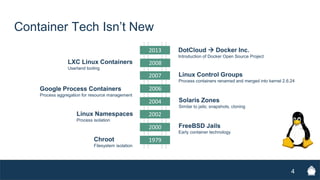
Container Tech Isn’t New
4
2000
2002
2004
2006
2007
1979
2008
2013
Chroot
Filesystem isolation
FreeBSD Jails
Early container technology
Linux Namespaces
Process isolation
Solaris Zones
Similar to jails; snapshots, cloning
Google Process Containers
Process aggregation for resource management
Linux Control Groups
Process containers renamed and merged into kernel 2.6.24
LXC Linux Containers
Userland tooling
DotCloud  Docker Inc.
Introduction of Docker Open Source Project
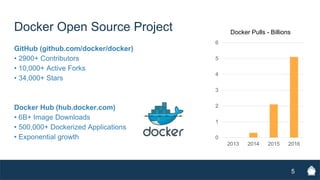
Docker Open Source Project
GitHub (github.com/docker/docker)
• 2900+ Contributors
• 10,000+ Active Forks
• 34,000+ Stars
Docker Hub (hub.docker.com)
• 6B+ Image Downloads
• 500,000+ Dockerized Applications
• Exponential growth
5
0
1
2
3
4
5
6
2013 2014 2015 2016
Docker Pulls - Billions
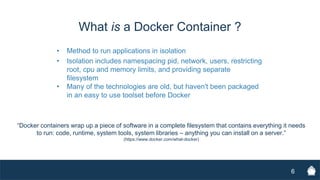
What is a Docker Container ?
• Method to run applications in isolation
• Isolation includes namespacing pid, network, users, restricting
root, cpu and memory limits, and providing separate
filesystem
• Many of the technologies are old, but haven't been packaged
in an easy to use toolset before Docker
6
“Docker containers wrap up a piece of software in a complete filesystem that contains everything it needs
to run: code, runtime, system tools, system libraries – anything you can install on a server.”
(https://www.docker.com/what-docker)
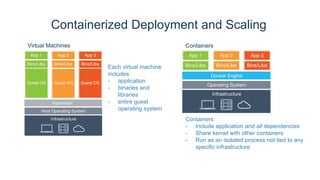
Containerized Deployment and Scaling
Each virtual machine
includes:
- application
- binaries and
libraries
- entire guest
operating system
Containers:
- Include application and all dependencies
- Share kernel with other containers
- Run as an isolated process not tied to any
specific infrastructure
Virtual Machines Containers
7
8
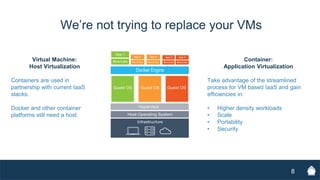
We’re not trying to replace your VMs
Virtual Machine:
Host Virtualization
Containers are used in
partnership with current IaaS
stacks.
Docker and other container
platforms still need a host.
Container:
Application Virtualization
Take advantage of the streamlined
process for VM based IaaS and gain
efficiencies in:
• Higher density workloads
• Scale
• Portability
• Security
9
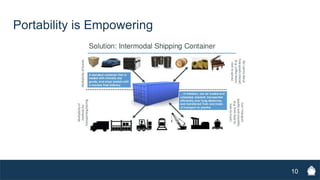
Portability is Empowering
10
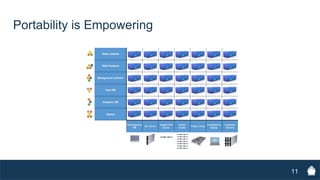
Portability is Empowering
11
Portability is Empowering
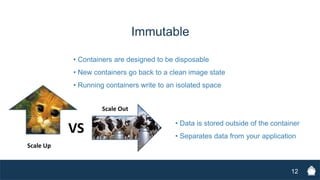
12
• Containers are designed to be disposable
• New containers go back to a clean image state
• Running containers write to an isolated space
Immutable
• Data is stored outside of the container
• Separates data from your application
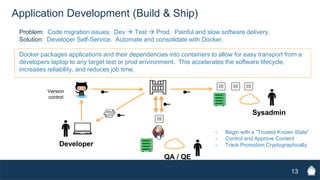
13
Application Development (Build & Ship)
Problem: Code migration issues: Dev  Test  Prod. Painful and slow software delivery.
Solution: Developer Self-Service. Automate and consolidate with Docker.
Docker packages applications and their dependencies into containers to allow for easy transport from a
developers laptop to any target test or prod environment. This accelerates the software lifecycle,
increases reliability, and reduces job time.
- Begin with a “Trusted Known State”
- Control and Approve Content
- Track Promotion CryptographicallyDeveloper
Version
control
Sysadmin
QA / QE
14
Application Modernization / Cloud Migration
Problem: Legacy applications: brittle, and difficult to change/bug fix/upgrade
Hard to scale, obsolete APIs, costly and difficult to support and maintain.
Solution: Microservices architecture. Technology diversity. Modular boundaries.
Mulit-tier applications can be deployed in parts and each tier is an independent container. Each of the containers
can be used for a single service. Legacy applications can be migrated to the cloud through either a “lift & shift” or
“refactoring” methodology, or potentially a combination.
Build
Docker Images
• Images are the definition. They include
the filesystem, environment variables,
and default entry points.
• Containers are an instance of an
image. They isolate the application
from the host, and even from other
containers.
15
Build
Dockerfiles
• Write your image definition in a Dockerfile
16
• Turn that Dockerfile into an image with
• Develop a new app or “lift and shift” your current codebase
• Union file system
• Multiple RO layers are stacked
• Containers add a single RW layer to
isolate changes
• Layers are cached for fast builds
• Layers are named with a hash inside
the engine
17
Docker Images
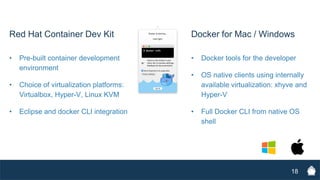
Docker for Mac / Windows
• Docker tools for the developer
• OS native clients using internally
available virtualization: xhyve and
Hyper-V
• Full Docker CLI from native OS
shell
18
Red Hat Container Dev Kit
• Pre-built container development
environment
• Choice of virtualization platforms:
Virtualbox, Hyper-V, Linux KVM
• Eclipse and docker CLI integration
Ship
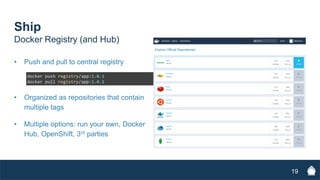
Docker Registry (and Hub)
• Push and pull to central registry
19
• Organized as repositories that contain
multiple tags
• Multiple options: run your own, Docker
Hub, OpenShift, 3rd parties
Run
20
• Run your image
• Launches a container base on your image
• Options for:
 Volumes: link external data into the container for persistence
 Networking: bridged, overlay, access with exposed ports
Run
Distributed
21
• Fault tolerant
• Blue/Green Deployment
• Seamless rollbacks
Distributed
Docker Compose
• Packages multiple containers together
• Defines parameters for ‘docker run’
• Configuration is stored in ‘docker-
compose.yml’
• Allows containers to be scaled, but
without orchestration
22
Docker on Red Hat
RHEL
Consistent performance and reliability
Certification and Support
SELinux Security
Atomic Host
• Minimal footprint operating system
• Linux container optimized
• Reliability and security of RHEL
23
Red Hat OpenShift Container Platform V3
OpenShift and Kubernetes add the ability to orchestrate
docker containers across multi-host installations.
24
• Self-service Platform
• Multi-language Support
• Application Persistence
• Automation
• OpenvSwitch Integration
Load Docker Images to OpenShift!
# oc new-project rhsummit
# oc new-app gitlab/gitlab-ce
Thank You!
25
Will Kinard
CTO BoxBoat Technologies
will@boxboat.com
@boxboat
www.boxboat.com/blog
Appendix
26
This is Important
27
28
• Isolated space for a running application
• All containers run on the same kernel unlike a VM
• Eliminates the overhead of an OS and services
Come Again?
Docker Containers – Run… Anywhere?
Linux:
Kernel Version 3.10+
• Ubuntu 13.10+
• Fedora 20+
• RHEL 7+
• CentOS 7.1+
• Gentoo
• ArchLinux
• openSUSE 13.1+
• CRUX 3.0+
Windows (Really!):
• Docker for Windows
• Windows Server 2016 (TP5)
29
Docker for ARM!
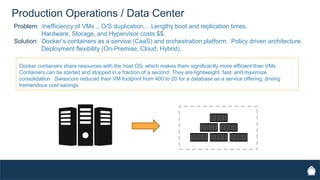
Production Operations / Data Center
Problem: Inefficiency of VMs .. O/S duplication… Lengthy boot and replication times.
Hardware, Storage, and Hypervisor costs $$.
Solution: Docker’s containers as a service (CaaS) and orchestration platform. Policy driven architecture.
Deployment flexibility (On-Premise, Cloud, Hybrid).
Docker containers share resources with the host OS, which makes them significantly more efficient than VMs.
Containers can be started and stopped in a fraction of a second. They are lightweight, fast, and maximize
consolidation. Swisscom reduced their VM footprint from 400 to 20 for a database as a service offering, driving
tremendous cost savings.
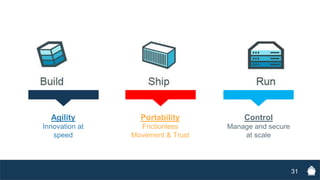
Control
Manage and secure
at scale
Portability
Frictionless
Movement & Trust
Agility
Innovation at
speed
+ +Build Ship Run
31
32
Isolated
• Isolated filesystem
• Namespace for isolating pids
• cgroups for limiting memory and CPU
• Separate network stack
• Restricted root capabilities
Docker Notary
• Open source project on github
(github.com/docker/notary)
• Trusted cross platform content
distribution
• Platform agnostic in delivering
content
• Publisher key validates integrity
of content
33
Portable
• Run Docker containers
unchanged in any
environment, on any
infrastructure
• Move applications at
will between
environments and
infrastructures
34
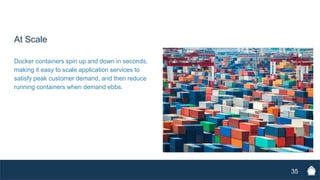
At Scale
Docker containers spin up and down in seconds,
making it easy to scale application services to
satisfy peak customer demand, and then reduce
running containers when demand ebbs.
35

Docker Containers Deep Dive

  • 1.
    Docker Containers DeepDive Best of Red Hat Summit Will Kinard October 4, 2016
  • 2.
    Agenda 2 • Intro • Containerization101 • Use Cases • Build, Ship, Run • OpenShift • Q&A
  • 3.
    3 • DevOps Advisoryand Implementation Services • Docker Consulting and Integration • CloudBees Jenkins Consulting About The Container Enablement Company • Continuous Integration, Delivery, and Deployment • Application Modernization • Cloud Migration
  • 4.
    Container Tech Isn’tNew 4 2000 2002 2004 2006 2007 1979 2008 2013 Chroot Filesystem isolation FreeBSD Jails Early container technology Linux Namespaces Process isolation Solaris Zones Similar to jails; snapshots, cloning Google Process Containers Process aggregation for resource management Linux Control Groups Process containers renamed and merged into kernel 2.6.24 LXC Linux Containers Userland tooling DotCloud  Docker Inc. Introduction of Docker Open Source Project
  • 5.
    Docker Open SourceProject GitHub (github.com/docker/docker) • 2900+ Contributors • 10,000+ Active Forks • 34,000+ Stars Docker Hub (hub.docker.com) • 6B+ Image Downloads • 500,000+ Dockerized Applications • Exponential growth 5 0 1 2 3 4 5 6 2013 2014 2015 2016 Docker Pulls - Billions
  • 6.
    What is aDocker Container ? • Method to run applications in isolation • Isolation includes namespacing pid, network, users, restricting root, cpu and memory limits, and providing separate filesystem • Many of the technologies are old, but haven't been packaged in an easy to use toolset before Docker 6 “Docker containers wrap up a piece of software in a complete filesystem that contains everything it needs to run: code, runtime, system tools, system libraries – anything you can install on a server.” (https://www.docker.com/what-docker)
  • 7.
    Containerized Deployment andScaling Each virtual machine includes: - application - binaries and libraries - entire guest operating system Containers: - Include application and all dependencies - Share kernel with other containers - Run as an isolated process not tied to any specific infrastructure Virtual Machines Containers 7
  • 8.
    8 We’re not tryingto replace your VMs Virtual Machine: Host Virtualization Containers are used in partnership with current IaaS stacks. Docker and other container platforms still need a host. Container: Application Virtualization Take advantage of the streamlined process for VM based IaaS and gain efficiencies in: • Higher density workloads • Scale • Portability • Security
  • 9.
  • 10.
  • 11.
  • 12.
    12 • Containers aredesigned to be disposable • New containers go back to a clean image state • Running containers write to an isolated space Immutable • Data is stored outside of the container • Separates data from your application
  • 13.
    13 Application Development (Build& Ship) Problem: Code migration issues: Dev  Test  Prod. Painful and slow software delivery. Solution: Developer Self-Service. Automate and consolidate with Docker. Docker packages applications and their dependencies into containers to allow for easy transport from a developers laptop to any target test or prod environment. This accelerates the software lifecycle, increases reliability, and reduces job time. - Begin with a “Trusted Known State” - Control and Approve Content - Track Promotion CryptographicallyDeveloper Version control Sysadmin QA / QE
  • 14.
    14 Application Modernization /Cloud Migration Problem: Legacy applications: brittle, and difficult to change/bug fix/upgrade Hard to scale, obsolete APIs, costly and difficult to support and maintain. Solution: Microservices architecture. Technology diversity. Modular boundaries. Mulit-tier applications can be deployed in parts and each tier is an independent container. Each of the containers can be used for a single service. Legacy applications can be migrated to the cloud through either a “lift & shift” or “refactoring” methodology, or potentially a combination.
  • 15.
    Build Docker Images • Imagesare the definition. They include the filesystem, environment variables, and default entry points. • Containers are an instance of an image. They isolate the application from the host, and even from other containers. 15
  • 16.
    Build Dockerfiles • Write yourimage definition in a Dockerfile 16 • Turn that Dockerfile into an image with • Develop a new app or “lift and shift” your current codebase
  • 17.
    • Union filesystem • Multiple RO layers are stacked • Containers add a single RW layer to isolate changes • Layers are cached for fast builds • Layers are named with a hash inside the engine 17 Docker Images
  • 18.
    Docker for Mac/ Windows • Docker tools for the developer • OS native clients using internally available virtualization: xhyve and Hyper-V • Full Docker CLI from native OS shell 18 Red Hat Container Dev Kit • Pre-built container development environment • Choice of virtualization platforms: Virtualbox, Hyper-V, Linux KVM • Eclipse and docker CLI integration
  • 19.
    Ship Docker Registry (andHub) • Push and pull to central registry 19 • Organized as repositories that contain multiple tags • Multiple options: run your own, Docker Hub, OpenShift, 3rd parties
  • 20.
    Run 20 • Run yourimage • Launches a container base on your image • Options for:  Volumes: link external data into the container for persistence  Networking: bridged, overlay, access with exposed ports
  • 21.
    Run Distributed 21 • Fault tolerant •Blue/Green Deployment • Seamless rollbacks
  • 22.
    Distributed Docker Compose • Packagesmultiple containers together • Defines parameters for ‘docker run’ • Configuration is stored in ‘docker- compose.yml’ • Allows containers to be scaled, but without orchestration 22
  • 23.
    Docker on RedHat RHEL Consistent performance and reliability Certification and Support SELinux Security Atomic Host • Minimal footprint operating system • Linux container optimized • Reliability and security of RHEL 23
  • 24.
    Red Hat OpenShiftContainer Platform V3 OpenShift and Kubernetes add the ability to orchestrate docker containers across multi-host installations. 24 • Self-service Platform • Multi-language Support • Application Persistence • Automation • OpenvSwitch Integration Load Docker Images to OpenShift! # oc new-project rhsummit # oc new-app gitlab/gitlab-ce
  • 25.
    Thank You! 25 Will Kinard CTOBoxBoat Technologies will@boxboat.com @boxboat www.boxboat.com/blog
  • 26.
  • 27.
  • 28.
    28 • Isolated spacefor a running application • All containers run on the same kernel unlike a VM • Eliminates the overhead of an OS and services Come Again?
  • 29.
    Docker Containers –Run… Anywhere? Linux: Kernel Version 3.10+ • Ubuntu 13.10+ • Fedora 20+ • RHEL 7+ • CentOS 7.1+ • Gentoo • ArchLinux • openSUSE 13.1+ • CRUX 3.0+ Windows (Really!): • Docker for Windows • Windows Server 2016 (TP5) 29 Docker for ARM!
  • 30.
    Production Operations /Data Center Problem: Inefficiency of VMs .. O/S duplication… Lengthy boot and replication times. Hardware, Storage, and Hypervisor costs $$. Solution: Docker’s containers as a service (CaaS) and orchestration platform. Policy driven architecture. Deployment flexibility (On-Premise, Cloud, Hybrid). Docker containers share resources with the host OS, which makes them significantly more efficient than VMs. Containers can be started and stopped in a fraction of a second. They are lightweight, fast, and maximize consolidation. Swisscom reduced their VM footprint from 400 to 20 for a database as a service offering, driving tremendous cost savings.
  • 31.
    Control Manage and secure atscale Portability Frictionless Movement & Trust Agility Innovation at speed + +Build Ship Run 31
  • 32.
    32 Isolated • Isolated filesystem •Namespace for isolating pids • cgroups for limiting memory and CPU • Separate network stack • Restricted root capabilities
  • 33.
    Docker Notary • Opensource project on github (github.com/docker/notary) • Trusted cross platform content distribution • Platform agnostic in delivering content • Publisher key validates integrity of content 33
  • 34.
    Portable • Run Dockercontainers unchanged in any environment, on any infrastructure • Move applications at will between environments and infrastructures 34
  • 35.
    At Scale Docker containersspin up and down in seconds, making it easy to scale application services to satisfy peak customer demand, and then reduce running containers when demand ebbs. 35