Essay/Project Submissions
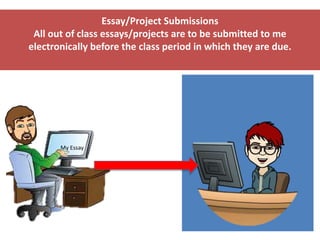
All out of class essays/projects are to be submitted to me
electronically before the class period in which they are due.
My Essay
Submit your essay through Kaizena at
https://kaizena.com/palmoreessaysubmissiong
mail. Or simply use the link on our class website
home page.
This system allows me to respond to your essay
with both voice and written comments and to
insert helpful links.
Group Codes
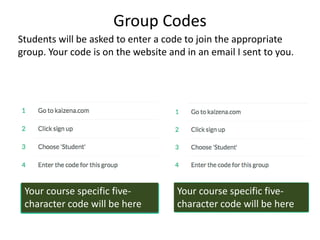
Students will be asked to enter a code to join the appropriate
group. Your code is on the website and in an email I sent to you.
Your course specific five-
character code will be here
Your course specific five-
character code will be here
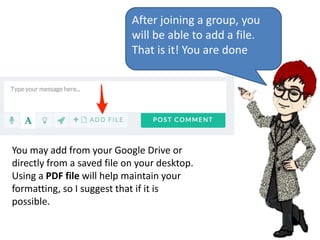
After joining a group, you
will be able to add a file.
That is it! You are done
You may add from your Google Drive or
directly from a saved file on your desktop.
Using a PDF file will help maintain your
formatting, so I suggest that if it is
possible.
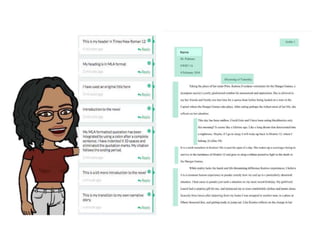
You may be asked to highlight and comment on specific parts of
your essay before your submission is complete. I will also review
this skill before your essay is due.
 To attach a comment to a highlight, start by making a
highlight in a file. Scroll to the part of the file where you
want to make your highlight. Click in the margin (or on the
text you want to highlight), and drag the cursor to expand
the comment box.
 Click on the A in the comment box on the left side to type
in your comment or question.
 Click “Post to Highlight”
 Make sure to use just one color (whichever you prefer), so I
can comment in a different color.
 You can also leave voice comments, but please use the
written comment feature to identify the sections of your
essay. You may leave me a voice comment if you have other
comments or questions.
Name
Please Note!!
• There are two conversations taking place in Kaizena.
One is the “Everyone” conversation, which includes the
entire class. The second is a private conversation
between each student and me. Please make sure to
upload your essay to the private conversation. If you
see an accidental upload to the entire class, please let
me or that student know immediately!
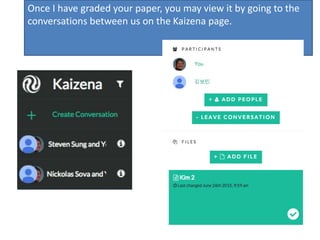
Once I have graded your paper, you may view it by going to the
conversations between us on the Kaizena page.
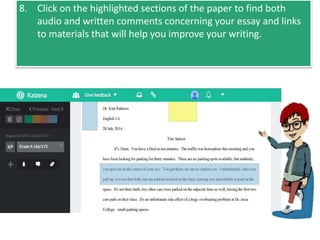
8. Click on the highlighted sections of the paper to find both
audio and written comments concerning your essay and links
to materials that will help you improve your writing.

Kaizena directions 2017

  • 1.
    Essay/Project Submissions All outof class essays/projects are to be submitted to me electronically before the class period in which they are due. My Essay
  • 2.
    Submit your essaythrough Kaizena at https://kaizena.com/palmoreessaysubmissiong mail. Or simply use the link on our class website home page. This system allows me to respond to your essay with both voice and written comments and to insert helpful links.
  • 3.
    Group Codes Students willbe asked to enter a code to join the appropriate group. Your code is on the website and in an email I sent to you. Your course specific five- character code will be here Your course specific five- character code will be here
  • 4.
    After joining agroup, you will be able to add a file. That is it! You are done You may add from your Google Drive or directly from a saved file on your desktop. Using a PDF file will help maintain your formatting, so I suggest that if it is possible.
  • 5.
    You may beasked to highlight and comment on specific parts of your essay before your submission is complete. I will also review this skill before your essay is due.  To attach a comment to a highlight, start by making a highlight in a file. Scroll to the part of the file where you want to make your highlight. Click in the margin (or on the text you want to highlight), and drag the cursor to expand the comment box.  Click on the A in the comment box on the left side to type in your comment or question.  Click “Post to Highlight”  Make sure to use just one color (whichever you prefer), so I can comment in a different color.  You can also leave voice comments, but please use the written comment feature to identify the sections of your essay. You may leave me a voice comment if you have other comments or questions.
  • 6.
  • 7.
    Please Note!! • Thereare two conversations taking place in Kaizena. One is the “Everyone” conversation, which includes the entire class. The second is a private conversation between each student and me. Please make sure to upload your essay to the private conversation. If you see an accidental upload to the entire class, please let me or that student know immediately!
  • 8.
    Once I havegraded your paper, you may view it by going to the conversations between us on the Kaizena page.
  • 9.
    8. Click onthe highlighted sections of the paper to find both audio and written comments concerning your essay and links to materials that will help you improve your writing.