Kafka Vs Kinesis
Agenda
1. Kafka architecture high level overview
2. Comparison with Kinesis in terms of throughput and cost
3. Headaches with Kinesis and Kafka
4. Use case for the data team
5. Reasons for switching
6. Success stories
7. References
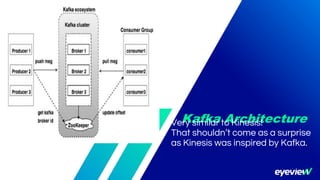
Kafka ArchitectureVery similar to Kinesis!
That shouldn’t come as a surprise
as Kinesis was inspired by Kafka.
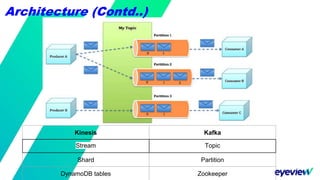
Kinesis Kafka
Stream Topic
Shard Partition
DynamoDB tables Zookeeper
Architecture (Contd..)
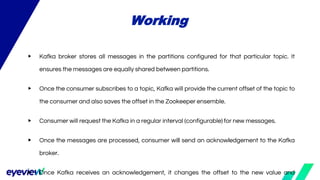
▶ Kafka broker stores all messages in the partitions configured for that particular topic. It
ensures the messages are equally shared between partitions.
▶ Once the consumer subscribes to a topic, Kafka will provide the current offset of the topic to
the consumer and also saves the offset in the Zookeeper ensemble.
▶ Consumer will request the Kafka in a regular interval (configurable) for new messages.
▶ Once the messages are processed, consumer will send an acknowledgement to the Kafka
broker.
▶ Once Kafka receives an acknowledgement, it changes the offset to the new value and
Working
How do you scale?
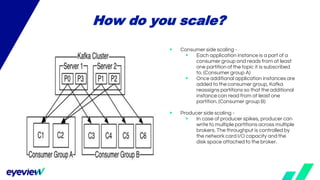
▶ Consumer side scaling -
▶ Each application instance is a part of a
consumer group and reads from at least
one partition of the topic it is subscribed
to. (Consumer group A)
▶ Once additional application instances are
added to the consumer group, Kafka
reassigns partitions so that the additional
instance can read from at least one
partition. (Consumer group B)
▶ Producer side scaling -
▶ In case of producer spikes, producer can
write to multiple partitions across multiple
brokers. The throughput is controlled by
the network card I/O capacity and the
disk space attached to the broker.
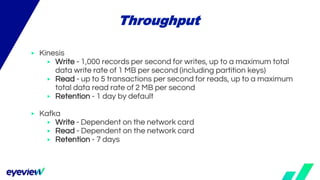
▶ Kinesis
▶ Write - 1,000 records per second for writes, up to a maximum total
data write rate of 1 MB per second (including partition keys)
▶ Read - up to 5 transactions per second for reads, up to a maximum
total data read rate of 2 MB per second
▶ Retention - 1 day by default
▶ Kafka
▶ Write - Dependent on the network card
▶ Read - Dependent on the network card
▶ Retention - 7 days
Throughput
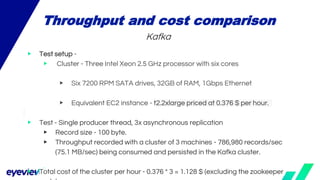
▶ Test setup -
▶ Cluster - Three Intel Xeon 2.5 GHz processor with six cores
▶ Six 7200 RPM SATA drives, 32GB of RAM, 1Gbps Ethernet
▶ Equivalent EC2 instance - t2.2xlarge priced at 0.376 $ per hour.
▶ Test - Single producer thread, 3x asynchronous replication
▶ Record size - 100 byte.
▶ Throughput recorded with a cluster of 3 machines - 786,980 records/sec
(75.1 MB/sec) being consumed and persisted in the Kafka cluster.
▶ Total cost of the cluster per hour - 0.376 * 3 = 1.128 $ (excluding the zookeeper
Throughput and cost comparison
Kafka
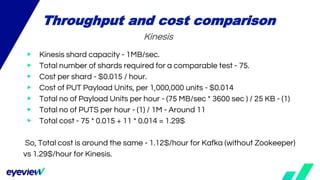
▶ Kinesis shard capacity - 1MB/sec.
▶ Total number of shards required for a comparable test - 75.
▶ Cost per shard - $0.015 / hour.
▶ Cost of PUT Payload Units, per 1,000,000 units - $0.014
▶ Total no of Payload Units per hour - (75 MB/sec * 3600 sec ) / 25 KB - (1)
▶ Total no of PUTS per hour - (1) / 1M - Around 11
▶ Total cost - 75 * 0.015 + 11 * 0.014 = 1.29$
So, Total cost is around the same - 1.12$/hour for Kafka (without Zookeeper)
vs 1.29$/hour for Kinesis.
Throughput and cost comparison
Kinesis
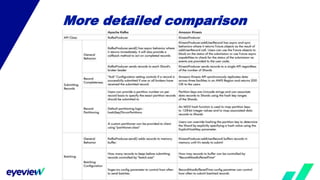
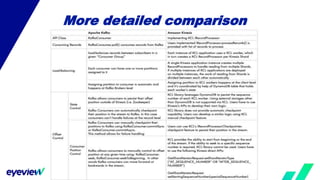
More detailed comparison
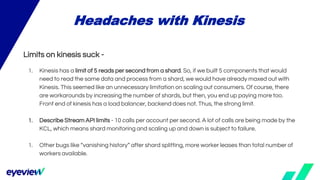
Limits on kinesis suck -
1. Kinesis has a limit of 5 reads per second from a shard. So, if we built 5 components that would
need to read the same data and process from a shard, we would have already maxed out with
Kinesis. This seemed like an unnecessary limitation on scaling out consumers. Of course, there
are workarounds by increasing the number of shards, but then, you end up paying more too.
Front end of kinesis has a load balancer, backend does not. Thus, the strong limit.
1. Describe Stream API limits - 10 calls per account per second. A lot of calls are being made by the
KCL, which means shard monitoring and scaling up and down is subject to failure.
1. Other bugs like “vanishing history” after shard splitting, more worker leases than total number of
workers available.
Headaches with Kinesis
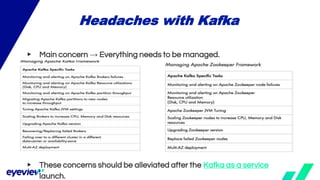
▶ Main concern → Everything needs to be managed.
▶ These concerns should be alleviated after the Kafka as a service
launch.
Headaches with Kafka
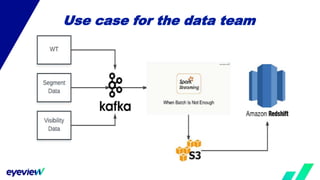
Use case for the data team
Kafka
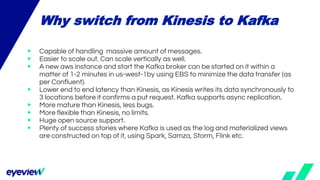
▶ Capable of handling massive amount of messages.
▶ Easier to scale out. Can scale vertically as well.
▶ A new aws instance and start the Kafka broker can be started on it within a
matter of 1-2 minutes in us-west-1by using EBS to minimize the data transfer (as
per Confluent).
▶ Lower end to end latency than Kinesis, as Kinesis writes its data synchronously to
3 locations before it confirms a put request. Kafka supports async replication.
▶ More mature than Kinesis, less bugs.
▶ More flexible than Kinesis, no limits.
▶ Huge open source support.
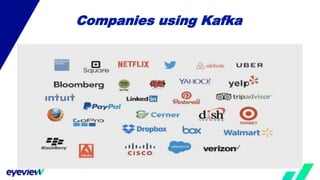
▶ Plenty of success stories where Kafka is used as the log and materialized views
are constructed on top of it, using Spark, Samza, Storm, Flink etc.
Why switch from Kinesis to Kafka
Companies using Kafka
How Netflix uses Kafka on AWS
Questions/Comments/Suggestions?
▶ Architecture - https://kafka.apache.org/documentation/
▶ Throughout study - https://engineering.linkedin.com/kafka/benchmarking-apache-kafka-2-
million-writes-second-three-cheap-machines
▶ Kinesis Limits - http://docs.aws.amazon.com/streams/latest/dev/service-sizes-and-
limits.html
▶ Detailed comparison - http://go.datapipe.com/whitepaper-kafka-vs-kinesis-download
▶ How netflix uses Kafka - https://medium.com/netflix-techblog/kafka-inside-keystone-
pipeline-dd5aeabaf6bb
References

Kafka vs kinesis

  • 1.
  • 2.
    Agenda 1. Kafka architecturehigh level overview 2. Comparison with Kinesis in terms of throughput and cost 3. Headaches with Kinesis and Kafka 4. Use case for the data team 5. Reasons for switching 6. Success stories 7. References
  • 3.
    Kafka ArchitectureVery similarto Kinesis! That shouldn’t come as a surprise as Kinesis was inspired by Kafka.
  • 4.
    Kinesis Kafka Stream Topic ShardPartition DynamoDB tables Zookeeper Architecture (Contd..)
  • 5.
    ▶ Kafka brokerstores all messages in the partitions configured for that particular topic. It ensures the messages are equally shared between partitions. ▶ Once the consumer subscribes to a topic, Kafka will provide the current offset of the topic to the consumer and also saves the offset in the Zookeeper ensemble. ▶ Consumer will request the Kafka in a regular interval (configurable) for new messages. ▶ Once the messages are processed, consumer will send an acknowledgement to the Kafka broker. ▶ Once Kafka receives an acknowledgement, it changes the offset to the new value and Working
  • 6.
    How do youscale? ▶ Consumer side scaling - ▶ Each application instance is a part of a consumer group and reads from at least one partition of the topic it is subscribed to. (Consumer group A) ▶ Once additional application instances are added to the consumer group, Kafka reassigns partitions so that the additional instance can read from at least one partition. (Consumer group B) ▶ Producer side scaling - ▶ In case of producer spikes, producer can write to multiple partitions across multiple brokers. The throughput is controlled by the network card I/O capacity and the disk space attached to the broker.
  • 7.
    ▶ Kinesis ▶ Write- 1,000 records per second for writes, up to a maximum total data write rate of 1 MB per second (including partition keys) ▶ Read - up to 5 transactions per second for reads, up to a maximum total data read rate of 2 MB per second ▶ Retention - 1 day by default ▶ Kafka ▶ Write - Dependent on the network card ▶ Read - Dependent on the network card ▶ Retention - 7 days Throughput
  • 8.
    ▶ Test setup- ▶ Cluster - Three Intel Xeon 2.5 GHz processor with six cores ▶ Six 7200 RPM SATA drives, 32GB of RAM, 1Gbps Ethernet ▶ Equivalent EC2 instance - t2.2xlarge priced at 0.376 $ per hour. ▶ Test - Single producer thread, 3x asynchronous replication ▶ Record size - 100 byte. ▶ Throughput recorded with a cluster of 3 machines - 786,980 records/sec (75.1 MB/sec) being consumed and persisted in the Kafka cluster. ▶ Total cost of the cluster per hour - 0.376 * 3 = 1.128 $ (excluding the zookeeper Throughput and cost comparison Kafka
  • 9.
    ▶ Kinesis shardcapacity - 1MB/sec. ▶ Total number of shards required for a comparable test - 75. ▶ Cost per shard - $0.015 / hour. ▶ Cost of PUT Payload Units, per 1,000,000 units - $0.014 ▶ Total no of Payload Units per hour - (75 MB/sec * 3600 sec ) / 25 KB - (1) ▶ Total no of PUTS per hour - (1) / 1M - Around 11 ▶ Total cost - 75 * 0.015 + 11 * 0.014 = 1.29$ So, Total cost is around the same - 1.12$/hour for Kafka (without Zookeeper) vs 1.29$/hour for Kinesis. Throughput and cost comparison Kinesis
  • 10.
  • 11.
  • 12.
    Limits on kinesissuck - 1. Kinesis has a limit of 5 reads per second from a shard. So, if we built 5 components that would need to read the same data and process from a shard, we would have already maxed out with Kinesis. This seemed like an unnecessary limitation on scaling out consumers. Of course, there are workarounds by increasing the number of shards, but then, you end up paying more too. Front end of kinesis has a load balancer, backend does not. Thus, the strong limit. 1. Describe Stream API limits - 10 calls per account per second. A lot of calls are being made by the KCL, which means shard monitoring and scaling up and down is subject to failure. 1. Other bugs like “vanishing history” after shard splitting, more worker leases than total number of workers available. Headaches with Kinesis
  • 13.
    ▶ Main concern→ Everything needs to be managed. ▶ These concerns should be alleviated after the Kafka as a service launch. Headaches with Kafka
  • 14.
    Use case forthe data team Kafka
  • 15.
    ▶ Capable ofhandling massive amount of messages. ▶ Easier to scale out. Can scale vertically as well. ▶ A new aws instance and start the Kafka broker can be started on it within a matter of 1-2 minutes in us-west-1by using EBS to minimize the data transfer (as per Confluent). ▶ Lower end to end latency than Kinesis, as Kinesis writes its data synchronously to 3 locations before it confirms a put request. Kafka supports async replication. ▶ More mature than Kinesis, less bugs. ▶ More flexible than Kinesis, no limits. ▶ Huge open source support. ▶ Plenty of success stories where Kafka is used as the log and materialized views are constructed on top of it, using Spark, Samza, Storm, Flink etc. Why switch from Kinesis to Kafka
  • 16.
  • 17.
    How Netflix usesKafka on AWS
  • 18.
  • 19.
    ▶ Architecture -https://kafka.apache.org/documentation/ ▶ Throughout study - https://engineering.linkedin.com/kafka/benchmarking-apache-kafka-2- million-writes-second-three-cheap-machines ▶ Kinesis Limits - http://docs.aws.amazon.com/streams/latest/dev/service-sizes-and- limits.html ▶ Detailed comparison - http://go.datapipe.com/whitepaper-kafka-vs-kinesis-download ▶ How netflix uses Kafka - https://medium.com/netflix-techblog/kafka-inside-keystone- pipeline-dd5aeabaf6bb References

Editor's Notes

  • #9 Source - https://engineering.linkedin.com/kafka/benchmarking-apache-kafka-2-million-writes-second-three-cheap-machines
  • #11 Source - http://go.datapipe.com/whitepaper-kafka-vs-kinesis-download
  • #12 Source - http://go.datapipe.com/whitepaper-kafka-vs-kinesis-download
  • #14 Source - http://go.datapipe.com/whitepaper-kafka-vs-kinesis-download