Presented By: Prateek Gupta
Introduction to
Amazon Kinesis Data
Streams
Lack of etiquette and manners is a huge turn off.
KnolX Etiquettes
Punctuality
Join the session 5 minutes prior to
the session start time. We start on
time and conclude on time!
Feedback
Make sure to submit a constructive
feedback for all sessions as it is
very helpful for the presenter.
Silent Mode
Keep your mobile devices in silent
mode, feel free to move out of
session in case you need to attend
an urgent call.
Avoid Disturbance
Avoid unwanted chit chat during
the session.
Our Agenda
02 Amazon Kinesis Data Streams
03 High-Level Architecture
04 Key Concepts and Terminology
05 Basic Operations
01 What is Streaming Data?
06 Demo
What is Streaming
Data?
What is Streaming Data?
Streaming data refers to the data that is generated continuously in real time by thousands of data
sources and delivered to a system for processing.
Key Points:
● Real-time
● Continuous flow
● Variety of sources
● Variety of formats
● Requires specialized processing
Examples:
● Ecommerce purchases
● Game data
● Information from social networks
● Log data
● Stock prices
● GPS data
● IoT Sensor Data
Amazon Kinesis Data Streams
Amazon Kinesis Data Streams is a real-time streaming data service by AWS. It makes it easy to
collect and process real-time streaming data at high scale.
Some key points to understand:
● Real-time data
● Highly Scalable
● Data sources
● Processing
● Cost-effective
● Easy to use
High-Level Architecture
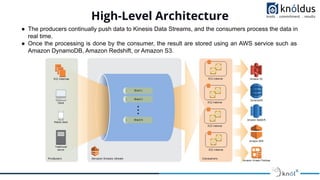
● The producers continually push data to Kinesis Data Streams, and the consumers process the data in
real time.
● Once the processing is done by the consumer, the result are stored using an AWS service such as
Amazon DynamoDB, Amazon Redshift, or Amazon S3.
Key Concepts and Terminology
➢ Producer: It is an application that puts the data records into Amazon Kinesis Data
Streams.
➢ Consumer: It is an application that retrieves the data records from Amazon Kinesis Data
Streams and process them.
➢ Kinesis Data Stream:
○ A Kinesis data stream is a set of shards.
○ Each shard has a sequence of data records.
○ Each data record has a sequence number.
○ Data retains for 24 hours by default.
➢ Shard:
○ A shard is a uniquely identified sequence of data records
○ A stream is composed of one or more shards, each of which provides a fixed unit of
capacity.
○ Each shard can support up to 1000 PUT records per second(or 1MB/sec), and up to
1,000 GET records per second(or 2MB/sec)
○ The data capacity of a stream is a function of the number of shards.
○ If the data rate increases, increase the number of shards allocated to the stream.
➢ Data Record:
○ A data record is the unit of data stored in a Kinesis data stream.
○ Each data record is composed of a sequence number, a partition key, and a data
blob(up to 1MB).
➢ Sequence Number:
○ A sequence number is a unique identifier for each data record.
○ Allows to read data in the order and also to determine which records have been processed
➢ Partition Key:
○ A partition key is a meaningful identifier that is associated with each record.
○ It is used by the service to determine which shard to store the record in.
○ Specified by the data producer while putting data into a data stream
○ Records with the same partition key are stored together in the same shard.
➢ Retention Period:
○ Amount of time that data records are stored in an Amazon Kinesis Data Stream.
○ Default data retention period for a stream is 24 hours(configurable upto 365 days)
➢ Capacity Mode:
○ The capacity mode determines how capacity is managed and the usage charges for a data
stream.
○ Currently, in Kinesis Data Streams, we can choose between an on-demand mode and a
provisioned mode for our data streams.
Basic Operations
Amazon Kinesis Data Streams provides a number of operations that can be performed on a data
stream. Here are some basic operations:
● create-stream
● describe-stream
● list-streams
● put-record
● get-shard-iterator
● get-records
● split-shard
● merge-shards
● delete-stream
Demo
References
● Kinesis Data Streams Official Documentation
● AWS Kinesis - Javatpoint
Thank You !

Introduction to Amazon Kinesis Data Streams

  • 1.
    Presented By: PrateekGupta Introduction to Amazon Kinesis Data Streams
  • 2.
    Lack of etiquetteand manners is a huge turn off. KnolX Etiquettes Punctuality Join the session 5 minutes prior to the session start time. We start on time and conclude on time! Feedback Make sure to submit a constructive feedback for all sessions as it is very helpful for the presenter. Silent Mode Keep your mobile devices in silent mode, feel free to move out of session in case you need to attend an urgent call. Avoid Disturbance Avoid unwanted chit chat during the session.
  • 3.
    Our Agenda 02 AmazonKinesis Data Streams 03 High-Level Architecture 04 Key Concepts and Terminology 05 Basic Operations 01 What is Streaming Data? 06 Demo
  • 4.
  • 5.
    What is StreamingData? Streaming data refers to the data that is generated continuously in real time by thousands of data sources and delivered to a system for processing. Key Points: ● Real-time ● Continuous flow ● Variety of sources ● Variety of formats ● Requires specialized processing Examples: ● Ecommerce purchases ● Game data ● Information from social networks ● Log data ● Stock prices ● GPS data ● IoT Sensor Data
  • 6.
    Amazon Kinesis DataStreams Amazon Kinesis Data Streams is a real-time streaming data service by AWS. It makes it easy to collect and process real-time streaming data at high scale. Some key points to understand: ● Real-time data ● Highly Scalable ● Data sources ● Processing ● Cost-effective ● Easy to use
  • 7.
    High-Level Architecture ● Theproducers continually push data to Kinesis Data Streams, and the consumers process the data in real time. ● Once the processing is done by the consumer, the result are stored using an AWS service such as Amazon DynamoDB, Amazon Redshift, or Amazon S3.
  • 8.
    Key Concepts andTerminology ➢ Producer: It is an application that puts the data records into Amazon Kinesis Data Streams. ➢ Consumer: It is an application that retrieves the data records from Amazon Kinesis Data Streams and process them. ➢ Kinesis Data Stream: ○ A Kinesis data stream is a set of shards. ○ Each shard has a sequence of data records. ○ Each data record has a sequence number. ○ Data retains for 24 hours by default.
  • 9.
    ➢ Shard: ○ Ashard is a uniquely identified sequence of data records ○ A stream is composed of one or more shards, each of which provides a fixed unit of capacity. ○ Each shard can support up to 1000 PUT records per second(or 1MB/sec), and up to 1,000 GET records per second(or 2MB/sec) ○ The data capacity of a stream is a function of the number of shards. ○ If the data rate increases, increase the number of shards allocated to the stream. ➢ Data Record: ○ A data record is the unit of data stored in a Kinesis data stream. ○ Each data record is composed of a sequence number, a partition key, and a data blob(up to 1MB).
  • 10.
    ➢ Sequence Number: ○A sequence number is a unique identifier for each data record. ○ Allows to read data in the order and also to determine which records have been processed ➢ Partition Key: ○ A partition key is a meaningful identifier that is associated with each record. ○ It is used by the service to determine which shard to store the record in. ○ Specified by the data producer while putting data into a data stream ○ Records with the same partition key are stored together in the same shard. ➢ Retention Period: ○ Amount of time that data records are stored in an Amazon Kinesis Data Stream. ○ Default data retention period for a stream is 24 hours(configurable upto 365 days)
  • 11.
    ➢ Capacity Mode: ○The capacity mode determines how capacity is managed and the usage charges for a data stream. ○ Currently, in Kinesis Data Streams, we can choose between an on-demand mode and a provisioned mode for our data streams.
  • 12.
    Basic Operations Amazon KinesisData Streams provides a number of operations that can be performed on a data stream. Here are some basic operations: ● create-stream ● describe-stream ● list-streams ● put-record ● get-shard-iterator ● get-records ● split-shard ● merge-shards ● delete-stream
  • 13.
  • 14.
    References ● Kinesis DataStreams Official Documentation ● AWS Kinesis - Javatpoint
  • 15.