JSONSchema with golang
Suraj Deshmukh
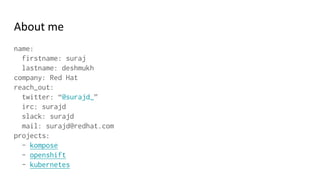
About me
name:
firstname: suraj
lastname: deshmukh
company: Red Hat
reach_out:
twitter: “@surajd_”
irc: surajd
slack: surajd
mail: surajd@redhat.com
projects:
- kompose
- openshift
- kubernetes
Config files
● For any software it's typical to have config files
○ ini
○ xml
○ json
○ yaml
So for your app you have specific config values that
you wanna read from files.
{"name": {"firstname": "suraj",
"lastname": "deshmukh"},
"company": "Red Hat",
"reach_out": {"twitter": "@surajd_",
"irc": "surajd",
"slack": "surajd",
"mail": "surajd@redhat.com"},
"projects": ["kompose",
"openshift",
"kubernetes"]
}
Example config:
intro_example.json
package main
import (
"encoding/json"
"io/ioutil"
"github.com/Sirupsen/logrus"
)
type Name struct {
FirstName string `json:"firstname,omitempty"`
LastName string `json:"lastname,omitempty"`
}
type Contact struct {
Twitter string `json:"twitter,omitempty"`
IRC string `json:"irc,omitempty"`
Slack string `json:"slack,omitempty"`
Mail string `json:"mail,omitempty"`
}
type About struct {
Name Name `json:"name,omitempty"`
Company string `json:"company,omitempty"`
ReachOut Contact `json:"reach_out,omitempty"`
Projects []string `json:"projects,omitempty"`
}
func main() {
introContents, err := ioutil.ReadFile("intro_example.json")
if err != nil {
logrus.Fatalln(err)
}
var aboutMe About
err = json.Unmarshal(introContents, &aboutMe)
if err != nil {
logrus.Fatalln(err)
}
// Limit on name length
if len(aboutMe.Name.FirstName) > 30 {
logrus.Fatalln("Firstname length is more than 30")
}
if len(aboutMe.Name.LastName) > 30 {
logrus.Fatalln("Lastname length is more than 30")
}
allowed_projects := []string{"kompose", "openshift", "kubernetes"}
isprojectallowed := func(project string) bool {
for _, validProject := range allowed_projects {
if project == validProject {
return true
}
}
return false
}
for _, project := range aboutMe.Projects {
if !isprojectallowed(project) {
logrus.Fatalf("Invalid project value detected %q", project)
}
}
}
validate_intro_example1.go
But you know spec keeps on changing and on
changing spec you have to write new code to
validate all the inputs.
What is JSON Schema?
JSON Schema is a vocabulary that allows you to annotate and validate
JSON/YAML documents.
YAML 1.2 is a superset of JSON
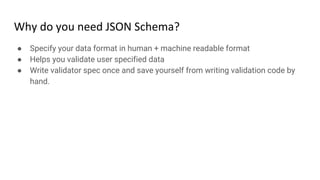
Why do you need JSON Schema?
● Specify your data format in human + machine readable format
● Helps you validate user specified data
● Write validator spec once and save yourself from writing validation code by
hand.
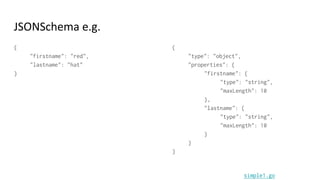
JSONSchema e.g.
5 {"type": "integer"}
simple0.go
JSONSchema e.g.
{
"firstname": "red",
"lastname": "hat"
}
{
"type": "object",
"properties": {
"firstname": {
"type": "string",
"maxLength": 10
},
"lastname": {
"type": "string",
"maxLength": 10
}
}
}
simple1.go
JSONSchema e.g.
["kompose", "kubernetes", "openshift"] {
"type": "array",
"items": {
"type": "string",
"enum": [
"kompose",
"openshift",
"kubernetes"
]
},
"uniqueItems": true,
"minLength": 1
}
simple2.go
golang library
github.com/xeipuuv/gojsonschema
Fitting it all together
validate_intro_example2.go
Validating YAML with JSONSchema
Read YAML and convert it to JSON and feed to gojsonschema
validate_intro_example3.go
Example JSONSchema in real world
● docker-compose
https://github.com/docker/compose/blob/master/compose/config/config_s
chema_v2.0.json
● libcompose
https://github.com/docker/libcompose/blob/master/config/schema.go
Ref:
● Github repo for demos:
https://github.com/surajssd/talks/tree/master/golangmeetupNov2016
● http://json-schema.org/
● 2016 - Intro to JSON Schema with Go, and Generating Validators And Skeleton -
Daisuke Maki https://www.youtube.com/watch?v=iu9Bc4yYisw
● https://en.wikipedia.org/wiki/YAML
● Julian Berman - Introduction to JSON schema
https://www.youtube.com/watch?v=Sbu8L5777jE
● Understanding JSON Schema
https://spacetelescope.github.io/understanding-json-schema/UnderstandingJSONSch
ema.pdf
● gojsonschema https://github.com/xeipuuv/gojsonschema
● yamltojson https://github.com/ghodss/yaml

JSONSchema with golang

  • 1.
  • 2.
    About me name: firstname: suraj lastname:deshmukh company: Red Hat reach_out: twitter: “@surajd_” irc: surajd slack: surajd mail: surajd@redhat.com projects: - kompose - openshift - kubernetes
  • 3.
    Config files ● Forany software it's typical to have config files ○ ini ○ xml ○ json ○ yaml
  • 4.
    So for yourapp you have specific config values that you wanna read from files.
  • 5.
    {"name": {"firstname": "suraj", "lastname":"deshmukh"}, "company": "Red Hat", "reach_out": {"twitter": "@surajd_", "irc": "surajd", "slack": "surajd", "mail": "surajd@redhat.com"}, "projects": ["kompose", "openshift", "kubernetes"] } Example config: intro_example.json
  • 6.
    package main import ( "encoding/json" "io/ioutil" "github.com/Sirupsen/logrus" ) typeName struct { FirstName string `json:"firstname,omitempty"` LastName string `json:"lastname,omitempty"` } type Contact struct { Twitter string `json:"twitter,omitempty"` IRC string `json:"irc,omitempty"` Slack string `json:"slack,omitempty"` Mail string `json:"mail,omitempty"` } type About struct { Name Name `json:"name,omitempty"` Company string `json:"company,omitempty"` ReachOut Contact `json:"reach_out,omitempty"` Projects []string `json:"projects,omitempty"` } func main() { introContents, err := ioutil.ReadFile("intro_example.json") if err != nil { logrus.Fatalln(err) } var aboutMe About err = json.Unmarshal(introContents, &aboutMe) if err != nil { logrus.Fatalln(err) } // Limit on name length if len(aboutMe.Name.FirstName) > 30 { logrus.Fatalln("Firstname length is more than 30") } if len(aboutMe.Name.LastName) > 30 { logrus.Fatalln("Lastname length is more than 30") } allowed_projects := []string{"kompose", "openshift", "kubernetes"} isprojectallowed := func(project string) bool { for _, validProject := range allowed_projects { if project == validProject { return true } } return false } for _, project := range aboutMe.Projects { if !isprojectallowed(project) { logrus.Fatalf("Invalid project value detected %q", project) } } } validate_intro_example1.go
  • 7.
    But you knowspec keeps on changing and on changing spec you have to write new code to validate all the inputs.
  • 8.
    What is JSONSchema? JSON Schema is a vocabulary that allows you to annotate and validate JSON/YAML documents.
  • 9.
    YAML 1.2 isa superset of JSON
  • 10.
    Why do youneed JSON Schema? ● Specify your data format in human + machine readable format ● Helps you validate user specified data ● Write validator spec once and save yourself from writing validation code by hand.
  • 11.
    JSONSchema e.g. 5 {"type":"integer"} simple0.go
  • 12.
    JSONSchema e.g. { "firstname": "red", "lastname":"hat" } { "type": "object", "properties": { "firstname": { "type": "string", "maxLength": 10 }, "lastname": { "type": "string", "maxLength": 10 } } } simple1.go
  • 13.
    JSONSchema e.g. ["kompose", "kubernetes","openshift"] { "type": "array", "items": { "type": "string", "enum": [ "kompose", "openshift", "kubernetes" ] }, "uniqueItems": true, "minLength": 1 } simple2.go
  • 14.
  • 15.
    Fitting it alltogether validate_intro_example2.go
  • 16.
    Validating YAML withJSONSchema Read YAML and convert it to JSON and feed to gojsonschema validate_intro_example3.go
  • 17.
    Example JSONSchema inreal world ● docker-compose https://github.com/docker/compose/blob/master/compose/config/config_s chema_v2.0.json ● libcompose https://github.com/docker/libcompose/blob/master/config/schema.go
  • 18.
    Ref: ● Github repofor demos: https://github.com/surajssd/talks/tree/master/golangmeetupNov2016 ● http://json-schema.org/ ● 2016 - Intro to JSON Schema with Go, and Generating Validators And Skeleton - Daisuke Maki https://www.youtube.com/watch?v=iu9Bc4yYisw ● https://en.wikipedia.org/wiki/YAML ● Julian Berman - Introduction to JSON schema https://www.youtube.com/watch?v=Sbu8L5777jE ● Understanding JSON Schema https://spacetelescope.github.io/understanding-json-schema/UnderstandingJSONSch ema.pdf ● gojsonschema https://github.com/xeipuuv/gojsonschema ● yamltojson https://github.com/ghodss/yaml