Game Usability Controller
ODIN
Jeff Houchens, Dakota Daugherty,
Jonathan Capps, Kyle Devlin
Controller Trollers Assignment 2
Full Sail University
(Omni Directional Interface Nexus)
Abstract
This week, our four-man team was tasked with creating an
innovative game controller for a user that has impaired use of
one hand. Through this presentation of 25 slides, our team will
showcase our combined core design concepts and introduce the
ODIN controller. The ODIN’s design meets industry standards in
usability and includes our own thought process inspirations, the
design purpose, methodologies, and assumptions. We have also
created detailed schematics and a working prototype. With this
prototype we performed playtests and documented the findings
in the presentation. Through our explanations and analysis we
hope to give you, the reader, a better understanding of our
processes and hope you will come to see the necessity of the
ODIN and other accessible controllers like it.
Introduction
Our goal for ODIN was to allow someone who has an
impaired use of one hand to still be able to play
modern video games with the same efficiency as
someone using a standard (two handed) controller.
This level of accessibility was key to our design as well
as our overall design process. Through this process we
came up with ODIN (Omni Directional Interface
Nexus) and have designed it to accomplish the ease of
use and productibility of modern game controllers.
Design Purpose
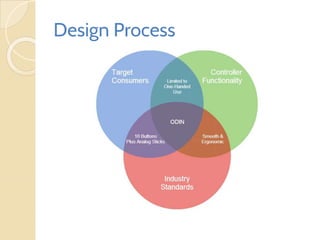
● Implement a controller design that is familiar to the user,
has a low skill requirement and as small learning curve as
possible.
● The controller design is targeting someone who is one
handed or has a disability that limits the use of one
hand/arm.
● A ergonomic, smooth, and natural feel of both the
controller and the input mechanisms using either hand.
● Our design utilizes an ten button design that simulates the
major buttons of most modern controllers.
Jeff’s Inspirations
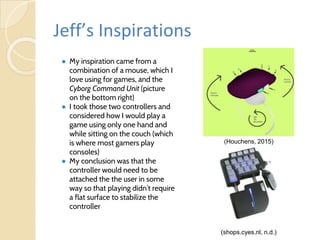
● My inspiration came from a
combination of a mouse, which I
love using for games, and the
Cyborg Command Unit (picture
on the bottom right)
● I took those two controllers and
considered how I would play a
game using only one hand and
while sitting on the couch (which
is where most gamers play
consoles)
● My conclusion was that the
controller would need to be
attached the the user in some
way so that playing didn’t require
a flat surface to stabilize the
controller
(shops.cyes.nl, n.d.)
(Houchens, 2015)
Dakota’s Inspirations
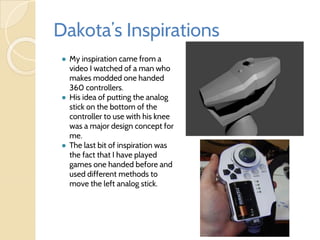
● My inspiration came from a
video I watched of a man who
makes modded one handed
360 controllers.
● His idea of putting the analog
stick on the bottom of the
controller to use with his knee
was a major design concept for
me.
● The last bit of inspiration was
the fact that I have played
games one handed before and
used different methods to
move the left analog stick.
Kyle’s Inspirations
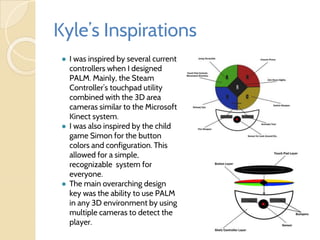
● I was inspired by several current
controllers when I designed
PALM. Mainly, the Steam
Controller’s touchpad utility
combined with the 3D area
cameras similar to the Microsoft
Kinect system.
● I was also inspired by the child
game Simon for the button
colors and configuration. This
allowed for a simple,
recognizable system for
everyone.
● The main overarching design
key was the ability to use PALM
in any 3D environment by using
multiple cameras to detect the
player.
Jon’s Inspirations
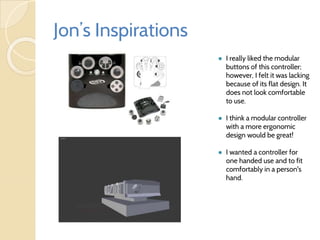
● I really liked the modular
buttons of this controller;
however, I felt it was lacking
because of its flat design. It
does not look comfortable
to use.
● I think a modular controller
with a more ergonomic
design would be great!
● I wanted a controller for
one handed use and to fit
comfortably in a person's
hand.
Design Process
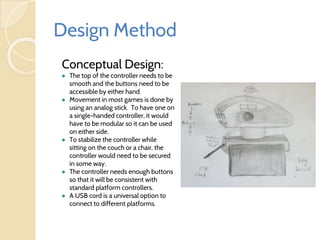
Design Method
Conceptual Design:
● The top of the controller needs to be
smooth and the buttons need to be
accessible by either hand.
● Movement in most games is done by
using an analog stick. To have one on
a single-handed controller, it would
have to be modular so it can be used
on either side.
● To stabilize the controller while
sitting on the couch or a chair, the
controller would need to be secured
in some way.
● The controller needs enough buttons
so that it will be consistent with
standard platform controllers.
● A USB cord is a universal option to
connect to different platforms.
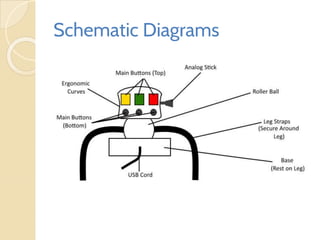
Schematic Diagrams
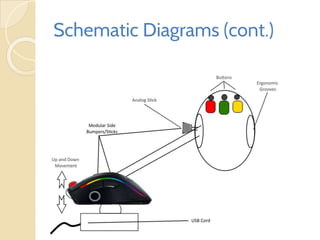
Schematic Diagrams (cont.)
Design Assumptions
●The controller should be secured by some method
so it doesn’t require a flat surface (ease of use)
●The analog stick should be modular so it can be
moved to the left or right side of the controller
depending on which hand the player is using
●The controller should contain both buttons and
bumpers to add functionality for complex
controller games
●All the buttons and bumpers need to be
symmetrical so either hand can use them the same
way
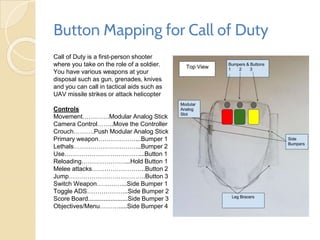
Button Mapping for Call of Duty
Call of Duty is a first-person shooter
where you take on the role of a soldier.
You have various weapons at your
disposal such as gun, grenades, knives
and you can call in tactical aids such as
UAV missile strikes or attack helicopter
Controls
Movement………….Modular Analog Stick
Camera Control……..Move the Controller
Crouch……….Push Modular Analog Stick
Primary weapon………………...Bumper 1
Lethals…………………………...Bumper 2
Use………………………………...Button 1
Reloading…………………...Hold Button 1
Melee attacks……………………..Button 2
Jump……………………………….Button 3
Switch Weapon…………...Side Bumper 1
Toggle ADS………………..Side Bumper 2
Score Board.......................Side Bumper 3
Objectives/Menu……….....Side Bumper 4
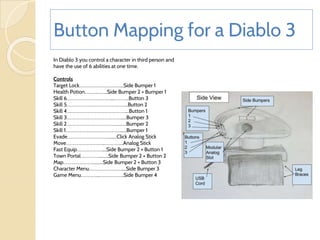
Button Mapping for a Diablo 3
In Diablo 3 you control a character in third person and
have the use of 6 abilities at one time.
Controls
Target Lock……………………………....Side Bumper 1
Health Potion………..……..Side Bumper 2 + Bumper 1
Skill 6………………………………....………...Button 3
Skill 5…………………………………………...Button 2
Skill 4…………………………………………....Button 1
Skill 3……………………………………….....Bumper 3
Skill 2……………………………………....….Bumper 2
Skill 1………………………………………......Bumper 1
Evade…………………………….........Click Analog Stick
Move…………………………..…………....Analog Stick
Fast Equip…………………....Side Bumper 2 + Button 1
Town Portal…………….........Side Bumper 2 + Button 2
Map……………………..........Side Bumper 2 + Button 3
Character Menu………………………....Side Bumper 3
Game Menu…………....………………..Side Bumper 4
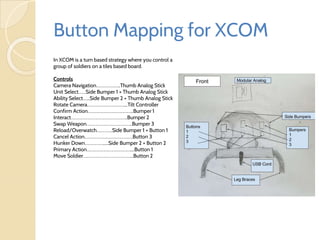
Button Mapping for XCOM
In XCOM is a turn based strategy where you control a
group of soldiers on a tiles based board.
Controls
Camera Navigation………………..Thumb Analog Stick
Unit Select……Side Bumper 1 + Thumb Analog Stick
Ability Select…...Side Bumper 2 + Thumb Analog Stick
Rotate Camera…………………………....Tilt Controller
Confirm Action………………………………..Bumper 1
Interact………………………………………..Bumper 2
Swap Weapon………………………………..Bumper 3
Reload/Overwatch………….Side Bumper 1 + Button 1
Cancel Action………………………………….Button 3
Hunker Down…………….....Side Bumper 2 + Button 2
Primary Action………………………………....Button 1
Move Soldier…………………………………...Button 2
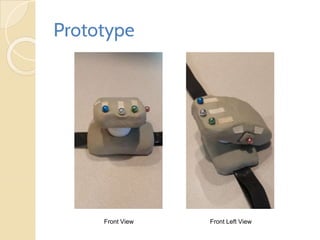
Prototype
Front View Front Left View
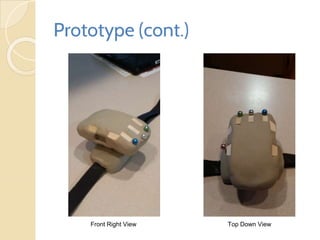
Prototype (cont.)
Front Right View Top Down View
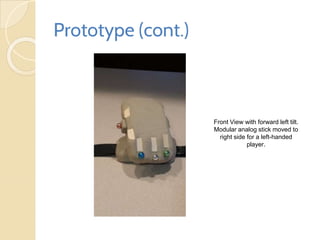
Prototype (cont.)
Front View with forward left tilt.
Modular analog stick moved to
right side for a left-handed
player.
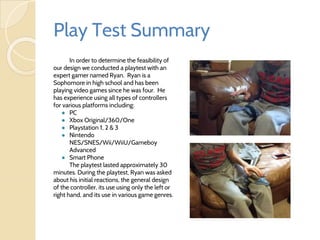
Play Test Summary
In order to determine the feasibility of
our design we conducted a playtest with an
expert gamer named Ryan. Ryan is a
Sophomore in high school and has been
playing video games since he was four. He
has experience using all types of controllers
for various platforms including:
● PC
● Xbox Original/360/One
● Playstation 1, 2 & 3
● Nintendo
NES/SNES/Wii/WiiU/Gameboy
Advanced
● Smart Phone
The playtest lasted approximately 30
minutes. During the playtest, Ryan was asked
about his initial reactions, the general design
of the controller, its use using only the left or
right hand, and its use in various game genres.
Play Test Results /
User Opinions
● His initial reaction to the controller: “It’s pretty
awesome”
● “It would take a little getting used to, but once a player
is used to it, it would be easy. Simple and complex.”
● “The controller could have a button by (in front and
above) the side analog stick for more options.”
● When asked about the side analog stick: “The side
analog stick isn’t weird at all. It’s basically the same as
a normal controller.”
● When asked about its use with a side scroller game:
“For Mario or Sonic, it would be weird to move the
analog stick up to move right instead of right when a
top analog stick, but it would be easy to get used to.”
Play Test Results /
User Opinions (cont.)
● When asked about its use with a first person shooter
(FPS): “For Call of Duty, if you could program the buttons,
it would be real easy. The top left bumper could be shoot,
the top middle button would change weapons, the top
middle bumper would be aim. X & Y aren’t really used
that much. The analog stick should have a push button
though like other controllers (like the Xbox One analog
sticks)
● When asked about the overall usability of the ODIN: “The
design is great and it could be easily patentable.”
Post Mortem
What Worked What Didn’t
● Work load was distributed
unevenly throughout the
team.
● Rarely had entire team
present at meetings due to
schedule conflicts.
● Example template
presentation had little to do
with current topic, which left
layout questions unanswered.
● Combining the core concepts
of each team member’s week
one designs.
● Having a physical prototype to
run playtests and gain useful
feedback.
● Meeting early on in the week to
decide the game controller
design.
Post Mortem (cont.)
What The Team Would Change
● With this being an unorthodox project
with restrictions, more time to better
understand what was needed in a one-
handed controller would have been
helpful.
● The ability to have more hands-on
testing with physical prototypes and play
testers who actually fit the project
demographic.
● Have a solid work schedule and meet
deadlines.
References
● Heck B. (2008) New Single-Handed Controller. BenHeck. Retrieved from:
http://www.benheck.com/new-single-handed-controller/
● Houchens, J. (2015). Controller Design Discussion. Retrieved from:
http://bit.ly/1NXeeKg
● Shops.Cyes.nl (n.d.). Saitek Pro Gamer Cyborg Command Unit (.JPG). Retrieved
from: http://bit.ly/1Qb8qAj
● Cacoo - Your ideas. Our canvas. (n.d.). Retrieved November 7, 2015. Retrieved from:
https://cacoo.com/
● Devlin, K. (2015, November 1). Controller Design Discussion. Retrieved November 8,
2015, from https://course.fso.fullsail.edu/class_sections/79943/discussions/942773

Controller Trollers odin_1115

  • 1.
    Game Usability Controller ODIN JeffHouchens, Dakota Daugherty, Jonathan Capps, Kyle Devlin Controller Trollers Assignment 2 Full Sail University (Omni Directional Interface Nexus)
  • 2.
    Abstract This week, ourfour-man team was tasked with creating an innovative game controller for a user that has impaired use of one hand. Through this presentation of 25 slides, our team will showcase our combined core design concepts and introduce the ODIN controller. The ODIN’s design meets industry standards in usability and includes our own thought process inspirations, the design purpose, methodologies, and assumptions. We have also created detailed schematics and a working prototype. With this prototype we performed playtests and documented the findings in the presentation. Through our explanations and analysis we hope to give you, the reader, a better understanding of our processes and hope you will come to see the necessity of the ODIN and other accessible controllers like it.
  • 3.
    Introduction Our goal forODIN was to allow someone who has an impaired use of one hand to still be able to play modern video games with the same efficiency as someone using a standard (two handed) controller. This level of accessibility was key to our design as well as our overall design process. Through this process we came up with ODIN (Omni Directional Interface Nexus) and have designed it to accomplish the ease of use and productibility of modern game controllers.
  • 4.
    Design Purpose ● Implementa controller design that is familiar to the user, has a low skill requirement and as small learning curve as possible. ● The controller design is targeting someone who is one handed or has a disability that limits the use of one hand/arm. ● A ergonomic, smooth, and natural feel of both the controller and the input mechanisms using either hand. ● Our design utilizes an ten button design that simulates the major buttons of most modern controllers.
  • 5.
    Jeff’s Inspirations ● Myinspiration came from a combination of a mouse, which I love using for games, and the Cyborg Command Unit (picture on the bottom right) ● I took those two controllers and considered how I would play a game using only one hand and while sitting on the couch (which is where most gamers play consoles) ● My conclusion was that the controller would need to be attached the the user in some way so that playing didn’t require a flat surface to stabilize the controller (shops.cyes.nl, n.d.) (Houchens, 2015)
  • 6.
    Dakota’s Inspirations ● Myinspiration came from a video I watched of a man who makes modded one handed 360 controllers. ● His idea of putting the analog stick on the bottom of the controller to use with his knee was a major design concept for me. ● The last bit of inspiration was the fact that I have played games one handed before and used different methods to move the left analog stick.
  • 7.
    Kyle’s Inspirations ● Iwas inspired by several current controllers when I designed PALM. Mainly, the Steam Controller’s touchpad utility combined with the 3D area cameras similar to the Microsoft Kinect system. ● I was also inspired by the child game Simon for the button colors and configuration. This allowed for a simple, recognizable system for everyone. ● The main overarching design key was the ability to use PALM in any 3D environment by using multiple cameras to detect the player.
  • 8.
    Jon’s Inspirations ● Ireally liked the modular buttons of this controller; however, I felt it was lacking because of its flat design. It does not look comfortable to use. ● I think a modular controller with a more ergonomic design would be great! ● I wanted a controller for one handed use and to fit comfortably in a person's hand.
  • 9.
  • 10.
    Design Method Conceptual Design: ●The top of the controller needs to be smooth and the buttons need to be accessible by either hand. ● Movement in most games is done by using an analog stick. To have one on a single-handed controller, it would have to be modular so it can be used on either side. ● To stabilize the controller while sitting on the couch or a chair, the controller would need to be secured in some way. ● The controller needs enough buttons so that it will be consistent with standard platform controllers. ● A USB cord is a universal option to connect to different platforms.
  • 11.
  • 12.
  • 13.
    Design Assumptions ●The controllershould be secured by some method so it doesn’t require a flat surface (ease of use) ●The analog stick should be modular so it can be moved to the left or right side of the controller depending on which hand the player is using ●The controller should contain both buttons and bumpers to add functionality for complex controller games ●All the buttons and bumpers need to be symmetrical so either hand can use them the same way
  • 14.
    Button Mapping forCall of Duty Call of Duty is a first-person shooter where you take on the role of a soldier. You have various weapons at your disposal such as gun, grenades, knives and you can call in tactical aids such as UAV missile strikes or attack helicopter Controls Movement………….Modular Analog Stick Camera Control……..Move the Controller Crouch……….Push Modular Analog Stick Primary weapon………………...Bumper 1 Lethals…………………………...Bumper 2 Use………………………………...Button 1 Reloading…………………...Hold Button 1 Melee attacks……………………..Button 2 Jump……………………………….Button 3 Switch Weapon…………...Side Bumper 1 Toggle ADS………………..Side Bumper 2 Score Board.......................Side Bumper 3 Objectives/Menu……….....Side Bumper 4
  • 15.
    Button Mapping fora Diablo 3 In Diablo 3 you control a character in third person and have the use of 6 abilities at one time. Controls Target Lock……………………………....Side Bumper 1 Health Potion………..……..Side Bumper 2 + Bumper 1 Skill 6………………………………....………...Button 3 Skill 5…………………………………………...Button 2 Skill 4…………………………………………....Button 1 Skill 3……………………………………….....Bumper 3 Skill 2……………………………………....….Bumper 2 Skill 1………………………………………......Bumper 1 Evade…………………………….........Click Analog Stick Move…………………………..…………....Analog Stick Fast Equip…………………....Side Bumper 2 + Button 1 Town Portal…………….........Side Bumper 2 + Button 2 Map……………………..........Side Bumper 2 + Button 3 Character Menu………………………....Side Bumper 3 Game Menu…………....………………..Side Bumper 4
  • 16.
    Button Mapping forXCOM In XCOM is a turn based strategy where you control a group of soldiers on a tiles based board. Controls Camera Navigation………………..Thumb Analog Stick Unit Select……Side Bumper 1 + Thumb Analog Stick Ability Select…...Side Bumper 2 + Thumb Analog Stick Rotate Camera…………………………....Tilt Controller Confirm Action………………………………..Bumper 1 Interact………………………………………..Bumper 2 Swap Weapon………………………………..Bumper 3 Reload/Overwatch………….Side Bumper 1 + Button 1 Cancel Action………………………………….Button 3 Hunker Down…………….....Side Bumper 2 + Button 2 Primary Action………………………………....Button 1 Move Soldier…………………………………...Button 2
  • 17.
  • 18.
  • 19.
    Prototype (cont.) Front Viewwith forward left tilt. Modular analog stick moved to right side for a left-handed player.
  • 20.
    Play Test Summary Inorder to determine the feasibility of our design we conducted a playtest with an expert gamer named Ryan. Ryan is a Sophomore in high school and has been playing video games since he was four. He has experience using all types of controllers for various platforms including: ● PC ● Xbox Original/360/One ● Playstation 1, 2 & 3 ● Nintendo NES/SNES/Wii/WiiU/Gameboy Advanced ● Smart Phone The playtest lasted approximately 30 minutes. During the playtest, Ryan was asked about his initial reactions, the general design of the controller, its use using only the left or right hand, and its use in various game genres.
  • 21.
    Play Test Results/ User Opinions ● His initial reaction to the controller: “It’s pretty awesome” ● “It would take a little getting used to, but once a player is used to it, it would be easy. Simple and complex.” ● “The controller could have a button by (in front and above) the side analog stick for more options.” ● When asked about the side analog stick: “The side analog stick isn’t weird at all. It’s basically the same as a normal controller.” ● When asked about its use with a side scroller game: “For Mario or Sonic, it would be weird to move the analog stick up to move right instead of right when a top analog stick, but it would be easy to get used to.”
  • 22.
    Play Test Results/ User Opinions (cont.) ● When asked about its use with a first person shooter (FPS): “For Call of Duty, if you could program the buttons, it would be real easy. The top left bumper could be shoot, the top middle button would change weapons, the top middle bumper would be aim. X & Y aren’t really used that much. The analog stick should have a push button though like other controllers (like the Xbox One analog sticks) ● When asked about the overall usability of the ODIN: “The design is great and it could be easily patentable.”
  • 23.
    Post Mortem What WorkedWhat Didn’t ● Work load was distributed unevenly throughout the team. ● Rarely had entire team present at meetings due to schedule conflicts. ● Example template presentation had little to do with current topic, which left layout questions unanswered. ● Combining the core concepts of each team member’s week one designs. ● Having a physical prototype to run playtests and gain useful feedback. ● Meeting early on in the week to decide the game controller design.
  • 24.
    Post Mortem (cont.) WhatThe Team Would Change ● With this being an unorthodox project with restrictions, more time to better understand what was needed in a one- handed controller would have been helpful. ● The ability to have more hands-on testing with physical prototypes and play testers who actually fit the project demographic. ● Have a solid work schedule and meet deadlines.
  • 25.
    References ● Heck B.(2008) New Single-Handed Controller. BenHeck. Retrieved from: http://www.benheck.com/new-single-handed-controller/ ● Houchens, J. (2015). Controller Design Discussion. Retrieved from: http://bit.ly/1NXeeKg ● Shops.Cyes.nl (n.d.). Saitek Pro Gamer Cyborg Command Unit (.JPG). Retrieved from: http://bit.ly/1Qb8qAj ● Cacoo - Your ideas. Our canvas. (n.d.). Retrieved November 7, 2015. Retrieved from: https://cacoo.com/ ● Devlin, K. (2015, November 1). Controller Design Discussion. Retrieved November 8, 2015, from https://course.fso.fullsail.edu/class_sections/79943/discussions/942773