O IN
                       L J
                     IA
                  AT
                SP        Spatial Join
                          Calculating Number of Physician per Population


            2             GIS in Health and Planning
       2 01
     1/                   2012 Spring
3/                        Rutgers University
                          by Wansoo Im, Ph.D.
Download census tract 2000 file
-www.state.nj.us/dep/gis


Download Municipal boundaries
-https://njgin.state.nj.us


“doctor point location layer” (downlaod from Sakai )
Census tract map/Municipality boundaries


=>Add All Maps in Arc GIS
CENSUS TRACT : OPEN ATTRIBUTE TABLE
In order to see what kind of information it has
DOCTOR LOCATION LAYER : OPEN ATTRIBUTE TABLE
In order to see what kind of information it has
HOW TO JOIN LOCATIONAL DATA WITH DATA FROM
ANOTHER LAYER?

Based on the location, we will join doctor’s location into Census tract layer.
JOIN DOCTOR POINTS WITH CENSUS DATA LAYER
CLICK “DATA FROM ANOTHER LAYER BASED ON
SPATIAL LOCATION”
SELECT “THE LAYER(CENSUS TRACT)” WHICH YOU
WANT TO JOIN WITH DOCTOR LOCATION
SET THE DIRECTORY(LOCATION TO SAVE YOUR
SHAPEFILE) -> CLICK “SHAPEFILE”
OPEN ATTRIBUTE TABLE TO CHECK IF NEW
LAYER(DOCTOR CTR) IS SUCCESSFULLY JOINT
By opening attribute table, you can check if data from 2 original
   layers(doctor points/census tract information) are included into a
   newly-created shapefiles.
LOOK THROUGH DATA
EXCEL – PIVOT TABLE
Objectives :
We are going to export data from maps into dbf.
(dbf. File includes the information of table, therefore, all shapefiles
    including data in the table have dbf. file)
Open dbf. File in Excel
By using Pivot table, we will calculate the number of doctors by each
   census tract
(the number of doctors belonging to each census tract)
OPEN ATTRIBUTE TABLE OF DOC_CTR LAYER
Click the menu icon to export data from table.
EXPORT DATA “DBF. FORMAT FILE”
WHY WE EXPORT DATA FROM TABLE?
(DBF. FORMAT)
   Originally Doc_CTR shapefile already has one dbf.file, however, if we
      start to open it in the excel and modify, we can possibly affect the
      original map data as the table is directly linked to a map.
      Therefore, we would like to export data from the original table so as
      to create new dbf. File(so to speak, “copy” dbf. file). In this way, we
      can adjust data(by using a new dbf. File) in Excel regardless of
      affecting original data in the map.
OPEN -> CLICK “ALL FILES”-> CLICK “DBF FILE”
OPEN IN EXCEL
WE CAN USE EXCEL FOR DATA CALCULATION!
THE NUMBER OF DOCTORS WITHIN EACH OF CENSUS
TRACT.
Number of doctors in each of census tract.
How do we calculate?
USE UNIQUE ID TO JOIN “INDIVIDUAL DOCTOR LOCATION” WITHIN
   CENSUS TRACT
    – “KEY” FIELD OR “STFID”
   (CENSUS TRACT ID)
Why can’t we use Tract field? – Tract id is within County (Aggregate scale)
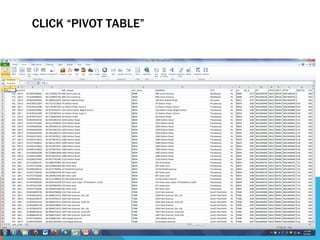
CLICK “INSERT” -> PIVOT TABLE
CLICK “PIVOT TABLE”
CLICK OK
THEN YOU WILL SEE THIS TABLE ;
DRAG “STFID” INTO ROW LABELS
DRAG “STFID” INTO VALUES
COPY THE TABLE
PASTE “VALUE” INTO NEW “SHEET”


Counting Case depending on variable that you
   chose.
In this case, Fivot Table counts the number of
    doctors depending on the Census Tract
    Area(Assigned by unique ID).
CLEAN THE DATA – FIRST ROW SHOULD INDICATE
THE NAME OF FIELD
CLEAN THE DATA – DELETE LAST ROW ; TOTAL
NUMBER
CHANGE “SHEET” NAME INTO DATA
Name that you can remember
No space/No special characters
(Arc GIS cannot recognize)
SAVE EXCEL FILE AND CLOSE IT
BEFORE JOINING IN ARC GIS PROGRAM
CENSUS TRACT LAYER- OPEN ATTRIBUTE BEFORE
JOINING DATA
JOIN THE TABLE
JOIN ATTRIBUTE FROM A TABLE
SELECT THE FIELD TO JOIN “STFID”
(UNIQUE CENSUS TRACT ID)
CLICK EXCEL FILE YOU SAVED
CLICK THE “SHEET” THAT YOU SAVED NEW DATA
(NO.DOCTORS BY CENSUS TRACT)
SELECT THE FIELD(STFID) FROM “DATA SHEET”
CHECK ATTRIBUTE TABLE TO MAKE SURE IF TABLE IS
JOINT WELL
There are some null data because this census tract is statewide while
   doctor location is located only within Middlesex county.
CALCULATE THE NUMBER OF DOCTORS PER
POPULATION WITHIN CENSUS TRACT
The number of doctor
The number of population
Let’s calculate doctors per population.
ADD A NEW FIELD
FIELD CALCULATION
ADD FIELD
10 digit/3decimal
CREATE NEW FIELD (FOR DOCTORS/POPULATION)
->RIGHT CLICK TO DO “FIELD CALCULATING”
FIELD CALCULATOR
But you will have 0 if denominator(total population2000=0) is 0


Select the data which population 2000 is more than 0


Use Field Calculator to use formula (number of
   doctors/population*100)
2 WAYS FOR SELECTION
1.      Select by Attribute
     select the layer “census 2000”, and select the field “population2000”
        put formula
Pop2000>0 ->click apply


2. Sorting Ascending in Attribute Table
Open Attribute table, sort the data regarding population 2000, and
    select data which is more than 0 in population 2000 field.
EX1) SELECTION BY SORTING POPULATION
EX2) SELECTION BY MENU (SELECTING BY
ATTRIBUTE)
Make sure if Population(denominator) is 0 not
FIELD CALCULATOR
RATE CALCULATION
– WHY 1000? INSTEAD 100?
IF THERE’S NULL DATA => ERROR!!!
Population should be over 0 AND
Number of doctors shouldn’t be null data


Therefore, number of doctor is more than 0 and calculate it again
(Assume that if there’s doctor, population is over 0)
YOU WILL GET NO.DOCTORS PER POPULATION
PERCENTAGE IN NEW FIELD YOU CREATED.
OUTCOME
UNSELECT DATA
GO TO SYMBOLOGY AND MAP IT OUT!
The number of doctors per population
EXPORT MIDDLESEX MUNICIPALITY FROM CENSUS
TRACT
SELECT MUNICIPAL OF MIDDLESEX COUNTY
EXPORT MIDDLESEX COUNTY CENSUS TRACT
Field : Double click “County”
Click “Unique value
County= Middlesex county
CHANGE DECIMAL DEGEE IN LEGEND
-> CLICK “LABEL” AND “FORMAT LABEL” CHANGE DECIMAL
DEGREE.
EXPORT MUNICIPAL BOUNDARY SHAPEFILE.
County = Middle sex
EXPORT MIDDLESEX COUNTY BOUNDARY SHAPEFILE.

Join location from another layer pivot table

  • 1.
    O IN L J IA AT SP Spatial Join Calculating Number of Physician per Population 2 GIS in Health and Planning 2 01 1/ 2012 Spring 3/ Rutgers University by Wansoo Im, Ph.D.
  • 2.
    Download census tract2000 file -www.state.nj.us/dep/gis Download Municipal boundaries -https://njgin.state.nj.us “doctor point location layer” (downlaod from Sakai ) Census tract map/Municipality boundaries =>Add All Maps in Arc GIS
  • 3.
    CENSUS TRACT :OPEN ATTRIBUTE TABLE In order to see what kind of information it has
  • 4.
    DOCTOR LOCATION LAYER: OPEN ATTRIBUTE TABLE In order to see what kind of information it has
  • 5.
    HOW TO JOINLOCATIONAL DATA WITH DATA FROM ANOTHER LAYER? Based on the location, we will join doctor’s location into Census tract layer.
  • 6.
    JOIN DOCTOR POINTSWITH CENSUS DATA LAYER
  • 7.
    CLICK “DATA FROMANOTHER LAYER BASED ON SPATIAL LOCATION”
  • 8.
    SELECT “THE LAYER(CENSUSTRACT)” WHICH YOU WANT TO JOIN WITH DOCTOR LOCATION
  • 9.
    SET THE DIRECTORY(LOCATIONTO SAVE YOUR SHAPEFILE) -> CLICK “SHAPEFILE”
  • 10.
    OPEN ATTRIBUTE TABLETO CHECK IF NEW LAYER(DOCTOR CTR) IS SUCCESSFULLY JOINT By opening attribute table, you can check if data from 2 original layers(doctor points/census tract information) are included into a newly-created shapefiles.
  • 11.
  • 12.
    EXCEL – PIVOTTABLE Objectives : We are going to export data from maps into dbf. (dbf. File includes the information of table, therefore, all shapefiles including data in the table have dbf. file) Open dbf. File in Excel By using Pivot table, we will calculate the number of doctors by each census tract (the number of doctors belonging to each census tract)
  • 13.
    OPEN ATTRIBUTE TABLEOF DOC_CTR LAYER Click the menu icon to export data from table.
  • 14.
    EXPORT DATA “DBF.FORMAT FILE”
  • 15.
    WHY WE EXPORTDATA FROM TABLE? (DBF. FORMAT) Originally Doc_CTR shapefile already has one dbf.file, however, if we start to open it in the excel and modify, we can possibly affect the original map data as the table is directly linked to a map. Therefore, we would like to export data from the original table so as to create new dbf. File(so to speak, “copy” dbf. file). In this way, we can adjust data(by using a new dbf. File) in Excel regardless of affecting original data in the map.
  • 16.
    OPEN -> CLICK“ALL FILES”-> CLICK “DBF FILE”
  • 17.
  • 18.
    WE CAN USEEXCEL FOR DATA CALCULATION!
  • 19.
    THE NUMBER OFDOCTORS WITHIN EACH OF CENSUS TRACT. Number of doctors in each of census tract. How do we calculate?
  • 20.
    USE UNIQUE IDTO JOIN “INDIVIDUAL DOCTOR LOCATION” WITHIN CENSUS TRACT – “KEY” FIELD OR “STFID” (CENSUS TRACT ID) Why can’t we use Tract field? – Tract id is within County (Aggregate scale)
  • 21.
  • 22.
  • 23.
  • 24.
    THEN YOU WILLSEE THIS TABLE ;
  • 25.
  • 26.
  • 27.
  • 28.
    PASTE “VALUE” INTONEW “SHEET” Counting Case depending on variable that you chose. In this case, Fivot Table counts the number of doctors depending on the Census Tract Area(Assigned by unique ID).
  • 29.
    CLEAN THE DATA– FIRST ROW SHOULD INDICATE THE NAME OF FIELD
  • 30.
    CLEAN THE DATA– DELETE LAST ROW ; TOTAL NUMBER
  • 31.
    CHANGE “SHEET” NAMEINTO DATA Name that you can remember No space/No special characters (Arc GIS cannot recognize)
  • 32.
    SAVE EXCEL FILEAND CLOSE IT BEFORE JOINING IN ARC GIS PROGRAM
  • 33.
    CENSUS TRACT LAYER-OPEN ATTRIBUTE BEFORE JOINING DATA
  • 34.
  • 35.
  • 36.
    SELECT THE FIELDTO JOIN “STFID” (UNIQUE CENSUS TRACT ID)
  • 37.
  • 38.
    CLICK THE “SHEET”THAT YOU SAVED NEW DATA (NO.DOCTORS BY CENSUS TRACT)
  • 39.
    SELECT THE FIELD(STFID)FROM “DATA SHEET”
  • 40.
    CHECK ATTRIBUTE TABLETO MAKE SURE IF TABLE IS JOINT WELL There are some null data because this census tract is statewide while doctor location is located only within Middlesex county.
  • 41.
    CALCULATE THE NUMBEROF DOCTORS PER POPULATION WITHIN CENSUS TRACT The number of doctor The number of population Let’s calculate doctors per population.
  • 42.
    ADD A NEWFIELD
  • 43.
  • 44.
  • 45.
    CREATE NEW FIELD(FOR DOCTORS/POPULATION) ->RIGHT CLICK TO DO “FIELD CALCULATING”
  • 46.
    FIELD CALCULATOR But youwill have 0 if denominator(total population2000=0) is 0 Select the data which population 2000 is more than 0 Use Field Calculator to use formula (number of doctors/population*100)
  • 47.
    2 WAYS FORSELECTION 1. Select by Attribute select the layer “census 2000”, and select the field “population2000” put formula Pop2000>0 ->click apply 2. Sorting Ascending in Attribute Table Open Attribute table, sort the data regarding population 2000, and select data which is more than 0 in population 2000 field.
  • 48.
    EX1) SELECTION BYSORTING POPULATION
  • 49.
    EX2) SELECTION BYMENU (SELECTING BY ATTRIBUTE) Make sure if Population(denominator) is 0 not
  • 50.
  • 51.
    RATE CALCULATION – WHY1000? INSTEAD 100?
  • 52.
    IF THERE’S NULLDATA => ERROR!!! Population should be over 0 AND Number of doctors shouldn’t be null data Therefore, number of doctor is more than 0 and calculate it again (Assume that if there’s doctor, population is over 0)
  • 53.
    YOU WILL GETNO.DOCTORS PER POPULATION PERCENTAGE IN NEW FIELD YOU CREATED.
  • 54.
  • 55.
  • 56.
    GO TO SYMBOLOGYAND MAP IT OUT! The number of doctors per population
  • 57.
  • 58.
    SELECT MUNICIPAL OFMIDDLESEX COUNTY
  • 59.
    EXPORT MIDDLESEX COUNTYCENSUS TRACT Field : Double click “County” Click “Unique value County= Middlesex county
  • 61.
    CHANGE DECIMAL DEGEEIN LEGEND -> CLICK “LABEL” AND “FORMAT LABEL” CHANGE DECIMAL DEGREE.
  • 62.
    EXPORT MUNICIPAL BOUNDARYSHAPEFILE. County = Middle sex
  • 63.
    EXPORT MIDDLESEX COUNTYBOUNDARY SHAPEFILE.