JDEDWARDS ENTERPRISEONE

IMPLEMENTING JD EDWARDS
WORKFLOW

USERS

INTERACTION

1
JDEDWARDS WORKFLOW
INTERACTION

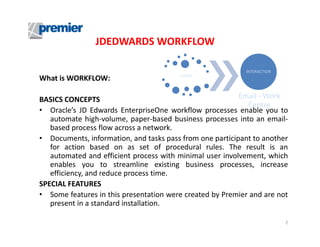
What is WORKFLOW:

USERS

Email - Work
BASICS CONCEPTS
Centre
• Oracle’s JD Edwards EnterpriseOne workflow processes enable you to
automate high-volume, paper-based business processes into an emailbased process flow across a network.
• Documents, information, and tasks pass from one participant to another
for action based on as set of procedural rules. The result is an
automated and efficient process with minimal user involvement, which
enables you to streamline existing business processes, increase
efficiency, and reduce process time.
SPECIAL FEATURES
• Some features in this presentation were created by Premier and are not
present in a standard installation.
2
WORKFLOW INTERACTION
•

•

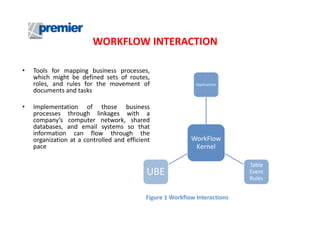
Tools for mapping business processes,
which might be defined sets of routes,
roles, and rules for the movement of
documents and tasks
Implementation of those business
processes through linkages with a
company’s computer network, shared
databases, and email systems so that
information can flow through the
organization at a controlled and efficient
pace

Applications

WorkFlow
Kernel

UBE
Figure 1 Workflow Interactions

Table
Event
Rules
WORKFLOW ACTIONS
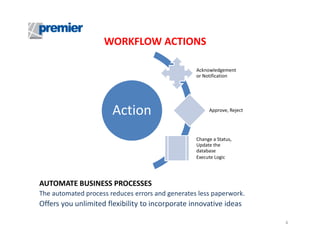
Acknowledgement
or Notification

Action

Approve, Reject

Change a Status,
Update the
database
Execute Logic

AUTOMATE BUSINESS PROCESSES
The automated process reduces errors and generates less paperwork.

Offers you unlimited flexibility to incorporate innovative ideas
4
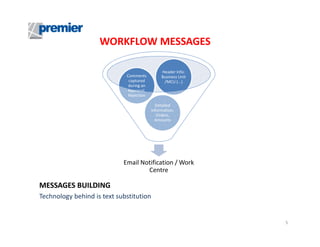
WORKFLOW MESSAGES
Comments
captured
during an
Approval,
Rejection

Header Info:
Business Unit
/MCU (...)

Detailed
Information,
Orders,
Amounts

Email Notification / Work
Centre

MESSAGES BUILDING
Technology behind is text substitution

5
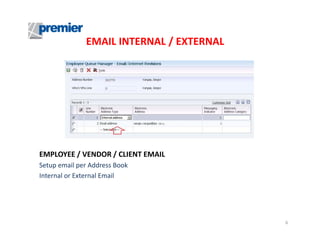
EMAIL INTERNAL / EXTERNAL

EMPLOYEE / VENDOR / CLIENT EMAIL
Setup email per Address Book
Internal or External Email

6
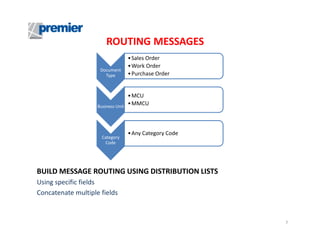
ROUTING MESSAGES
Document
Type

Business Unit

Category
Code

• Sales Order
• Work Order
• Purchase Order

• MCU
• MMCU

• Any Category Code

BUILD MESSAGE ROUTING USING DISTRIBUTION LISTS
Using specific fields
Concatenate multiple fields

7
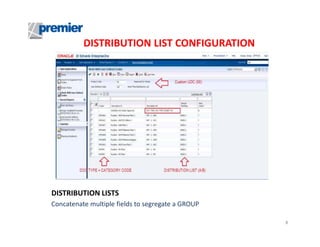
DISTRIBUTION LIST CONFIGURATION

DISTRIBUTION LISTS
Concatenate multiple fields to segregate a GROUP
8
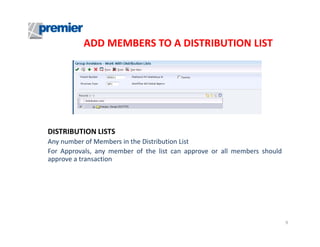
ADD MEMBERS TO A DISTRIBUTION LIST

DISTRIBUTION LISTS
Any number of Members in the Distribution List
For Approvals, any member of the list can approve or all members should
approve a transaction

9
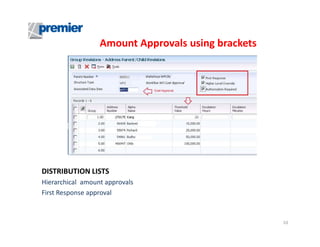
Amount Approvals using brackets

DISTRIBUTION LISTS
Hierarchical amount approvals
First Response approval

10
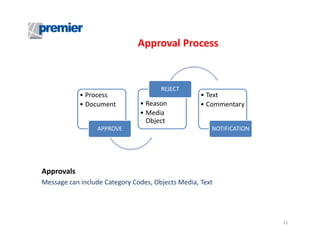
Approval Process

• Process
• Document

APPROVE

REJECT

• Reason
• Media
Object

• Text
• Commentary

NOTIFICATION

Approvals
Message can include Category Codes, Objects Media, Text

11
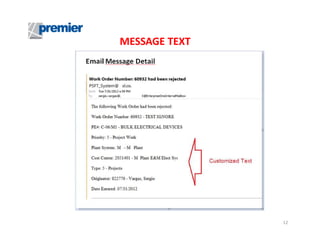
MESSAGE TEXT

12
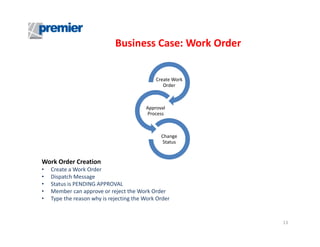
Business Case: Work Order

Create Work
Order

Approval
Process

Change
Status

Work Order Creation
•
•
•
•
•

Create a Work Order
Dispatch Message
Status is PENDING APPROVAL
Member can approve or reject the Work Order
Type the reason why is rejecting the Work Order

13
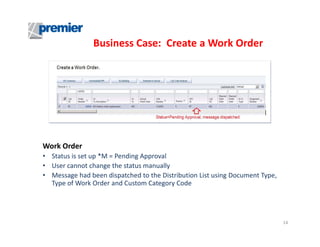
Business Case: Create a Work Order

Work Order
• Status is set up *M = Pending Approval
• User cannot change the status manually
• Message had been dispatched to the Distribution List using Document Type,
Type of Work Order and Custom Category Code

14
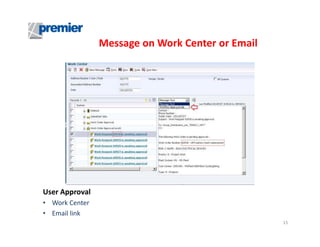
Message on Work Center or Email

User Approval
• Work Center
• Email link
15
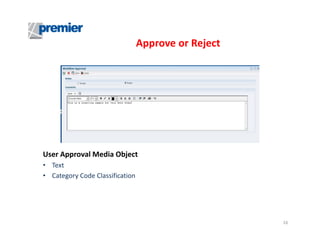
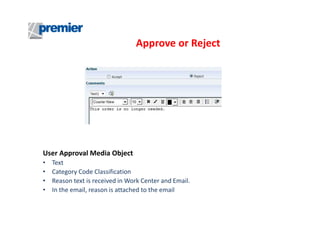
Approve or Reject

User Approval Media Object
• Text
• Category Code Classification

16
Approve or Reject

User Approval Media Object
•
•
•
•

Text
Category Code Classification
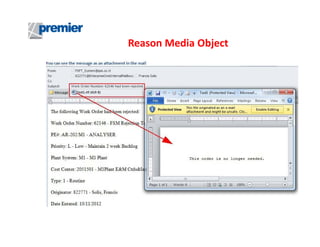
Reason text is received in Work Center and Email.
In the email, reason is attached to the email
Reason Media Object
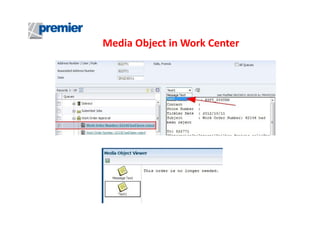
Media Object in Work Center
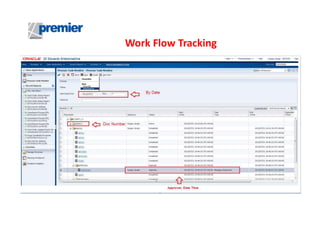
Work Flow Tracking
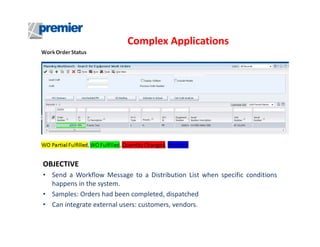
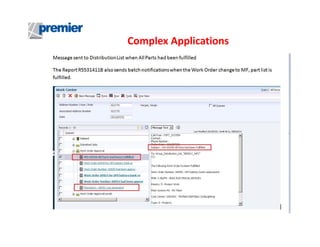
Complex Applications

OBJECTIVE
• Send a Workflow Message to a Distribution List when specific conditions
happens in the system.
• Samples: Orders had been completed, dispatched
• Can integrate external users: customers, vendors.
Complex Applications
Additional Features
Administrators
• Can deactivate activate cancel any Work Flow Process
• Respond to Work Flow Messages
• Trace a transaction’s history
Other Features
• Delegation feature
• Escalation feature
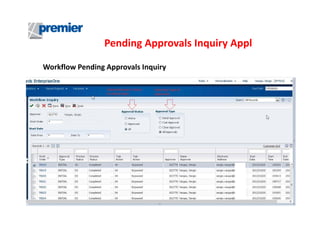
Pending Approvals Inquiry Appl
Workflow Pending Approvals Inquiry
Pending Approvals Inquiry Application
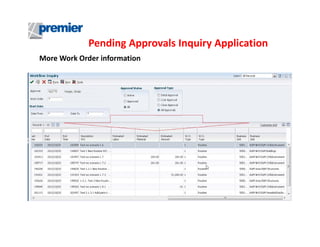
More Work Order information
Pending Approvals Inquiry Application
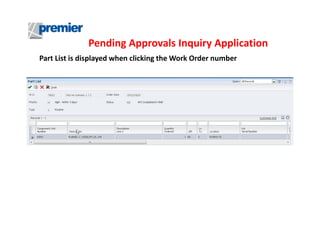
Part List is displayed when clicking the Work Order number
Contact Premier Group
Sergio Vargas
Sr. Technical Consultant
Premier Group
5201 Blue Lagoon Drive
5th Floor - Suite 560
Miami, FL 33126
Sergio_vargas@premierway.com
Telephone +1-305-567-3188

Jdedwards EnterpriseOne Implementing Workflow

  • 1.
    JDEDWARDS ENTERPRISEONE IMPLEMENTING JDEDWARDS WORKFLOW USERS INTERACTION 1
  • 2.
    JDEDWARDS WORKFLOW INTERACTION What isWORKFLOW: USERS Email - Work BASICS CONCEPTS Centre • Oracle’s JD Edwards EnterpriseOne workflow processes enable you to automate high-volume, paper-based business processes into an emailbased process flow across a network. • Documents, information, and tasks pass from one participant to another for action based on as set of procedural rules. The result is an automated and efficient process with minimal user involvement, which enables you to streamline existing business processes, increase efficiency, and reduce process time. SPECIAL FEATURES • Some features in this presentation were created by Premier and are not present in a standard installation. 2
  • 3.
    WORKFLOW INTERACTION • • Tools formapping business processes, which might be defined sets of routes, roles, and rules for the movement of documents and tasks Implementation of those business processes through linkages with a company’s computer network, shared databases, and email systems so that information can flow through the organization at a controlled and efficient pace Applications WorkFlow Kernel UBE Figure 1 Workflow Interactions Table Event Rules
  • 4.
    WORKFLOW ACTIONS Acknowledgement or Notification Action Approve,Reject Change a Status, Update the database Execute Logic AUTOMATE BUSINESS PROCESSES The automated process reduces errors and generates less paperwork. Offers you unlimited flexibility to incorporate innovative ideas 4
  • 5.
    WORKFLOW MESSAGES Comments captured during an Approval, Rejection HeaderInfo: Business Unit /MCU (...) Detailed Information, Orders, Amounts Email Notification / Work Centre MESSAGES BUILDING Technology behind is text substitution 5
  • 6.
    EMAIL INTERNAL /EXTERNAL EMPLOYEE / VENDOR / CLIENT EMAIL Setup email per Address Book Internal or External Email 6
  • 7.
    ROUTING MESSAGES Document Type Business Unit Category Code •Sales Order • Work Order • Purchase Order • MCU • MMCU • Any Category Code BUILD MESSAGE ROUTING USING DISTRIBUTION LISTS Using specific fields Concatenate multiple fields 7
  • 8.
    DISTRIBUTION LIST CONFIGURATION DISTRIBUTIONLISTS Concatenate multiple fields to segregate a GROUP 8
  • 9.
    ADD MEMBERS TOA DISTRIBUTION LIST DISTRIBUTION LISTS Any number of Members in the Distribution List For Approvals, any member of the list can approve or all members should approve a transaction 9
  • 10.
    Amount Approvals usingbrackets DISTRIBUTION LISTS Hierarchical amount approvals First Response approval 10
  • 11.
    Approval Process • Process •Document APPROVE REJECT • Reason • Media Object • Text • Commentary NOTIFICATION Approvals Message can include Category Codes, Objects Media, Text 11
  • 12.
  • 13.
    Business Case: WorkOrder Create Work Order Approval Process Change Status Work Order Creation • • • • • Create a Work Order Dispatch Message Status is PENDING APPROVAL Member can approve or reject the Work Order Type the reason why is rejecting the Work Order 13
  • 14.
    Business Case: Createa Work Order Work Order • Status is set up *M = Pending Approval • User cannot change the status manually • Message had been dispatched to the Distribution List using Document Type, Type of Work Order and Custom Category Code 14
  • 15.
    Message on WorkCenter or Email User Approval • Work Center • Email link 15
  • 16.
    Approve or Reject UserApproval Media Object • Text • Category Code Classification 16
  • 17.
    Approve or Reject UserApproval Media Object • • • • Text Category Code Classification Reason text is received in Work Center and Email. In the email, reason is attached to the email
  • 18.
  • 19.
    Media Object inWork Center
  • 20.
  • 21.
    Complex Applications OBJECTIVE • Senda Workflow Message to a Distribution List when specific conditions happens in the system. • Samples: Orders had been completed, dispatched • Can integrate external users: customers, vendors.
  • 22.
  • 23.
    Additional Features Administrators • Candeactivate activate cancel any Work Flow Process • Respond to Work Flow Messages • Trace a transaction’s history Other Features • Delegation feature • Escalation feature
  • 24.
    Pending Approvals InquiryAppl Workflow Pending Approvals Inquiry
  • 25.
    Pending Approvals InquiryApplication More Work Order information
  • 26.
    Pending Approvals InquiryApplication Part List is displayed when clicking the Work Order number
  • 27.
    Contact Premier Group SergioVargas Sr. Technical Consultant Premier Group 5201 Blue Lagoon Drive 5th Floor - Suite 560 Miami, FL 33126 Sergio_vargas@premierway.com Telephone +1-305-567-3188