JavaScript Document Object :
       ondblclick (Event handler)
Description
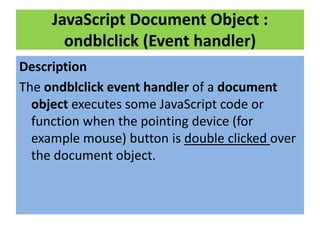
The ondblclick event handler of a document
  object executes some JavaScript code or
  function when the pointing device (for
  example mouse) button is double clicked over
  the document object.
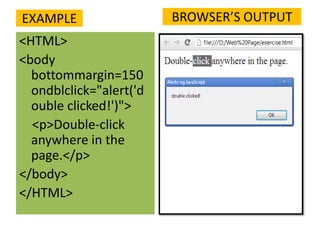
EXAMPLE                  BROWSER’S OUTPUT
<HTML>
<body
  bottommargin=150
  ondblclick="alert('d
  ouble clicked!')">
  <p>Double-click
  anywhere in the
  page.</p>
</body>
</HTML>
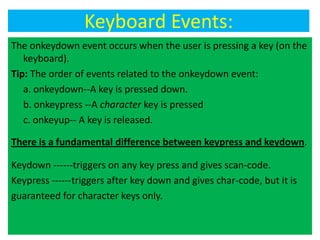
Keyboard Events:
The onkeydown event occurs when the user is pressing a key (on the
   keyboard).
Tip: The order of events related to the onkeydown event:
   a. onkeydown--A key is pressed down.
   b. onkeypress --A character key is pressed
   c. onkeyup-- A key is released.

There is a fundamental difference between keypress and keydown.

Keydown ------triggers on any key press and gives scan-code.
Keypress ------triggers after key down and gives char-code, but it is
guaranteed for character keys only.
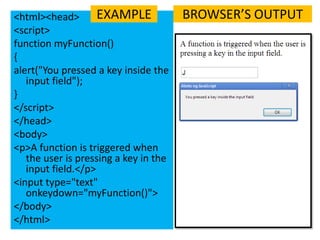
<html><head>        EXAMPLE            BROWSER’S OUTPUT
<script>
function myFunction()
{
alert("You pressed a key inside the
   input field");
}
</script>
</head>
<body>
<p>A function is triggered when
   the user is pressing a key in the
   input field.</p>
<input type="text"
   onkeydown="myFunction()">
</body>
</html>
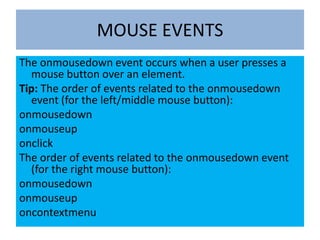
MOUSE EVENTS
The onmousedown event occurs when a user presses a
  mouse button over an element.
Tip: The order of events related to the onmousedown
  event (for the left/middle mouse button):
onmousedown
onmouseup
onclick
The order of events related to the onmousedown event
  (for the right mouse button):
onmousedown
onmouseup
oncontextmenu
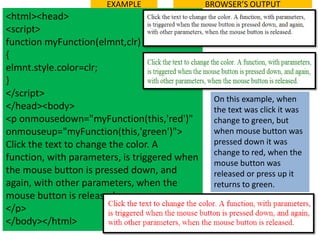
EXAMPLE                 BROWSER’S OUTPUT
<html><head>
<script>
function myFunction(elmnt,clr)
{
elmnt.style.color=clr;
}
</script>
                                                On this example, when
</head><body>                                   the text was click it was
<p onmousedown="myFunction(this,'red')"         change to green, but
onmouseup="myFunction(this,'green')">           when mouse button was
Click the text to change the color. A           pressed down it was
                                                change to red, when the
function, with parameters, is triggered when
                                                mouse button was
the mouse button is pressed down, and           released or press up it
again, with other parameters, when the          returns to green.
mouse button is released.
</p>
</body></html>
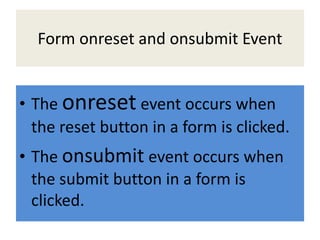
Form onreset and onsubmit Event


• The onreset event occurs when
  the reset button in a form is clicked.
• The onsubmit event occurs when
  the submit button in a form is
  clicked.
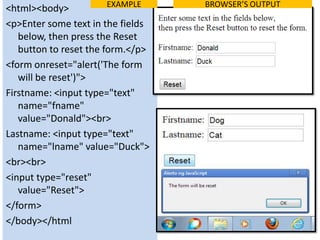
EXAMPLE    BROWSER’S OUTPUT
<html><body>
<p>Enter some text in the fields
   below, then press the Reset
   button to reset the form.</p>
<form onreset="alert('The form
   will be reset')">
Firstname: <input type="text"
   name="fname"
   value="Donald"><br>
Lastname: <input type="text"
   name="lname" value="Duck">
<br><br>
<input type="reset"
   value="Reset">
</form>
</body></html
EXAMPLE
<html><head><script>         <body>
function greeting()          What is your name?<br>
                             <form name="frm1"
{
                             action="tryjsref_form_onsubmit.ht
alert("Welcome " +           m" onsubmit="greeting()">
   document.forms["frm1"     <input type="text"
   ]["fname"].value + "!")   name="fname">
}                            <input type="submit"
</script>                    value="Submit">
                             </form>
</head>
                             </body>
    BROWSER’S OUTPUT         </html>

Javascript event handler 2

  • 2.
    JavaScript Document Object: ondblclick (Event handler) Description The ondblclick event handler of a document object executes some JavaScript code or function when the pointing device (for example mouse) button is double clicked over the document object.
  • 3.
    EXAMPLE BROWSER’S OUTPUT <HTML> <body bottommargin=150 ondblclick="alert('d ouble clicked!')"> <p>Double-click anywhere in the page.</p> </body> </HTML>
  • 4.
    Keyboard Events: The onkeydownevent occurs when the user is pressing a key (on the keyboard). Tip: The order of events related to the onkeydown event: a. onkeydown--A key is pressed down. b. onkeypress --A character key is pressed c. onkeyup-- A key is released. There is a fundamental difference between keypress and keydown. Keydown ------triggers on any key press and gives scan-code. Keypress ------triggers after key down and gives char-code, but it is guaranteed for character keys only.
  • 5.
    <html><head> EXAMPLE BROWSER’S OUTPUT <script> function myFunction() { alert("You pressed a key inside the input field"); } </script> </head> <body> <p>A function is triggered when the user is pressing a key in the input field.</p> <input type="text" onkeydown="myFunction()"> </body> </html>
  • 6.
    MOUSE EVENTS The onmousedownevent occurs when a user presses a mouse button over an element. Tip: The order of events related to the onmousedown event (for the left/middle mouse button): onmousedown onmouseup onclick The order of events related to the onmousedown event (for the right mouse button): onmousedown onmouseup oncontextmenu
  • 7.
    EXAMPLE BROWSER’S OUTPUT <html><head> <script> function myFunction(elmnt,clr) { elmnt.style.color=clr; } </script> On this example, when </head><body> the text was click it was <p onmousedown="myFunction(this,'red')" change to green, but onmouseup="myFunction(this,'green')"> when mouse button was Click the text to change the color. A pressed down it was change to red, when the function, with parameters, is triggered when mouse button was the mouse button is pressed down, and released or press up it again, with other parameters, when the returns to green. mouse button is released. </p> </body></html>
  • 8.
    Form onreset andonsubmit Event • The onreset event occurs when the reset button in a form is clicked. • The onsubmit event occurs when the submit button in a form is clicked.
  • 9.
    EXAMPLE BROWSER’S OUTPUT <html><body> <p>Enter some text in the fields below, then press the Reset button to reset the form.</p> <form onreset="alert('The form will be reset')"> Firstname: <input type="text" name="fname" value="Donald"><br> Lastname: <input type="text" name="lname" value="Duck"> <br><br> <input type="reset" value="Reset"> </form> </body></html
  • 10.
    EXAMPLE <html><head><script> <body> function greeting() What is your name?<br> <form name="frm1" { action="tryjsref_form_onsubmit.ht alert("Welcome " + m" onsubmit="greeting()"> document.forms["frm1" <input type="text" ]["fname"].value + "!") name="fname"> } <input type="submit" </script> value="Submit"> </form> </head> </body> BROWSER’S OUTPUT </html>