Web Presentations,
deck.js and Extensions
Rémi Emonet
SoftShake 2013
2013-10-25
This presentation has been edited for reading. Press 'v' to remove comments if
desired.
Comments appear like this (on yellowish background)

00:07
We are (almost) all “Presenters”
we are all making some kind of presentations

00:09
00:11
Today's Topic

00:13
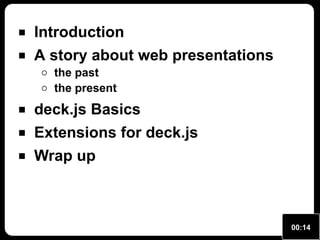
Introduction
A story about web presentations
the past
the present

deck.js Basics
Extensions for deck.js
Wrap up

00:14
00:18
A story about
web presentations

00:21
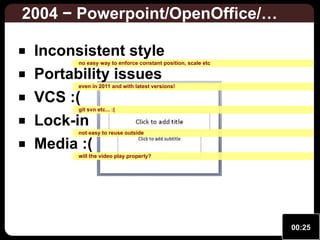
2004 − Powerpoint/OpenOffice/…
Inconsistent style

no easy way to enforce constant position, scale etc

Portability issues

even in 2011 and with latest versions!

VCS :(

git svn etc... :(

Lock-in

not easy to reuse outside

Media :(

will the video play properly?

00:25
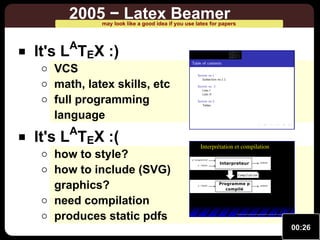
2005 − Latex Beamer

may look like a good idea if you use latex for papers

A

It's L TEX :)

VCS
math, latex skills, etc
full programming
language

It's LATEX :(

how to style?
how to include (SVG)
graphics?
need compilation
produces static pdfs

00:26
2005 − Web Pages Generation
more as an experimental idea

00:30
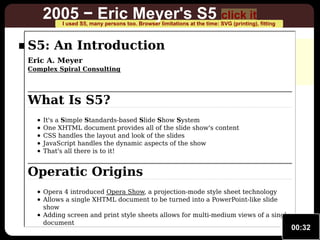
2005 − Eric Meyer's S5 click it

I used S5, many persons too. Browser limitations at the time: SVG (printing), fitting

S5: An really animated
not Introduction

no fitting to window
limited SVG support from browsers

Eric A. Meyer

Complex Spiral Consulting

What Is S5?
It's a Simple Standards-based Slide Show System
One XHTML document provides all of the slide show's content
CSS handles the layout and look of the slides
JavaScript handles the dynamic aspects of the show
That's all there is to it!

Operatic Origins
Opera 4 introduced Opera Show, a projection-mode style sheet technology
Allows a single XHTML document to be turned into a PowerPoint-like slide
show
Adding screen and print style sheets allows for multi-medium views of a single
document

00:32
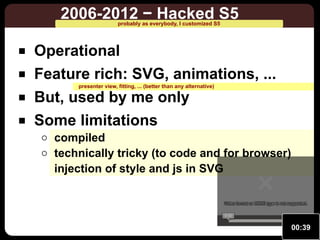
2006-2012 − Hacked S5
probably as everybody, I customized S5

Operational
Feature rich: SVG, animations, ...
presenter view, fitting, ... (better than any alternative)

But, used by me only
Some limitations

compiled
technically tricky (to code and for browser)
injection of style and js in SVG
Video format or MIME type is not supported.
0:00

00:39
2012 − The Questioning

00:41
A story about
web presentations
(back to the present)
00:43
00:48
00:51
deck.js Basics

00:54
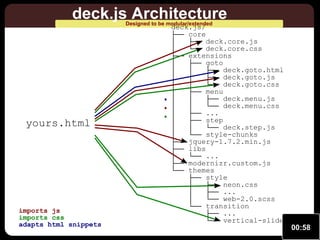
deck.js Architecture
Designed to be modular/extended

imports js
imports css
adapts html snippets

...

yours.html

deck.js/
├── core
│
├── deck.core.js
│
└── deck.core.css
├── extensions
│
├── goto
│
│
├── deck.goto.html
│
│
├── deck.goto.js
│
│
└── deck.goto.css
│
├── menu
│
│
├── deck.menu.js
│
│
└── deck.menu.css
│
├── ...
│
├── step
│
│
└── deck.step.js
│
└── style-chunks
├── jquery-1.7.2.min.js
├── libs
│
└── ...
├── modernizr.custom.js
└── themes
├── style
│
├── neon.css
│
├── ...
│
└── web-2.0.scss
└── transition
├── ...
└── vertical-slide.css
00:58
deck.js Example click to try
view frame source if interested (not critical for the rest)

http://imakewebthings.com/deck.js/introduction/

01:02
1 …
2
3
4
5
6
7
8
9
10
11
12
13
14
15
16
17
18
19
20 …
21
22
23
24
25
26
27
28
29
30
31
32
33

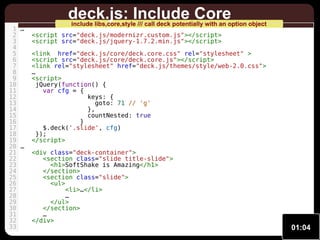
deck.js: Include Core

include libs,core,style /// call deck potentially with an option object

<script src="deck.js/modernizr.custom.js"></script>
<script src="deck.js/jquery-1.7.2.min.js"></script>
<link href="deck.js/core/deck.core.css" rel="stylesheet" >
<script src="deck.js/core/deck.core.js"></script>
<link rel="stylesheet" href="deck.js/themes/style/web-2.0.css">
…
<script>
jQuery(function() {
var cfg = {
keys: {
goto: 71 // 'g'
},
countNested: true
}
$.deck('.slide', cfg)
});
</script>
<div class="deck-container">
<section class="slide title-slide">
<h1>SoftShake is Amazing</h1>
</section>
<section class="slide">
<ul>
<li>…</li>
…
</ul>
</section>
…
</div>

01:04
Extensions for deck.js

01:06
01:12
01:14
1 …
2
3
4
5
6
7
8
9
10
11
12
13
14
15
16
17 …
18
19
20
21
22
23
24
25
26
27
28
29
30
31

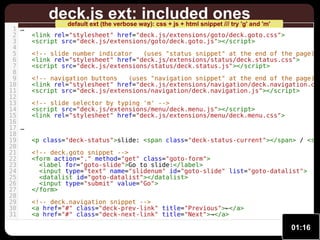
deck.js ext: included ones

default ext (the verbose way): css + js + html snippet /// try 'g' and 'm'

<link rel="stylesheet" href="deck.js/extensions/goto/deck.goto.css">
<script src="deck.js/extensions/goto/deck.goto.js"></script>

<!-- slide number indicator
(uses "status snippet" at the end of the page) <link rel="stylesheet" href="deck.js/extensions/status/deck.status.css">
<script src="deck.js/extensions/status/deck.status.js"></script>

<!-- navigation buttons
(uses "navigation snippet" at the end of the page) <link rel="stylesheet" href="deck.js/extensions/navigation/deck.navigation.css
<script src="deck.js/extensions/navigation/deck.navigation.js"></script>
<!-- slide selector by typing 'm' -->
<script src="deck.js/extensions/menu/deck.menu.js"></script>
<link rel="stylesheet" href="deck.js/extensions/menu/deck.menu.css">

<p class="deck-status">slide: <span class="deck-status-current"></span> / <spa
<!-- deck.goto snippet -->
<form action="." method="get" class="goto-form">
<label for="goto-slide">Go to slide:</label>
<input type="text" name="slidenum" id="goto-slide" list="goto-datalist">
<datalist id="goto-datalist"></datalist>
<input type="submit" value="Go">
</form>
<!-- deck.navigation snippet -->
<a href="#" class="deck-prev-link" title="Previous">←</a>
<a href="#" class="deck-next-link" title="Next">→</a>

01:16
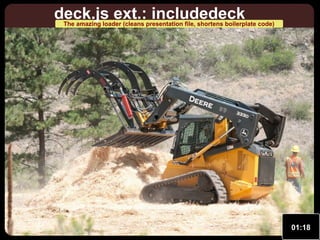
deck.js ext.: includedeck

The amazing loader (cleans presentation file, shortens boilerplate code)

01:18
01:20
deck.js extensions: fit

proper fitting using CSS3, click inside to give focus

http://home.heeere.com/data/deck-js-demo-2/samples/deck-fit.html

01:22
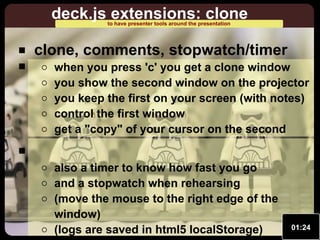
deck.js extensions: clone
to have presenter tools around the presentation

clone, comments, stopwatch/timer

when you press 'c' you get a clone window
you show the second window on the projector
you keep the first on your screen (with notes)
control the first window
get a "copy" of your cursor on the second
also a timer to know how fast you go
and a stopwatch when rehearsing
(move the mouse to the right edge of the
window)
(logs are saved in html5 localStorage)

01:24
deck.js extensions: step, anim
http://home.heeere.com/data/deck-js-demo-2/samples/deck-anim.html

01:27
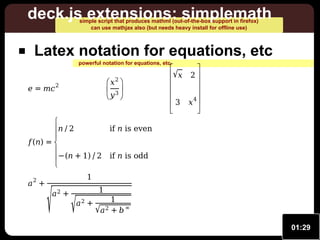
deck.js extensions: simplemath
simple script that produces mathml (out-of-the-box support in firefox)
can use mathjax also (but needs heavy install for offline use)

Latex notation for equations, etc
powerful notation for equations, etc.

e = mc

 x2 
 3
y 

2


n ∕ 2


f (n ) = 

− (n + 1) ∕ 2


a2 +

√



√ x 2 






4
3 x 





if n is even
if n is odd

1
a2 +

√

1

a2 +

1
√a 2 + b ∞
01:29
deck.js extensions: svg

Vector graphics (12k for the smiley) /// give focus to see presentation

http://home.heeere.com/data/deck-js-demo-2/samples/deck-svg.html

01:31
deck.js ext.: smartsyntax

shorter way of writing slides, knows about extensions (e.g., anim)

Markdow inspired syntax

but markdown is limited (no easy way for adding classes and ids)

Adds some features
1. easy slide block creation

2. easy addition of classes and ids
3. extension specific “tags”
=deck.js extensions: smartsyntax=[e]#smartdemo
* Markdow inspired syntax
* Adds some features
*# easy slide block creation
*# easy addition of classes and ids[inred]
*# extension specific “tags”

01:33
deck.js ext.: smartsyntax

easily animate any html or svg element + play/pause videos (even with a remote
control) (even with some clones)

=deck.js extensions: smartsyntax=[e]
* Example[inred]
@CSS!: .inred {color: red;}
@SVG:myclass,floatright media/smiley.svg 300px 300px
@anim-appear:400: #innerEye1

Example

Video format or MIME type
0:00
is not supported.
is not supported.

01:40
deck.js ext.: smartsyntax

easily animate any html or svg element + play/pause videos (even with a remote
control) (even with some clones)

=deck.js extensions: smartsyntax=[e]
* Example[inred]
@CSS!: .inred {color: red;}
@SVG:myclass,floatright media/smiley.svg 300px 300px
@anim-appear:400: #innerEye1 | #innerEye2 | -#innerEye1 + -#innerEye2
@anim-appear:1000: #innerEye1 + #innerEye2 + #shadow
@anim-play: .myvideo
@anim-pause: .myvideo

Example

Video format or MIME type
0:00
is not supported.
is not supported.

01:44
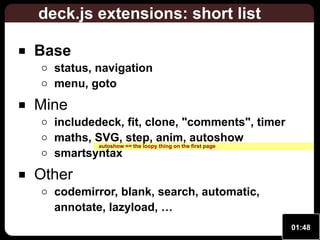
deck.js extensions: short list
Base

status, navigation
menu, goto

Mine

includedeck, fit, clone, "comments", timer
maths, SVG, step, anim, autoshow
autoshow == the loopy thing on the first page
smartsyntax

Other

codemirror, blank, search, automatic,
annotate, lazyload, …
01:48
deck.js extensions: how to
Get included by the user

do initialization on DOM ready
deck.js ready: $(document).bind('deck.init', function()
{…})

Add and use options
$.extend(true, $[deck].defaults, {…} );
var opts = $[deck]('getOptions');

Interact with deck.js (and your DOM)

listen to events: $(document).bind('deck.change', …)
act on deck.js: $[deck]('getSlides') $[deck]('next')
01:50
…
Wrap up

01:53
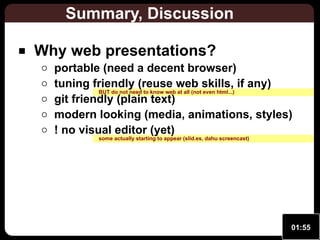
Summary, Discussion
Why web presentations?

portable (need a decent browser)
tuning friendly (reuse web skills, if any)
BUT do not need to know web at all (not even html...)
git friendly (plain text)
modern looking (media, animations, styles)
! no visual editor (yet)
some actually starting to appear (slid.es, dahu screencast)

01:55
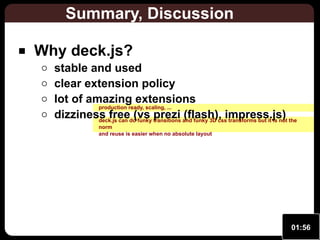
Summary, Discussion
Why deck.js?

stable and used
clear extension policy
lot of amazing extensions
production ready, scaling, ...
dizziness freedo funky transitions and funky 3D cssimpress.js) the
(vs prezi (flash), transforms but it is not
deck.js can
norm
and reuse is easier when no absolute layout

01:56
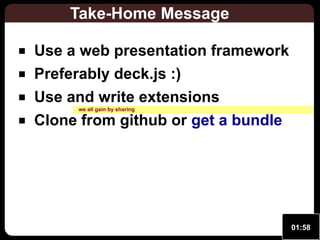
Take-Home Message
Use a web presentation framework
Preferably deck.js :)
Use and write extensions
we all gain by sharing

Clone from github or get a bundle

01:58
Attributions
CC Images

02:00
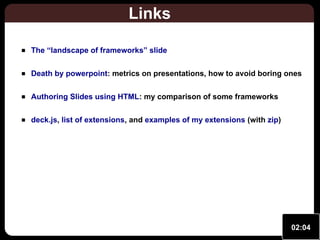
Links
The “landscape of frameworks” slide
Death by powerpoint: metrics on presentations, how to avoid boring ones
Authoring Slides using HTML: my comparison of some frameworks
deck.js, list of extensions, and examples of my extensions (with zip)

02:04
Thank you for your attention

@remiemonet
remi@heeere.com

Web Presentations, deck.js and Extensions
02:10

Web Presentations, deck.js and Extensions

  • 1.
    Web Presentations, deck.js andExtensions Rémi Emonet SoftShake 2013 2013-10-25 This presentation has been edited for reading. Press 'v' to remove comments if desired. Comments appear like this (on yellowish background) 00:07
  • 2.
    We are (almost)all “Presenters” we are all making some kind of presentations 00:09
  • 3.
  • 4.
  • 5.
    Introduction A story aboutweb presentations the past the present deck.js Basics Extensions for deck.js Wrap up 00:14
  • 6.
  • 7.
    A story about webpresentations 00:21
  • 8.
    2004 − Powerpoint/OpenOffice/… Inconsistentstyle no easy way to enforce constant position, scale etc Portability issues even in 2011 and with latest versions! VCS :( git svn etc... :( Lock-in not easy to reuse outside Media :( will the video play properly? 00:25
  • 9.
    2005 − LatexBeamer may look like a good idea if you use latex for papers A It's L TEX :) VCS math, latex skills, etc full programming language It's LATEX :( how to style? how to include (SVG) graphics? need compilation produces static pdfs 00:26
  • 10.
    2005 − WebPages Generation more as an experimental idea 00:30
  • 11.
    2005 − EricMeyer's S5 click it I used S5, many persons too. Browser limitations at the time: SVG (printing), fitting S5: An really animated not Introduction no fitting to window limited SVG support from browsers Eric A. Meyer Complex Spiral Consulting What Is S5? It's a Simple Standards-based Slide Show System One XHTML document provides all of the slide show's content CSS handles the layout and look of the slides JavaScript handles the dynamic aspects of the show That's all there is to it! Operatic Origins Opera 4 introduced Opera Show, a projection-mode style sheet technology Allows a single XHTML document to be turned into a PowerPoint-like slide show Adding screen and print style sheets allows for multi-medium views of a single document 00:32
  • 12.
    2006-2012 − HackedS5 probably as everybody, I customized S5 Operational Feature rich: SVG, animations, ... presenter view, fitting, ... (better than any alternative) But, used by me only Some limitations compiled technically tricky (to code and for browser) injection of style and js in SVG Video format or MIME type is not supported. Video format or MIME type is not supported. 0:00 00:39
  • 13.
    2012 − TheQuestioning 00:41
  • 14.
    A story about webpresentations (back to the present) 00:43
  • 15.
  • 16.
  • 17.
  • 18.
    deck.js Architecture Designed tobe modular/extended imports js imports css adapts html snippets ... yours.html deck.js/ ├── core │ ├── deck.core.js │ └── deck.core.css ├── extensions │ ├── goto │ │ ├── deck.goto.html │ │ ├── deck.goto.js │ │ └── deck.goto.css │ ├── menu │ │ ├── deck.menu.js │ │ └── deck.menu.css │ ├── ... │ ├── step │ │ └── deck.step.js │ └── style-chunks ├── jquery-1.7.2.min.js ├── libs │ └── ... ├── modernizr.custom.js └── themes ├── style │ ├── neon.css │ ├── ... │ └── web-2.0.scss └── transition ├── ... └── vertical-slide.css 00:58
  • 19.
    deck.js Example clickto try view frame source if interested (not critical for the rest) http://imakewebthings.com/deck.js/introduction/ 01:02
  • 20.
    1 … 2 3 4 5 6 7 8 9 10 11 12 13 14 15 16 17 18 19 20 … 21 22 23 24 25 26 27 28 29 30 31 32 33 deck.js:Include Core include libs,core,style /// call deck potentially with an option object <script src="deck.js/modernizr.custom.js"></script> <script src="deck.js/jquery-1.7.2.min.js"></script> <link href="deck.js/core/deck.core.css" rel="stylesheet" > <script src="deck.js/core/deck.core.js"></script> <link rel="stylesheet" href="deck.js/themes/style/web-2.0.css"> … <script> jQuery(function() { var cfg = { keys: { goto: 71 // 'g' }, countNested: true } $.deck('.slide', cfg) }); </script> <div class="deck-container"> <section class="slide title-slide"> <h1>SoftShake is Amazing</h1> </section> <section class="slide"> <ul> <li>…</li> … </ul> </section> … </div> 01:04
  • 21.
  • 22.
  • 23.
  • 24.
    1 … 2 3 4 5 6 7 8 9 10 11 12 13 14 15 16 17 … 18 19 20 21 22 23 24 25 26 27 28 29 30 31 deck.jsext: included ones default ext (the verbose way): css + js + html snippet /// try 'g' and 'm' <link rel="stylesheet" href="deck.js/extensions/goto/deck.goto.css"> <script src="deck.js/extensions/goto/deck.goto.js"></script> <!-- slide number indicator (uses "status snippet" at the end of the page) <link rel="stylesheet" href="deck.js/extensions/status/deck.status.css"> <script src="deck.js/extensions/status/deck.status.js"></script> <!-- navigation buttons (uses "navigation snippet" at the end of the page) <link rel="stylesheet" href="deck.js/extensions/navigation/deck.navigation.css <script src="deck.js/extensions/navigation/deck.navigation.js"></script> <!-- slide selector by typing 'm' --> <script src="deck.js/extensions/menu/deck.menu.js"></script> <link rel="stylesheet" href="deck.js/extensions/menu/deck.menu.css"> <p class="deck-status">slide: <span class="deck-status-current"></span> / <spa <!-- deck.goto snippet --> <form action="." method="get" class="goto-form"> <label for="goto-slide">Go to slide:</label> <input type="text" name="slidenum" id="goto-slide" list="goto-datalist"> <datalist id="goto-datalist"></datalist> <input type="submit" value="Go"> </form> <!-- deck.navigation snippet --> <a href="#" class="deck-prev-link" title="Previous">←</a> <a href="#" class="deck-next-link" title="Next">→</a> 01:16
  • 25.
    deck.js ext.: includedeck Theamazing loader (cleans presentation file, shortens boilerplate code) 01:18
  • 26.
  • 27.
    deck.js extensions: fit properfitting using CSS3, click inside to give focus http://home.heeere.com/data/deck-js-demo-2/samples/deck-fit.html 01:22
  • 28.
    deck.js extensions: clone tohave presenter tools around the presentation clone, comments, stopwatch/timer when you press 'c' you get a clone window you show the second window on the projector you keep the first on your screen (with notes) control the first window get a "copy" of your cursor on the second also a timer to know how fast you go and a stopwatch when rehearsing (move the mouse to the right edge of the window) (logs are saved in html5 localStorage) 01:24
  • 29.
    deck.js extensions: step,anim http://home.heeere.com/data/deck-js-demo-2/samples/deck-anim.html 01:27
  • 30.
    deck.js extensions: simplemath simplescript that produces mathml (out-of-the-box support in firefox) can use mathjax also (but needs heavy install for offline use) Latex notation for equations, etc powerful notation for equations, etc. e = mc  x2   3 y  2  n ∕ 2   f (n ) =   − (n + 1) ∕ 2   a2 + √   √ x 2        4 3 x      if n is even if n is odd 1 a2 + √ 1 a2 + 1 √a 2 + b ∞ 01:29
  • 31.
    deck.js extensions: svg Vectorgraphics (12k for the smiley) /// give focus to see presentation http://home.heeere.com/data/deck-js-demo-2/samples/deck-svg.html 01:31
  • 32.
    deck.js ext.: smartsyntax shorterway of writing slides, knows about extensions (e.g., anim) Markdow inspired syntax but markdown is limited (no easy way for adding classes and ids) Adds some features 1. easy slide block creation 2. easy addition of classes and ids 3. extension specific “tags” =deck.js extensions: smartsyntax=[e]#smartdemo * Markdow inspired syntax * Adds some features *# easy slide block creation *# easy addition of classes and ids[inred] *# extension specific “tags” 01:33
  • 33.
    deck.js ext.: smartsyntax easilyanimate any html or svg element + play/pause videos (even with a remote control) (even with some clones) =deck.js extensions: smartsyntax=[e] * Example[inred] @CSS!: .inred {color: red;} @SVG:myclass,floatright media/smiley.svg 300px 300px @anim-appear:400: #innerEye1 Example Video format or MIME type Video format or MIME type 0:00 is not supported. is not supported. 01:40
  • 34.
    deck.js ext.: smartsyntax easilyanimate any html or svg element + play/pause videos (even with a remote control) (even with some clones) =deck.js extensions: smartsyntax=[e] * Example[inred] @CSS!: .inred {color: red;} @SVG:myclass,floatright media/smiley.svg 300px 300px @anim-appear:400: #innerEye1 | #innerEye2 | -#innerEye1 + -#innerEye2 @anim-appear:1000: #innerEye1 + #innerEye2 + #shadow @anim-play: .myvideo @anim-pause: .myvideo Example Video format or MIME type Video format or MIME type 0:00 is not supported. is not supported. 01:44
  • 35.
    deck.js extensions: shortlist Base status, navigation menu, goto Mine includedeck, fit, clone, "comments", timer maths, SVG, step, anim, autoshow autoshow == the loopy thing on the first page smartsyntax Other codemirror, blank, search, automatic, annotate, lazyload, … 01:48
  • 36.
    deck.js extensions: howto Get included by the user do initialization on DOM ready deck.js ready: $(document).bind('deck.init', function() {…}) Add and use options $.extend(true, $[deck].defaults, {…} ); var opts = $[deck]('getOptions'); Interact with deck.js (and your DOM) listen to events: $(document).bind('deck.change', …) act on deck.js: $[deck]('getSlides') $[deck]('next') 01:50 …
  • 37.
  • 38.
    Summary, Discussion Why webpresentations? portable (need a decent browser) tuning friendly (reuse web skills, if any) BUT do not need to know web at all (not even html...) git friendly (plain text) modern looking (media, animations, styles) ! no visual editor (yet) some actually starting to appear (slid.es, dahu screencast) 01:55
  • 39.
    Summary, Discussion Why deck.js? stableand used clear extension policy lot of amazing extensions production ready, scaling, ... dizziness freedo funky transitions and funky 3D cssimpress.js) the (vs prezi (flash), transforms but it is not deck.js can norm and reuse is easier when no absolute layout 01:56
  • 40.
    Take-Home Message Use aweb presentation framework Preferably deck.js :) Use and write extensions we all gain by sharing Clone from github or get a bundle 01:58
  • 41.
  • 42.
    Links The “landscape offrameworks” slide Death by powerpoint: metrics on presentations, how to avoid boring ones Authoring Slides using HTML: my comparison of some frameworks deck.js, list of extensions, and examples of my extensions (with zip) 02:04
  • 43.
    Thank you foryour attention @remiemonet remi@heeere.com Web Presentations, deck.js and Extensions 02:10