ORACLE DATA SHEET


                                               JAVA PLATFORM, MICRO EDITION
                                               SOFTWARE DEVELOPMENT KIT 3.0
DEVELOPMENT TOOLS FOR CDC,                     Oracle’s Java Platform, Micro Edition (Java ME) Software Development Kit
CLDC, AND BLU-RAY DISC JAVA                    (SDK) integrates the Connected Limited Device Configuration (CLDC), the
KEY FEATURES                                   Connected Device Configuration (CDC), and Blu-ray Disc Java (BD-J)
• A single SDK for all Java ME platforms,
                                               technology into one simple development environment. The Java ME SDK is the
 including new support for Blu-ray Disc
 Java (BD-J)                                   successor to the Sun Java Wireless Toolkit and the Java Toolkit for CDC and
• Prototype applications using built-in        offers improved device emulation, a standalone lightweight development
 Emulators or on Windows Mobile                environment, and powerful tools to speed application development.
• On-device tooling enabling hot
 deployment, debugging and more
• Application profiling, network monitoring,
 and memory monitoring
• Support for creating attractive
 application user interfaces with LWUIT


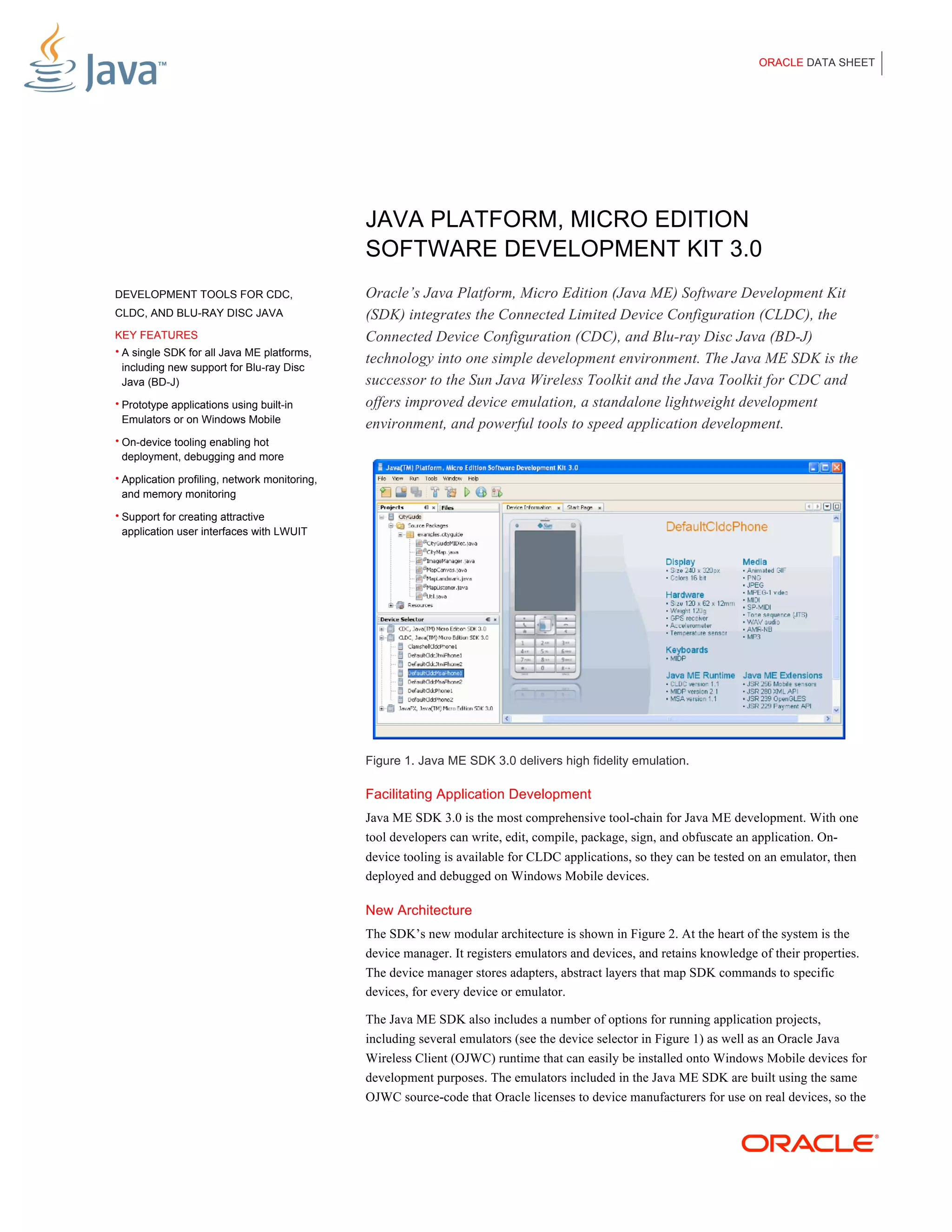
                                               Figure 1. Java ME SDK 3.0 delivers high fidelity emulation.

                                               Facilitating Application Development
                                               Java ME SDK 3.0 is the most comprehensive tool-chain for Java ME development. With one
                                               tool developers can write, edit, compile, package, sign, and obfuscate an application. On-
                                               device tooling is available for CLDC applications, so they can be tested on an emulator, then
                                               deployed and debugged on Windows Mobile devices.

                                               New Architecture
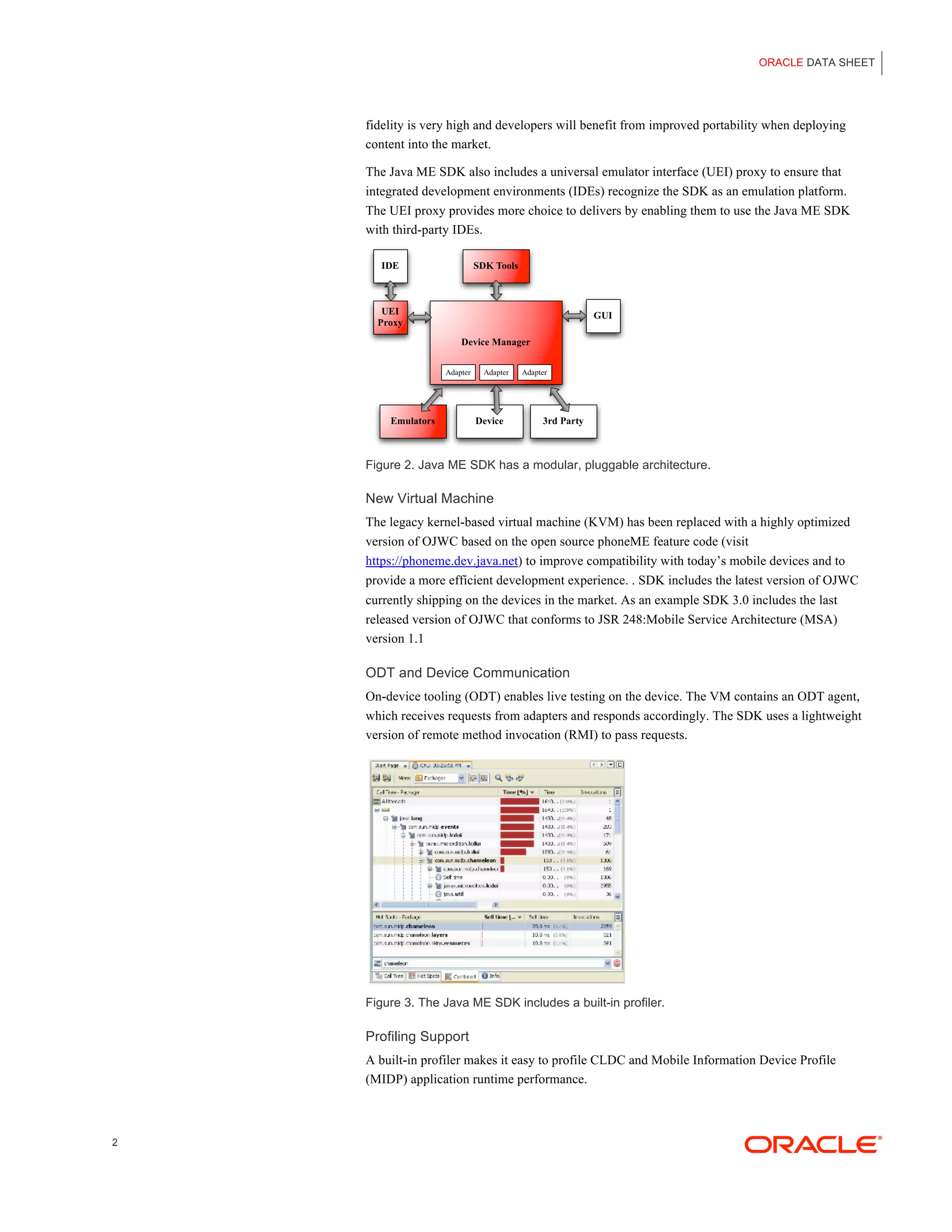
                                               The SDK’s new modular architecture is shown in Figure 2. At the heart of the system is the
                                               device manager. It registers emulators and devices, and retains knowledge of their properties.
                                               The device manager stores adapters, abstract layers that map SDK commands to specific
                                               devices, for every device or emulator.

                                               The Java ME SDK also includes a number of options for running application projects,
                                               including several emulators (see the device selector in Figure 1) as well as an Oracle Java
                                               Wireless Client (OJWC) runtime that can easily be installed onto Windows Mobile devices for
                                               development purposes. The emulators included in the Java ME SDK are built using the same
                                               OJWC source-code that Oracle licenses to device manufacturers for use on real devices, so the
ORACLE DATA SHEET


    fidelity is very high and developers will benefit from improved portability when deploying
    content into the market.

    The Java ME SDK also includes a universal emulator interface (UEI) proxy to ensure that
    integrated development environments (IDEs) recognize the SDK as an emulation platform.
    The UEI proxy provides more choice to delivers by enabling them to use the Java ME SDK
    with third-party IDEs.


    Figure 2. Java ME SDK has a modular, pluggable architecture.

    New Virtual Machine
    The legacy kernel-based virtual machine (KVM) has been replaced with a highly optimized
    version of OJWC based on the open source phoneME feature code (visit
    https://phoneme.dev.java.net) to improve compatibility with today’s mobile devices and to
    provide a more efficient development experience. . SDK includes the latest version of OJWC
    currently shipping on the devices in the market. As an example SDK 3.0 includes the last
    released version of OJWC that conforms to JSR 248:Mobile Service Architecture (MSA)
    version 1.1

    ODT and Device Communication
    On-device tooling (ODT) enables live testing on the device. The VM contains an ODT agent,
    which receives requests from adapters and responds accordingly. The SDK uses a lightweight
    version of remote method invocation (RMI) to pass requests.


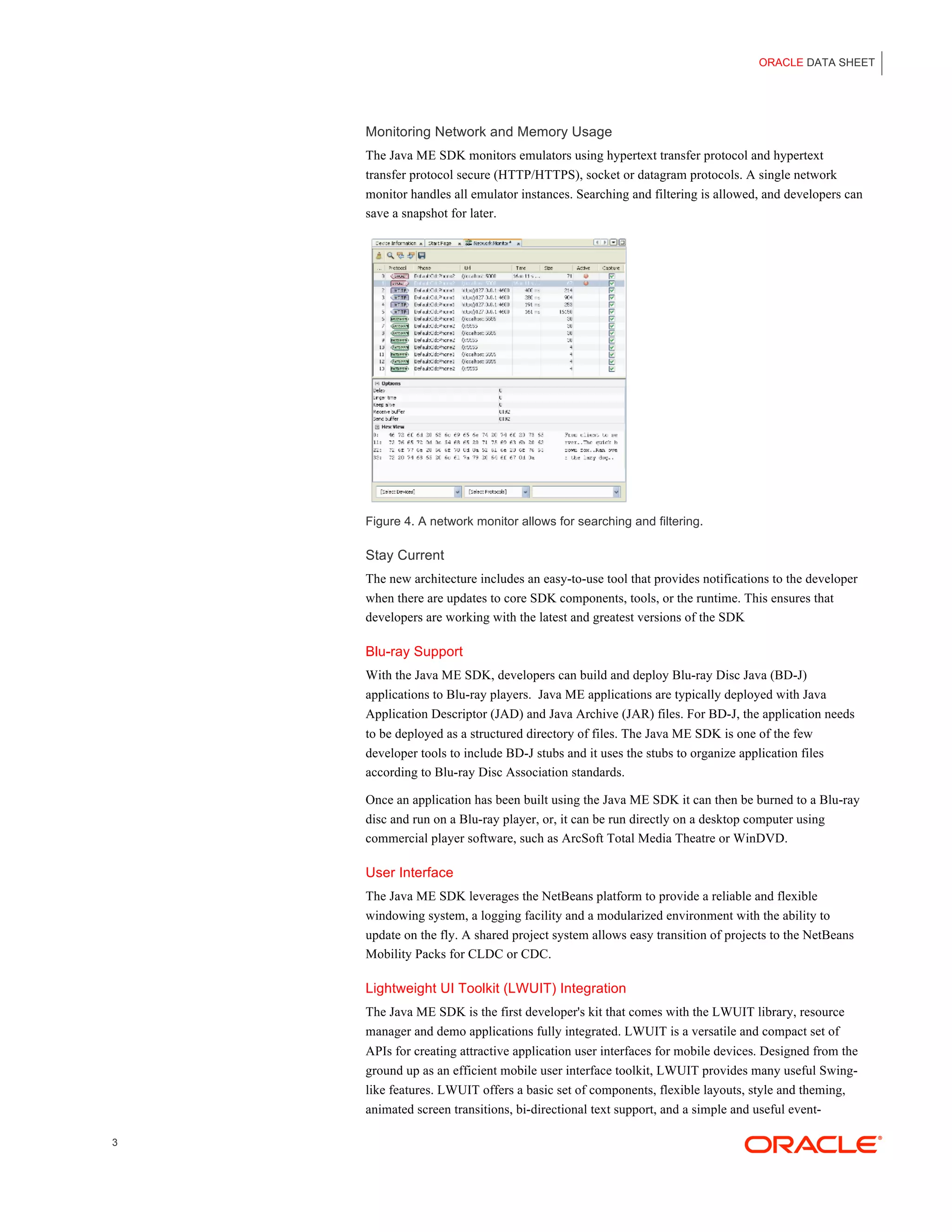
    Figure 3. The Java ME SDK includes a built-in profiler.

    Profiling Support
    A built-in profiler makes it easy to profile CLDC and Mobile Information Device Profile
    (MIDP) application runtime performance.


2
ORACLE DATA SHEET


    Monitoring Network and Memory Usage
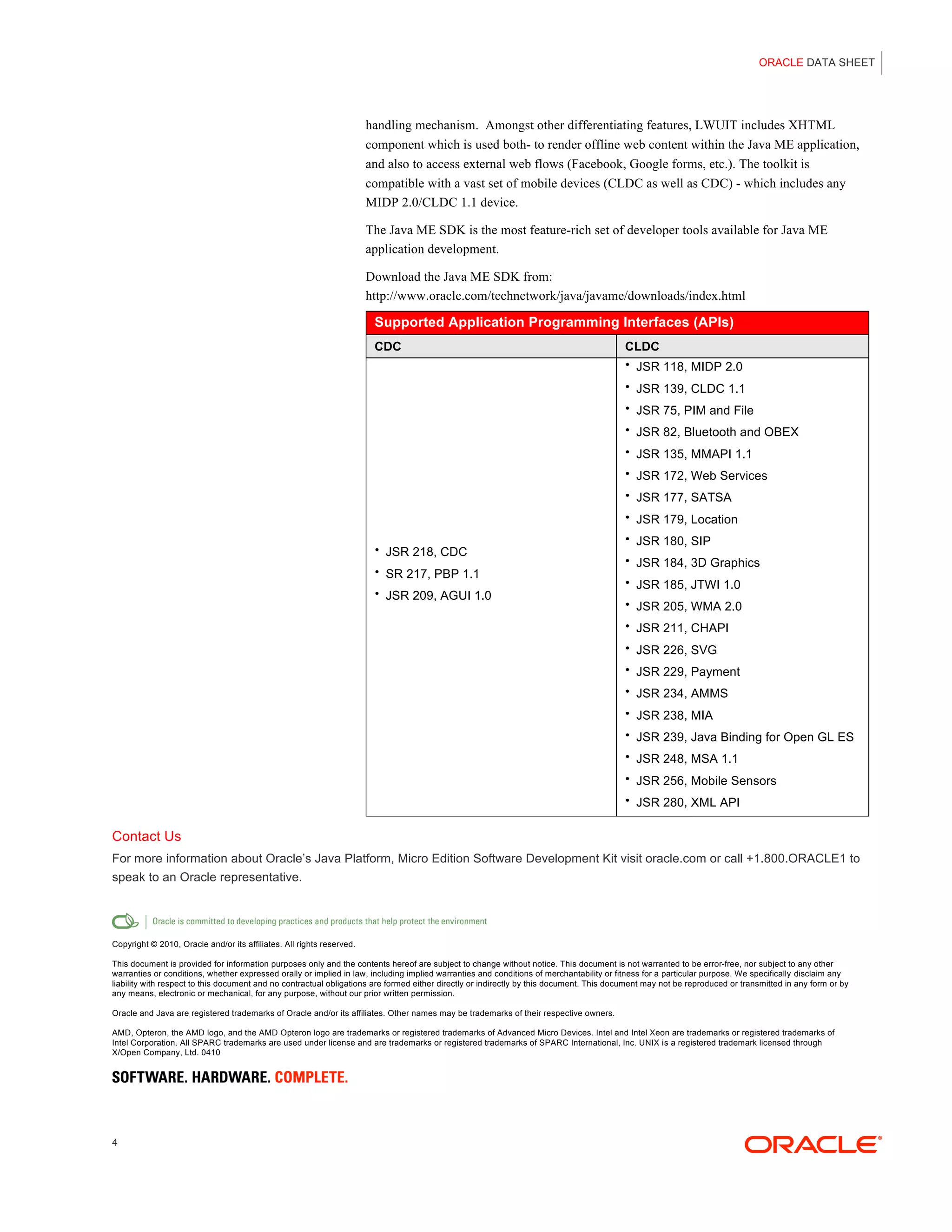
    The Java ME SDK monitors emulators using hypertext transfer protocol and hypertext
    transfer protocol secure (HTTP/HTTPS), socket or datagram protocols. A single network
    monitor handles all emulator instances. Searching and filtering is allowed, and developers can
    save a snapshot for later.


    Figure 4. A network monitor allows for searching and filtering.

    Stay Current
    The new architecture includes an easy-to-use tool that provides notifications to the developer
    when there are updates to core SDK components, tools, or the runtime. This ensures that
    developers are working with the latest and greatest versions of the SDK

    Blu-ray Support
    With the Java ME SDK, developers can build and deploy Blu-ray Disc Java (BD-J)
    applications to Blu-ray players. Java ME applications are typically deployed with Java
    Application Descriptor (JAD) and Java Archive (JAR) files. For BD-J, the application needs
    to be deployed as a structured directory of files. The Java ME SDK is one of the few
    developer tools to include BD-J stubs and it uses the stubs to organize application files
    according to Blu-ray Disc Association standards.

    Once an application has been built using the Java ME SDK it can then be burned to a Blu-ray
    disc and run on a Blu-ray player, or, it can be run directly on a desktop computer using
    commercial player software, such as ArcSoft Total Media Theatre or WinDVD.

    User Interface
    The Java ME SDK leverages the NetBeans platform to provide a reliable and flexible
    windowing system, a logging facility and a modularized environment with the ability to
    update on the fly. A shared project system allows easy transition of projects to the NetBeans
    Mobility Packs for CLDC or CDC.

    Lightweight UI Toolkit (LWUIT) Integration
    The Java ME SDK is the first developer's kit that comes with the LWUIT library, resource
    manager and demo applications fully integrated. LWUIT is a versatile and compact set of
    APIs for creating attractive application user interfaces for mobile devices. Designed from the
    ground up as an efficient mobile user interface toolkit, LWUIT provides many useful Swing-
    like features. LWUIT offers a basic set of components, flexible layouts, style and theming,
    animated screen transitions, bi-directional text support, and a simple and useful event-

3
ORACLE DATA SHEET


                                                                       handling mechanism. Amongst other differentiating features, LWUIT includes XHTML
                                                                       component which is used both- to render offline web content within the Java ME application,
                                                                       and also to access external web flows (Facebook, Google forms, etc.). The toolkit is
                                                                       compatible with a vast set of mobile devices (CLDC as well as CDC) - which includes any
                                                                       MIDP 2.0/CLDC 1.1 device.

                                                                       The Java ME SDK is the most feature-rich set of developer tools available for Java ME
                                                                       application development.

                                                                       Download the Java ME SDK from:
                                                                       http://www.oracle.com/technetwork/java/javame/downloads/index.html

                                                                        Supported Application Programming Interfaces (APIs)
                                                                        CDC                                                              CLDC
                                                                                                                                         • JSR 118, MIDP 2.0

                                                                                                                                         • JSR 139, CLDC 1.1
                                                                                                                                         • JSR 75, PIM and File

                                                                                                                                         • JSR 82, Bluetooth and OBEX

                                                                                                                                         • JSR 135, MMAPI 1.1

                                                                                                                                         • JSR 172, Web Services

                                                                                                                                         • JSR 177, SATSA

                                                                                                                                         • JSR 179, Location

                                                                                                                                         • JSR 180, SIP
                                                                        • JSR 218, CDC
                                                                                                                                         • JSR 184, 3D Graphics
                                                                        • SR 217, PBP 1.1
                                                                                                                                         • JSR 185, JTWI 1.0
                                                                        • JSR 209, AGUI 1.0
                                                                                                                                         • JSR 205, WMA 2.0

                                                                                                                                         • JSR 211, CHAPI

                                                                                                                                         • JSR 226, SVG

                                                                                                                                         • JSR 229, Payment
                                                                                                                                         • JSR 234, AMMS

                                                                                                                                         • JSR 238, MIA

                                                                                                                                         • JSR 239, Java Binding for Open GL ES
                                                                                                                                         • JSR 248, MSA 1.1

                                                                                                                                         • JSR 256, Mobile Sensors

                                                                                                                                         • JSR 280, XML API


Contact Us
For more information about Oracle’s Java Platform, Micro Edition Software Development Kit visit oracle.com or call +1.800.ORACLE1 to
speak to an Oracle representative.


Copyright © 2010, Oracle and/or its affiliates. All rights reserved.

This document is provided for information purposes only and the contents hereof are subject to change without notice. This document is not warranted to be error-free, nor subject to any other
warranties or conditions, whether expressed orally or implied in law, including implied warranties and conditions of merchantability or fitness for a particular purpose. We specifically disclaim any
liability with respect to this document and no contractual obligations are formed either directly or indirectly by this document. This document may not be reproduced or transmitted in any form or by
any means, electronic or mechanical, for any purpose, without our prior written permission.

Oracle and Java are registered trademarks of Oracle and/or its affiliates. Other names may be trademarks of their respective owners.

AMD, Opteron, the AMD logo, and the AMD Opteron logo are trademarks or registered trademarks of Advanced Micro Devices. Intel and Intel Xeon are trademarks or registered trademarks of
Intel Corporation. All SPARC trademarks are used under license and are trademarks or registered trademarks of SPARC International, Inc. UNIX is a registered trademark licensed through
X/Open Company, Ltd. 0410


4

Javame sdk-datasheet-167819

  • 1.
    ORACLE DATA SHEET JAVA PLATFORM, MICRO EDITION SOFTWARE DEVELOPMENT KIT 3.0 DEVELOPMENT TOOLS FOR CDC, Oracle’s Java Platform, Micro Edition (Java ME) Software Development Kit CLDC, AND BLU-RAY DISC JAVA (SDK) integrates the Connected Limited Device Configuration (CLDC), the KEY FEATURES Connected Device Configuration (CDC), and Blu-ray Disc Java (BD-J) • A single SDK for all Java ME platforms, technology into one simple development environment. The Java ME SDK is the including new support for Blu-ray Disc Java (BD-J) successor to the Sun Java Wireless Toolkit and the Java Toolkit for CDC and • Prototype applications using built-in offers improved device emulation, a standalone lightweight development Emulators or on Windows Mobile environment, and powerful tools to speed application development. • On-device tooling enabling hot deployment, debugging and more • Application profiling, network monitoring, and memory monitoring • Support for creating attractive application user interfaces with LWUIT Figure 1. Java ME SDK 3.0 delivers high fidelity emulation. Facilitating Application Development Java ME SDK 3.0 is the most comprehensive tool-chain for Java ME development. With one tool developers can write, edit, compile, package, sign, and obfuscate an application. On- device tooling is available for CLDC applications, so they can be tested on an emulator, then deployed and debugged on Windows Mobile devices. New Architecture The SDK’s new modular architecture is shown in Figure 2. At the heart of the system is the device manager. It registers emulators and devices, and retains knowledge of their properties. The device manager stores adapters, abstract layers that map SDK commands to specific devices, for every device or emulator. The Java ME SDK also includes a number of options for running application projects, including several emulators (see the device selector in Figure 1) as well as an Oracle Java Wireless Client (OJWC) runtime that can easily be installed onto Windows Mobile devices for development purposes. The emulators included in the Java ME SDK are built using the same OJWC source-code that Oracle licenses to device manufacturers for use on real devices, so the
  • 2.
    ORACLE DATA SHEET fidelity is very high and developers will benefit from improved portability when deploying content into the market. The Java ME SDK also includes a universal emulator interface (UEI) proxy to ensure that integrated development environments (IDEs) recognize the SDK as an emulation platform. The UEI proxy provides more choice to delivers by enabling them to use the Java ME SDK with third-party IDEs. Figure 2. Java ME SDK has a modular, pluggable architecture. New Virtual Machine The legacy kernel-based virtual machine (KVM) has been replaced with a highly optimized version of OJWC based on the open source phoneME feature code (visit https://phoneme.dev.java.net) to improve compatibility with today’s mobile devices and to provide a more efficient development experience. . SDK includes the latest version of OJWC currently shipping on the devices in the market. As an example SDK 3.0 includes the last released version of OJWC that conforms to JSR 248:Mobile Service Architecture (MSA) version 1.1 ODT and Device Communication On-device tooling (ODT) enables live testing on the device. The VM contains an ODT agent, which receives requests from adapters and responds accordingly. The SDK uses a lightweight version of remote method invocation (RMI) to pass requests. Figure 3. The Java ME SDK includes a built-in profiler. Profiling Support A built-in profiler makes it easy to profile CLDC and Mobile Information Device Profile (MIDP) application runtime performance. 2
  • 3.
    ORACLE DATA SHEET Monitoring Network and Memory Usage The Java ME SDK monitors emulators using hypertext transfer protocol and hypertext transfer protocol secure (HTTP/HTTPS), socket or datagram protocols. A single network monitor handles all emulator instances. Searching and filtering is allowed, and developers can save a snapshot for later. Figure 4. A network monitor allows for searching and filtering. Stay Current The new architecture includes an easy-to-use tool that provides notifications to the developer when there are updates to core SDK components, tools, or the runtime. This ensures that developers are working with the latest and greatest versions of the SDK Blu-ray Support With the Java ME SDK, developers can build and deploy Blu-ray Disc Java (BD-J) applications to Blu-ray players. Java ME applications are typically deployed with Java Application Descriptor (JAD) and Java Archive (JAR) files. For BD-J, the application needs to be deployed as a structured directory of files. The Java ME SDK is one of the few developer tools to include BD-J stubs and it uses the stubs to organize application files according to Blu-ray Disc Association standards. Once an application has been built using the Java ME SDK it can then be burned to a Blu-ray disc and run on a Blu-ray player, or, it can be run directly on a desktop computer using commercial player software, such as ArcSoft Total Media Theatre or WinDVD. User Interface The Java ME SDK leverages the NetBeans platform to provide a reliable and flexible windowing system, a logging facility and a modularized environment with the ability to update on the fly. A shared project system allows easy transition of projects to the NetBeans Mobility Packs for CLDC or CDC. Lightweight UI Toolkit (LWUIT) Integration The Java ME SDK is the first developer's kit that comes with the LWUIT library, resource manager and demo applications fully integrated. LWUIT is a versatile and compact set of APIs for creating attractive application user interfaces for mobile devices. Designed from the ground up as an efficient mobile user interface toolkit, LWUIT provides many useful Swing- like features. LWUIT offers a basic set of components, flexible layouts, style and theming, animated screen transitions, bi-directional text support, and a simple and useful event- 3
  • 4.
    ORACLE DATA SHEET handling mechanism. Amongst other differentiating features, LWUIT includes XHTML component which is used both- to render offline web content within the Java ME application, and also to access external web flows (Facebook, Google forms, etc.). The toolkit is compatible with a vast set of mobile devices (CLDC as well as CDC) - which includes any MIDP 2.0/CLDC 1.1 device. The Java ME SDK is the most feature-rich set of developer tools available for Java ME application development. Download the Java ME SDK from: http://www.oracle.com/technetwork/java/javame/downloads/index.html Supported Application Programming Interfaces (APIs) CDC CLDC • JSR 118, MIDP 2.0 • JSR 139, CLDC 1.1 • JSR 75, PIM and File • JSR 82, Bluetooth and OBEX • JSR 135, MMAPI 1.1 • JSR 172, Web Services • JSR 177, SATSA • JSR 179, Location • JSR 180, SIP • JSR 218, CDC • JSR 184, 3D Graphics • SR 217, PBP 1.1 • JSR 185, JTWI 1.0 • JSR 209, AGUI 1.0 • JSR 205, WMA 2.0 • JSR 211, CHAPI • JSR 226, SVG • JSR 229, Payment • JSR 234, AMMS • JSR 238, MIA • JSR 239, Java Binding for Open GL ES • JSR 248, MSA 1.1 • JSR 256, Mobile Sensors • JSR 280, XML API Contact Us For more information about Oracle’s Java Platform, Micro Edition Software Development Kit visit oracle.com or call +1.800.ORACLE1 to speak to an Oracle representative. Copyright © 2010, Oracle and/or its affiliates. All rights reserved. This document is provided for information purposes only and the contents hereof are subject to change without notice. This document is not warranted to be error-free, nor subject to any other warranties or conditions, whether expressed orally or implied in law, including implied warranties and conditions of merchantability or fitness for a particular purpose. We specifically disclaim any liability with respect to this document and no contractual obligations are formed either directly or indirectly by this document. This document may not be reproduced or transmitted in any form or by any means, electronic or mechanical, for any purpose, without our prior written permission. Oracle and Java are registered trademarks of Oracle and/or its affiliates. Other names may be trademarks of their respective owners. AMD, Opteron, the AMD logo, and the AMD Opteron logo are trademarks or registered trademarks of Advanced Micro Devices. Intel and Intel Xeon are trademarks or registered trademarks of Intel Corporation. All SPARC trademarks are used under license and are trademarks or registered trademarks of SPARC International, Inc. UNIX is a registered trademark licensed through X/Open Company, Ltd. 0410 4