Java MEFafadia TechPrasanjitDeyprasanjit@fafadia-tech.com
IntroductionJ2ME or Java ME is a java platform designed for mobile phones and embedded systems Java ME is a replacement for a similar technology known as Personal JavaJava ME is basically divided into two configurationsConnected Limited Device ConfigurationConnected Device Configuration
Connected Limited Device ConfigurationThe  CLDC or Connected Limited Device Configuration contains a strict subset of the Java-class libraries, and is the minimum amount needed for a JVM to operate.A configuration provides the most basic set of libraries and virtual-machine features that must be present in each implementation of a J2ME environment.When coupled with one or more profiles, the Connected Limited Device Configuration gives developers a solid Java platform for creating applications for consumers and embedded devices.CLDC has got many profiles of which MIDP is the most widely used oneCLDC is used with devices having limited memory and processor
Connected Device ConfigurationCDC or Connected Device Configuration is a subset of Java SE, containing almost all the libraries that are not GUI relatedIt is richer than CLDCIt has got 3 profiles namely Foundation profile , Personal basis profile and Personal profileCDC profile is used for devices with more memory and processor speedCDC is used in high-end PDA’s, smart phones and set-top boxes
ProfilesA profile complements a configuration by adding additional classes that provide features appropriate to a particular type of device or to a specific vertical market segmentProfiles are layered on top of the configurationBoth Java ME configurations have one or more associated profilesMIDP or Mobile Information Device Profile is the most widely used profile under CLDC
MIDPMIDP or Mobile Information Device Profile complements the CLDC by adding networking, user interface components, and local storageThis profile is primarily aimed at the limited display and storage facilities of mobile phones, and it therefore provides a relatively simple user interface and basic networking based on HTTP 1.1. MIDP is the best known of the J2ME profiles because it is the basis for Wireless JavaMIDP provides some important API’s under CLDC such as javax.microedition.midlet, javax.microedition.lcdui, javax.microedition.rms
Midlets and emulatorJava ME is a platform designed for small devices with low memory and processor speedAn application made using MID profile is called a midletMidlets can be run on any platform which has a JVM installedMidlets needs an emulator to run themAn emulator is an application that run a midlet on the desktopSun’s Wireless Toolkit and EclipseME provides an emulator that are used for running a midletA group of midlets is called a midlet suite
Midlet life cycleThere are three possible states in a midlet’s life cyclepaused – The midlet instance is created and is inactiveactive – The midlet is activedestroyed – The midlet is terminated and is ready for reclamation by the garbage collectorWhen the midlet is created in response to a user request, it is in paused state. At some point later, the midlet is activated and again later can go back to the paused state and finally terminates due to the user request
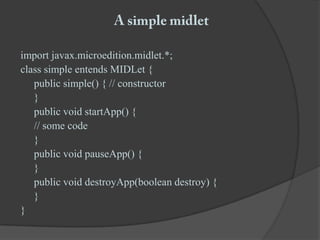
A simple midletimport javax.microedition.midlet.*;class simple entendsMIDLet {	public simple() { // constructor	}	public void startApp() {	// some code	}	public void pauseApp() {	}	public void destroyApp(boolean destroy) {	}}
A tour of CLDC/MIDPPackages:javax.microedition.midlet.*;	 javax.microedition.io.*;javax.microedition.lcdui.*;javax.microedition.rms.*;User Interface widgets:	Form, TextField, List, TextBox, DateField, Image, Gauge, Alert, Canvas, Graphics, DisplayEvent Handling classes: 	Command and Command ListenerHigh level UI : Form, TextBox, etc. Low level UI : Canvas, Graphics
User Interface with MIDPThe javax,microedition,lcdui.*; includes several classes for displaying the interface to the screen
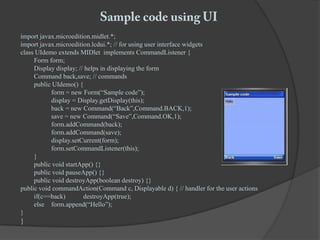
Sample code using UIimport javax.microedition.midlet.*;import javax.microedition.lcdui.*; // for using user interface widgetsclass UIdemo extends MIDlet  implements CommandListener {	Form form;	Display display; // helps in displaying the form	Command back,save; // commands	public UIdemo() {		form = new Form(“Sample code”);		display = Display.getDisplay(this);		back = new Command(“Back”,Command.BACK,1);		save = new Command(“Save”,Command.OK,1);form.addCommand(back);form.addCommand(save);display.setCurrent(form);form.setCommandListener(this);	}	public void startApp() {}	public void pauseApp() {}	public void destroyApp(boolean destroy) {} public void commandAction(Command c, Displayable d) { // handler for the user actions	if(c==back)	destroyApp(true);	else	form.append(“Hello”);}}
Persistent storageRecord Management System or rms helps in storing records locally on the deviceIt stores records in binary formatIt stores data persistently and data can be retrieved later even after the device has been switched offRecords are stored in the Record StoresSeveral methods in record store are:openRecordStore()closeRecordStore()deleteRecordStore()getRecord()Enumeraterecord() and so on
Connection typesAll the important classes and methods for connecting the to the wireless network are included in the javax.microedition.io.* packageThe connections types are provided by the InputStream and the OutputStream interfacesThese interfaces adds the ability to input and output data over the networkThere are three important level of connections available SocketDatagramHTTP connection
Thank you

Introduction To J2ME(FT - Prasanjit Dey)

  • 1.
  • 2.
    IntroductionJ2ME or JavaME is a java platform designed for mobile phones and embedded systems Java ME is a replacement for a similar technology known as Personal JavaJava ME is basically divided into two configurationsConnected Limited Device ConfigurationConnected Device Configuration
  • 3.
    Connected Limited DeviceConfigurationThe CLDC or Connected Limited Device Configuration contains a strict subset of the Java-class libraries, and is the minimum amount needed for a JVM to operate.A configuration provides the most basic set of libraries and virtual-machine features that must be present in each implementation of a J2ME environment.When coupled with one or more profiles, the Connected Limited Device Configuration gives developers a solid Java platform for creating applications for consumers and embedded devices.CLDC has got many profiles of which MIDP is the most widely used oneCLDC is used with devices having limited memory and processor
  • 4.
    Connected Device ConfigurationCDCor Connected Device Configuration is a subset of Java SE, containing almost all the libraries that are not GUI relatedIt is richer than CLDCIt has got 3 profiles namely Foundation profile , Personal basis profile and Personal profileCDC profile is used for devices with more memory and processor speedCDC is used in high-end PDA’s, smart phones and set-top boxes
  • 5.
    ProfilesA profile complementsa configuration by adding additional classes that provide features appropriate to a particular type of device or to a specific vertical market segmentProfiles are layered on top of the configurationBoth Java ME configurations have one or more associated profilesMIDP or Mobile Information Device Profile is the most widely used profile under CLDC
  • 6.
    MIDPMIDP or MobileInformation Device Profile complements the CLDC by adding networking, user interface components, and local storageThis profile is primarily aimed at the limited display and storage facilities of mobile phones, and it therefore provides a relatively simple user interface and basic networking based on HTTP 1.1. MIDP is the best known of the J2ME profiles because it is the basis for Wireless JavaMIDP provides some important API’s under CLDC such as javax.microedition.midlet, javax.microedition.lcdui, javax.microedition.rms
  • 7.
    Midlets and emulatorJavaME is a platform designed for small devices with low memory and processor speedAn application made using MID profile is called a midletMidlets can be run on any platform which has a JVM installedMidlets needs an emulator to run themAn emulator is an application that run a midlet on the desktopSun’s Wireless Toolkit and EclipseME provides an emulator that are used for running a midletA group of midlets is called a midlet suite
  • 8.
    Midlet life cycleThereare three possible states in a midlet’s life cyclepaused – The midlet instance is created and is inactiveactive – The midlet is activedestroyed – The midlet is terminated and is ready for reclamation by the garbage collectorWhen the midlet is created in response to a user request, it is in paused state. At some point later, the midlet is activated and again later can go back to the paused state and finally terminates due to the user request
  • 9.
    A simple midletimportjavax.microedition.midlet.*;class simple entendsMIDLet { public simple() { // constructor } public void startApp() { // some code } public void pauseApp() { } public void destroyApp(boolean destroy) { }}
  • 10.
    A tour ofCLDC/MIDPPackages:javax.microedition.midlet.*; javax.microedition.io.*;javax.microedition.lcdui.*;javax.microedition.rms.*;User Interface widgets: Form, TextField, List, TextBox, DateField, Image, Gauge, Alert, Canvas, Graphics, DisplayEvent Handling classes: Command and Command ListenerHigh level UI : Form, TextBox, etc. Low level UI : Canvas, Graphics
  • 11.
    User Interface withMIDPThe javax,microedition,lcdui.*; includes several classes for displaying the interface to the screen
  • 12.
    Sample code usingUIimport javax.microedition.midlet.*;import javax.microedition.lcdui.*; // for using user interface widgetsclass UIdemo extends MIDlet implements CommandListener { Form form; Display display; // helps in displaying the form Command back,save; // commands public UIdemo() { form = new Form(“Sample code”); display = Display.getDisplay(this); back = new Command(“Back”,Command.BACK,1); save = new Command(“Save”,Command.OK,1);form.addCommand(back);form.addCommand(save);display.setCurrent(form);form.setCommandListener(this); } public void startApp() {} public void pauseApp() {} public void destroyApp(boolean destroy) {} public void commandAction(Command c, Displayable d) { // handler for the user actions if(c==back) destroyApp(true); else form.append(“Hello”);}}
  • 13.
    Persistent storageRecord ManagementSystem or rms helps in storing records locally on the deviceIt stores records in binary formatIt stores data persistently and data can be retrieved later even after the device has been switched offRecords are stored in the Record StoresSeveral methods in record store are:openRecordStore()closeRecordStore()deleteRecordStore()getRecord()Enumeraterecord() and so on
  • 14.
    Connection typesAll theimportant classes and methods for connecting the to the wireless network are included in the javax.microedition.io.* packageThe connections types are provided by the InputStream and the OutputStream interfacesThese interfaces adds the ability to input and output data over the networkThere are three important level of connections available SocketDatagramHTTP connection
  • 15.