UNIT-6
FILE HANDLING
• Describing the basics of input and output in Java,
• read and write data from the console,
• File streams, using streams to read and write files, using the path
interface to operate on file, using the path interface to operate on
directory paths,
• using the files class to check, delete, copy, or move a file, or move a
directory
File handling in Java
• File handling in Java means that how to read from and write to file in Java.
• Java provides the basic I/O package for reading and writing streams.
• java.io package allows to do all Input and Output tasks in Java .
What is Stream
• an object that either delivers data to its destination (screen, file, etc.) or that takes data from a
source (keyboard, file, etc.)
• A stream in java is a path along which data flows
It can be of two types :
Byte Stream and Character Stream.
When an I/O stream manages 8-bit bytes of binary data, it is called a byte stream.
And, when the I/O stream manages 16-bit Unicode characters, it is called a
character stream.
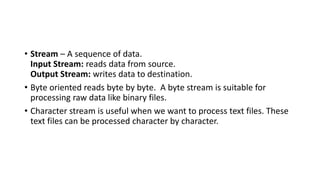
• Stream – A sequence of data.
Input Stream: reads data from source.
Output Stream: writes data to destination.
• Byte oriented reads byte by byte. A byte stream is suitable for
processing raw data like binary files.
• Character stream is useful when we want to process text files. These
text files can be processed character by character.
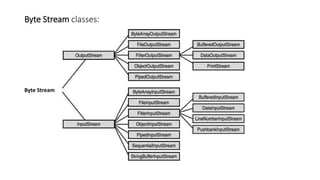
Byte Stream classes:
Byte Stream
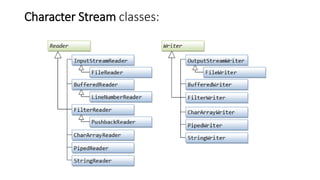
Character Stream classes:
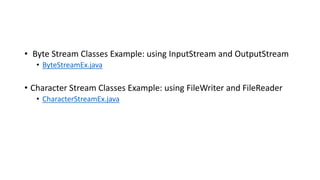
• Byte Stream Classes Example: using InputStream and OutputStream
• ByteStreamEx.java
• Character Stream Classes Example: using FileWriter and FileReader
• CharacterStreamEx.java
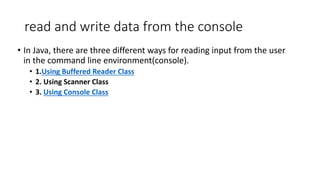
read and write data from the console
• In Java, there are three different ways for reading input from the user
in the command line environment(console).
• 1.Using Buffered Reader Class
• 2. Using Scanner Class
• 3. Using Console Class
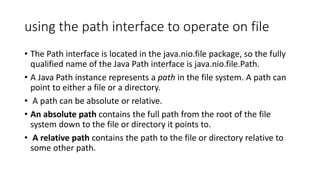
using the path interface to operate on file
• The Path interface is located in the java.nio.file package, so the fully
qualified name of the Java Path interface is java.nio.file.Path.
• A Java Path instance represents a path in the file system. A path can
point to either a file or a directory.
• A path can be absolute or relative.
• An absolute path contains the full path from the root of the file
system down to the file or directory it points to.
• A relative path contains the path to the file or directory relative to
some other path.
Example:
import java.nio.file.*;
public class PathExample {
public static void main(String[] args)
{
Path path = Paths.get("E:LPUmyfile.txt");
System.out.println(path.getFileName().toString());
}
}
Copy a file
import java.io.*;
class file_copy {
public static void main(String[] args) {
try {
File inputFile = new File("file1.txt");
File outputFile = new File("file2.txt");
FileInputStream fis = new
FileInputStream(inputFile);
FileOutputStream fos = new
FileOutputStream(outputFile);
int c;
while ((c = fis.read()) != -1) {
fos.write(c);
}
fis.close();
fos.close();
} catch (FileNotFoundException e) {
System.err.println("FileStreamsTest: " + e);
} catch (IOException e) {
System.err.println("FileStreamsTest: " + e);
}
}
}
Moving a file
import java.io.File;
public class file_move
{
public static void main(String[] args)
{
try{
File mv =new File("newfile.txt");
if(mv.renameTo(new File("F:" + mv.getName()))){
System.out.println("File is moved successful!");
}else{
System.out.println("File is failed to move!");
}
}catch(Exception e){
e.printStackTrace();
}
}
}
Deleting a file
import java.io.*;
public class file_del
{
public static void main(String[] args)
{
File file = new File("newfile.txt");
if(file.delete())
{
System.out.println("File deleted
successfully");
}
else
{
System.out.println("Failed to delete the
file");
}
}
}
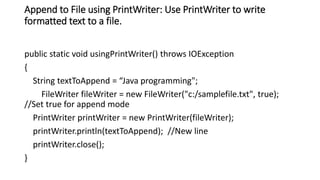
Append to File using PrintWriter: Use PrintWriter to write
formatted text to a file.
public static void usingPrintWriter() throws IOException
{
String textToAppend = “Java programming";
FileWriter fileWriter = new FileWriter("c:/samplefile.txt", true);
//Set true for append mode
PrintWriter printWriter = new PrintWriter(fileWriter);
printWriter.println(textToAppend); //New line
printWriter.close();
}
Practice Programs
• WAP to count vowels in a file
• WAP to count the number of characters from a file
• WAP to check whether the file is present in the specified location or
not

JAVA

  • 1.
  • 2.
    FILE HANDLING • Describingthe basics of input and output in Java, • read and write data from the console, • File streams, using streams to read and write files, using the path interface to operate on file, using the path interface to operate on directory paths, • using the files class to check, delete, copy, or move a file, or move a directory
  • 3.
    File handling inJava • File handling in Java means that how to read from and write to file in Java. • Java provides the basic I/O package for reading and writing streams. • java.io package allows to do all Input and Output tasks in Java . What is Stream • an object that either delivers data to its destination (screen, file, etc.) or that takes data from a source (keyboard, file, etc.) • A stream in java is a path along which data flows It can be of two types : Byte Stream and Character Stream. When an I/O stream manages 8-bit bytes of binary data, it is called a byte stream. And, when the I/O stream manages 16-bit Unicode characters, it is called a character stream.
  • 4.
    • Stream –A sequence of data. Input Stream: reads data from source. Output Stream: writes data to destination. • Byte oriented reads byte by byte. A byte stream is suitable for processing raw data like binary files. • Character stream is useful when we want to process text files. These text files can be processed character by character.
  • 5.
  • 6.
  • 7.
    • Byte StreamClasses Example: using InputStream and OutputStream • ByteStreamEx.java • Character Stream Classes Example: using FileWriter and FileReader • CharacterStreamEx.java
  • 8.
    read and writedata from the console • In Java, there are three different ways for reading input from the user in the command line environment(console). • 1.Using Buffered Reader Class • 2. Using Scanner Class • 3. Using Console Class
  • 9.
    using the pathinterface to operate on file • The Path interface is located in the java.nio.file package, so the fully qualified name of the Java Path interface is java.nio.file.Path. • A Java Path instance represents a path in the file system. A path can point to either a file or a directory. • A path can be absolute or relative. • An absolute path contains the full path from the root of the file system down to the file or directory it points to. • A relative path contains the path to the file or directory relative to some other path.
  • 10.
    Example: import java.nio.file.*; public classPathExample { public static void main(String[] args) { Path path = Paths.get("E:LPUmyfile.txt"); System.out.println(path.getFileName().toString()); } }
  • 11.
    Copy a file importjava.io.*; class file_copy { public static void main(String[] args) { try { File inputFile = new File("file1.txt"); File outputFile = new File("file2.txt"); FileInputStream fis = new FileInputStream(inputFile); FileOutputStream fos = new FileOutputStream(outputFile); int c; while ((c = fis.read()) != -1) { fos.write(c); } fis.close(); fos.close(); } catch (FileNotFoundException e) { System.err.println("FileStreamsTest: " + e); } catch (IOException e) { System.err.println("FileStreamsTest: " + e); } } }
  • 12.
    Moving a file importjava.io.File; public class file_move { public static void main(String[] args) { try{ File mv =new File("newfile.txt"); if(mv.renameTo(new File("F:" + mv.getName()))){ System.out.println("File is moved successful!"); }else{ System.out.println("File is failed to move!"); } }catch(Exception e){ e.printStackTrace(); } } }
  • 13.
    Deleting a file importjava.io.*; public class file_del { public static void main(String[] args) { File file = new File("newfile.txt"); if(file.delete()) { System.out.println("File deleted successfully"); } else { System.out.println("Failed to delete the file"); } } }
  • 14.
    Append to Fileusing PrintWriter: Use PrintWriter to write formatted text to a file. public static void usingPrintWriter() throws IOException { String textToAppend = “Java programming"; FileWriter fileWriter = new FileWriter("c:/samplefile.txt", true); //Set true for append mode PrintWriter printWriter = new PrintWriter(fileWriter); printWriter.println(textToAppend); //New line printWriter.close(); }
  • 15.
    Practice Programs • WAPto count vowels in a file • WAP to count the number of characters from a file • WAP to check whether the file is present in the specified location or not