Programming in Java
Topic: Managing Files & I/O
Handling
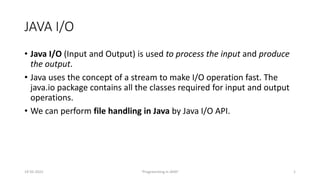
JAVA I/O
• Java I/O (Input and Output) is used to process the input and produce
the output.
• Java uses the concept of a stream to make I/O operation fast. The
java.io package contains all the classes required for input and output
operations.
• We can perform file handling in Java by Java I/O API.
19-05-2022 "Programming in JAVA" 1
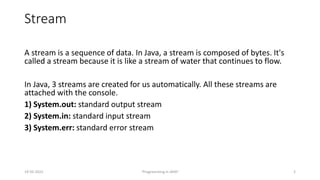
Stream
A stream is a sequence of data. In Java, a stream is composed of bytes. It's
called a stream because it is like a stream of water that continues to flow.
In Java, 3 streams are created for us automatically. All these streams are
attached with the console.
1) System.out: standard output stream
2) System.in: standard input stream
3) System.err: standard error stream
19-05-2022 "Programming in JAVA" 2
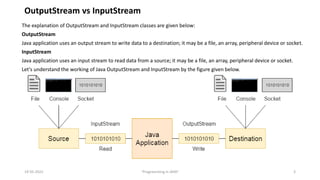
The explanation of OutputStream and InputStream classes are given below:
OutputStream
Java application uses an output stream to write data to a destination; it may be a file, an array, peripheral device or socket.
InputStream
Java application uses an input stream to read data from a source; it may be a file, an array, peripheral device or socket.
Let's understand the working of Java OutputStream and InputStream by the figure given below.
19-05-2022 "Programming in JAVA" 3
OutputStream vs InputStream
Java FileOutputStream Class
• Java FileOutputStream is an output stream used for writing data to
a file.
• If you have to write primitive values into a file, use FileOutputStream
class. You can write byte-oriented as well as character-oriented data
through FileOutputStream class. But, for character-oriented data, it is
preferred to use FileWriter than FileOutputStream.
19-05-2022 "Programming in JAVA" 4
import java.io.FileOutputStream;
public class FileOutputStreamExample {
public static void main(String args[]){
try{
FileOutputStream fout=new FileOutputStream("D:testout.txt");
fout.write(65);
fout.close();
System.out.println("success...");
}catch(Exception e){System.out.println(e);}
}
}
19-05-2022 "Programming in JAVA" 5
Output:
Success...
The content of a text file testout.txt is set with
the data A.
testout.txt
A
import java.io.FileOutputStream;
public class FileOutputStreamExample {
public static void main(String args[]){
try{
FileOutputStream fout=new FileOutputStream("D:testout.txt");
String s="Welcome to javaTpoint.";
byte b[]=s.getBytes();//converting string into byte array
fout.write(b);
fout.close();
System.out.println("success...");
}catch(Exception e){System.out.println(e);}
}
}
19-05-2022 "Programming in JAVA" 6
Output:
Success...
The content of a text file testout.txt is set with the
data Welcome to javaTpoint.
testout.txt
Welcome to javaTpoint.
Java FileInputStream Class
• Java FileInputStream class obtains input bytes from a file. It is used for
reading byte-oriented data (streams of raw bytes) such as image data,
audio, video etc.
• You can also read character-stream data. But, for reading streams of
characters, it is recommended to use FileReader class.
19-05-2022 "Programming in JAVA" 7
import java.io.FileInputStream;
public class DataStreamExample {
public static void main(String args[]){
try{
FileInputStream fin=new FileInputStream("D:testout.txt");
int i=fin.read();
System.out.print((char)i);
fin.close();
}catch(Exception e){System.out.println(e);}
}
}
19-05-2022 "Programming in JAVA" 8
import java.io.FileInputStream;
public class DataStreamExample {
public static void main(String args[]){
try{
FileInputStream fin=new FileInputStream("D:testout.txt");
int i=0;
while((i=fin.read())!=-1){
System.out.print((char)i);
}
fin.close();
}catch(Exception e){System.out.println(e);}
}
}
19-05-2022 "Programming in JAVA" 9
Demonstration
19-05-2022 "Programming in JAVA" 10

1.26 File Input-Output in JAVA.pptx

  • 1.
    Programming in Java Topic:Managing Files & I/O Handling
  • 2.
    JAVA I/O • JavaI/O (Input and Output) is used to process the input and produce the output. • Java uses the concept of a stream to make I/O operation fast. The java.io package contains all the classes required for input and output operations. • We can perform file handling in Java by Java I/O API. 19-05-2022 "Programming in JAVA" 1
  • 3.
    Stream A stream isa sequence of data. In Java, a stream is composed of bytes. It's called a stream because it is like a stream of water that continues to flow. In Java, 3 streams are created for us automatically. All these streams are attached with the console. 1) System.out: standard output stream 2) System.in: standard input stream 3) System.err: standard error stream 19-05-2022 "Programming in JAVA" 2
  • 4.
    The explanation ofOutputStream and InputStream classes are given below: OutputStream Java application uses an output stream to write data to a destination; it may be a file, an array, peripheral device or socket. InputStream Java application uses an input stream to read data from a source; it may be a file, an array, peripheral device or socket. Let's understand the working of Java OutputStream and InputStream by the figure given below. 19-05-2022 "Programming in JAVA" 3 OutputStream vs InputStream
  • 5.
    Java FileOutputStream Class •Java FileOutputStream is an output stream used for writing data to a file. • If you have to write primitive values into a file, use FileOutputStream class. You can write byte-oriented as well as character-oriented data through FileOutputStream class. But, for character-oriented data, it is preferred to use FileWriter than FileOutputStream. 19-05-2022 "Programming in JAVA" 4
  • 6.
    import java.io.FileOutputStream; public classFileOutputStreamExample { public static void main(String args[]){ try{ FileOutputStream fout=new FileOutputStream("D:testout.txt"); fout.write(65); fout.close(); System.out.println("success..."); }catch(Exception e){System.out.println(e);} } } 19-05-2022 "Programming in JAVA" 5 Output: Success... The content of a text file testout.txt is set with the data A. testout.txt A
  • 7.
    import java.io.FileOutputStream; public classFileOutputStreamExample { public static void main(String args[]){ try{ FileOutputStream fout=new FileOutputStream("D:testout.txt"); String s="Welcome to javaTpoint."; byte b[]=s.getBytes();//converting string into byte array fout.write(b); fout.close(); System.out.println("success..."); }catch(Exception e){System.out.println(e);} } } 19-05-2022 "Programming in JAVA" 6 Output: Success... The content of a text file testout.txt is set with the data Welcome to javaTpoint. testout.txt Welcome to javaTpoint.
  • 8.
    Java FileInputStream Class •Java FileInputStream class obtains input bytes from a file. It is used for reading byte-oriented data (streams of raw bytes) such as image data, audio, video etc. • You can also read character-stream data. But, for reading streams of characters, it is recommended to use FileReader class. 19-05-2022 "Programming in JAVA" 7
  • 9.
    import java.io.FileInputStream; public classDataStreamExample { public static void main(String args[]){ try{ FileInputStream fin=new FileInputStream("D:testout.txt"); int i=fin.read(); System.out.print((char)i); fin.close(); }catch(Exception e){System.out.println(e);} } } 19-05-2022 "Programming in JAVA" 8
  • 10.
    import java.io.FileInputStream; public classDataStreamExample { public static void main(String args[]){ try{ FileInputStream fin=new FileInputStream("D:testout.txt"); int i=0; while((i=fin.read())!=-1){ System.out.print((char)i); } fin.close(); }catch(Exception e){System.out.println(e);} } } 19-05-2022 "Programming in JAVA" 9
  • 11.