Sark Co. and Blackboard
Policies and Procedures
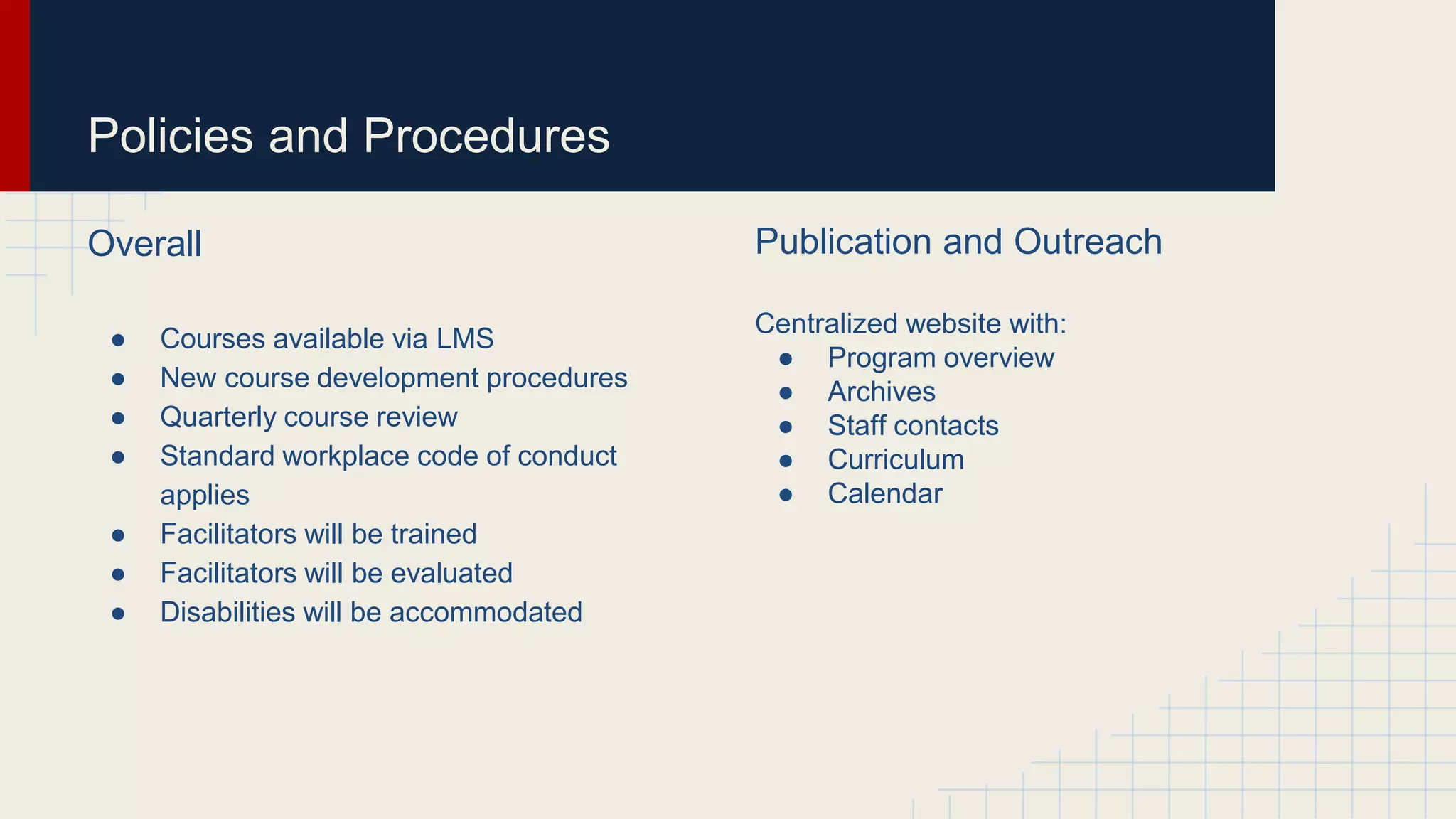
Mission and Vision
The mission of the ID and IT
department at SARK is to
provide quality instruction
through electronic
technologies to enable
employees to advance their
knowledge bases and
careers to enhance our
company’s service and
support our long term goals
and vision
Policies and Procedures
Overall
● Courses available via LMS
● New course development procedures
● Quarterly course review
● Standard workplace code of conduct
applies
● Facilitators will be trained
● Facilitators will be evaluated
● Disabilities will be accommodated
Publication and Outreach
Centralized website with:
● Program overview
● Archives
● Staff contacts
● Curriculum
● Calendar
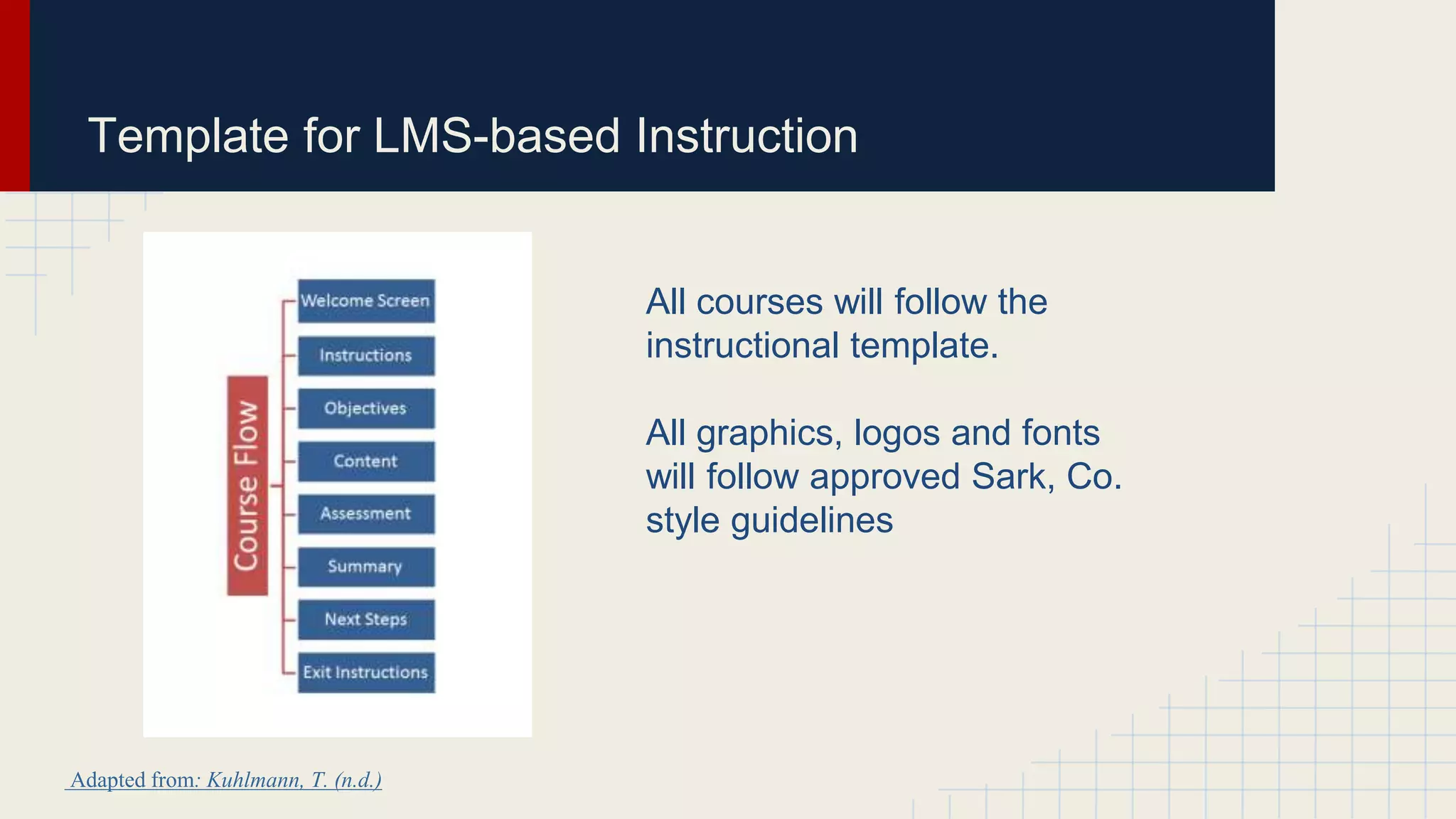
Template for LMS-based Instruction
All courses will follow the
instructional template.
All graphics, logos and fonts
will follow approved Sark, Co.
style guidelines
Adapted from: Kuhlmann, T. (n.d.)
Detailed Instructional Structure
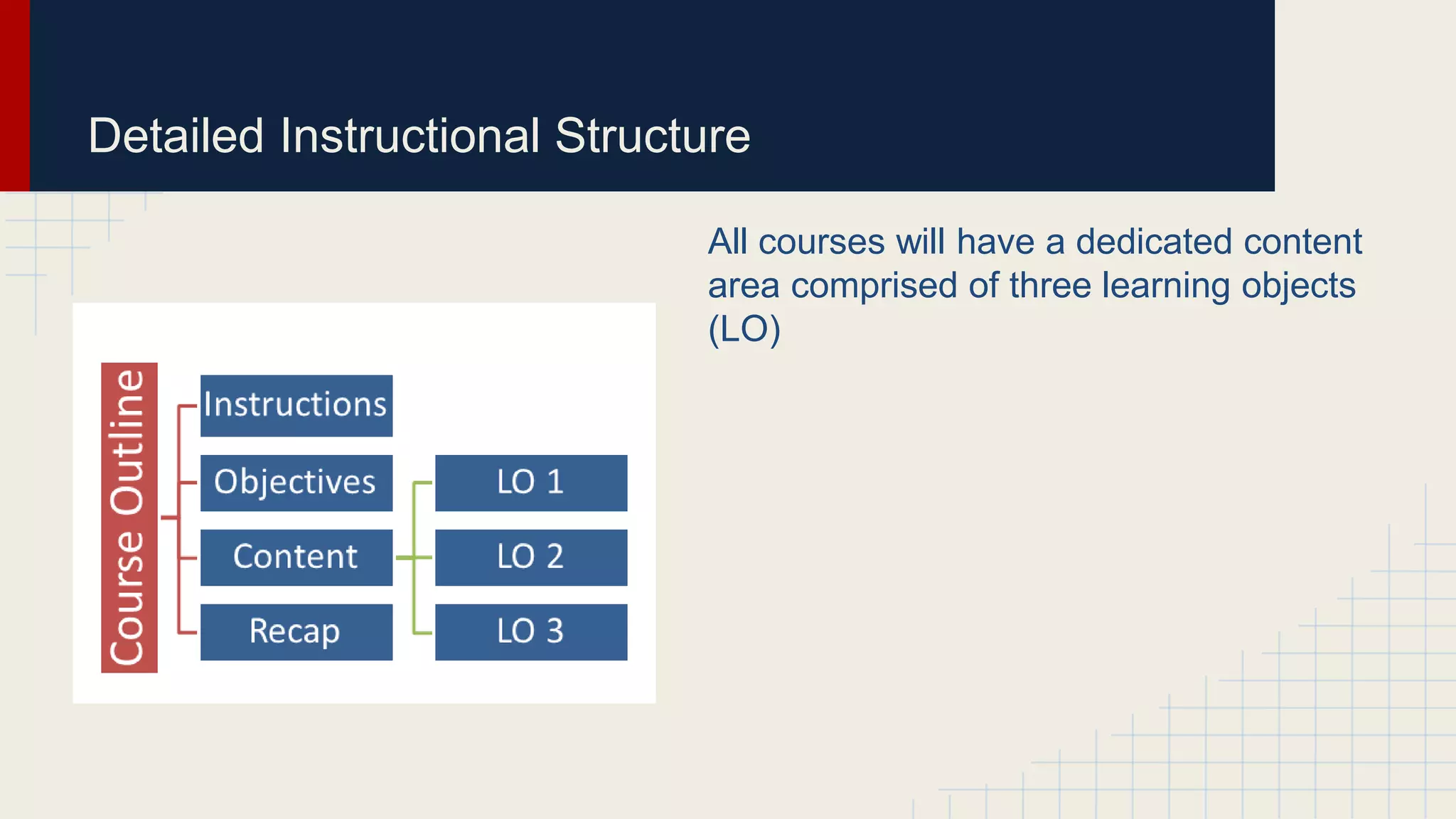
All courses will have a dedicated content
area comprised of three learning objects
(LO)
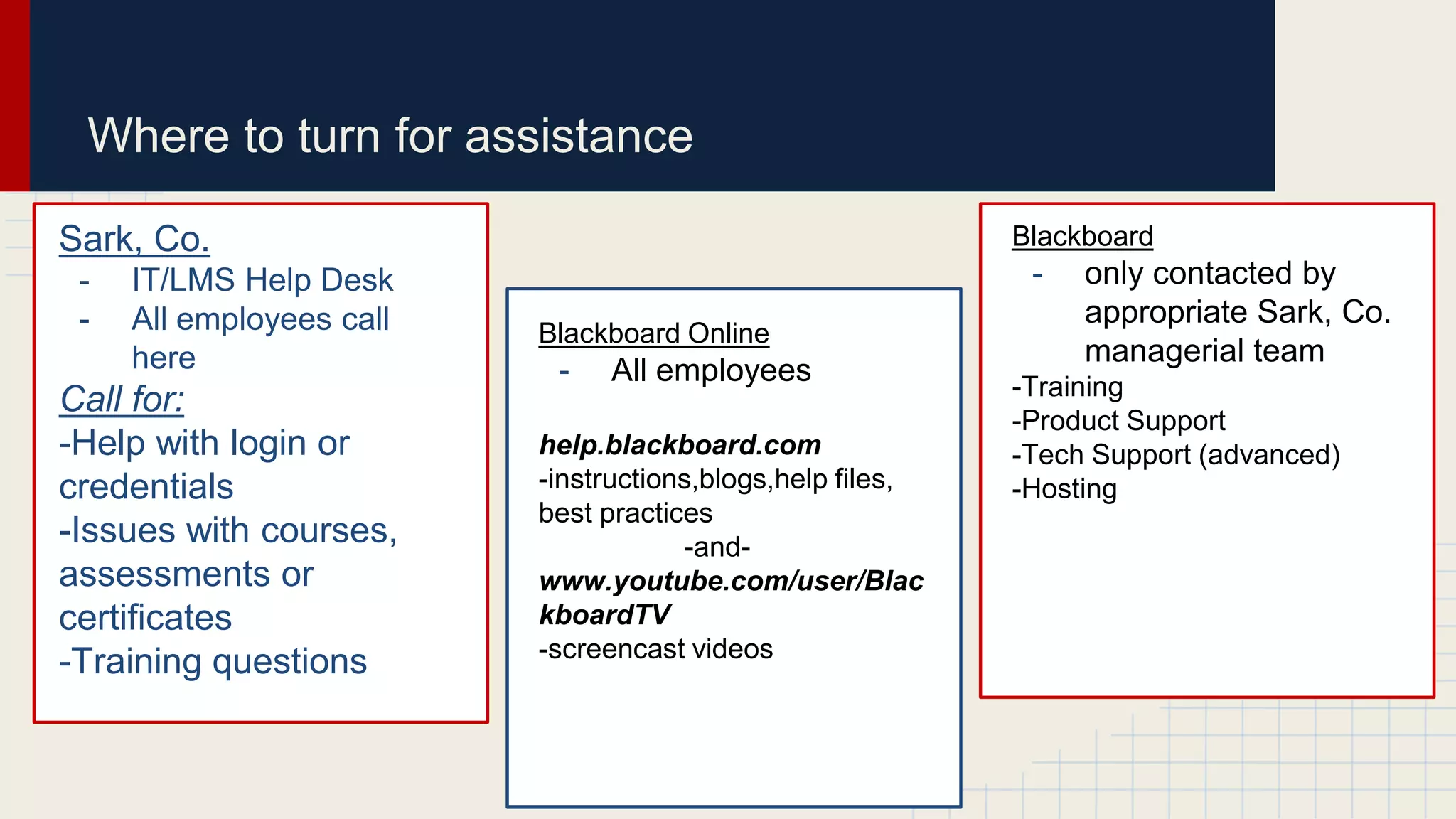
Sark, Co.
- IT/LMS Help Desk
- All employees call
here
Call for:
-Help with login or
credentials
-Issues with courses,
assessments or
certificates
-Training questions
Blackboard
- only contacted by
appropriate Sark, Co.
managerial team
-Training
-Product Support
-Tech Support (advanced)
-Hosting
Blackboard Online
- All employees
help.blackboard.com
-instructions,blogs,help files,
best practices
-and-
www.youtube.com/user/Blac
kboardTV
-screencast videos
Where to turn for assistance
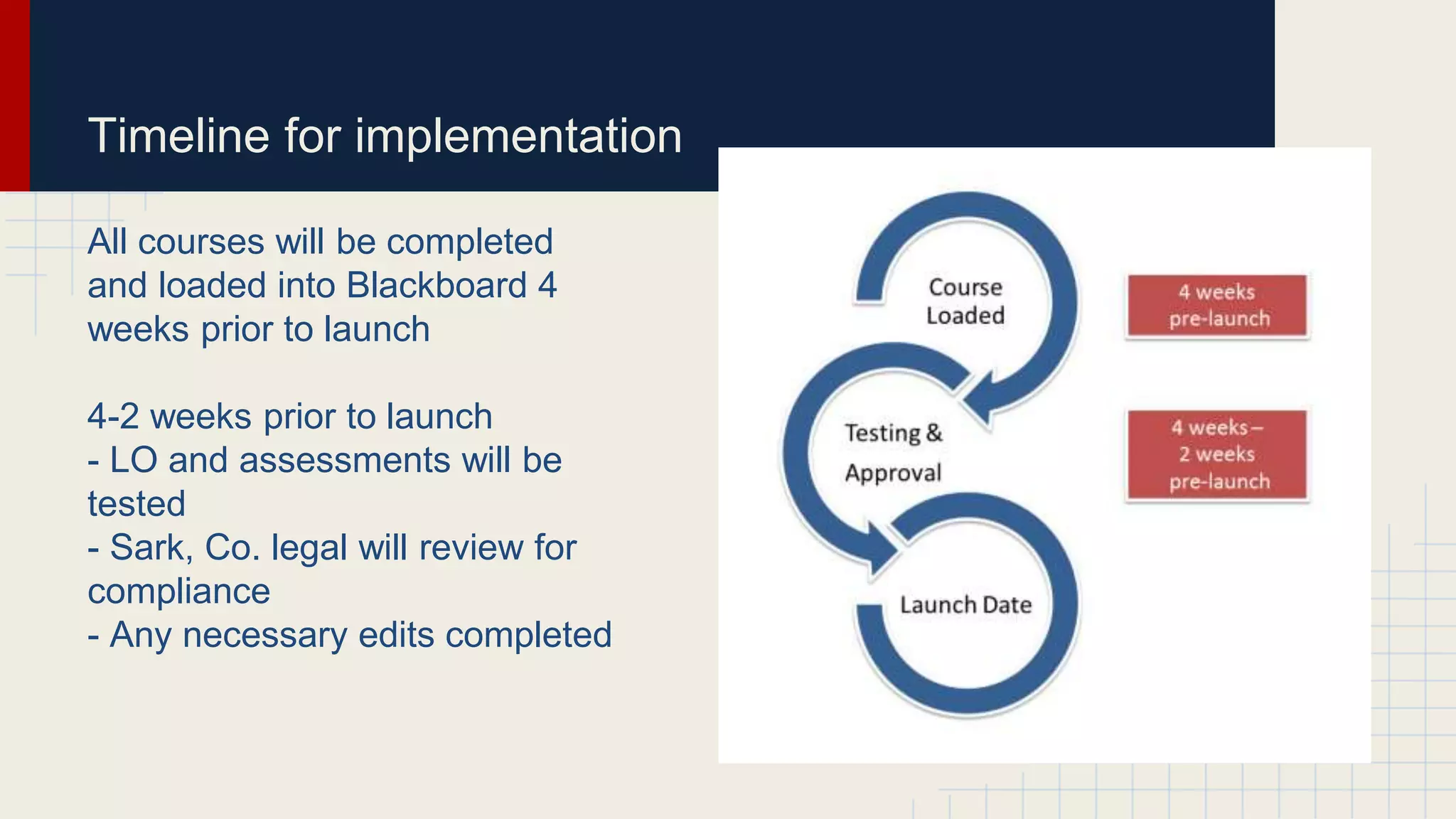
Timeline for implementation
All courses will be completed
and loaded into Blackboard 4
weeks prior to launch
4-2 weeks prior to launch
- LO and assessments will be
tested
- Sark, Co. legal will review for
compliance
- Any necessary edits completed
User Procedures
User Roles
System roles: Held by the directors of training and IT to control access and
administrative features
Institutional roles: Instructional designer and IT managers control what users
see when they log on to the system
Course and organization roles: Employees hold these roles for both learning
and teaching
Custom roles: The administrators can define roles as needed to carry out
specific tasks
Blackboard Inc, User Roles
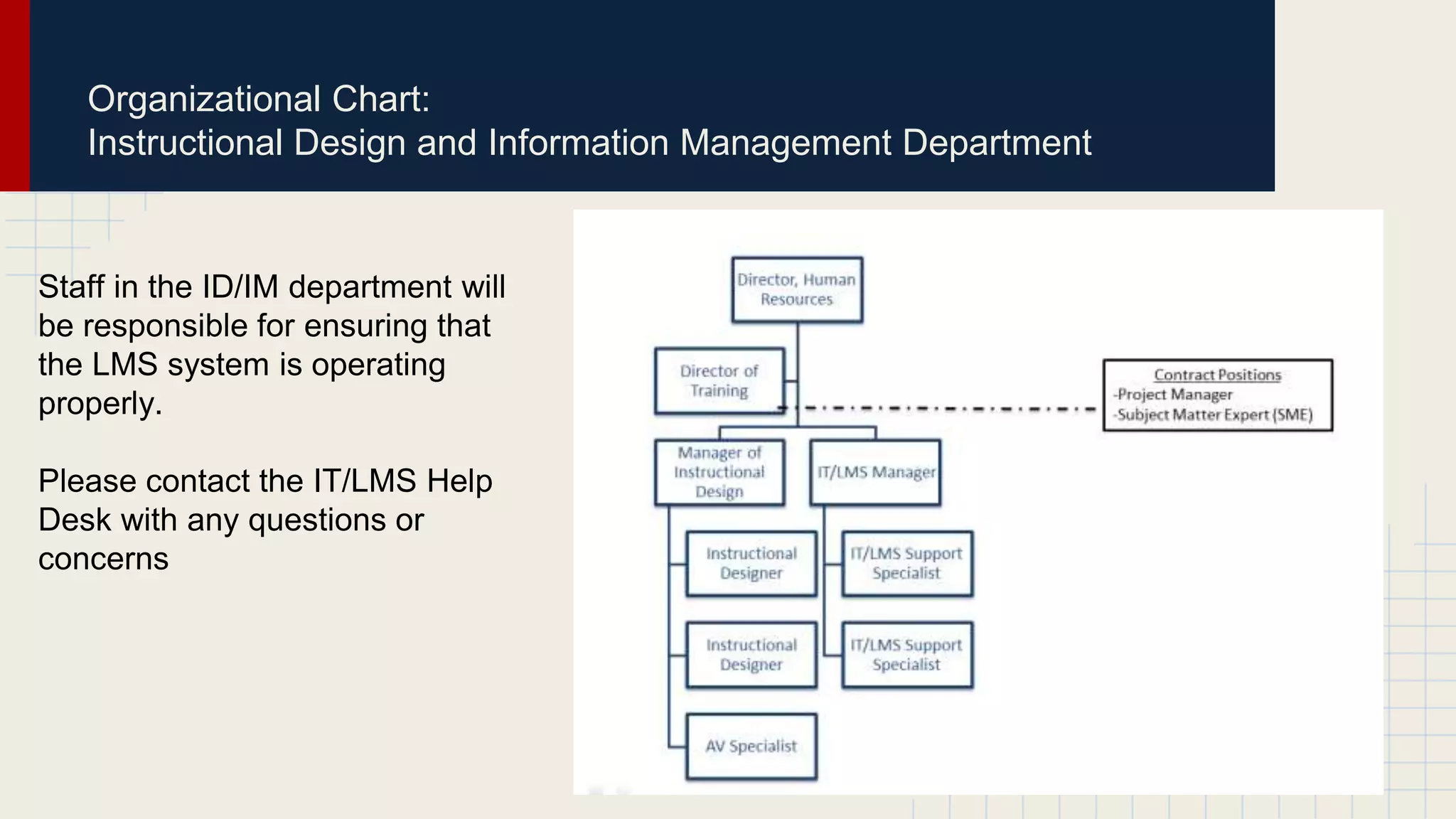
Organizational Chart:
Instructional Design and Information Management Department
Staff in the ID/IM department will
be responsible for ensuring that
the LMS system is operating
properly.
Please contact the IT/LMS Help
Desk with any questions or
concerns
User Procedures
Course Creation and Request
Courses are not automatically created and must follow the approved template and timeline. At Sark,
Co. employee training courses are created by members of the Instructional Design team. Instructional
Design team members have access to the Course request form on the Blackboard website. All
requests for courses must be approved by the Director of Training.
Course Content Management
Blackboard course content is managed and maintained by the Manager of Instructional Design.
Course Size
The maximum size for Blackboard courses is 300MB. A system‐generated warning will be sent to the
course instructor when the course nears the 300MB size limit. Large courses impede the functions of
the Blackboard system and become difficult to archive and restore.
(TEAL Center)
User Procedures
Roster Uploads
Upon hiring all employees will be enrolled in Blackboard to have access to basic onboarding courses.
Annual training rosters will be verified by Department Managers for compliance courses. Employees
will be able to self-enroll in enrichment courses and elective study courses as they wish. Enrollment
for enrichment classes is ongoing and listings of courses will be available on the Blackboard website
and on the Sark, Co. employee intranet.
Course Access
Course access is granted to the registered instructor and students. Department managers may be
added upon their request and at the discretion of the Director of Training.
(TEAL Center)
User Procedures
Administrator Access
Only the Blackboard Administrators and SARK staff members are granted administrative access to a
course and may enter a course without permission to assist a faculty member or student.
Course Security
Blackboard is a password protected system. All users are cautioned against sharing their passwords
with others. Only the Blackboard Administrators, SARK staff, instructor of record, students and others
the instructor of record deems appropriate have access to a course.
(TEAL Center)
Training Before Teaching a Class
The Blackboard Training Center and SARK require the following courses are
completed prior to teaching a class:
● Building Courses
● Enhancing Communications
● Assessing Learners
● Building Online Communities
Instructional Designers should also complete the following in addition to administrative
courses
● Designing Engaging Content (Blackboard Training Center, 2015)
Prerequisite Training
Prerequisite training for new unit members before operating Blackboard:
New user class: Navigating Blackboard for Workplace Success
● Asynchronous class designed to show new employees how to navigate through the Blackboard
training portal with ease. Employees will learn how to:
:
● Configure their computer to be able to use Blackboard without errors
● Log into Blackboard
● Enroll in a course
● Use the Discussion Board
● Take a test
● Access grades
● Getting Additional Help
(Towson University)
Summary of Benefits
1. Easily create instructor-led courses that use a variety of content
2. Facilitate the transfer of knowledge from internal top performers or subject-matter
experts to other employees
3. Allow employees to use mobile devices to access content
4. Tap social learning tools to engage employees and keep them coming back to gain
deeper knowledge
5. Offer flexibility with self-paced asynchronous courses or all-at-once instruction via
synchronous sessions
6. Standardize training across a global organization and reduce associated travel
expenses.
7. Promote and enable mentoring that fosters leadership development
8. Get more from your training investment by repurposing content for a variety of
employee audiences and courses
(Blackboard, 2014)
References:
Blackboard. (2014). LMS evaluation guide ebook [PDF]. Retrieved from
https:/images.email.blackboard.com/Web/BlackboardInc/{d7165201-8a7d-46b2-bc23-
fd096e58ad9e}_Blackboard_ProEd_LMS_EvalGuide.pdf
Blackboard Inc. 1997-2015 Retrieved from: http://www.blackboard.com/business
Blackboard. (2015). User roles and privileges. Retreived from: https://help.blackboard.com/en-
us/Learn/9.1_SP_12_and_SP_13/Administrator/170_User_Management/030_About_User_Roles_and_Privileges
Blackboard Training Registration Center.. (2015). Retrieved from
https://trainingcenter.blackboard.com/Public/Course/Browse?viewstate=e30%3D
Kuhlmann, T. (n.d.). How to create an e-learning template that works. The Rapid eLearning Blog. [Web log.] Articulate Network.
Retrieved from: http://blogs.articulate.com/rapid-elearning/how-to-create-an-e-learning-template-that-works/
TEAL Center. (2011). Blackboard policies and procedures for Coastal Carolina University [PDF]. Retrieved from
https://www.coastal.edu/blackboard/BBPoliciesV1.pdf
Towson University (n.d.). Student Orientation Quick Start. Blackboard [Web log.]. Retrieved from:
http://www.towson.edu/blackboard/studentorientationcourse.asp

Ix564 unit 5 slides

  • 1.
    Sark Co. andBlackboard Policies and Procedures
  • 2.
    Mission and Vision Themission of the ID and IT department at SARK is to provide quality instruction through electronic technologies to enable employees to advance their knowledge bases and careers to enhance our company’s service and support our long term goals and vision
  • 3.
    Policies and Procedures Overall ●Courses available via LMS ● New course development procedures ● Quarterly course review ● Standard workplace code of conduct applies ● Facilitators will be trained ● Facilitators will be evaluated ● Disabilities will be accommodated Publication and Outreach Centralized website with: ● Program overview ● Archives ● Staff contacts ● Curriculum ● Calendar
  • 4.
    Template for LMS-basedInstruction All courses will follow the instructional template. All graphics, logos and fonts will follow approved Sark, Co. style guidelines Adapted from: Kuhlmann, T. (n.d.)
  • 5.
    Detailed Instructional Structure Allcourses will have a dedicated content area comprised of three learning objects (LO)
  • 6.
    Sark, Co. - IT/LMSHelp Desk - All employees call here Call for: -Help with login or credentials -Issues with courses, assessments or certificates -Training questions Blackboard - only contacted by appropriate Sark, Co. managerial team -Training -Product Support -Tech Support (advanced) -Hosting Blackboard Online - All employees help.blackboard.com -instructions,blogs,help files, best practices -and- www.youtube.com/user/Blac kboardTV -screencast videos Where to turn for assistance
  • 7.
    Timeline for implementation Allcourses will be completed and loaded into Blackboard 4 weeks prior to launch 4-2 weeks prior to launch - LO and assessments will be tested - Sark, Co. legal will review for compliance - Any necessary edits completed
  • 8.
    User Procedures User Roles Systemroles: Held by the directors of training and IT to control access and administrative features Institutional roles: Instructional designer and IT managers control what users see when they log on to the system Course and organization roles: Employees hold these roles for both learning and teaching Custom roles: The administrators can define roles as needed to carry out specific tasks Blackboard Inc, User Roles
  • 9.
    Organizational Chart: Instructional Designand Information Management Department Staff in the ID/IM department will be responsible for ensuring that the LMS system is operating properly. Please contact the IT/LMS Help Desk with any questions or concerns
  • 10.
    User Procedures Course Creationand Request Courses are not automatically created and must follow the approved template and timeline. At Sark, Co. employee training courses are created by members of the Instructional Design team. Instructional Design team members have access to the Course request form on the Blackboard website. All requests for courses must be approved by the Director of Training. Course Content Management Blackboard course content is managed and maintained by the Manager of Instructional Design. Course Size The maximum size for Blackboard courses is 300MB. A system‐generated warning will be sent to the course instructor when the course nears the 300MB size limit. Large courses impede the functions of the Blackboard system and become difficult to archive and restore. (TEAL Center)
  • 11.
    User Procedures Roster Uploads Uponhiring all employees will be enrolled in Blackboard to have access to basic onboarding courses. Annual training rosters will be verified by Department Managers for compliance courses. Employees will be able to self-enroll in enrichment courses and elective study courses as they wish. Enrollment for enrichment classes is ongoing and listings of courses will be available on the Blackboard website and on the Sark, Co. employee intranet. Course Access Course access is granted to the registered instructor and students. Department managers may be added upon their request and at the discretion of the Director of Training. (TEAL Center)
  • 12.
    User Procedures Administrator Access Onlythe Blackboard Administrators and SARK staff members are granted administrative access to a course and may enter a course without permission to assist a faculty member or student. Course Security Blackboard is a password protected system. All users are cautioned against sharing their passwords with others. Only the Blackboard Administrators, SARK staff, instructor of record, students and others the instructor of record deems appropriate have access to a course. (TEAL Center)
  • 13.
    Training Before Teachinga Class The Blackboard Training Center and SARK require the following courses are completed prior to teaching a class: ● Building Courses ● Enhancing Communications ● Assessing Learners ● Building Online Communities Instructional Designers should also complete the following in addition to administrative courses ● Designing Engaging Content (Blackboard Training Center, 2015)
  • 14.
    Prerequisite Training Prerequisite trainingfor new unit members before operating Blackboard: New user class: Navigating Blackboard for Workplace Success ● Asynchronous class designed to show new employees how to navigate through the Blackboard training portal with ease. Employees will learn how to: : ● Configure their computer to be able to use Blackboard without errors ● Log into Blackboard ● Enroll in a course ● Use the Discussion Board ● Take a test ● Access grades ● Getting Additional Help (Towson University)
  • 15.
    Summary of Benefits 1.Easily create instructor-led courses that use a variety of content 2. Facilitate the transfer of knowledge from internal top performers or subject-matter experts to other employees 3. Allow employees to use mobile devices to access content 4. Tap social learning tools to engage employees and keep them coming back to gain deeper knowledge 5. Offer flexibility with self-paced asynchronous courses or all-at-once instruction via synchronous sessions 6. Standardize training across a global organization and reduce associated travel expenses. 7. Promote and enable mentoring that fosters leadership development 8. Get more from your training investment by repurposing content for a variety of employee audiences and courses (Blackboard, 2014)
  • 16.
    References: Blackboard. (2014). LMSevaluation guide ebook [PDF]. Retrieved from https:/images.email.blackboard.com/Web/BlackboardInc/{d7165201-8a7d-46b2-bc23- fd096e58ad9e}_Blackboard_ProEd_LMS_EvalGuide.pdf Blackboard Inc. 1997-2015 Retrieved from: http://www.blackboard.com/business Blackboard. (2015). User roles and privileges. Retreived from: https://help.blackboard.com/en- us/Learn/9.1_SP_12_and_SP_13/Administrator/170_User_Management/030_About_User_Roles_and_Privileges Blackboard Training Registration Center.. (2015). Retrieved from https://trainingcenter.blackboard.com/Public/Course/Browse?viewstate=e30%3D Kuhlmann, T. (n.d.). How to create an e-learning template that works. The Rapid eLearning Blog. [Web log.] Articulate Network. Retrieved from: http://blogs.articulate.com/rapid-elearning/how-to-create-an-e-learning-template-that-works/ TEAL Center. (2011). Blackboard policies and procedures for Coastal Carolina University [PDF]. Retrieved from https://www.coastal.edu/blackboard/BBPoliciesV1.pdf Towson University (n.d.). Student Orientation Quick Start. Blackboard [Web log.]. Retrieved from: http://www.towson.edu/blackboard/studentorientationcourse.asp

Editor's Notes

  • #3 The mission of the ID and IT department at SARK is to provide quality instruction through electronic technologies to enable employees to advance their knowledge bases and careers to enhance our company’s service and support our long term goals and vision. Our core values are to provide accessible training, promote professionalism, and ensure quality in the workplace.
  • #4 Unit overall operational policies and procedures E-learning courses: user and unit member policies Courses will be made available within the LMS. Any new course must be developed, reviewed and approved by the heads of the ID and IT department. Courses will be reviewed for content quarterly and updated when necessary. Courses should follow standard workplace policies and procedures with regards to completion, honesty and workplace code of conduct. ID and IT Department will ensure course facilitators are sufficiently trained in the use of distance learning technology. Training courses and facilitator performance will be evaluated via learner survey at the end of each course. Those will disabilities will be accommodated upon request.
  • #9 System Roles: These roles are held by administrators/directors and control who has access to administrative features as well as how much access they have. Institutional Roles: Instructional Designers and IT managers hold these roles and use them to control what users see when they log on to the system. Course and Organization Roles: Each user of the system is assigned a role for each course with which they are associated. This enables an employee to be a teacher of one training class while enrolled as a student in another. Custom Roles: Administrators can define other roles and assign specific privileges as needed to fit specific jobs and tasks within the organization. https://help.blackboard.com/en-us/Learn/9.1_SP_12_and_SP_13/Administrator/170_User_Management/030_About_User_Roles_and_Privileges
  • #14 Teaching and Learning Courses expand your knowledge of core Blackboard Learn product features while at the same time placing them within a broader pedagogically sound framework. Online courses designed for instructors, instructional designers and developers can lead to a certification or simply enhance your ability in these areas. Building Courses, Enhancing Communications, and Assessing Learners Monitoring Student Performance, Building Online Communities, and Designing Engaging Content
  • #15 Each new user will need to take the online class, Learning Basics for Business. New users will be able to navigate their class site and add/edit basic content. People learn better in a collaborative environment. Provide the professional training they need with engaging, hands-on tools and a personalized, interactive online learning environment. Blackboard offers easy-to-use, integrated, blended learning solutions that can be up and running quickly, even with limited resources, and deployed separately or together. Either way, they make training and development more collaborative, effective, and efficient for your organizations. The benefits: · Increase training opportunities · Reduce cost · Improve training outcomes · Improved results