
Learning ManagementLearning Management SystemSystem
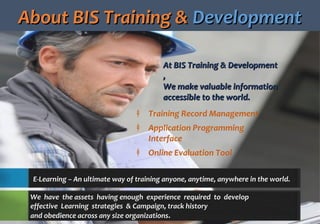
About BIS Training &About BIS Training & DevelopmentDevelopment
E-Learning – An ultimate way of training anyone, anytime, anywhere in the world.
At BIS Training & DevelopmentAt BIS Training & Development
,,
We make valuable informationWe make valuable information
accessible to the world.accessible to the world.
‡ Training Record Management
‡ Application Programming
Interface
‡ Online Evaluation Tool
We have the assets having enough experience required to develop
effective Learning strategies & Campaign, track history
and obedience across any size organizations.
DetailedDetailed Over View:Over View:
This Power Point Presentation gives an overview of the top
features of the BISTrainer Learning Management System (LMS).
Features would be explored in this presentation include:
‡ Course Delivery
‡ Testing Functionality
‡ User Management
‡ System Reporting
‡ Support & Feedback
BISTrainerBISTrainer Course DeliveryCourse Delivery
We are constantly looking for Quality Online Courses that
could be accessible over our network to thousands of
enterprises through Canada and around the World.
BISTrainerBISTrainer Course DeliveryCourse Delivery
Course Selection  Dynamic Videos Interactive Activities  Course Notes Multilingual 
‡ New Courses
‡ Courses in
Progress
‡ Courses Completed
‡ Virtual Hosts
‡ Motion Graphics
‡ Typography
‡ Interactive Activity
‡ Simulations
‡ Info Retention
‡ Training Objectives
‡ Learning Points
‡ Space - Record Notes
‡ French and English
‡ German Language
‡ Additional Slangs
Professional services for all of your course
development needs…
Course SelectionCourse Selection InterfaceInterface
A user-friendly interface shows all courses accessible to learners.
Learners can see -
Which courses are new,
Which courses they have started,
Which courses they have completed,
Corresponding test results.
DynamicDynamic VideosVideos
BISTrainer uses a delivery system that allows an experience and cont
ributes to higher information retention.
Helps Operator’s view training
videos including Virtual hosts,
Motion graphics, Typography,
High resolution images & more
Interactive ActivitiesInteractive Activities - Simulations- Simulations
These activities keep learners engaged and increase information
retention.
BISTrainer has the ability to deliver
Interactive Activities,
Simulations throughout training m
odules.
CourseCourse NotesNotes
BISTrainer can upright PDF docs to supplement every single
course. .
These notes can deliver learners -
Training Objectives, Key Learning
Points etc.
This tool is a useful resource, as on
e can review in future.
MultilingualMultilingual
This tool has capability to be interpreted into added languages
upon request.
BISTrainer is currently available in
French and English
Languages and soon
would be available in German.
BISTRAINERBISTRAINER TESTING FEATURESTESTING FEATURES
Online Testing Passing Mark Repeat Course Set Auto Certificate  Proctor Functions 
‡ Multiple Choice
‡ True and False
‡ Fill‐in‐the‐Blank
‡ Pass Marks
‡ Estimated Length
‡ Course Notes
‡ Course Reappears
‡ New Course Section
‡ Selection Interface
‡ Printable Certificate
‡ Date of Completion
‡ Title of Course
‡ Designated Users
‡ Proctor Codes
‡ Managed Courses
OnlineOnline TestingTesting
Each unit has a Multiple
Choice, True and False,
or Fill‐in‐the‐
Blank test that will veri
fy the student’s sympat
hetic of the material pr
esented..
PassingPassing MarkMark
BISTrainer allows a minimum passing mark to be set for each course.
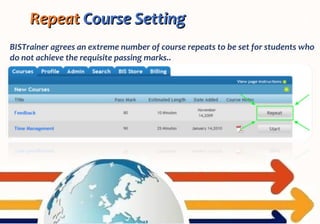
RepeatRepeat Course SettingCourse Setting
BISTrainer agrees an extreme number of course repeats to be set for students who
do not achieve the requisite passing marks..
Auto CertificateAuto Certificate GenerationGeneration
BISTrainer is capable
of automatically generate
a custom, printable Certif
icate of Completion with t
he learner’s name, date of
completion, and title of t
he course.
ProctorProctor FunctionalityFunctionality
When exams must be taken in the existence of a manager or proctor, courses can
be sealed by the system. Only chosen system users can create proctor codes that
will unlock the course for students.
BISTRAINER USER MANAGEMENTBISTRAINER USER MANAGEMENT FEATURESFEATURES
Manage Users
Move User
Feature
Profile
Management
ManageManage UsersUsers
Once accounts have been setup by a manager, a request code can be printed or e
mailed straight to the learner, permitting them to actuate their account. .
Managers has the ability to
add and take out learners,
as well as reset passwords
under
their level of responsibility.
Move User Move User FeatureFeature
This excludes the requirement to remove a surviving account and setup a new 
account any time a student transfers to a new situation.
Managers has the ability to 
move a student from single 
position to a different one 
and relocate all of their 
progress history.
ProfileProfile ManagementManagement
Every student has the 
ability to manage their own 
profile comprising updating 
of their personal 
information and account 
password.
BISTrainer  has  been  designed  to  accomplish  the  present  as  well  as  future 
requirements and requests of our clients.
BISTRAINER REPORTING BISTRAINER REPORTING FEATURES FEATURES 
Reporting 
Dashboard 
Automatic
Course 
Completion 
Email 
Custom Reports 
Detailed Course 
Results 
Reporting Reporting Dashboard Dashboard 
Reporting privilege to check out reports 
detailing:
‡Course Completion Information
‡Average Test Scores
‡Completion Times by Corporation
‡Union, Province or Locality
Automatic Course Automatic Course Completion Email  Completion Email  
Multiple people an email to know 
course has been completed. 
‡Name of Student & Course Title
‡Student’s locality & Marks Received
‡Date of Course Completion
‡Their comments on the Course.
CustomCustom Reports  Reports  
Generate custom reports which give administrative users info on inactive users, 
reporting managers, feedback of users, & separate history for any group of users.
DetailedDetailed Course Results  Course Results  
BISTrainer allows reporting managers to 
drill down into the reporting system to 
understand particular test consequences 
for a particular user.
            BISTRAINER SUPPORT BISTRAINER SUPPORT FEATURES FEATURES             BISTRAINER SUPPORT BISTRAINER SUPPORT FEATURES FEATURES 
            Online Online InstructionsInstructions            Online Online InstructionsInstructions
An  expandable  set  of  on‐screen 
commands  that  teach  students 
through  all  of  BISTrainer  features 
and  functionality  to  afford  a  user‐
friendly experience. 
A small introductory video
illuminating how to use the system.
This video publicizes new students
with BISTrainer to help mark their
experience more pleasant.
Students are encouraged to provide
feedback. This data is important for
recognizing training gaps and
chances for perfection.
Technical support for BIStrainer
from Monday to Friday, 9:00 am to
4:00 pm MST. Email support - 24
hours a day, 7 days a week.
PricingPricing OptionsOptions
Click to VisitClick to Visit
ContactContact InformationInformation
Tel: (780) 410 1660
Toll-free: (866) 416 1660
Fax: (780) 410 1659
Address:
#180, 150 Chippewa Road
Sherwood Park
AB T8A 2A6
Canada
BISTrainer LMS
www.TrainAndDevelop.ca
Thank You For Your 
Attention!!

BISTrainer - Learning Management System