ITEC N453 – Information
 Technology Practices

        201220 - Week 06

      CLOUD COMPUTING
Agenda
• What is Cloud Computing?
• What are the Drivers (Motives) for Cloud Computing?
• Facts and Statistics
• Data
• Benefits
• Characteristics
• Participants
• Delivery Models (Categories)
• Cloud Computing Forms
What can be the definition of cloud
computing?
• Find an easy-to-understand definition online and share it
 with your colleagues
Emerging Technology: Cloud Computing
What is Cloud computing?
• “A model of computing where firms and individuals
  obtain computing power and software applications over
  the Internet, rather than purchasing their own hardware
  and software.” [1, P.196]

• According to Wikipedia
  • Cloud computing is Internet-based computing, whereby shared
    resources, software and information are provided to computers and
    other devices on-demand, like a public utility.


 [1] Laudon, K. Laudon, J. “Management Information Systems” 2010, 11/e
Emerging Technology: Cloud Computing
• “The cloud in cloud computing provides the means
 through which everything — from computing power to
 computing infrastructure, applications, business processes
 to personal collaboration — can be delivered to you as a
 service wherever and whenever you need.” [3]

• Elastic: cloud can easily expand and contract.
• This elasticity means that users can request additional
 resources on demand and just as easily de-provision (or
 release) those resources when they’re no longer needed.


 [3] Cloud Computing for Dummies
VIDEO: WHAT IS CLOUD COMPUTING?
What are the Drivers (Motives) for
Cloud Computing?
Drivers
• Cost effective
  • Economies of Scale: cost advantages resulting in the ability to
    spread fixed costs over more customers


• Elasticity (agility) is one of the main reasons individual,
 business, and IT users are moving to the cloud.

• Reducing capital expenditures
Facts & Statistics
• Fastest growing form of computing
   • Estimated market size in 2009 of $8 billion
   • Projected size of $160 billion in 2012 [1, P.196]


• Hardware
  • Firms IBM, HP, and Dell are building huge, scalable cloud
    computing centers which provide computing power, data storage,
    and high speed Internet connections to firms who rely on the
    Internet for business software applications. [1, P.196]

• Software
   • Software firms such as Google, Microsoft, SAP, Oracle and
     Salesforce.com sell software applications as services delivered over
     the Internet. [1, P.196]

 [1] Laudon, K. Laudon, J. “Management Information Systems” 2010, 11/e
Data
• Data are permanently stored in remote servers in massive
  data centers
• Accessed and updated over the Internet using clients
• Clients: desktops, notebooks, netbooks, mobile devices.
Benefits
• Organizations do not own infrastructure

 • Do not have to make large investments in their own hardware and
   software.
 • Purchase the computing services from remote providers and pay
   only for the amount of computing power they actually use or (are
   billed on a subscription basis)
 • On-demand computing / utility computing describe these services.


• Cloud computing is appealing to SME that lack resources
 to purchase and own their own hardware and software.
Characteristics
• Elasticity and the ability to scale up and down
• Self-service provisioning and automatic de-provisioning
• Application programming interfaces (APIs)
• Billing and metering of service usage in a pay-as-you-go
 model
Participants
• The end user
  • doesn’t really have to know anything about the underlying
    technology.


• Business management
  • needs to take responsibility for overall governance of data or
    services living in a cloud.
  • Cloud service providers must provide a predictable and guaranteed
    service level and security to all their constituents.


• The cloud service provider
  • responsible for IT assets and maintenance.
Delivery models
Delivery models
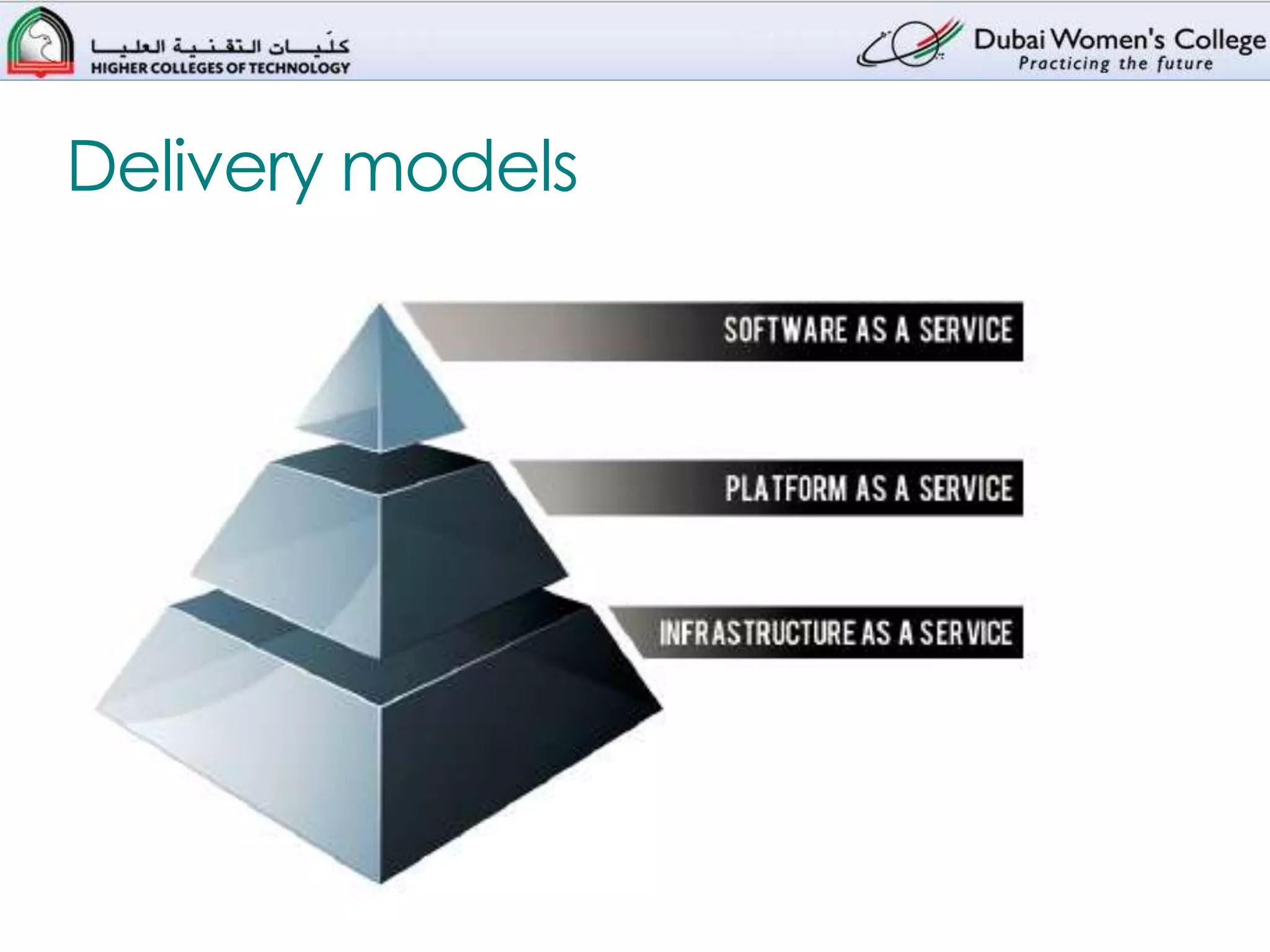
1.        The Infrastructure as a Service (IaaS) layer
     1.     offers storage and compute resources that developers and IT
            organizations use to deliver custom business solutions.


2.        The Platform as a Service (PaaS) layer
     1.     offers development environments that IT organizations can use to
            create cloud-ready business applications.


3.        The Software as a Service (SaaS) layer
     1.     offers purpose-built business applications.


• The customer accesses those services with defined
 interfaces.
Online Group Assignment
Access the following Web page

                    http://bit.ly/n3iFjT

 Compare between the three cloud computing categories:
IaaS, PaaS, and SaaS in terms of:
• Characteristics
• Where each category Makes Sense?
• Where each category May Not be the Best Option?
• Which company applies each category?


  Provide your answers on BB-Learn Discussion Forum
Cloud Computing Forms
• Cloud computing is offered in different forms
  • ✓ Public clouds
  • ✓ Private clouds
  • ✓ Hybrid clouds, which combine both public and private
End of Lecture
      
References
• [1] Laudon, K. Laudon, J. “Management Information
 Systems” 2010, 11/e

• [2] <csrc.nist.gov/groups/SNS/cloud-computing/cloud-
 def-v15.doc> Oct, 06 2010.

• [3] Cloud Computing for Dummies

Itecn453 cloud computing

  • 1.
    ITEC N453 –Information Technology Practices 201220 - Week 06 CLOUD COMPUTING
  • 2.
    Agenda • What isCloud Computing? • What are the Drivers (Motives) for Cloud Computing? • Facts and Statistics • Data • Benefits • Characteristics • Participants • Delivery Models (Categories) • Cloud Computing Forms
  • 3.
    What can bethe definition of cloud computing? • Find an easy-to-understand definition online and share it with your colleagues
  • 4.
    Emerging Technology: CloudComputing What is Cloud computing? • “A model of computing where firms and individuals obtain computing power and software applications over the Internet, rather than purchasing their own hardware and software.” [1, P.196] • According to Wikipedia • Cloud computing is Internet-based computing, whereby shared resources, software and information are provided to computers and other devices on-demand, like a public utility. [1] Laudon, K. Laudon, J. “Management Information Systems” 2010, 11/e
  • 5.
    Emerging Technology: CloudComputing • “The cloud in cloud computing provides the means through which everything — from computing power to computing infrastructure, applications, business processes to personal collaboration — can be delivered to you as a service wherever and whenever you need.” [3] • Elastic: cloud can easily expand and contract. • This elasticity means that users can request additional resources on demand and just as easily de-provision (or release) those resources when they’re no longer needed. [3] Cloud Computing for Dummies
  • 6.
    VIDEO: WHAT ISCLOUD COMPUTING?
  • 7.
    What are theDrivers (Motives) for Cloud Computing?
  • 8.
    Drivers • Cost effective • Economies of Scale: cost advantages resulting in the ability to spread fixed costs over more customers • Elasticity (agility) is one of the main reasons individual, business, and IT users are moving to the cloud. • Reducing capital expenditures
  • 9.
    Facts & Statistics •Fastest growing form of computing • Estimated market size in 2009 of $8 billion • Projected size of $160 billion in 2012 [1, P.196] • Hardware • Firms IBM, HP, and Dell are building huge, scalable cloud computing centers which provide computing power, data storage, and high speed Internet connections to firms who rely on the Internet for business software applications. [1, P.196] • Software • Software firms such as Google, Microsoft, SAP, Oracle and Salesforce.com sell software applications as services delivered over the Internet. [1, P.196] [1] Laudon, K. Laudon, J. “Management Information Systems” 2010, 11/e
  • 10.
    Data • Data arepermanently stored in remote servers in massive data centers • Accessed and updated over the Internet using clients • Clients: desktops, notebooks, netbooks, mobile devices.
  • 11.
    Benefits • Organizations donot own infrastructure • Do not have to make large investments in their own hardware and software. • Purchase the computing services from remote providers and pay only for the amount of computing power they actually use or (are billed on a subscription basis) • On-demand computing / utility computing describe these services. • Cloud computing is appealing to SME that lack resources to purchase and own their own hardware and software.
  • 12.
    Characteristics • Elasticity andthe ability to scale up and down • Self-service provisioning and automatic de-provisioning • Application programming interfaces (APIs) • Billing and metering of service usage in a pay-as-you-go model
  • 13.
    Participants • The enduser • doesn’t really have to know anything about the underlying technology. • Business management • needs to take responsibility for overall governance of data or services living in a cloud. • Cloud service providers must provide a predictable and guaranteed service level and security to all their constituents. • The cloud service provider • responsible for IT assets and maintenance.
  • 14.
  • 15.
    Delivery models 1. The Infrastructure as a Service (IaaS) layer 1. offers storage and compute resources that developers and IT organizations use to deliver custom business solutions. 2. The Platform as a Service (PaaS) layer 1. offers development environments that IT organizations can use to create cloud-ready business applications. 3. The Software as a Service (SaaS) layer 1. offers purpose-built business applications. • The customer accesses those services with defined interfaces.
  • 16.
    Online Group Assignment Accessthe following Web page http://bit.ly/n3iFjT Compare between the three cloud computing categories: IaaS, PaaS, and SaaS in terms of: • Characteristics • Where each category Makes Sense? • Where each category May Not be the Best Option? • Which company applies each category? Provide your answers on BB-Learn Discussion Forum
  • 17.
    Cloud Computing Forms •Cloud computing is offered in different forms • ✓ Public clouds • ✓ Private clouds • ✓ Hybrid clouds, which combine both public and private
  • 18.
  • 19.
    References • [1] Laudon,K. Laudon, J. “Management Information Systems” 2010, 11/e • [2] <csrc.nist.gov/groups/SNS/cloud-computing/cloud- def-v15.doc> Oct, 06 2010. • [3] Cloud Computing for Dummies

Editor's Notes

  • #9 CostClearly, business management is under a lot of pressure to reduce costs while providing a sophisticated level of service to internal and external customers.Supporting business agilityOne of the most immediate benefits of cloud-based infrastructure services is the ability to add new infrastructure capacity quickly and at lower costs. Therefore, cloud services allow the business to gain IT resources in a self service manager, thus saving time and money. By being able to move more quickly, the business can adapt to changes in the market without complex procurement processes. A typical cloud service provider has economies of scale (cost advantages resulting in the ability to spread fixed costs over more customers) that the typical corporation lacks. As mentioned earlier, the cloud’s self-service capability means it’s easier for IT to add more compute cycles (more CPU resources added on an incremental basis) or storage to meet an immediate or intermittent needs.Reducing capital expendituresYou might want to add a new business application, but lack the money. You might need to increase the amount of storage for various departments. Cloud service providers offer this type of capability at a prorated basis. A cloud service vendor might rent storage on a per-gigabyte basis. Companies are often challenged to increase the functionality of IT while minimizing capital expenditures. By purchasing just the right amount of IT resources on demand the organization can avoid purchasing unnecessary equipment.
  • #11 Data are permanently stored in remote servers in massive data centers and accessed in remote servers in massive data centers and accessed and updated over the Internet using clients that include desktops, notebooks, netbooks, mobile devices.
  • #14 The end user doesn’t really have to know anything about the underlying technology. In small businesses, for example, the cloud provider becomes the de facto data center. In larger organizations, the IT organization oversees the inner workings of both internal resources and external cloud resources. Business management needs to take responsibility for overall governance of data or services living in a cloud. Cloud service providers must provide a predictable and guaranteed service level and security to all their constituents.The cloud service provider is responsible for IT assets and maintenance.
  • #15 The customer accesses those services with defined interfaces. These interfaces are, in fact, all that the user ever comes in contact with. The customer never sees the infrastructure that provides a movie on demand, for example — they only see the screen that enables the user to select and purchase the movie. Likewise, in cloud computing the underlying infrastructure that provides the service may be very sophisticated indeed. However, the user doesn’t necessarily need to understand this infrastructure to use it.
  • #16 The customer accesses those services with defined interfaces. These interfaces are, in fact, all that the user ever comes in contact with. The customer never sees the infrastructure that provides a movie on demand, for example — they only see the screen that enables the user to select and purchase the movie. Likewise, in cloud computing the underlying infrastructure that provides the service may be very sophisticated indeed. However, the user doesn’t necessarily need to understand this infrastructure to use it.