R.M.K. COLLEGE OF ENGINEERING AND TECHNOLOGY
PUDUVOYAL – 601206
IT6712–SECURITY LAB MANUAL
ANNA UNIVERSITY REGULATIONS 2013
Department Information Technology
Subject Name Security Lab
Subject Code IT6712
Faculty In-charge with Designation Mr. A. Madhu, Assistant Professor
IT6712 SECURITY LABORATORY L T P C
0 0 3 2
OBJECTIVES: The student should be made to:
 Be exposed to the different cipher techniques
 Learn to implement the algorithms DES, RSA,MD5,SHA-1
 Learn to use tools like GnuPG, KF sensor, Net Strumbler
LIST OF EXPERIMENTS
1. Implement the following SUBSTITUTION & TRANSPOSITION TECHNIQUES concepts:
a) Caesar Cipher
b) Playfair Cipher
c) Hill Cipher
d) Vigenere Cipher
e) Rail fence – row & Column Transformation
2. Implement the following algorithms
a) DES
b) RSA Algorithm
c) Diffiee-Hellman
d) MD5
e) SHA-1
3 Implement the SIGNATURE SCHEME - Digital Signature Standard
4. Demonstrate how to provide secure data storage, secure data transmission and for creating
digital signatures (GnuPG).
5. Setup a honey pot and monitor the honeypot on network (KF Sensor)
6. Installation of rootkits and study about the variety of options
7. Perform wireless audit on an access point or a router and decrypt WEP and WPA.( Net
Stumbler)
8. Demonstrate intrusion detection system (ids) using any tool (snort or any other s/w)
TOTAL: 45 PERIODS
OUTCOMES: At the end of the course, the student should be able to
 Implement the cipher techniques
 Develop the various security algorithms
 Use different open source tools for network security and analysis
LAB EQUIPMENTS FOR A BATCH OF 30 STUDENTS:
SOFTWARE: C / C++ / Java or equivalent compiler GnuPG, KF Sensor or Equivalent, Snort,
Net Stumbler or Equivalent
HARDWARE: Standalone desktops -30 Nos. (or) Server supporting 30 terminals or more.
SOFTWARE USED
 JDK 1.7/1.8
 NetBeans IDE 7x/8x
 Gpg4Win
 WinPcap
 Snort
 ViStumbler
 KF Sensor
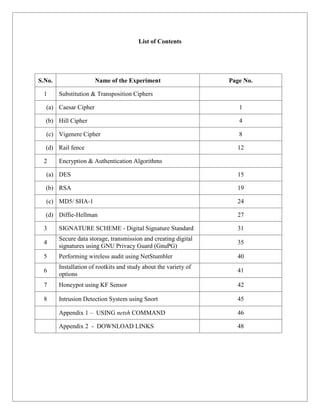
List of Contents
S.No. Name of the Experiment Page No.
1 Substitution & Transposition Ciphers
(a) Caesar Cipher 1
(b) Hill Cipher 4
(c) Vigenere Cipher 8
(d) Rail fence 12
2 Encryption & Authentication Algorithms
(a) DES 15
(b) RSA 19
(c) MD5/ SHA-1 24
(d) Diffie-Hellman 27
3 SIGNATURE SCHEME - Digital Signature Standard 31
4
Secure data storage, transmission and creating digital
signatures using GNU Privacy Guard (GnuPG)
35
5 Performing wireless audit using NetStumbler 40
6
Installation of rootkits and study about the variety of
options
41
7 Honeypot using KF Sensor 42
8 Intrusion Detection System using Snort 45
Appendix 1 – USING netsh COMMAND 46
Appendix 2 - DOWNLOAD LINKS 48
1
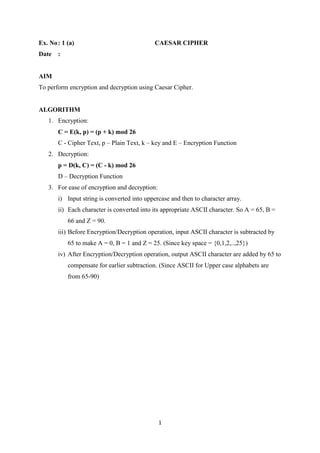
Ex. No: 1 (a) CAESAR CIPHER
Date :
AIM
To perform encryption and decryption using Caesar Cipher.
ALGORITHM
1. Encryption:
C = E(k, p) = (p + k) mod 26
C - Cipher Text, p – Plain Text, k – key and E – Encryption Function
2. Decryption:
p = D(k, C) = (C - k) mod 26
D – Decryption Function
3. For ease of encryption and decryption:
i) Input string is converted into uppercase and then to character array.
ii) Each character is converted into its appropriate ASCII character. So A = 65, B =
66 and Z = 90.
iii) Before Encryption/Decryption operation, input ASCII character is subtracted by
65 to make A = 0, B = 1 and Z = 25. (Since key space = {0,1,2,..,25})
iv) After Encryption/Decryption operation, output ASCII character are added by 65 to
compensate for earlier subtraction. (Since ASCII for Upper case alphabets are
from 65-90)
2
/*Ceaser Cipher */
import java.util.Scanner;
public class CaesarCipher {
public static void main(String[] args) {
Scanner in = new Scanner(System.in);
System.out.println("Enter the plaintext message without space:");
String plainText = in.nextLine();
int key = in.nextInt(); // key value should be from 0 to 25
plainText = plainText.toUpperCase();
char[] plainTextChar = plainText.toCharArray();
//Encryption
for (int i = 0; i < plainTextChar.length; i++) {
plainTextChar[i] = (char) (((int) plainTextChar[i] + key - 65) % 26 + 65);
}
System.out.println("The Ciphertext message:");
String cipherText = String.valueOf(plainTextChar);
System.out.println(cipherText);
plainTextChar = cipherText.toCharArray();
//Decryption
for (int i = 0; i < plainTextChar.length; i++) {
plainTextChar[i] = (char) (((int) plainTextChar[i] - key - 65) % 26 + 65);
}
String recoveredPlainText = String.valueOf(plainTextChar).toLowerCase();
System.out.println("Recovered Plaintext message:");
System.out.println(recoveredPlainText);
}
}
3
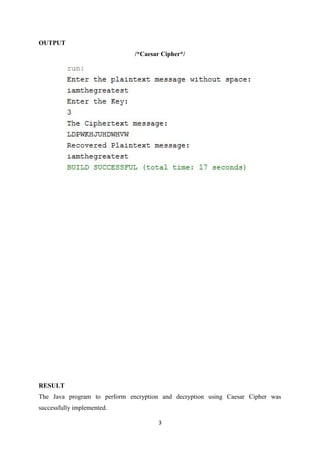
OUTPUT
/*Caesar Cipher*/
RESULT
The Java program to perform encryption and decryption using Caesar Cipher was
successfully implemented.
4
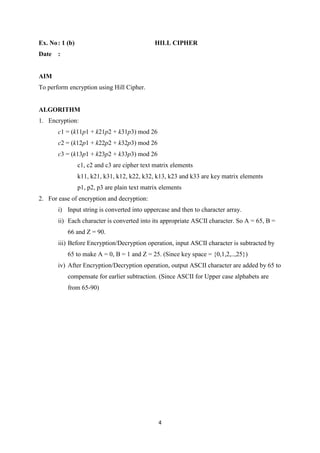
Ex. No: 1 (b) HILL CIPHER
Date :
AIM
To perform encryption using Hill Cipher.
ALGORITHM
1. Encryption:
c1 = (k11p1 + k21p2 + k31p3) mod 26
c2 = (k12p1 + k22p2 + k32p3) mod 26
c3 = (k13p1 + k23p2 + k33p3) mod 26
c1, c2 and c3 are cipher text matrix elements
k11, k21, k31, k12, k22, k32, k13, k23 and k33 are key matrix elements
p1, p2, p3 are plain text matrix elements
2. For ease of encryption and decryption:
i) Input string is converted into uppercase and then to character array.
ii) Each character is converted into its appropriate ASCII character. So A = 65, B =
66 and Z = 90.
iii) Before Encryption/Decryption operation, input ASCII character is subtracted by
65 to make A = 0, B = 1 and Z = 25. (Since key space = {0,1,2,..,25})
iv) After Encryption/Decryption operation, output ASCII character are added by 65 to
compensate for earlier subtraction. (Since ASCII for Upper case alphabets are
from 65-90)
5
/*HILL CIPHER*/
import java.util.Scanner;
class HillCipher {
public String encrypt(String plainText, int key[][]) {
char[] text=plainText.toCharArray();
int c1,c2,c3,p1,p2,p3;
p1=(int)text[0] - 65;
p2=(int)text[1] - 65;
p3=(int)text[2] - 65;
c1 = (key[0][0]*p1+key[0][1]*p2+key[0][2]*p3) % 26;
c2 = (key[1][0]*p1+key[1][1]*p2+key[1][2]*p3) % 26;
c3 = (key[2][0]*p1+key[2][1]*p2+key[2][2]*p3) % 26;
char[] cipherText=new char[3];
cipherText[0]=(char)(c1+65);
cipherText[1]=(char)(c2+65);
cipherText[2]=(char)(c3+65);
return String.valueOf(cipherText);
}
}
public class HillCipherDemo {
public static void main(String[] args) {
Scanner sc = new Scanner(System.in);
HillCipher hillCipher = new HillCipher();
System.out.print("Enter the plaintext message:");
String plainText = sc.nextLine();
6
int[][] key=new int[3][3];
System.out.println("Enter the Key in 3 X 3 Matrix Format:");
for(int i=0;i<3;i++)
{
for(int j=0;j<3;j++){
key[i][j]= sc.nextInt();
}
}
String cipherText = hillCipher.encrypt(plainText.toUpperCase(), key);
System.out.println("Cipher Text="+cipherText);
}
}
7
OUTPUT
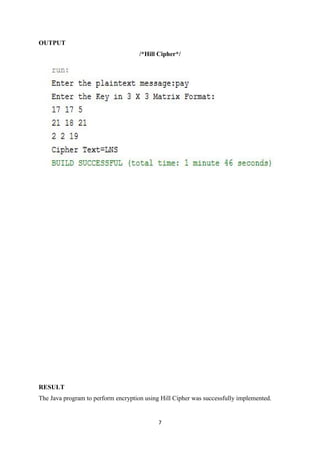
/*Hill Cipher*/
RESULT
The Java program to perform encryption using Hill Cipher was successfully implemented.
8
Ex. No: 1 (c) VIGENERE CIPHER
Date :
AIM
To perform encryption and decryption using Vigenere Cipher.
ALGORITHM
1. Encryption
Ci= (pi+ kimod m) mod 26
2. Decryption
pi= (Ci- kimod m) mod 26
3. For ease of encryption and decryption:
i) Input string is converted into uppercase and then to character array.
ii) Each character is converted into its appropriate ASCII character. So A = 65, B =
66 and Z = 90.
iii) Before Encryption/Decryption operation, input ASCII character is subtracted by
65 to make A = 0, B = 1 and Z = 25. (Since key space = {0,1,2,..,25})
iv) After Encryption/Decryption operation, output ASCII character are added by 65 to
compensate for earlier subtraction. (Since ASCII for Upper case alphabets are
from 65-90)
9
/*VIGENERE CIPHER*/
import java.util.Arrays;
import java.util.Scanner;
public class VigenereCipherDemo {
public static void main(String[] args) {
Scanner sc = new Scanner(System.in);
String plainText = sc.nextLine();
String key=sc.nextLine();
char[] plainTextChar = plainText.toUpperCase().toCharArray();
char[] keyChar =
Arrays.copyOf(key.toUpperCase().toCharArray(),plainTextChar.length);
int i=0;
//Making length of Key same as length of Plain Text message
for(int j=key.toCharArray().length;j<keyChar.length;j++){
keyChar[j]=keyChar[i];
i++;
}
char[] cipherTextChar = new char[keyChar.length];
//Encryption
for(i=0;i<cipherTextChar.length;i++){
cipherTextChar[i]=(char)(int) ((plainTextChar[i]+keyChar[i]-130)%26+65);
}
System.out.println("Cipher Text="+String.valueOf(cipherTextChar));
char[] recoveredPlainTextChar = new char[cipherTextChar.length];
//Decryption
for(i=0;i<recoveredPlainTextChar.length;i++)
10
{
recoveredPlainTextChar[i] = (char)(int) ((cipherTextChar[i]-keyChar[i]+26)%26+65)
;
}
System.out.println("Recovered Plain
Text="+String.valueOf(recoveredPlainTextChar).toLowerCase());
}
}
11
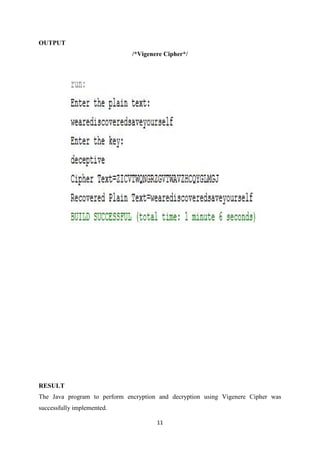
OUTPUT
/*Vigenere Cipher*/
RESULT
The Java program to perform encryption and decryption using Vigenere Cipher was
successfully implemented.
12
Ex. No: 1 (d) RAIL FENCE CIPHER
Date :
AIM
To perform encryption and decryption using Rail Fence technique.
ALGORITHM
1. Encryption
The plaintext iswritten down as a sequence of diagonals and then read off as a sequence
of rows.
For example, to encipher the message “meet me after the toga party” with a railfence of
depth 2, we write the following:
m e m a t r h t g p r y
e t e f e t e o a a t
The encrypted message isMEMATRHTGPRYETEFETEOAAT.
13
/*RAIL FENCE */
import java.util.Scanner;
public class RailFenceDemo {
public static void main(String[] args) {
Scanner sc = new Scanner(System.in);
System.out.println("Enter the plaintext(Even Number of characters):");
String plainText = sc.nextLine();
char[] plainTextChar = plainText.toCharArray();
char[] cipherTextChar = new char[plainTextChar.length];
int i, j = 0;
for (i = 0; i < (cipherTextChar.length / 2); i++) {
cipherTextChar[i] = plainTextChar[j];
cipherTextChar[i + plainTextChar.length / 2] = plainTextChar[j + 1];
j = j + 2;
}
System.out.println("CipherText=" + String.valueOf(cipherTextChar));
char[] recoveredPlainTextChar = new char[cipherTextChar.length];
j = 0;
for (i = 0; i < recoveredPlainTextChar.length; i = i + 2) {
recoveredPlainTextChar[i] = cipherTextChar[j];
recoveredPlainTextChar[i + 1] = cipherTextChar[j + (plainTextChar.length / 2)];
j++;
}
System.out.println("Recovered Plain Text=" +
String.valueOf(recoveredPlainTextChar));
}
}
14
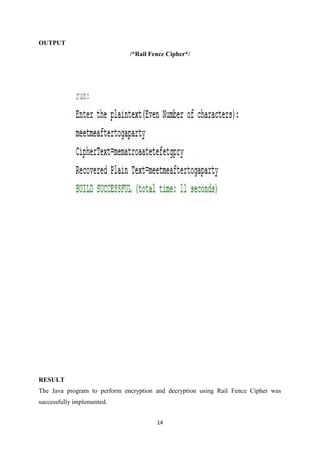
OUTPUT
/*Rail Fence Cipher*/
RESULT
The Java program to perform encryption and decryption using Rail Fence Cipher was
successfully implemented.
15
Ex. No: 2 (a) DATA ENCRYPTION STANDARD
Date :
AIM
To perform encryption and decryption using DES.
ALGORITHM
1. Using Java’s in-built packages, DES algorithm is implemented.
2. Import necessary packages.
3. Add security provider.
4. Convert the input message to byte format for easy manipulation.
5. Get key and other cryptographic details using appropriate methods.
6. Perform encryption using appropriate methods.
7. To recover the plain text message, perform decryption using appropriate method.
16
/*DES Demo*/
import com.sun.crypto.provider.SunJCE;
import java.util.Base64;
importjava.io.BufferedReader;
importjava.io.InputStreamReader;
importjava.math.BigInteger;
importjava.security.Security;
importjavax.crypto.Cipher;
importjavax.crypto.KeyGenerator;
importjavax.crypto.SecretKey;
public class DesDemo {
public static void main(String[] args) throws Exception{
// TODO code application logic here
BufferedReaderbr = new BufferedReader(new InputStreamReader(System.in));
Security.addProvider(new SunJCE());
//Getting PlainText Message From User
System.out.println("Enter the plaintext message");
String plainMessage = br.readLine();
byte[] input = plainMessage.getBytes();
BigInteger b = new BigInteger(1, input);
System.out.println("PlainText in the binary form: " + b.toString(2));
//System.out.println("Entered PlainText is: " + new String(input));
Cipher cipher = Cipher.getInstance("DES");
KeyGeneratorkeyGen = KeyGenerator.getInstance("DES");
SecretKey key=keyGen.generateKey();
17
//Base64 works in Java 8 only
System.out.println("The Key is:"+ Base64.getEncoder().encodeToString(key.getEncoded()));
//Encryption
cipher.init(Cipher.ENCRYPT_MODE, key);
byte[] cipherText = cipher.doFinal(input);
BigInteger b2 = new BigInteger(1, cipherText);
System.out.println("CipherText in the binary form: " + b2.toString(2));
//System.out.println("CipherText: " + new String(cipherText));
//Decryption
cipher.init(Cipher.DECRYPT_MODE, key);
byte[] plainText = cipher.doFinal(cipherText);
System.out.println();
System.out.println("Recovered PlainText : " + new String(plainText));
}
}
18
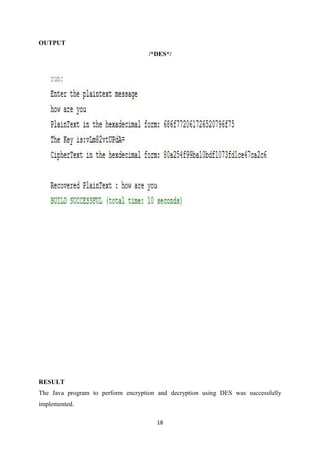
OUTPUT
/*DES*/
RESULT
The Java program to perform encryption and decryption using DES was successfully
implemented.
19
Ex. No: 2 (b) RSA
Date :
AIM
To perform encryption and decryption using RSA.
ALGORITHM
Version 1:
1. Using Java’s in-built packages, RSA algorithm is implemented.
2. Import necessary packages.
3. Add security provider.
4. Convert the input message to byte format for easy manipulation.
5. Get key and other cryptographic details using appropriate methods.
6. Perform encryption using appropriate methods.
7. To recover the plain text message, perform decryption using appropriate method.
Version 2:
1. Use BigInteger class to perform RSA encryption and decryption.
2. Encryption
C = Me
mod n
3. Decyption
M = Cd
mod n
4. Get encryption constant, prime numbers p and q from the user.
5. Calculate n and phi(n).
6. Calculate decryption constant.
7. Use various methods of BigInteger to perform modular arithmetic.
20
/*RSA Demo */
import java.io.*;
importjava.math.BigInteger;
importjava.security.Security;
importjava.security.KeyPairGenerator;
importjava.security.Key;
importjava.security.KeyPair;
importjavax.crypto.Cipher;
importcom.sun.crypto.provider.SunJCE;
public class RsaDemo {
public static void main(String[] args) throws Exception {
BufferedReaderbr = new BufferedReader(new InputStreamReader(System.in));
Security.addProvider(new SunJCE());
//Getting PlainText Message From User
System.out.println("Enter the plaintext message");
String plainMessage = br.readLine();
byte[] input = plainMessage.getBytes();
BigInteger b = new BigInteger(1, input);
System.out.println("PlainText in the binary form: " + b.toString(2));
//System.out.println("Entered PlainText is: " + new String(input));
Cipher cipher = Cipher.getInstance("RSA");
// Get an instance of the RSA key generator
21
KeyPairGeneratorkpg = KeyPairGenerator.getInstance("RSA");
kpg.initialize(2048);
// Generate the keys
KeyPairkp = kpg.genKeyPair();
Key publicKey = kp.getPublic();
Key privateKey = kp.getPrivate();
//Encryption
cipher.init(Cipher.ENCRYPT_MODE, publicKey);
byte[] cipherText = cipher.doFinal(input);
BigInteger b2 = new BigInteger(1, cipherText);
System.out.println("CipherText in the binary form: " + b2.toString(2));
//System.out.println("CipherText: " + new String(cipherText));
//Decryption
cipher.init(Cipher.DECRYPT_MODE, privateKey);
byte[] plainText = cipher.doFinal(cipherText);
System.out.println();
System.out.println("Recovered PlainText : " + new String(plainText));
}
}
22
/*RSA Version 2 */
import java.math.BigInteger;
import java.io.BufferedReader;
import java.io.InputStreamReader;
public class RSAAlgorithm {
public static void main(String[] args) throws Exception {
// TODO code application logic here
BufferedReader br = new BufferedReader(new InputStreamReader(System.in));
System.out.println("Enter Encryption Constant:");
BigInteger e = new BigInteger(br.readLine());
System.out.println("Enter Prime Number 1:");
BigInteger p = new BigInteger(br.readLine());
System.out.println("Enter Prime Number 2:");
BigInteger q = new BigInteger(br.readLine());
BigInteger n = p.multiply(q);
BigInteger phi = p.subtract(BigInteger.ONE).multiply(q.subtract(BigInteger.ONE));
BigInteger d = e.modInverse(phi);
System.out.println("Enter PlainText Message:");
BigInteger plainText = new BigInteger(br.readLine());
BigInteger cipherText = plainText.modPow(e, n);
System.out.println("CipherText:" + cipherText);
BigInteger recoveredPlainText = cipherText.modPow(d, n);
System.out.println("Recovered PlainText:" + recoveredPlainText);
}
}
23
OUTPUT
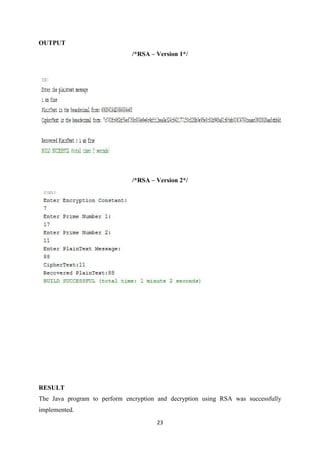
/*RSA – Version 1*/
/*RSA – Version 2*/
RESULT
The Java program to perform encryption and decryption using RSA was successfully
implemented.
24
Ex. No: 2 (c) MD5/SHA-1
Date :
AIM
To generate message digest value using MD5/SHA-1.
ALGORITHM
1. Using Java’s in-built packages, MD5/SHA-1 algorithm is implemented.
2. Import necessary packages.
3. Convert the input message to byte format for easy manipulation.
4. Using appropriate methods, message digest is generated.
5. Message digest is displayed in hexadecimal format.
25
/*Message Digest Demo – MD5 and SHA-1*/
import java.io.*;
importjava.math.BigInteger;
importjava.security.Security;
importjava.security.MessageDigest;
importcom.sun.crypto.provider.SunJCE;
public class MessageDigestDemo {
public static void main(String[] args) throws Exception {
BufferedReaderbr=new BufferedReader(new InputStreamReader(System.in));
Security.addProvider(new SunJCE());
System.out.println("Enter the message");
String message=br.readLine();
byte[] input = message.getBytes();
System.out.println("Message: " + new String(input));
MessageDigest md = MessageDigest.getInstance("MD5");
//MessageDigest md = MessageDigest.getInstance("SHA-1");
md.update(input);
byte[] hash = md.digest();
BigInteger b=new BigInteger(1,hash);
String hashValue=b.toString(16);
System.out.println("MessageDigest in HexaDecimal Format: " + hashValue);
}
}
26
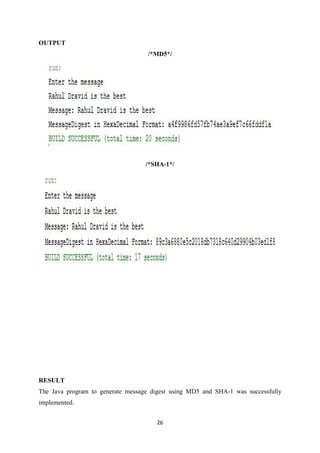
OUTPUT
/*MD5*/
/*SHA-1*/
RESULT
The Java program to generate message digest using MD5 and SHA-1 was successfully
implemented.
27
Ex. No: 2 (d) DIFFIE – HELLMAN KEY EXCHANGE
Date :
AIM
To perform Diffie-Hellman Key Exchange.
ALGORITHM
1. Use various methods of BigInteger to perform modular arithmetic.
2. Get the prime number and one of its primitive root from the user.
3. Get the private keys of User A and User B.
4. Calculate public keys of User A and User B.
5. Calculate shared secret key.
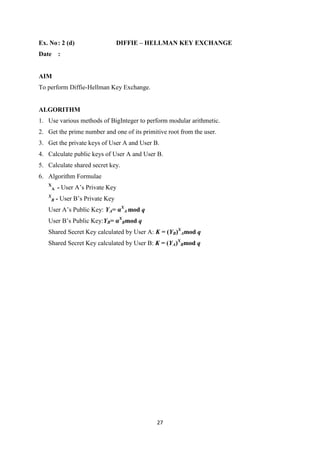
6. Algorithm Formulae
X
A - User A’s Private Key
X
B - User B’s Private Key
User A’s Public Key: YA= αX
A mod q
User B’s Public Key:YB= αX
Bmod q
Shared Secret Key calculated by User A: K = (YB)X
Amod q
Shared Secret Key calculated by User B: K = (YA)X
Bmod q
28
/*Diffie-Hellman Key Exchange*/
import java.io.BufferedReader;
import java.io.InputStreamReader;
import java.math.BigInteger;
import java.io.IOException;
public class DiffieHellman {
public static void main(String[] args) {
// TODO code application logic here
try {
BufferedReader br = new BufferedReader(new InputStreamReader(System.in));
System.out.println("Enter the prime number:");
BigInteger primeNumber = new BigInteger(br.readLine());
System.out.println("Enter the primitive root of prime number:");
BigInteger primitiveRoot = new BigInteger(br.readLine());
System.out.println("Enter the private key of A:");
BigInteger privateKeyA = new BigInteger(br.readLine());
System.out.println("Enter the private key of B:");
BigInteger privateKeyB = new BigInteger(br.readLine());
BigInteger publicKeyA = primitiveRoot.modPow(privateKeyA, primeNumber);
BigInteger publicKeyB = primitiveRoot.modPow(privateKeyB, primeNumber);
System.out.println("Public Key of A:" + publicKeyA);
System.out.println("Public Key of B:" + publicKeyB);
BigInteger sharedSecretKeyB = publicKeyA.modPow(privateKeyB, primeNumber);
BigInteger sharedSecretKeyA = publicKeyB.modPow(privateKeyA, primeNumber);
System.out.println("Shared Secret Key Computed By A:" + sharedSecretKeyA);
System.out.println("Shared Secret Key Computed By B:" + sharedSecretKeyB);
29
} catch (ArithmeticException e) {
System.out.println(e);
} catch (IOException e) {
System.out.println("Input/Output Exception" + e);
}
}
}
30
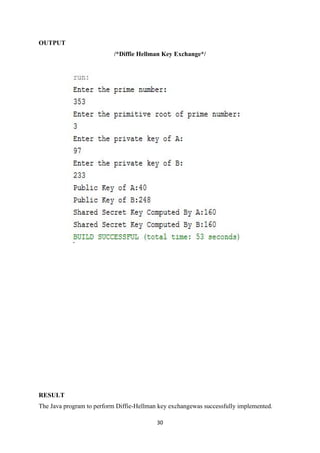
OUTPUT
/*Diffie Hellman Key Exchange*/
RESULT
The Java program to perform Diffie-Hellman key exchangewas successfully implemented.
31
Ex. No: 3 DIGITAL SIGNATURE STANDARD
Date :
AIM
To generate and verify digital signature using DSS.
ALGORITHM
1. Using Java’s in-built packages, DSS algorithm is implemented.
2. Import necessary packages.
3. Add security provider.
4. Convert the input message to byte format for easy manipulation.
5. Get cryptographic details using appropriate methods.
6. Sign and verify the message using appropriate methods.
32
/*DSS*/
import com.sun.crypto.provider.SunJCE;
import java.io.BufferedReader;
import java.io.FileOutputStream;
import java.io.InputStreamReader;
import java.math.BigInteger;
import java.security.KeyPair;
import java.security.KeyPairGenerator;
import java.security.SecureRandom;
import java.security.Security;
import java.security.Signature;
public class DSSDemo {
public static void main(String[] args) throws Exception {
BufferedReader br = new BufferedReader(new InputStreamReader(System.in));
Security.addProvider(new SunJCE());
KeyPairGenerator keyGen = KeyPairGenerator.getInstance("DSA", "SUN");
keyGen.initialize(512, new SecureRandom());
KeyPair keyPair = keyGen.generateKeyPair();
Signature signature = Signature.getInstance("SHA1withDSA", "SUN");
signature.initSign(keyPair.getPrivate(), new SecureRandom());
String inputMessage = br.readLine();
byte[] message = inputMessage.getBytes();
signature.update(message);
byte[] sigBytes = signature.sign();
BigInteger signedMessage = new BigInteger(1, sigBytes);
33
System.out.println("Digital Signature in HEX Format:"+signedMessage.toString(16));
signature.initVerify(keyPair.getPublic());
signature.update(message);
if(signature.verify(sigBytes)==true)
System.out.println("Signature is verified");
else
System.out.println("Signature is not matching");
}
}
34
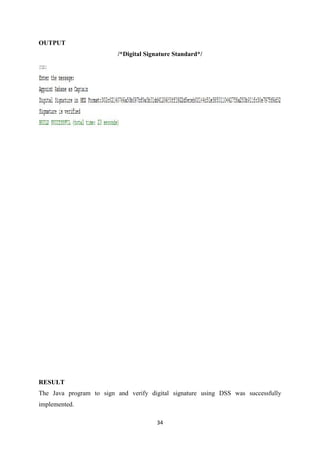
OUTPUT
/*Digital Signature Standard*/
RESULT
The Java program to sign and verify digital signature using DSS was successfully
implemented.
35
Ex. No: 4 Using GNU Privacy Guard
Date :
AIM
To create public-key certificates, to perform encryption and to generate digital signature
using GnuPG.
CREATING CERTIFICATE USING KLEOPATRA
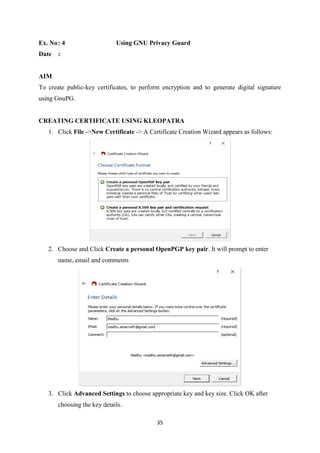
1. Click File ->New Certificate -> A Certificate Creation Wizard appears as follows:
2. Choose and Click Create a personal OpenPGP key pair. It will prompt to enter
name, email and comments
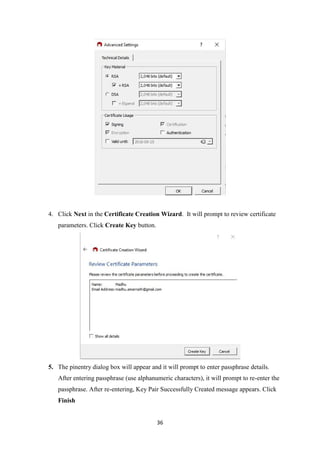
3. Click Advanced Settings to choose appropriate key and key size. Click OK after
choosing the key details.
36
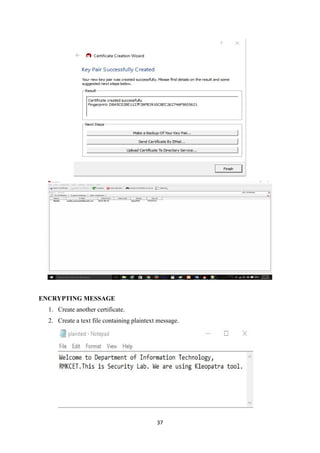
4. Click Next in the Certificate Creation Wizard. It will prompt to review certificate
parameters. Click Create Key button.
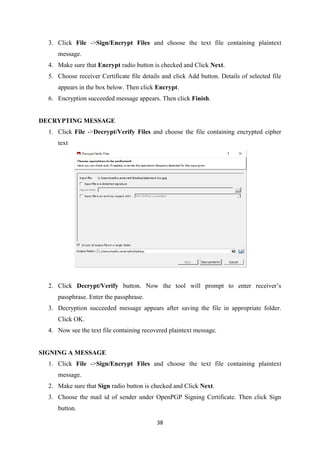
5. The pinentry dialog box will appear and it will prompt to enter passphrase details.
After entering passphrase (use alphanumeric characters), it will prompt to re-enter the
passphrase. After re-entering, Key Pair Successfully Created message appears. Click
Finish
37
ENCRYPTING MESSAGE
1. Create another certificate.
2. Create a text file containing plaintext message.
38
3. Click File ->Sign/Encrypt Files and choose the text file containing plaintext
message.
4. Make sure that Encrypt radio button is checked and Click Next.
5. Choose receiver Certificate file details and click Add button. Details of selected file
appears in the box below. Then click Encrypt.
6. Encryption succeeded message appears. Then click Finish.
DECRYPTING MESSAGE
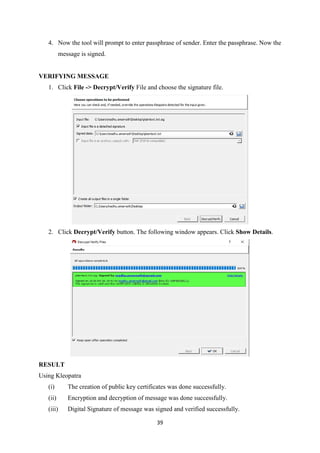
1. Click File ->Decrypt/Verify Files and choose the file containing encrypted cipher
text
2. Click Decrypt/Verify button. Now the tool will prompt to enter receiver’s
passphrase. Enter the passphrase.
3. Decryption succeeded message appears after saving the file in appropriate folder.
Click OK.
4. Now see the text file containing recovered plaintext message.
SIGNING A MESSAGE
1. Click File ->Sign/Encrypt Files and choose the text file containing plaintext
message.
2. Make sure that Sign radio button is checked and Click Next.
3. Choose the mail id of sender under OpenPGP Signing Certificate. Then click Sign
button.
39
4. Now the tool will prompt to enter passphrase of sender. Enter the passphrase. Now the
message is signed.
VERIFYING MESSAGE
1. Click File -> Decrypt/Verify File and choose the signature file.
2. Click Decrypt/Verify button. The following window appears. Click Show Details.
RESULT
Using Kleopatra
(i) The creation of public key certificates was done successfully.
(ii) Encryption and decryption of message was done successfully.
(iii) Digital Signature of message was signed and verified successfully.
40
Ex. No: 5 Performing Wireless Audit Using ViStumbler
Date :
AIM
To perform wireless audit using ViStumbler.
Using Vistumbler
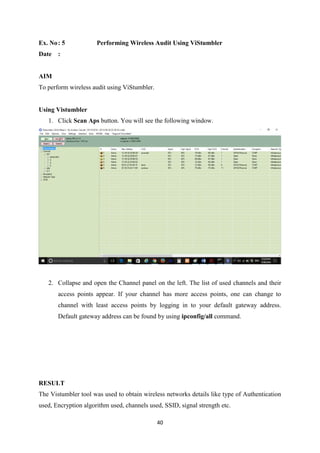
1. Click Scan Aps button. You will see the following window.
2. Collapse and open the Channel panel on the left. The list of used channels and their
access points appear. If your channel has more access points, one can change to
channel with least access points by logging in to your default gateway address.
Default gateway address can be found by using ipconfig/all command.
RESULT
The Vistumbler tool was used to obtain wireless networks details like type of Authentication
used, Encryption algorithm used, channels used, SSID, signal strength etc.
41
Ex. No: 6 GMER – Rootkit Detection and Removal
Date :
AIM
To use GMER application to detect and remove rootkits.
PROCEDURE
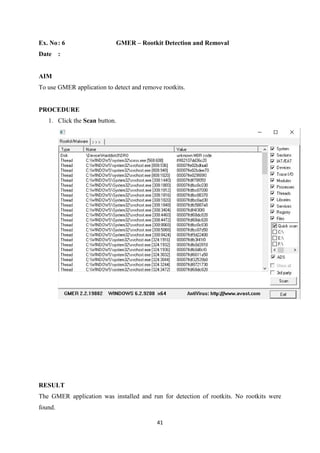
1. Click the Scan button.
RESULT
The GMER application was installed and run for detection of rootkits. No rootkits were
found.
42
Ex. No: 7 SNORT
Date :
AIM
To demonstrate intrusion detection using Snort.
PROCEDURE
1. Install WinPcap libraries.
2. Install Snort
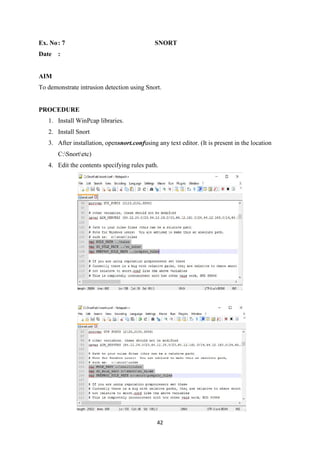
3. After installation, opensnort.confusing any text editor. (It is present in the location
C:Snortetc)
4. Edit the contents specifying rules path.
43
5. To use snort from any window path, set path variable as C:Snortbin under
Environment Variables.
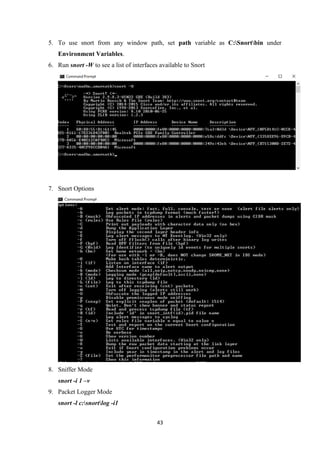
6. Run snort -W to see a list of interfaces available to Snort
7. Snort Options
8. Sniffer Mode
snort -i 1 –v
9. Packet Logger Mode
snort -l c:snortlog -i1
44
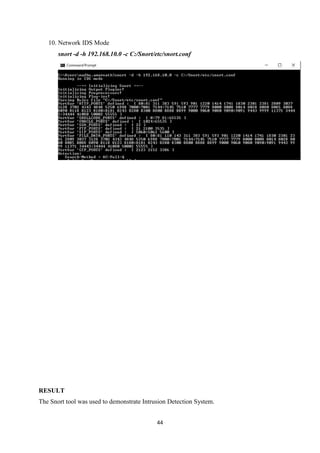
10. Network IDS Mode
snort -d -h 192.168.10.0 -c C:/Snort/etc/snort.conf
RESULT
The Snort tool was used to demonstrate Intrusion Detection System.
45
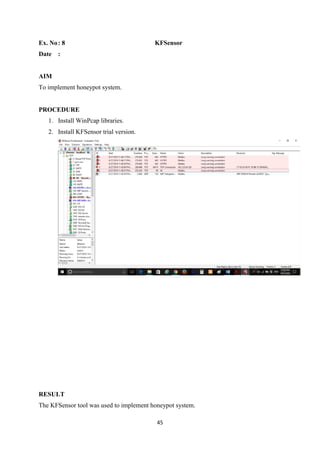
Ex. No: 8 KFSensor
Date :
AIM
To implement honeypot system.
PROCEDURE
1. Install WinPcap libraries.
2. Install KFSensor trial version.
RESULT
The KFSensor tool was used to implement honeypot system.
46
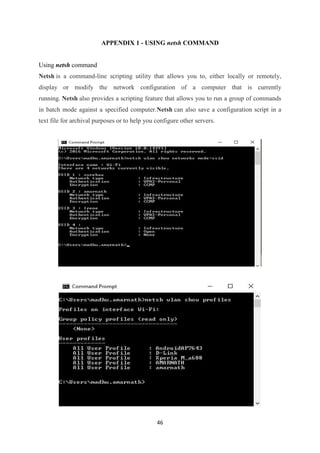
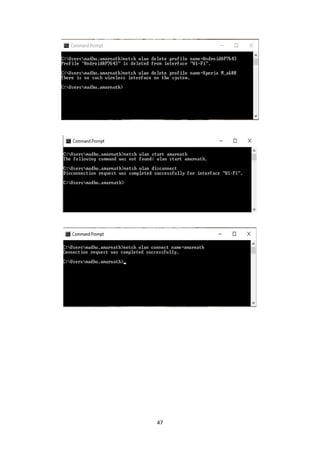
APPENDIX 1 - USING netsh COMMAND
Using netsh command
Netsh is a command-line scripting utility that allows you to, either locally or remotely,
display or modify the network configuration of a computer that is currently
running. Netsh also provides a scripting feature that allows you to run a group of commands
in batch mode against a specified computer.Netsh can also save a configuration script in a
text file for archival purposes or to help you configure other servers.
47
48
APPENDIX 2 – DOWNLOAD LINKS
1. GnuPG - Encryption software for files and emails (Supports OpenPGP and S/MIME)
https://www.gpg4win.org/
2. Vistumbler – Wireless Network Scanner
https://www.vistumbler.net/downloads.html
3. Snort - Network Intrusion Detection & Prevention System
https://www.snort.org/downloads/snort/Snort_2_9_8_3_Installer.exe
4. GMER – Application to detect and remove rootkits
http://www.gmer.net/
5. KFSensor – Windows Honeypot System
http://www.keyfocus.net/kfsensor/free-trial/
6. WinPcap – Windows Packet Capture Library
http://www.winpcap.org/install/default.htm

IT6712 lab manual

  • 1.
    R.M.K. COLLEGE OFENGINEERING AND TECHNOLOGY PUDUVOYAL – 601206 IT6712–SECURITY LAB MANUAL ANNA UNIVERSITY REGULATIONS 2013 Department Information Technology Subject Name Security Lab Subject Code IT6712 Faculty In-charge with Designation Mr. A. Madhu, Assistant Professor
  • 2.
    IT6712 SECURITY LABORATORYL T P C 0 0 3 2 OBJECTIVES: The student should be made to:  Be exposed to the different cipher techniques  Learn to implement the algorithms DES, RSA,MD5,SHA-1  Learn to use tools like GnuPG, KF sensor, Net Strumbler LIST OF EXPERIMENTS 1. Implement the following SUBSTITUTION & TRANSPOSITION TECHNIQUES concepts: a) Caesar Cipher b) Playfair Cipher c) Hill Cipher d) Vigenere Cipher e) Rail fence – row & Column Transformation 2. Implement the following algorithms a) DES b) RSA Algorithm c) Diffiee-Hellman d) MD5 e) SHA-1 3 Implement the SIGNATURE SCHEME - Digital Signature Standard 4. Demonstrate how to provide secure data storage, secure data transmission and for creating digital signatures (GnuPG). 5. Setup a honey pot and monitor the honeypot on network (KF Sensor) 6. Installation of rootkits and study about the variety of options 7. Perform wireless audit on an access point or a router and decrypt WEP and WPA.( Net Stumbler) 8. Demonstrate intrusion detection system (ids) using any tool (snort or any other s/w) TOTAL: 45 PERIODS OUTCOMES: At the end of the course, the student should be able to  Implement the cipher techniques  Develop the various security algorithms  Use different open source tools for network security and analysis LAB EQUIPMENTS FOR A BATCH OF 30 STUDENTS: SOFTWARE: C / C++ / Java or equivalent compiler GnuPG, KF Sensor or Equivalent, Snort, Net Stumbler or Equivalent HARDWARE: Standalone desktops -30 Nos. (or) Server supporting 30 terminals or more.
  • 3.
    SOFTWARE USED  JDK1.7/1.8  NetBeans IDE 7x/8x  Gpg4Win  WinPcap  Snort  ViStumbler  KF Sensor
  • 4.
    List of Contents S.No.Name of the Experiment Page No. 1 Substitution & Transposition Ciphers (a) Caesar Cipher 1 (b) Hill Cipher 4 (c) Vigenere Cipher 8 (d) Rail fence 12 2 Encryption & Authentication Algorithms (a) DES 15 (b) RSA 19 (c) MD5/ SHA-1 24 (d) Diffie-Hellman 27 3 SIGNATURE SCHEME - Digital Signature Standard 31 4 Secure data storage, transmission and creating digital signatures using GNU Privacy Guard (GnuPG) 35 5 Performing wireless audit using NetStumbler 40 6 Installation of rootkits and study about the variety of options 41 7 Honeypot using KF Sensor 42 8 Intrusion Detection System using Snort 45 Appendix 1 – USING netsh COMMAND 46 Appendix 2 - DOWNLOAD LINKS 48
  • 5.
    1 Ex. No: 1(a) CAESAR CIPHER Date : AIM To perform encryption and decryption using Caesar Cipher. ALGORITHM 1. Encryption: C = E(k, p) = (p + k) mod 26 C - Cipher Text, p – Plain Text, k – key and E – Encryption Function 2. Decryption: p = D(k, C) = (C - k) mod 26 D – Decryption Function 3. For ease of encryption and decryption: i) Input string is converted into uppercase and then to character array. ii) Each character is converted into its appropriate ASCII character. So A = 65, B = 66 and Z = 90. iii) Before Encryption/Decryption operation, input ASCII character is subtracted by 65 to make A = 0, B = 1 and Z = 25. (Since key space = {0,1,2,..,25}) iv) After Encryption/Decryption operation, output ASCII character are added by 65 to compensate for earlier subtraction. (Since ASCII for Upper case alphabets are from 65-90)
  • 6.
    2 /*Ceaser Cipher */ importjava.util.Scanner; public class CaesarCipher { public static void main(String[] args) { Scanner in = new Scanner(System.in); System.out.println("Enter the plaintext message without space:"); String plainText = in.nextLine(); int key = in.nextInt(); // key value should be from 0 to 25 plainText = plainText.toUpperCase(); char[] plainTextChar = plainText.toCharArray(); //Encryption for (int i = 0; i < plainTextChar.length; i++) { plainTextChar[i] = (char) (((int) plainTextChar[i] + key - 65) % 26 + 65); } System.out.println("The Ciphertext message:"); String cipherText = String.valueOf(plainTextChar); System.out.println(cipherText); plainTextChar = cipherText.toCharArray(); //Decryption for (int i = 0; i < plainTextChar.length; i++) { plainTextChar[i] = (char) (((int) plainTextChar[i] - key - 65) % 26 + 65); } String recoveredPlainText = String.valueOf(plainTextChar).toLowerCase(); System.out.println("Recovered Plaintext message:"); System.out.println(recoveredPlainText); } }
  • 7.
    3 OUTPUT /*Caesar Cipher*/ RESULT The Javaprogram to perform encryption and decryption using Caesar Cipher was successfully implemented.
  • 8.
    4 Ex. No: 1(b) HILL CIPHER Date : AIM To perform encryption using Hill Cipher. ALGORITHM 1. Encryption: c1 = (k11p1 + k21p2 + k31p3) mod 26 c2 = (k12p1 + k22p2 + k32p3) mod 26 c3 = (k13p1 + k23p2 + k33p3) mod 26 c1, c2 and c3 are cipher text matrix elements k11, k21, k31, k12, k22, k32, k13, k23 and k33 are key matrix elements p1, p2, p3 are plain text matrix elements 2. For ease of encryption and decryption: i) Input string is converted into uppercase and then to character array. ii) Each character is converted into its appropriate ASCII character. So A = 65, B = 66 and Z = 90. iii) Before Encryption/Decryption operation, input ASCII character is subtracted by 65 to make A = 0, B = 1 and Z = 25. (Since key space = {0,1,2,..,25}) iv) After Encryption/Decryption operation, output ASCII character are added by 65 to compensate for earlier subtraction. (Since ASCII for Upper case alphabets are from 65-90)
  • 9.
    5 /*HILL CIPHER*/ import java.util.Scanner; classHillCipher { public String encrypt(String plainText, int key[][]) { char[] text=plainText.toCharArray(); int c1,c2,c3,p1,p2,p3; p1=(int)text[0] - 65; p2=(int)text[1] - 65; p3=(int)text[2] - 65; c1 = (key[0][0]*p1+key[0][1]*p2+key[0][2]*p3) % 26; c2 = (key[1][0]*p1+key[1][1]*p2+key[1][2]*p3) % 26; c3 = (key[2][0]*p1+key[2][1]*p2+key[2][2]*p3) % 26; char[] cipherText=new char[3]; cipherText[0]=(char)(c1+65); cipherText[1]=(char)(c2+65); cipherText[2]=(char)(c3+65); return String.valueOf(cipherText); } } public class HillCipherDemo { public static void main(String[] args) { Scanner sc = new Scanner(System.in); HillCipher hillCipher = new HillCipher(); System.out.print("Enter the plaintext message:"); String plainText = sc.nextLine();
  • 10.
    6 int[][] key=new int[3][3]; System.out.println("Enterthe Key in 3 X 3 Matrix Format:"); for(int i=0;i<3;i++) { for(int j=0;j<3;j++){ key[i][j]= sc.nextInt(); } } String cipherText = hillCipher.encrypt(plainText.toUpperCase(), key); System.out.println("Cipher Text="+cipherText); } }
  • 11.
    7 OUTPUT /*Hill Cipher*/ RESULT The Javaprogram to perform encryption using Hill Cipher was successfully implemented.
  • 12.
    8 Ex. No: 1(c) VIGENERE CIPHER Date : AIM To perform encryption and decryption using Vigenere Cipher. ALGORITHM 1. Encryption Ci= (pi+ kimod m) mod 26 2. Decryption pi= (Ci- kimod m) mod 26 3. For ease of encryption and decryption: i) Input string is converted into uppercase and then to character array. ii) Each character is converted into its appropriate ASCII character. So A = 65, B = 66 and Z = 90. iii) Before Encryption/Decryption operation, input ASCII character is subtracted by 65 to make A = 0, B = 1 and Z = 25. (Since key space = {0,1,2,..,25}) iv) After Encryption/Decryption operation, output ASCII character are added by 65 to compensate for earlier subtraction. (Since ASCII for Upper case alphabets are from 65-90)
  • 13.
    9 /*VIGENERE CIPHER*/ import java.util.Arrays; importjava.util.Scanner; public class VigenereCipherDemo { public static void main(String[] args) { Scanner sc = new Scanner(System.in); String plainText = sc.nextLine(); String key=sc.nextLine(); char[] plainTextChar = plainText.toUpperCase().toCharArray(); char[] keyChar = Arrays.copyOf(key.toUpperCase().toCharArray(),plainTextChar.length); int i=0; //Making length of Key same as length of Plain Text message for(int j=key.toCharArray().length;j<keyChar.length;j++){ keyChar[j]=keyChar[i]; i++; } char[] cipherTextChar = new char[keyChar.length]; //Encryption for(i=0;i<cipherTextChar.length;i++){ cipherTextChar[i]=(char)(int) ((plainTextChar[i]+keyChar[i]-130)%26+65); } System.out.println("Cipher Text="+String.valueOf(cipherTextChar)); char[] recoveredPlainTextChar = new char[cipherTextChar.length]; //Decryption for(i=0;i<recoveredPlainTextChar.length;i++)
  • 14.
    10 { recoveredPlainTextChar[i] = (char)(int)((cipherTextChar[i]-keyChar[i]+26)%26+65) ; } System.out.println("Recovered Plain Text="+String.valueOf(recoveredPlainTextChar).toLowerCase()); } }
  • 15.
    11 OUTPUT /*Vigenere Cipher*/ RESULT The Javaprogram to perform encryption and decryption using Vigenere Cipher was successfully implemented.
  • 16.
    12 Ex. No: 1(d) RAIL FENCE CIPHER Date : AIM To perform encryption and decryption using Rail Fence technique. ALGORITHM 1. Encryption The plaintext iswritten down as a sequence of diagonals and then read off as a sequence of rows. For example, to encipher the message “meet me after the toga party” with a railfence of depth 2, we write the following: m e m a t r h t g p r y e t e f e t e o a a t The encrypted message isMEMATRHTGPRYETEFETEOAAT.
  • 17.
    13 /*RAIL FENCE */ importjava.util.Scanner; public class RailFenceDemo { public static void main(String[] args) { Scanner sc = new Scanner(System.in); System.out.println("Enter the plaintext(Even Number of characters):"); String plainText = sc.nextLine(); char[] plainTextChar = plainText.toCharArray(); char[] cipherTextChar = new char[plainTextChar.length]; int i, j = 0; for (i = 0; i < (cipherTextChar.length / 2); i++) { cipherTextChar[i] = plainTextChar[j]; cipherTextChar[i + plainTextChar.length / 2] = plainTextChar[j + 1]; j = j + 2; } System.out.println("CipherText=" + String.valueOf(cipherTextChar)); char[] recoveredPlainTextChar = new char[cipherTextChar.length]; j = 0; for (i = 0; i < recoveredPlainTextChar.length; i = i + 2) { recoveredPlainTextChar[i] = cipherTextChar[j]; recoveredPlainTextChar[i + 1] = cipherTextChar[j + (plainTextChar.length / 2)]; j++; } System.out.println("Recovered Plain Text=" + String.valueOf(recoveredPlainTextChar)); } }
  • 18.
    14 OUTPUT /*Rail Fence Cipher*/ RESULT TheJava program to perform encryption and decryption using Rail Fence Cipher was successfully implemented.
  • 19.
    15 Ex. No: 2(a) DATA ENCRYPTION STANDARD Date : AIM To perform encryption and decryption using DES. ALGORITHM 1. Using Java’s in-built packages, DES algorithm is implemented. 2. Import necessary packages. 3. Add security provider. 4. Convert the input message to byte format for easy manipulation. 5. Get key and other cryptographic details using appropriate methods. 6. Perform encryption using appropriate methods. 7. To recover the plain text message, perform decryption using appropriate method.
  • 20.
    16 /*DES Demo*/ import com.sun.crypto.provider.SunJCE; importjava.util.Base64; importjava.io.BufferedReader; importjava.io.InputStreamReader; importjava.math.BigInteger; importjava.security.Security; importjavax.crypto.Cipher; importjavax.crypto.KeyGenerator; importjavax.crypto.SecretKey; public class DesDemo { public static void main(String[] args) throws Exception{ // TODO code application logic here BufferedReaderbr = new BufferedReader(new InputStreamReader(System.in)); Security.addProvider(new SunJCE()); //Getting PlainText Message From User System.out.println("Enter the plaintext message"); String plainMessage = br.readLine(); byte[] input = plainMessage.getBytes(); BigInteger b = new BigInteger(1, input); System.out.println("PlainText in the binary form: " + b.toString(2)); //System.out.println("Entered PlainText is: " + new String(input)); Cipher cipher = Cipher.getInstance("DES"); KeyGeneratorkeyGen = KeyGenerator.getInstance("DES"); SecretKey key=keyGen.generateKey();
  • 21.
    17 //Base64 works inJava 8 only System.out.println("The Key is:"+ Base64.getEncoder().encodeToString(key.getEncoded())); //Encryption cipher.init(Cipher.ENCRYPT_MODE, key); byte[] cipherText = cipher.doFinal(input); BigInteger b2 = new BigInteger(1, cipherText); System.out.println("CipherText in the binary form: " + b2.toString(2)); //System.out.println("CipherText: " + new String(cipherText)); //Decryption cipher.init(Cipher.DECRYPT_MODE, key); byte[] plainText = cipher.doFinal(cipherText); System.out.println(); System.out.println("Recovered PlainText : " + new String(plainText)); } }
  • 22.
    18 OUTPUT /*DES*/ RESULT The Java programto perform encryption and decryption using DES was successfully implemented.
  • 23.
    19 Ex. No: 2(b) RSA Date : AIM To perform encryption and decryption using RSA. ALGORITHM Version 1: 1. Using Java’s in-built packages, RSA algorithm is implemented. 2. Import necessary packages. 3. Add security provider. 4. Convert the input message to byte format for easy manipulation. 5. Get key and other cryptographic details using appropriate methods. 6. Perform encryption using appropriate methods. 7. To recover the plain text message, perform decryption using appropriate method. Version 2: 1. Use BigInteger class to perform RSA encryption and decryption. 2. Encryption C = Me mod n 3. Decyption M = Cd mod n 4. Get encryption constant, prime numbers p and q from the user. 5. Calculate n and phi(n). 6. Calculate decryption constant. 7. Use various methods of BigInteger to perform modular arithmetic.
  • 24.
    20 /*RSA Demo */ importjava.io.*; importjava.math.BigInteger; importjava.security.Security; importjava.security.KeyPairGenerator; importjava.security.Key; importjava.security.KeyPair; importjavax.crypto.Cipher; importcom.sun.crypto.provider.SunJCE; public class RsaDemo { public static void main(String[] args) throws Exception { BufferedReaderbr = new BufferedReader(new InputStreamReader(System.in)); Security.addProvider(new SunJCE()); //Getting PlainText Message From User System.out.println("Enter the plaintext message"); String plainMessage = br.readLine(); byte[] input = plainMessage.getBytes(); BigInteger b = new BigInteger(1, input); System.out.println("PlainText in the binary form: " + b.toString(2)); //System.out.println("Entered PlainText is: " + new String(input)); Cipher cipher = Cipher.getInstance("RSA"); // Get an instance of the RSA key generator
  • 25.
    21 KeyPairGeneratorkpg = KeyPairGenerator.getInstance("RSA"); kpg.initialize(2048); //Generate the keys KeyPairkp = kpg.genKeyPair(); Key publicKey = kp.getPublic(); Key privateKey = kp.getPrivate(); //Encryption cipher.init(Cipher.ENCRYPT_MODE, publicKey); byte[] cipherText = cipher.doFinal(input); BigInteger b2 = new BigInteger(1, cipherText); System.out.println("CipherText in the binary form: " + b2.toString(2)); //System.out.println("CipherText: " + new String(cipherText)); //Decryption cipher.init(Cipher.DECRYPT_MODE, privateKey); byte[] plainText = cipher.doFinal(cipherText); System.out.println(); System.out.println("Recovered PlainText : " + new String(plainText)); } }
  • 26.
    22 /*RSA Version 2*/ import java.math.BigInteger; import java.io.BufferedReader; import java.io.InputStreamReader; public class RSAAlgorithm { public static void main(String[] args) throws Exception { // TODO code application logic here BufferedReader br = new BufferedReader(new InputStreamReader(System.in)); System.out.println("Enter Encryption Constant:"); BigInteger e = new BigInteger(br.readLine()); System.out.println("Enter Prime Number 1:"); BigInteger p = new BigInteger(br.readLine()); System.out.println("Enter Prime Number 2:"); BigInteger q = new BigInteger(br.readLine()); BigInteger n = p.multiply(q); BigInteger phi = p.subtract(BigInteger.ONE).multiply(q.subtract(BigInteger.ONE)); BigInteger d = e.modInverse(phi); System.out.println("Enter PlainText Message:"); BigInteger plainText = new BigInteger(br.readLine()); BigInteger cipherText = plainText.modPow(e, n); System.out.println("CipherText:" + cipherText); BigInteger recoveredPlainText = cipherText.modPow(d, n); System.out.println("Recovered PlainText:" + recoveredPlainText); } }
  • 27.
    23 OUTPUT /*RSA – Version1*/ /*RSA – Version 2*/ RESULT The Java program to perform encryption and decryption using RSA was successfully implemented.
  • 28.
    24 Ex. No: 2(c) MD5/SHA-1 Date : AIM To generate message digest value using MD5/SHA-1. ALGORITHM 1. Using Java’s in-built packages, MD5/SHA-1 algorithm is implemented. 2. Import necessary packages. 3. Convert the input message to byte format for easy manipulation. 4. Using appropriate methods, message digest is generated. 5. Message digest is displayed in hexadecimal format.
  • 29.
    25 /*Message Digest Demo– MD5 and SHA-1*/ import java.io.*; importjava.math.BigInteger; importjava.security.Security; importjava.security.MessageDigest; importcom.sun.crypto.provider.SunJCE; public class MessageDigestDemo { public static void main(String[] args) throws Exception { BufferedReaderbr=new BufferedReader(new InputStreamReader(System.in)); Security.addProvider(new SunJCE()); System.out.println("Enter the message"); String message=br.readLine(); byte[] input = message.getBytes(); System.out.println("Message: " + new String(input)); MessageDigest md = MessageDigest.getInstance("MD5"); //MessageDigest md = MessageDigest.getInstance("SHA-1"); md.update(input); byte[] hash = md.digest(); BigInteger b=new BigInteger(1,hash); String hashValue=b.toString(16); System.out.println("MessageDigest in HexaDecimal Format: " + hashValue); } }
  • 30.
    26 OUTPUT /*MD5*/ /*SHA-1*/ RESULT The Java programto generate message digest using MD5 and SHA-1 was successfully implemented.
  • 31.
    27 Ex. No: 2(d) DIFFIE – HELLMAN KEY EXCHANGE Date : AIM To perform Diffie-Hellman Key Exchange. ALGORITHM 1. Use various methods of BigInteger to perform modular arithmetic. 2. Get the prime number and one of its primitive root from the user. 3. Get the private keys of User A and User B. 4. Calculate public keys of User A and User B. 5. Calculate shared secret key. 6. Algorithm Formulae X A - User A’s Private Key X B - User B’s Private Key User A’s Public Key: YA= αX A mod q User B’s Public Key:YB= αX Bmod q Shared Secret Key calculated by User A: K = (YB)X Amod q Shared Secret Key calculated by User B: K = (YA)X Bmod q
  • 32.
    28 /*Diffie-Hellman Key Exchange*/ importjava.io.BufferedReader; import java.io.InputStreamReader; import java.math.BigInteger; import java.io.IOException; public class DiffieHellman { public static void main(String[] args) { // TODO code application logic here try { BufferedReader br = new BufferedReader(new InputStreamReader(System.in)); System.out.println("Enter the prime number:"); BigInteger primeNumber = new BigInteger(br.readLine()); System.out.println("Enter the primitive root of prime number:"); BigInteger primitiveRoot = new BigInteger(br.readLine()); System.out.println("Enter the private key of A:"); BigInteger privateKeyA = new BigInteger(br.readLine()); System.out.println("Enter the private key of B:"); BigInteger privateKeyB = new BigInteger(br.readLine()); BigInteger publicKeyA = primitiveRoot.modPow(privateKeyA, primeNumber); BigInteger publicKeyB = primitiveRoot.modPow(privateKeyB, primeNumber); System.out.println("Public Key of A:" + publicKeyA); System.out.println("Public Key of B:" + publicKeyB); BigInteger sharedSecretKeyB = publicKeyA.modPow(privateKeyB, primeNumber); BigInteger sharedSecretKeyA = publicKeyB.modPow(privateKeyA, primeNumber); System.out.println("Shared Secret Key Computed By A:" + sharedSecretKeyA); System.out.println("Shared Secret Key Computed By B:" + sharedSecretKeyB);
  • 33.
    29 } catch (ArithmeticExceptione) { System.out.println(e); } catch (IOException e) { System.out.println("Input/Output Exception" + e); } } }
  • 34.
    30 OUTPUT /*Diffie Hellman KeyExchange*/ RESULT The Java program to perform Diffie-Hellman key exchangewas successfully implemented.
  • 35.
    31 Ex. No: 3DIGITAL SIGNATURE STANDARD Date : AIM To generate and verify digital signature using DSS. ALGORITHM 1. Using Java’s in-built packages, DSS algorithm is implemented. 2. Import necessary packages. 3. Add security provider. 4. Convert the input message to byte format for easy manipulation. 5. Get cryptographic details using appropriate methods. 6. Sign and verify the message using appropriate methods.
  • 36.
    32 /*DSS*/ import com.sun.crypto.provider.SunJCE; import java.io.BufferedReader; importjava.io.FileOutputStream; import java.io.InputStreamReader; import java.math.BigInteger; import java.security.KeyPair; import java.security.KeyPairGenerator; import java.security.SecureRandom; import java.security.Security; import java.security.Signature; public class DSSDemo { public static void main(String[] args) throws Exception { BufferedReader br = new BufferedReader(new InputStreamReader(System.in)); Security.addProvider(new SunJCE()); KeyPairGenerator keyGen = KeyPairGenerator.getInstance("DSA", "SUN"); keyGen.initialize(512, new SecureRandom()); KeyPair keyPair = keyGen.generateKeyPair(); Signature signature = Signature.getInstance("SHA1withDSA", "SUN"); signature.initSign(keyPair.getPrivate(), new SecureRandom()); String inputMessage = br.readLine(); byte[] message = inputMessage.getBytes(); signature.update(message); byte[] sigBytes = signature.sign(); BigInteger signedMessage = new BigInteger(1, sigBytes);
  • 37.
    33 System.out.println("Digital Signature inHEX Format:"+signedMessage.toString(16)); signature.initVerify(keyPair.getPublic()); signature.update(message); if(signature.verify(sigBytes)==true) System.out.println("Signature is verified"); else System.out.println("Signature is not matching"); } }
  • 38.
    34 OUTPUT /*Digital Signature Standard*/ RESULT TheJava program to sign and verify digital signature using DSS was successfully implemented.
  • 39.
    35 Ex. No: 4Using GNU Privacy Guard Date : AIM To create public-key certificates, to perform encryption and to generate digital signature using GnuPG. CREATING CERTIFICATE USING KLEOPATRA 1. Click File ->New Certificate -> A Certificate Creation Wizard appears as follows: 2. Choose and Click Create a personal OpenPGP key pair. It will prompt to enter name, email and comments 3. Click Advanced Settings to choose appropriate key and key size. Click OK after choosing the key details.
  • 40.
    36 4. Click Nextin the Certificate Creation Wizard. It will prompt to review certificate parameters. Click Create Key button. 5. The pinentry dialog box will appear and it will prompt to enter passphrase details. After entering passphrase (use alphanumeric characters), it will prompt to re-enter the passphrase. After re-entering, Key Pair Successfully Created message appears. Click Finish
  • 41.
    37 ENCRYPTING MESSAGE 1. Createanother certificate. 2. Create a text file containing plaintext message.
  • 42.
    38 3. Click File->Sign/Encrypt Files and choose the text file containing plaintext message. 4. Make sure that Encrypt radio button is checked and Click Next. 5. Choose receiver Certificate file details and click Add button. Details of selected file appears in the box below. Then click Encrypt. 6. Encryption succeeded message appears. Then click Finish. DECRYPTING MESSAGE 1. Click File ->Decrypt/Verify Files and choose the file containing encrypted cipher text 2. Click Decrypt/Verify button. Now the tool will prompt to enter receiver’s passphrase. Enter the passphrase. 3. Decryption succeeded message appears after saving the file in appropriate folder. Click OK. 4. Now see the text file containing recovered plaintext message. SIGNING A MESSAGE 1. Click File ->Sign/Encrypt Files and choose the text file containing plaintext message. 2. Make sure that Sign radio button is checked and Click Next. 3. Choose the mail id of sender under OpenPGP Signing Certificate. Then click Sign button.
  • 43.
    39 4. Now thetool will prompt to enter passphrase of sender. Enter the passphrase. Now the message is signed. VERIFYING MESSAGE 1. Click File -> Decrypt/Verify File and choose the signature file. 2. Click Decrypt/Verify button. The following window appears. Click Show Details. RESULT Using Kleopatra (i) The creation of public key certificates was done successfully. (ii) Encryption and decryption of message was done successfully. (iii) Digital Signature of message was signed and verified successfully.
  • 44.
    40 Ex. No: 5Performing Wireless Audit Using ViStumbler Date : AIM To perform wireless audit using ViStumbler. Using Vistumbler 1. Click Scan Aps button. You will see the following window. 2. Collapse and open the Channel panel on the left. The list of used channels and their access points appear. If your channel has more access points, one can change to channel with least access points by logging in to your default gateway address. Default gateway address can be found by using ipconfig/all command. RESULT The Vistumbler tool was used to obtain wireless networks details like type of Authentication used, Encryption algorithm used, channels used, SSID, signal strength etc.
  • 45.
    41 Ex. No: 6GMER – Rootkit Detection and Removal Date : AIM To use GMER application to detect and remove rootkits. PROCEDURE 1. Click the Scan button. RESULT The GMER application was installed and run for detection of rootkits. No rootkits were found.
  • 46.
    42 Ex. No: 7SNORT Date : AIM To demonstrate intrusion detection using Snort. PROCEDURE 1. Install WinPcap libraries. 2. Install Snort 3. After installation, opensnort.confusing any text editor. (It is present in the location C:Snortetc) 4. Edit the contents specifying rules path.
  • 47.
    43 5. To usesnort from any window path, set path variable as C:Snortbin under Environment Variables. 6. Run snort -W to see a list of interfaces available to Snort 7. Snort Options 8. Sniffer Mode snort -i 1 –v 9. Packet Logger Mode snort -l c:snortlog -i1
  • 48.
    44 10. Network IDSMode snort -d -h 192.168.10.0 -c C:/Snort/etc/snort.conf RESULT The Snort tool was used to demonstrate Intrusion Detection System.
  • 49.
    45 Ex. No: 8KFSensor Date : AIM To implement honeypot system. PROCEDURE 1. Install WinPcap libraries. 2. Install KFSensor trial version. RESULT The KFSensor tool was used to implement honeypot system.
  • 50.
    46 APPENDIX 1 -USING netsh COMMAND Using netsh command Netsh is a command-line scripting utility that allows you to, either locally or remotely, display or modify the network configuration of a computer that is currently running. Netsh also provides a scripting feature that allows you to run a group of commands in batch mode against a specified computer.Netsh can also save a configuration script in a text file for archival purposes or to help you configure other servers.
  • 51.
  • 52.
    48 APPENDIX 2 –DOWNLOAD LINKS 1. GnuPG - Encryption software for files and emails (Supports OpenPGP and S/MIME) https://www.gpg4win.org/ 2. Vistumbler – Wireless Network Scanner https://www.vistumbler.net/downloads.html 3. Snort - Network Intrusion Detection & Prevention System https://www.snort.org/downloads/snort/Snort_2_9_8_3_Installer.exe 4. GMER – Application to detect and remove rootkits http://www.gmer.net/ 5. KFSensor – Windows Honeypot System http://www.keyfocus.net/kfsensor/free-trial/ 6. WinPcap – Windows Packet Capture Library http://www.winpcap.org/install/default.htm