INTRODUCTION TO
OPERATING SYSTEMS AND
CLIENT/SERVER
ENVIRONMENTS
INDIVIDUAL PROJECT 2
(IT 140-1701A-03)
JASON LOPOMO
JANUARY 17, 2017
1
TABLE OF CONTENTS
• Hard drive
• RAM (random access memory)
• ROM (read-only memory)
• CMOS (complementary metal-oxide semiconductor)
• Video card
• Network card
• Processor (CPU)
• CD-ROM
• Cache
• Motherboard
2
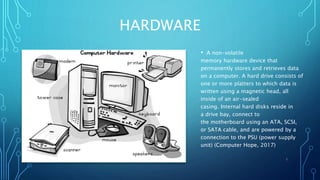
HARDWARE
• A non-volatile
memory hardware device that
permanently stores and retrieves data
on a computer. A hard drive consists of
one or more platters to which data is
written using a magnetic head, all
inside of an air-sealed
casing. Internal hard disks reside in
a drive bay, connect to
the motherboard using an ATA, SCSI,
or SATA cable, and are powered by a
connection to the PSU (power supply
unit) (Computer Hope, 2017)
3
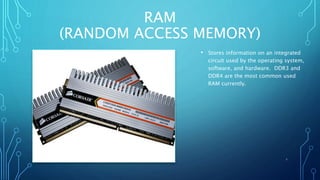
RAM
(RANDOM ACCESS MEMORY)
• Stores information on an integrated
circuit used by the operating system,
software, and hardware. DDR3 and
DDR4 are the most common used
RAM currently.
4
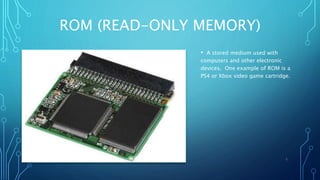
ROM (READ-ONLY MEMORY)
• A stored medium used with
computers and other electronic
devices. One example of ROM is a
PS4 or Xbox video game cartridge.
5
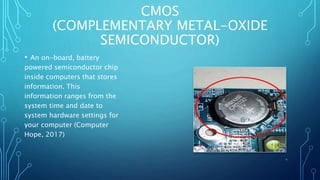
CMOS
(COMPLEMENTARY METAL-OXIDE
SEMICONDUCTOR)
• An on-board, battery
powered semiconductor chip
inside computers that stores
information. This
information ranges from the
system time and date to
system hardware settings for
your computer (Computer
Hope, 2017)
6
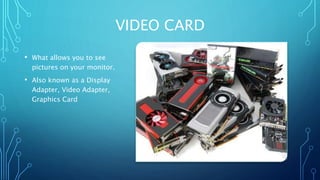
VIDEO CARD
• What allows you to see
pictures on your monitor.
• Also known as a Display
Adapter, Video Adapter,
Graphics Card
7
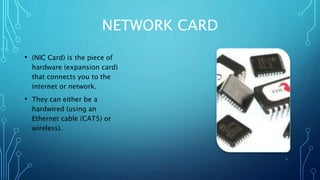
NETWORK CARD
• (NIC Card) is the piece of
hardware (expansion card)
that connects you to the
internet or network.
• They can either be a
hardwired (using an
Ethernet cable (CAT5) or
wireless).
8
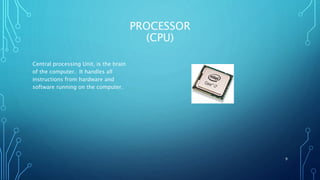
PROCESSOR
(CPU)
Central processing Unit, is the brain
of the computer. It handles all
instructions from hardware and
software running on the computer.
9
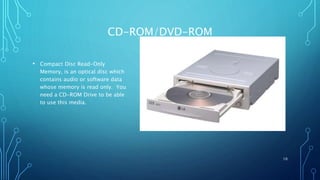
CD-ROM/DVD-ROM
• Compact Disc Read-Only
Memory, is an optical disc which
contains audio or software data
whose memory is read only. You
need a CD-ROM Drive to be able
to use this media.
10
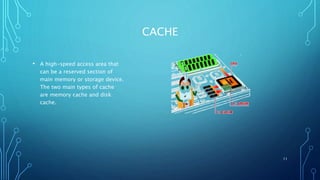
CACHE
• A high-speed access area that
can be a reserved section of
main memory or storage device.
The two main types of cache
are memory cache and disk
cache.
11
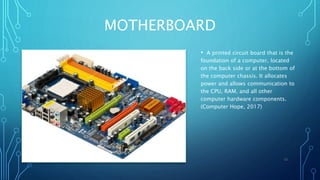
MOTHERBOARD
• A printed circuit board that is the
foundation of a computer, located
on the back side or at the bottom of
the computer chassis. It allocates
power and allows communication to
the CPU, RAM, and all other
computer hardware components.
(Computer Hope, 2017)
12
References
Computer Hope. (2017). Hard drive. Retrieved from http://www.computerhope.com/jargon/h/harddriv.htm.
13

IT140_IP2_JasonLopomo_SlidePresentation

  • 1.
    INTRODUCTION TO OPERATING SYSTEMSAND CLIENT/SERVER ENVIRONMENTS INDIVIDUAL PROJECT 2 (IT 140-1701A-03) JASON LOPOMO JANUARY 17, 2017 1
  • 2.
    TABLE OF CONTENTS •Hard drive • RAM (random access memory) • ROM (read-only memory) • CMOS (complementary metal-oxide semiconductor) • Video card • Network card • Processor (CPU) • CD-ROM • Cache • Motherboard 2
  • 3.
    HARDWARE • A non-volatile memoryhardware device that permanently stores and retrieves data on a computer. A hard drive consists of one or more platters to which data is written using a magnetic head, all inside of an air-sealed casing. Internal hard disks reside in a drive bay, connect to the motherboard using an ATA, SCSI, or SATA cable, and are powered by a connection to the PSU (power supply unit) (Computer Hope, 2017) 3
  • 4.
    RAM (RANDOM ACCESS MEMORY) •Stores information on an integrated circuit used by the operating system, software, and hardware. DDR3 and DDR4 are the most common used RAM currently. 4
  • 5.
    ROM (READ-ONLY MEMORY) •A stored medium used with computers and other electronic devices. One example of ROM is a PS4 or Xbox video game cartridge. 5
  • 6.
    CMOS (COMPLEMENTARY METAL-OXIDE SEMICONDUCTOR) • Anon-board, battery powered semiconductor chip inside computers that stores information. This information ranges from the system time and date to system hardware settings for your computer (Computer Hope, 2017) 6
  • 7.
    VIDEO CARD • Whatallows you to see pictures on your monitor. • Also known as a Display Adapter, Video Adapter, Graphics Card 7
  • 8.
    NETWORK CARD • (NICCard) is the piece of hardware (expansion card) that connects you to the internet or network. • They can either be a hardwired (using an Ethernet cable (CAT5) or wireless). 8
  • 9.
    PROCESSOR (CPU) Central processing Unit,is the brain of the computer. It handles all instructions from hardware and software running on the computer. 9
  • 10.
    CD-ROM/DVD-ROM • Compact DiscRead-Only Memory, is an optical disc which contains audio or software data whose memory is read only. You need a CD-ROM Drive to be able to use this media. 10
  • 11.
    CACHE • A high-speedaccess area that can be a reserved section of main memory or storage device. The two main types of cache are memory cache and disk cache. 11
  • 12.
    MOTHERBOARD • A printedcircuit board that is the foundation of a computer, located on the back side or at the bottom of the computer chassis. It allocates power and allows communication to the CPU, RAM, and all other computer hardware components. (Computer Hope, 2017) 12
  • 13.
    References Computer Hope. (2017).Hard drive. Retrieved from http://www.computerhope.com/jargon/h/harddriv.htm. 13