IT INFRASTRUCTURE
HARDWARE AND SOFTWARE
GROUP 10
TALHA AZIZ
IFRAN
MANZOOR
MUSRIKH
FAROOQ
HARDWARE
INTRODUCTION
• Computer Hardware
Computer hardware is the physical components of the
computer, Refers to the tangible (things you can touch)
component of a computer system.
HARDWARE
COMPONENTS
Hardware components are further divided into three groups
1. Input Devices
2. Output Devices
3. System Unit
HARDWARE
COMPONENTS
INPUT DEVICES
An input device let you communicate with a computer. You can
use input devices to enter information and issue commands
OUTPUT DEVICES
An output devices display information on a screen, creates
printed copies or generate sound.
SYSTEM UNIT
The system unit is the part of computer which is responsible for
accepting and processing the data brought in by the input
devices
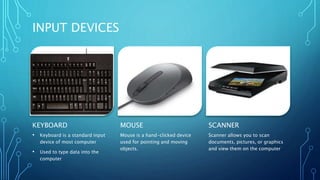
INPUT DEVICES
KEYBOARD
• Keyboard is a standard input
device of most computer
• Used to type data into the
computer
MOUSE
Mouse is a hand-clicked device
used for pointing and moving
objects.
SCANNER
Scanner allows you to scan
documents, pictures, or graphics
and view them on the computer
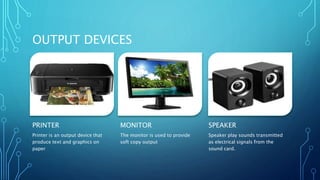
OUTPUT DEVICES
PRINTER
Printer is an output device that
produce text and graphics on
paper
MONITOR
The monitor is used to provide
soft copy output
SPEAKER
Speaker play sounds transmitted
as electrical signals from the
sound card.
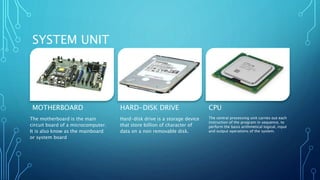
SYSTEM UNIT
MOTHERBOARD
The motherboard is the main
circuit board of a microcomputer.
It is also know as the mainboard
or system board
HARD-DISK DRIVE
Hard-disk drive is a storage device
that store billion of character of
data on a non removable disk.
CPU
The central processing unit carries out each
instruction of the program in sequence, to
perform the basis arithmetical logical, input
and output operations of the system.
THANK YOU

IT Infrastructure (Hardware).pptx

  • 1.
    IT INFRASTRUCTURE HARDWARE ANDSOFTWARE GROUP 10 TALHA AZIZ IFRAN MANZOOR MUSRIKH FAROOQ
  • 2.
    HARDWARE INTRODUCTION • Computer Hardware Computerhardware is the physical components of the computer, Refers to the tangible (things you can touch) component of a computer system.
  • 3.
    HARDWARE COMPONENTS Hardware components arefurther divided into three groups 1. Input Devices 2. Output Devices 3. System Unit
  • 4.
    HARDWARE COMPONENTS INPUT DEVICES An inputdevice let you communicate with a computer. You can use input devices to enter information and issue commands OUTPUT DEVICES An output devices display information on a screen, creates printed copies or generate sound. SYSTEM UNIT The system unit is the part of computer which is responsible for accepting and processing the data brought in by the input devices
  • 5.
    INPUT DEVICES KEYBOARD • Keyboardis a standard input device of most computer • Used to type data into the computer MOUSE Mouse is a hand-clicked device used for pointing and moving objects. SCANNER Scanner allows you to scan documents, pictures, or graphics and view them on the computer
  • 6.
    OUTPUT DEVICES PRINTER Printer isan output device that produce text and graphics on paper MONITOR The monitor is used to provide soft copy output SPEAKER Speaker play sounds transmitted as electrical signals from the sound card.
  • 7.
    SYSTEM UNIT MOTHERBOARD The motherboardis the main circuit board of a microcomputer. It is also know as the mainboard or system board HARD-DISK DRIVE Hard-disk drive is a storage device that store billion of character of data on a non removable disk. CPU The central processing unit carries out each instruction of the program in sequence, to perform the basis arithmetical logical, input and output operations of the system.
  • 8.